Bowmark
Bowmark वेबसाइटों को टाइप किए गए फ़ंक्शन में बदल देता है जिन्हें AI एजेंट कॉल कर सकता है। एक लाइब्रेरी पढ़ें, एक छोटी स्क्रिप्ट लिखें, और संरचित डेटा वापस पाएं।
होस्ट किया गया MCP सर्वर
npx add-mcp 'https://api.bowmark.ai/mcp'Claude Code, Codex, Cursor और अन्य में इंस्टॉल होता है
दस्तावेज़
Add Bowmark to Claude, ChatGPT, Cursor or any MCP client, or call it from your own code.
Every client below uses one MCP server and one API key. Sign up and create a key on the keys page. ChatGPT and the Claude app sign you in instead, so they need no key.
Claude
claude mcp add bowmark --transport http https://api.bowmark.ai/mcp \
  --header "Authorization: Bearer $BOWMARK_API_KEY"
Or install the plugin, which adds the server and the Bowmark skill together.
- Open Plugins → Add → Add custom connector.
- Name it
Bowmarkand paste this URL:https://api.bowmark.ai/mcp/claude-connector - Under Authentication, pick Sign in now, then click Connect and sign in to Bowmark.
Download bowmark.mcpb and double-click it.
ChatGPT
Go to chatgpt.com/plugins and click + (top right). If you don't see it, turn on Settings → Apps & Connectors → Advanced → Developer mode.
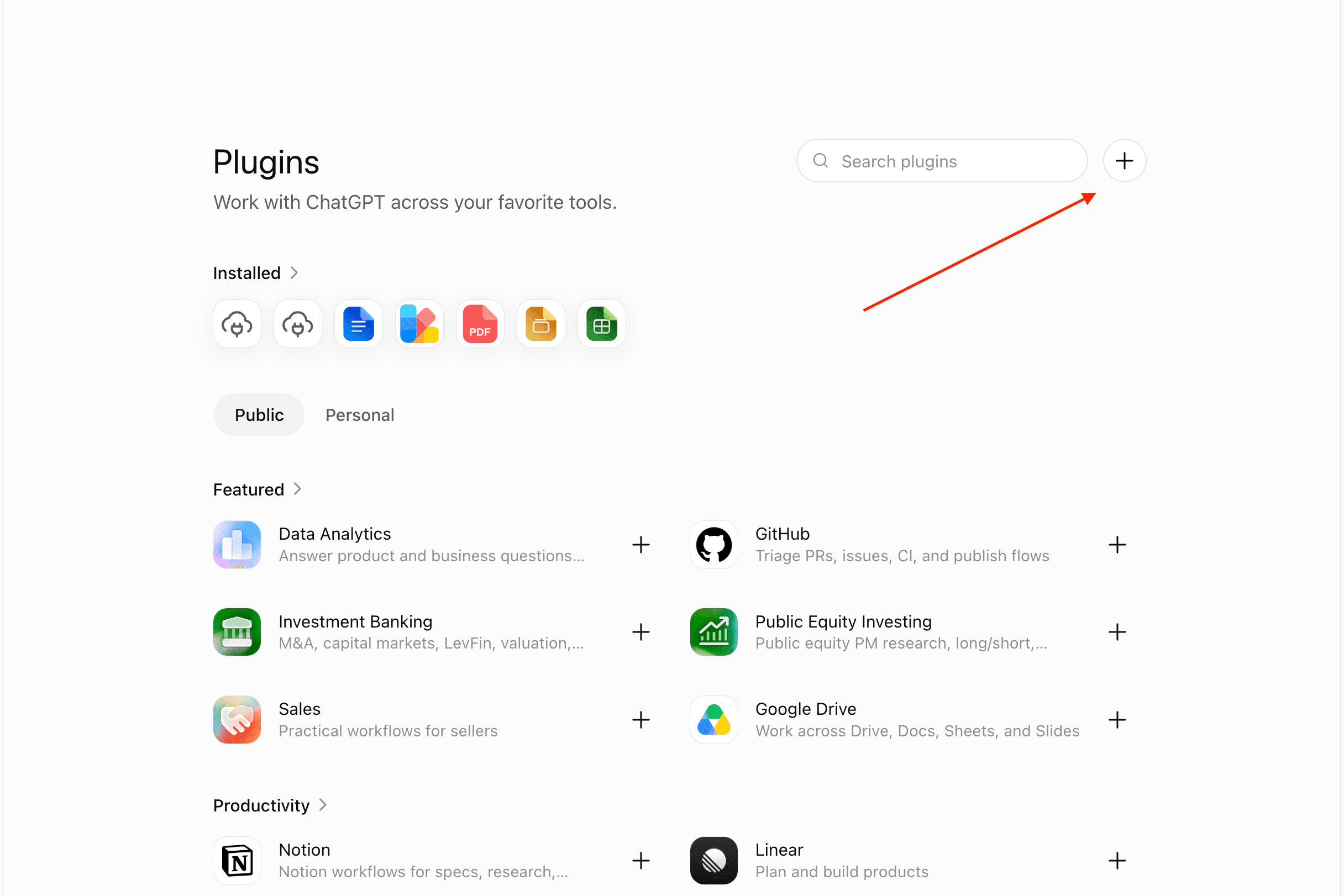
Top right, beside the search box. Captured 2026-07.
Name it Bowmark, set Server URL to https://api.bowmark.ai/mcp/chatgpt-app, choose OAuth, tick the risk box and click Create.
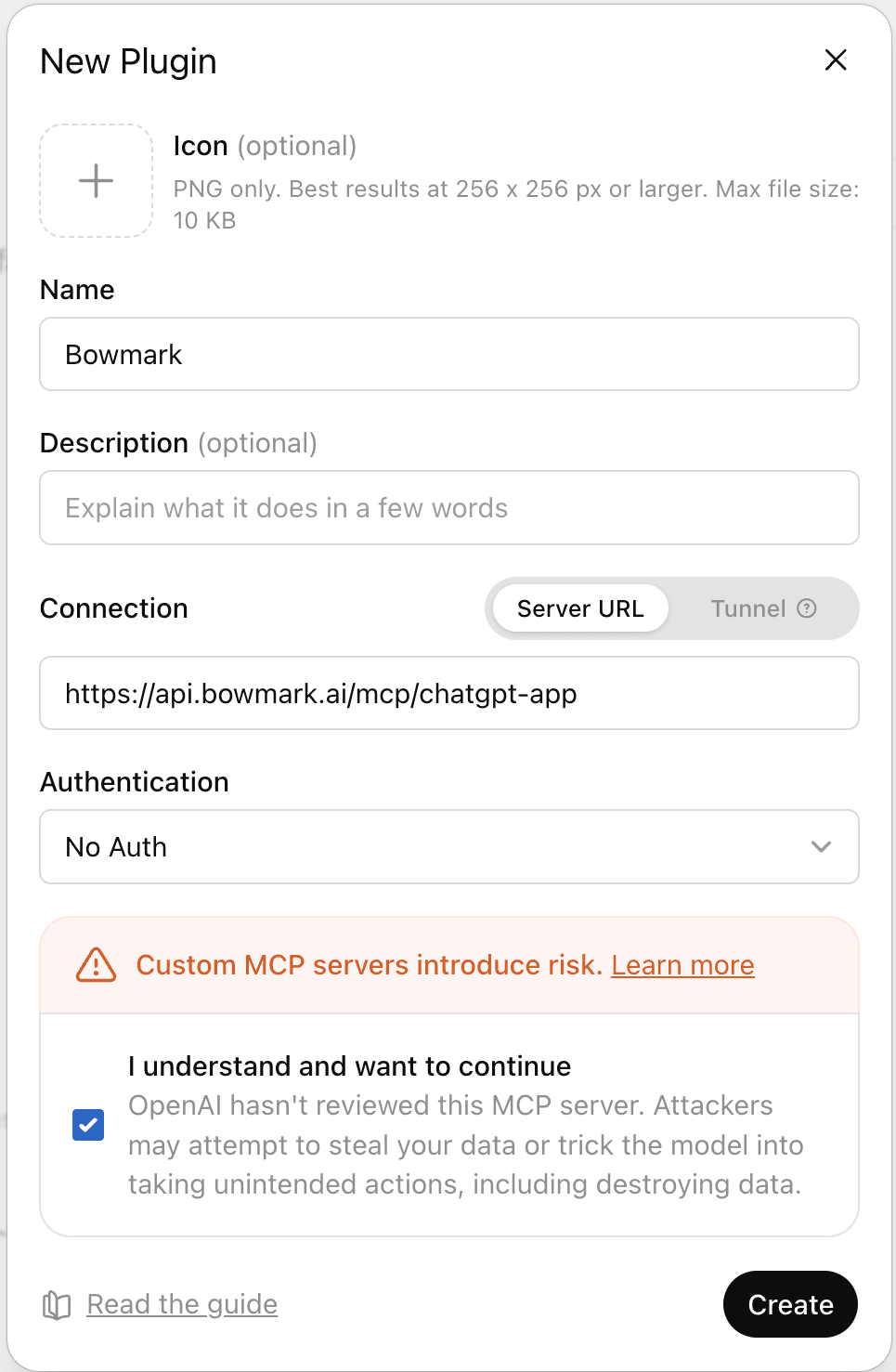
Leave Description blank. Create stays greyed out until the risk box is ticked. Captured 2026-08.
In a chat, type @ and pick Bowmark.

Do this every turn. Captured 2026-08.
Type @Bowmark every turn
Cursor and other MCP clients
Most clients take this JSON as is:
{
  "mcpServers": {
    "bowmark": {
      "url": "https://api.bowmark.ai/mcp",
      "headers": { "Authorization": "Bearer <your Bowmark API key>" }
    }
  }
}
Settings → MCP → Add new MCP server, then paste the JSON above.
In ~/.codex/config.toml, with BOWMARK_API_KEY set in your shell:
[mcp_servers.bowmark]
url = "https://api.bowmark.ai/mcp"
bearer_token_env_var = "BOWMARK_API_KEY"
gemini extensions install https://github.com/bowmark-ai/plugin
- In a workflow with an AI Agent node, click + under Tool and add MCP Client Tool.
- Set Endpoint to
https://api.bowmark.ai/mcp. - Set Server Transport to HTTP Streamable.
- Set Authentication to Bearer Auth and paste your API key as the token.
- Set Tools to Include to All.
{
  "mcpServers": {
    "bowmark": {
      "command": "npx",
      "args": ["@bowmark/mcp"],
      "env": { "BOWMARK_API_KEY": "<your Bowmark API key>" }
    }
  }
}
From PyPI instead: "command": "uvx", "args": ["bowmark-mcp"].
Windsurf, LM Studio and other MCP clients take the same JSON.
Plugin
The plugin adds the MCP server and a skill that tells your agent when to use Bowmark.
claude plugin marketplace add bowmark-ai/plugin
claude plugin install bowmark@bowmark-ai
codex plugin marketplace add bowmark-ai/plugin
Then run codex /plugins and install Bowmark from the list.
No MCP client? Run npx skills add bowmark-ai/skill, or point your agent at bowmark.ai/skill.md.
Make your agent check Bowmark first
Add this to your agent's rules file (CLAUDE.md, AGENTS.md, .cursor/rules):
Check Bowmark first for live website tasks: browsing, fetching a page, calling a
third-party API, reading prices, stock or search results, and filling in a form.
1. Call Bowmark's get_library with a short query (the site's hostname often works).
2. If Bowmark has a fitting function, call it with run.
3. Only if Bowmark has nothing, use your own browser or fetch, and then call report
   with what you wanted and which site.
get_library is an MCP tool, also GET /v1/library over HTTP. report is an MCP tool.
In the Claude app, paste this into Settings → General → "What personal preferences should Claude consider in responses?":
When a task needs a live website (prices, stock, tickets, bookings, search results, a form), use the Bowmark connector first: call get_library with the site's name, then run what fits. Only open a browser if Bowmark has nothing for that site.
Your own code
The client library gives you two calls:
bowmark: call one typed function directly.run(): send a script that runs on Bowmark.read.page,browser_agent, andweb_form_fieldswork only throughrun().
npm i @bowmark/web
// app.ts, run with: npx tsx app.ts
import { bowmark, run } from "@bowmark/web"; // reads BOWMARK_API_KEY

const { tracks } = await bowmark.music.search("aphex twin", 3);

const envelope = await run(\`return await bowmark.read.page("https://example.com")\`);
if (!envelope.ok || envelope.status !== "ok") throw new Error(envelope.error ?? \`Bowmark run ${envelope.status}. Check incomplete.cutOff.\`);
console.log(envelope.result.title); // "Example Domain"
Top-level await needs ESM: add "type": "module" to package.json, or name the file app.mts.
Needs Python 3.11 or newer.
pip install "bowmark-web>=1" "bowmark-web-stubs>=1"
Keep the >=1. On Python 3.10 or older, a bare pip install bowmark-web succeeds but installs an empty 0.0.0 name placeholder, and the first import fails. With the pin, pip stops with "no matching distribution" instead. Upgrade Python; do not install from GitHub.
import asyncio
from bowmark_web import bowmark, run  # reads BOWMARK_API_KEY

async def main() -> None:
    found = await bowmark.music.search("aphex twin", 3)

    envelope = await run('return await bowmark.read.page("https://example.com")')
    if not envelope["ok"] or envelope["status"] != "ok":
        raise RuntimeError(envelope["error"] or f"Bowmark run {envelope['status']}. Check incomplete.cutOff.")
    print(envelope["result"]["title"])  # Example Domain

asyncio.run(main())
run() returns an envelope instead of raising. Check status as well as ok: a partial run is ok: true with status: "partial", and its result may be cut short. Check incomplete before you trust it. A failed run has its explanation in error and result is null. See Read the response and Read any page (maxChars, truncated). See Read the response. Full guides: Node library and Python library. No install at all? Use the HTTP API.
Data and compliance
Bowmark may process data outside the United States, and it holds no SOC 2, HIPAA or BAA certification today, so don't send patient health data. Where data goes, which providers handle it, and the browser agent's routing are on Data and compliance.
[
Quickstart
Get an API key, run one script from your terminal, then add Bowmark to your agent.
](https://bowmark.ai/docs/quickstart)[
Pricing
Bowmark charges in US dollars for what each call uses, after a free $10.