Kai
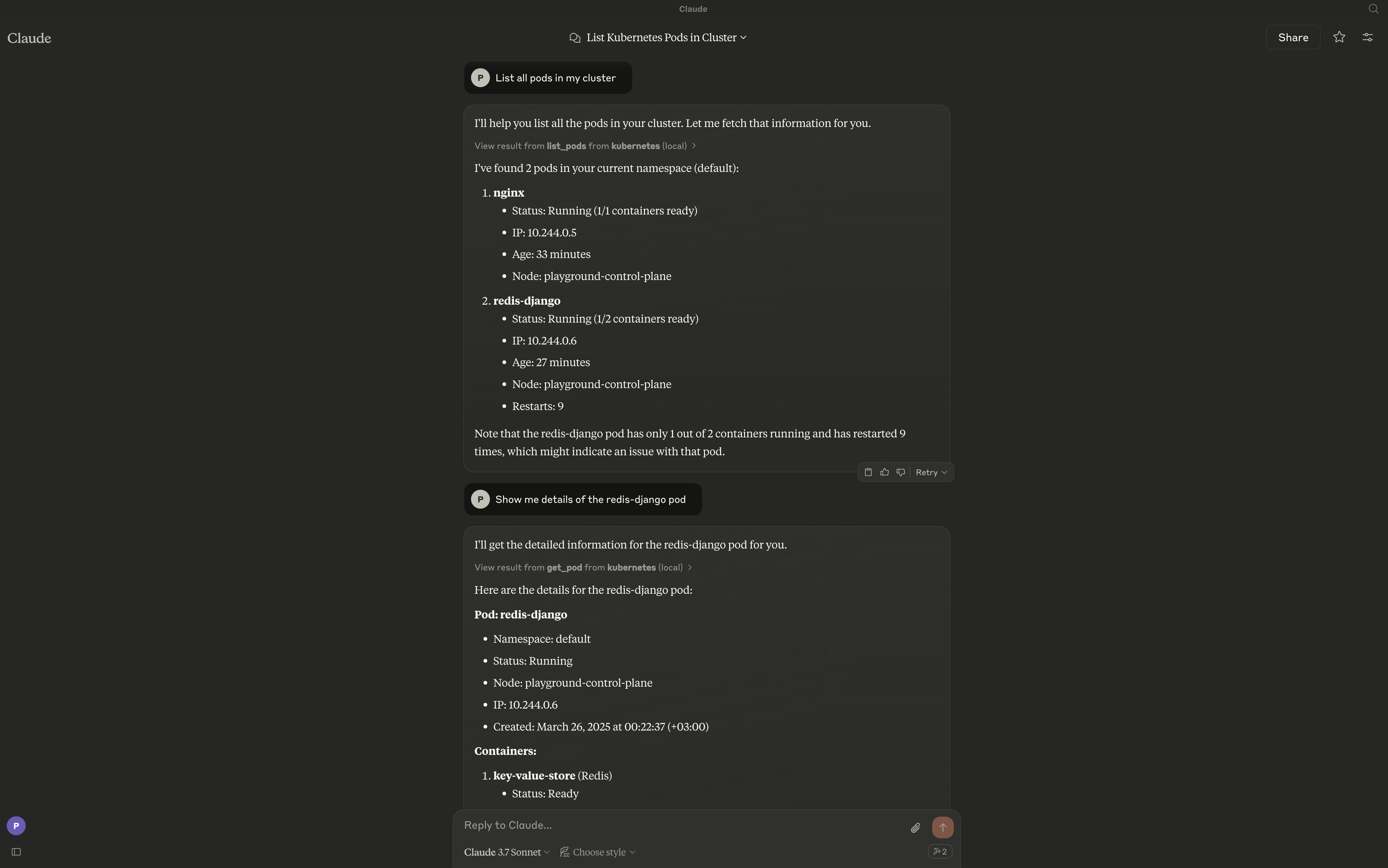
Kai बड़े भाषा मॉडल (LLMs) और आपके Kubernetes क्लस्टर के बीच एक सेतु प्रदान करता है, जो Kubernetes संसाधनों के साथ प्राकृतिक भाषा में बातचीत को सक्षम बनाता है। यह सर्वर क्लस्टर, नेमस्पेस, पॉड, डिप्लॉयमेंट, सर्विस और अन्य Kubernetes संसाधनों के प्रबंधन के लिए उपकरणों का एक व्यापक सेट प्रस्तुत करता है।
दस्तावेज़
Kai - Kubernetes MCP Server
A Model Context Protocol (MCP) server for managing Kubernetes clusters from MCP-compatible clients like Claude Desktop, Cursor, and Continue.
Overview
Kai exposes Kubernetes operations as MCP tools, letting an LLM client manage your cluster through natural language — workloads, networking, config, storage, RBAC, custom resources, and raw manifests.
Features
Core Workloads
- Pods - Create, list, get, delete, and stream logs
- Deployments - Create, list, describe, and update
- Jobs - Batch workload management (create, get, list, delete)
- CronJobs - Scheduled batch workloads (create, get, list, delete)
Networking
- Services - Create, get, list, and delete
- Ingress - HTTP/HTTPS routing, TLS configuration (create, get, list, update, delete)
Configuration
- ConfigMaps - Configuration management (create, get, list, update, delete)
- Secrets - Secret management (create, get, list, update, delete)
- Namespaces - Namespace management (create, get, list, delete)
Cluster Operations
- Context Management - Switch contexts, list contexts, rename, delete
- Nodes - Node monitoring, cordoning, and draining (list, get, cordon, uncordon, drain)
- Cluster Health - Cluster status and resource metrics (cluster health, node/pod metrics)
Storage
- Persistent Volumes - PV management (list, get, delete) and PVC management (create, list, get, delete)
- Storage Classes - Storage class operations (list, get)
Security
- RBAC - Roles, RoleBindings, ClusterRoles, ClusterRoleBindings, and ServiceAccounts (list, get)
Utilities
- Port Forwarding - Forward ports to pods and services (start, stop, list sessions)
Advanced
- Apply/Delete Manifests - Apply or delete raw YAML/JSON, multi-document and any kind including CRDs (apply_yaml, delete_yaml)
- Custom Resources - CRD and custom resource operations (list/get CRDs, list/get/delete custom resources)
- Events - Event listing and filtering (by namespace, type, involved object)
- API Discovery - API resource exploration (list_api_resources)
Requirements
The server connects to your current kubectl context by default. Ensure you have access to a Kubernetes cluster configured for kubectl (e.g., minikube, Rancher Desktop, kind, EKS, GKE, AKS).
Installation
go install github.com/basebandit/kai/cmd/kai@latest
Container image
A multi-arch image (linux/amd64, linux/arm64) is published on Docker Hub:
docker pull cyclon/kai:v1.0.0
docker run --rm cyclon/kai:v1.0.0 -version
CLI Options
kai [options]

Options:
  -kubeconfig string        Path to kubeconfig file (default "~/.kube/config")
  -context string           Name for the loaded context (default "local")
  -in-cluster               Use in-cluster config (when running inside a pod)
  -transport string         stdio (default), streamable-http, or sse-legacy
  -sse-addr string          HTTP listen address for streamable-http/sse-legacy (default ":8080")
  -tls-cert string          Path to TLS certificate (enables HTTPS)
  -tls-key string           Path to TLS private key (enables HTTPS)
  -request-timeout duration Timeout for Kubernetes API requests (default 30s)
  -metrics                  Expose Prometheus metrics at /metrics (default true)
  -log-format string        json (default) or text
  -log-level string         debug, info, warn, error (default "info")
  -version                  Show version information
Logs are written to stderr in structured JSON format by default, making them easy to parse:
{"time":"2024-01-15T10:30:00Z","level":"INFO","msg":"kubeconfig loaded","path":"/home/user/.kube/config","context":"local"}
{"time":"2024-01-15T10:30:00Z","level":"INFO","msg":"starting server","transport":"stdio"}
Configuration
Claude Desktop
Edit your Claude Desktop configuration:
# macOS
code ~/Library/Application\ Support/Claude/claude_desktop_config.json

# Linux
code ~/.config/Claude/claude_desktop_config.json
Add the server configuration:
{
  "mcpServers": {
    "kubernetes": {
      "command": "/path/to/kai"
    }
  }
}
With custom kubeconfig:
{
  "mcpServers": {
    "kubernetes": {
      "command": "/path/to/kai",
      "args": ["-kubeconfig", "/path/to/custom/kubeconfig"]
    }
  }
}
Cursor
Add to your Cursor MCP settings:
{
  "mcpServers": {
    "kubernetes": {
      "command": "/path/to/kai"
    }
  }
}
Continue
Add to your Continue configuration (~/.continue/config.json):
{
  "experimental": {
    "modelContextProtocolServers": [
      {
        "transport": {
          "type": "stdio",
          "command": "/path/to/kai"
        }
      }
    ]
  }
}
HTTP Mode (web clients, remote use)
For non-stdio clients, run the streamable HTTP transport:
kai -transport=streamable-http -sse-addr=:8080
The MCP endpoint is http://localhost:8080/mcp. Health probes are at /healthz
and /readyz, and Prometheus metrics at /metrics. The legacy SSE transport
(-transport=sse-legacy, endpoint /sse) still works but is deprecated.
Custom Kubeconfig
By default, Kai uses ~/.kube/config. You can specify a different kubeconfig:
kai -kubeconfig=/path/to/custom/kubeconfig -context=my-cluster
Running Inside a Kubernetes Cluster
When deploying Kai inside a Kubernetes cluster, use the -in-cluster flag to automatically use the pod's service account credentials:
kai -in-cluster -transport=streamable-http -sse-addr=:8080
The recommended way to run Kai in-cluster is with kmcp (from kagent), which manages MCP servers as MCPServer resources:
apiVersion: kagent.dev/v1alpha1
kind: MCPServer
metadata:
  name: kai
spec:
  transportType: http
  httpTransport:
    targetPort: 8080
    path: /mcp
  deployment:
    image: cyclon/kai:v1.0.0
    port: 8080
    cmd: /kai
    args: ["-in-cluster", "-transport=streamable-http", "-sse-addr=:8080"]
    serviceAccountName: kai
kmcp creates the Deployment and Service for you. The service account needs RBAC for the resources Kai manages — broad get/list/watch, plus create/update/delete where you use mutating tools. See the kmcp deploy guide.
Runnable example: deploy/kagent/kai.example.yaml (test-only — grants cluster-admin; scope down for real use).
Usage Examples
Once configured, you can interact with your cluster using natural language:
- "List all pods in the default namespace"
- "Create a deployment named nginx with 3 replicas using the nginx:latest image"
- "Show me the logs for pod my-app"
- "Delete the service named backend"
- "Create a cronjob that runs every 5 minutes"
- "Create an ingress for my-app with TLS enabled"
- "Port forward service nginx on port 8080:80"
- "Apply this manifest: "
Contributing
Contributions are welcome! Please see our contributing guidelines for more information.
License
This project is licensed under the MIT License.