Armor Crypto MCP
आधिकारिकएमसीपी जो कई ब्लॉकचेन, स्टेकिंग, डीफाई, स्वैप, ब्रिजिंग, वॉलेट प्रबंधन, डीसीए, लिमिट ऑर्डर, कॉइन लुकअप, ट्रैकिंग और अधिक के साथ इंटरफेस करता है।
Armor Crypto MCP के साथ आप क्या कर सकते हैं?
- Solana वॉलेट बनाएं और प्रबंधित करें — वॉलेट प्रबंधन टूल के माध्यम से नए वॉलेट जनरेट करें, उन्हें समूहों में व्यवस्थित करें, और अप्रयुक्त वॉलेट को संग्रहित करें।
- टोकन स्वैप निष्पादित करें — स्वैप टूल का उपयोग करके Solana पर सामान्य स्वैप करें।
- स्वचालित ट्रेडिंग रणनीतियाँ सेट करें — DCA ऑर्डर, लिमिट ऑर्डर और शेड्यूल किए गए ट्रेड को रखें, सूचीबद्ध करें और रद्द करें।
- टोकन स्टेक और अनस्टेक करें — स्टेकिंग टूल का उपयोग करके संपत्तियों को स्टेक करें या स्टेक की गई स्थितियों को वापस लें।
- ट्रेंडिंग टोकन खोजें — Solana पर टोकन खोजें और ट्रेंडिंग टोकन डेटा प्राप्त करें।
- सांख्यिकीय विश्लेषण चलाएं — सटीक ऑन-चेन डेटा विश्लेषण के लिए सांख्यिकीय कैलकुलेटर टूल लागू करें।
दस्तावेज़
Armor Crypto MCP
अल्फा परीक्षण संस्करण 0.1.24
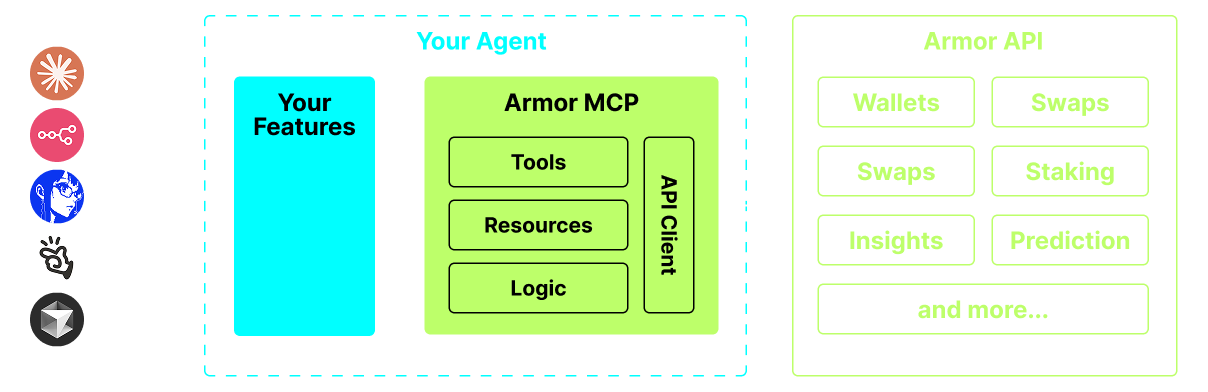
AI एजेंटों को क्रिप्टो इकोसिस्टम के साथ एकीकृत करने का एकमात्र स्रोत। इसमें वॉलेट निर्माण और प्रबंधन, स्वैप, स्थानांतरण, DCA, स्टॉप लॉस और टेक प्रॉफिट जैसे इवेंट-आधारित ट्रेड, और बहुत कुछ शामिल है। Armor MCP अल्फा में Solana का समर्थन करता है और बीटा में होने पर, Ethereum, Base, Avalanche, Bitcoin, Sui, Berachain, megaETH, Optimism, Ton, BNB, और Arbitrum सहित एक दर्जन से अधिक ब्लॉकचेन का समर्थन करेगा। Armor के MCP का उपयोग करके आप एकीकृत तर्क और उपकरणों के पूरे सेट के साथ अपने AI एजेंट में संपूर्ण क्रिप्टो ला सकते हैं।
विशेषताएँ
🧠 AI नेटिव
📙 वॉलेट प्रबंधन
🔃 स्वैप
🌈 विशेष ट्रेड (DCA, स्टॉप लॉस आदि)
⛓️ मल्टी-चेन
↔️ क्रॉस-चेन लेन-देन
🥩 स्टेकिंग
🤖 एजेंटिक फ्रेमवर्क में तेज़ एकीकरण
👫 सामाजिक भावना
🔮 भविष्यवाणी
आवश्यकताएँ
1. सुनिश्चित करें कि आपके पास python स्थापित है
2. uv स्थापित करें
Linux / Windows
pip install uv
Mac
brew install uv
3. Claude Desktop या आपका AI एजेंट MCP चलाएगा
विवरण के लिए उपयोग और कॉन्फ़िगरेशन देखें।
अल्फा परीक्षण
हम वर्तमान में प्री-अल्फा में हैं, और हम Claude Desktop, Cline, Cursor, n8n आदि जैसे विभिन्न एजेंटों और एजेंटिक फ्रेमवर्क की क्षमताओं का परीक्षण कर रहे हैं।
वर्तमान सुविधाएँ और उपकरण
- वॉलेट प्रबंधन
- समूहीकरण और संगठन
- संग्रहण
- स्वैप और ट्रेड
- सामान्य स्वैप
- DCA (रखें / सूचीबद्ध करें / रद्द करें)
- अनुसूचित आदेश
- सीमा आदेश (रखें / सूचीबद्ध करें / रद्द करें)
- स्टेकिंग और अनस्टेकिंग
- टोकन खोज और ट्रेंडिंग टोकन
- सटीक विश्लेषण के लिए सांख्यिकीय कैलकुलेटर
- Solana ब्लॉकचेन का समर्थन करता है
जल्द आ रहा है
- अधिक ब्लॉकचेन समर्थन
- मिंटिंग
- Armor एजेंट एक उपकरण के रूप में (या A2A)
MCP सेटअप
वर्तमान में API कुंजी प्राप्त करने के लिए आपके पास Armor NFT होना आवश्यक है। इसे यहाँ प्राप्त करें
उपयोग और कॉन्फ़िगरेशन
अपने एजेंट के साथ Armor MCP का उपयोग करने के लिए, आपको निम्नलिखित कॉन्फ़िगरेशन की आवश्यकता है, <PUT-YOUR-KEY-HERE> को अपनी API कुंजी से बदलें:
{
  "mcpServers": {
    "armor-crypto-mcp": {
      "command": "uvx",
      "args": ["armor-crypto-mcp@latest", "--version"],
      "env": {
        "ARMOR_API_KEY": "<PUT-YOUR-KEY-HERE>"
      }
    }
  }
}
Claude Desktop में उपयोग
- डेवलपर मोड सक्षम होना चाहिए
- विंडो के ऊपर बाईं ओर Claude Desktop का फ़ाइल मेनू खोलें।
- फ़ाइल > सेटिंग्स पर जाएँ
- डेवलपर के अंतर्गत, कॉन्फ़िगरेशन संपादित करें पर क्लिक करें
- कॉन्फ़िग फ़ाइल में, ऊपर से
armor-wallet-mcpअनुभाग डालें - प्लेसहोल्डर को अपनी API कुंजी से बदलना सुनिश्चित करें
- फ़ाइल सहेजें और Claude Desktop में एक नई चैट शुरू करें
Cline में उपयोग
- VSCode में बाएँ पैनल पर Cline टैब में
MCP Serversबटन पर क्लिक करें - बाएँ पैनल के नीचे स्क्रॉल करें और
Configure MCP Serversपर क्लिक करें - कॉन्फ़िग फ़ाइल में, ऊपर से
armor-wallet-mcpअनुभाग डालें - प्लेसहोल्डर को अपनी API कुंजी से बदलना सुनिश्चित करें
- फ़ाइल सहेजें,
MCP Serversटैब के अंतर्गतDoneपर क्लिक करें और Cline के साथ चैट करना शुरू करें
n8n में उपयोग
- n8n ऐप खोलें
- स्क्रीन के नीचे बाईं ओर अपने उपयोगकर्ता नाम के बगल में
...पर क्लिक करें औरSettingsपर क्लिक करें - बाएँ पैनल पर,
Community nodesऔर फिरInstall a Community Nodeबटन पर क्लिक करें npm Package Nameके लिए खोज फ़ील्ड में mcp टाइप करेंMCP Nodesस्थापित करें- कोई भी MCP नोड जोड़ें, उदाहरण के लिए:
List Tools - MCP क्लाइंट
Parametersटैब में,Select Credentialपर क्लिक करें औरCreate new credentialपर क्लिक करें Commandके अंतर्गतuvxदर्ज करेंArgumentsके अंतर्गतarmor-crypto-mcpदर्ज करेंEnvironmentsके अंतर्गतARMOR_API_KEY=eyJhbGciOiJIUzI1NiIsIn...दर्ज करें और=के बाद पूर्ण API कुंजी मान पेस्ट करेंParametersटैब में वापस जाकर आप उस नोड के लिए MCPOperationचुन सकते हैं
Armor MCP का उपयोग
एक बार जब आप Armor MCP सेट कर लेते हैं, यहाँ कुछ संकेत दिए गए हैं जिनका उपयोग आप आरंभ करने के लिए कर सकते हैं