Zillow Listings Scraper: Zestimates & Price Cuts (Apify Actor)
बिक्री, किराये और बिक चुकी Zillow लिस्टिंग को शहर, ZIP, खोज URL या पते के आधार पर स्क्रैप करें: कीमत, Zestimate, किराये का अनुमान, बेडरूम, बाथरूम, क्षेत्रफल और संपत्ति का विवरण। कीमतों में कटौती और स्थिति में बदलाव ट्रैक करें। लॉगिन की आवश्यकता नहीं। JSON या CSV में निर्यात करें। कीमत: प्रति 1,000 लिस्टिंग $1.90, प्रति 1,000 संपत्ति जाँच $3.30, प्रति खोज पृष्ठ $0.004। Apify Actor के रूप में चलता है और Apify MCP सर्वर (https://mcp.apify.com/?tools=cliqtomedia/zillow-scraper) के ज़रिए MCP क्लाइंट से कॉल किया जा सकता है।
होस्ट किया गया MCP सर्वर
npx add-mcp 'https://mcp.apify.com/?tools=cliqtomedia/zillow-scraper'Claude Code, Codex, Cursor और अन्य में इंस्टॉल होता है
दस्तावेज़
Zillow Listings Scraper: Zestimates & Price Cuts, No Login (cliqtomedia/zillow-scraper) Actor
Scrape Zillow listings for sale, for rent and sold by city, ZIP, search URL or address. Get price, Zestimate, rent estimate and full property details, and track price cuts and status changes.
- URL: https://apify.com/cliqtomedia/zillow-scraper.md
- Developed by: Cliqto Media (community)
- Categories: Real estate
- Features: Limited permissions
- Stats: 6 total users, 5 monthly users, 100.0% runs succeeded, 0 bookmarks
- User rating: No ratings yet
Pricing
from $1.33 / 1,000 listing saveds
This Actor is paid per event. You are not charged for the Apify platform usage, but only a fixed price for specific events. Since this Actor supports Apify Store discounts, the price gets lower the higher subscription plan you have.
Learn more: https://docs.apify.com/actors/running/actors-in-store.md#pay-per-event
What's an Apify Actor?
An Actor is a serverless cloud program that runs on the Apify platform. It has two run modes. In Batch mode, an Actor accepts a well-defined JSON input, performs an action which can take anything from a few seconds to a few hours, and optionally produces a well-defined JSON output, datasets with results, or files in key-value store. In Standby mode, an Actor provides a web server which can be used as a website, API, or an MCP server.
Apify vocabulary and the platform model are defined once, in the agent quickstart at https://apify.com/agents.md.
How to integrate an Actor?
If asked about integration, you help developers integrate Actors into their projects. You adapt to their stack and deliver integrations that are safe, well-documented, and production-ready.
Do not guess an integration path. Every one of them is in the agent quickstart at https://apify.com/agents.md: the Apify MCP server, Agent Skills with the Apify CLI, the JavaScript and Python clients, the REST API, and the account-free path for an agent with no human to sign in. It also carries the rule on stating cost before the first paid run.
For examples already wired to this Actor's own input schema, see the API section below.
Each client library has reference documentation the quickstart does not restate: JavaScript/TypeScript (npm install apify-client) and Python (pip install apify-client).
README
This Zillow scraper gets home listings from Zillow for a US city, ZIP code, map area or search URL. It returns one row per home with price, Zestimate, rent estimate, beds, baths, size and status. It can also read full property details and tell you what changed since the last run.
Use it if you track US homes for sale, for rent or sold. The smallest run usually ends in under a minute: enter Austin, TX, keep 10 properties and click Start.
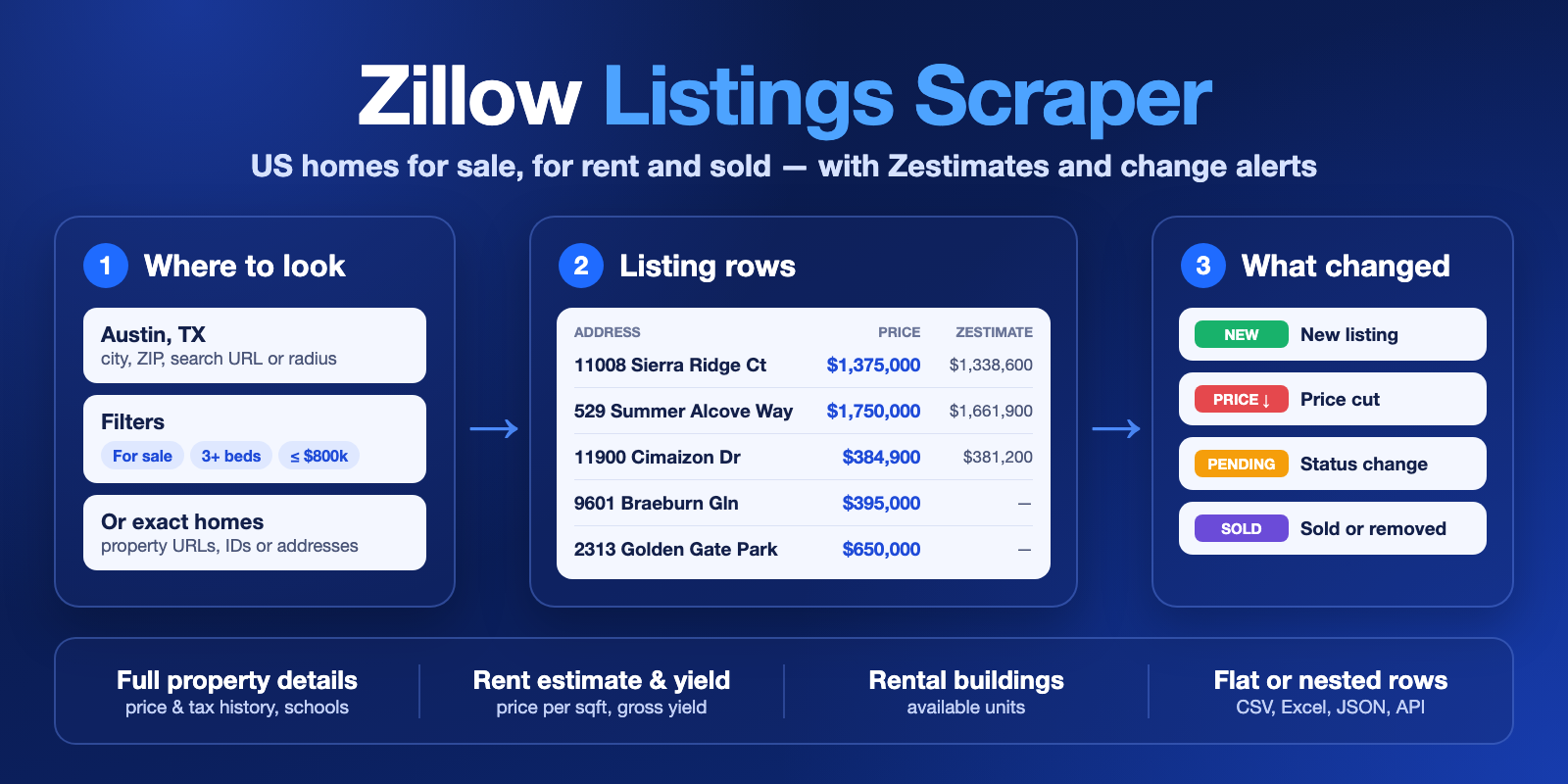
Table of contents
- What it does
- How it works
- Quick start
- Use cases
- Input
- Output
- Pricing
- Limits
- API, export and integrations
- Troubleshooting
- FAQ
- Related Actors
- Support
What it does
The Actor reads public Zillow pages and saves US properties as rows in a Dataset. You can start from:
- a city with a state, or a ZIP code (
Austin, TX,78701); - a Zillow search URL that you copy from your browser, with its map area and filters;
- a point on the map and a radius in miles;
- exact homes: property URLs, Zillow property IDs (zpid) or street addresses;
- an apartment building page, to get the units that are available now.
Each row has the address, price, Zestimate, rent Zestimate, beds, baths, living area, status, days on Zillow, price per square foot and gross rental yield. With full details on, it also has the description, price history, tax history, schools, photos and home features.
In monitor mode the Actor remembers what it saw. On the next run it marks each home as new, priceDown, priceUp, pending, sold, removed or statusChanged, and it can save only the changed homes.
Good fit
- Export homes for sale, for rent or recently sold in a city or ZIP code to CSV or Excel.
- Watch a market every day and get only new listings, price cuts and status changes.
- Check a list of exact properties: Zestimate, rent estimate, price and tax history, schools.
- Compare price per square foot and rough rental yield before a deeper look.
- Turn on investor metrics to get a rough monthly payment, cash flow, cap rate, cash-on-cash return and maximum allowable offer for each home.
- Re-check the homes from an earlier run by its Dataset ID and see what changed in price, Zestimate and status.
How it works
- You give a place (city, ZIP, URL or map point) or exact homes (URLs, IDs or addresses).
- The Actor opens Zillow search pages one by one and reads the home cards. If Zillow shows only part of a large map, it can split the map into smaller areas. For exact homes it reads each property page.
- It adds simple numbers: price per square foot, price to Zestimate and gross rental yield.
- In monitor mode it compares each home with the saved snapshot and writes what changed.
- It saves rows to the Dataset, a run report to
RUN_SUMMARYand market medians toMARKET_SUMMARY.
Quick start
-
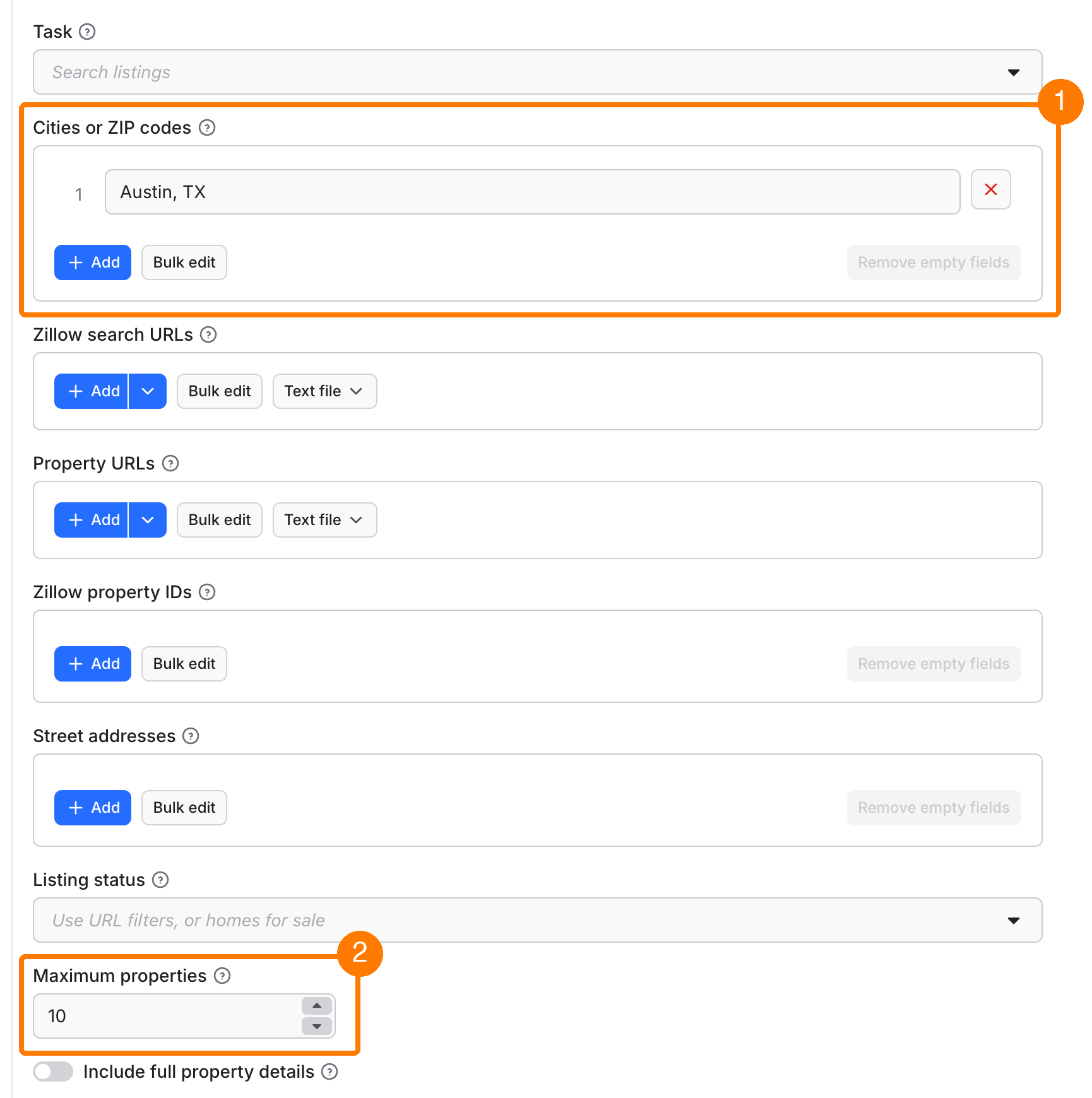
Open the Input tab. Cities or ZIP codes already has
Austin, TX(box 1 in the picture). Keep it or type your own city with a state, or a ZIP code. -
Keep Task empty. It means
Search listings, and the search uses homes for sale. -
Keep Maximum properties at
10for a first test (box 2). Use0later to read all results. -
Click the start button under the form.
-
When the run ends, open the Output tab. Check the
address,price,zestimateandrentZestimatecolumns (box 1). Zillow does not show an estimate for every home, sozestimateandrentZestimateare often empty (in our latest test, 3 homes out of 10 had a Zestimate and rent Zestimate). Click Export to download CSV, Excel or JSON (box 2).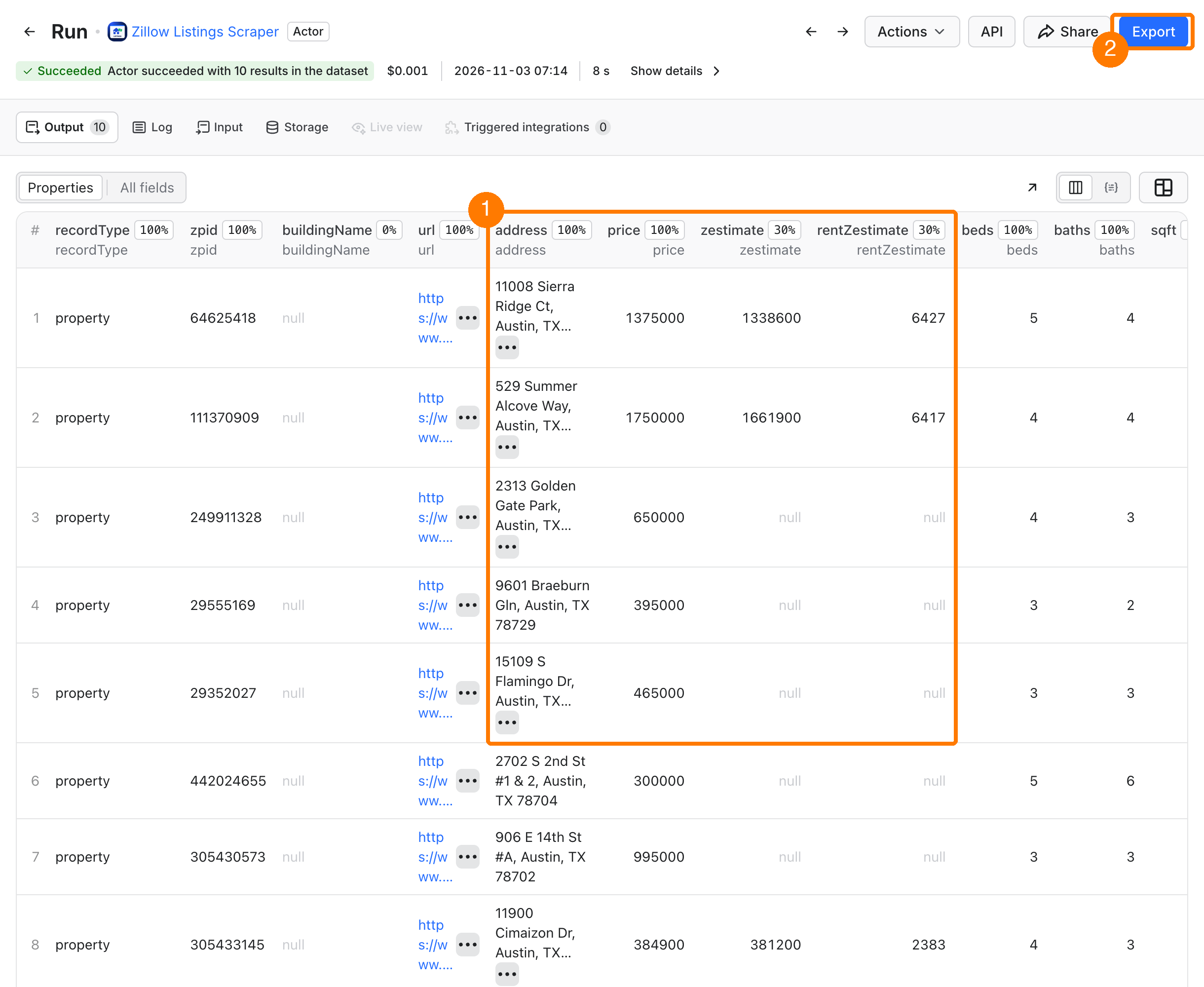
Expected result: 10 homes for sale in Austin, TX, one row per home. In our latest tests this run usually took 3 to 10 seconds, and a slow run took up to 40 seconds when Zillow blocked the first routes and the run had to retry. A run costs $0.023 on the Free plan (1 search page + 10 listings). The $0.001 in the run header of the screenshot is only the platform usage that we pay; your price is the events listed under Pricing.
Use cases
| Buyer job | Input path | Output entity | Key fields | Next integration |
|---|---|---|---|---|
| Export a market | locations or searchUrls, status | Property row | address, price, zestimate, beds, sqft | CSV/Excel export, Google Sheets |
| Watch new listings and price cuts | mode: monitor, onlyChanges, stateName | Changed property row | changes, price, status, url | Schedule + Slack or Notion summary |
| Check exact homes | propertyUrls, zpids or addresses | Property row with details | zestimate, rentZestimate, priceHistory, taxHistory, schools | API, Make, Zapier |
| Rental research | status: forRent, extractBuildingUnits | Rental or building unit row | price, rentZestimate, grossRentalYield, buildingName | Spreadsheet model |
| Recent sales | status: sold, soldInLastDays | Sold property row | price, zestimate, pricePerSqft, daysOnZillow | Comparison in a spreadsheet |
Input
No field is required. Give a place or exact homes. The form opens with Austin, TX and 10 properties.
Input fields
| Field | Plain name | Type | Required | Default / prefill | Allowed values | Effect | Example | Recommendation |
|---|---|---|---|---|---|---|---|---|
mode | Task | string | no | default search | search, details, monitor | Search places, read exact homes only, or search and compare with the last run | monitor | Use details when you have only URLs, IDs or addresses |
locations | Cities or ZIP codes | array of strings | one input needed | prefill ["Austin, TX"] | US city with state, or 5-digit ZIP | Adds a Zillow search for each place | ["78701"] | Always add the state to a city |
searchUrls | Zillow search URLs | array of URLs | one input needed | empty | https://www.zillow.com/... search pages | Keeps the map area and filters of the URL | Zillow URL from your browser | Best way to copy a complex Zillow filter |
propertyUrls | Property URLs | array of URLs | one input needed | empty | Zillow home, building or address pages | Reads these exact pages | .../64625418_zpid/ | Use building pages with extractBuildingUnits |
zpids | Zillow property IDs | array of strings | one input needed | empty | digits only | Reads each property by ID | ["64625418"] | Fastest way to check a known home |
addresses | Street addresses | array of strings | one input needed | empty | full US address with city and state | Finds the property, then reads it | ["11008 Sierra Ridge Ct, Austin, TX 78739"] | Write the full address |
status | Listing status | string | no | default fromUrl | fromUrl, forSale, forRent, sold, all | Replaces the status of the URL; cities use for sale | forRent | Set it when you search by city |
maxItems | Maximum properties | integer | no | default 100, prefill 10 | 0 or more; 0 = all available | Stops after this many unique homes | 500 | Start small, then raise it |
includeDetails | Include full property details | boolean | no | false | true/false | Reads each property page for history, schools and features | true | Turn on only when you need these fields |
outputFormat | Output format | string | no | default flat | flat, nested | Flat writes lists as JSON text in cells; nested keeps them | nested | Flat for Sheets, nested for code |
onlyChanges | Save only changed listings | boolean | no | false | true/false | Saves only new and changed homes | true | Use with a schedule |
stateName | Monitor storage name | string | no | default zillow-scraper-monitor | starts with zillow-scraper, lowercase, digits, dashes, up to 63 chars | Where the snapshot is kept between runs | zillow-scraper-austin | One name per monitor |
splitMap | Split large map searches | boolean | no | default true | true/false | Splits the map when Zillow caps the result list | true | Keep on for big cities |
proxyMode | Search page connection route | string | no | default auto | auto, datacenter, residential, unblocker | How search pages are loaded | auto | Keep auto |
maxRequests | Maximum source requests | integer | no | empty | 1 or more | Stops after this many requests to Zillow | 200 | Use as an extra safety limit |
sort | Sort listings | string | no | empty (URL sort) | relevance, newest, priceLow, priceHigh, beds, sqft, lot, zestimate | Sets the Zillow sort | newest | newest for daily monitors |
latitude, longitude, radiusMiles | Map point and radius | numbers | no | radius 5 miles | valid coordinates | Searches inside a circle | 30.27, -97.74, 3 | Give both coordinates |
minPrice … maxLotSize | Price, beds, baths, area, year, HOA, lot | numbers | no | empty | 0 or more; min not above max | Zillow filters | minBeds: 3 | Leave empty to keep URL filters |
homeTypes, keywords, daysOnZillow, soldInLastDays | Type, keywords, time windows | mixed | no | empty | see the form | Zillow filters | daysOnZillow: "7" | |
hasPool, hasGarage, petsAllowed, waterView and other yes/no filters | Home and rental filters | boolean | no | empty | true/false | Zillow filters | hasPool: true | Leave unset to keep defaults |
extractBuildingUnits | Building output | string | no | default disabled | disabled, available | For building pages: summary row or one row per available unit | available | |
includeWalkScore | Walk, transit and bike scores | boolean | no | false | true/false | Extra request per property | true | Uses the property-check-plus price |
includeNearbyHomes | Nearby comparable homes | boolean | no | false | true/false | Extra request per property | true | Uses the property-check-plus price |
includeInvestorMetrics | Investor metrics | boolean | no | false | true/false | Adds investorMetrics and investorAssumptions to each row; no extra request | true | No extra charge |
investorDownPaymentPct, investorInterestRatePct, investorLoanTermYears | Loan assumptions | numbers | no | empty (20%, Zillow rate or 7%, 30 years) | 0 to 100, 0 to 30, 0 to 50 | Replace the defaults in the metrics | investorDownPaymentPct: 25 | Used only with includeInvestorMetrics |
investorPropertyTaxRatePct, investorInsuranceAnnual, investorOperatingExpensePct | Cost assumptions | numbers | no | empty (listing or Zillow tax, 0.35% of price, 30% of rent) | 0 to 10, 0 or more, 0 to 100 | Replace the defaults in the metrics | investorOperatingExpensePct: 35 | Used only with includeInvestorMetrics |
investorRepairCost, investorMaoPct | Flip assumptions | numbers | no | empty (0 and 70%) | 0 or more, 0 to 100 | Used for the maximum allowable offer | investorRepairCost: 40000 | Used only with includeInvestorMetrics |
datasetId | Re-check homes from an earlier Dataset | string | no | empty | ID of a Dataset you own (10 to 30 letters and digits) | Reads zpid, URL or address from its rows and runs the Actor in details mode | aBcDeFgHiJkLmNoPq | One property check per home |
deliveryConnector, deliveryTarget | Send results to | strings | no | empty | your MCP connector; Notion page link or Slack channel ID | Posts a short summary after the run | Notion page link | See below |
With empty input, Search and Monitor use Austin, TX. Details mode with no URL, ID or address stops with PROPERTY_INPUT_REQUIRED before any request, and you pay nothing. Duplicate homes across inputs are saved and charged once per run.
Interacting settings
| When | Input A | Input B | Effective behavior | Example | Cost/result effect |
|---|---|---|---|---|---|
| Details mode | mode: details | locations, searchUrls | Search inputs are ignored; only URLs, IDs and addresses are read | zpids only | One property check per home |
| Search with details | mode: search | includeDetails: true | Each found home is also read in full | 50 homes | Property check per home instead of listing price |
| Scores or nearby homes | includeWalkScore or includeNearbyHomes | any mode | Property page plus one more lookup | 1 zpid | Property-check-plus price per home |
| Investor metrics | includeInvestorMetrics: true | investor* fields | Your numbers replace the defaults; each source is listed in investorAssumptions | investorDownPaymentPct: 25 | No extra charge |
| Dataset ID | datasetId | search inputs | The Dataset rows decide the homes; the Actor runs in details mode, property lists you fill in are added | datasetId of last week | One property check per home |
| Status | status | URL filters | A set status replaces the status in the URL | sold + URL | none |
| Monitor | onlyChanges: true | maxItems | Unchanged homes also count toward the limit | maxItems: 1000 | Pages are charged even when nothing changed |
| Big map | splitMap: true | maxItems above Zillow window | The map is split into smaller areas | maxItems: 0 | More pages, more time |
Input examples
Homes for sale in a city (prefill)
{
  "locations": ["Austin, TX"],
  "maxItems": 10
}
Expected behavior: one search page, 10 homes for sale.
Expected output: property rows with address, price, zestimate, rentZestimate, status.
Limit or cost note: $0.023 on the Free plan in our test (1 page + 10 listings).
Rentals in another city
{
  "locations": ["Miami, FL"],
  "status": "forRent",
  "maxItems": 10
}
Expected behavior: rentals instead of homes for sale.
Expected output: rental rows with price (monthly rent), rentZestimate, beds, sqft.
Daily monitor of price cuts and new listings
{
  "mode": "monitor",
  "locations": ["Austin, TX"],
  "onlyChanges": true,
  "stateName": "zillow-scraper-austin",
  "maxItems": 1000
}
Expected behavior: the first run saves every home it sees. Later runs save only homes with a change.
Expected output: rows with changes, for example ["priceDown"].
Limit or cost note: in our test the first run saved 1000 homes from 27 pages in about 3 minutes with the run timeout set to 1800 seconds; a repeat run over 900 of the same homes saved only the 2 that had changed and charged the 25 pages plus those 2 rows. The default timeout is 300 seconds, so raise Timeout in the run options for more than a few hundred homes.
Exact home with scores and nearby homes
{
  "mode": "details",
  "zpids": ["64625418"],
  "includeWalkScore": true,
  "includeNearbyHomes": true,
  "outputFormat": "nested"
}
Expected behavior: one full property row, usually within a minute (about 3 seconds in our test).
Expected output: priceHistory, taxHistory, schools, walkScore, nearbyHomes.
Available units in an apartment building
{
  "mode": "details",
  "propertyUrls": [
    {
      "url": "https://www.zillow.com/apartments/dallas-tx/hanover-turtle-creek/CpjCGP/"
    }
  ],
  "extractBuildingUnits": "available",
  "maxItems": 3
}
Expected behavior: reads the building page, then each available unit.
Expected output: unit rows with buildingName, price, beds, sqft.
Investor metrics for rentals and sales
{
  "locations": ["Austin, TX"],
  "maxItems": 10,
  "includeInvestorMetrics": true,
  "investorDownPaymentPct": 25,
  "investorOperatingExpensePct": 35
}
Expected output: the usual rows plus investorMetrics (monthlyMortgagePayment, monthlyCashFlow, capRate, cashOnCashReturn, rentToPrice, afterRepairValue, maxAllowableOffer) and investorAssumptions. Homes without a price or a rent estimate get investorMetrics: null.
Re-check homes from an earlier run
{
  "datasetId": "<Dataset ID of an earlier run>"
}
Expected output: one full row per home found in that Dataset, with the current price, Zestimate and status. Property IDs, URLs and addresses you fill in are checked too, and search inputs are ignored. At most 10000 Dataset rows are read, and maxItems limits how many homes are checked. A badly formed ID stops the run with INVALID_DATASET_ID, an ID that cannot be opened with your account (not found, deleted or not yours) with DATASET_NOT_FOUND, and a Dataset without any zpid, property URL or address with DATASET_HAS_NO_PROPERTIES. These stops cost nothing.
Output
Each Dataset row is one property, one apartment building or one building unit. The Properties view in the Output tab shows the main columns.
Output fields
| Field | Meaning | Type | Can be empty? | Example / enum | Source / notes |
|---|---|---|---|---|---|
zpid | Zillow property ID | string | yes (building rows) | 64625418 | Zillow |
recordType | Row type | string | no | property, building | Actor |
url | Zillow property page | string | no | https://www.zillow.com/homedetails/... | Zillow |
address | Full address | string | no | 11008 Sierra Ridge Ct, Austin, TX 78739 | Zillow |
price | Listing price, monthly rent for rentals, or sold price; empty when Zillow has not published a price yet | number | yes | 1375000 | Zillow |
zestimate | Zillow estimated value | number | yes | 1338600 | Zillow, not for every home |
rentZestimate | Zillow estimated monthly rent | number | yes | 6427 | Zillow |
beds, baths, sqft | Bedrooms, bathrooms, living area | number | yes | 5, 4, 4395 | Zillow |
status | Listing status | string | yes | FOR_SALE, FOR_RENT, sold statuses | Zillow |
daysOnZillow | Days on Zillow | number | yes | 23 | Zillow |
pricePerSqft | Price divided by living area | number | yes | 312.86 | Actor calculation |
priceToZestimate | Price divided by Zestimate | number | yes | 1.027 | Actor calculation |
grossRentalYield | Yearly rent estimate divided by price, before costs | number | yes | 0.0561 | Actor calculation, see rentalYieldValueBasis |
buildingName, priceMin, priceMax | Building name and rent range | mixed | yes | Hanover Turtle Creek | building rows only |
description, priceHistory, taxHistory, schools, photos | Full details | text or list | yes | list of events | with includeDetails or details mode |
walkScore, nearbyHomes | Scores and comparable homes | mixed | yes | 78 | with the plus options |
investorMetrics, investorAssumptions | Monthly payment, cash flow, cap rate, cash-on-cash return, rent to price, after-repair value, maximum allowable offer, and the assumptions behind them | object | yes | see example below | includeInvestorMetrics; empty when price or rent is missing |
changes | What changed since the last run | list | yes | new, priceDown, priceUp, pending, sold, removed, statusChanged | monitor only |
fetchedAt | Time the row was read (UTC) | string | no | 2026-11-01T08:17:29.253Z | Actor |
In flat format lists and objects are JSON text in one cell. In nested format they stay lists and objects.
Output entities and surfaces
| Situation | Dataset/API/KVS/live view | Result shape | User action |
|---|---|---|---|
| Normal item | Dataset, Properties view | One row per home | Open, export or use the fields |
| Domain-empty result | Dataset empty; RUN_SUMMARY resultReason: NO_MATCHES or NOT_FOUND | No rows | Check the place, filters or ID |
| No changes in a monitor | Dataset empty; RUN_SUMMARY resultReason: NO_CHANGES | No rows | Nothing to do |
| Partial result | Dataset rows + RUN_SUMMARY status: partial with stopReason | Rows saved before the stop | Read stopReason, raise the limit if needed |
| Technical failure | Run status FAILED, RUN_SUMMARY error code; saved rows stay | Error code such as SOURCE_BLOCKED | Run again later |
| Market summary | Key-value store record MARKET_SUMMARY | Medians of the observed homes | Use as a quick market view |
Output example
{
  "zpid": "64625418",
  "recordType": "property",
  "url": "https://www.zillow.com/homedetails/11008-Sierra-Ridge-Ct-Austin-TX-78739/64625418_zpid/",
  "address": "11008 Sierra Ridge Ct, Austin, TX 78739",
  "price": 1375000,
  "zestimate": 1338600,
  "rentZestimate": 6427,
  "beds": 5,
  "baths": 4,
  "sqft": 4395,
  "status": "FOR_SALE",
  "homeType": "SINGLE_FAMILY",
  "daysOnZillow": 23,
  "pricePerSqft": 312.86,
  "priceToZestimate": 1.027,
  "grossRentalYield": 0.0561,
  "rentalYieldValueBasis": "listingPrice",
  "yearBuilt": null,
  "description": null,
  "changes": "[]",
  "fetchedAt": "2026-11-01T08:17:29.253Z"
}
With Investor metrics on (includeInvestorMetrics: true, down payment 25%, operating expenses 35%), the same home also gets these two fields. They are JSON text. The rate, tax and insurance came from defaults, and every assumption is listed in the row:
{
  "investorMetrics": "{\"monthlyMortgagePayment\":6860.93,\"monthlyCashFlow\":-4344.84,\"capRate\":0.022,\"cashOnCashReturn\":-0.1517,\"rentToPrice\":0.0047,\"afterRepairValue\":1338600,\"maxAllowableOffer\":937020}",
  "investorAssumptions": "{\"purchasePrice\":1375000,\"downPaymentPct\":25,\"downPaymentSource\":\"input\",\"interestRatePct\":7,\"interestRateSource\":\"default\",\"note\":\"Estimate calculated by this Actor, not financial advice.\"}"
}
The row above is trimmed and comes from the prefill run. null means Zillow did not show this value on the search page. Turn on full details to get more fields. Not every home has every field.
Send results to Slack or Notion
Pick your connector in the optional deliveryConnector field. After the run saves its data, the Actor posts a short summary (up to 25 rows and a link to the full dataset) there. Put a Notion page link or a Slack channel ID in deliveryTarget: in Notion every run is added on top of that one page, so your workspace does not fill up with new pages. A delivery error never fails the run and costs nothing extra. Connect a service once in Apify Console → MCP connectors.
Use case → fields
| Buyer job | Input path | Output entity | Key fields | Next integration |
|---|---|---|---|---|
| Market export | locations | Property row | price, zestimate, pricePerSqft | CSV, Excel |
| Monitor | mode: monitor, onlyChanges | Changed row | changes, price, status | Schedule, Slack, Notion |
| Property check | zpids | Full row | priceHistory, taxHistory, schools | API |
Pricing
Pricing unit
You pay per event (pay per event). There is no start fee. Platform usage is paid by us.
| Event | When it is charged | Free | Starter | Scale | Business and higher |
|---|---|---|---|---|---|
search-page | Each Zillow search page or building page that is read | $0.004 | $0.0036 | $0.0032 | $0.0028 |
listing | Each saved home from search pages | $0.0019 | $0.00171 | $0.00152 | $0.00133 |
property-check | Each property page check (details, IDs, addresses, units) | $0.0033 | $0.00297 | $0.00264 | $0.00231 |
property-check-plus | Property check with walk score or nearby homes | $0.0045 | $0.00405 | $0.0036 | $0.00315 |
- A full property row is included in the property check. You do not pay
listingon top of it. - A search page with no matches is charged as one
search-page. - A search page that Zillow blocks is also charged as one
search-page, because the request was made. The run then ends withSOURCE_BLOCKEDand keeps the rows saved before the block. - A property check is charged even when the home is not found or Zillow fails, because the work is done.
- Investor metrics and Dataset ID import (below) have no extra event. You pay the usual
listingorproperty-check. - In a monitor, pages and checks are charged even when nothing changed.
listingis charged only for saved rows. - Invalid input stops before any request and costs nothing.
- If you set a maximum cost per run, the Actor stops before it, keeps the saved rows and ends with
CHARGE_LIMIT.
Cost examples
Event counts were measured on our test runs. Prices are Free plan prices, so Starter, Scale and Business pay less.
| Scenario | Input scope | Expected item/event count | Base charge | Optional charge | Stop/cap behavior |
|---|---|---|---|---|---|
| Prefill | Austin, TX, 10 homes | 1 page + 10 listings | $0.023 | none | Stops at 10 homes |
| Big export | Austin, TX, 1000 homes | 27 pages + 1000 listings | $2.008 | none | Stops at 1000 homes, about 3 minutes with timeout 1800 s |
| Monitor repeat | Same homes, a day later | 27 pages, 0 to a few rows | $0.108 and up | none | Only changed homes are saved; none changed gives NO_CHANGES |
| One exact home | 1 zpid | 1 property check | $0.0033 | $0.0045 with scores or nearby homes | usually under a minute |
| Home not found | 1 zpid | 1 property check | $0.0033 | none | NOT_FOUND, no rows |
| Apartment building | 1 building, 3 units | 1 page + 3 property checks | $0.0139 | none | Stops at 3 units |
Price by size of the export (Free plan)
A search page holds about 37 homes, so each page adds $0.004 to the homes you save. The page fee pays for empty and unchanged pages too, so a very small export costs a little more than the per-home price suggests.
| Saved homes | Pages | Total (Free) | Per home |
|---|---|---|---|
| 1 | 1 | $0.0059 | $0.0059 |
| 10 | 1 | $0.023 | $0.0023 |
| 100 | 3 | $0.202 | $0.0020 |
| 1000 | 27 | $2.008 | $0.0020 |
The most popular Zillow scraper in the Store charges $0.0023 per home with no page fee, so $0.023 for 10 homes, $0.23 for 100 and $2.30 for 1000 (checked 2026-11-03). Our price on the Free plan is the same for 10 homes, about 12% lower for 100 homes and about 13% lower for 1000 homes. For 1 home it is higher because of the page fee. On paid Apify plans both prices fall, but the leader's price falls faster (about $0.0013 per home on Gold and $0.0004 on Diamond, against our $0.00133 per home plus $0.0028 per page on Gold), so on Gold and higher plans we are the more expensive choice for small and medium exports.
Limits
- US Zillow only. The Actor does not log in and reads only public pages.
- Dataset ID import reads at most 10000 rows and checks at most
maxItemshomes. - Zillow changes often and sometimes blocks requests or hides a field. Missing values stay
null; the Actor does not guess them. - Zillow shows a limited number of homes per map view. With
splitMapon, the Actor splits the map, but a very dense area can still end withSOURCE_RESULT_WINDOWand partial results. maxItems: 0means all homes the run can read before the run timeout or your cost limit.MARKET_SUMMARYmedians use only the homes seen in this run. They are not a full market census.- Investor metrics are a rough screening tool, not financial advice. They use the Zillow rent estimate and simple default assumptions (20% down, Zillow 30-year rate or 7%, 30% operating costs). Check
investorAssumptionsin each row and set your own numbers for a serious decision. - The Actor does not return flood, fire, heat or other climate risk scores. Zillow does not publish them on a page we can read without a login, and we did not find a public route to them.
- Building rent ranges are not exact unit prices. Turn on
extractBuildingUnitsfor units. - Gross rental yield is before costs and uses the Zillow rent estimate. It is not financial advice.
- A monitor does not mark a home as
removedwhen the scan was not complete. Use one monitor name per search and do not run two runs with the samestateNameat once. - No phone numbers, emails, agent or owner contacts. Phone numbers and emails are removed from descriptions.
API, export and integrations
- API: start the Actor with the same JSON as the input examples, then read the Dataset items.
- Export: CSV, Excel, JSON, XML or HTML from the Output tab or the Dataset API.
- Scheduling: create a schedule with
mode: monitorandonlyChanges: trueto get only new homes and price changes. - Webhooks / no-code: use an Apify webhook, Make, Zapier or n8n on run success and read the
changes,priceandurlfields. - SDK / MCP / agent: see below.
curl -X POST "https://api.apify.com/v2/acts/cliqtomedia~zillow-scraper/run-sync-get-dataset-items?token=YOUR_API_TOKEN" \
  -H "Content-Type: application/json" \
  -d '{"locations":["Austin, TX"],"maxItems":10}'
Use with AI agents (MCP)
- MCP server URL with only this Actor:
https://mcp.apify.com?tools=cliqtomedia/zillow-scraper. - Smallest useful input:
{"locations":["Austin, TX"],"maxItems":10}. - Key output fields:
address(full address),price(listing price or monthly rent in USD),zestimate(Zillow value estimate),rentZestimate(monthly rent estimate),changes(what changed in a monitor). - The prefill run usually ends in under a minute and costs $0.023 on the Free plan. A 1000-home search takes about 3 minutes (set the run timeout to 1800 seconds) and costs about $2.01 on the Free plan.
- Limits: US only, public pages only,
nullwhen Zillow does not show a value.
Troubleshooting
The run stops at once with an INVALID_ error
Symptom: the run fails in a second with a code like INVALID_LOCATION, INVALID_ZPID or PROPERTY_INPUT_REQUIRED.
Likely reason: a field has a wrong format, or there is no place and no exact home.
Check: cities need a state (Austin, TX), ZIP codes need 5 digits, IDs need digits only, min values must not be above max values.
Action: fix the field and start again. Nothing was charged.
The Dataset ID is rejected
Symptom: the run fails at once with INVALID_DATASET_ID, DATASET_NOT_FOUND or DATASET_HAS_NO_PROPERTIES.
Likely reason: the ID is not 10 to 30 letters and digits, the Dataset does not exist or belongs to another account, or its rows have no zpid, url or address.
Check: copy the ID from the run's Storage tab in your own account; open the Dataset and look for those columns.
Action: fix the ID and start again. Nothing was charged. Only the first 10000 rows are read.
The Dataset is empty
Symptom: the run succeeded but has no rows.
Likely reason: RUN_SUMMARY shows NO_MATCHES (filters too strict), NOT_FOUND (wrong ID or address) or NO_CHANGES (monitor with no changes).
Check: open the same search on Zillow in your browser.
Action: relax the filters or fix the ID.
Fewer homes than expected
Symptom: the run ends with partial and SOURCE_RESULT_WINDOW.
Likely reason: Zillow shows only part of a large map.
Check: splitMap is on and maxItems is high enough.
Action: turn on splitMap, raise maxItems or split the search into ZIP codes.
The run failed with SOURCE_BLOCKED or SOURCE_RATE_LIMIT
Symptom: run status FAILED with a source error.
Likely reason: Zillow refused the request this time.
Check: rows saved before the error stay in the Dataset.
Action: keep proxyMode on auto and run again later.
The run stopped with CHARGE_LIMIT, REQUEST_LIMIT or TIME_LIMIT
Symptom: the run succeeded with partial.
Likely reason: your maximum cost per run, maxRequests or the run timeout was reached.
Action: raise the limit, or lower maxItems.
FAQ
Do I need a Zillow account or API key?
No. The Actor reads public Zillow pages. You need only an Apify account.
How do I get only new listings and price cuts?
Set mode to monitor, turn on onlyChanges and give a stateName. Run it on a schedule. The first run saves all homes; later runs save only changes.
Why is the Zestimate empty for some homes?
Zillow does not show a Zestimate for every home. The Actor keeps null and does not guess.
Can I export recently sold homes?
Yes. Set status to sold. You can add soldInLastDays, for example "30".
How much does 1000 homes cost?
In our test 1000 homes from Austin took 27 search pages: $2.008 on the Free plan and about $1.41 on Gold and higher plans. Full details for each home cost more, because each home needs its own property check.
Related Actors
- Redfin & Realtor Listings Scraper (US): Sale, Sold & Rent — the same US homes from Redfin and Realtor.com, to compare prices across sites.
- Craigslist Scraper - Listings, Prices & Photos, No Login — local rental and for-sale ads from Craigslist.
Support
For a bug, question or feature request, open the Actor's Issues tab on Apify. Include the run ID, the input mode and the error code from RUN_SUMMARY. Never send your API token or other private data.
Changelog
This Actor's version history is a separate document: https://apify.com/cliqtomedia/zillow-scraper/changelog.md
Actor input Schema
mode (type: string):
Search or monitor cities and URLs. Details mode reads only property URLs, IDs, and addresses; it ignores search inputs. For full search results, use Search with Include full property details. See Pricing for event prices. Empty, unchanged, and failed checks are billed. Plan discounts apply.
locations (type: array):
Enter US cities with a state, or five-digit ZIP codes. For example: Austin, TX or 78701.
searchUrls (type: array):
Paste Zillow search URLs from your browser. Map bounds and search filters are kept unless you set a matching filter below.
propertyUrls (type: array):
Zillow property pages to read. Numeric property URLs use the property-check price. Building and address pages also use the search-page price.
zpids (type: array):
Enter numeric Zillow property IDs. Each ID lookup uses the property-check price, including not-found results.
addresses (type: array):
Enter a full US street address, city, and state for each property.
status (type: string):
Use the filters in a pasted URL, or choose a status to replace them. City searches use homes for sale by default.
maxItems (type: integer):
Stop after this many unique properties have been read across all inputs. Use 0 to read all available results. OnlyChanges also counts unchanged properties toward this limit.
includeDetails (type: boolean):
Read each property page for description, price and tax history, schools, and home features. Available fields vary by property. Each property lookup uses the property-check price; the detailed row is included. Empty and failed checks are billed too.
outputFormat (type: string):
Flat output stores lists and objects as JSON text in cells. Nested output keeps lists and objects.
onlyChanges (type: boolean):
Compare with the saved snapshot and save only new listings, price changes, and status changes. The first run saves every observed listing. Page and property checks are billed even when no rows change.
stateName (type: string):
Named storage for monitoring between runs. Use lowercase letters, numbers, and dashes; start with zillow-scraper and keep the name at most 63 characters. Use a separate name for each independent monitor. Avoid overlapping runs with the same name.
splitMap (type: boolean):
Split map areas when Zillow limits the result window and your requested limit needs more listings. Large searches take more time and requests.
proxyMode (type: string):
Automatic tries datacenter, US residential, then Apify Unblocker for search pages. Property ID lookups use US residential. A fixed page route can fail; attempted checks are billed.
maxRequests (type: integer):
Optional limit on requests sent to Zillow, including retries and redirects. Results already saved are kept when this limit is reached.
sort (type: string):
Set a Zillow sort order. If omitted, the sort in your URL is kept.
homeTypes (type: array):
Keep these home types. Leave empty to keep the Zillow search defaults.
keywords (type: string):
Send these words to Zillow to search listing text.
minPrice (type: number):
Lowest listing price in US dollars.
maxPrice (type: number):
Highest listing price in US dollars.
minBeds (type: number):
Minimum number of bedrooms.
maxBeds (type: number):
Maximum number of bedrooms.
minBaths (type: number):
Minimum number of bathrooms, including half baths.
minSqft (type: number):
Minimum living area in square feet.
maxSqft (type: number):
Maximum living area in square feet.
minYearBuilt (type: number):
Earliest year the home was built.
maxYearBuilt (type: number):
Latest year the home was built.
maxHoa (type: number):
Maximum monthly HOA fee in US dollars.
minLotSize (type: number):
Minimum lot area in square feet.
maxLotSize (type: number):
Maximum lot area in square feet.
daysOnZillow (type: string):
Ask Zillow for listings added within this number of days.
soldInLastDays (type: string):
In the sold mode, ask Zillow for sales within this number of days.
hasPool (type: boolean):
Filter for a pool. Leave unset to keep the search defaults.
hasGarage (type: boolean):
Filter for a garage. Leave unset to keep the search defaults.
hasAirConditioning (type: boolean):
Filter for air conditioning. Leave unset to keep the search defaults.
singleStory (type: boolean):
Filter for single-story homes. Leave unset to keep the search defaults.
newConstruction (type: boolean):
Include new construction listings. Leave unset to keep the search defaults.
foreclosure (type: boolean):
Include foreclosure listings. Leave unset to keep the search defaults.
includePending (type: boolean):
Include pending or under-contract listings. Leave unset to keep the search defaults.
forSaleByOwner (type: boolean):
Include listings offered by owners. Leave unset to keep the search defaults.
forSaleByAgent (type: boolean):
Include listings offered by agents. Agent contact data is excluded from output. Leave unset to keep the search defaults.
has3DModel (type: boolean):
Filter for a 3D home tour. Leave unset to keep the search defaults.
hasVideo (type: boolean):
Keep listings with a video, using the public listing flag. This is checked after pages are read and may need more requests.
waterfront (type: boolean):
Filter for waterfront homes. Leave unset to keep the search defaults.
comingSoon (type: boolean):
Include coming-soon listings. Leave unset to keep the search defaults.
extractBuildingUnits (type: string):
For building URLs, return the building summary or the available apartments listed on that page. Each apartment lookup uses the property-check price. Reading a building page uses the search-page price.
latitude (type: number):
Center latitude for a map search. Supply longitude too.
longitude (type: number):
Center longitude for a map search. Supply latitude too.
radiusMiles (type: number):
Distance from the coordinates. Defaults to 5 miles.
petsAllowed (type: boolean):
Apply the pets allowed Zillow filter. Leave unset to keep the search defaults.
largeDogsAllowed (type: boolean):
Apply the large dogs allowed Zillow filter. Leave unset to keep the search defaults.
smallDogsAllowed (type: boolean):
Apply the small dogs allowed Zillow filter. Leave unset to keep the search defaults.
catsAllowed (type: boolean):
Apply the cats allowed Zillow filter. Leave unset to keep the search defaults.
noPets (type: boolean):
Apply the no pets Zillow filter. Leave unset to keep the search defaults.
rentalParking (type: boolean):
Apply the rental parking available Zillow filter. Leave unset to keep the search defaults.
inUnitLaundry (type: boolean):
Apply the in-unit laundry Zillow filter. Leave unset to keep the search defaults.
furnished (type: boolean):
Apply the furnished rentals Zillow filter. Leave unset to keep the search defaults.
acceptsApplications (type: boolean):
Apply the rentals accepting applications Zillow filter. Leave unset to keep the search defaults.
incomeRestricted (type: boolean):
Apply the income-restricted rentals Zillow filter. Leave unset to keep the search defaults.
openHousesOnly (type: boolean):
Apply the open houses only Zillow filter. Leave unset to keep the search defaults.
hasBasement (type: boolean):
Apply the basement Zillow filter. Leave unset to keep the search defaults.
cityView (type: boolean):
Apply the city view Zillow filter. Leave unset to keep the search defaults.
mountainView (type: boolean):
Apply the mountain view Zillow filter. Leave unset to keep the search defaults.
parkView (type: boolean):
Apply the park view Zillow filter. Leave unset to keep the search defaults.
waterView (type: boolean):
Apply the water view Zillow filter. Leave unset to keep the search defaults.
minParkingSpots (type: number):
Apply the minimum parking spaces filter in Zillow.
minSchoolRating (type: number):
Apply the minimum school rating filter in Zillow.
includeWalkScore (type: boolean):
Also read property details and public mobility scores when Zillow provides them. This takes an extra request per property.
includeNearbyHomes (type: boolean):
Also read property details and nearby comparable homes from Zillow valuation data. This takes an extra request per property.
includeInvestorMetrics (type: boolean):
Adds monthly cash flow, cap rate, cash-on-cash return, rent-to-price (the 1% rule), after-repair value (ARV) and the 70% rule offer to each row that has a price and a rent estimate. Calculated by this Actor from the row figures and the assumptions below, not by Zillow; an estimate, not financial advice. No extra charge. ARV uses nearby homes when Include nearby comparable homes is on, otherwise the Zestimate.
investorDownPaymentPct (type: number):
Share of the purchase price paid in cash, for example 25. 0 or empty uses 20.
investorInterestRatePct (type: number):
Fixed loan rate, for example 6.5. 0 or empty uses the 30-year fixed rate Zillow shows for the home, or 7 when it shows none.
investorLoanTermYears (type: integer):
Loan length in years, for example 30. 0 or empty uses 30.
investorPropertyTaxRatePct (type: number):
For example 1.2. 0 or empty uses the tax rate Zillow shows, then the listing annual tax, then 1.1.
investorInsuranceAnnual (type: integer):
For example 1800. 0 or empty uses 0.35% of the price.
investorOperatingExpensePct (type: integer):
Vacancy, repairs, management and reserves as a share of monthly rent, for example 30. 0 or empty uses 30.
investorRepairCost (type: integer):
Repairs you expect to pay for, for example 20000. It is added to the cash you put in and subtracted from the 70% rule offer. 0 or empty means none.
investorMaoPct (type: integer):
Maximum offer as a share of the after-repair value, for example 70. 0 or empty uses 70.
datasetId (type: string):
Optional. The ID of a Dataset from an earlier run of this Actor that you own, for example Dg1x2y3z4a5b6c7d8. The Actor reads the zpid, property URL or address of each row and runs a property check for it, as in Get property details mode. Search inputs are ignored. Property IDs, URLs and addresses you fill in above are checked too. At most 10000 rows are read, and Maximum results limits the checks. Each property check uses the property-check price. Errors: INVALID_DATASET_ID, DATASET_NOT_FOUND, DATASET_HAS_NO_PROPERTIES (nothing is charged).
deliveryConnector (type: string):
Your Slack, Notion or other MCP connector. After the run the Actor posts a short summary there. Connect services once in Apify Console → MCP connectors.
deliveryTarget (type: string):
Where to post the summary: a Notion page link (each run is added on top of that page) or a Slack channel ID. Leave empty to let the connector decide.
Actor input object example
{
  "mode": "search",
  "locations": [
    "Austin, TX"
  ],
  "status": "fromUrl",
  "maxItems": 10,
  "includeDetails": false,
  "outputFormat": "flat",
  "onlyChanges": false,
  "stateName": "zillow-scraper-monitor",
  "splitMap": true,
  "proxyMode": "auto",
  "extractBuildingUnits": "disabled",
  "includeWalkScore": false,
  "includeNearbyHomes": false,
  "includeInvestorMetrics": false
}
Actor output Schema
properties (type: string):
The saved property rows.
runSummary (type: string):
Counts, limits, and reasons the run stopped.
marketSummary (type: string):
Medians and counts for the listings observed by each search.
API
You can run this Actor programmatically using our API. Below are code examples in JavaScript, Python, and CLI, as well as the OpenAPI specification and MCP server setup.
JavaScript example
import { ApifyClient } from 'apify-client';

// Initialize the ApifyClient with your Apify API token
// Replace the '<YOUR_API_TOKEN>' with your token
const client = new ApifyClient({
    token: '<YOUR_API_TOKEN>',
});

// Prepare Actor input
const input = {
    "locations": [
        "Austin, TX"
    ],
    "maxItems": 10
};

// Run the Actor and wait for it to finish
const run = await client.actor("cliqtomedia/zillow-scraper").call(input);

// Fetch and print Actor results from the run's dataset (if any)
console.log('Results from dataset');
console.log(`💾 Check your data here: https://console.apify.com/storage/datasets/${run.defaultDatasetId}`);
const { items } = await client.dataset(run.defaultDatasetId).listItems();
items.forEach((item) => {
    console.dir(item);
});

// 📚 Want to learn more 📖? Go to → https://docs.apify.com/api/client/js/docs
Python example
from apify_client import ApifyClient

# Initialize the ApifyClient with your Apify API token
# Replace '<YOUR_API_TOKEN>' with your token.
client = ApifyClient("<YOUR_API_TOKEN>")

# Prepare the Actor input
run_input = {
    "locations": ["Austin, TX"],
    "maxItems": 10,
}

# Run the Actor and wait for it to finish
run = client.actor("cliqtomedia/zillow-scraper").call(run_input=run_input)

# Fetch and print Actor results from the run's dataset (if there are any)
print(f"💾 Check your data here: https://console.apify.com/storage/datasets/{run.default_dataset_id}")
for item in client.dataset(run.default_dataset_id).iterate_items():
    print(item)

# 📚 Want to learn more 📖? Go to → https://docs.apify.com/api/client/python/docs/quick-start
CLI example
echo '{
  "locations": [
    "Austin, TX"
  ],
  "maxItems": 10
}' |
apify call cliqtomedia/zillow-scraper --silent --output-dataset
MCP server setup
{
    "mcpServers": {
        "apify": {
            "type": "http",
            "url": "https://mcp.apify.com/?tools=fetch-actor-details,cliqtomedia/zillow-scraper"
        }
    }
}
The hosted server signs you in with OAuth on first connect, so no API token belongs in this config. Clients without OAuth support can send an Authorization: Bearer <APIFY_API_TOKEN> header instead, using a token from API & Integrations in Apify Console (https://console.apify.com/settings/integrations).
OpenAPI specification
Download the OpenAPI definition: https://api.apify.com/v2/actors/g14qmSDkm8CON6lM7/builds/JN0anVhzTzp70ZsDh/openapi.json