Teradata
आधिकारिकप्लेटफ़ॉर्म प्रबंधन, डेटा गुणवत्ता संबोधित करने और Teradata डेटाबेस में पढ़ने और लिखने के लिए उपकरणों का एक संग्रह।
Teradata MCP के साथ आप क्या कर सकते हैं?
- क्वेरी करें और डेटा का विश्लेषण करें — बिना SQL लिखे तालिकाओं का पता लगाने, डेटा प्रोफाइल करने और पैटर्न देखने के लिए प्राकृतिक भाषा में प्रश्न पूछें।
- सिमेंटिक लेयर बनाएं — कस्टमाइज़ेशन गाइड के माध्यम से YAML परिभाषाओं से कस्टम डोमेन-विशिष्ट टूल, प्रॉम्प्ट और क्यूब बनाएं।
- AI और RAG पाइपलाइन चलाएं —
rag,tdvs, औरfsटूल का उपयोग करके सिमेंटिक खोज, रिट्रीवल-ऑगमेंटेड जनरेशन और वेक्टर स्टोरेज करें। - डेटाबेस प्रशासन प्रबंधित करें —
dba,sec, औरbarटूल सुइट के माध्यम से सुरक्षा संभालें, क्षमता की निगरानी करें और बैकअप स्वचालित करें। - लंबे समय तक चलने वाले विश्लेषण निष्पादित करें —
tdml_*एनालिटिक फ़ंक्शन को बैकग्राउंड कार्यों के रूप में लॉन्च करें और ब्लॉक करने के बजाय परिणामों के लिए पोल करें। - विनाशकारी क्रियाओं से सुरक्षा करें —
bar_*औरsec_*ऑपरेशनों पर बहु-चरणीय पुष्टिकरण प्रवाह के लिए गार्ड मोड का उपयोग करें।
दस्तावेज़
Teradata MCP सर्वर



AI एजेंटों को एंटरप्राइज़ सुरक्षा और विस्तारशीलता के साथ सीधे Teradata से कनेक्ट करें।
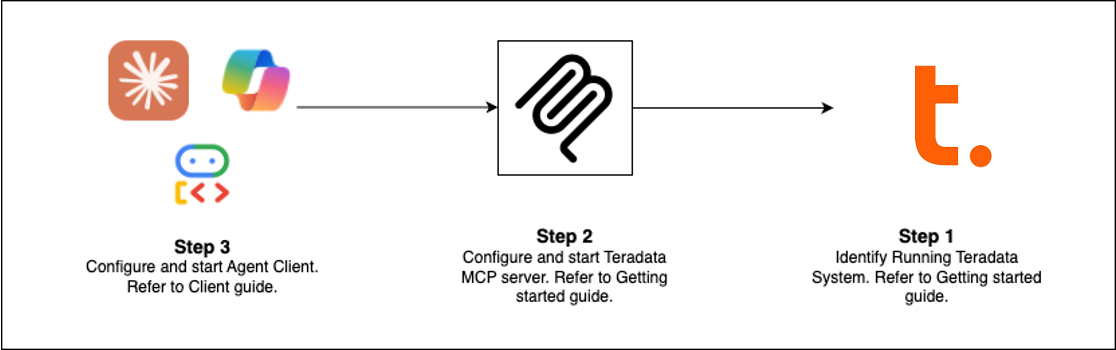
त्वरित आरंभ (अपना रास्ता चुनें)
| क्लाइंट | किसके लिए सर्वोत्तम | सेटअप समय |
|---|---|---|
| Claude Desktop | अन्वेषणात्मक विश्लेषण, प्लेटफ़ॉर्म प्रशासन | 5 मिनट |
| VS Code + Copilot | डेटा इंजीनियरिंग, एजेंट विकास | 5 मिनट |
| Open WebUI | नए LLM का स्थानीय रूप से परीक्षण | 5 मिनट |
| कोड उदाहरण | अपना स्वयं का क्लाइंट बनाएं | भिन्न |
| Flowise | विज़ुअल एजेंट निर्माता | 10 मिनट |
पूर्व-आवश्यकताएँ: Teradata डेटाबेस (या निःशुल्क सैंडबॉक्स) + uv
Claude Desktop सेटअप (कोई इंस्टॉलेशन नहीं)
इसे claude_desktop_config.json में जोड़ें (सेटिंग्स > डेवलपर > कॉन्फ़िग संपादित करें):
{
  "mcpServers": {
    "teradata": {
      "command": "uvx",
      "args": ["teradata-mcp-server"],
      "env": {
        "DATABASE_URI": "teradata://<USERNAME>:<PASSWORD>@<HOST_URL>:1025/<USERNAME>"
      }
    }
  }
}
आप क्या कर सकते हैं
| उपयोग केस | क्षमताएँ | उपकरण |
|---|---|---|
| क्वेरी और विश्लेषण | तालिकाओं का अन्वेषण, डेटा प्रोफ़ाइलिंग, परिणाम समझाना, पैटर्न विज़ुअलाइज़ करना—SQL की आवश्यकता नहीं | base, dba, qlty, plot |
| सिमेंटिक लेयर | YAML या हमारे एजेंट स्किल से कस्टम सिमेंटिक लेयर और उपकरण उत्पन्न करें | और जानें → |
| AI और RAG पाइपलाइन | सिमेंटिक खोज, पुनर्प्राप्ति-संवर्धित जनरेशन, वेक्टर भंडारण | rag, tdvs, fs |
| डेटाबेस प्रशासन | सुरक्षा प्रबंधन, क्षमता निगरानी, स्वचालित बैकअप | dba, sec, bar |
नया क्या है (नवीनतम रिलीज़)
- FastMCP v4 — सत्ररहित प्रोटोकॉल, लंबे समय तक चलने वाले विश्लेषण के लिए पृष्ठभूमि कार्य, तर्क पूर्णता
- प्रतिक्रिया कैशिंग — 5-मिनट TTL सिग्नल बहु-टर्न वार्तालापों में अनावश्यक डेटाबेस क्वेरी कम करते हैं
- गार्ड मोड — विनाशकारी संचालन के लिए बहु-चरणीय पुष्टिकरण प्रवाह (bar_, sec_)
- पृष्ठभूमि कार्य —
tdml_*विश्लेषणात्मक फ़ंक्शन ब्लॉक करने के बजाय पोलिंग के लिए कार्य ID लौटाते हैं - तर्क पूर्णता — उपयोगकर्ता टाइप करते समय स्कीमा से तालिका और स्तंभ नामों का स्वतः सुझाव
- हुक्स क्षमता — कस्टम निगरानी, ऑडिट, या दर-सीमा के लिए उपकरण कॉल को इंटरसेप्ट करें
- पंक्ति सीमा सुरक्षा — कॉन्फ़िगर करने योग्य कैप (
DEFAULT_ROW_LIMIT,MAX_ROW_LIMIT) LLM टोकन अतिप्रवाह रोकते हैं - उन्नत सुरक्षा — बारीक पंक्ति-स्तरीय पहुँच नियंत्रण के लिए VX दृश्य
विस्तार और तैनाती
कस्टम लॉजिक जोड़ें
निगरानी, ऑडिट ट्रेल्स, या सत्यापन के लिए उपकरण कॉल इंटरसेप्ट करने हेतु हुक्स का उपयोग करें → हुक्स गाइड
सिमेंटिक लेयर परिभाषित करें
YAML में डोमेन-विशिष्ट उपकरण, प्रॉम्प्ट और क्यूब्स बनाएं → अनुकूलन गाइड
हर जगह तैनात करें
CLI (uv), HTTP सर्वर, Docker कंटेनर, या क्लाउड सेवा के रूप में चलाएं → इंस्टॉलेशन गाइड
इसे क्रियान्वित देखें
- वॉयस एजेंट — Amazon Nova Sonic के साथ रीयल-टाइम द्विदिश ऑडियो
- वेब एजेंट — Google ADK फ्रेमवर्क के साथ इंटरैक्टिव चैट UI
- Flowise बिल्डर — विज़ुअल ड्रैग-एंड-ड्रॉप वर्कफ़्लो
- कस्टम मिडलवेयर — प्रदर्शन निगरानी पैटर्न
और जानें
- पूर्ण दस्तावेज़ीकरण — इंस्टॉलेशन, कॉन्फ़िगरेशन, आर्किटेक्चर, सुरक्षा
- वीडियो ट्यूटोरियल — चरण-दर-चरण वॉकथ्रू
- डेवलपर गाइड — विस्तार करें और योगदान दें
- आर्किटेक्चर — घटक एक साथ कैसे काम करते हैं
योगदान
हम योगदान का स्वागत करते हैं! आरंभ करने के लिए हमारा योगदान गाइड और डेवलपर गाइड देखें।