cowork-semantic-search
Recherche sémantique locale sur des documents (txt, md, pdf, docx, pptx, csv). Entièrement hors ligne, multilingue, recherche hybride vectorielle + par mots-clés via LanceDB. Aucune clé API, aucun cloud.
Documentation
cowork-semantic-search




If you find this useful, consider giving it a ⭐ — it helps others discover the project.
Local semantic search for your documents. No API keys. No cloud. Works with any MCP client.
Why
AI coding tools are powerful, but they have blind spots when it comes to your local files:
- Frozen knowledge -- training data has a cutoff. Your latest reports, notes, and contracts don't exist in the model's world.
- Context window limits -- you can't paste 500 documents into a prompt.
- No cross-file search -- your AI tool can read one file at a time, but can't search across your entire document library for the relevant pieces.
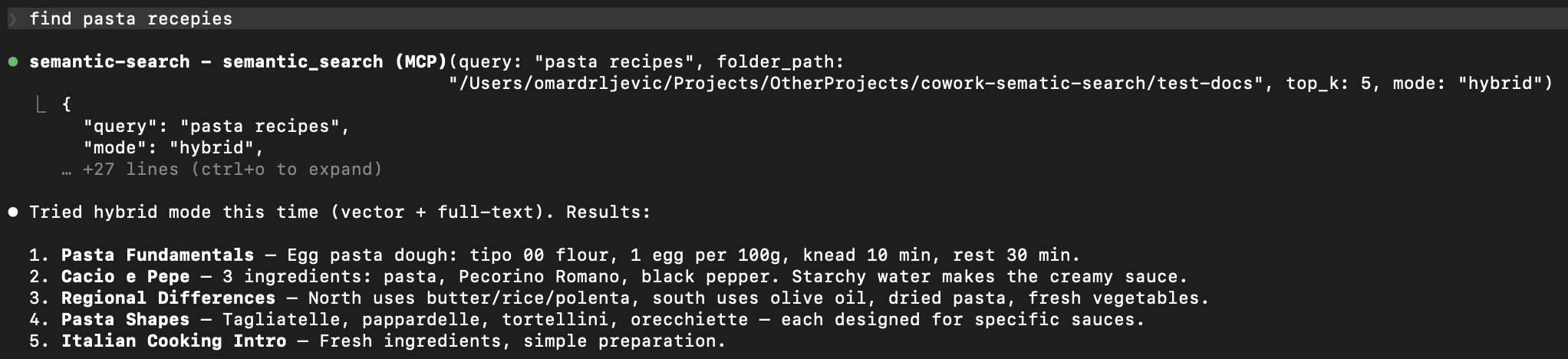
This plugin bridges that gap. It indexes your local documents into a small, fast vector database. When you ask a question, it retrieves only the relevant pieces -- so your AI tool can answer with your actual data.
Your documents --> chunked --> embedded --> local vector DB
                                                 |
         Your question --> embedded --> similarity search --> relevant chunks --> AI answers
Features
- Fully offline -- one-time model download (~120MB), then no network calls. No data leaves your machine.
- Incremental indexing -- SHA-256 content hashing. Only changed files get reprocessed. Re-indexing 1000 files where 3 changed takes seconds.
- Multilingual -- handles 50+ languages natively. Search in one language, find results in another.
- Hybrid search -- combines semantic similarity with full-text keyword search via Reciprocal Rank Fusion. Catches what pure vector search misses.
- Multiple formats -- txt, md, pdf, docx, pptx, csv out of the box.
- Any MCP client -- works with Claude Code, Cursor, Windsurf, Cline, and any other MCP-compatible tool.
- Zero infrastructure -- LanceDB stores everything as local files. No server, no Docker, no database to manage.
Supported Formats
| Format | Extension | Details |
|---|---|---|
| Plain text | .txt | UTF-8 with fallback |
| Markdown | .md | Raw text preserved |
.pdf | Page-level extraction with metadata | |
| Word | .docx | Full paragraph extraction |
| PowerPoint | .pptx | Slide-level extraction with metadata |
| CSV | .csv | Row-based text extraction |
Quick Start
1. Install
git clone https://github.com/ZhuBit/cowork-semantic-search.git
cd cowork-semantic-search
python3 -m venv .venv && source .venv/bin/activate
pip install -e ".[all]"
2. Configure your MCP client
Add the server to your MCP client's config. Replace paths with your own.
Claude Code -- .mcp.json in your project root
{
  "mcpServers": {
    "semantic-search": {
      "command": "/absolute/path/to/.venv/bin/python",
      "args": ["-m", "server.main"],
      "cwd": "/absolute/path/to/cowork-semantic-search",
      "env": {
        "PYTHONPATH": "/absolute/path/to/cowork-semantic-search"
      }
    }
  }
}
Cursor -- .cursor/mcp.json in your project root or ~/.cursor/mcp.json globally
{
  "mcpServers": {
    "semantic-search": {
      "command": "/absolute/path/to/.venv/bin/python",
      "args": ["-m", "server.main"],
      "env": {
        "PYTHONPATH": "/absolute/path/to/cowork-semantic-search"
      }
    }
  }
}
Windsurf -- ~/.codeium/windsurf/mcp_config.json
{
  "mcpServers": {
    "semantic-search": {
      "command": "/absolute/path/to/.venv/bin/python",
      "args": ["-m", "server.main"],
      "env": {
        "PYTHONPATH": "/absolute/path/to/cowork-semantic-search"
      }
    }
  }
}
Cline -- MCP Servers settings in the Cline VS Code extension
Open Cline > MCP Servers icon > Configure > Advanced MCP Settings, then add:
{
  "mcpServers": {
    "semantic-search": {
      "command": "/absolute/path/to/.venv/bin/python",
      "args": ["-m", "server.main"],
      "env": {
        "PYTHONPATH": "/absolute/path/to/cowork-semantic-search"
      }
    }
  }
}
3. Restart your MCP client and go
"Index all documents in ~/Documents/projects"
"Search for 'quarterly revenue report'"
First run downloads the embedding model (~120MB), then everything runs offline.
Example: Search Your Obsidian Vault
If you keep notes in Obsidian (or any folder of markdown files), this plugin turns your AI tool into a search engine for your knowledge base.
You: "Index my vault at ~/Documents/ObsidianVault"
AI:  Indexed 847 files -> 3,291 chunks in 42s

You: "What did I write about API rate limiting?"
AI:  Found 6 relevant chunks across 3 files:
       - notes/backend/rate-limiting-strategies.md
       - projects/acme-api/design-decisions.md
       - daily/2025-11-03.md
       ...

You: "Find anything about the client meeting last November, use hybrid search"
AI:  Found 4 results using hybrid search (vector + keyword):
       - meetings/2025-11-12-acme-kickoff.md
       - daily/2025-11-12.md
       ...
Works the same with PDFs, Word docs, PowerPoints, and CSVs -- just point it at a folder.
Tools
| Tool | Description |
|---|---|
index_folder | Index or re-index all documents in a folder. Incremental -- skips unchanged files. |
semantic_search | Search indexed documents using natural language. Supports vector and hybrid modes. |
get_index_status | Show total chunks, file count, and list of indexed files. |
reindex_file | Force re-index a single file, bypassing the hash cache. |
How It Works
- Parse -- extract text from each document, preserving structure (pages, slides)
- Chunk -- split into ~400 character overlapping pieces for precise retrieval
- Embed -- convert each chunk into a 384-dimensional vector using
paraphrase-multilingual-MiniLM-L12-v2 - Store -- save chunks + vectors in a LanceDB database (a local file, no server needed)
- Search -- embed your query, find nearest chunks by cosine similarity, optionally combine with full-text keyword search via RRF
Advanced Usage
Use as a Python library
from server.indexer import index_folder
from server.search import semantic_search

# Index a folder
result = index_folder("/path/to/docs")
print(f"{result['files_indexed']} files -> {result['total_chunks']} chunks")

# Search
results = semantic_search("project deadline", mode="hybrid")
for r in results["results"]:
    print(f"  {r['file_name']}: {r['text'][:100]}...")
Architecture
server/
  main.py       # MCP server + tool definitions
  parsers.py    # Per-format text extraction
  chunker.py    # Text splitting with metadata
  indexer.py    # Discovery, hashing, embedding pipeline
  store.py      # LanceDB vector store + FTS + hybrid search
  search.py     # Query embedding + search orchestration
| Component | Choice | Why |
|---|---|---|
| MCP framework | FastMCP | Clean tool definitions, async support |
| Embeddings | sentence-transformers | Offline, multilingual, fast |
| Vector DB | LanceDB | Serverless, embedded, FTS built-in |
| Chunking | langchain-text-splitters | Battle-tested recursive splitting |
| PyMuPDF | Fast, accurate extraction | |
| DOCX | python-docx | Lightweight, no system deps |
| PPTX | python-pptx | Slide-level extraction |
Development
source .venv/bin/activate
pytest tests/ -v
56 tests covering parsers, chunking, indexing, search, and MCP tool integration.
Contributions welcome -- open an issue or submit a PR.
Roadmap
- ONNX runtime for faster embeddings (drop PyTorch dependency)
- Configurable chunk size and overlap via tool params
- Multi-folder named indexes
- Metadata filtering (date ranges, tags, custom fields)
- Watch mode (auto-reindex on file changes)
Support
If this is useful to you, consider giving it a ⭐ — it helps others find the project.
License
AGPL-3.0 -- free to use, modify, and self-host. If you offer this as a network service, you must share your source code. See LICENSE for details.