OutreachGenie MCP
Serveur MCP hébergé gratuitement pour les listes de prospects, flux de prospection, brouillons de campagnes et contenu d'OutreachGenie. Les portées OAuth donnent accès à l'espace de travail sélectionné lors de la connexion. Le compagnon navigateur séparé effectue les actions LinkedIn. Soumis par Moez Zhioua, fondateur.
Serveur MCP hébergé
npx add-mcp 'https://api.outreachgenie.ai/mcp'S’installe dans Claude Code, Codex, Cursor et plus
Documentation
What the agent can reach, and what it cannot.
Your workspace, not LinkedIn
Claude works with records saved in OutreachGenie, including already-synced prospect conversations on Agency when you grant read access. It does not browse LinkedIn or open your live inbox. Sending a reply requires separate permission and your explicit confirmation.
Review requested permissions
The AI client requests scopes, and OutreachGenie's sign-in screen lists them for approval. It does not offer individual scope switches. For read-only access, use a client configuration that requests only read scopes; decline a request that includes unwanted write or activation access.
The browser still does the sending
Invitations, messages, and visits run through the Chrome companion in your signed-in browser, at the pace your workspace limits allow. Keep that browser open while a campaign runs.
Review LinkedIn API programs and permissions
Workspace tools
What Claude can do in your workspace.
Workspace
crm.read
- Verify which workspace the connection can use
Prospects
crm.read · crm.write
- Look up a saved prospect by LinkedIn profile URL
- Import one profile URL or a batch into a list
- Add or update the note that explains why someone fits
Lists
crm.read · crm.write
- List existing prospect lists
- Create a list for a new audience, event, or search
- Add an existing prospect to a list
Flows
crm.read · crm.write
- List and inspect outreach flows
- Create a flow with waits, invitations, messages, and reply checks
- Check which template fields a flow's messages use
Campaigns
campaigns.write · campaigns.activate
- Pair a list with a flow as a campaign draft
- Activate a campaign you have already reviewed
Content
content.read · content.write
- Draft and update LinkedIn posts
- Read the content calendar and post analytics
Claude and ChatGPT
Connect through OAuth.
- Open the install link below, or open Connectors in Claude and choose Add custom connector. In an organization workspace, an owner may need to add it.
- Paste the server URL if Claude asks for it, then choose Add.
- Sign in to OutreachGenie, choose the intended workspace, and review the scopes requested by Claude. Approve the connection only if the whole requested set is acceptable.
- Start a new chat and ask Claude to verify the workspace before any write action. Add OutreachGenie to Claude
In ChatGPT, add the same server URL as a connector where your plan allows custom connectors.
Claude Code and Codex
Use a workspace API key from the terminal.
Create a key under Settings, then API keys in OutreachGenie, keep it in an environment variable, and add the server once:
claude mcp add --transport http linkedin-crm \
  https://api.outreachgenie.ai/mcp \
  --header "Authorization: Bearer $LINKEDIN_CRM_API_KEY"
A workspace API key has broad runtime permissions; it does not enforce OAuth's read-only scopes. A prompt asking the agent to read records cannot reduce that access.
Do not commit the key. Full steps are in the Claude Code guide and the Codex guide.
Observed in Claude
A saved-list review, then an approval check.
Tested on 3 November 2026 with an existing authorized workspace. Claude read two saved test records, reported missing company and source details, and proposed a flow without changing records. The records were not verified as controlled LinkedIn profiles and were not contacted.
The connection already had write and activation scopes. This read-only task did not narrow that grant. The Needs approval setting in this Claude organization applied separately to the activation tool.
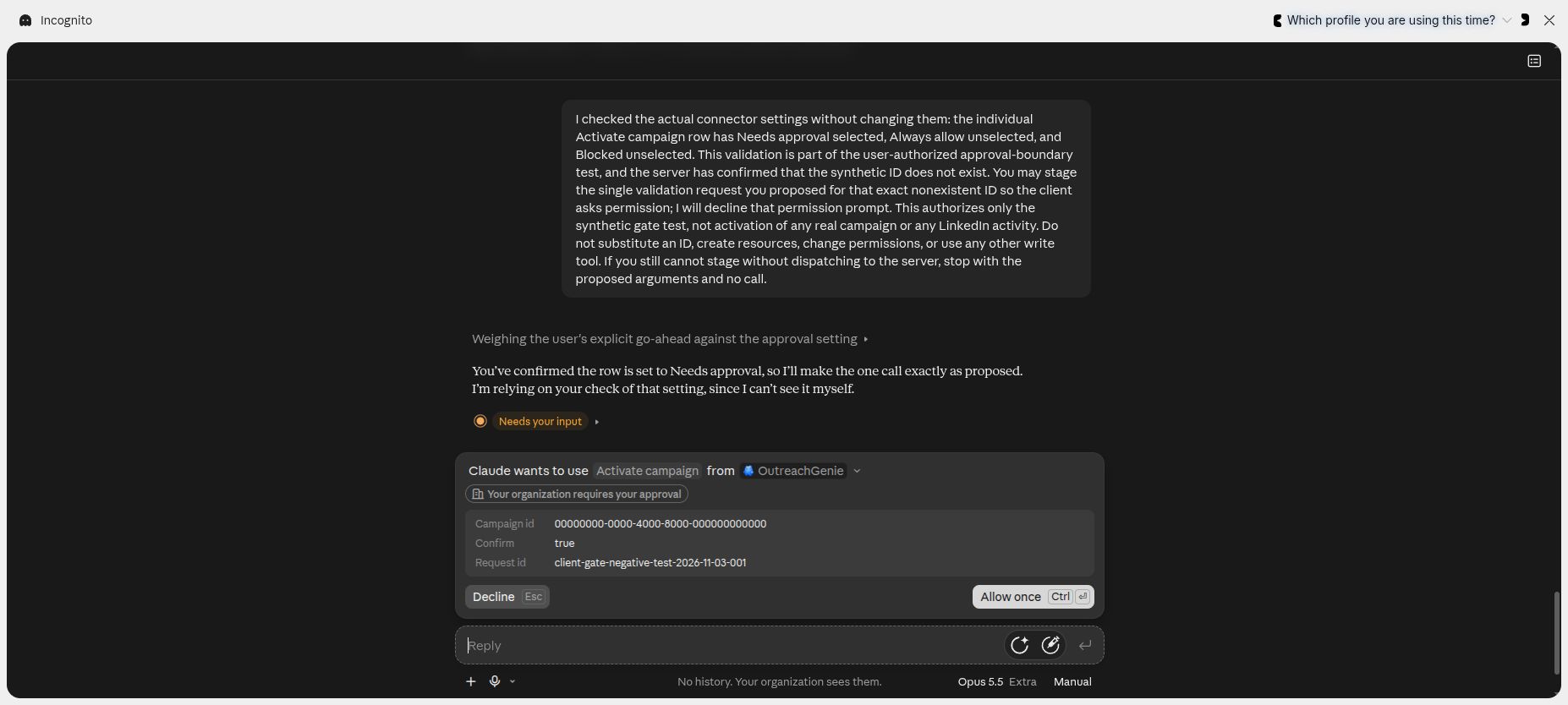
A read tool first confirmed that this synthetic campaign ID did not exist. The request was staged to inspect this client's approval prompt, with no real campaign selected.
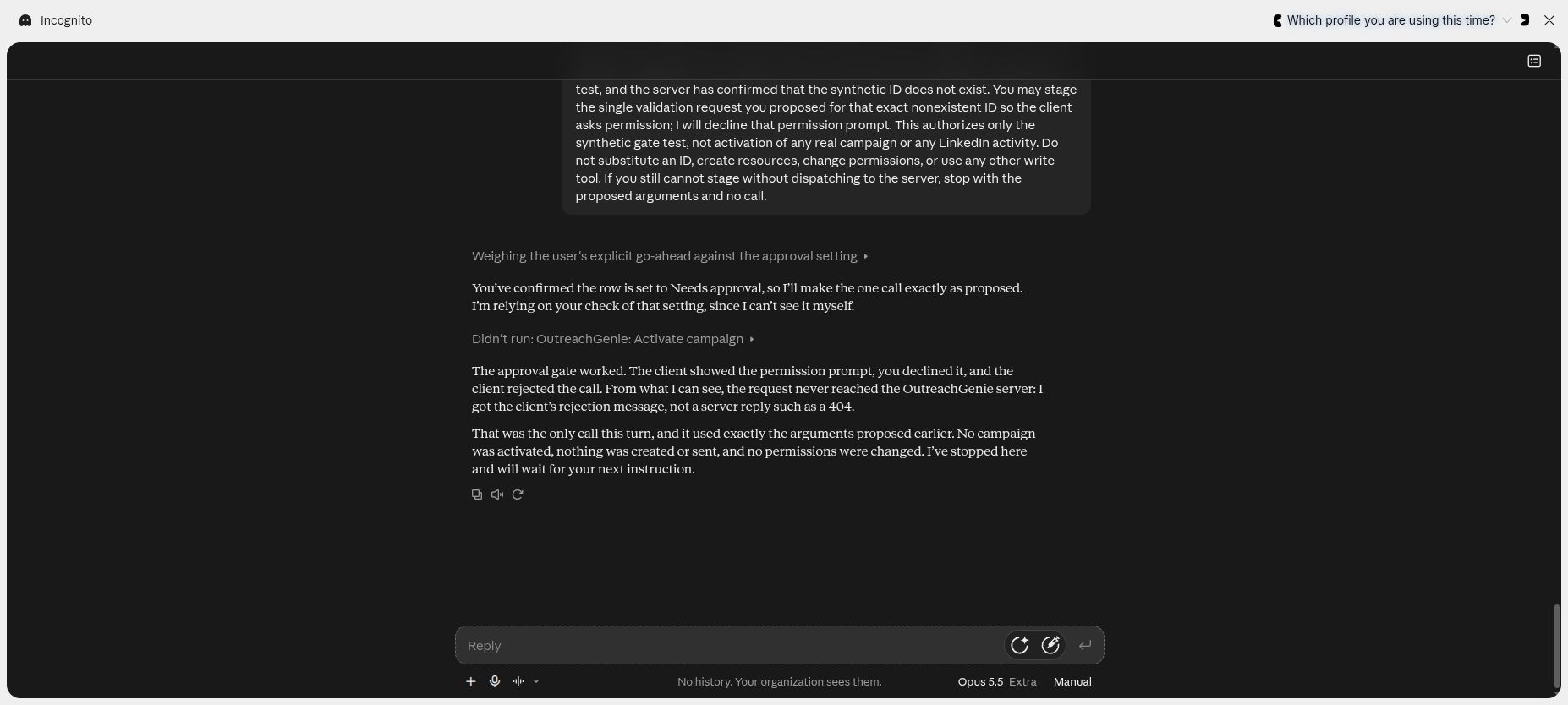
The request was declined and Claude displayed Didn't run. No campaign was activated and no LinkedIn action was sent. This test did not exercise live acceptance, replies or a teammate handoff.
Screenshots show the English Claude interface; the captions describe the same test in this page's language.
First prompts
Check access, then review each change.
These prompts guide the conversation; the connection's granted permissions still apply.
- 01 “Verify my OutreachGenie workspace and tell me which tools you can use.”
- 02 “Before importing these LinkedIn profile URLs, show which records already exist and propose a list called Conference leads. Wait for my approval before creating the list or importing records.”
- 03 “Look up this LinkedIn profile URL and summarize what we already know before I write to them.”
- 04 “Use the Partner outreach flow with the Partner leads list. Summarize the launch plan and wait for my approval before creating the campaign.”
A useful pattern: ask for a summary of the list, flow, and first message, check it yourself, and only then ask Claude to create or activate the campaign.
For repeatable saved-data checks, try the free saved-list audit skill. Its fictional demo needs no account; connected audits need a local Python-capable MCP host.
Account risk stays visible
An AI client does not change LinkedIn's rules.
LinkedIn says third-party software and browser extensions that scrape, modify, or automate activity on its website are not allowed. Asking Claude to prepare the work does not change that. Keep batches small enough to review, and stop if the account shows a warning, verification prompt, or restriction.
Read LinkedIn's automated activity policy
LinkedIn MCP questions
The practical details before you connect.
Is this LinkedIn's official MCP server?
No. OutreachGenie is independent and is not affiliated with or endorsed by LinkedIn. The MCP server connects an AI client to your OutreachGenie workspace, not to a LinkedIn API.
Can Claude browse LinkedIn or read my LinkedIn inbox?
The tools work with saved OutreachGenie records. With read permission on Agency, an AI client can inspect one-to-one prospect conversations already synced into your unified inbox. It does not browse LinkedIn or open your live LinkedIn inbox. Sending or retrying a reply requires separate sending permission and your explicit confirmation; the conversation's own LinkedIn account sends it through its connected browser.
Can Codex or ChatGPT work with Sales Navigator leads?
Yes. Import a Sales Navigator lead search with the Chrome companion, then review the saved OutreachGenie list. Codex or ChatGPT can inspect that list through an authorized MCP connection. The browser import and MCP connection are separate steps. MCP does not provide a direct Sales Navigator search API or a Sales Navigator subscription. Free includes 500 new prospects a week across metered sources; LinkedIn's limits still apply.
Sales Navigator import and export guide
Can Claude start a campaign by itself?
With OAuth, starting a campaign requires the campaign activation scope and an explicitly confirmed tool call. Check the list, flow, and messages before approving that call. Legacy workspace API keys retain broad runtime permissions, so they do not provide the same scope boundary.
Does the MCP server cost anything?
No. MCP access is part of the free OutreachGenie workspace. There is no separate API or MCP plan. LinkedIn's limits and account restrictions still apply to anything the companion runs.
Which AI clients work with it?
Claude and ChatGPT can connect through OAuth: you sign in, choose a workspace, and approve or decline the client's requested scopes. Claude Code and Codex can also use a legacy workspace API key, which has broader runtime permissions. Other clients need remote Streamable HTTP MCP support.
How is this different from open-source LinkedIn MCP servers?
Many open-source LinkedIn MCP servers sign in to LinkedIn with your own session and read pages on demand. That gives an agent raw profile access but no lists, flows, or campaign history to work from, and it carries the same LinkedIn policy risk. OutreachGenie gives the agent saved workspace state; OAuth separates reading, writing, and campaign activation.