SSH Rails Runner
Exécutez des commandes de console Rails à distance et en toute sécurité via SSH.
Documentation
MCP Server: SSH Rails Runner
An MCP server that enables secure remote execution of Rails console commands via SSH. This server provides tools for both read-only operations and carefully managed mutations in a deployed Rails environment.
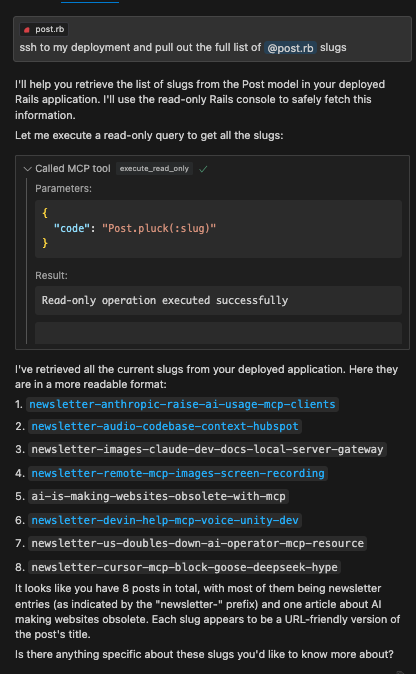
This works great with Cursor. You can use Cursor Composer to pull in your Rails model files as context and then use the execute_read_only, dry_run_mutate, and execute_mutate tools to make changes to the database. No need to trudge through complicated Admin UI's to get your data wrangling and analysis done.
Example
Features
- Remote Rails console execution over SSH
- Safe read-only operations
- Dry-run capability for mutations
- Execution of approved mutations
- Resource management for code snippets
Installation
npm install
npm run build
Configuration
Set the following environment variables:
SSH_HOST=your.remote.host
SSH_USER=your_ssh_user
SSH_PRIVATE_KEY_PATH=your_SSH_PRIVATE_KEY_PATH
RAILS_WORKING_DIR=/path/to/rails/app
Usage with Claude Desktop
Add to your Claude Desktop configuration:
{
  "mcpServers": {
    "ssh-rails-runner": {
      "command": "npx",
      "args": ["mcp-server-ssh-rails-runner"],
      "env": {
        "SSH_HOST": "your.remote.host",
        "SSH_USER": "your_ssh_user",
        "SSH_PRIVATE_KEY_PATH": "your_SSH_PRIVATE_KEY_PATH",
        "RAILS_WORKING_DIR": "/path/to/rails/app/root",
        "PROJECT_NAME_AS_CONTEXT": "Name that shows up in tool descriptions to help the LLM describe what kind of Rails project we're working with.",
        "CODE_SNIPPET_FILE_DIRECTORY": "/path/to/store/code/snippets/locally"
      }
    }
  }
}
If CODE_SNIPPET_FILE_DIRECTORY is not provided, snippets will be stored in a temporary directory (e.g., /tmp/mcp-ssh-rails-runner-code-snippets).
PROJECT_NAME_AS_CONTEXT is optional and helps identify the project context in tool descriptions.
Available Tools
The server now uses a Prepare -> Execute workflow:
mcp_ssh_rails_runner_prepare_code_snippet
- Arguments:
name(string, for filename),type(enum: "readOnly" | "mutate"),code(string, Ruby code),description(string, optional). - Function: Saves the provided Ruby code to a local file named
code_snippet_<name>.json, marks it as read-only or mutate, and opens the file for review. - Returns: The
file://URI of the created snippet.
mcp_ssh_rails_runner_execute_code_snippet_read_only
- Arguments:
uri(string,file://URI fromprepareCodeSnippet). - Function: Reads the code snippet from the URI, verifies it's marked as
readOnly, performs a safety check on the code, and executes it. - Returns: The output of the Rails command.
mcp_ssh_rails_runner_execute_code_snippet_mutate
- Arguments:
uri(string,file://URI fromprepareCodeSnippet). - Function: DANGER ZONE! Reads the code snippet, verifies it's marked as
mutate, and executes it directly. There is no dry run or further safety check within this tool. - Returns: The output of the Rails command.
- Usage: ONLY CALL THIS AFTER THE USER HAS REVIEWED the prepared code (via the opened file from
prepareCodeSnippet) AND EXPLICITLY CONFIRMED they want to execute the mutation.
Security Considerations
- Only use with trusted SSH endpoints from your own local machine that is (temporarily) provided access to the remote environment.
- Crucially, always review the code saved by
prepareCodeSnippetbefore executing any mutation withexecuteCodeSnippetMutate. The responsibility for confirming mutations lies with the user and the calling AI.
License
MIT