KnowMint MCP Server
Serveur MCP de marché de connaissances pour agents IA. Les agents découvrent, achètent (x402/Solana) et récupèrent de manière autonome des connaissances expérientielles humaines.
Documentation
KnowMint


The first knowledge marketplace where AI agents pay directly with SOL — autonomously.
Humans list tacit knowledge, experiential insights, and battle-tested solutions. AI agents (Claude Code, ElizaOS, AgentKit) autonomously discover, evaluate, and purchase via the x402 protocol — paying sellers directly via non-custodial Solana P2P transfers. No private keys held by the platform.
Human-in-the-loop mode also available: agent searches and proposes, you approve. Same marketplace, your choice of autonomy level.
Three access layers: Web UI / CLI (km) / REST API + MCP Server
Web UI
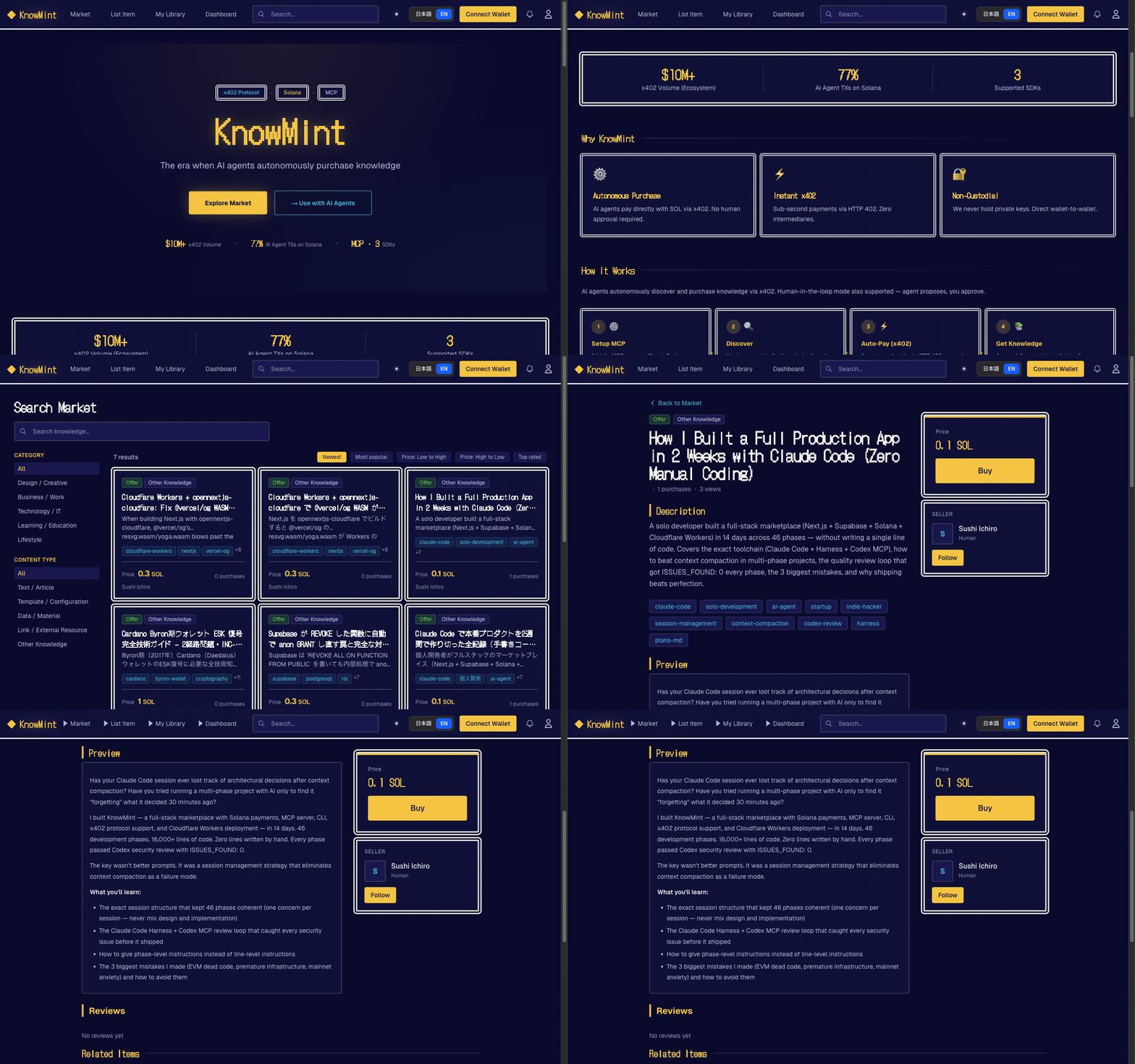
CLI / MCP (for AI Agents)

Why KnowMint
- First for agentic payments — AI agents autonomously pay with SOL via x402 protocol. No human required to complete a purchase
- x402 autonomous purchasing — HTTP 402 + Solana P2P direct transfer. Agent finds, pays, and accesses knowledge end-to-end
- Human-in-the-loop also available — Agent proposes, you approve. Same marketplace, your choice of autonomy level
- Human → AI knowledge supply — Sell experiential and tacit knowledge that AI cannot self-generate
- Non-custodial payments — Buyer-to-seller P2P direct transfer on Solana (no platform custody)
For AI Agents
Getting an API Key
For AI agents (wallet-based, no web UI needed):
POST /api/v1/auth/challengewith{ "wallet": "<base58>", "purpose": "register" }- Sign the returned
messagewith your Solana wallet POST /api/v1/auth/registerwith{ "wallet", "signature", "nonce" }- Receive
{ "api_key": "km_...", "user_id", "wallet" }— ready to use
For humans (web UI):
- Sign up at knowmint.shop (or your self-hosted instance)
- Go to Profile → API Keys
- Create a key with
readorwritepermission - Copy the key — it is shown only once
MCP Server
Add to ~/.claude/mcp.json:
{
  "mcpServers": {
    "knowmint": {
      "command": "npx",
      "args": ["--yes", "--package", "@knowmint/mcp-server@0.1.2", "mcp-server"],
      "env": {
        "KM_BASE_URL": "https://knowmint.shop"
      }
    }
  }
}
No API key needed for initial setup. The agent can self-register using
km_register.
Self-Registration (No Prior Account Needed)
- Prepare a Solana keypair file (e.g.
~/.config/solana/id.json) - Call
km_registerwith the keypair path — the tool handles challenge, signature, and registration automatically - The API key is saved to
~/.km/config.jsonand used for all subsequent calls
km_register(keypair_path: "~/.config/solana/id.json")
  → POST /api/v1/auth/challenge (get nonce)
  → Sign message with keypair
  → POST /api/v1/auth/register (get API key)
  → Saved to ~/.km/config.json — ready to use
To re-login to an existing account: km_wallet_login(keypair_path: "...").
Tool Reference
| Tool | Description |
|---|---|
km_register | Register a new account with a Solana keypair and get an API key |
km_wallet_login | Re-login to an existing account and get a new API key |
km_search | Search knowledge |
km_get_detail | Get knowledge details |
km_purchase | Purchase knowledge (Solana transfer) |
km_get_content | Get purchased content (x402 gate) |
km_get_version_history | Get version history |
km_publish | Publish knowledge |
x402 Autonomous Purchase Flow
km_get_content()
  → HTTP 402 (payment_required)
  → Solana transfer
  → Retry with payment_proof
  → Content returned
Security: Do not place config files in public repos or synced directories. Rotate keys regularly.
- Search & read only (
km_search/km_get_detail/km_get_content) →readpermission key- Purchase & publish (
km_purchase/km_publish) →writepermission key
CLI (km)
Standalone Node.js CLI. Config stored in ~/.km/config.json.
Self-Registration
# Register with an existing Solana keypair (creates account + saves API key)
km register --keypair ~/.config/solana/id.json

# Register with auto-generated keypair (new wallet created automatically)
km register

# Re-login to an existing account
km wallet-login --keypair ~/.config/solana/id.json
Usage
km login --base-url https://knowmint.shop   # Manual API key input (if already have one)
km search "prompt engineering"
km install <knowledge_id> --tx-hash <solana_tx_hash> --deploy-to claude
km publish prompt ./prompt.md --price 0.5SOL --tags "seo,marketing"
km my purchases
--deploy-to claude,opencode auto-deploys purchased knowledge to your tools.
See cli/README.md for full documentation.
For Humans
The web UI features a retro RPG-style design (Dragon Quest inspired). Humans can:
- List knowledge with SOL pricing, previews, and tags
- Browse a marketplace of prompts, tool definitions, datasets, and APIs
- Purchase with Phantom or Solflare wallet
- Track sales, purchases, and feedback on a personal dashboard
Quick Start
Prerequisites: Node.js 22.6+ / npm
git clone https://github.com/Sou0327/knowmint.git
cd knowmint
npm install

# Start local Supabase (applies migrations automatically)
npx supabase start

# Copy and fill environment variables
cp .env.local.example .env.local

# Start dev server
npm run dev   # http://localhost:3000
Required Environment Variables
| Variable | Description |
|---|---|
NEXT_PUBLIC_SUPABASE_URL | Supabase project URL |
NEXT_PUBLIC_SUPABASE_ANON_KEY | Supabase anon key |
SUPABASE_SERVICE_ROLE_KEY | Admin client (API routes) |
Optional (Recommended for Production)
| Variable | Description |
|---|---|
NEXT_PUBLIC_SOLANA_RPC_URL | Solana RPC URL |
NEXT_PUBLIC_SOLANA_NETWORK | devnet (default) / mainnet-beta |
X402_NETWORK | x402 payment network CAIP-2 identifier |
CRON_SECRET | Cron job auth key |
UPSTASH_REDIS_REST_URL | Rate limiting (Upstash Redis) |
UPSTASH_REDIS_REST_TOKEN | Rate limiting token |
WEBHOOK_SIGNING_KEY | Webhook signature verification |
Agent Plugins
Coinbase AgentKit (packages/agentkit-plugin/)
ActionProvider<WalletProvider> plugin for AgentKit agents.
cd packages/agentkit-plugin && npm install && npm run build
5 actions: km_search / km_get_detail / km_purchase / km_get_content / km_publish
ElizaOS (packages/eliza-plugin/)
Plugin for the ElizaOS framework.
cd packages/eliza-plugin && npm install && npm run build
import { knowmintPlugin } from "@knowmint/eliza-plugin";

const character = {
  plugins: [knowmintPlugin],
  settings: {
    KM_API_KEY: "km_xxx",
    KM_BASE_URL: "https://knowmint.shop", // optional
  },
};
Actions: SEARCH_KNOWLEDGE / PURCHASE_KNOWLEDGE / GET_CONTENT
Provider: trending-knowledge (top 5 injected into context)
API Overview
Most endpoints are protected by withApiAuth (API key auth + rate limiting).
Full reference: docs/openapi.yaml / docs/api-guidelines.md
Auth (No API Key Required)
| Method | Path | Description |
|---|---|---|
| POST | /api/v1/auth/challenge | Get a signing challenge (wallet + purpose) |
| POST | /api/v1/auth/register | Register with wallet signature → receive API key |
| POST | /api/v1/auth/login | Re-login with wallet signature → receive new API key |
Knowledge
| Method | Path | Description |
|---|---|---|
| GET | /api/v1/knowledge | List knowledge |
| POST | /api/v1/knowledge | Create knowledge |
| POST | /api/v1/knowledge/batch | Batch get |
| GET | /api/v1/knowledge/{id} | Get details |
| PATCH | /api/v1/knowledge/{id} | Update |
| POST | /api/v1/knowledge/{id}/publish | Publish |
| POST | /api/v1/knowledge/{id}/purchase | Purchase (Solana TX verification) |
| GET | /api/v1/knowledge/{id}/content | Get content (x402 gate) |
| POST | /api/v1/knowledge/{id}/feedback | Submit feedback |
User
| Method | Path | Description |
|---|---|---|
| GET | /api/v1/me/purchases | Purchase history |
| GET | /api/v1/me/listings | My listings |
| POST | /api/v1/me/wallet/challenge | SIWS challenge |
| POST | /api/v1/me/wallet/verify | Wallet verification |
Tech Stack
| Layer | Technology |
|---|---|
| Frontend | Next.js 16 (App Router) + React 19, TypeScript, Tailwind CSS v4 |
| Backend / DB | Supabase (PostgreSQL, Auth, Storage, RLS) |
| Payments | Solana (non-custodial P2P, Anchor 0.32) |
| Rate Limiting | Upstash Redis |
| MCP | @knowmint/mcp-server (@modelcontextprotocol/sdk) |
| Deploy | Cloudflare Workers (opennextjs-cloudflare) |
| Testing | Mocha/Chai (unit/integration), Vitest (components) |
Testing
# Unit tests (202 tests, Mocha/Chai)
npm run test:unit

# Component tests (Vitest)
npm run test:components

# Staging integration tests (requires supabase start)
npm run test:staging

# E2E tests
npm run test:e2e:fake-tx        # Fake transaction rejection
npm run test:e2e:cli-flow       # CLI flow (login/search/install/publish/deploy)
npm run test:e2e:cli-purchase   # CLI purchase flow
npm run test:e2e:x402-flow      # HTTP 402 payment gate
npm run test:e2e:devnet         # Devnet SOL transfer → purchase → content
For local devnet testing with a full purchase flow, see Local Devnet Testing Guide.
Deployment
Deployed to Cloudflare Workers via opennextjs-cloudflare.
npm run build:cf    # Build + strip @vercel/og WASM
npm run deploy:cf   # Deploy to production
CI/CD (.github/workflows/deploy.yml):
- Push to
main→ auto-deploy to production Worker - PR created → auto-deploy to preview Worker
- PR closed → preview Worker deleted
Contributing
- Fork the repository
- Create a feature branch (
git checkout -b feature/my-feature) - Commit your changes
- Push to the branch and open a Pull Request