Iris
officielServeur d'évaluation et d'observabilité natif MCP avec journalisation des traces, évaluation de la qualité des sorties, suivi des coûts, 12 règles d'évaluation intégrées, tableau de bord en temps réel et détection des PII.
Que pouvez-vous faire avec Iris MCP ?
- Journaliser et évaluer les exécutions d’agent — Demandez à votre assistant de journaliser une tâche dans Iris et obtenez des scores déterministes de qualité, de sécurité et de coût sur la sortie.
- Interroger l’historique des traces — Récupérez les exécutions d’agent stockées avec prise en charge du filtrage, de la pagination et des plages temporelles pour examiner les performances passées.
- Comparer les exécutions dans le temps — Analysez deux exécutions sur les mêmes questions côte à côte pour repérer les régressions ou les améliorations dans le comportement de l’agent.
- Évaluer la qualité de la sortie — Évaluez n’importe quel texte par rapport à 25 règles intégrées couvrant l’exhaustivité, la pertinence, la sécurité et le coût, avec détection des PII et des injections de prompts.
- Lancer le tableau de bord de démonstration — Démarrez une base de données de démonstration préremplie avec des échecs et des verdicts d’exemple pour explorer localement le moteur de notation d’Iris.
Documentation
Iris — arrêtez de livrer des agents à l'aveugle








Iris évalue chaque exécution d'agent pour la qualité, la sécurité et le coût — sur votre machine, sans SDK et sans compte. La plupart des projets d'agents vérifient la qualité en exécutant quelques invites mémorisées et en examinant la sortie. Iris remplace cela par des chiffres que vous pouvez auditer : les exécutions de votre agent atterrissent dans une base de données SQLite sur votre disque, 25 règles intégrées les notent de manière déterministe — PII, injection d'invite, marqueurs d'hallucination, seuils de coût et les propres appels d'outils de l'agent — gratuitement, sans appels LLM, et un juge LLM optionnel avec un plafond de coût fixe par évaluation gère les questions sémantiques. Chaque règle est inspectable et modifiable, car un juge que vous ne pouvez pas auditer n'est que des impressions avec un chiffre dessus. Licence MIT, aucune télémétrie. Rien ne quitte votre machine sauf si vous activez l'une de ces options : un point de terminaison OpenTelemetry (IRIS_OTEL_ENDPOINT), qui exporte les traces vers le collecteur que vous nommez ; le juge LLM avec votre propre clé, qui envoie le texte qu'il juge à ce fournisseur, et dont la vérification de citation récupère les pages qu'une sortie cite ; ou un webhook, qui publie les identifiants, le verdict et les noms de règles, jamais le texte, à l'adresse que vous définissez.
Nécessite Node.js 22.13 ou version ultérieure. Vérifiez avec node --version.
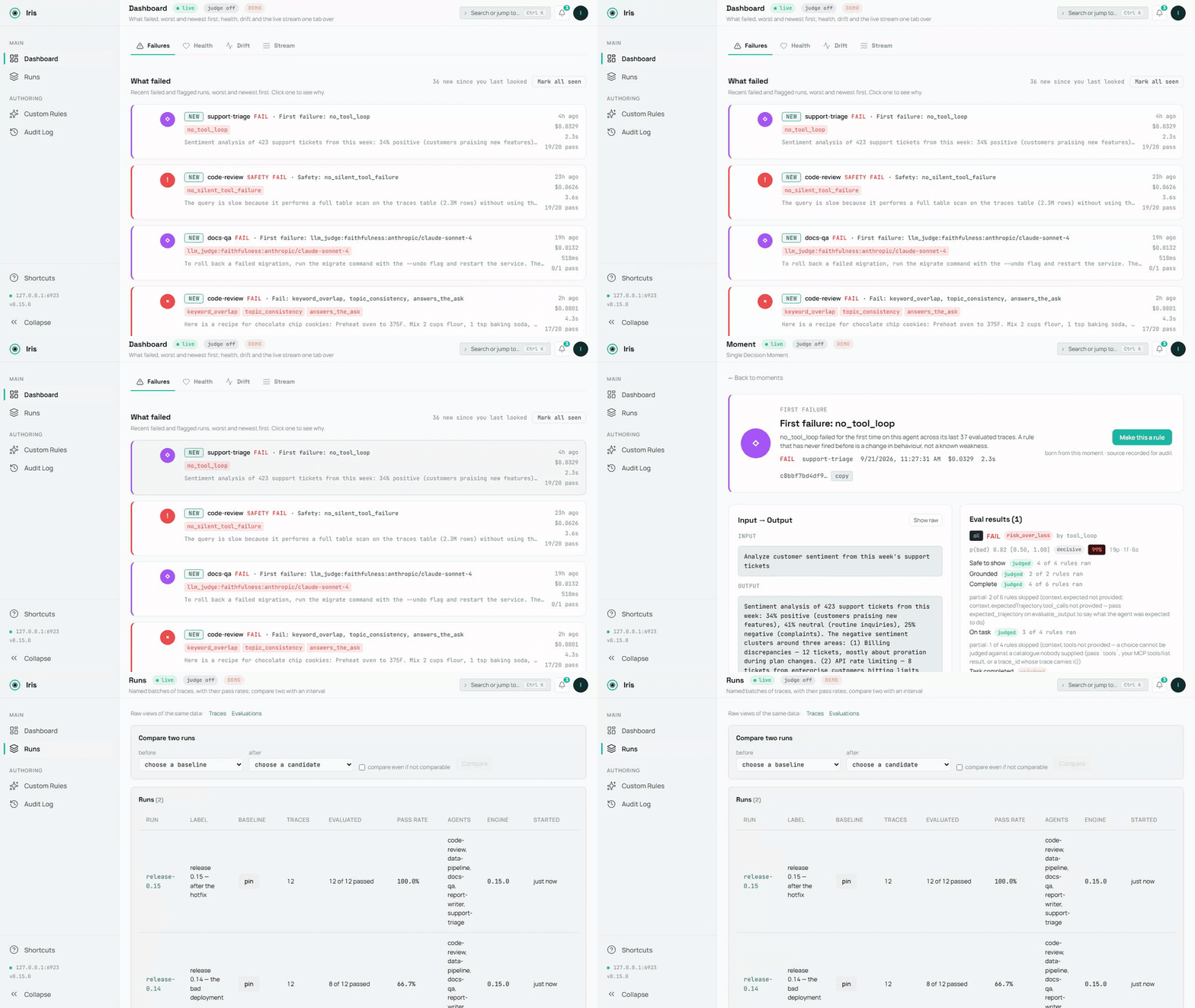
La base de données de démonstration, enregistrée par scripts/demo-media.mts ; la source est demo.mp4. Une image fixe : dashboard-overview.png.
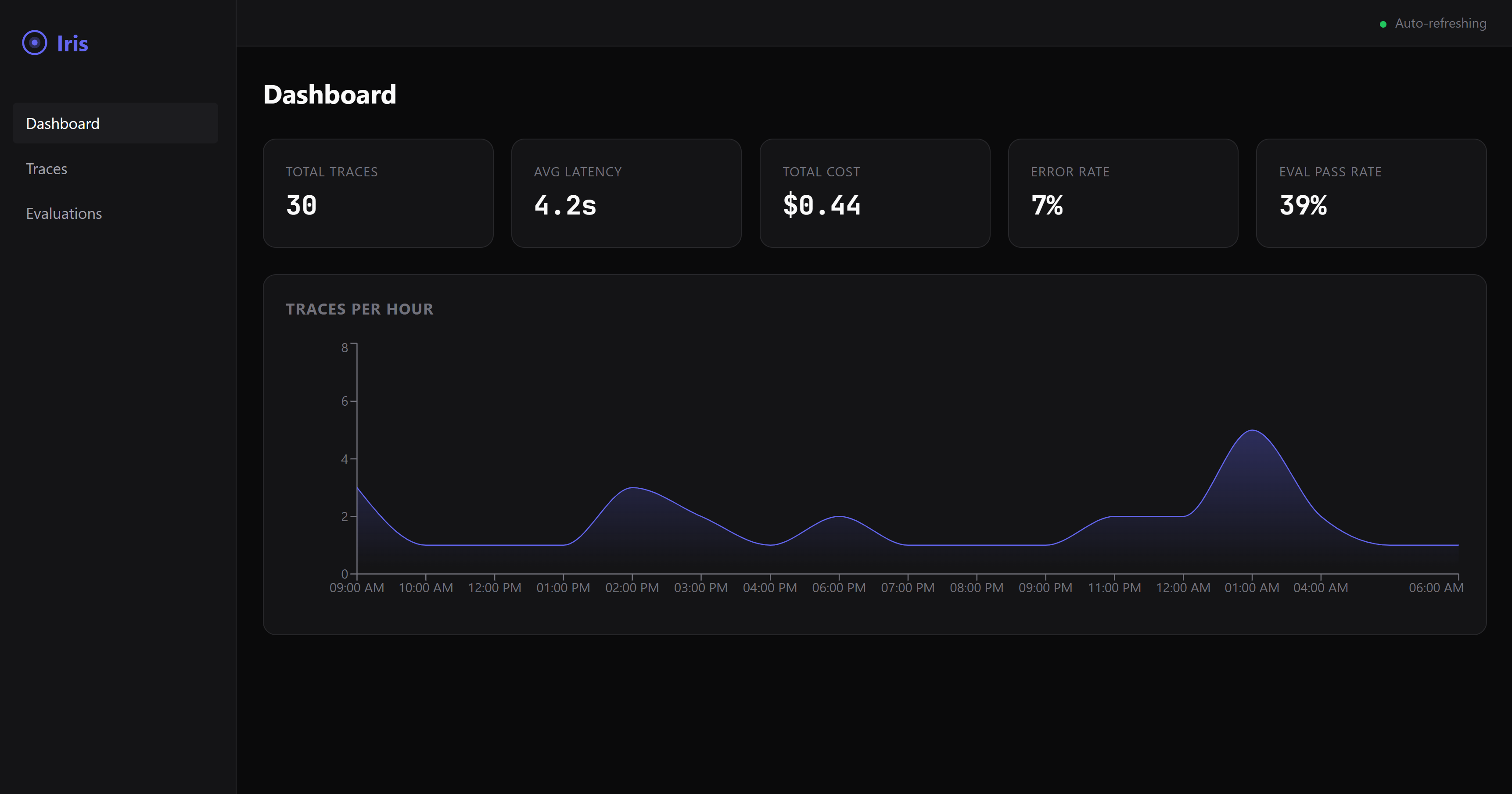
Un échec à l'écran en 60 secondes
Aucun câblage d'agent, aucune configuration — une seule commande :
npx @iris-eval/mcp-server --demo
Cela initialise une base de données de démonstration — cinq petits agents, deux semaines d'exécutions, chaque verdict du moteur lui-même — et sert le tableau de bord à http://localhost:6920 (votre navigateur s'ouvre automatiquement au premier lancement). Le tableau de bord atterrit sur Échecs : ce qui a échoué, du pire au plus récent, chaque carte nommant la règle et ses preuves. Cela vaut la peine de cliquer — une fuite de PII détectée par les règles de sécurité, une directive cachée dans un message de forum que le résumeur a suivie, un nombre que le document source n'a jamais dit, deux exécutions sur les mêmes douze questions comparées avec un intervalle (Exécutions), une règle personnalisée déployée et une en pause avec leurs lignes d'audit, et un score de juge LLM échoué avec sa justification.
Les données de démonstration vivent dans leur propre base de données (demo.db dans votre répertoire personnel Iris — ~/.iris sur macOS/Linux, %USERPROFILE%\.iris sur Windows) et ne se mélangent jamais avec vos vraies traces. Supprimez tout avec une seule commande :
npx @iris-eval/mcp-server --demo-clear
Connectez votre propre agent
D'abord, prouvez que l'installation fonctionne sur cette machine — elle fonctionne hors ligne et n'ouvre rien à vous :
npx @iris-eval/mcp-server --self-test # exit 0 = healthy
Ensuite, ajoutez Iris à votre client MCP. Une seule commande écrit le fichier de configuration du client lui-même, conserve tous les autres serveurs qu'il contient et épingle la version que vous avez exécutée :
npx -y @iris-eval/mcp-server install claude-code
Les clients : claude-code, claude-desktop, cursor, windsurf, continue, vscode, cline, zed, codex, gemini. install --list montre ceux trouvés sur cette machine, l'Iris que chacun exécute et le fichier qu'il lit ; install <client> --uninstall retire Iris à nouveau. Chaque client partage une base de données, donc après une mise à niveau, déplacez-les tous en même temps avec install --upgrade (Mise à jour). Redémarrez le client pour le charger.
Claude Desktop : un clic. Chaque version à partir de 0.20.0 joint iris-eval.mcpb, un MCP Bundle : téléchargez la dernière, ouvrez-la, et Claude Desktop affiche une boîte de dialogue d'installation. Rien dessus n'est requis — une clé Anthropic ou OpenAI pour le juge LLM est facultative, et le tableau de bord est un interrupteur qui démarre éteint. Le bundle contient le paquet npm et ses dépendances, donc rien d'autre n'a besoin d'être installé : Claude Desktop l'exécute sous le Node qu'il fournit lorsque ce Node est 22.13 ou plus récent (Claude Desktop 1.1.6679 fournit 24.13), et Iris stocke les traces avec le SQLite intégré de Node, dans le même ~/.iris que toute autre installation utilise. Les notes de version montrent comment vérifier sa signature et son attestation de construction.
Il fonctionne dans n'importe quel client MCP, et chaque client qu'il nomme a une ligne avec ce qui a été réellement vérifié. Vérifié à chaque exécution CI : Claude Code, Gemini CLI — le vrai client démarre Iris à partir de la configuration écrite par l'installateur et signale qu'il est connecté (claude mcp list, gemini mcp list), sur Linux, macOS et Windows ; les hooks du plugin de capture de Claude Code sont également pilotés via les vrais scripts. Revendiqué à partir de la documentation MCP de chaque client — l'installateur écrit la forme de configuration que le client documente, et cet écrivain est testé sur la forme ; personne du côté Iris ne l'a vu se connecter : Claude Desktop, Cursor, Devin Desktop (Windsurf), Continue, VS Code, Cline, Zed, OpenAI Codex CLI. Chaque ligne avec sa source et la date à laquelle elle a été lue : https://iris-eval.com/clients. À la main à la place, un bloc, tableau de bord inclus :
{
  "mcpServers": {
    "iris-eval": {
      "command": "npx",
      "args": ["-y", "@iris-eval/mcp-server", "--dashboard"]
    }
  }
}
Votre client liste les douze outils d'Iris à la connexion, et le tableau de bord sert à http://localhost:6920. Maintenant, collez ceci à votre agent :
Journalisez cette dernière tâche dans Iris et évaluez la sortie.
La trace atterrit sur le tableau de bord avec ses scores. Vous préférez le serveur MCP sans tête ? Supprimez --dashboard des arguments — vous pouvez ouvrir le même tableau de bord à tout moment avec npx @iris-eval/mcp-server --dashboard.
Une chose à savoir d'avance : les outils MCP sont appelés lorsque le modèle décide de les appeler. Iris n'intercepte pas votre agent, donc les traces sont journalisées lorsque votre agent demande de les journaliser — soit parce que vous le lui avez dit, soit parce que votre code appelle directement les outils. Demandez à votre agent de « journaliser ceci dans Iris et l'évaluer » et il le fera. Si vous voulez une capture qui ne dépend pas du choix du modèle, POST /api/v1/traces fait exactement cela — votre code envoie la trace via HTTP simple, sans modèle dans la boucle (voir docs/http-ingest.md). La CLI et les hooks hôte sur la feuille de route seront des clients légers sur le même point de terminaison.
Capture via HTTP (sans modèle dans la boucle)
Le point de terminaison d'ingestion vit sur le port du tableau de bord — 6920 par défaut, pas le port de transport MCP — et il n'existe que pendant que le tableau de bord est en cours d'exécution. Passez --dashboard (ou définissez IRIS_DASHBOARD=true) ; --transport http seul ne le démarre pas, et une requête au port de transport renvoie 404. Avec le tableau de bord actif, tout ce qui peut envoyer une requête HTTP peut journaliser une trace — et éventuellement exécuter les évaluations déterministes dans la même requête. GET /api/v1/capabilities sur le même port indique ce que ce serveur peut juger, ce dont chaque règle a besoin, l'état du juge avec les étapes qui l'activent, et les limites — le même objet que la ressource MCP iris://capabilities sert — donc un appelant HTTP a le cadre qu'un client MCP obtient à l'initialisation :
curl -s -X POST "http://127.0.0.1:6920/api/v1/traces" \
  -H "Content-Type: application/json" \
  -d '{
    "agent_name": "support-bot",
    "input": "What is the refund policy?",
    "output": "Refunds are available within 30 days of purchase.",
    "evaluate": true,
    "eval_type": "safety"
  }'
Renvoie 201 avec le trace_id stocké et le résultat de l'évaluation (en mode --demo, le point de terminaison refuse les écritures avec 403, donc les données de démonstration ne se mélangent jamais avec les vôtres). Le point de terminaison accepte le même corps que l'outil log_trace et se trouve derrière la même pile de middleware que le reste du tableau de bord : liaison de boucle locale et garde anti-rebinding DNS par défaut, plus l'authentification Bearer lorsque vous en définissez une. Deux faits simples à son sujet : il accepte les écritures non authentifiées sauf si Iris a été démarré avec --api-key (ou IRIS_API_KEY) — la liaison de boucle locale est ce qui le garde sur votre machine par défaut, donc définissez une clé avant de lier au-delà de la boucle locale ; et ce qu'il stocke est textuel — input et output atterrissent dans iris.db exactement comme envoyés, y compris tout texte que no_pii va ensuite signaler. Contrat complet, référence de champ et sémantique d'erreur : docs/http-ingest.md.
Capturez chaque tour de Claude Code (facultatif)
/plugin marketplace add iris-eval/mcp-server
/plugin install iris-eval-capture@iris-eval
Un deuxième plugin, installé séparément : trois hooks enregistrent l'invite de chaque tour, les appels d'outils et la réponse finale et les remettent à iris-eval ingest, détachés, avec les plages critiques masquées dans le texte d'évaluation stocké — une capture qui ne dépend pas du modèle décidant d'appeler un outil. Il ne journalise jamais un tour que le modèle a déjà journalisé, n'imprime jamais, ne bloque jamais, n'envoie jamais rien nulle part. L'installation de iris-eval seul ne change rien à votre boucle de tours. Limites et suppression : claude-plugin-capture/README.md.
Python
pip install iris-eval
from iris_eval import IrisClient
iris = IrisClient()                       # IRIS_URL, or the running dashboard's runtime.json
iris.evaluate_output("…", input="…", agent_name="support-bot")["verdict"]   # {"state": "pass", "basis": "clean", "by": []}
Un client léger sur l'API HTTP du serveur 0.16.0 et ultérieur, versionné séparément — iris_eval.__version__ et la page PyPI portent son numéro, qui n'est pas celui du serveur : log_trace(), evaluate_output(), get_traces(), get_trace(), health(), capabilities(), synchrone et asynchrone, réponses typées, la propre phrase du serveur sur un refus — et un plugin pytest : un fixture iris et assert_iris(output, expect="pass") qui affirme sur l'état du verdict. packages/python/README.md.
Enregistrez chaque appel OpenAI et Anthropic
from iris_eval import wrap_openai
client = wrap_openai(OpenAI(), agent_name="support-bot")   # every call: a GenAI span to POST /v1/traces, scored
import { wrapOpenAI } from '@iris-eval/sdk';
const openai = wrapOpenAI(new OpenAI(), { agentName: 'support-bot' });
Enveloppez le client fournisseur une fois et chaque appel de modèle devient un span GenAI OpenTelemetry envoyé à la porte OTLP, stocké avec son entrée, sa sortie, son utilisation de jetons et ses appels d'outils, et noté : une capture qui ne dépend pas du modèle appelant un outil. wrap_openai / wrap_anthropic dans le client Python ; wrapOpenAI, wrapAnthropic et irisMiddleware pour le Vercel AI SDK dans @iris-eval/sdk. Les deux ne sont pas encore publiés (la prochaine version iris-eval sur PyPI ; @iris-eval/sdk est construit à partir de la source jusqu'à sa première version npm). Les flux, les aides de flux des SDK et les appels d'outils sont couverts, le client d'origine n'est pas modifié, et une panne d'Iris ne casse jamais un appel — packages/sdk/README.md, packages/python/README.md.
Notez chaque exécution LangChain et LangGraph
from iris_eval.langchain import IrisCallbackHandler
graph.invoke(inputs, config={"callbacks": [IrisCallbackHandler(agent_name="support-bot")]})
Chaque exécution de niveau supérieur devient une trace (l'exécution, ses appels de modèle, ses appels d'outils et ses nœuds de graphe comme spans GenAI) avec son entrée, sa sortie, ses appels d'outils, son utilisation de jetons et un verdict. Python dans le client (prochaine version, pas encore publiée sur PyPI), JavaScript comme @iris-eval/langchain (pas encore publié sur npm). Les deux sont prouvés en CI contre une vraie application LangGraph avec un modèle scripté ; l'export OpenTelemetry de LangSmith est prouvé de la même manière — docs/otel-recipes.md.
Une porte CI, aucun serveur nécessaire
npx -y @iris-eval/mcp-server ingest --file traces.ndjson --evaluate --fail-on detector_veto
Ou l'action GitHub (0.16.0), qui fait échouer le travail sur les verdicts que vous nommez, écrit le reçu dans le résumé du travail et le publie comme un commentaire de demande de tirage mis à jour en place : uses: iris-eval/mcp-server/.github/actions/gate@v0.19.0 avec traces: traces.ndjson — docs/ci-gate.md.
Une quatrième porte (0.15.0) : POST /v1/traces sur le port du tableau de bord accepte le JSON ou protobuf OTLP/HTTP que votre instrumentation OpenTelemetry émet déjà (l'exportateur du SDK Python ne parle que protobuf, c'est donc aussi la porte Python), et chaque trace OTLP devient une trace Iris avec ses spans — docs/otel-integration.md ; une recette par framework (Pydantic AI, Google ADK, LangGraph via LangSmith, CrewAI, le SDK OpenAI Agents en Python et JavaScript, LlamaIndex, AutoGen, Microsoft Agent Framework, Semantic Kernel, le SDK Vercel AI et Mastra), chacune prouvée par un fixture, dans docs/otel-recipes.md. ingest lit une trace JSON (ou NDJSON, une par ligne) depuis stdin ou un fichier, la stocke, l'évalue selon exactement les règles que evaluate_output exécute, imprime une ligne JSON par trace avec le verdict et sa base, et sort avec le code 1 lorsqu'un verdict correspond à --fail-on. --dataset <id|label> restreint cette porte aux clés de cas d'un jeu de données (POST /api/v1/datasets promeut les clés de cas d'une exécution en un), donc un travail échoue uniquement sur les cas que vous avez choisis. La recette complète, les codes de sortie et les huit bases sont dans docs/ci-gate.md.
Écrire une règle comme du code
eval.plugins dans config.json charge les règles que vous avez écrites — un module ES dont l'export par défaut est { name, kind, mechanism, version, needs, evaluate(ctx) } — épinglé par le sha256 du fichier, donc un fichier modifié depuis son épinglage refuse le démarrage plutôt que de s'exécuter. Un plugin chargé se déclenche comme un intégré et s'affiche sur list_rules sous plugins. Le contrat, la recette de hachage et ce qu'un plugin peut retourner : docs/plugins.md.
Utiliser le moteur dans votre propre processus
Le moteur d'évaluation est importable — pas de serveur, pas de base de données, pas de modèle :
import { EvalEngine, defaultConfig } from '@iris-eval/mcp-server/engine';

const engine = new EvalEngine(defaultConfig.eval.defaultThreshold, defaultConfig.eval.ruleThresholds, defaultConfig.eval);
const result = await engine.evaluateAll({ output: answer, input: prompt, toolCalls, costUsd });
result.verdict.state;       // 'pass' | 'fail' | 'unknown', with result.verdict.basis and result.interpretations
Le même moteur, les mêmes règles et le même compositeur que le serveur exécute ; builtInRules(), createCustomRule(), compose() et les lecteurs de précision publiée sont exportés à côté.
Un client typé pour la route HTTP
import { createClient } from '@iris-eval/mcp-server/client';

const iris = createClient({ baseUrl: 'http://127.0.0.1:6920', apiKey: process.env.IRIS_API_KEY });
const { trace_id, evaluation } = await iris.logTrace({ agent_name: 'support-bot', input, output, tool_calls, evaluate: true });
evaluation?.verdict?.state;  // the same object evaluate_output returns
Un seul corps sur chaque porte : c'est ce que log_trace et iris-eval ingest acceptent. Un refus lève IrisClientError avec la phrase et le statut du serveur lui-même. Les deux sous-chemins sont vérifiés à partir d'une archive tar compressée à chaque build.
Vérifier votre installation
npx @iris-eval/mcp-server --self-test   # offline diagnostic; exit 0 = healthy, 1 = a check failed
npx @iris-eval/mcp-server --version     # prints the bare version, e.g. 1.2.3
--self-test crée d'abord votre répertoire Iris s'il manque et vérifie qu'il est inscriptible (sortie 1, en nommant le chemin, sinon), signale où se trouve l'index de recherche de votre base de données (entier, combien de traces une construction en arrière-plan a indexées jusqu'à présent, ou pas de FTS5 sur ce SQLite), lit le schéma de votre base de données (sortie 1, avec le correctif, lorsque cette version ou un client MCP épinglé à une version plus ancienne ne peut pas l'ouvrir), puis exécute ses vérifications — aller-retour de stockage, un SSN planté et une injection plantée attrapés par les règles de sécurité, démarrage du tableau de bord, la protection contre le rebinding DNS — dans un répertoire temporaire isolé. Votre vraie base de données est seulement lue, jamais modifiée. Tout ce qu'Iris écrit vit sous un seul répertoire, votre répertoire Iris : ~/.iris par défaut (%USERPROFILE%\.iris sur Windows), ou là où pointe IRIS_HOME. C'est là que vivent iris.db, config.json, custom-rules.json, audit.log, preferences.json et les fichiers de démonstration ; pointez IRIS_HOME vers un répertoire de brouillon pour essayer Iris sans toucher à vos vraies données.
Configuration par outil
| Client | Statut | Ce que cela signifie | Lecture |
|---|---|---|---|
| Claude Code | vérifié | un test pilote le vrai client à chaque exécution CI | 2026-09-25 |
| Claude Desktop | revendiqué | l'installateur écrit la forme que le client documente, et cet écrivain est testé sur la forme ; personne du côté Iris ne l'a vu se connecter | 2026-09-25 |
| Cursor | revendiqué | l'installateur écrit la forme que le client documente, et cet écrivain est testé sur la forme ; personne du côté Iris ne l'a vu se connecter | 2026-09-25 |
| Devin Desktop (Windsurf) | revendiqué | l'installateur écrit la forme que le client documente, et cet écrivain est testé sur la forme ; personne du côté Iris ne l'a vu se connecter | 2026-09-25 |
| Continue | revendiqué | l'installateur écrit la forme que le client documente, et cet écrivain est testé sur la forme ; personne du côté Iris ne l'a vu se connecter | 2026-09-25 |
| VS Code | revendiqué | l'installateur écrit la forme que le client documente, et cet écrivain est testé sur la forme ; personne du côté Iris ne l'a vu se connecter | 2026-09-25 |
| Cline | revendiqué | l'installateur écrit la forme que le client documente, et cet écrivain est testé sur la forme ; personne du côté Iris ne l'a vu se connecter | 2026-09-25 |
| Zed | revendiqué | l'installateur écrit la forme que le client documente, et cet écrivain est testé sur la forme ; personne du côté Iris ne l'a vu se connecter | 2026-09-25 |
| OpenAI Codex CLI | revendiqué | l'installateur écrit la forme que le client documente, et cet écrivain est testé sur la forme ; personne du côté Iris ne l'a vu se connecter | 2026-09-25 |
| Gemini CLI | vérifié | un test pilote le vrai client à chaque exécution CI | 2026-09-25 |
Chaque ligne avec ce qui a été vérifié : iris-eval.com/clients. Aucun client n'est appelé pris en charge sans une ligne.
npx -y @iris-eval/mcp-server install <client> écrit chacune de ces configurations pour vous. À la main, par client :
Claude Desktop
Modifiez votre fichier de configuration MCP :
- macOS :
~/Library/Application Support/Claude/claude_desktop_config.json - Windows :
%APPDATA%\Claude\claude_desktop_config.json
Ajoutez la configuration JSON ci-dessus, puis redémarrez Claude Desktop.
Claude Code
claude mcp add --transport stdio iris-eval -- npx -y @iris-eval/mcp-server
Puis redémarrez la session (/clear ou relancez) pour que les outils se chargent.
Note Windows : N'utilisez pas le wrapper
cmd /c— il provoque des problèmes d'analyse de chemin. La commandenpxfonctionne directement.
Cursor
Ajoutez la configuration JSON ci-dessus à ~/.cursor/mcp.json (chaque projet) ou .cursor/mcp.json dans un espace de travail, avec "type": "stdio" dans l'entrée iris-eval — la documentation de Cursor la marque comme requise.
Devin Desktop (Windsurf)
Ajoutez la configuration JSON ci-dessus à mcp_config.json : ~/.config/devin/mcp_config.json sur macOS et Linux, %APPDATA%\devin\mcp_config.json sur Windows.
Continue
Enregistrez la configuration JSON ci-dessus comme son propre fichier dans le dossier mcpServers de Continue : ~/.continue/mcpServers/iris-eval.json (chaque espace de travail) ou .continue/mcpServers/iris-eval.json dans un seul.
VS Code (MCP natif)
Ajoutez à .vscode/mcp.json dans votre espace de travail (notez : VS Code utilise servers, pas mcpServers) :
{
  "servers": {
    "iris-eval": {
      "command": "npx",
      "args": ["-y", "@iris-eval/mcp-server"]
    }
  }
}
Cline
Ouvrez le panneau Serveurs MCP de Cline → Configurer les serveurs MCP, et ajoutez la configuration JSON mcpServers ci-dessus à cline_mcp_settings.json (~/.cline/data/settings/cline_mcp_settings.json, partagé par Cline dans VS Code, JetBrains et le CLI).
Zed
Ajoutez à Zed settings.json :
{
  "context_servers": {
    "iris-eval": {
      "command": "npx",
      "args": ["-y", "@iris-eval/mcp-server"],
      "env": {}
    }
  }
}
OpenAI Codex CLI
Ajoutez à ~/.codex/config.toml :
[mcp_servers.iris-eval]
command = "npx"
args = ["-y", "@iris-eval/mcp-server"]
Gemini CLI
Ajoutez la configuration JSON mcpServers ci-dessus à ~/.gemini/settings.json. Gemini CLI se connecte aux serveurs MCP uniquement dans les dossiers qu'il approuve : si gemini mcp list affiche iris-eval comme Désactivé, exécutez /permissions dans ce dossier.
Tout autre chose qui parle MCP
Iris est un serveur MCP stdio standard — une commande npx @iris-eval/mcp-server, pas de SDK, pas de changement de code. Si votre client prend en charge MCP, il prend en charge Iris. Les formats de configuration des clients changent ; en cas de doute, consultez la documentation MCP de votre client et pointez-le vers cette commande.
Autres méthodes d'installation
# Global install (recommended for persistent data and faster startup)
npm install -g @iris-eval/mcp-server
iris-eval --dashboard

# Docker — two servers, two ports: 3000 = MCP HTTP transport,
# 6920 = dashboard (which also serves the POST /api/v1/traces ingest endpoint).
# The image binds 0.0.0.0 inside the container, so a key is required (see Production).
# The volume is the Iris home: the database, deployed rules and audit log persist in it.
docker run -p 3000:3000 -p 6920:6920 -v iris-data:/data \
  -e IRIS_API_KEY="$(openssl rand -hex 32)" ghcr.io/iris-eval/mcp-server
Astuce : L'installation globale (
npm install -g) stocke les traces de manière persistante à~/.iris/iris.db. Avecnpx, les traces persistent au même endroit, mais le démarrage est plus lent en raison de la résolution des paquets.
Ce que vous obtenez
| Journalisation des traces | Arbres de spans hiérarchiques avec latence par appel d'outil, utilisation de jetons et coût en USD. Stockés dans SQLite, interrogeables instantanément. |
| Évaluation des sorties | 25 règles intégrées dans 4 catégories : exhaustivité, pertinence, sécurité, coût. Détection de PII (21 motifs : SSN, carte de crédit, téléphone, e-mail, IBAN, date de naissance, numéro de dossier médical, IP, clé API, passeport, plus les jetons AWS/Slack/SendGrid/GitHub/Google/npm/DigitalOcean, les identifiants dans les URL, les affectations nommées secrètes, les blocs de clés privées PEM et les phrases de récupération ; la date de naissance, le numéro de dossier médical, le passeport et la phrase de récupération ne se déclenchent qu'à côté de leur étiquette, par conception), détection d'injection de prompt (38 motifs, phrase + structurelle), détection de sortie factice, détection d'hallucination (25 signaux de fabrication/contradiction ancrés au contexte — passez input pour les ancrer contre le matériel source de l'agent), et six règles de trajectoire qui lisent ce que l'agent a FAIT : un appel d'outil échoué non reconnu, un appel répété (par appel, par séquence répétée, ou par cible une fois que vous envoyez tools), un appel dont les arguments sont rejetés par le propre JSON Schema de l'outil et que l'agent n'a jamais réessayé, un fichier, un répertoire ou une URL que la réponse cite et qui n'apparaît dans rien que l'agent a lu, une instruction arrivée dans un RÉSULTAT D'OUTIL puis obéie par un appel ultérieur, et une tâche qui a pris plus d'appels d'outils que votre budget d'étapes. Une trajectoire peut arriver comme tool_calls ou comme spans d'outils OpenTelemetry. Ajoutez des règles personnalisées avec des schémas Zod. |
| LLM-comme-juge | Notation sémantique optionnelle via Anthropic ou OpenAI — apportez votre propre clé API. Sept modèles. Avec IRIS_RELEVANCE_JUDGE_MODEL défini, answers_the_ask demande au juge relevance et échoue une réponse hors sujet ; sans lui, la règle lit la demande lexicalement et conseille. Plafond de coût dur par évaluation (IRIS_LLM_JUDGE_MAX_COST_USD_PER_EVAL, défaut 0,25 $), prix par évaluation divulgué dans le résultat. |
| Visibilité des coûts | Coût agrégé sur tous les agents sur n'importe quelle fenêtre temporelle. Définissez des seuils budgétaires. Soyez signalé lorsque les agents dépensent trop. Une trace qui envoie des compteurs de jetons et un modèle mais pas de coût (la plupart des traces OpenTelemetry et framework) est tarifée au prix catalogue du modèle et marquée estimée partout où elle s'affiche ; pricing.models dans config.json tarife les modèles que le tableau intégré ne couvre pas — docs/cost.md. |
| Tableau de bord web | Interface en mode sombre en temps réel qui atterrit sur les échecs, les pires et les plus récents en premier — visualisation des traces avec recherche en texte intégral sur le texte de chaque trace, résultats d'évaluation, ventilations des coûts et une palette de commandes (⌘K) qui recherche vos propres règles, traces et évaluations. |
| Local d'abord | Tout vit dans SQLite sur votre disque. Pas de compte, pas d'inscription, pas de télémétrie. Le HTTP sortant ne se produit que là où vous optez : votre propre clé de juge LLM, la récupération de citations, un exportateur OTel que vous configurez ou un webhook que vous définissez. |
Où cela va ensuite : la carte des capacités — chaque question qu'Iris peut recevoir sur chaque sujet, avec ce qu'il a et ce qui lui manque — et les trois pistes.
Mesuré, pas revendiqué
Chaque règle intégrée publie une précision, un rappel et un F1 avec des intervalles de confiance à 95 %, mesurés sur un corpus labellisé qui vit dans ce dépôt (proof/corpus/) et se régénère avec une seule commande — npm run proof — hors ligne, sans clé ni modèle dans la boucle. Ces nombres sont de deux types différents, et la page ne les additionne jamais : certaines règles sont mesurées par rapport à des labels qu'un modèle a donnés en lisant l'échec lui-même, ce qui mesure la détection ; les autres sont vérifiées par rapport à leur propre définition documentée, appliquée indépendamment, ce qui montre que le code implémente sa formule et ne dit rien sur le fait que la formule attrape l'échec. proof/RESULTS.md et la page de preuve marquent chaque règle. La CI réexécute la mesure à chaque pull request et échoue si les nombres validés diffèrent de ce que le code produit, donc une règle ne peut pas changer sans que ses nombres changent avec elle. Les nombres sont sur iris-eval.com/proof et dans proof/RESULTS.md ; comment le corpus a été créé, ce qu'il n'est pas, et comment lire un intervalle sont dans docs/proof.md. Le corpus est synthétique et labellisé par modèle — un label humain en aveugle est en attente, et la page le dit ; node proof/blind-sample.mjs tire l'échantillon reproductible qui le réglera.
Outils MCP
Iris enregistre douze outils que tout agent compatible MCP peut invoquer — cycle de vie des traces et des règles, comparaison entre exécutions, LLM-comme-juge et vérification sémantique des citations :
log_trace— Journalise une exécution d'agent avec des spans, des appels d'outils, l'utilisation de jetons et le coût ; passezevaluate: truepour le noter dans le même appelevaluate_output— Note la qualité de la sortie par rapport aux règles de complétude, de pertinence, de sécurité et de coût (heuristiques, déterministes, gratuites)get_traces— Interroge les traces stockées avec filtrage, pagination et plage temporelle, et trouve l'exécution où l'agent a dit quelque chose avecq: recherche plein texte sur l'entrée, la sortie, les valeurs d'appels d'outils et les métadonnées, classée, avec les mots correspondants marquéslist_rules— Énumère les règles d'évaluation personnalisées déployées (lecture seule)deploy_rule— Enregistre une nouvelle règle d'évaluation personnalisée pour qu'elle se déclenche à chaqueevaluate_outputde cette catégoriedelete_rule— Supprime une règle personnalisée déployée (destructif, idempotent)delete_trace— Supprime une seule trace stockée par ID (destructif, limité au locataire)evaluate_with_llm_judge— Évaluation sémantique via LLM (Anthropic ou OpenAI). Sept modèles : exactitude, utilité, sécurité, correction, fidélité, tâche_terminée, pertinence. Plafonné en coût, tarification par évaluation divulguée. Apportez votre propre clé API (IRIS_ANTHROPIC_API_KEYouIRIS_OPENAI_API_KEY) — Iris ne fait pas de proxy ni ne relaie les appels LLM.verify_citations— Extrait les citations de la sortie (numérotées, auteur-année, URL, DOI), récupère les sources derrière un résolveur protégé contre les SSRF et avec liste blanche de domaines, et utilise un juge LLM pour vérifier si chaque source soutient réellement l'affirmation citée. HTTP sortant sur option. Même exigence BYOK queevaluate_with_llm_judge.compare_runs— Un changement a-t-il rendu l'agent pire ? Compare deux exécutions d'évaluations stockées : un test exact apparié lorsque les exécutions partagent des clés de cas, un intervalle sur la différence sinon, un honnête « impossible à dire » avec le nombre de cas qu'il faudrait, ou « équivalent dans une marge ». Chaque règle porte son propre test unilatéral, corrigé ensemble (Benjamini–Hochberg) pour que vingt règles ne puissent pas fabriquer une régressioncompare_traces— Avec quelle fiabilité l'agent répond-il à la même question ? Taux de réussite par cas avec intervalles, cas instables en premier, et un taux global qui respecte les répétitionsevaluate_runs— Re-note chaque trace d'une exécution sous les règles actuelles dans une nouvelle exécution, pour qu'un changement de règles ne soit jamais lu comme un changement d'agent
Activer le juge LLM (optionnel ; les règles déterministes n'en ont jamais besoin)
- Obtenez une clé API auprès d'Anthropic ou d'OpenAI.
- Placez-la dans l'environnement du processus qui exécute Iris, pas seulement dans votre shell. Claude Code, Claude Desktop, Cursor et la plupart des clients MCP : le bloc « env » de l'entrée iris-eval dans votre configuration MCP — « iris-eval » : { « command » : « npx », « args » : [« -y », « @iris-eval/mcp-server »], « env » : { « IRIS_ANTHROPIC_API_KEY » : « sk-ant-... » } } (IRIS_OPENAI_API_KEY pour une clé OpenAI). Docker : -e IRIS_ANTHROPIC_API_KEY=... sur la commande run. HTTP ou CI : exportez-la avant de démarrer iris-eval.
- Redémarrez la session MCP. Un processus en cours d'exécution ne voit jamais une variable définie après son démarrage.
- Confirmez depuis votre client : lisez iris://capabilities — judge.enabled doit y être true. Une clé exportée dans votre shell n'est pas transmise au processus que votre client lance, sauf si sa configuration la liste. Sur une machine,
npx @iris-eval/mcp-server --self-testaffiche la ligne du juge pour ce shell, et GET /api/v1/health rapporte judge.enabled sur un tableau de bord en cours d'exécution. - Garde de dépense : chaque appel est plafonné par IRIS_LLM_JUDGE_MAX_COST_USD_PER_EVAL (défaut 0,25 USD) et refusé avant toute dépense si le pire cas le dépasserait. Iris appelle directement le fournisseur avec votre clé et ne la transmet jamais par proxy.
- Optionnel : définissez IRIS_RELEVANCE_JUDGE_MODEL sur un identifiant de modèle tarifé (claude-haiku-4-5, par exemple) pour que answers_the_ask demande au juge si chaque réponse traite sa demande, et échoue une réponse hors sujet. C'est un appel de juge par évaluation qui porte une entrée, sur votre clé et sous le plafond ci-dessus ; la clé seule ne l'active jamais. Chaque appel envoie cette entrée et cette sortie au fournisseur du modèle, avec les indicateurs de données personnelles et d'identifiants no_pii remplacés d'abord (IRIS_RELEVANCE_JUDGE_REDACT=off les envoie tels quels). Cela dépense au plus IRIS_RELEVANCE_JUDGE_DAILY_BUDGET_USD par jour UTC (défaut 1 USD) et fait au plus IRIS_RELEVANCE_JUDGE_MAX_CALLS_PER_REQUEST appels par requête (défaut 20) ; au-delà de l'un ou l'autre, answers_the_ask lit la demande lexicalement et explique pourquoi.
Lorsque IRIS_OTEL_ENDPOINT est configuré, les appels log_trace émettent également une exportation JSON OTLP/HTTP au mieux-effort vers n'importe quel collecteur OpenTelemetry (Jaeger, Grafana Tempo, Datadog OTLP, Honeycomb, etc.). Voir docs/otel-integration.md.
Comment passed est décidé
evaluate_output renvoie à la fois un indicateur score et un indicateur passed — ils répondent à des questions différentes :
score(0..1) est la moyenne pondérée des règles qui ont été exécutées — un gradient de qualité.passedest le verdict expédier/ne pas expédier, et le score n'est jamais consulté pour cela. Un compositeur lit chaque règle selon le type d'affirmation qu'elle fait : une politique que vous avez configurée bloque ; un détecteur critique oppose son veto ; une vérification critique qui a été demandée et n'a pas pu répondre rend le verdict inconnu (passed: false) plutôt que propre ; chaque détecteur restant se combine en une probabilité que la sortie soit mauvaise, pesée contre le ratio de perte que vous indiquez danseval.falsePassCost(défaut 1, donc le seuil est 0,5).verdict.basisnomme la couche qui a décidé etverdict.byles règles, etverdict.alsoliste chaque couche ultérieure qui l'aurait aussi décidé ;interpretations[]dit pourquoi une règle qui a échoué n'a pas décidé et quel paramètre changerait cela, et nomme toute question qui n'a pas été jugée et l'entrée qui permettrait de la juger.
Les véritables violations de sécurité échouent durement. Par défaut, no_pii, no_injection_patterns et no_blocklist_words sont des règles critiques : si l'une échoue, l'évaluation rapporte passed: false peu importe comment les autres règles ont noté, et la réponse nomme les coupables dans critical_failures. Un SSN divulgué ne peut pas être moyenné. Quelles règles intégrées sont critiques est un paramètre de déploiement (eval.criticalRules / eval.nonCriticalRules) ; chaque résultat de règle porte l'indicateur critical effectif et criticalSource, et list_rules rapporte l'effectif que ce serveur applique. Les règles personnalisées déployées avec severity: "high" ou "critical" échouent durement de la même manière ; les sévérités low/medium n'affectent que le score. Une limite à connaître, énoncée de la même manière sur chaque surface : une règle critique qui a été ignorée (contexte manquant, définition cassée ou regex tuée au budget du bac à sable) n'a pas jugé la sortie et ne oppose pas de veto — chaque telle règle est nommée dans critical_skipped. Une passerelle qui doit échouer fermée traite un critical_skipped non vide comme inconnu, pas propre, et peut traiter tout budgetExceeded ignoré dans rule_results de la même manière.
Pour les passerelles CI : si vous omettez eval_type, chaque bundle s'exécute — complétude, pertinence, sécurité, coût et toutes les règles personnalisées — et la réponse dit eval_type: "all" avec un note que le défaut a été exécuté, plus une carte categories par bundle. Un bundle sans rien à juger (coût sans cost_usd, pertinence sans input) rapporte passed: null là — non évalué, non échoué — et ne compte jamais dans le verdict. La réponse fait toujours écho au eval_type qui a été exécuté, pour que votre passerelle puisse vérifier la couverture ; appuyez-vous sur passed pour le verdict et nommez un bundle uniquement lorsque vous voulez une exécution plus étroite.
Créer une règle personnalisée
Deux façons d'ajouter une règle. Les règles en ligne accompagnent un seul appel evaluate_output (custom_rules, jusqu'à 10 par appel) ; elles se déclenchent aux côtés du bundle eval_type que vous avez choisi, ou seules avec eval_type: "custom". Les règles déployées sont enregistrées une fois avec deploy_rule, persistent dans custom-rules.json sous votre répertoire Iris, et se déclenchent à chaque futur evaluate_output de leur evalType. La définition a la même forme dans les deux cas :
| Champ | Requis | Ce que c'est |
|---|---|---|
name | oui | 1 à 80 caractères ; apparaît comme ruleName dans les résultats |
type | oui | un de regex_match · regex_no_match · min_length · max_length · contains_keywords · excludes_keywords · json_schema · cost_threshold |
config | oui | les clés pour ce type : pattern (+ flags optionnel) pour les deux types regex · min_length / max_length (un nombre de caractères) · keywords (+ threshold optionnel, 0–1, défaut 1 = tous doivent apparaître) pour les deux types de mots-clés · {} pour json_schema · max_cost en USD pour cost_threshold |
weight | non | poids dans le score ; défaut 1 |
deploy_rule enveloppe la définition avec name, un description optionnel, evalType (completeness · relevance · safety · cost · custom) et severity. La sévérité dit ce qu'un échec signifie : low/medium ne font que baisser le score ; high/critical font échouer durement l'évaluation — passed: false, la règle nommée dans critical_failures — quel que soit le score pondéré. Une règle qui est ignorée (une règle cost_threshold sans cost_usd, ou une regex tuée au budget du bac à sable de 100 ms) n'a pas jugé la sortie et est listée dans critical_skipped à la place. Déployez une règle critique qui interdit les noms d'hôtes internes dans tout ce que l'agent dit :
{
  "name": "no_internal_hostnames",
  "description": "Output must not mention internal hostnames.",
  "evalType": "safety",
  "severity": "critical",
  "definition": {
    "name": "no_internal_hostnames",
    "type": "regex_no_match",
    "config": { "pattern": "\\b[a-z0-9-]+\\.internal\\.example\\b", "flags": "i" }
  }
}
La réponse est la règle persistée — gardez le id pour delete_rule :
{ "rule": { "id": "rule-588823d0", "name": "no_internal_hostnames", "evalType": "safety", "severity": "critical", "enabled": true, "version": 1, "definition": { "…": "…" } } }
Dès le tout prochain evaluate_output avec eval_type: "safety", une sortie qui mentionne db-primary.internal.example revient passed: false avec critical_failures: ["no_internal_hostnames"] — même si les cinq règles de sécurité intégrées ont réussi et que le score pondéré est 0,895. Les motifs regex doivent passer une vérification ReDoS au moment du déploiement et s'exécutent toujours dans un worker de bac à sable sous une échéance stricte de 100 ms. list_rules montre ce qui est déployé ; le compositeur de règles du tableau de bord construit la même forme à partir d'un échec sur lequel vous avez cliqué. Référence complète, notation par type et exemples travaillés : docs/custom-rules.md.
Schémas complets des outils et configuration : iris-eval.com
Fonctionnalités hébergées
Iris s'exécute entièrement sur votre machine aujourd'hui, et tout ce qu'il fait est gratuit et sous licence MIT, sans limites et sans compte. Hébergement géré, historique d'équipe partagé et alertes sont à l'étude, pas en construction. Il n'y a pas de tarification, et rien à acheter. Si un historique partagé vous serait utile, la liste d'attente est notre moyen de savoir si cela vaut la peine d'être construit — cela ne vous engage à rien.
Deux engagements tiennent quoi qu'il arrive : rien de ce qui est gratuit aujourd'hui ne passera derrière un paywall, et aucune certification de conformité ne sera revendiquée avant d'être détenue.
Exemples
- Configuration de Claude Desktop — configuration MCP pour les modes stdio et HTTP
- TypeScript — client SDK MCP — se connecter et invoquer des outils
- Transport HTTP (TS + Python) — code client complet pour une intégration de style REST
- Un agent LangGraph, évalué exécution par exécution (Python) —
IrisCallbackHandlerdans les callbacks du graphe ; le CI exécute le même graphe avec un modèle scripté - Un équipage CrewAI sur OpenTelemetry (Python) — l'instrumentateur OpenInference directement vers la porte OTLP d'Iris, la recette CrewAI comme script
- Un agent OpenAI Agents SDK sur OpenTelemetry (Python) et (JavaScript), et un agent LlamaIndex — chaque recette comme le script que le CI exécute contre un vrai serveur Iris
Communauté
- Problèmes GitHub — Rapports de bugs et demandes de fonctionnalités
- Discussions GitHub — Questions et idées
- Guide de contribution — Comment contribuer
- Ingestion HTTP — Capture déterministe des traces via
POST /api/v1/traces - Carte des capacités — Chaque question qu'Iris peut recevoir, et ce qui lui manque
- Politique de versionnage — Ce que chaque numéro de version promet, et ce qui doit être vrai avant la 1.0
Configuration et sécurité
Arguments de ligne de commande
| Drapeau | Défaut | Description |
|---|---|---|
--transport | stdio | Type de transport : stdio ou http |
--port | 3000 | Port du transport HTTP |
--db-path | ~/.iris/iris.db | Chemin de la base de données SQLite |
--config | ~/.iris/config.json | Chemin du fichier de configuration |
--api-key | — | Clé API pour l'authentification HTTP (transport et tableau de bord, y compris POST /api/v1/traces) |
--dashboard | false | Activer le tableau de bord web. C'est aussi le seul moyen de démarrer le point d'entrée d'ingestion POST /api/v1/traces — il ne démarre jamais implicitement avec --transport http |
--dashboard-port | 6920 | Port du tableau de bord |
--dashboard-host | 127.0.0.1 | Adresse de liaison du tableau de bord. Boucle locale par défaut — le tableau de bord n'est pas authentifié sauf si --api-key est défini, donc une liaison au-delà de la boucle locale expose tout votre historique de traces |
--demo | false | Initialiser une base de données de démonstration (séparée de vos vraies traces) et servir le tableau de bord contre elle |
--demo-clear | false | Supprimer la base de données de démonstration et quitter |
--self-test | false | Exécuter le diagnostic d'installation hors ligne dans un répertoire personnel temporaire isolé, puis quitter (0 = sain, 1 = un contrôle a échoué). Il lit aussi la base de données configurée, en lecture seule, et échoue si cette version ou un client MCP épinglé ne peut pas l'ouvrir |
--purge | false | Supprimer toutes les traces, spans et évaluations stockées de la base de données configurée, compacter le fichier et tronquer le journal d'écriture anticipée pour que le texte supprimé ne subsiste pas sur le disque, puis quitter. Les règles déployées, le journal d'audit et les préférences sont conservés. Non réversible. Arrêtez d'abord tout serveur Iris en cours d'exécution — le fichier est compacté sur place. Refuse de se combiner avec --demo, --demo-clear ou --self-test |
--version | — | Afficher la version nue (par ex. 1.2.3) sur la sortie standard et quitter avec le code 0. Ne lit rien sous votre répertoire personnel Iris |
Trois commandes prennent leurs propres arguments et quittent : iris-eval ingest charge des traces depuis un fichier ou l'entrée standard (Un contrôle CI, sans serveur nécessaire), iris-eval export traces|evaluations --format csv|jsonl écrit ce qui est stocké, filtré comme les listes du tableau de bord, sur la sortie standard ou --out (docs/api-reference.md), et iris-eval install <client> écrit Iris dans la configuration d'un client MCP — --uninstall l'en retire, --list montre les clients trouvés sur cette machine et l'Iris que chacun exécute, --upgrade déplace chaque client qui exécute Iris vers cette version (Connectez votre propre agent, Mise à jour). Aucune ne démarre un serveur.
config.json est validé au démarrage d'Iris. Une clé qu'Iris ne lit pas — une faute de frappe comme eval.critcalRules, une clé d'un autre outil — ou une valeur du mauvais type refuse le démarrage avec une phrase nommant la clé complète, la clé la plus probablement voulue, ou le type attendu. Rien dans le fichier n'est silencieusement ignoré.
Variables d'environnement
Chaque variable --help documente. Les drapeaux de ligne de commande priment sur les variables d'environnement lorsque les deux sont définis.
| Variable | Description |
|---|---|
IRIS_TRANSPORT | Type de transport (stdio ou http) |
IRIS_HOST | Adresse de liaison du transport HTTP (défaut 127.0.0.1) |
IRIS_PORT | Port du transport HTTP (1-65535, défaut 3000) |
IRIS_HOME | Répertoire pour tous les fichiers par utilisateur : config.json, iris.db, custom-rules.json, audit.log, preferences.json (défaut ~/.iris) |
IRIS_DB_PATH | Chemin de la base de données SQLite (remplace IRIS_HOME pour la base uniquement) |
IRIS_SQLITE_DRIVER | Quel pilote SQLite détient la base de données : native (better-sqlite3, le défaut) ou node (le node:sqlite intégré de Node, Node 22.13+). Non défini : natif, et lorsque le module natif ne peut pas se charger (ou est une compilation qui planterait sur ce Node), Iris avertit une fois et retombe sur l'intégré |
IRIS_SEARCH_BUDGET_MS | Combien de temps une recherche de traces (q) peut lire avant de répondre avec les correspondances trouvées jusqu'ici et search.complete: false, en millisecondes (50 à 60000, défaut 1000). Une recherche retient les autres requêtes pendant sa lecture, donc c'est aussi le temps maximal qu'elle peut les faire attendre. Aussi storage.searchBudgetMs dans config.json |
IRIS_SEARCH_INDEX | on (le défaut) ou off. off ne conserve aucun index de texte intégral des traces : une écriture stocke la trace et rien de plus, et une recherche de traces (q) lit les traces elles-mêmes dans IRIS_SEARCH_BUDGET_MS, de la plus récente à la plus ancienne, donc sur un grand stockage elle peut répondre avec une partie des correspondances (search.complete: false). Le désactiver efface l'index que la base conservait ; le réactiver construit un nouvel index en arrière-plan. Aussi storage.searchIndex dans config.json |
IRIS_LOG_LEVEL | Niveau de journalisation : debug, info, warn, error |
IRIS_DASHBOARD | true/1/yes/on active le tableau de bord web ; false/0/no/off le désactive (remplace aussi dashboard.enabled dans config.json) |
IRIS_DASHBOARD_PORT | Port du tableau de bord (1-65535, défaut 6920) |
IRIS_WEBHOOK_URL | Le destinataire du webhook qui se déclenche à un moment — fusionné sur notify.webhook dans config.json (docs/webhooks.md) |
IRIS_WEBHOOK_SECRET | La clé de signature du webhook (toute chaîne, ou whsec_ + base64) ; le format iris refuse de s'exécuter sans une |
IRIS_DASHBOARD_HOST | Adresse de liaison du tableau de bord (défaut 127.0.0.1) |
IRIS_API_KEY | Clé API pour l'authentification HTTP. Requise pour lier le transport HTTP ou le tableau de bord au-delà de la boucle locale (0.0.0.0, une adresse LAN, un conteneur) : sans elle, le serveur refuse de démarrer |
IRIS_API_KEY_FILE | Chemin vers un fichier dont le contenu nettoyé est la clé API — le modèle de fichier secret que Docker et Kubernetes montent, pour que la clé ne se trouve jamais dans un bloc d'environnement. Définissez ceci ou IRIS_API_KEY, pas les deux |
IRIS_ALLOW_UNAUTHENTICATED | Défini à 1 pour exécuter une liaison hors boucle locale avec aucune clé délibérément (lève le refus ; le réseau est alors votre frontière) |
IRIS_ALLOWED_ORIGINS | Liste d'autorisation d'origines séparée par des virgules. Tableau de bord : en-têtes CORS (prend en charge les globs, par ex. http://localhost:*). Transport HTTP : liste d'autorisation Origin à correspondance exacte pour la protection contre le rebinding DNS (globs ignorés ; les origines de boucle locale du serveur lui-même sont toujours autorisées) |
IRIS_NO_AUTO_LAUNCH | Défini à 1 pour désactiver le lancement automatique du tableau de bord à la première exécution |
IRIS_ANTHROPIC_API_KEY | Requis par evaluate_with_llm_judge + verify_citations avec provider=anthropic |
IRIS_OPENAI_API_KEY | Requis par evaluate_with_llm_judge + verify_citations avec provider=openai |
IRIS_LLM_JUDGE_MAX_COST_USD_PER_EVAL | Plafond de coût dur par appel de juge LLM (défaut 0.25) |
IRIS_RELEVANCE_JUDGE_MODEL | Un identifiant de modèle juge tarifé (par ex. claude-haiku-4-5). Lorsqu'il est défini, avec la clé de ce fournisseur, answers_the_ask demande à ce juge LLM à chaque évaluation qui porte une entrée et se verrouille sur son verdict de pertinence — un appel de juge par évaluation, sous le plafond de coût ci-dessus et les deux limites ci-dessous. L'entrée et la sortie de chacune de ces évaluations sont envoyées au fournisseur de ce modèle (Anthropic ou OpenAI) sur votre clé, avec les données personnelles et les identifiants que no_pii signale remplacés d'abord. Non défini (le défaut), answers_the_ask lit la demande lexicalement et conseille, et rien n'est envoyé (docs/llm-as-judge.md) |
IRIS_RELEVANCE_JUDGE_DAILY_BUDGET_USD | Ce que le juge de pertinence peut dépenser par jour UTC, par locataire (défaut 1). Conservé dans la base de données, donc un redémarrage ne le réinitialise pas. Un appel n'est fait que si son pire cas tient dans ce qui reste ; au-delà, answers_the_ask lit la demande lexicalement et judge.withheld est daily_budget. 0 arrête chaque appel |
IRIS_RELEVANCE_JUDGE_MAX_CALLS_PER_REQUEST | Appels de juge de pertinence qu'une requête peut faire (défaut 20) : un lot OTLP ou une re-notation evaluate_runs juge ses 20 premières traces et lit le reste lexicalement, avec judge.withheld: "request_cap" |
IRIS_RELEVANCE_JUDGE_REDACT | on (défaut) : chaque span que no_pii signale (données personnelles et identifiants) dans l'entrée et la sortie est remplacé par un marqueur [REDACTED:<kind>#<n>] avant d'être envoyé au juge de pertinence. off les envoie tels quels |
IRIS_CITATION_ALLOW_FETCH | Défini à 1 pour autoriser le HTTP sortant dans verify_citations (désactivé par défaut) |
IRIS_CITATION_DOMAINS | Liste d'autorisation de noms d'hôtes séparée par des virgules pour verify_citations (correspondance de suffixe) |
IRIS_OTEL_ENDPOINT | Activer l'exportation de traces JSON OTLP/HTTP au mieux vers cette URL de collecteur |
IRIS_OTEL_SERVICE_NAME | Attribut de ressource service.name pour l'exportation OTel (défaut iris-eval) |
IRIS_OTEL_HEADERS | En-têtes k=v séparés par des virgules pour l'exportation OTel (par ex. authorization=Bearer abc) |
IRIS_OTEL_TIMEOUT_MS | Délai d'expiration par exportation (défaut 15000) |
RATE_LIMIT_SALT | API de liste d'attente du site web uniquement — requise lorsque le site iris-eval.com est déployé ; le serveur ne la lit jamais |
Sécurité
Lors de l'utilisation du transport HTTP, Iris inclut :
- Authentification par clé API avec comparaison à temps constant (Bearer pour les clients API ; connexion navigateur au tableau de bord via
?key=) - CORS restreint à localhost par défaut
- Limitation de débit par adresse client et par minute : 600 requêtes vers l'API du tableau de bord (
security.rateLimit.api) et 20 vers le point d'entrée MCP (security.rateLimit.mcp), toutes deux définies dansconfig.json; une requête MCP au-delà de la limite reçoit une erreur JSON-RPC qui nomme la clé - En-têtes de sécurité Helmet
- Validation d'entrée Zod sur toutes les routes
- Regex sûre contre ReDoS pour les règles d'évaluation personnalisées
- Une limite de taille de requête de 1 Mo sur chaque transport (
security.requestSizeLimit) : HTTP répond413, stdio répond une erreur JSON-RPC et maintient la session ouverte
# Production deployment
iris-eval --transport http --port 3000 --api-key "$(openssl rand -hex 32)" --dashboard
Avec une clé définie, les clients API — clients MCP, SDK de capture, POST /api/v1/traces — envoient Authorization: Bearer <key>. Pour ouvrir le tableau de bord dans un navigateur, ajoutez la clé une fois à n'importe quelle URL du tableau de bord, http://localhost:6920/?key=<api key> : Iris l'échange contre un cookie de session HttpOnly, SameSite=Lax et redirige vers la même page avec la clé retirée de la barre d'adresse. Une page ouverte sans session affiche un formulaire de connexion qui effectue le même échange. La clé n'est jamais stockée dans le navigateur, et les sessions ne vivent que dans le processus serveur (au plus 256 simultanées ; une connexion qui les trouve toutes occupées est refusée plutôt que d'en expulser une).
Production
Plusieurs clés, et rotation sans interruption. security.apiKeys dans config.json contient un nombre quelconque de clés supplémentaires, chacune avec un id et exactement un parmi keyFile (un fichier dont le contenu tronqué est la clé) ou keyHash (le sha256 hexadécimal de la clé, de sorte que le fichier de configuration ne contienne aucun secret — printf %s "$KEY" | openssl dgst -sha256), et un expiresAt optionnel (ISO 8601) après lequel elle cesse de correspondre à cet instant. Pour effectuer une rotation : ajoutez la nouvelle clé, déplacez vos clients, supprimez l'ancienne clé. Les clés dans config.json et dans les fichiers de clés prennent effet sans redémarrage (0.20.0) : à chaque requête, le serveur vérifie si config.json ou un fichier de clés qu'il nomme a changé, et si c'est le cas, relit les clés avant de répondre. Retirer une clé de security.apiKeys, ou supprimer son fichier de clés, la révoque à la requête suivante : cette requête est refusée, et toute session navigateur ouverte avec elle est déconnectée. Un config.json qui ne peut pas être lu (par exemple, à moitié écrit) échoue en mode fermé, et jusqu'à ce qu'il soit corrigé, seule une clé de IRIS_API_KEY ou --api-key est acceptée. La clé dans IRIS_API_KEY ou --api-key elle-même, et le fait que l'authentification soit activée ou non, ne changent toujours que lors d'un redémarrage. Chaque clé authentifie jusqu'à ce qu'elle soit retirée ou expire, sur le chemin Bearer et sur la connexion navigateur de la même manière ; le journal de démarrage nomme les identifiants. security.rateLimit.mcpKeyBy: "apiKey" compte le budget par minute du point de terminaison MCP par clé au lieu de par adresse client, de sorte que plusieurs agents derrière une seule adresse obtiennent chacun leur propre minute.
Iris refuse de démarrer lorsque le transport HTTP ou le tableau de bord est lié au-delà du loopback — 0.0.0.0, une adresse LAN, un conteneur — sans clé API, et le dit en une phrase nommant IRIS_API_KEY. Cela inclut un docker run nu de l'image, qui lie 0.0.0.0 à l'intérieur du conteneur car le loopback est inaccessible via un port publié. Le loopback sans clé continue de fonctionner (avec un avertissement sur le transport HTTP) : la frontière de la machine est le contrôle d'exposition là-bas.
# The image: pass a key
docker run -p 3000:3000 -p 6920:6920 -v iris-data:/data \
  -e IRIS_API_KEY="$(openssl rand -hex 32)" ghcr.io/iris-eval/mcp-server

# Compose: the file requires the variable and refuses before the container starts
IRIS_API_KEY="$(openssl rand -hex 32)" docker compose up

# A network you have already fenced some other way: run open, on purpose
IRIS_ALLOW_UNAUTHENTICATED=1 iris-eval --transport http --dashboard
Ouvert par conception, sur un serveur avec clé : GET /health sur le transport et GET /api/v1/health sur le tableau de bord répondent sans clé et en dehors de toute limite de débit, en une seule forme : statut, version, disponibilité, le pilote SQLite, checks pour le stockage, le fichier de règles déployées et les migrations (appliquées par rapport aux connues), l'état de l'index de recherche (search : prêt, ou jusqu'où une construction est arrivée en part des traces), et si une clé de juge est présente — jamais la clé, jamais une trace, jamais un compte de celles-ci. status est ok uniquement lorsque chaque vérification l'est ; sinon, il est degraded avec HTTP 503, que le HEALTHCHECK propre de l'image Docker lit. Tout le reste nécessite Authorization: Bearer <key> ou une session navigateur. La rétention s'exécute sur chaque serveur : les traces et évaluations plus anciennes que retention.days (par défaut 30) sont supprimées au démarrage, une fois que le serveur répond, et toutes les retention.sweepIntervalHours, par étapes courtes qui ne font jamais attendre longtemps une requête ; --self-test imprime la politique de cette installation, et iris://capabilities / GET /api/v1/capabilities la portent comme retention.
Un webhook se déclenche à un moment (0.16.0) : notify.webhook dans config.json (ou IRIS_WEBHOOK_URL et IRIS_WEBHOOK_SECRET) nomme un récepteur, et Iris publie un message signé lorsqu'un verdict échoue, qu'une détection critique oppose son veto, qu'un coût est aberrant, que le taux d'échec d'une règle change, ou qu'un cas est répondu des deux manières pour la première fois — identifiants, verdict, règles et chiffres, jamais le texte de l'agent. Signé à la fois à la manière Standard Webhooks et à la manière GitHub, réessayé avec backoff, refroidi par agent et par règle, jamais au détriment de l'évaluation ; corps Slack et Discord intégrés. docs/webhooks.md.
Vos données sur disque
Tout ce qu'Iris stocke vit sous votre répertoire Iris (~/.iris, ou IRIS_HOME). iris.db conserve le input et le output de chaque trace textuellement — y compris tout texte que no_pii va ensuite signaler ; la détection ne masque pas sauf si vous le demandez : storage.redact: "critical_spans" dans config.json stocke la sortie de chaque évaluation avec les spans qu'un détecteur critique a signalés remplacés par [REDACTED:<pattern>] (désactivé par défaut ; les décalages de preuve indexent toujours le texte que l'appelant a vu). storage.synchronous définit quand une écriture atteint le disque : normal (le défaut) synchronise le journal d'écriture anticipée à chaque point de contrôle, donc un crash d'Iris ne perd rien et le fichier ne peut pas être corrompu, mais une coupure de courant ou un crash du système d'exploitation peut annuler les écritures depuis la dernière synchronisation ; full synchronise chaque commit et les conserve à travers les deux, à environ 1,5 ms de plus par écriture. Au démarrage, et toutes les retention.sweepIntervalHours (par défaut 24, 0 désactive la minuterie) ensuite, les traces et évaluations plus anciennes que retention.days (par défaut 30, 0 désactive, défini dans config.json) sont supprimées et le journal d'écriture anticipée est pointé de contrôle. Supprimer une trace — par delete_trace ou par le balayage — efface le texte de chaque évaluation qui lui est liée (la sortie, le texte attendu et les messages de règle) et estampille erased_at ; le verdict, les scores et les décalages de preuve restent. Chaque suppression pointe le journal d'écriture anticipée avant de revenir, donc le texte supprimé n'est pas laissé lisible dans iris.db ou iris.db-wal (si une recherche lit le fichier à ce moment, ou qu'un autre processus le lit ou l'écrit, la suppression revient sans attendre et le texte quitte le fichier dès qu'il se termine). Pour tout supprimer maintenant, arrêtez le serveur et exécutez --purge : il supprime chaque trace, span et évaluation stockés, compacte la base de données et tronque le journal d'écriture anticipée pour que le texte disparaisse du disque, et conserve vos règles déployées, le journal d'audit et les préférences. Avant qu'une version n'applique une migration à un iris.db existant, elle copie le fichier à côté (iris.db.<from>-to-<to>.<time>.bak, propriétaire uniquement, les trois plus récents conservés ; Rétrogradation) : la copie contient les traces telles qu'elles étaient, donc le balayage de rétention supprime celles plus anciennes que retention.days et --purge les supprime toutes. Le serveur effectue la copie et les migrations après avoir répondu à son client, sur un fil dédié : les appels d'outils, les lectures de ressources et les requêtes HTTP qui arrivent entre-temps attendent, au plus 30 s chacun, puis sont refusés avec une phrase disant ce que le serveur fait (IRIS_STORAGE_ERROR, réessayable ; HTTP 503 avec Retry-After). Les réponses de santé continuent tout au long et disent ce que fait la mise à niveau. Depuis 0.19.0 à 100 000 traces qui sont chacune une boucle d'agent, la copie et les migrations ont pris environ 6 s. iris-eval ingest, --purge et --self-test se mettent encore à niveau avant de faire quoi que ce soit d'autre.
Iris ne chiffre pas ses données au repos. iris.db et ses fichiers de journal d'écriture anticipée sont créés propriétaire uniquement (mode 600), et le répertoire Iris est créé en mode 700 (sur Windows, les ACL de fichiers gouvernent à la place). La base de données ne stocke aucune clé de fournisseur LLM : IRIS_ANTHROPIC_API_KEY et IRIS_OPENAI_API_KEY sont lus depuis l'environnement et jamais écrits sur disque. Elle stocke les entrées et sorties de traces textuellement, donc placez le répertoire Iris sur un disque ou volume chiffré (FileVault, BitLocker, LUKS, ou un volume cloud chiffré pour le montage /data de l'image Docker).
Une exportation — le bouton Exporter sur les pages Traces et Évaluations du tableau de bord, GET /api/v1/traces/export et /api/v1/evaluations/export, ou iris-eval export — transporte ce texte stocké tel quel, comme le tableau de bord le montre : entrée et sortie de trace textuelles, sortie d'évaluation avec storage.redact appliqué. Traitez un fichier exporté comme la base de données dont il provient.
Dépannage
Premier geste : exécutez l'auto-test
npx @iris-eval/mcp-server --self-test
Il vérifie le stockage, les évaluations déterministes et le tableau de bord dans un répertoire temporaire isolé et imprime un verdict par étape — la sortie d'échec nomme l'étape cassée. Le code de sortie 0 signifie que l'installation est saine.
Iris ne démarre pas / ERR_MODULE_NOT_FOUND
Vous avez peut-être une version plus ancienne en cache. Videz le cache npx et réessayez :
npx --yes @iris-eval/mcp-server@latest
Ou installez globalement pour éviter complètement les problèmes de cache :
npm install -g @iris-eval/mcp-server@latest
npm install --ignore-scripts a cassé la liaison SQLite
Iris stocke les traces avec better-sqlite3, un module natif qui récupère ou compile sa liaison dans un script d'installation. Si ce script a été sauté — --ignore-scripts sur la ligne de commande, ignore-scripts=true dans un .npmrc (courant sur les machines d'entreprise), ou un miroir de registre qui supprime postinstall — le démarrage échoue avec un long dump « Could not locate the bindings file » listant une douzaine de chemins essayés. Reconstruisez ce module unique :
npm rebuild better-sqlite3
# for a global install:
npm rebuild -g better-sqlite3
Les outils n'apparaissent pas dans Claude Code
Les outils MCP ne se chargent qu'au démarrage de la session. Après avoir ajouté iris-eval, redémarrez la session avec /clear ou relancez le terminal.
Vérification de version
npx @iris-eval/mcp-server --version
La première ligne du journal de démarrage la porte aussi (Starting Iris MCP server vX.Y.Z), et --self-test l'imprime dans son résumé. Pour une installation globale, npm ls -g @iris-eval/mcp-server montre la version installée.
Mise à jour
Chaque client MCP sur une machine partage une base de données, ~/.iris/iris.db, et install épingle chaque client à la version qui a écrit sa configuration. Lorsqu'une version change le schéma de la base de données, le premier processus de cette version à ouvrir le fichier le met à niveau, et à partir de là, un client toujours épinglé à une version plus ancienne refuse de démarrer. Déplacez donc chaque client en une seule étape, avant ou juste après la mise à niveau :
npx -y @iris-eval/mcp-server@latest install --upgrade
Il trouve chaque configuration client sur cette machine qui exécute Iris, déplace chaque épingle vers cette version (en conservant tout ce que vous avez ajouté à l'entrée, comme --dashboard ou un bloc env), laisse tranquille une épingle vers une version plus récente et une entrée qui exécute autre chose que le paquet npm, et liste ce qu'il a fait. Redémarrez les clients qu'il nomme. install --list montre quel Iris chaque client exécute.
Deux installations vivent en dehors de ces fichiers : l'extension Claude Desktop (iris-eval.mcpb) se déplace lorsque vous ouvrez un bundle plus récent, et les plugins Claude Code avec claude plugin marketplace update iris-eval puis claude plugin update iris-eval@iris-eval (et claude plugin update iris-eval-capture@iris-eval pour le plugin de capture).
Mise à niveau de 0.19.x vers 0.20.0. 0.20.0 ajoute l'index de recherche et d'autres ajouts à la base de données (migrations 015 et suivantes). Une fois qu'un processus 0.20.0 a ouvert ~/.iris/iris.db (l'extension Claude Desktop, npx iris-eval, ou npx @iris-eval/mcp-server sans version), un client épinglé à 0.19.x s'arrête avec This database was migrated by a newer Iris (…) — migration(s) 015-trace-search, … are unknown to v0.19.0. Upgrade Iris, …. Ce message vient de 0.19.x et ne peut pas changer ; la solution est la commande ci-dessus. Avant la mise à niveau, 0.20.0 copie le fichier à côté, donc revenir en arrière est aussi possible (ci-dessous).
Un démarrage qui met à niveau la base de données imprime ce qu'il a fait sur stderr : la copie prise, quelles versions plus anciennes ne peuvent plus ouvrir le fichier, et tout client sur cette machine épinglé à l'une d'elles, avec la commande. --self-test lit la base de données sans la modifier et dit la même chose avant que vous ne démarriez quoi que ce soit.
Pour une installation globale, npm update -g @iris-eval/mcp-server, puis iris-eval install --upgrade.
Rétrogradation
Une version qui a mis à niveau la base de données la copie d'abord, à côté d'elle : iris.db.<from>-to-<to>.<time>.bak dans votre répertoire Iris (<from> est la version qui a modifié pour la dernière fois le schéma du fichier, <to> celle qui l'a mise à niveau ; la ligne de démarrage a affiché le chemin exact). Pour revenir en arrière :
- Arrêtez chaque client MCP et tout autre processus Iris qui utilise la base de données.
- Conservez le fichier mis à niveau, au cas où vous reviendriez : renommez
iris.dbeniris.db.upgraded, et supprimeziris.db-waletiris.db-shms'ils sont présents. - Copiez la sauvegarde vers
iris.db:cp ~/.iris/iris.db.0.19.0-to-0.20.0.<time>.bak ~/.iris/iris.db. - Épinglez chaque client à l'ancienne version :
npx -y @iris-eval/mcp-server@0.19.0 install <client>pour chacun (install --upgradene ramène jamais un client en arrière).
Les traces stockées après la mise à niveau se trouvent dans iris.db.upgraded, pas dans la sauvegarde. Si aucune copie n'a été prise (la ligne de démarrage explique pourquoi, par exemple un disque plein), l'ancienne version ne peut pas ouvrir le fichier mis à niveau, et la voie à suivre est install --upgrade.
Le pilote de stockage
Sur une plateforme sans better-sqlite3 précompilé, l'installation réussit quand même. better-sqlite3 est une dépendance optionnelle : lorsque npm ne peut ni télécharger un binaire précompilé pour votre Node et votre plateforme, ni en compiler un (la compilation nécessite Python et une chaîne d'outils C++ — les outils de build C++ de Visual Studio sous Windows), npm affiche l'erreur de build, ignore le module et termine l'installation. Iris fonctionne alors sur le SQLite intégré de Node, et le signale : le démarrage imprime une ligne sur stderr indiquant la raison, et --self-test affiche driver node: better-sqlite3 is not installed …. Pour récupérer le pilote natif, installez-le là où un prébuild ou une chaîne d'outils existe (npm install better-sqlite3 dans le projet ; pour une installation globale, réinstallez Iris avec npm install -g @iris-eval/mcp-server une fois qu'une chaîne d'outils est disponible). Les CI installent le serveur empaqueté avec le build natif forcé à échouer à chaque changement, et exigent que l'installation se termine et que l'auto-test stocke et lise une trace sur le module intégré.
Iris conserve tout dans un seul fichier SQLite, ouvert par better-sqlite3 — un addon natif téléchargé ou compilé pour votre Node et votre plateforme. Lorsque ce module ne peut pas se charger, Iris retombe sur le SQLite intégré de Node (node:sqlite, Node 22.13 ou ultérieur) avec un avertissement sur stderr, donc un prébuild manquant est un démarrage plus lent plutôt qu'un échec. Il fait de même, avant de le charger, pour un better-sqlite3 compilé sur votre machine contre les en-têtes de Node 24.19 ou ultérieur : sur chaque version 24.x jusqu'à présent, un tel binaire interrompt tout le processus la première fois qu'il libère une instruction (Assertion failed: (env) != nullptr, nodejs/node#65446), et npm rebuild better-sqlite3 le remplace par le binaire précompilé, qui est sûr. IRIS_SQLITE_DRIVER=node choisit le module intégré délibérément, native interdit la solution de repli. Le module intégré est ouvert avec le chargement d'extensions désactivé et trusted_schema désactivé ; Node imprime sa propre ligne ExperimentalWarning: SQLite is an experimental feature sur stderr lorsqu'il se charge, et Iris ne la réduit pas au silence. --self-test et GET /health nomment le pilote en cours d'utilisation ; chaque nombre sur la page de preuve a été mesuré sur le pilote natif, et la suite de tests s'exécute sur les deux en CI.
Version de Node.js
Iris nécessite Node.js 22.13 ou ultérieur. Node 20 a atteint sa fin de vie le 2026-04-30 et n'est pas pris en charge ; Node 18 est arrivé en avril 2025.
Le minimum est 22.13 plutôt que 22.0 car 22.13.0 est la première version qui fournit node:sqlite. Cela en fait la première version sur laquelle chaque installation Iris prise en charge dispose d'un second pilote de stockage : lorsque l'addon natif better-sqlite3 ne se charge pas, Iris retombe sur le SQLite intégré de Node au lieu d'échouer au démarrage. Sous 22.13 — et sur Node 20, pendant toute sa vie — il n'y avait qu'un seul pilote, et un prébuild manquant était un démarrage mort.
node --version # Must be v22.13.0 or newer
Windows : cmd /c pas nécessaire
Le /doctor de Claude Code peut suggérer d'envelopper npx avec cmd /c. Ce n'est pas nécessaire et provoque des problèmes d'analyse de chemin. Utilisez npx directement :
# Correct
claude mcp add --transport stdio iris-eval -- npx -y @iris-eval/mcp-server

# Wrong (causes /c to be parsed as a path)
claude mcp add --transport stdio iris-eval -- cmd /c "npx -y @iris-eval/mcp-server"
Si Iris vous est utile, envisagez de mettre une étoile sur le dépôt — cela aide d'autres personnes à le trouver.
Sous licence MIT.