Mermaid
Générez dynamiquement des diagrammes et graphiques Mermaid avec l'IA MCP.
Documentation
 MCP Mermaid



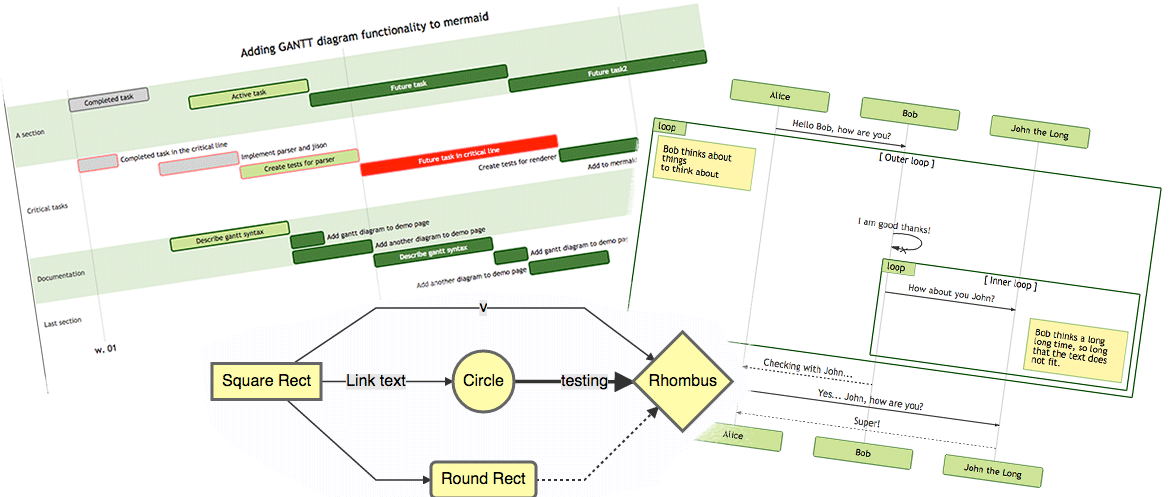
Generate mermaid diagram and chart with AI MCP dynamically. Also you can use:
mcp-server-chart to generate chart, graph, map.
Infographic to generate infographic, such as
Timeline,Comparison,List,Processand so on.- 🖼️ figure.ling.pub/gallery to browse and share AI-generated diagrams and figures created with mcp-mermaid and other tools.
✨ Features
-
Fully support all features and syntax of
Mermaid. -
Support configuration of
backgroundColorandtheme, enabling large AI models to output rich style configurations. -
Support exporting to
base64,svg,mermaid,file, and remote-friendlysvg_url,png_urlformats, with validation forMermaidto facilitate the model's multi-round output of correct syntax and graphics. UseoutputType: "file"to automatically save PNG diagrams to disk for AI agents, or the URL modes to share diagrams through public mermaid.ink links.
🤖 Usage
To use with Desktop APP, such as Claude, VSCode, Cline, Cherry Studio, and so on, add the MCP server config below. On Mac system:
{
  "mcpServers": {
    "mcp-mermaid": {
      "command": "npx",
      "args": [
        "-y",
        "mcp-mermaid"
      ]
    }
  }
}
On Window system:
{
  "mcpServers": {
    "mcp-mermaid": {
      "command": "cmd",
      "args": [
        "/c",
        "npx",
        "-y",
        "mcp-mermaid"
      ]
    }
  }
}
Also, you can use it on aliyun, modelscope, glama.ai, smithery.ai or others with HTTP, SSE Protocol.
Access Points:
- SSE:
http://localhost:3033/sse - Streamable:
http://localhost:1122/mcp
Available Docker Tags:
susuperli/mcp-mermaid:latest- Latest stable version- View all available tags at Docker Hub
🚰 Run with SSE or Streamable transport
Option 1: Global Installation
Install the package globally:
npm install -g mcp-mermaid
Run the server with your preferred transport option:
# For SSE transport (default endpoint: /sse)
mcp-mermaid -t sse

# For Streamable transport with custom endpoint
mcp-mermaid -t streamable
Option 2: Local Development
If you're working with the source code locally:
# Clone and setup
git clone https://github.com/hustcc/mcp-mermaid.git
cd mcp-mermaid
npm install
npm run build

# Run with npm scripts
npm run start:sse        # SSE transport on port 3033
npm run start:streamable # Streamable transport on port 1122
Access Points
Then you can access the server at:
- SSE transport:
http://localhost:3033/sse - Streamable transport:
http://localhost:1122/mcp(local) orhttp://localhost:3033/mcp(global)
🎮 CLI Options
You can also use the following CLI options when running the MCP server. Command options by run cli with -h.
MCP Mermaid CLI

Options:
  --transport, -t  Specify the transport protocol: "stdio", "sse", or "streamable" (default: "stdio")
  --port, -p       Specify the port for SSE or streamable transport (default: 3033)
  --endpoint, -e   Specify the endpoint for the transport:
                    - For SSE: default is "/sse"
                    - For streamable: default is "/mcp"
  --help, -h       Show this help message
🔨 Development
Install dependencies:
npm install
Build the server:
npm run build
Start the MCP server
Using MCP Inspector (for debugging):
npm run start
Using different transport protocols:
# SSE transport (Server-Sent Events)
npm run start:sse

# Streamable HTTP transport
npm run start:streamable
Direct node commands:
# SSE transport on port 3033
node build/index.js --transport sse --port 3033

# Streamable HTTP transport on port 1122
node build/index.js --transport streamable --port 1122

# STDIO transport (for MCP client integration)
node build/index.js --transport stdio
🐳 Docker Usage
Run MCP Mermaid with Docker:
# Pull the image
docker pull susuperli/mcp-mermaid:latest

# Run with SSE transport (default)
docker run -p 3033:3033 susuperli/mcp-mermaid:latest --transport sse

# Run with streamable transport
docker run -p 1122:1122 susuperli/mcp-mermaid:latest --transport streamable --port 1122
📄 License
MIT@hustcc.