3D Cartoon Generator & File System Tools
Génère des images de dessins animés en 3D en utilisant l'IA Gemini de Google et fournit des opérations sécurisées sur le système de fichiers.
Documentation
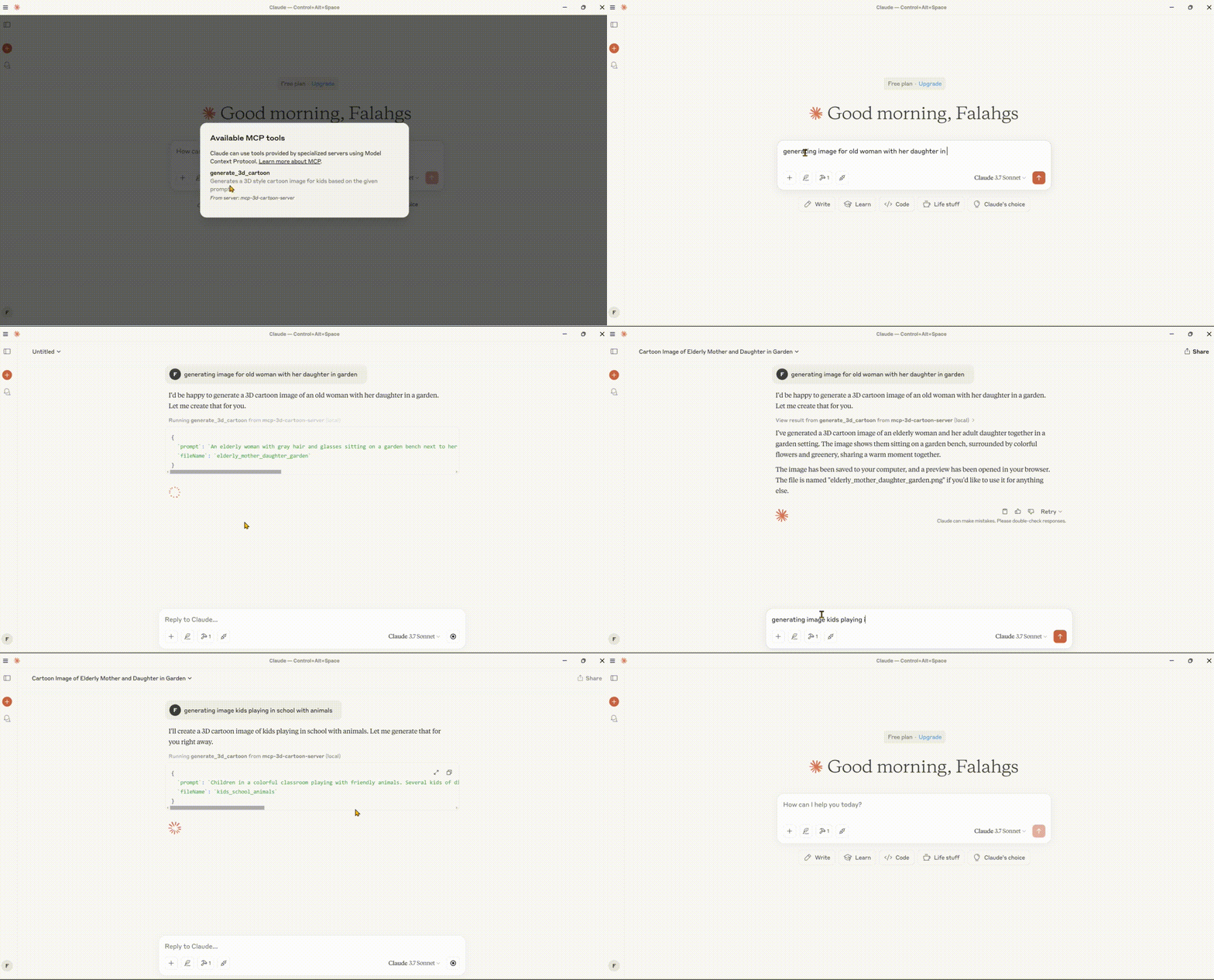
MCP Combined Server: 3D Cartoon Generator & File System Tools
A professional-grade server that provides two major capabilities:
- High-quality 3D-style cartoon image generation using Google's Gemini AI
- Secure file system operations for reading, writing, and managing files
🌟 Features
Image Generation
- 3D Cartoon Generation: Creates high-quality 3D-style cartoon images
- Child-Friendly Design: Focuses on colorful, playful, and engaging visuals
- Instant Preview: Automatically opens generated images in your default browser
- Local Storage: Saves images and previews in an organized output directory
File System Operations
- Secure File Access: Path validation and security checks
- Read/Write Files: Read and write text file contents
- Directory Operations: List, create, and navigate directories
- File Search: Find files matching patterns
System Features
- Professional Configuration: Robust error handling and controlled logging
- Cross-Platform Support: Intelligent file path handling for Windows, macOS, and Linux
- Smart OS Detection: Automatically finds the best save location for each operating system
- Security Controls: Restricted directory access through configuration
🛠️ Technical Stack
- Core Framework: Model Context Protocol (MCP) SDK
- AI Integration: Google Generative AI (Gemini)
- Runtime: Node.js v14+
- Language: TypeScript
- Package Manager: npm
📋 Prerequisites
- Node.js (v14 or higher)
- Google Gemini API key
- TypeScript
⚙️ Installation
- Clone the repository:
git clone https://github.com/falahgs/mcp-3d-style-cartoon-gen-server.git
cd mcp-3d-style-cartoon-gen-server
- Install dependencies:
npm install
- Configure environment:
Create a
.envfile in the root directory:
GEMINI_API_KEY=your_api_key_here
ALLOWED_DIRECTORIES=/path/to/allowed/dir1,/path/to/allowed/dir2
- Build the project:
npm run build
🔧 Configuring Claude Desktop with MCP Server
To integrate this combined server with Claude Desktop:
-
Locate the Configuration File:
- Windows:
%APPDATA%\Claude\claude_desktop_config.json - macOS:
~/Library/Application Support/Claude/claude_desktop_config.json - Linux:
~/.config/Claude/claude_desktop_config.json
- Windows:
-
Add the following configuration:
{
  "mcpServers": {
    "mcp-3d-cartoon-generator": {
      "command": "node",
      "args": [
        "path/to/your/build/index.js"
      ],
      "env": {
        "GEMINI_API_KEY": "your_gemini_api_key_here",
        "IS_REMOTE": "true",
        "SAVE_TO_DESKTOP": "true",
        "DETECT_OS_PATHS": "true",
        "ALLOWED_DIRECTORIES": "C:\\Users\\YourUsername\\Desktop,C:\\Users\\YourUsername\\Documents",
        "DEBUG": "false"
      }
    }
  }
}
Windows PowerShell Helper Script
For Windows users, you can use the included fix_claude_config.ps1 script to automatically configure Claude Desktop:
- Edit the script to update the path to your server build and your Gemini API key
- Run the script in PowerShell:
powershell -ExecutionPolicy Bypass -File .\fix_claude_config.ps1
This will create or update the configuration file with proper encoding and settings.
🚀 Available Tools
1. Image Generation Tool
{
  "name": "generate_3d_cartoon",
  "description": "Generates a 3D style cartoon image for kids based on the given prompt",
  "inputSchema": {
    "type": "object",
    "properties": {
      "prompt": {
        "type": "string",
        "description": "The prompt describing the 3D cartoon image to generate"
      },
      "fileName": {
        "type": "string",
        "description": "The name of the output file (without extension)"
      }
    },
    "required": ["prompt", "fileName"]
  }
}
2. File System Tools
Read File
{
  "name": "read_file",
  "description": "Read the contents of a file",
  "inputSchema": {
    "type": "object",
    "properties": {
      "path": {
        "type": "string",
        "description": "Path to the file to read"
      }
    },
    "required": ["path"]
  }
}
Write File
{
  "name": "write_file",
  "description": "Write content to a file",
  "inputSchema": {
    "type": "object",
    "properties": {
      "path": {
        "type": "string",
        "description": "Path to the file to write"
      },
      "content": {
        "type": "string",
        "description": "Content to write to the file"
      }
    },
    "required": ["path", "content"]
  }
}
List Directory
{
  "name": "list_directory",
  "description": "List the contents of a directory",
  "inputSchema": {
    "type": "object",
    "properties": {
      "path": {
        "type": "string",
        "description": "Path to the directory to list"
      }
    },
    "required": ["path"]
  }
}
Create Directory
{
  "name": "create_directory",
  "description": "Create a new directory",
  "inputSchema": {
    "type": "object",
    "properties": {
      "path": {
        "type": "string",
        "description": "Path to the directory to create"
      }
    },
    "required": ["path"]
  }
}
Search Files
{
  "name": "search_files",
  "description": "Search for files matching a pattern",
  "inputSchema": {
    "type": "object",
    "properties": {
      "path": {
        "type": "string",
        "description": "Base directory to search from"
      },
      "pattern": {
        "type": "string",
        "description": "Search pattern (glob format)"
      },
      "excludePatterns": {
        "type": "array",
        "items": {
          "type": "string"
        },
        "description": "Patterns to exclude from search (glob format)"
      }
    },
    "required": ["path", "pattern"]
  }
}
📄 Example Usage
Image Generation Examples
// Generate a 3D cartoon
{
  "name": "generate_3d_cartoon",
  "arguments": {
    "prompt": "A friendly robot playing with a cat",
    "fileName": "robot_cat_play"
  }
}
File System Examples
// Read a file
{
  "name": "read_file",
  "arguments": {
    "path": "C:/Users/YourUsername/Documents/example.txt"
  }
}

// Write a file
{
  "name": "write_file",
  "arguments": {
    "path": "C:/Users/YourUsername/Documents/new-file.txt",
    "content": "This is the content of the file."
  }
}

// List directory contents
{
  "name": "list_directory",
  "arguments": {
    "path": "C:/Users/YourUsername/Documents"
  }
}

// Create a directory
{
  "name": "create_directory",
  "arguments": {
    "path": "C:/Users/YourUsername/Documents/new-folder"
  }
}

// Search for files
{
  "name": "search_files",
  "arguments": {
    "path": "C:/Users/YourUsername/Documents",
    "pattern": "*.txt",
    "excludePatterns": ["temp*", "*.tmp"]
  }
}
🔒 Security Features
The server implements several security measures:
- Path Validation: All file paths are validated to ensure they are within allowed directories.
- Allowed Directories: Only directories explicitly set in the
ALLOWED_DIRECTORIESenvironment variable can be accessed. - Symlink Protection: Prevents access to directories outside the allowed scope via symlinks.
- Controlled Logging: Debug logs are disabled by default to prevent information leakage.
⚙️ Configuration Options
Environment Variables
| Variable | Description | Default |
|---|---|---|
GEMINI_API_KEY | Google Gemini API key for image generation | (Required) |
ALLOWED_DIRECTORIES | Comma-separated list of allowed file system paths | User's home dir, current dir |
IS_REMOTE | Run in remote mode without browser opening | false |
SAVE_TO_DESKTOP | Force saving to desktop directory | false |
DETECT_OS_PATHS | Enable OS-specific path detection | true |
DEBUG | Enable verbose debug logging | false |
🛠️ Troubleshooting
Common Issues:
-
JSON Parsing Errors in Claude:
- Ensure
DEBUGis set to "false" to prevent logs from interfering with JSON communication - Check for proper JSON formatting in the Claude configuration
- Ensure
-
File Access Denied:
- Verify that the paths you're trying to access are included in
ALLOWED_DIRECTORIES - Check file permissions on the target files/directories
- Verify that the paths you're trying to access are included in
-
Images Not Saving:
- Set
SAVE_TO_DESKTOPto "true" to ensure images save to the desktop - Check desktop path detection in the server logs (enable DEBUG temporarily)
- Set
📄 License
🤝 Contributing
Contributions are welcome! Please feel free to submit a Pull Request.