Norce Assistant
Fournit des connaissances basées sur l'IA et des exemples de code pour le développement Norce Commerce directement dans votre environnement IA préféré.
Documentation
Using the Assistant MCP Server
Overview: The Assistant MCP (Model Context Protocol) server provides AI-powered knowledge and code examples for Norce Commerce development directly in your preferred AI environment.
What is Norce Assistant MCP?
The Assistant MCP server acts as a bridge between AI assistants (like Claude Desktop, VSCode extensions, or other MCP-compatible tools) and Norce Commerce documentation and knowledge base. It enables you to get contextual help, code examples, and technical guidance without leaving your development environment.
Server URL: https://norceassistant.mcp.kapa.ai and https://norceassistant2.mcp.kapa.ai
Authentication Methods
The Assistant MCP server supports two authentication methods depending on your use case:
1. Google Authentication (Recommended for Personal Use)
- Use case: Individual developers using desktop AI clients
- Setup: Automatic redirect to Google OAuth on first connection
- Benefits: Easy setup, no API key management required
- Host:
https://norceassistant2.mcp.kapa.ai
2. API Key Authentication (For Development Tools, applications or agents)
- Use case: Development tools, applications, automated agents
- Setup: Requires a valid API key in request headers
- Benefits: Programmatic access, suitable for CI/CD and automation
- Host:
https://norceassistant.mcp.kapa.ai
Setup Instructions
Claude Desktop Setup (Google Auth)
- Install Claude Desktop if you haven't already
- Configure MCP connection in Claude Desktop settings
- Add Norce Assistant server:
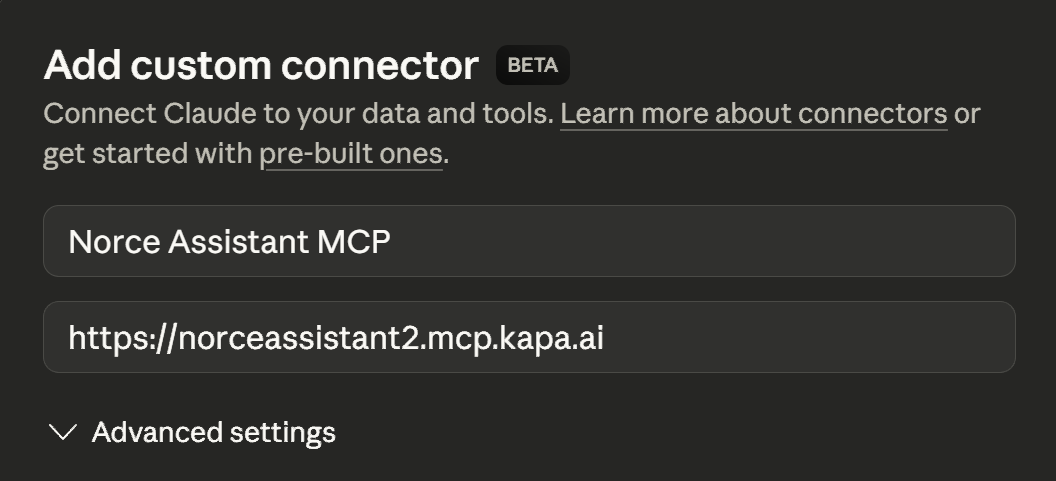
- First connection: You'll be redirected to Google for authentication
- Grant permissions to access the Norce Assistant service
VSCode/Development Tools Setup (API Key)
For programmatic access or development tools, use API key authentication:
{
  "servers": {
    "norceassistant_server": {
      "transport": "http",
      "url": "https://norceassistant.mcp.kapa.ai",
      "headers": {
        "Authorization": "Bearer YOUR_API_KEY_HERE"
      }
    }
  }
}
Note: Replace
YOUR_API_KEY_HEREwith your actual Norce Assistant API key. Contact your Norce support for API key access.
Using Norce Assistant
Once connected, you can:
- Ask technical questions about Norce Commerce APIs
- Request code examples for specific integration scenarios
- Get help with troubleshooting common development issues
- Access documentation without switching contexts
Example Queries
- "How do I authenticate with the Norce Commerce API?"
- "Show me an example of creating a product using the Admin API"
- "What are the required fields for a customer registration?"
- "Help me troubleshoot a 401 error in my API call"
- "Help me build an application that connects to Norce Commerce and..."
Troubleshooting
Connection Issues
- Verify the server URL is correct:
https://norceassistant.mcp.kapa.aiorhttps://norceassistant2.mcp.kapa.ai - Check your internet connection
- Ensure your MCP client supports HTTP transport
Authentication Problems
- Google Auth: Clear browser cache and retry authentication
- API Key: Verify the API key is valid and properly formatted in headers
- Check that the Authorization header format is:
Bearer YOUR_API_KEY