Teradata
officielUne collection d'outils pour gérer la plateforme, traiter la qualité des données et lire et écrire dans la base de données Teradata.
Que pouvez-vous faire avec Teradata MCP ?
- Interroger et analyser les données — Posez des questions en langage naturel pour explorer les tables, profiler les données et visualiser les tendances sans écrire de SQL.
- Générer des couches sémantiques — Créez des outils, invites et cubes personnalisés spécifiques à un domaine à partir de définitions YAML via le guide de personnalisation.
- Exécuter des pipelines IA et RAG — Effectuez une recherche sémantique, une génération augmentée par récupération et un stockage vectoriel à l’aide des outils
rag,tdvsetfs. - Gérer l’administration de la base de données — Gérez la sécurité, surveillez la capacité et automatisez les sauvegardes via les suites d’outils
dba,secetbar. - Exécuter des analyses de longue durée — Lancez les fonctions analytiques
tdml_*comme tâches en arrière-plan et interrogez les résultats au lieu de bloquer. - Protéger contre les actions destructrices — Utilisez le mode de garde pour des flux de confirmation en plusieurs étapes sur les opérations
bar_*etsec_*.
Documentation
Serveur MCP Teradata



Connectez des agents IA directement à Teradata avec une sécurité et une extensibilité d'entreprise.
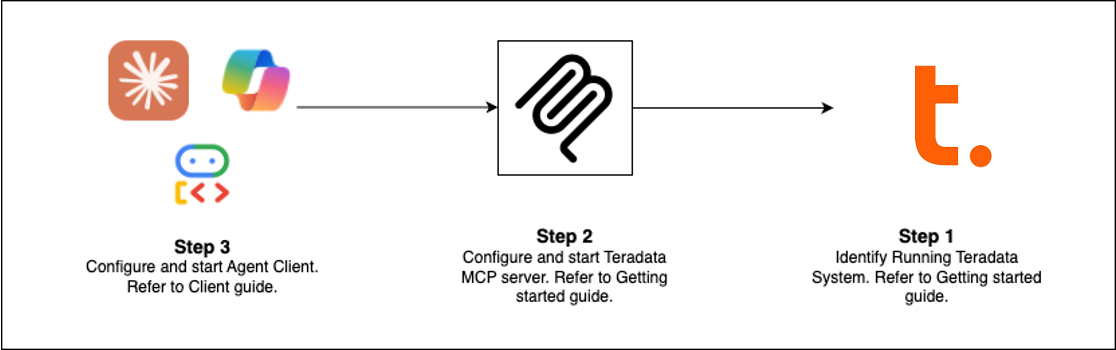
Démarrage rapide (Choisissez votre chemin)
| Client | Idéal pour | Temps de configuration |
|---|---|---|
| Claude Desktop | Analyse exploratoire, administration de plateforme | 5 min |
| VS Code + Copilot | Ingénierie de données, développement d'agents | 5 min |
| Open WebUI | Tester de nouveaux LLM localement | 5 min |
| Exemples de code | Construire votre propre client | variable |
| Flowise | Constructeur d'agents visuels | 10 min |
Prérequis : Base de données Teradata (ou sandbox gratuit) + uv
Configuration de Claude Desktop (Aucune installation)
Ajoutez ceci à claude_desktop_config.json (Paramètres > Développeur > Modifier la configuration) :
{
  "mcpServers": {
    "teradata": {
      "command": "uvx",
      "args": ["teradata-mcp-server"],
      "env": {
        "DATABASE_URI": "teradata://<USERNAME>:<PASSWORD>@<HOST_URL>:1025/<USERNAME>"
      }
    }
  }
}
Ce que vous pouvez faire
| Cas d'utilisation | Capacités | Outils |
|---|---|---|
| Interroger et analyser | Explorer les tables, profiler les données, expliquer les résultats, visualiser les modèles—aucune requête SQL requise | base, dba, qlty, plot |
| Couche sémantique | Générer des couches sémantiques et des outils personnalisés à partir de YAML ou avec notre compétence d'agent | En savoir plus → |
| Pipelines IA et RAG | Recherche sémantique, génération augmentée par récupération, stockage vectoriel | rag, tdvs, fs |
| Administration de base de données | Gérer la sécurité, surveiller la capacité, automatiser les sauvegardes | dba, sec, bar |
Nouveautés (Dernière version)
- FastMCP v4 — Protocole sans session, tâches en arrière-plan pour les analyses de longue durée, complétion d'arguments
- Mise en cache des réponses — Les signaux TTL de 5 minutes réduisent les requêtes de base de données redondantes dans les conversations multi-tours
- Mode de protection — Flux de confirmation en plusieurs étapes pour les opérations destructrices (bar_, sec_)
- Tâches en arrière-plan —
tdml_*les fonctions analytiques renvoient des identifiants de tâche pour l'interrogation au lieu de bloquer - Complétion d'arguments — Suggestion automatique des noms de tables et de colonnes à partir du schéma pendant la saisie
- Capacité de hooks — Intercepter les appels d'outils pour une surveillance, un audit ou une limitation de débit personnalisés
- Protection de limite de lignes — Plafonds configurables (
DEFAULT_ROW_LIMIT,MAX_ROW_LIMIT) empêchent le dépassement de jetons LLM - Sécurité renforcée — Vues VX pour un contrôle d'accès granulaire au niveau des lignes
Étendre et déployer
Ajouter une logique personnalisée
Utilisez des hooks pour intercepter les appels d'outils pour la surveillance, les pistes d'audit ou la validation → Guide des hooks
Définir des couches sémantiques
Créez des outils, des invites et des cubes spécifiques au domaine en YAML → Guide de personnalisation
Déployer partout
Exécutez en CLI (uv), serveur HTTP, conteneur Docker ou service cloud → Guide d'installation
Voir en action
- Agent vocal — Audio bidirectionnel en temps réel avec Amazon Nova Sonic
- Agent web — Interface de chat interactive avec le framework Google ADK
- Constructeur Flowise — Flux de travail visuels par glisser-déposer
- Middleware personnalisé — Modèles de surveillance des performances
En savoir plus
- Documentation complète — Installation, configuration, architecture, sécurité
- Tutoriels vidéo — Procédures pas à pas
- Guide du développeur — Étendre et contribuer
- Architecture — Comment les composants fonctionnent ensemble
Contribuer
Nous accueillons les contributions ! Consultez notre Guide de contribution et Guide du développeur pour commencer.