DICOM MCP Server
Permet aux assistants IA d'interroger, lire et déplacer des données sur des serveurs DICOM tels que PACS et VNA pour l'imagerie médicale.
Documentation
DICOM MCP Server for Medical Imaging Systems 🏥



The dicom-mcp server enables AI assistants to query, read, and move data on DICOM servers (PACS, VNA, etc.).
🤝 Contribute • 📝 Report Bug • 📝 Blog Post 1
---------------------------------------------------------------------
🧑⚕️ User: "Any significant findings in John Doe's previous CT report?"
🧠 LLM → ⚙️ Tools:
query_patients → query_studies → query_series → extract_pdf_text_from_dicom
💬 LLM Response: "The report from 2025-03-26 mentions a history of splenomegaly (enlarged spleen)"
🧑⚕️ User: "What's the volume of his spleen at the last scan and the scan today?"
🧠 LLM → ⚙️ Tools:
(query_studies → query_series → move_series → query_series → extract_pdf_text_from_dicom) x2
(The move_series tool sends the latest CT to a DICOM segmentation node, which returns volume PDF report)
💬 LLM Response: "last year 2024-03-26: 412cm³, today 2025-04-10: 350cm³"
---------------------------------------------------------------------
✨ Core Capabilities
dicom-mcp provides tools to:
- 🔍 Query Metadata: Search for patients, studies, series, and instances using various criteria.
- 📄 Read DICOM Reports (PDF): Retrieve DICOM instances containing encapsulated PDFs (e.g., clinical reports) and extract the text content.
- ➡️ Send DICOM Images: Send series or studies to other DICOM destinations, e.g. AI endpoints for image segmentation, classification, etc.
- ⚙️ Utilities: Manage connections and understand query options.
🚀 Quick Start
📥 Installation
Install using uv or pip:
uv tool install dicom-mcp
Or by cloning the repository:
# Clone and set up development environment
git clone https://github.com/ChristianHinge/dicom-mcp
cd dicom mcp

# Create and activate virtual environment
uv venv
source .venv/bin/activate

# Install with test dependencies
uv pip install -e ".[dev]"
⚙️ Configuration
dicom-mcp requires a YAML configuration file (config.yaml or similar) defining DICOM nodes and calling AE titles. Adapt the configuration or keep as is for compatibility with the sample ORTHANC Server.
nodes:
  main:
    host: "localhost"
    port: 4242
    ae_title: "ORTHANC"
    description: "Local Orthanc DICOM server"

current_node: "main"
calling_aet: "MCPSCU"
[!WARNING] DICOM-MCP is not meant for clinical use, and should not be connected with live hospital databases or databases with patient-sensitive data. Doing so could lead to both loss of patient data, and leakage of patient data onto the internet. DICOM-MCP can be used with locally hosted open-weight LLMs for complete data privacy.
(Optional) Sample ORTHANC server
If you don't have a DICOM server available, you can run a local ORTHANC server using Docker:
Clone the repository and install test dependencies pip install -e ".[dev]
cd tests
docker compose up -d
cd ..
pytest # uploads dummy pdf data to ORTHANC server
UI at http://localhost:8042
🔌 MCP Integration
Add to your client configuration (e.g. claude_desktop_config.json):
{
  "mcpServers": {
    "dicom": {
      "command": "uvx",
      "args": ["dicom-mcp", "/path/to/your_config.yaml"]
    }
  }
}
For development:
{
    "mcpServers": {
        "arxiv-mcp-server": {
            "command": "uv",
            "args": [
                "--directory",
                "path/to/cloned/dicom-mcp",
                "run",
                "dicom-mcp",
                "/path/to/your_config.yaml"
            ]
        }
    }
}
🛠️ Tools Overview
dicom-mcp provides four categories of tools for interaction with DICOM servers and DICOM data.
🔍 Query Metadata
query_patients: Search for patients based on criteria like name, ID, or birth date.query_studies: Find studies using patient ID, date, modality, description, accession number, or Study UID.query_series: Locate series within a specific study using modality, series number/description, or Series UID.query_instances: Find individual instances (images/objects) within a series using instance number or SOP Instance UID
📄 Read DICOM Reports (PDF)
extract_pdf_text_from_dicom: Retrieve a specific DICOM instance containing an encapsulated PDF and extract its text content.
➡️ Send DICOM Images
move_series: Send a specific DICOM series to another configured DICOM node using C-MOVE.move_study: Send an entire DICOM study to another configured DICOM node using C-MOVE.
⚙️ Utilities
list_dicom_nodes: Show the currently active DICOM node and list all configured nodes.switch_dicom_node: Change the active DICOM node for subsequent operations.verify_connection: Test the DICOM network connection to the currently active node using C-ECHO.get_attribute_presets: List the available levels of detail (minimal, standard, extended) for metadata query results.
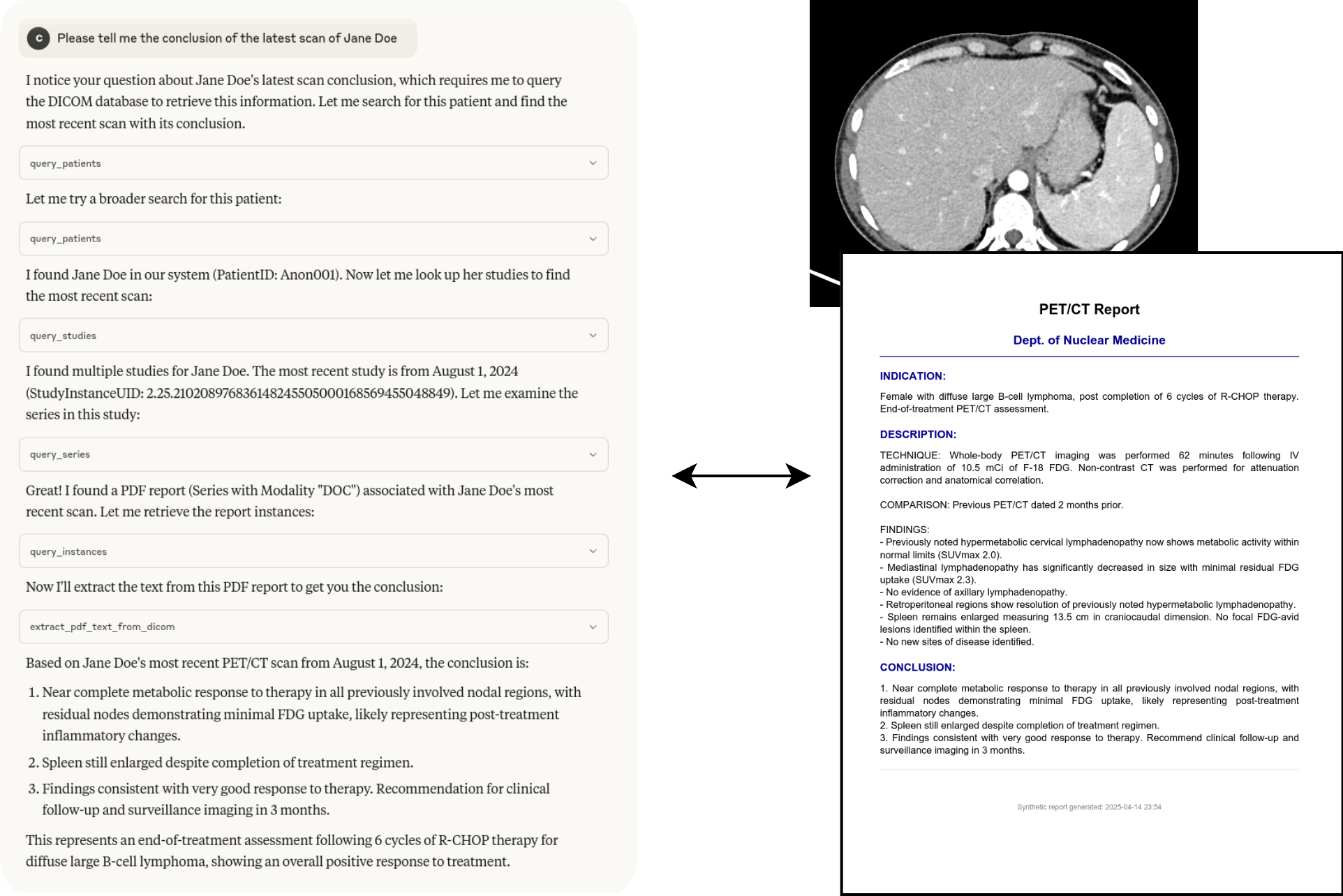
Example interaction
The tools can be chained together to answer complex questions:
📈 Contributing
Running Tests
Tests require a running Orthanc DICOM server. You can use Docker:
# Navigate to the directory containing docker-compose.yml (e.g., tests/)
cd tests
docker-compose up -d
Run tests using pytest:
# From the project root directory
pytest
Stop the Orthanc container:
cd tests
docker-compose down
Debugging
Use the MCP Inspector for debugging the server communication:
npx @modelcontextprotocol/inspector uv run dicom-mcp /path/to/your_config.yaml --transport stdio
🙏 Acknowledgments
- Built using pynetdicom
- Uses PyPDF2 for PDF text extraction