Paprika 3
Gestiona tus recetas de Paprika 3 con un LLM. Lee, crea y actualiza recetas en tu aplicación Paprika.
Documentación
paprika-3-mcp
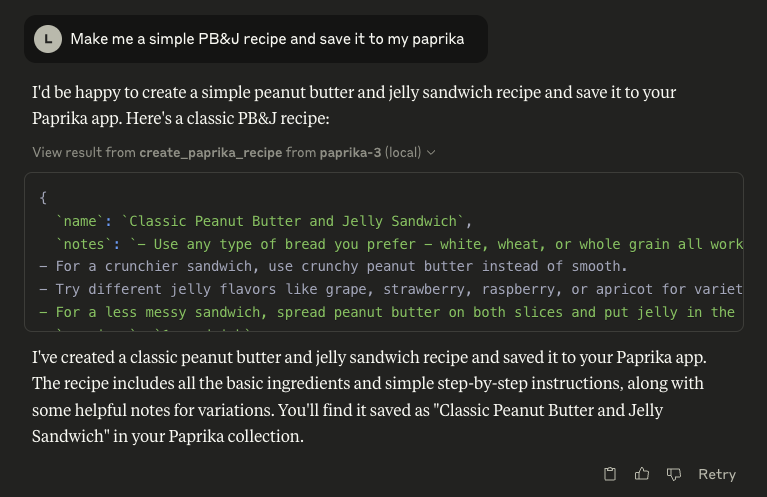
Un servidor de Model Context Protocol (MCP) que expone tus recetas de Paprika 3 como recursos legibles por LLM — y permite que un LLM como Claude cree o actualice recetas en tu aplicación Paprika.
🖼️ Ejemplo: Claude usando el servidor MCP de Paprika
🚀 Características
¿Ves algo que falta? ¡Abre un issue en este repositorio para solicitar una función!
📄 Recursos
- Recetas ✅
- Fotos de recetas 🚧
🛠 Herramientas
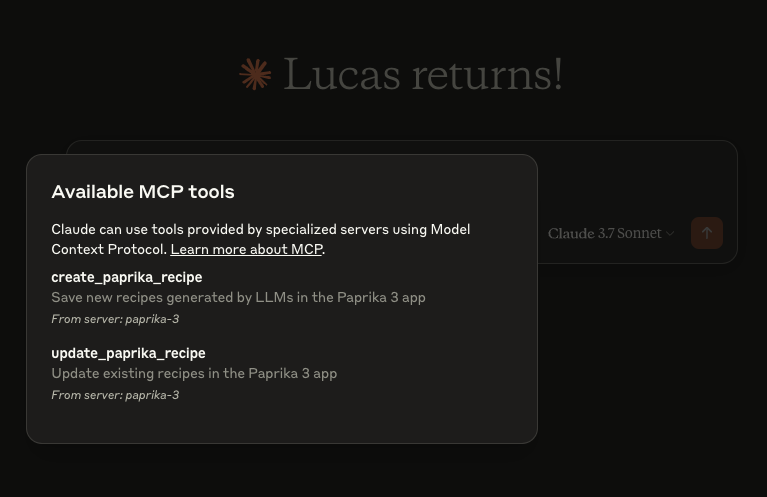
create_paprika_recipe
Permite a Claude guardar una nueva receta en tu aplicación Paprikaupdate_paprika_recipe
Permite a Claude modificar una receta existente
⚙️ Requisitos previos
- ✅ Un sistema Mac, Linux o Windows
- ✅ Paprika 3 instalado con sincronización en la nube habilitada
- ✅ Tu nombre de usuario y contraseña de Paprika 3
- ✅ Claude o cualquier cliente LLM con soporte de herramientas MCP habilitado
🛠 Instalación
Puedes descargar un binario precompilado desde la página de Releases.
🍎 macOS (vía Homebrew)
Si estás en macOS, la forma más fácil de instalar es con Homebrew:
brew tap soggycactus/tap
brew install paprika-3-mcp
🐧 Linux / 🪟 Windows
-
Ve a la última versión.
-
Descarga el archivo apropiado para tu sistema operativo y arquitectura:
paprika-3-mcp_<version>_linux_amd64.zippara Linuxpaprika-3-mcp_<version>_windows_amd64.zippara Windows
-
Extrae el archivo zip:
- Linux:
unzip paprika-3-mcp_<version>_<os>_<arch>.zip - Windows:
- Haz clic derecho en el archivo
.zipy selecciona Extraer todo, o usa una herramienta como 7-Zip.
- Haz clic derecho en el archivo
- Linux:
-
Mueve el binario a un directorio en el
$PATHde tu sistema:-
Linux:
sudo mv paprika-3-mcp /usr/local/bin/ -
Windows:
- Mueve
paprika-3-mcp.exea cualquier carpeta en tuPATH(por ejemplo,%USERPROFILE%\bin)
- Mueve
-
✅ Prueba la instalación
Puedes verificar que el servidor esté instalado comprobando:
paprika-3-mcp --version
Deberías ver:
paprika-3-mcp version v0.1.0
🤖 Configurando Claude
Si aún no has configurado MCP, primero lee más sobre cómo instalar el cliente de Claude Desktop y configurar un servidor MCP.
Para agregar paprika-3-mcp a Claude, todo lo que necesitas hacer es crear otra entrada en la sección mcpServers de tu archivo claude_desktop_config.json:
{
  "mcpServers": {
    "paprika-3": {
      "command": "paprika-3-mcp",
      "args": [
        "--username",
        "<your paprika 3 username (usually email)>",
        "--password",
        "<your paprika 3 password>"
      ]
    }
  }
}
Reinicia Claude y deberías ver las herramientas del servidor MCP después de hacer clic en el ícono de cabeza de martillo:
📄 Licencia
Este proyecto es de código abierto bajo la Licencia MIT © 2025 Lucas Stephens.
🗂 Misceláneos
📄 ¿Dónde puedo ver los registros del servidor?
El servidor MCP escribe registros estructurados usando slog de Go con rotación vía lumberjack. Los archivos de registro se crean automáticamente según tu sistema operativo:
| Sistema Operativo | Ruta del archivo de registro |
|---|---|
| macOS | ~/Library/Logs/paprika-3-mcp/server.log |
| Linux | /var/log/paprika-3-mcp/server.log |
| Windows | %APPDATA%\paprika-3-mcp\server.log |
| Otro / Desconocido | /tmp/paprika-3-mcp/server.log |
💡 Los registros se rotan automáticamente a 100MB, manteniendo solo 5 archivos de respaldo. Los registros también se eliminan después de 10 días.