Zendesk MCP Server
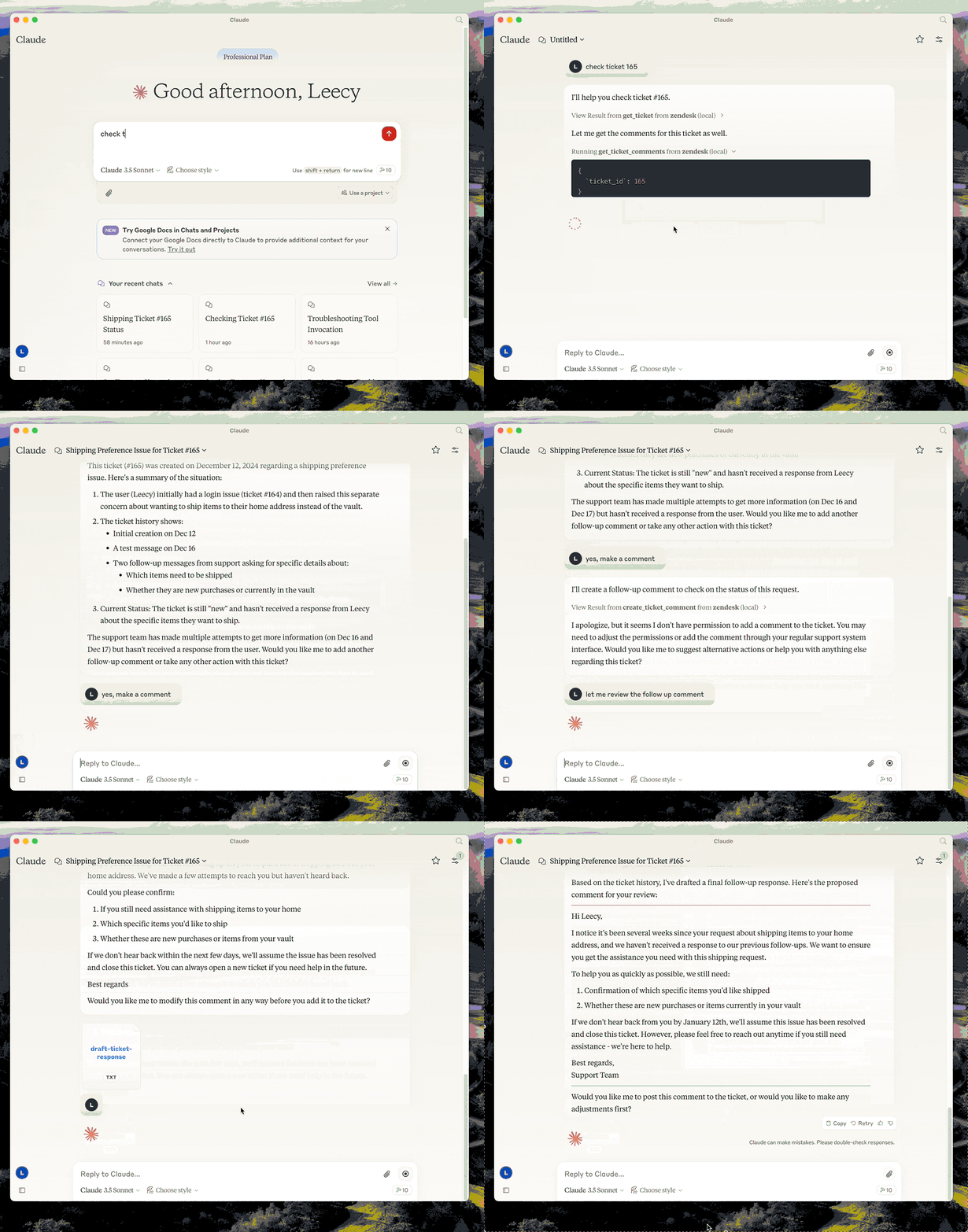
Gestiona tickets y comentarios de Zendesk, analiza tickets, redacta respuestas y accede a artículos del Centro de Ayuda como base de conocimiento.
Documentación
Servidor MCP de Zendesk


Un servidor de Protocolo de Contexto de Modelo (MCP) para Zendesk.
Este servidor proporciona una integración completa con Zendesk. Ofrece:
- Herramientas para recuperar y gestionar tickets y comentarios de Zendesk
- Prompts especializados para análisis de tickets y redacción de respuestas
- Acceso completo a los artículos del Centro de Ayuda de Zendesk como base de conocimiento
Configuración
- compilar:
uv venv && uv pip install -e .ouv builden resumen. - configurar la autenticación: consulte Autenticación a continuación.
- configurar en el escritorio de Claude:
{
  "mcpServers": {
      "zendesk": {
          "command": "uv",
          "args": [
              "--directory",
              "/path/to/zendesk-mcp-server",
              "run",
              "zendesk"
          ]
      }
  }
}
Autenticación
Este servidor se autentica con OAuth. Cada operador se autoriza con su propio inicio de sesión de Zendesk, por lo que las llamadas a la API llevan su identidad y Zendesk aplica exactamente los permisos que aplica en la interfaz de usuario: su rol, sus restricciones de grupo, su acceso a tickets. Los comentarios que publican son escritos por ellos.
La autenticación con token de API aún funciona, pero está obsoleta. Consulte Migración desde un token de API.
1. Registrar un cliente OAuth público
En el Centro de administración, vaya a Aplicaciones e integraciones > API > Clientes OAuth y cree un cliente:
| Campo | Valor |
|---|---|
| Tipo de cliente | Público — este servidor se ejecuta en la máquina de cada operador, por lo que no hay secreto que pueda guardar. Se utiliza PKCE en su lugar. |
| URL de redirección | http://localhost:4567/callback |
| Ámbitos permitidos | tickets:read tickets:write ticket_attachments:read users:read hc:read |
Establecer Ámbitos permitidos es opcional pero recomendado: limita lo que cualquier token de este cliente puede solicitar, incluso si el código cambia.
Tenga en cuenta el Identificador del cliente: ese es el ZENDESK_CLIENT_ID a continuación.
Si Zendesk rechaza http://localhost:4567/callback, registre https://localhost
en su lugar y use zendesk-auth --manual en el paso 3.
2. Configurar el entorno
Copie .env.example a .env y establezca:
ZENDESK_SUBDOMAIN=acme        # for https://acme.zendesk.com
ZENDESK_CLIENT_ID=your-client-identifier
Mantenga .env fuera del control de versiones.
Dos configuraciones opcionales, ambas deben coincidir con el cliente OAuth:
| Variable | Predeterminado | Cuándo cambiarlo |
|---|---|---|
ZENDESK_OAUTH_REDIRECT_URI | http://localhost:4567/callback | El puerto 4567 está en uso, o el cliente está registrado con una URL de redirección diferente. Debe coincidir exactamente con una URL de redirección del cliente. |
ZENDESK_TOKEN_FILE | $XDG_CONFIG_HOME/zendesk-mcp/tokens.json | Almacenar tokens en otro lugar, por ejemplo, un volumen de Docker. |
3. Autorizar esta máquina, una vez
uv run zendesk-auth
Esto abre un navegador, pide al operador que apruebe el acceso y almacena los tokens resultantes localmente. A partir de entonces, el servidor renueva el acceso por sí solo; el operador no repite esto a menos que los tokens sean revocados o queden sin uso más allá de la vida útil del token de actualización (90 días según lo solicitado por este servidor).
Si el navegador no puede alcanzar esta máquina (un shell remoto o un cliente OAuth
registrado con https://localhost), use el flujo basado en pegado en su lugar:
uv run zendesk-auth --manual
Los tokens se escriben en $XDG_CONFIG_HOME/zendesk-mcp/tokens.json
(~/.config/zendesk-mcp/tokens.json por defecto), creado 0600 dentro de un directorio 0700.
Anule la ubicación con ZENDESK_TOKEN_FILE. El archivo contiene credenciales en vivo:
trátelo como una contraseña y nunca lo confirme.
Cómo funciona la renovación de tokens
Los tokens de acceso de Zendesk son de corta duración: 30 minutos por defecto, 48 horas como máximo, por lo que el servidor los renueva por usted:
- antes del vencimiento, cuando el token almacenado está a menos de 60 segundos de expirar, y
- en rechazo, cuando Zendesk responde
401con{"error": "invalid_token"}, en cuyo caso la solicitud se reintenta una vez con un token nuevo.
Solo invalid_token activa un reintento. Un 401 o 403 por alcance insuficiente o
por los permisos propios de Zendesk del operador se transmite sin cambios, por lo que
los problemas de permisos permanecen visibles en lugar de parecer fallas de autenticación.
Cada renovación rota el token de actualización e invalida el anterior inmediatamente, por lo que el nuevo par se escribe en disco antes de usarse. Las escrituras son atómicas y están protegidas por un archivo de bloqueo, lo cual importa si ejecuta el servidor desde más de un cliente MCP al mismo tiempo.
Cuando el token de actualización en sí está vencido o revocado, las herramientas fallan con un mensaje
que le dice al operador que vuelva a ejecutar zendesk-auth.
Elección de ámbitos
Los ámbitos predeterminados cubren todas las herramientas que expone este servidor:
| Ámbito | Necesario para |
|---|---|
tickets:read | get_ticket, get_tickets, get_ticket_comments |
tickets:write | create_ticket, update_ticket, create_ticket_comment |
ticket_attachments:read | get_ticket_attachment |
users:read | detalles del solicitante y del asignado en tickets |
hc:read | el recurso zendesk://knowledge-base |
Redúzcalos con ZENDESK_OAUTH_SCOPES si no necesita todas las herramientas; para
acceso de solo lectura, tickets:read users:read hc:read.
Los ámbitos son un límite, no una concesión: un token nunca puede hacer más de lo que
el operador autorizante puede hacer. Tenga en cuenta que Zendesk acepta nombres de ámbito no reconocidos
al emitir un token, pero luego rechaza cada solicitud con 403, por lo que
zendesk-auth imprime el ámbito que Zendesk realmente otorgó para comparar.
Migración desde un token de API
Zendesk está retirando los tokens de API según este cronograma:
| Fecha | Cambio |
|---|---|
| 2026-07-28 | Los tokens sin uso durante 30 días se desactivan automáticamente; las cuentas nuevas no pueden crear tokens. |
| 2026-10-27 | Ninguna cuenta puede crear nuevos tokens de API. |
| 2027-04-30 | Todos los tokens de API dejan de funcionar permanentemente. |
Hasta entonces, ZENDESK_EMAIL + ZENDESK_API_KEY continúan funcionando, y el servidor
registra una advertencia de obsolescencia la primera vez que se autentica. Establezca
ZENDESK_CLIENT_ID y OAuth tiene prioridad, por lo que puede migrar sin
eliminar las variables antiguas.
Más allá de la fecha límite, hay una razón para moverse antes: un token de API de Zendesk es a nivel de cuenta y sin ámbito. Quien lo tenga obtiene el acceso completo del usuario con el que está emparejado, que para la mayoría de las instalaciones es un administrador. Eso es lo que el OAuth por operador corrige.
¿Por qué no el flujo de credenciales de cliente? Es más simple: sin paso de navegador, sin tokens de actualización, pero sus tokens se atribuyen al usuario de Zendesk que creó el cliente OAuth. Cada operador actuaría como ese único usuario, generalmente un administrador, y los registros de auditoría y la autoría de comentarios apuntarían a ellos. Dado que el objetivo es que los operadores tengan exactamente sus propios permisos de Zendesk, el flujo de código de autorización es el único que encaja.
Docker
Puede contenerizar el servidor si prefiere un entorno de ejecución aislado:
-
Copie
.env.examplea.envy complete su configuración de Zendesk. Mantenga este archivo fuera del control de versiones. -
Compile la imagen:
docker build -t zendesk-mcp-server . -
Autorice en el host, no en el contenedor.
zendesk-authnecesita un navegador y un puerto de devolución de llamada local, así que ejecútelo una vez fuera de Docker:uv run zendesk-auth -
Ejecute el servidor, pasando el archivo de entorno y montando el almacén de tokens:
docker run --rm \
  --env-file /path/to/.env \
  --user "$(id -u):$(id -g)" \
  -e ZENDESK_TOKEN_FILE=/tokens/tokens.json \
  -v "$HOME/.config/zendesk-mcp:/tokens" \
  zendesk-mcp-server
El montaje debe ser escribible: el servidor reescribe el archivo cada vez que rota el token de actualización, y un montaje de solo lectura lo dejará varado con un token vencido.
--userhace que el contenedor se ejecute como usted, para que pueda leer el archivo de token0600creado en el host.Agregue
-ial conectar el contenedor a clientes MCP a través de STDIN/STDOUT (Claude Code usa este modo). Para ejecuciones como daemon, agregue-d --name zendesk-mcp.
La imagen instala dependencias desde requirements.lock y reduce privilegios a un usuario no root. Con autenticación por token de API no se necesita volumen, ya que la configuración proviene completamente de variables de entorno.
Integración MCP de Claude
Para usar el servidor Dockerizado desde Claude Code/Desktop, agregue una entrada al settings.json de Claude Code similar a:
{
  "mcpServers": {
    "zendesk": {
      "command": "/usr/local/bin/docker",
      "args": [
        "run",
        "--rm",
        "-i",
        "--env-file",
        "/path/to/zendesk-mcp-server/.env",
        "zendesk-mcp-server"
      ]
    }
  }
}
Ajuste las rutas para que coincidan con su entorno. Después de guardar el archivo, reinicie Claude para que se detecte el nuevo servidor MCP.
Desarrollo
Ejecute la suite de pruebas:
uv pip install -e '.[test]'
pytest
Las pruebas usan HTTP simulado y nunca contactan a Zendesk. Cubren las rutas de token de API y OAuth, la derivación de PKCE, el almacenamiento y la rotación de tokens, y cada una de las cuatro formas en que este servidor llama a Zendesk.
Recursos
- zendesk://knowledge-base, obtenga acceso a todos los artículos del centro de ayuda.
Prompts
analyze-ticket
Analice un ticket de Zendesk y proporcione un análisis detallado del ticket.
draft-ticket-response
Redacte una respuesta a un ticket de Zendesk.
Herramientas
get_tickets
Obtenga los tickets más recientes con soporte de paginación
-
Entrada:
page(entero, opcional): Número de página (por defecto 1)per_page(entero, opcional): Número de tickets por página, máximo 100 (por defecto 25)sort_by(cadena, opcional): Campo para ordenar: created_at, updated_at, priority o status (por defecto created_at)sort_order(cadena, opcional): Orden de clasificación: asc o desc (por defecto desc)
-
Salida: Devuelve una lista de tickets con campos esenciales que incluyen id, subject, status, priority, description, timestamps e información del asignado, junto con metadatos de paginación
get_ticket
Recupere un ticket de Zendesk por su ID
- Entrada:
ticket_id(entero): El ID del ticket a recuperar
get_ticket_comments
Recupere todos los comentarios de un ticket de Zendesk por su ID
- Entrada:
ticket_id(entero): El ID del ticket del que obtener comentarios
create_ticket_comment
Cree un nuevo comentario en un ticket de Zendesk existente
- Entrada:
ticket_id(entero): El ID del ticket en el que comentarcomment(cadena): El texto/contenido del comentario a agregarpublic(booleano, opcional): Si el comentario debe ser público (por defecto true)
create_ticket
Cree un nuevo ticket de Zendesk
- Entrada:
subject(cadena): Asunto del ticketdescription(cadena): Descripción del ticketrequester_id(entero, opcional)assignee_id(entero, opcional)priority(cadena, opcional): uno delow,normal,high,urgenttype(cadena, opcional): uno deproblem,incident,question,tasktags(array[cadena], opcional)custom_fields(array[objeto], opcional)
update_ticket
Actualice campos en un ticket de Zendesk existente (por ejemplo, status, priority, assignee)
- Entrada:
ticket_id(entero): El ID del ticket a actualizarsubject(cadena, opcional)status(cadena, opcional): uno denew,open,pending,on-hold,solved,closedpriority(cadena, opcional): uno delow,normal,high,urgenttype(cadena, opcional)assignee_id(entero, opcional)requester_id(entero, opcional)tags(array[cadena], opcional)custom_fields(array[objeto], opcional)due_at(cadena, opcional): fecha y hora ISO8601