OmniDoc
Servidor MCP local de la aplicación de escritorio OmniDoc. Los asistentes de IA crean, editan y revisan documentos editables, importan Word, exportan DOCX, PDF y HTML, publican archivos como enlaces web y traducen PDF, Word y PowerPoint a más de 90 idiomas manteniendo el diseño.
Documentación
Translate whole documents, keep the layout
Upload a file, choose the languages and a model, and download the translated file, with the layout, tables, formulas and images where they were.
Upload a file to start translating
Drag & drop files here, or Browse files
Supports PDF, DOCX, PPTX, XLSX, CSV, EPUB, TXT, MD, HTML, SRT, ASS, JPG, PNG, UDOC and LaTeX source (.tex/.zip/.tar.gz)
- 15 file formatsPDF, Word, PowerPoint, Excel, CSV, EPUB, TXT, Markdown, HTML, SRT/ASS subtitles, JPG/PNG images, UDOC and LaTeX projects, including arXiv sources.
- 38 languagesTranslate between any of them: Chinese, English, Japanese, Korean, French, German, Spanish, Russian, Arabic and more.
- Bilingual or translation onlyKeep the original and the translation together to review paragraph by paragraph, or get the translation alone.
- GlossariesFix how specialist terms are translated and keep them consistent across the whole document.
- Scans tooText in scanned pages and images is read with OCR first, then translated.
- Your choice of modelPick XiRang XR-397B, DeepSeek, Qwen, ChatGPT, Gemini or Claude before you translate.
Supported models
Used by students and researchers at Tsinghua University, Peking University, MIT and other universities
Supported Formats
From research papers to contracts and product documentation — translate common document formats with full layout preservation.
15 Formats Continuously Updating
Documents & Layout Data & Spreadsheets Code & Development Media & Subtitles
PDF document Standard and scanned
Excel (XLSX) Spreadsheets
Markdown Technical documents
SRT / ASS Video subtitles
Word (DOCX) Professional documents
CSV data Tabular text
JPG / PNG Image OCR
EPUB / e-books Digital publications
PowerPoint Presentations
HTML Web pages
TXT Plain text
UDOC UniDoc documents
Translation Preview
One account for every OmniDoc product
The editors run on your computer and your files stay there. Sign in only for translation, AI and web publishing.
Office editors · work offline
Works offlineUniDocDocumentsWrite and lay out documents, import and export DOCX, Markdown and HTML, and save as native UDOC.Open Works offlineUniCellSpreadsheetsEnter data and formulas, then calculate, filter and organize. Works with XLSX and CSV.Open Works offlineUniPPTPresentationsImport PPTX, edit text, shapes and equations, and present right in the browser.Open Works offlineUniPicImagesCrop, adjust colors and annotate, and add text and shapes. PNG, JPG, WEBP and SVG.Open
AI and translation
Online serviceOmniDoc TranslateDocument translation15 formats including PDF, Word, PPT and LaTeX, 38 languages, original layout preserved.Open Online serviceAI HumanizerMake AI text read humanEstimates the AI score the way CNKI and VIP checkers measure it, rewrites paragraph by paragraph so the text reads naturally, and writes the result back into your Word layout. 5 free checks a day.Open Online serviceBrowser extensionWeb page translationTranslate the current page in Edge and Chrome and read it side by side with the original.Open
Mail, websites and developers
Online serviceUniMailMailSend and organize email, and open attachments in the workspace to keep editing.Open Online serviceOmniwing StudioWebsites & contentBuild websites with AI, edit pages visually, and manage site and blog content.Open DevelopersDeveloper APIAPI & AI toolsA REST API for documents, an OpenAI-compatible AI API, and an MCP server through which AI assistants create, edit and publish documents.Open
- Open and editOpen local files from the workspace, or choose “Open with OmniDoc” in your file manager.
- Saved on your computerDocuments, spreadsheets, slides and images stay on your device. No forced upload and no sign-in for local editing.
- Publish and sharePublish HTML, Markdown, PDF, Word or UDOC as a public web address, send it with UniMail, or translate it with OmniDoc.
See what OmniDoc looks like in use
These screenshots come from the UniDoc and UniCell web editors, the same editors built into the desktop app. An AI assistant made all four sample documents with OmniDoc's MCP tools; the translation shot is a bilingual document OmniDoc translated from Chinese.
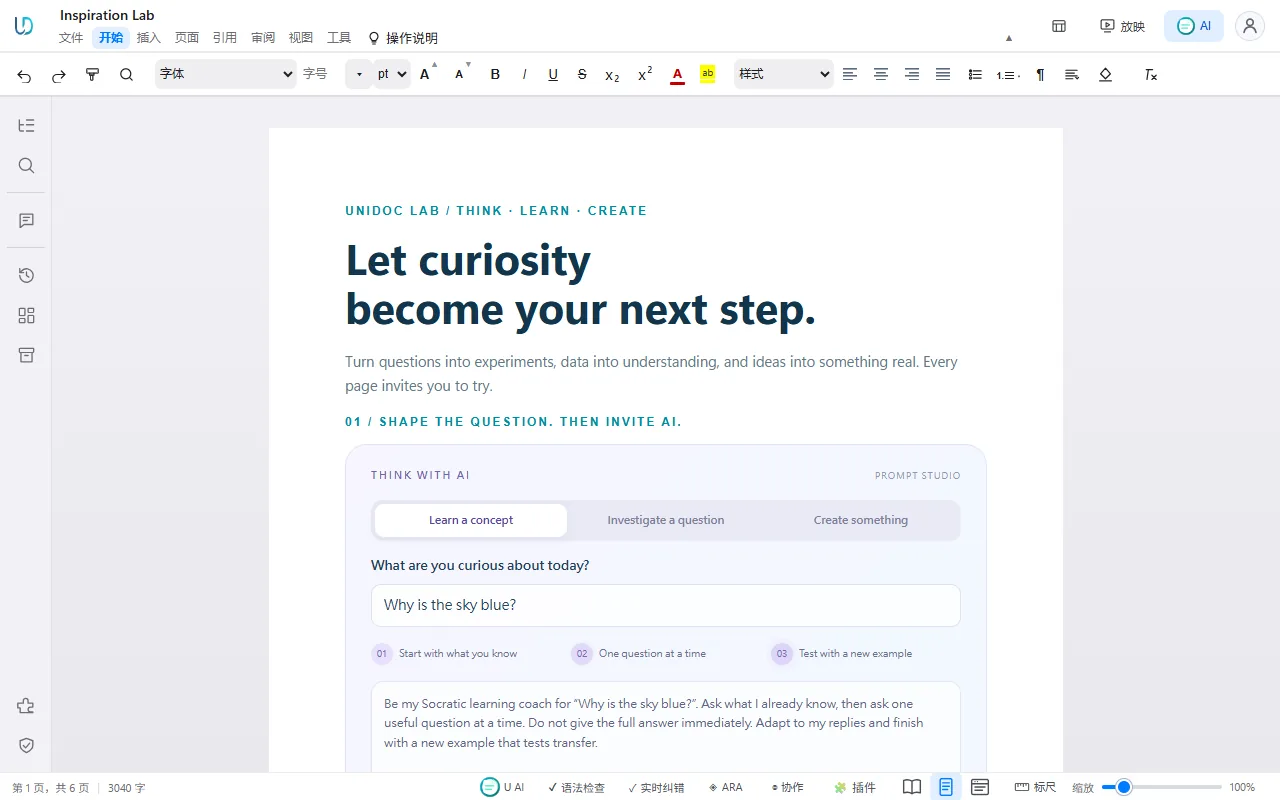
Interactive documents Sliders, equations and charts live in the document. Drag a slider and the numbers in the text, the cards and the curves all follow, even after you publish it as a web page.
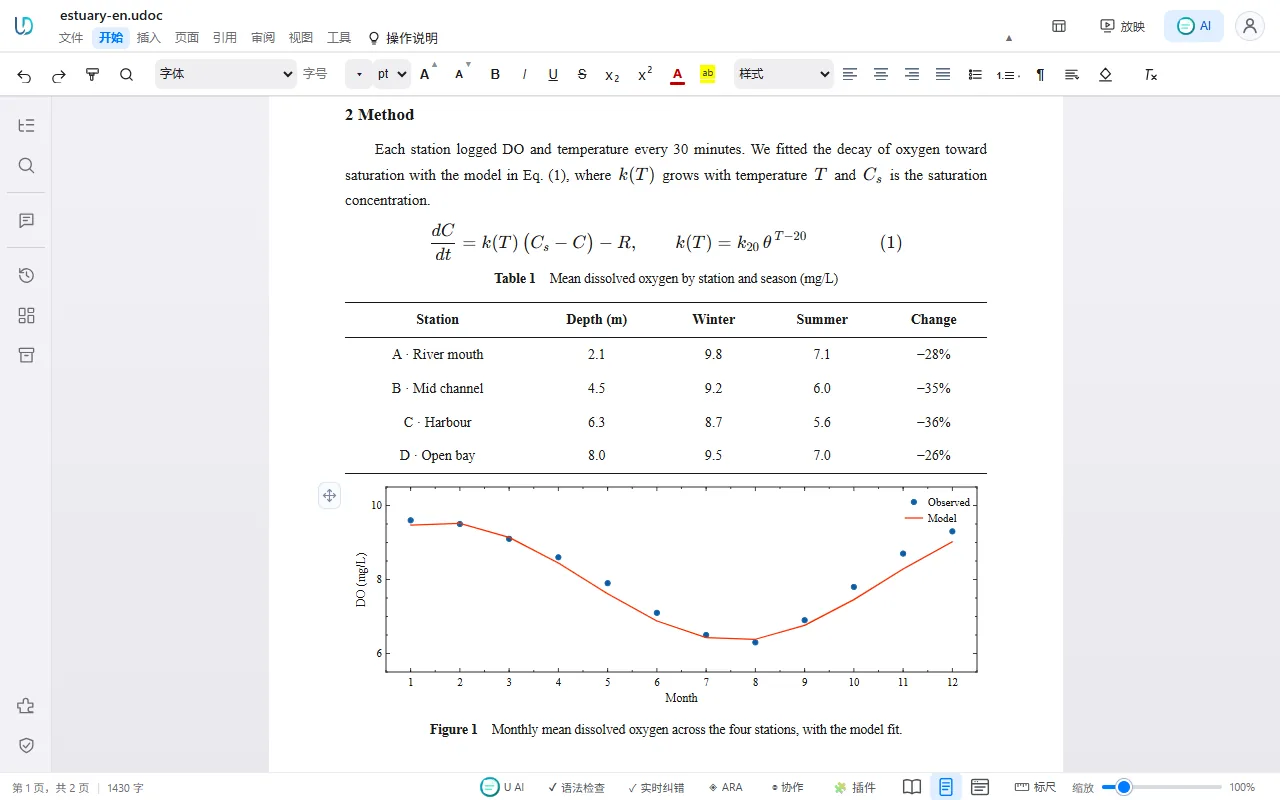
Papers and reports Numbered equations, three-line tables and live charts, laid out like a journal page.
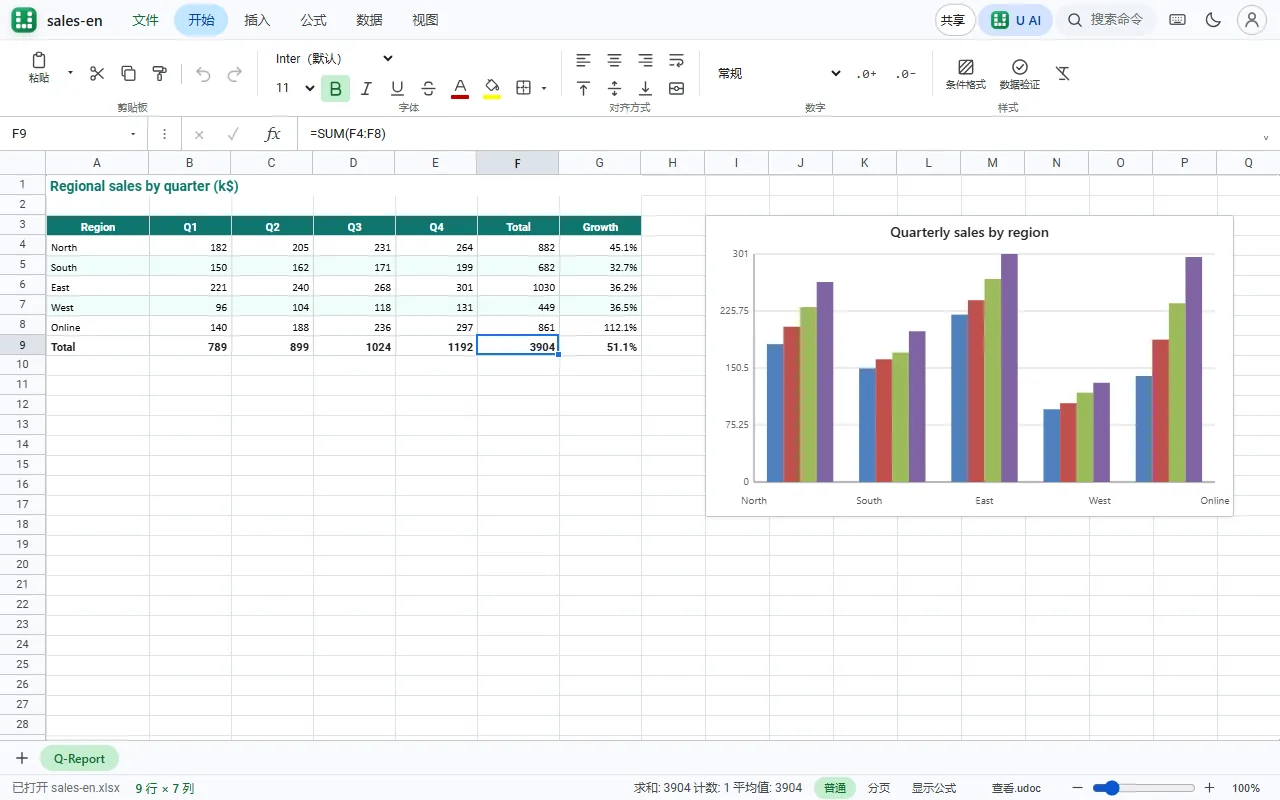
Spreadsheets UniCell opens XLSX files directly, with their formulas, conditional formatting and charts.
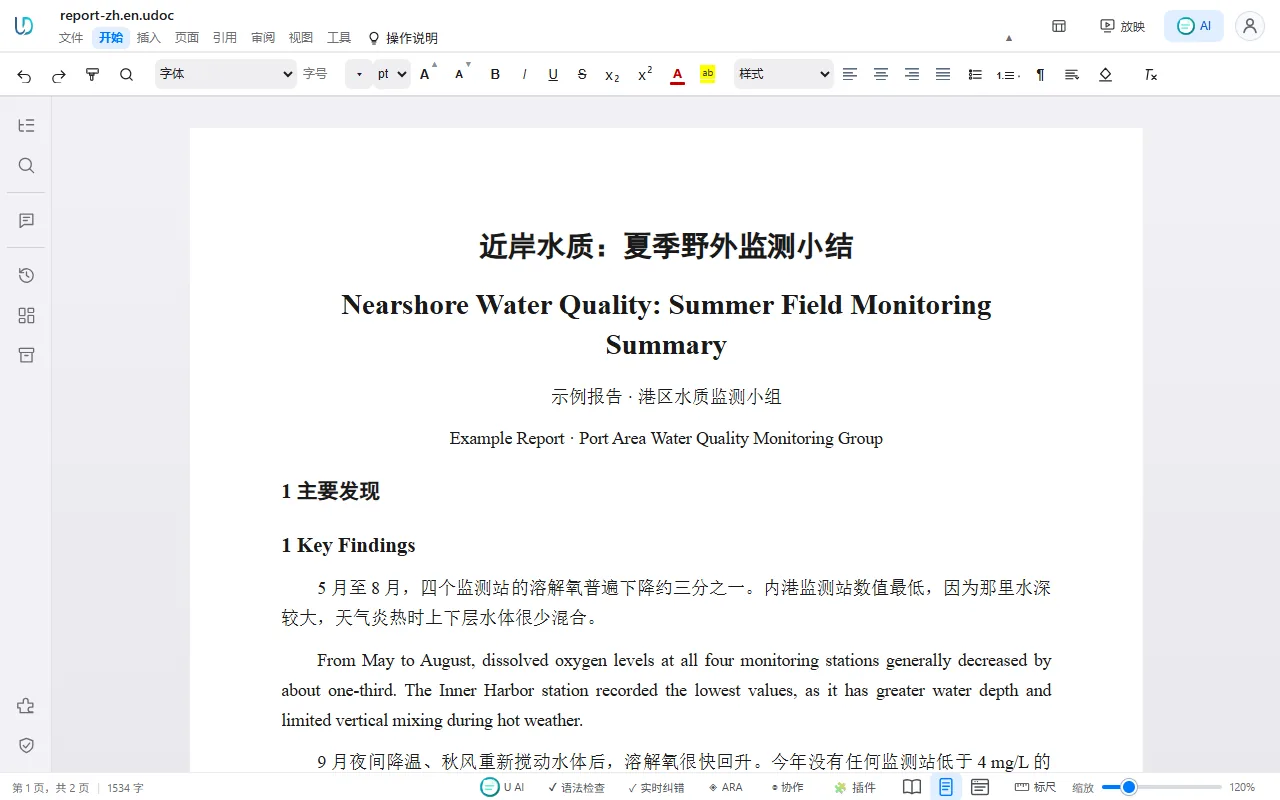
Bilingual translation Translated documents keep their layout. In bilingual mode the original and the translation share each paragraph, and the banner, cards and table stay in place.
OmniDoc Desktop 1.07: a free office suite every AI can use
OmniDoc Desktop in 56 seconds: open and edit Word, Excel, PowerPoint, PDF and Markdown for free, publish documents as web pages, and let AI assistants create and edit files through OmniDoc.
Translate documents, keep the layout
Upload papers, contracts and product manuals with complex layouts and translate them as they are
Multi-Engine Translation
Choose an engine before you translate: XiRang XR-397B, DeepSeek, Qwen, ChatGPT, Gemini, Claude.
Multi-Format Support
PDF, Word, PPT, Excel, CSV, images, ebooks, Markdown, HTML, subtitles and LaTeX: 15 formats, upload and translate.
Smart OCR
Recognizes text in scanned documents and images. Supports extracting and translating text embedded in PDF images.
API and MCP
Scripts translate in batches through the REST API, apps call Claude Haiku 5.5 through an OpenAI-compatible endpoint, and AI assistants such as Claude and Cursor create, edit, translate and publish documents through MCP.
Glossary Support
Upload a glossary to define how specific terms should be translated. Applied automatically to ensure consistent terminology.
Bilingual View
View original and translated text side by side for quick proofreading.
OmniDoc desktop: free and works offline
One app for Word, Excel, PowerPoint, PDF and Markdown files.
Every Office file, rendered as HTML
Word, Excel, PowerPoint, PDF and Markdown open, edit and present in a web engine. Export lossless HTML and publish it as a link in one click.
Free to use
Downloading, installing, local editing and format conversion are free and need no account. Only cloud services such as translation use credits, based on actual usage.
Faster
Native engines run on your computer: about 9 ms from keystroke to layout, 11 s to export a large Word file, about 1 s from PDF to HTML.
Interactive documents
Put charts, animations, flowcharts and formulas right in the document. Published as a web page they stay interactive, and AI can create them in one go.
Frequently Asked Questions
Why OmniDoc
A powerful AI document engine and office suite, all in one app
PDF layout reconstruction, interactive dynamic documents and AI-native office work in one app: translated PDFs keep their layout, documents become web pages, and AI builds your Word, Excel and PowerPoint files. The desktop app is free.
Papers and contracts translated, layout intact
Tables, formulas and footnotes stay in place, scans and LaTeX papers work too, and bilingual output is ready to hand in.
Powerful PDF layout reconstruction
Keep every page 1:1 as it looks, or rebuild paragraphs, headings, lists and reading order into a Word file you can edit right away. Offline on your computer.
Documents that move, shared as web pages
Put charts, animations and flowcharts in the document and readers can interact with them; export to Word or PDF whenever you need.
One sentence, and AI makes the Word, Excel or PPT
Connect Claude, Cursor or another AI assistant to write documents, build spreadsheets and decks, and convert PDFs on your own computer, at no cost.
Three core technologies behind every OmniDoc product
Structure extraction that keeps the layout, documents that are interactive web pages, and an office suite that AI assistants operate directly.
Production-grade structure extraction that keeps the layout
OmniDoc reads PDFs, Word files and scans into their real structure: headings, paragraphs, lists, tables, formulas, headers, footers, footnotes and reading order. Translation and conversion put every element back where it was, so a translated paper keeps its equations and a converted PDF keeps its pages.
PDF to a web page with selectable text in about one second on your own computer; scanned and complex pages go through visual structure extraction.
From a fixed PDF layout to a flowing document
A PDF only records where each piece of text sits on the page; it has no paragraphs or headings. OmniDoc rebuilds paragraphs, headings, lists, tables and reading order from those scattered blocks and writes an editable, flowing document, or keeps the original layout page by page when you need it.
UniDoc: documents that are interactive web pages
A UniDoc document can hold interactive charts, animations, flowcharts, tabs, cards and numbered equations that readers click, drag and play. Publish it and it stays interactive at a public web address; when you need a static copy, export the same file to Word, PDF or lossless HTML. AI assistants can write a whole interactive document in one go.
Native.udoc format, about 9 ms from keystroke to layout, and the same editor in the desktop app and the browser.
An AI-native office suite: your assistant does the work
OmniDoc Desktop ships with an MCP server of more than 40 tools. Claude, Cursor and other MCP apps use it to create and edit Word, Excel and PowerPoint files, convert PDFs, translate, publish and manage Zotero papers, and to check their own work: every edit returns layout problems, recalculated formulas or slide previews.
Runs on your computer: editing and conversion are offline and free; cloud services such as translation use credits.
Ask your AI assistant, get a finished file
Install OmniDoc Desktop and add it to Claude Desktop or Cursor in one click, or to any app that supports MCP. Your assistant then works on real files on your computer.
Word documents
Write reports, papers and résumés from templates, import an existing.docx, and save Word, PDF and lossless HTML in one call. Figures, tables and equations are numbered, and layout problems are reported back.
Excel workbooks
Build or change.xlsx files with formulas that are recalculated and checked, native Excel charts, pivot tables, conditional formatting, filters and sparklines.
PowerPoint decks
Create decks from your own template or a blank 16:9 deck, fill layouts with text, tables, charts and pictures, add animations and transitions, and catch overflowing text on every slide.
PDF conversion
Convert PDFs offline to Word with the page layout kept or as editable paragraphs, to HTML with selectable text, or to images; merge, split and compress PDFs.
Read, translate and publish
Read Word and PDF files in reading order, translate files with the same engines as omnidoc.top, and turn any document into a public web link.
Papers and Zotero
Search your Zotero library, add papers with their PDFs, notes and tags, and fetch a paper's full text from open-access sources or your own institutional sign-in.
Editing and conversion run offline at no cost. Translation and other cloud services use credits, and your assistant acts as the account signed in to OmniDoc, so there is no API key to paste.
APIs for developers
Document API
REST endpoints to upload files, run translation jobs, track them and download results, plus file tools, glossaries, instant text translation and audio and video jobs.
MCP server
The local MCP server in OmniDoc Desktop gives AI agents more than 40 document tools that work offline, with no API key.