agent-droid-bridge
Agent Droid Bridge otorga a los agentes de IA control programático sobre dispositivos Android y emuladores a través de ADB, expuesto como un servidor MCP.
Documentación









Agent Droid Bridge
Agent Droid Bridge es un servidor MCP que conecta agentes de IA a dispositivos Android y emuladores a través de ADB. Está diseñado para automatización móvil, pruebas de aplicaciones, análisis dinámico e ingeniería inversa: expone toda la superficie de ADB como herramientas estructuradas que cualquier cliente de IA compatible con MCP puede llamar directamente. Si ADB puede hacerlo, un agente puede hacerlo.
Las herramientas diseñadas específicamente devuelven respuestas estructuradas y mínimas. Sin volcados XML crudos, sin contexto desperdiciado: los agentes se mantienen rápidos en sesiones largas.

Demo
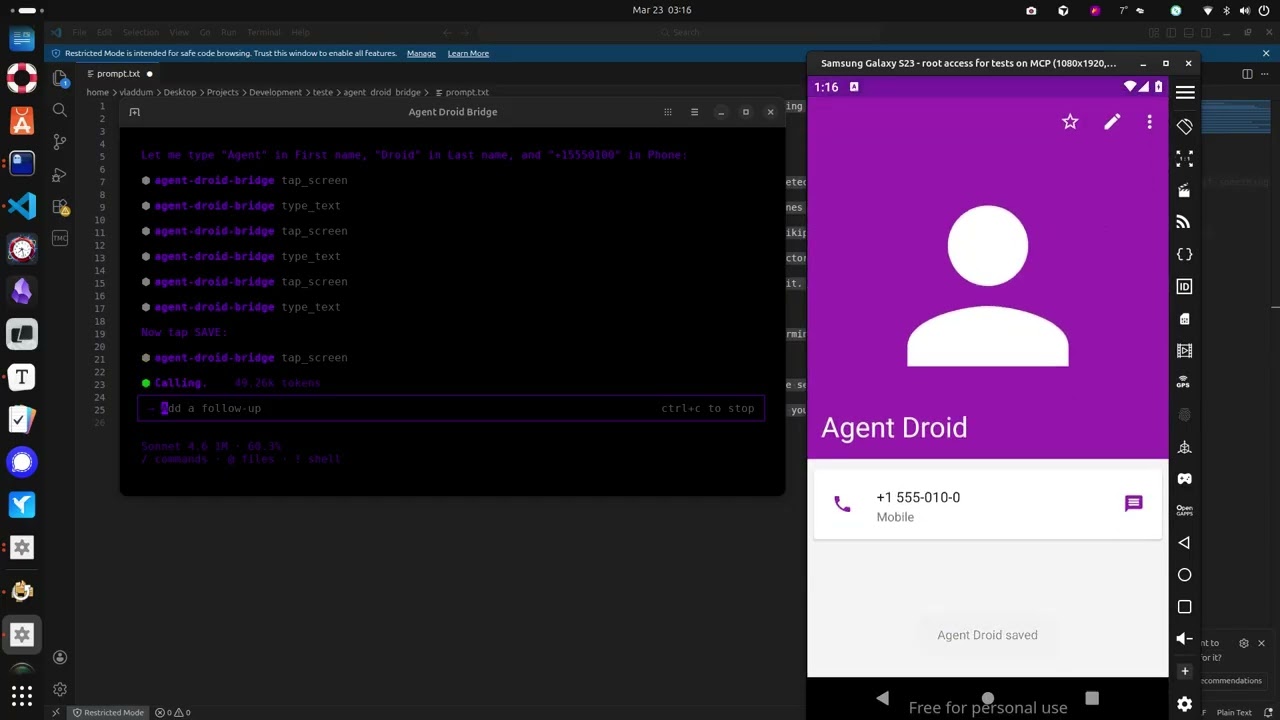
La demo anterior ejecuta algunas tareas sencillas para mostrar lo que un agente conectado puede hacer, y esto es solo la punta del iceberg:
- Instala la aplicación Paint, la abre y dibuja una casa calculando coordenadas de píxeles para las paredes y el techo
- Abre el navegador del dispositivo, busca "MCP Wikipedia", navega a la página de resultados y toma una captura de pantalla
- Abre la Calculadora, calcula 1337 × 42 y extrae el resultado a la máquina anfitriona
- Abre Contactos, crea una nueva entrada con nombre y número de teléfono, y confirma que se guardó
- Abre el Calendario y programa una cita para una fecha específica
- Abre Configuración y activa el modo oscuro
- Extrae el APK de la Calculadora del dispositivo a la máquina anfitriona
- Instala Notepad, escribe un resumen de una oración de cada tarea completada y toma una captura de pantalla final
Qué hace
Herramientas
- 14 herramientas integradas para captura de pantalla, inspección de interfaz, lectura de texto, extracción de elementos, entrada táctil y deslizamiento, entrada de texto, eventos de teclas, lanzamiento de aplicaciones, comandos ADB e inspección de dispositivos
- El paquete
app_managerañade 9 herramientas para gestión de paquetes, ciclo de vida de aplicaciones, extracción de APK, permisos e inyección de intents. Cárgalo conADB_EXTRA_TOOL_PACKS=app_manager - La disponibilidad de herramientas se refleja en las instrucciones de inicio del servidor. Los agentes reciben un catálogo preciso al momento de la conexión
Manejo de dispositivos
- Detecta automáticamente un único dispositivo conectado; solicita selección cuando hay múltiples dispositivos presentes
- Se ejecuta sobre stdio, compatible con cualquier cliente de IA compatible con MCP
- Respuestas estructuradas en lugar de volcados XML crudos, manteniendo el contexto del agente ágil en ejecuciones de automatización largas
Seguridad
- Dos modos de ejecución:
unrestricted(acceso completo a ADB, lista de denegación opcional) yrestricted(solo lista de permitidos, bloquea todo lo que no esté explícitamente permitido) - Establece
ADB_ALLOW_SHELL=falsepara deshabilitar todos los comandos de shell independientemente del modo - Oculta herramientas específicas del agente con
ADB_DENIED_TOOLS - Todos los comandos se analizan mediante
shlex. No es posible la inyección de shell
Observabilidad
- Un grabador de sesión opcional registra cada llamada de herramienta, comando ADB y evento de seguridad en archivos JSONL estructurados. Actívalo con
MCP_LOG_ENABLED=trueyMCP_LOG_DIR
Casos de uso
QA móvil y automatización de pruebas Automatiza flujos de interfaz en dispositivos reales y emuladores sin modificar la aplicación ni escribir código de prueba. Toca, desliza, escribe, lee contenido de pantalla, toma capturas de pantalla: todo desde un prompt en lenguaje natural.
Investigación de seguridad de aplicaciones Extrae APKs, inspecciona permisos declarados, dispara intents arbitrarios y observa el comportamiento en tiempo de ejecución en pantalla. Sin instrumentación, sin necesidad de jailbreak.
Análisis dinámico Lanza aplicaciones en estados controlados, impulsa interacciones de interfaz, captura el estado de pantalla en cada paso y extrae artefactos: todo programable a través de un agente de IA.
Desarrollo y depuración Instala builds, verifica estados de interfaz, consulta información de aplicaciones y ejecuta comandos ADB sin salir de tu entorno de codificación.
Instalación
uvx agent-droid-bridge
No se necesita clonar ni entornos virtuales. Requiere Python 3.11+ y ADB instalado en tu máquina anfitriona.
uvx lo proporciona uv. Si no lo tienes: curl -LsSf https://astral.sh/uv/install.sh | sh
Para instalar desde el código fuente en su lugar, consulta docs/setup.md — Opción B.
Para verificar la instalación: uvx agent-droid-bridge --help
Inicio rápido
- Instala ADB — consulta docs/setup.md para instrucciones específicas por plataforma
- Conecta un dispositivo Android o inicia un emulador
- Añade el servidor a la configuración de tu cliente MCP:
{
  "mcpServers": {
    "agent-droid-bridge": {
      "command": "uvx",
      "args": ["agent-droid-bridge"],
      "env": {
        "ADB_EXECUTION_MODE": "unrestricted",
        "ADB_ALLOW_SHELL": "true",
        "ADB_PATH": "adb",
        "ADB_EXTRA_TOOL_PACKS": "",
        "MCP_LOG_ENABLED": "false",
        "MCP_LOG_DIR": "~/logs/agent-droid-bridge"
      }
    }
  }
}
Para habilitar el registro de sesión, establece MCP_LOG_ENABLED a "true" y actualiza MCP_LOG_DIR a una ruta escribible en tu máquina.
| Variable | Predeterminado | Descripción |
|---|---|---|
ADB_EXECUTION_MODE | unrestricted | Modo de seguridad. unrestricted permite todos los comandos de shell (con lista de denegación opcional); restricted permite solo comandos en ADB_SHELL_ALLOWLIST. |
ADB_ALLOW_SHELL | true | Establece a false para bloquear todos los comandos adb shell independientemente del modo de ejecución. |
ADB_PATH | adb | Ruta al binario de ADB. Reemplázala con una ruta completa si adb no está en tu PATH del sistema (por ejemplo, C:\platform-tools\adb.exe en Windows). |
ADB_EXTRA_TOOL_PACKS | (vacío) | Lista separada por comas de paquetes de herramientas adicionales para cargar. Establece a app_manager para habilitar 9 herramientas adicionales de gestión de aplicaciones. |
MCP_LOG_ENABLED | false | Establece a true para habilitar el registro de sesión. Requiere MCP_LOG_DIR. |
MCP_LOG_DIR | (ninguno) | Directorio donde se escriben los registros de sesión. Requerido cuando MCP_LOG_ENABLED es true. |
- Indica a tu agente que use las herramientas MCP
agent-droid-bridge
Guía de configuración completa y referencia de variables de entorno: docs/setup.md
Herramientas
| Herramienta | Qué hace |
|---|---|
get_ui_hierarchy | Devuelve la pantalla actual como jerarquía de interfaz XML |
take_screenshot | Captura la pantalla como PNG codificado en base64 |
tap_screen | Envía un gesto de toque en coordenadas de píxeles |
swipe_screen | Envía un gesto de deslizamiento entre dos puntos durante una duración determinada |
type_text | Escribe texto en el campo de entrada enfocado |
press_key | Envía un evento de tecla Android (Atrás, Inicio, Enter, etc.) |
launch_app | Lanza una aplicación por su nombre de componente package/activity |
execute_adb_command | Ejecuta un comando ADB o ADB shell arbitrario |
list_devices | Lista todos los dispositivos Android visibles actualmente para ADB con su serial, estado y modelo |
snapshot_ui | Toma una instantánea ligera de la interfaz y devuelve un token para usar con detect_ui_change |
detect_ui_change | Consulta cambios de interfaz después de una acción; acepta un token de instantánea como línea base; devuelve la jerarquía solo cuando se solicita |
get_screen_elements | Analiza la jerarquía de interfaz y devuelve elementos estructurados con coordenadas y propiedades de interacción; admite modos tappable, interactive, input y all |
get_screen_text | Devuelve todo el texto visible en pantalla ordenado de arriba a abajo, como texto plano |
check_device_capabilities | Devuelve información estructurada del dispositivo — identidad, postura de seguridad y especificaciones de hardware — en una sola llamada; admite modos identity, security, hardware y all |
Paquetes de herramientas adicionales
Los paquetes opcionales amplían el conjunto de herramientas principal. Actívalos estableciendo ADB_EXTRA_TOOL_PACKS en la configuración de tu cliente MCP. Consulta docs/extra-tool-packs.md.
app_manager
Gestión de paquetes, control del ciclo de vida de aplicaciones, extracción de APK, gestión de permisos e inyección de intents.
| Herramienta | Qué hace |
|---|---|
list_packages | Lista paquetes instalados con filtrado, búsqueda y niveles de detalle opcionales |
get_app_info | Devuelve metadatos estáticos completos para una sola aplicación instalada |
install_app | Instala un APK desde una ruta del host en el dispositivo |
uninstall_app | Elimina una aplicación instalada por nombre de paquete |
pull_apk | Extrae el APK instalado del dispositivo al host |
manage_permission | Otorga, revoca, verifica o lista permisos de tiempo de ejecución para una aplicación |
launch_app_extra | Lanza una aplicación por nombre de paquete, resolviendo automáticamente la actividad de lanzador |
manage_app | Controla el estado de tiempo de ejecución de la aplicación — detener, borrar datos, borrar caché, habilitar, deshabilitar |
inject_intent | Dispara un intent a un componente mediante am start, am broadcast o am startservice |
Referencia completa de parámetros: docs/tools.md
Configuración
Configura el servidor completamente desde el bloque env de tu cliente MCP. No hay archivos que editar. El bloque de entorno del Inicio rápido anterior cubre la mayoría de los ajustes comunes. Para la referencia completa, incluidos filtros de seguridad, visibilidad de herramientas y tiempos de espera, consulta docs/configuration.md.
Para usar un archivo de configuración YAML en su lugar, establece ADB_CONFIG_SOURCE=yaml. Consulta docs/configuration.md para más detalles.
La grabación de sesión es independiente. Actívala con MCP_LOG_ENABLED=true y MCP_LOG_DIR. Referencia completa: docs/logging.md.
Documentación
| Archivo | Descripción |
|---|---|
| docs/setup.md | Requisitos previos, instalación y configuración del cliente MCP |
| docs/tools.md | Referencia completa de parámetros para todas las herramientas |
| docs/configuration.md | Referencia de variables de entorno y adb_config.yaml |
| docs/logging.md | Grabador de sesión — archivos de registro, niveles, retención y activación |
| docs/extra-tool-packs.md | Paquetes de herramientas adicionales — activación de paquetes, el contrato de paquetes y cómo escribir los tuyos |
| docs/troubleshooting.md | Problemas comunes de configuración y problemas de ADB |
| docs/workflows.md | Flujos de trabajo comunes con múltiples herramientas y ejemplos |
| CHANGELOG.md | Historial de versiones y cambios |
Contribuciones
Las contribuciones son bienvenidas. Consulta CONTRIBUTING.md para las pautas sobre configuración, estándares de código y envío de solicitudes de extracción. Para reportar una vulnerabilidad de seguridad, sigue el proceso en SECURITY.md — no abras un issue público.