MCP Storybook Image Generator
Genera imágenes de cuentos infantiles usando la IA Gemini de Google.
GitHub
6
Prueba este MCPPatrocinadoDocumentación
MCP Storybook Image Generator
Un servidor de nivel profesional que genera hermosas imágenes de cuentos infantiles con historias correspondientes utilizando la IA Gemini de Google.
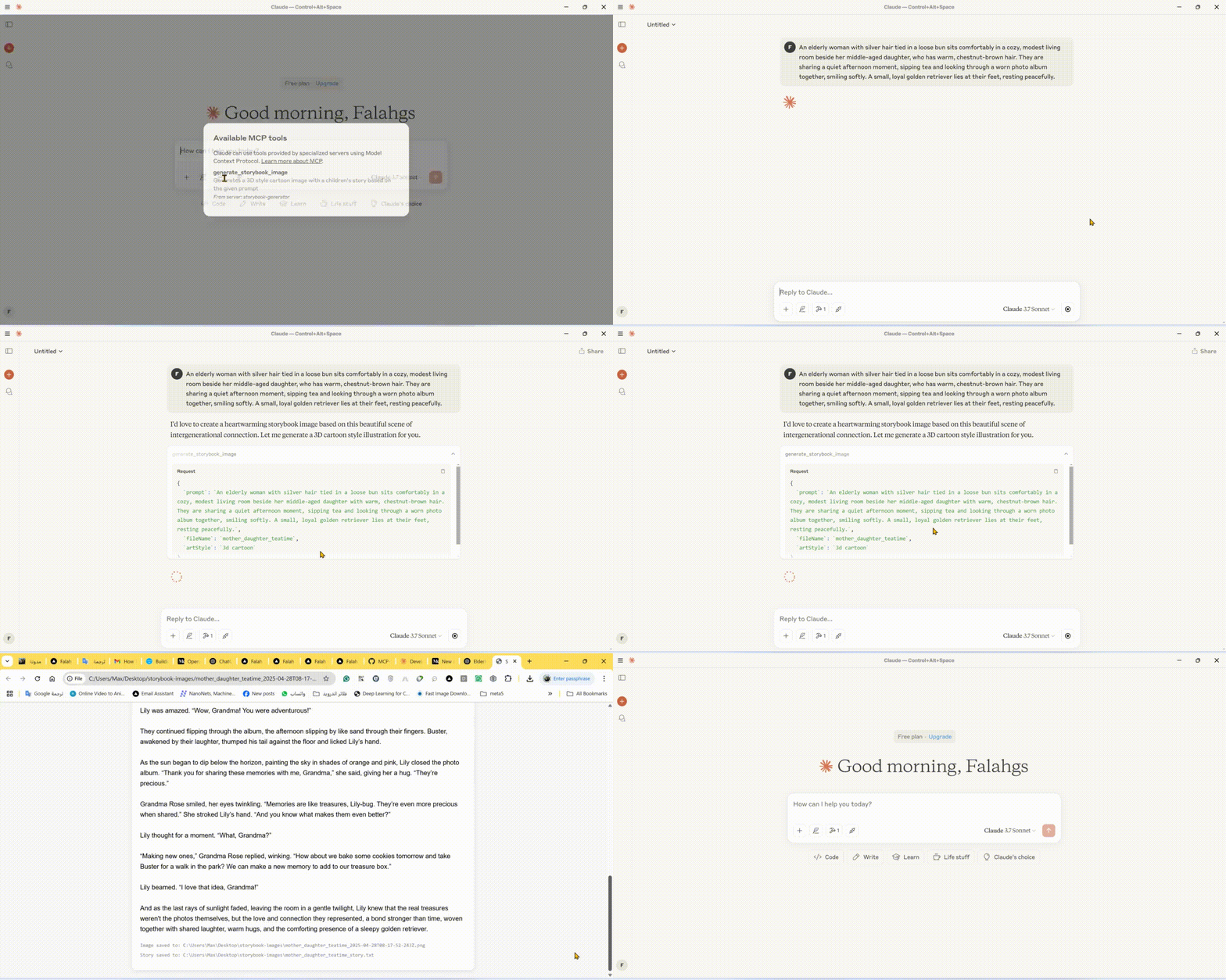
🎬 Demo
🌟 Características
- Generación de Imágenes de Cuentos: Crea imágenes de alta calidad en varios estilos artísticos para cuentos infantiles
- Creación Automática de Historias: Genera cuentos infantiles atractivos que coinciden con las imágenes
- Múltiples Estilos Artísticos: Elige entre estilos 3D cartoon, acuarela, pixel art, dibujo a mano o claymation
- Vista Previa Instantánea: Abre automáticamente las imágenes e historias generadas en tu navegador
- Almacenamiento Local: Guarda imágenes e historias en un directorio de salida organizado
🛠️ Stack Técnico
- Framework Principal: Model Context Protocol (MCP) SDK
- Integración de IA: Google Generative AI (Gemini)
- Runtime: Node.js v14+
- Lenguaje: TypeScript
- Gestor de Paquetes: npm
📋 Requisitos Previos
- Node.js (v14 o superior)
- Clave de API de Google Gemini
- TypeScript
⚙️ Instalación
- Instala las dependencias:
npm install
- Configura el entorno:
Crea un archivo
.enven el directorio raíz:
GEMINI_API_KEY=your_api_key_here
- Compila el proyecto:
npm run build
🚀 Usando la CLI
Puedes usar el generador de cuentos directamente desde la línea de comandos:
# Using npx (after publishing to npm)
npx mcp-storybook-image-generator --api-key your_api_key_here --save-to-desktop

# Or run locally
node build/cli.js --api-key your_api_key_here --save-to-desktop
Opciones de Línea de Comandos
| Opción | Descripción |
|---|---|
--api-key <key> | Establece tu clave de API de Gemini |
--save-to-desktop | Guarda los archivos generados en el escritorio |
--debug | Habilita el registro de depuración |
--help | Muestra información de ayuda |
🔧 Configurando Claude Desktop con el Servidor MCP
Para integrar este servidor con Claude Desktop:
-
Localiza el Archivo de Configuración de Claude Desktop:
- Windows:
%APPDATA%\Claude\claude_desktop_config.json - macOS:
~/Library/Application Support/Claude/claude_desktop_config.json - Linux:
~/.config/Claude/claude_desktop_config.json
- Windows:
-
Agrega la siguiente configuración:
{
  "mcpServers": {
    "storybook-generator": {
      "command": "npx",
      "args": [
        "-y",
        "mcp-storybook-image-generator@latest",
        "--api-key",
        "your_gemini_api_key_here"
      ],
      "env": {
        "SAVE_TO_DESKTOP": "true",
        "DEBUG": "false"
      }
    }
  }
}
🚀 Herramienta Disponible
Herramienta Generador de Imágenes de Cuentos
{
  "name": "generate_storybook_image",
  "description": "Generates a 3D style cartoon image with a children's story based on the given prompt",
  "inputSchema": {
    "type": "object",
    "properties": {
      "prompt": {
        "type": "string",
        "description": "The prompt describing the storybook scene to generate"
      },
      "fileName": {
        "type": "string",
        "description": "Base name for the output files (without extension)"
      },
      "artStyle": {
        "type": "string",
        "description": "The art style for the image (default: '3d cartoon')",
        "enum": ["3d cartoon", "watercolor", "pixel art", "hand drawn", "claymation"]
      }
    },
    "required": ["prompt", "fileName"]
  }
}
📄 Ejemplo de Uso
Ejemplos de Generación de Cuentos
// Generate a storybook with a 3D cartoon style
{
  "name": "generate_storybook_image",
  "arguments": {
    "prompt": "A friendly dragon teaching kids how to fly",
    "fileName": "dragon_flight_lesson",
    "artStyle": "3d cartoon"
  }
}

// Generate a storybook with a watercolor style
{
  "name": "generate_storybook_image",
  "arguments": {
    "prompt": "A rabbit and turtle having a tea party in the forest",
    "fileName": "forest_tea_party",
    "artStyle": "watercolor"
  }
}

// Generate a storybook with pixel art style
{
  "name": "generate_storybook_image",
  "arguments": {
    "prompt": "A space adventure with a kid astronaut meeting friendly aliens",
    "fileName": "space_adventure",
    "artStyle": "pixel art"
  }
}
⚙️ Opciones de Configuración
Variables de Entorno
| Variable | Descripción | Predeterminado |
|---|---|---|
GEMINI_API_KEY | Clave de API de Google Gemini para generación con IA | (Requerido) |
SAVE_TO_DESKTOP | Forzar guardado en el directorio del escritorio | false |
DEBUG | Habilitar registro de depuración detallado | false |
📝 Archivos de Salida
Para cada solicitud de generación de cuentos, el servidor produce:
- Imagen PNG: La ilustración generada que coincide con tu prompt en el estilo artístico solicitado
- Archivo de Texto: El cuento infantil correspondiente en formato de texto plano
- Vista Previa HTML: Una vista combinada que muestra tanto la imagen como la historia juntas
Estos archivos se guardan en:
- Tu escritorio en una carpeta llamada "storybook-images" (si
SAVE_TO_DESKTOP=true) - El directorio del servidor en una carpeta llamada "storybook-images"
🤝 Contribuciones
¡Las contribuciones, problemas y solicitudes de funciones son bienvenidos! No dudes en consultar la página de problemas.
📄 Licencia
Este proyecto está licenciado bajo la Licencia MIT - consulta el archivo LICENSE para más detalles.