Claude Prompts MCP Server
Un servidor MCP universal que carga prompts desde un archivo de configuración JSON externo.
Documentación

Claude Prompts
La capa de flujo de trabajo portátil junto a tu entorno de codificación con IA.
Tu cliente ejecuta con sus propias herramientas, agentes y contexto.
Claude Prompts añade recursos de prompts reutilizables, cadenas componibles, compuertas de validación y exportación de habilidades nativas del cliente.


Inicio rápido · Lo que obtienes · Componer flujos de trabajo · Ejecutar en cualquier lugar · Documentación
Lo que tu cliente de IA te ofrece — y lo que este servidor añade
| Tu cliente ya hace | Este servidor añade |
|---|---|
| Ejecutar un prompt | Componer prompts con validación, guía de razonamiento y formato en una sola expresión |
| Habilidades de un solo paso | Flujos de trabajo de varios pasos que conectan contexto entre pasos |
| Ejecutar subagentes | Transferir pasos intermedios de la cadena a agentes con contexto completo del flujo de trabajo |
| Formato de habilidad nativo del cliente | Crear una vez como YAML, exportar a cualquier cliente con skills:export |
| Escritura manual de prompts | Plantillas versionadas con recarga en caliente, reversión e historial |
| Confiar en la salida | Validar la salida entre pasos: autoevaluación y comandos de shell |
¿Es esto para mí?
- Úsalo si escribes los mismos prompts repetidamente, ejecutas flujos de trabajo de varios pasos o quieres compartir prompts reutilizables con un equipo.
- Omítelo si las
/commandsintegradas de tu cliente ya manejan lo que necesitas, o buscas una biblioteca de prompts sin código. - Funciona con Claude Code, Claude Desktop, Cursor, OpenCode, Gemini CLI, Codex, Windsurf y Zed. Los instaladores de plugins añaden enlaces (seguimiento de cadenas, aplicación de compuertas, preservación de estado) para Claude Code, OpenCode, Gemini CLI y Codex (experimental); otros clientes ejecutan solo MCP.
Inicio rápido
Claude Code (Recomendado)
# Add marketplace (first time only)
/plugin marketplace add minipuft/minipuft-plugins

# Install
/plugin install claude-prompts@minipuft

# Try it
>>tech_evaluation_chain library:'zod' context:'API validation'
Configuración de desarrollo
Carga el plugin desde la fuente local para desarrollo:
git clone https://github.com/minipuft/claude-prompts-mcp ~/Applications/claude-prompts-mcp
cd ~/Applications/claude-prompts-mcp/server && npm install && npm run build
claude --plugin-dir ~/Applications/claude-prompts-mcp
Edita hooks/prompts → reinicia Claude Code. Edita TypeScript → recompila primero.
Codex (Experimental)
Los hooks de Codex requieren Codex CLI 0.117 o posterior y no están disponibles en Windows. Consulta los requisitos de codex-prompts para los prerrequisitos de Python y Node.js.
Habilita los hooks en ~/.codex/config.toml:
[features]
hooks = true
Luego instala el plugin:
codex plugin marketplace add https://github.com/minipuft/minipuft-plugins.git
codex plugin add codex-prompts@minipuft
Reinicia Codex, ejecuta /hooks para revisar los hooks del plugin y luego prueba >>tech_evaluation_chain library:'zod' context:'API validation'.
Más configuraciones de clientes
Claude Desktop
Opción A: Lanzamiento de GitHub (recomendado)
- Descarga
claude-prompts-{version}.mcpbdesde Lanzamientos - Arrastra a Configuración de Claude Desktop → Servidores MCP
- Listo
El paquete .mcpb es autónomo (~5MB); no requiere npm.
Opción B: NPX (actualizaciones automáticas)
Añade a tu archivo de configuración:
- macOS:
~/Library/Application Support/Claude/claude_desktop_config.json - Windows:
%APPDATA%\Claude\claude_desktop_config.json
{
  "mcpServers": {
    "claude-prompts": {
      "command": "npx",
      "args": ["-y", "claude-prompts@latest", "--client", "claude-code"]
    }
  }
}
Reinicia Claude Desktop y prueba: >>research_chain topic:'remote team policies'
Otros clientes: VS Code · Cursor · OpenCode · Gemini CLI · Windsurf · Zed · Desde la fuente
Configuración del cliente: VS Code, Cursor y otros clientes solo MCP usan la guía de configuración manual a continuación.
Instaladores de plugins (recomendados donde estén disponibles; añaden hooks):
# OpenCode (full hooks)
npm install -g opencode-prompts && opencode-prompts install

# Gemini CLI (partial hooks)
gemini extensions install https://github.com/minipuft/gemini-prompts
Configuración manual para VS Code, Cursor, OpenCode (sin hooks), Gemini CLI (sin hooks), Codex (sin hooks de plugin), Windsurf y Zed: consulta la Guía de integración de clientes para ubicaciones de configuración por cliente, ejemplos JSON y la matriz de preajustes --client. La Referencia de capacidades del cliente cubre el mapeo de perfiles y los límites.
Desde la fuente (desarrolladores):
git clone https://github.com/minipuft/claude-prompts-mcp.git
cd claude-prompts-mcp/server && npm install && npm run build && npm test
Apunta tu configuración MCP a server/dist/index.js. Transporte: --transport=stdio (predeterminado) o --transport=streamable-http.
Recursos personalizados: --init=~/my-prompts genera un espacio de trabajo inicial: tres prompts de ejemplo más config.jsonc. Edítalos (esquema YAML) o haz que tu IA cree nuevos prompts, compuertas y marcos mediante resource_manager. Apunta MCP_RESOURCES_PATH a un espacio de trabajo existente si ya tienes uno con la forma adecuada. Consulta la Guía de recursos personalizados.
Lo que obtienes
Cuatro primitivas que creas, versionas y compones. El conjunto incluido trae 51 prompts en 9 categorías — una biblioteca inicial, no el límite: tu IA escribe nuevos prompts y cadenas mediante resource_manager mientras trabaja, por lo que el conjunto crece alrededor de lo que realmente haces. Todo con recarga en caliente, todo versionado con reversión.
| Primitiva | Símbolo | Qué es | Ejemplo |
|---|---|---|---|
| Plantilla de prompt | >> | YAML versionado con argumentos nombrados; recarga en caliente al guardar | >>review target:'src/auth/' |
| Compuerta | :: | Criterio de validación contra el que la IA verifica su propia salida; bloqueante o consultiva; puede verificar con shell | :: 'cite sources' · :: verify:"npm test" |
| Marco | @ | Marco de razonamiento que da forma a cómo la IA trabaja el problema; conecta el tuyo propio o usa los integrados como @ReACT, @5W1H o el andamiaje @CAGEERF del propio proyecto (Guía de marcos) | @ReACT · @your_framework |
| Estilo | # | Formato y tono de la salida | #analytical · #procedural |
Los prompts, compuertas y marcos se gestionan mediante la herramienta resource_manager. Tu IA crea, edita, versiona y revierte a través de MCP, sin necesidad de editar archivos. Los estilos se gestionan con la CLI cpm incluida. Las compuertas fallidas pueden reintentar automáticamente o pausar para tu decisión (Guía de compuertas). Construye tu primera primitiva: Tutorial de creación de prompts.
Las tres herramientas
Todo lo anterior llega a tu cliente mediante tres herramientas MCP:
| Herramienta | Propósito |
|---|---|
prompt_engine | Ejecutar prompts con marcos y validación |
resource_manager | Crear, actualizar, versionar y revertir recursos |
system_control | Estado, analíticas, cambio de marcos |
La mayoría de los usuarios invocan estas mediante la sintaxis >> en la conversación; los hooks construyen las llamadas reales. Para clientes MCP programáticos que llaman herramientas directamente, consulta la Referencia de herramientas MCP.
Componer flujos de trabajo
Cómo escribir una cadena
>>review target:'src/auth/' @ReACT :: 'cite sources'
  --> security_scan :: verify:"npm test"
  ==> implementation
Lee de arriba a abajo:
>>review target:'src/auth/'ejecuta el promptreviewcontra tu carpeta de autenticación.@ReACTsuperpone el marco de razonamiento ReACT en este paso.:: 'cite sources'añade una compuerta que la IA debe cumplir (citar fuentes o reintentar).--> security_scan :: verify:"npm test"encadena al paso 2, que debe pasarnpm testantes de producir la salida.==> implementationtransfiere el paso final a un agente nativo del cliente (un subagente en Claude Code).
review se incluye con el servidor; security_scan y implementation representan prompts que tú escribes.
La validación se ejecuta entre pasos, no solo al final. Para la gramática completa de operadores y ejemplos, consulta la Referencia de herramientas MCP.
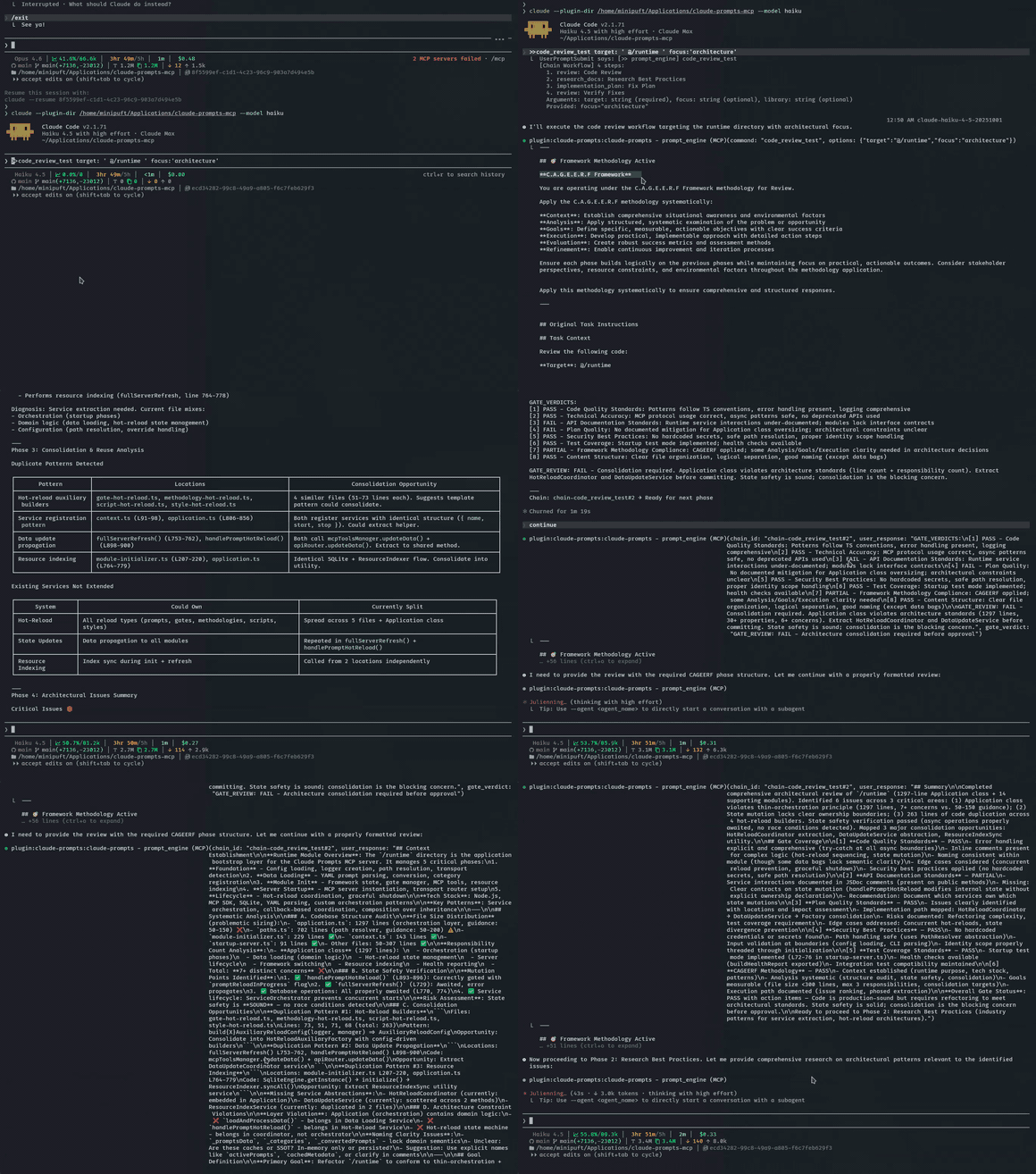
Una compuerta detecta un campo faltante, el modelo se corrige y la cadena pasa. Registrado en haiku, el modelo más económico.
Dos patrones extienden la sintaxis básica. Las cadenas también admiten conexión de contexto entre pasos y transferencias de agentes. Consulta Ciclo de vida de cadenas y Referencia de herramientas MCP.
Ver la salida: cadena de evaluación técnica con investigación context7
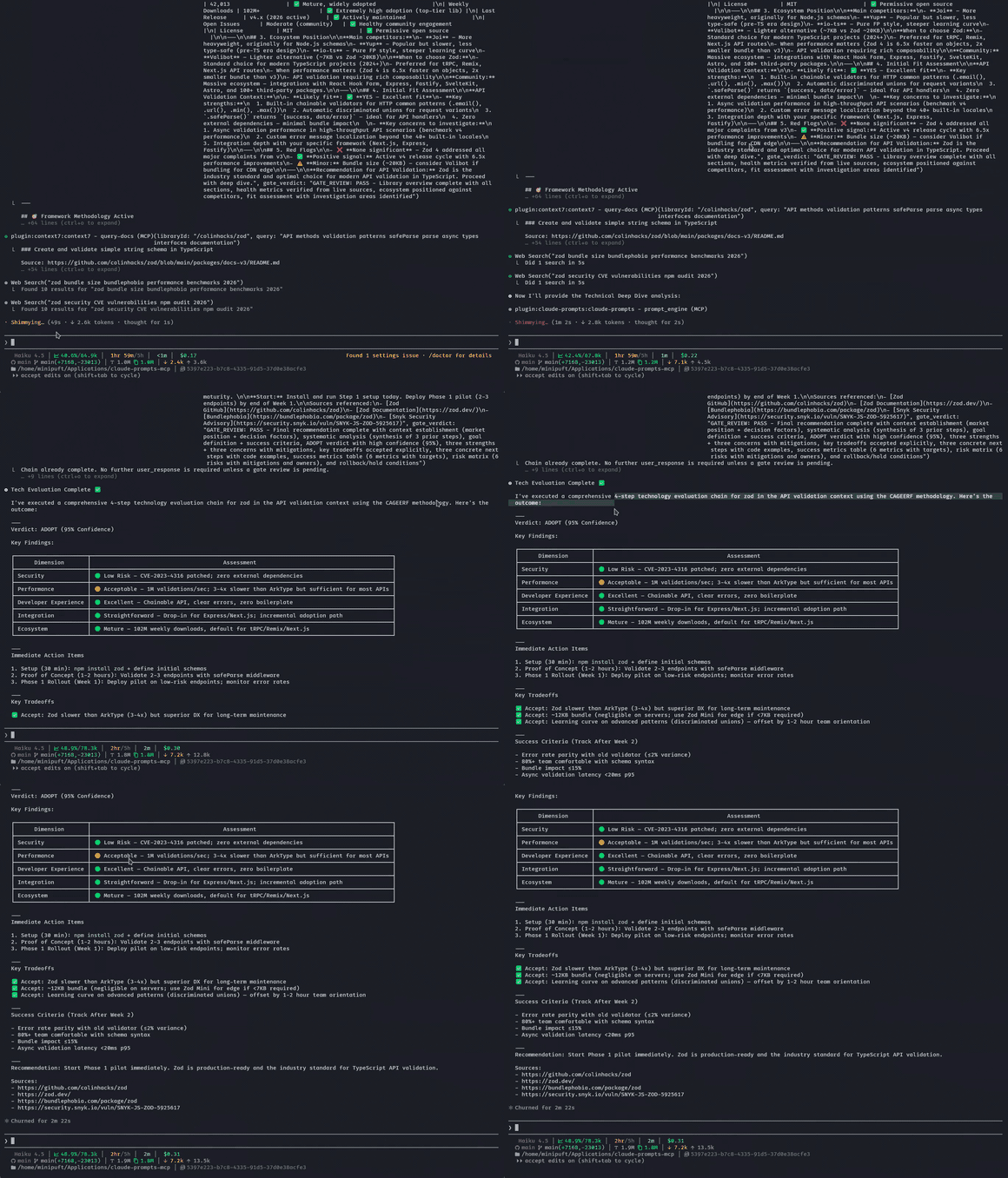
Context7 obtiene documentación de bibliotecas en vivo en medio de la cadena. La salida final es una evaluación estructurada con fuentes.
Bucles de verificación
Validación de verdad fundamental mediante comandos de shell. La IA sigue iterando hasta que las pruebas pasan:
>>implement-feature :: verify:"npm test" loop:true
Implementa, ejecuta la prueba, lee los fallos, corrige, reintenta. Genera un contexto nuevo después de fallos repetidos para evitar la degradación del contexto.
implement-feature representa tu propio prompt: :: verify se adjunta a cualquiera de ellos.
| Preajuste | Intentos | Tiempo de espera | Caso de uso |
|---|---|---|---|
:fast | 1 | 30s | Verificación rápida |
:full | 5 | 5 min | Validación de CI |
:extended | 10 | 10 min | Suites de pruebas grandes |
Para ciclos autónomos de prueba-corrección con prevención de degradación del contexto: Guía de bucles Ralph.
Modo juez
Deja que la IA elija los recursos adecuados para la tarea:
%judge Help me refactor this authentication module
Analiza las plantillas disponibles, marcos de razonamiento, reglas de validación y estilos, luego recomienda la mejor combinación. Tú confirmas antes de que se ejecute. Para puntuación y anulaciones, consulta la Guía del modo juez.
Ejecutar en cualquier lugar
Crea flujos de trabajo como plantillas YAML. Exporta como habilidades nativas a tu cliente.
[!IMPORTANTE] Hay dos ámbitos de fuente de verdad. El YAML de prompts MCP bajo
server/resources/es canónico para las habilidades compiladas por este repositorio. Las habilidades operativas compartidas creadas por usuarios, reglas e instrucciones globales son canónicas en~/.claude; las instalaciones de Codex y OpenCode son consumidores descendentes unidireccionales y no deben editarse de forma independiente. Codex usa enlaces simbólicos por habilidad; Codex y OpenCode comparten unAGENTS.mdglobal generado que contiene elCLAUDE.mdglobal más el despacho compacto de reglas. OpenCode descubre de forma nativa~/.claude/skillsy carga ese archivo generado mediante su configuracióninstructions.~/.codex/rules/permanece reservado para la política de ejecución de comandos de Codex. Las pautas del repositorio siguen la misma regla de propiedad.CLAUDE.mdmás.claude/rules/*.mdson canónicos; elAGENTS.mdrastreado es una proyección compacta generada para clientes que prefieren ese nombre de archivo. Incluye secciones seleccionadas del manual del proyecto, además de entradas de despacho condicional para cada regla de Claude, en lugar de copiar todos los cuerpos de reglas en un contexto siempre cargado. El renderizador aplica el presupuesto documentado por defecto de 32 KiB para la guía del proyecto de Codex. Un hook de pre-commit lo regenera a partir de los bytes fuente en stage, y CI rechaza desviaciones:
npm run guidance:sync   # regenerate AGENTS.md
npm run guidance:check  # verify the committed projection
# skills-sync.yaml — choose what to export
registrations:
  claude-code:
    user:
      - prompt:development/review
      - prompt:development/validate_work
npm run skills:export
El prompt review se convierte en una habilidad de Claude Code /review. validate_work se convierte en /validate_work. Misma fuente, experiencia nativa; no se requiere llamada MCP en tiempo de ejecución.
Se compila a habilidades de Claude Code, reglas de Cursor, comandos de OpenCode y más. npm run skills:diff marca cuando las exportaciones se desvían de la fuente. Configuración, clientes compatibles y detección de desviaciones: Guía de sincronización de habilidades.
Con Hooks
Sin hooks, estás llamando a las tres herramientas MCP explícitamente (el LLM construye cada llamada). Con hooks, los operadores funcionan en conversación: >>, -->, ==>, :: se sienten nativos en lugar de mediados, y el estado del flujo de trabajo sobrevive entre turnos del LLM y compactación de contexto.
Lo que los hooks desbloquean:
| Hook | Desbloquea |
|---|---|
| Enrutamiento automático | >>research_chain topic:'X' en el chat dispara la llamada correcta a la herramienta MCP sin que la nombres |
| Continuidad de cadena entre compactaciones | Las cadenas de múltiples pasos preservan el estado cuando el contexto se compacta a mitad de ejecución; la cadena no se reinicia desde cero |
| Seguimiento de veredictos entre pasos | Los veredictos de aprobación/rechazo se entrelazan a través de todos los pasos de la cadena sin que el LLM los vuelva a derivar |
| Transferencias nativas de agentes | ==> enruta automáticamente al sistema de subagentes de tu cliente; sin invocación manual de subagentes |
| Persistencia de sesión | El estado del flujo de trabajo se preserva cuando el contexto se compacta a mitad de cadena |
Los hooks se incluyen con la instalación del plugin. Soporte completo en Claude Code (este repositorio) y OpenCode; parcial en Gemini CLI; experimental en Codex, donde los hooks de Codex están desactivados por defecto y cada instalación requiere una revisión de confianza /hooks única. Otros clientes obtienen las tres herramientas MCP pero sin comportamientos impulsados por hooks. Detalle: hooks/README.md.
Cómo Funciona
Comando con operadores → el servidor analiza e inyecta recursos (marco, compuertas, estilo) → el cliente ejecuta el prompt renderizado y se autoevalúa contra las compuertas → el enrutador decide: siguiente paso al aprobar, reintentar al fallar, regresar al terminar.
Ciclo de vida completo de la solicitud, etapas del pipeline y diagramas de subsistemas: Descripción general de la arquitectura.
Documentación
Elige una guía según lo que quieras hacer: aprender construyendo, completar una tarea, consultar sintaxis o entender el diseño.
Accesos rápidos: Construye tu primer prompt · Ciclo de vida de cadenas · Referencia de herramientas MCP · Descripción general de la arquitectura · Solución de problemas
Contribuciones
cd server
npm install
npm run build        # esbuild bundles to dist/index.js
npm test             # Run test suite
npm run validate:all # Full CI validation
La compilación produce un paquete autocontenido. server/dist/ está en gitignore, y CI compila desde cero a partir de la fuente.
Consulta CONTRIBUTING.md para los detalles del flujo de trabajo.