Code Reasoning
Mejora la capacidad de Claude para resolver tareas complejas de programación mediante un pensamiento estructurado y paso a paso.
GitHub
259
Prueba este MCPPatrocinadoDocumentación
Servidor MCP Code Reasoning
Un servidor de Model Context Protocol (MCP) que mejora la capacidad de Claude para resolver tareas complejas de programación mediante un pensamiento estructurado y paso a paso.


Instalación Rápida
-
Configura Claude Desktop editando:
- macOS:
~/Library/Application Support/Claude/claude_desktop_config.json - Windows:
%APPDATA%\Claude\claude_desktop_config.json - Linux:
~/.config/Claude/claude_desktop_config.json
{ "mcpServers": { "code-reasoning": { "command": "npx", "args": ["-y", "@mettamatt/code-reasoning"] } } } - macOS:
-
Configura VS Code:
{
  "mcp": {
    "servers": {
      "code-reasoning": {
        "command": "npx",
        "args": ["-y", "@mettamatt/code-reasoning"]
      }
    }
  }
}
Uso
-
Para activar este MCP, añade esto a tus mensajes de chat:
Use sequential thinking to reason about this. -
Usa indicaciones listas para usar que activen Code-Reasoning:
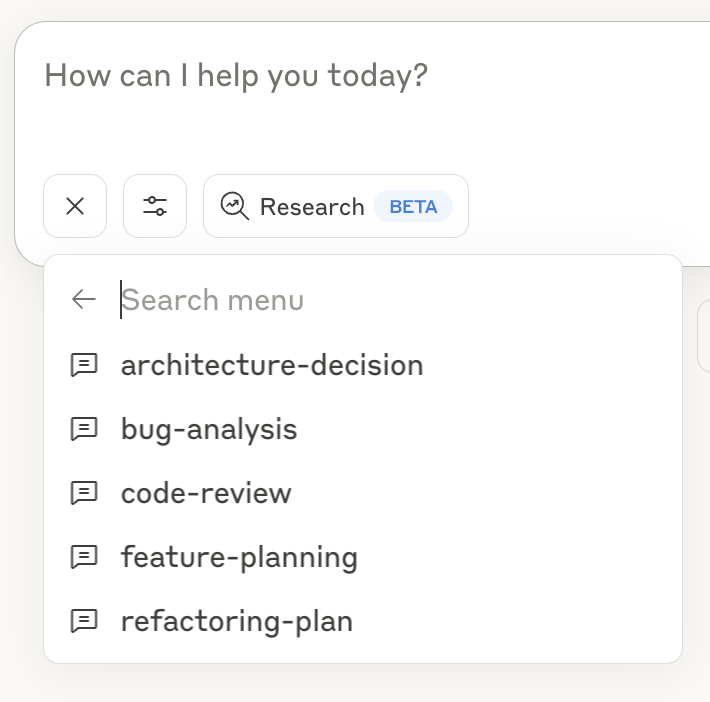
- Haz clic en el icono "+" en la ventana de chat de Claude Desktop, o en Claude Code escribe
/helppara ver los comandos específicos. - Selecciona "Add from Code Reasoning" de las herramientas disponibles
- Elige una plantilla de indicación y completa la información requerida
- Envía el formulario para añadir la indicación a tu mensaje de chat y pulsa Enter
Consulta la Guía de Indicaciones para obtener detalles sobre el uso de las plantillas de indicaciones.
Opciones de Línea de Comandos
--debug: Habilita el registro detallado--helpo-h: Muestra información de ayuda
Características Principales
- Enfoque en Programación: Optimizado para tareas de codificación y resolución de problemas
- Pensamiento Estructurado: Descompone problemas complejos en pasos manejables
- Ramas de Pensamiento: Explora múltiples rutas de solución en paralelo
- Revisión de Pensamiento: Refina el razonamiento anterior a medida que mejora la comprensión
- Límites de Seguridad: Se detiene automáticamente después de 20 pasos de pensamiento para evitar bucles
- Indicaciones Listas para Usar: Plantillas predefinidas para tareas comunes de desarrollo
Documentación
Documentación detallada disponible en el directorio docs:
- Ejemplos de Uso: Ejemplos de pensamiento secuencial con el servidor MCP
- Guía de Configuración: Todas las opciones de configuración para el servidor MCP
- Guía de Indicaciones: Uso y personalización de indicaciones con el servidor MCP
- Marco de Pruebas: Información sobre pruebas
Estructura del Proyecto
├── index.ts                  # Entry point
├── src/                      # Implementation source files
└── test/                     # Placeholder for future test utilities
Licencia
Este proyecto está licenciado bajo la Licencia MIT. Consulta el archivo LICENSE para más detalles.