AGS Extend SDK MCP Server
oficialUn servidor MCP para ayudar a los asistentes de IA a responder preguntas y generar código del SDK de AccelByte Extend de manera más efectiva.
¿Qué puedes hacer con AGS Extend SDK MCP?
- Buscar símbolos del SDK de Extend — encuentra funciones y modelos en C#, Go, Java o Python usando coincidencias aproximadas por nombre, etiquetas o descripción con
search-symbols. - Describir símbolos específicos — obtén detalles completos de un símbolo por ID, incluyendo parámetros, campos, importaciones, tipos de retorno, ejemplos de uso y permisos requeridos con
describe-symbols. - Crear una nueva aplicación Extend — invoca el prompt
create-extend-apppara clonar un repositorio de plantilla y comenzar desde un ejemplo funcional en el lenguaje que elijas.
Documentación
Servidor MCP de AGS Extend SDK
Un servidor del Protocolo de Contexto de Modelo (MCP) que proporciona a los asistentes de IA (VS Code Copilot, Cursor, Claude, Gemini, Antigravity) el SDK de Extend de AccelByte como contexto adicional, para que puedan responder preguntas sobre el SDK y generar código correcto del SDK de Extend.
Qué hace
- Buscar símbolos del SDK de Extend (funciones y modelos) por nombre, etiquetas o descripción (coincidencia difusa)
- Describir símbolos específicos — parámetros, campos, importaciones, ejemplos, tipo de retorno, permisos requeridos
- Andamiar una nueva aplicación Extend desde un repositorio de plantilla mediante el prompt
create-extend-app
Sirve como referencia del SDK para cuatro lenguajes — C#, Go, Java y Python. Eliges el lenguaje por conexión a través de la ruta URL (consulta Elige tu lenguaje).
AccelByte aloja el Servidor MCP de Extend SDK por ti — no necesitas instalar ni ejecutar nada localmente. Solo apunta tu asistente de IA a la URL MCP alojada para tu lenguaje. No requiere inicio de sesión: el servidor solo expone datos de referencia del SDK de solo lectura. ¿Prefieres ejecutarlo tú mismo? Consulta Ejecución local y autoalojamiento.
Instalación rápida
Pega esto en tu asistente de codificación con IA — obtendrá la guía de instalación, te hará un par de preguntas y configurará todo por ti:
Install the AGS Extend SDK MCP server for me. Fetch and follow the instructions at
https://raw.githubusercontent.com/AccelByte/ags-extend-sdk-mcp-server/refs/heads/master/INSTALL.md
Funciona en VS Code Copilot, Cursor, Claude Code, Antigravity y Gemini CLI.
Usuarios de Claude Desktop: La ruta más sencilla es Configuración → Conectores → Agregar conector personalizado (Nombre:
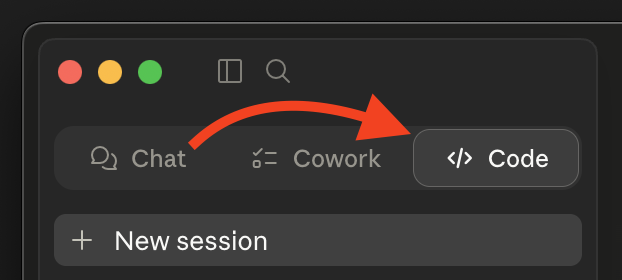
extend-sdk, URL: tu URL MCP) — no se necesita instalador de IA. Consulta Claude Desktop más abajo.Si quieres usar el prompt de instalación rápida de arriba, cambia primero a la pestaña Código (Chat y Cowork no pueden editar tu archivo de configuración).
¿Prefieres hacerlo tú mismo? Consulta Instalación manual más abajo.
Instalación manual
Paso 1: Elige tu lenguaje y obtén tu URL
La URL MCP es la URL base del servidor alojado seguida de /extend-mcp/{language}:
https://<mcp-server-host>/extend-mcp/{language}
| Lenguaje | Ruta URL |
|---|---|
| C# | /extend-mcp/csharp |
| Go | /extend-mcp/go |
| Java | /extend-mcp/java |
| Python | /extend-mcp/python |
<mcp-server-host>es el host del despliegue de tu organización — pregunta a tu administrador de AccelByte si no estás seguro.- Una instancia alojada sirve todos los lenguajes. Para cambiar de lenguaje más tarde, solo cambia el segmento final de la ruta (ej.
/extend-mcp/python→/extend-mcp/go). Solicitar un lenguaje desconocido devuelve HTTP400. - La ruta base (
/extend-mcp) sin lenguaje sirve el lenguaje predeterminado configurado del servidor.
¿No hay instancia alojada? Puedes ejecutar el servidor tú mismo con Docker — consulta Ejecución local y autoalojamiento.
Paso 2: Configura tu cliente
El servidor usa transporte HTTP Transmisible. Los clientes que soportan transporte HTTP se conectan directamente a la URL. Los clientes que solo soportan transporte stdio usan mcp-remote como puente.
¿Necesitas
mcp-remote? Se ejecuta mediantenpx, por lo que necesitas Node.js 18+ connpxdisponible — verifica connpx --version. No se requiere instalación global.
Sustituye tu URL del Paso 1 donde veas <URL> a continuación.
Visual Studio Code (Copilot)
.vscode/mcp.json en tu espacio de trabajo (o settings.json de usuario):
{
  "servers": {
    "extend-sdk": {
      "type": "http",
      "url": "<URL>"
    }
  }
}
Si tu cliente no puede alcanzar un servidor HTTP, cambia a: { "command": "npx", "args": ["-y", "mcp-remote", "<URL>"] }.
Consulta la documentación de MCP de VS Code.
Cursor
.cursor/mcp.json en tu espacio de trabajo (o configuración de usuario):
{
  "mcpServers": {
    "extend-sdk": {
      "type": "http",
      "url": "<URL>"
    }
  }
}
Si tu cliente no puede alcanzar un servidor HTTP, cambia a: { "command": "npx", "args": ["-y", "mcp-remote", "<URL>"] }.
Consulta la documentación de MCP de Cursor.
Claude Code
claude mcp add --transport http extend-sdk <URL>
Alternativa (entornos solo stdio): claude mcp add extend-sdk -- npx -y mcp-remote <URL>.
Consulta la documentación de MCP de Claude Code.
Antigravity
mcp_config.json en la raíz de tu proyecto:
{
  "mcpServers": {
    "extend-sdk": {
      "type": "http",
      "url": "<URL>"
    }
  }
}
Si tu cliente no puede alcanzar un servidor HTTP, cambia a: { "command": "npx", "args": ["-y", "mcp-remote", "<URL>"] }.
Consulta la documentación de MCP de Antigravity.
Gemini CLI
gemini mcp add --transport http extend-sdk <URL>
Alternativa (entornos solo stdio): gemini mcp add extend-sdk -- npx -y mcp-remote <URL>.
Consulta la documentación de MCP de Gemini CLI.
Claude Desktop
Opción A — Conector personalizado (recomendado)
- Abre Configuración → Conectores → Agregar conector personalizado (bajo el área "Personalizar").
- Rellena Nombre:
extend-sdky URL del servidor MCP remoto: tu<URL>del Paso 1. - Guarda.
¿No ves "Agregar conector personalizado"? Algunos planes Team y Enterprise deshabilitan los conectores personalizados mediante la política del espacio de trabajo. Si la opción falta o está deshabilitada, usa la Opción B.
Opción B — Archivo de configuración mcp-remote (alternativa)
Edita claude_desktop_config.json:
- macOS:
~/Library/Application Support/Claude/claude_desktop_config.json - Windows:
%APPDATA%\Claude\claude_desktop_config.json
{
  "mcpServers": {
    "extend-sdk": {
      "command": "npx",
      "args": ["-y", "mcp-remote", "<URL>"]
    }
  }
}
Reinicia Claude Desktop después de guardar.
Uso de las herramientas
Una vez conectado, tu asistente tiene acceso a estas herramientas. En el chat de tu asistente, prueba los ejemplos de prompts a continuación — da permiso para ejecutar las herramientas cuando se solicite.
search-symbols
Busca símbolos del SDK de Extend por nombre, etiquetas o descripción, con coincidencia difusa. Devuelve una lista paginada de resúmenes.
"Buscar símbolos relacionados con usuario" · "Encontrar símbolos para inventario"
describe-symbols
Obtén detalles completos de símbolos específicos por ID — campos, parámetros, importaciones, ejemplo de uso, tipo de retorno y permisos requeridos.
"Describe los símbolos
AdminCreateUser@iamyUser@iam"
create-extend-app
Una plantilla de prompt que clona un repositorio de plantilla de aplicación Extend y lo abre (en un Contenedor de Desarrollo cuando está disponible) para que puedas empezar desde una muestra funcional.
Invoca el prompt
create-extend-appy sigue las opciones de escenario / plantilla / lenguaje.
[!TIP] Al codificar con este servidor MCP, empieza desde una muestra de inicio del SDK de Extend o una plantilla de aplicación Extend en lugar de un proyecto en blanco, y añade archivos fuente relevantes como contexto para obtener mejores resultados.
Ejecutarlo tú mismo
¿Prefieres ejecutar el servidor localmente (stdio) o alojar el servidor HTTP tú mismo? Consulta Ejecución local y autoalojamiento para uso con Docker, variables de entorno, endpoints HTTP, pruebas de humo, desarrollo desde el código fuente y publicación de la imagen.
Solución de problemas
Las llamadas a herramientas fallan / el servidor devuelve 400
Verifica el lenguaje en tu ruta URL. Debe ser uno de csharp, go, java o python (ej. /extend-mcp/go). Un lenguaje desconocido devuelve HTTP 400.
El cliente no puede conectarse a la URL HTTP
Algunos clientes solo soportan transporte stdio. Cambia ese cliente a la configuración del puente mcp-remote mostrada en el Paso 2. Necesita Node.js 18+ con npx disponible (npx --version).
"Conexión rechazada" o el host es inalcanzable
Confirma que el <mcp-server-host> y la URL completa sean correctos (pregunta a tu administrador de AccelByte), y que tu red pueda alcanzarlo.
Documentación
- Guía de instalación — seguida por el prompt de instalación rápida; legible por sí sola
- Ejecución local y autoalojamiento — Docker, variables de entorno, endpoints HTTP, desarrollo y publicación de la imagen
- Colección de Postman — instrucciones de importación y prueba de humo con Newman para
search-symbolsydescribe-symbols
Contribuciones
Este repositorio se publica tal cual. Para informes de errores y preguntas, por favor abre un issue.