VMS Integration
Se conecta a un programa de grabación de CCTV (VMS) para recuperar transmisiones de video grabadas y en vivo, y controlar el software VMS.
Documentación
Servidor MCP - Integración VMS
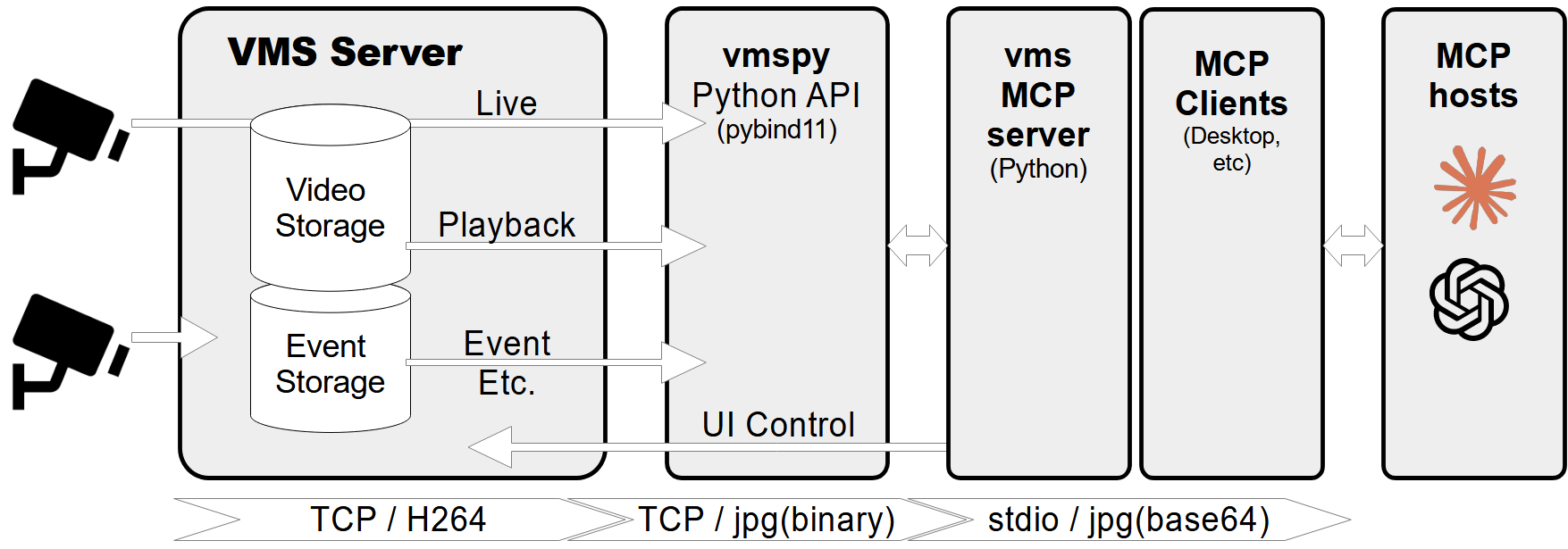
Un servidor de Protocolo de Contexto de Modelo (MCP) diseñado para conectarse a un programa de grabación CCTV (VMS) para recuperar transmisiones de video grabadas y en vivo. También proporciona herramientas para controlar el software VMS, como mostrar diálogos de video en vivo o reproducción para canales específicos en momentos determinados.
Características
- Recuperar información de canales de video, incluido el estado de conexión y grabación.
- Obtener fechas y horas de grabación para canales específicos.
- Obtener imágenes en vivo o grabadas de canales de video.
- Mostrar transmisiones de video en vivo o diálogos de reproducción para canales y marcas de tiempo específicos.
- Controlar cámaras PTZ (Pan-Tilt-Zoom) moviéndolas a posiciones preestablecidas.
- Manejo integral de errores y registro de actividades.
Requisitos previos
- Python 3.12+
- Biblioteca
vmspy(para integración VMS) - Biblioteca
Pillow(para procesamiento de imágenes)
Configuración del servidor MCP
Si deseas usar mcp-vms con el escritorio de Claude, debes configurar el archivo claude_desktop_config.json de la siguiente manera:
{
  "mcpServers": {
	"vms": {
	  "command": "uv",
	  "args": [
		"--directory",
		"X:\\path\\to\\mcp-vms",
		"run",
		"mcp_vms.py"
	  ]
	}
  }
}
Configuración de conexión VMS
El servidor utiliza la siguiente configuración predeterminada para conectarse al VMS:
- mcp_vms_config.py
vms_config = {
    'img_width': 320,
    'img_height': 240,
    'pixel_format': 'RGB',
    'url': '127.0.0.1',
    'port': 3300,
    'access_id': 'admin',
    'access_pw': 'admin',
}
Instalación
1. Instalar el administrador de paquetes UV
Ejecuta el siguiente comando en PowerShell para instalar UV:
powershell -ExecutionPolicy ByPass -c "irm https://astral.sh/uv/install.ps1 | iex"
Para métodos de instalación alternativos, consulta la documentación oficial de UV.
2. Instalar el servidor VMS
Descarga e instala el servidor VMS desde:
http://surveillance-logic.com/en/download.html
(Requerido antes de usar este servidor MCP)
3. Instalar dependencias de Python
Descarga la biblioteca vmspy:
vmspy1.4-python3.12-x64.zip
Extrae el contenido en tu directorio mcp_vms
El directorio mcp-vms debería verse así:
mcp-vms/
├── .gitignore
├── .python-version
├── LICENSE
├── README.md
├── pyproject.toml
├── uv.lock
├── mcp_vms.py            # Main server implementation
├── mcp_vms_config.py     # VMS connection configuration
├── vmspy.pyd             # VMS Python library
├── avcodec-61.dll        # FFmpeg libraries
├── avutil-59.dll
├── swresample-5.dll
├── swscale-8.dll
