esp-mcp
Un servidor MCP para flujos de trabajo de ESP-IDF, que permite compilaciones de proyectos, flasheo de firmware y resolución automatizada de problemas a partir de registros de compilación.
Documentación
Objetivo
El objetivo de este MCP es:
- Consolidar los comandos de ESP-IDF y proyectos relacionados en un solo lugar.
- Simplificar el inicio usando únicamente comunicación con LLM.
Cómo contribuir al proyecto
¡Simplemente encuentra un comando que falte en este MCP y crea un PR para él!
Si quieres que alguien te ayude con esta implementación, solo abre un issue.
Aviso
Este proyecto es actualmente una Prueba de Concepto (PoC) para un servidor MCP adaptado a los flujos de trabajo de ESP-IDF.
Capacidades actuales:
Características principales:
run_esp_idf_install: Instala las dependencias y el toolchain de ESP-IDF medianteinstall.sh.create_esp_project: Crea un nuevo proyecto ESP-IDF.setup_project_esp_target: Establece el chip objetivo para proyectos ESP-IDF (esp32, esp32c3, esp32s3, etc.).build_esp_project: Compila proyectos ESP-IDF con soporte de compilación incremental.list_esp_serial_ports: Lista los puertos serie disponibles para dispositivos ESP.flash_esp_project: Flashea el firmware compilado a dispositivos ESP conectados.run_pytest: Ejecuta pruebas pytest con soporte pytest-embedded para proyectos ESP-IDF.
Características adicionales:
- Gestión flexible de rutas de ESP-IDF: soporta versiones de ESP-IDF por proyecto mediante el parámetro
idf_path. - Gestión de configuración del SDK: soporta archivos
sdkconfig_defaultspersonalizados para la configuración de compilación (se pueden especificar varios archivos separados por punto y coma). - Seguimiento del tiempo de compilación para monitoreo de rendimiento.
- Especificación opcional del puerto para operaciones de flasheo.
- Incluye soporte experimental para la corrección automática de problemas basada en los registros de compilación.
Visión y trabajo futuro: La visión a largo plazo es expandir este MCP hasta convertirlo en un kit de herramientas integral para interactuar con dispositivos embebidos, con la posible integración con plataformas de home assistant, y agilizar el acceso a la documentación de ESP-IDF y tecnologías relacionadas.
Imaginamos características como:
- Soporte más amplio de comandos ESP-IDF (por ejemplo, interacción con
monitor,menuconfigsi es factible). - Gestión de dispositivos y recuperación de información.
- Integración con otras herramientas y plataformas de desarrollo embebido.
¡Tus ideas y contribuciones son bienvenidas! No dudes en discutirlas abriendo un issue.
Instalación
Primero, clona este repositorio MCP:
git clone git@github.com:horw/esp-mcp.git
Luego, configúralo en tu chatbot.
El fragmento JSON a continuación es un ejemplo de cómo podrías configurar este servidor esp-mcp dentro de un chatbot o un sistema de agente que soporte el Protocolo de Contexto de Modelo (MCP). Los pasos y el formato de configuración exactos pueden variar según el sistema de chatbot específico que estés usando. Consulta la documentación de tu chatbot para obtener detalles sobre cómo integrar servidores MCP.
{
    "mcpServers": {
        "esp-run": { // "esp-run" is an arbitrary name you can assign to this server configuration.
            "command": "<path_to_uv_or_python_executable>",
            "args": [
                "--directory",
                "<path_to_cloned_esp-mcp_repository>", // e.g., /path/to/your/cloned/esp-mcp
                "run",
                "main.py" // If using python directly, this might be just "main.py" and `command` would be your python interpreter
            ],
            "env": {
                "IDF_PATH": "<path_to_your_esp-idf_directory>" // e.g., ~/esp/esp-idf or C:\\Espressif\\frameworks\\esp-idf
            }
        }
    }
}
Algunas notas sobre la configuración:
command: Esta debe ser la ruta completa a tu ejecutableuvsi lo estás usando, o tu intérprete de Python (por ejemplo,/usr/bin/python3oC:\\Python39\\python.exe) si planeas ejecutarmain.pydirectamente.args:- El primer argumento para
--directorydebe ser la ruta absoluta donde clonaste el repositorioesp-mcp. - Si estás usando
uv, los argumentosrun main.pyson apropiados. Si estás usando Python directamente, es posible que solo necesitesmain.pyen la listaargs, y asegúrate de que tucommandapunte al ejecutable de Python.
- El primer argumento para
IDF_PATH: (Opcional) Esta variable de entorno puede apuntar al directorio raíz de tu instalación de ESP-IDF. ESP-IDF es el Framework oficial de Desarrollo IoT de Espressif. Si no lo has instalado, consulta la documentación oficial de ESP-IDF para obtener instrucciones de instalación. Nota: Todas las herramientas soportan un parámetroidf_pathque se puede especificar manualmente al llamar a la herramienta, lo que te permite usar diferentes versiones de ESP-IDF para diferentes proyectos sin configurar la variable de entorno. Siidf_pathno se proporciona, la herramienta usará la variable de entornoIDF_PATHsi está disponible.
Uso
Una vez que el servidor esp-mcp esté configurado y en ejecución, tu LLM o chatbot puede interactuar con él usando las herramientas definidas en este MCP. Por ejemplo, podrías pedirle a tu chatbot que:
- "Instala las dependencias de ESP-IDF para la instalación de ESP-IDF en
/path/to/esp-idf." - "Establece el chip objetivo a esp32s3 para el proyecto en
/path/to/my/esp-project." - "Compila el proyecto ubicado en
/path/to/my/esp-projectusando elesp-mcp." - "Compila el proyecto con valores predeterminados de sdkconfig personalizados:
sdkconfig.defaults;sdkconfig.ci.release." - "Ejecuta pruebas pytest para el proyecto en
/path/to/my/esp-projectcon objetivo esp32c3." - "Flashea el firmware a mi dispositivo ESP32 conectado para el proyecto en
my_app."
El servidor MCP ejecutará entonces los comandos ESP-IDF correspondientes (como idf.py build, idf.py set-target, idf.py flash, pytest) según las herramientas implementadas en main.py.
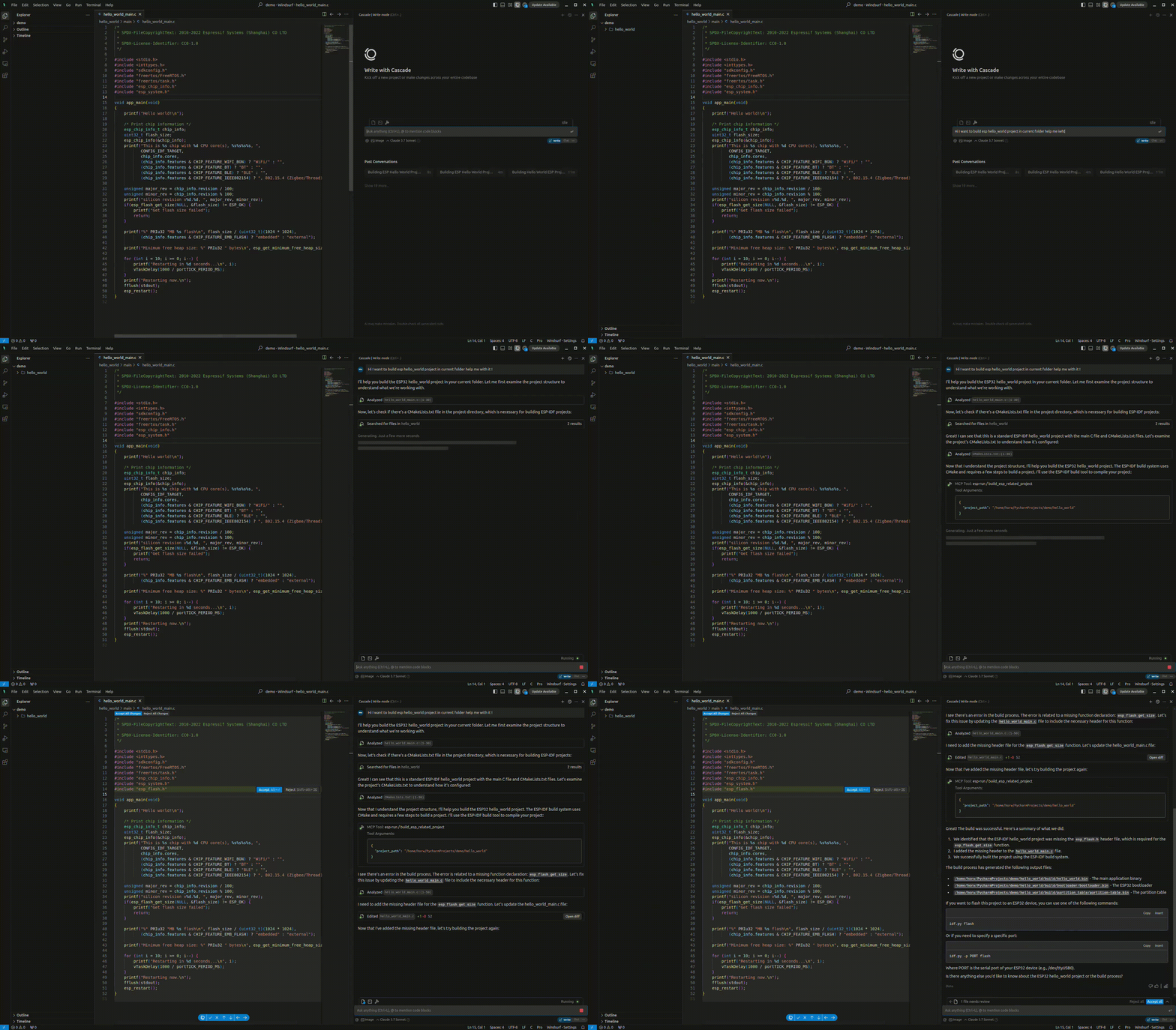
El result.gif a continuación muestra un ejemplo de interacción:
Ejemplos
- Compilar y Flashear