Fused MCP
Un servidor MCP basado en Python para que científicos de datos ejecuten código Python con un cliente Claude.
Documentación
Fused MCP Agents: Configuración de servidores MCP para datos



Documentación 🌪️ Lee el anuncio 🔥 Únete a Discord
Los servidores MCP permiten que LLMs como Claude realicen solicitudes HTTP, conectándolos a APIs y código ejecutable. Construimos este repositorio para nosotros y para cualquiera que trabaje con datos para pasar fácilmente cualquier código Python directamente a tu propia aplicación de escritorio de Claude.
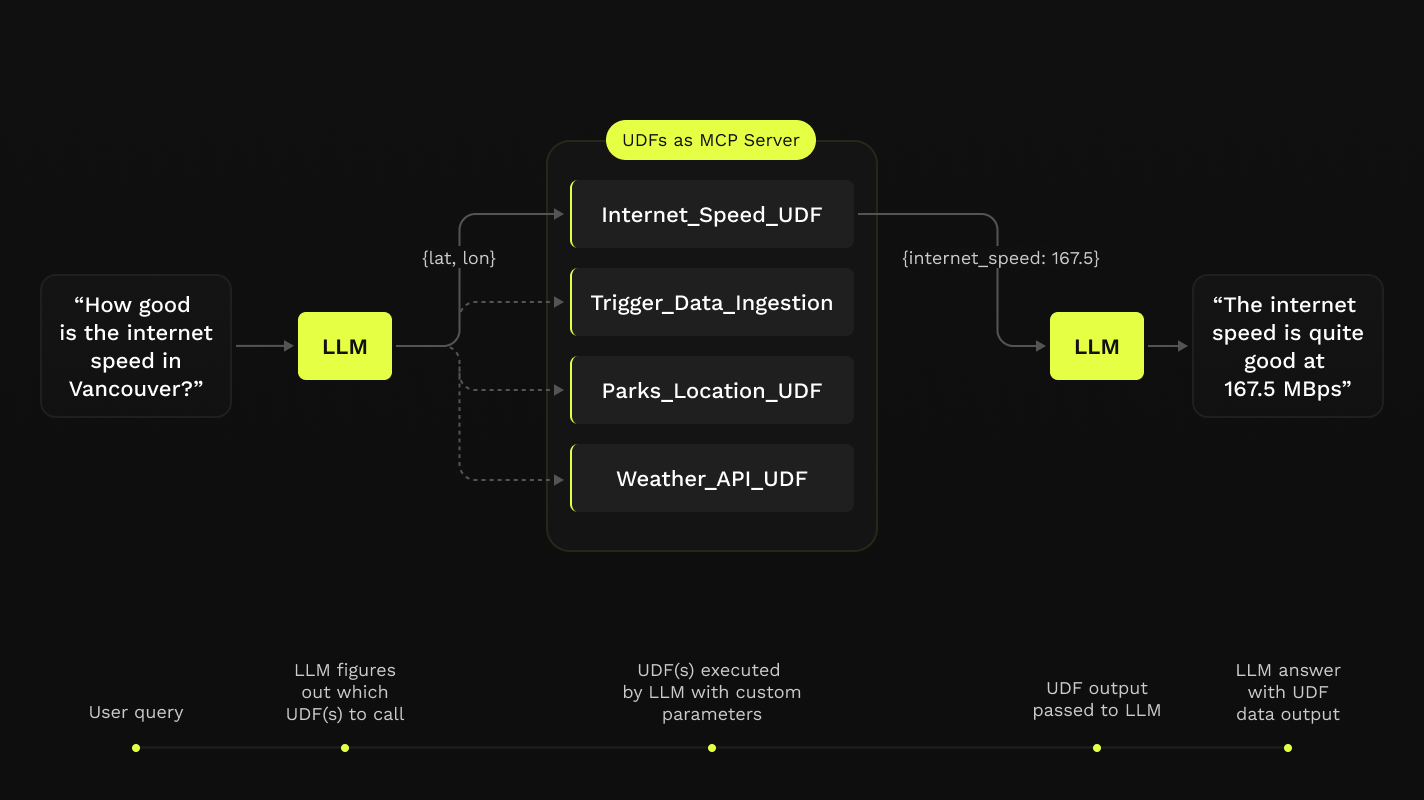
Este repositorio ofrece un flujo de trabajo simple paso a paso en notebooks para configurar servidores MCP con la aplicación de escritorio de Claude, todo en Python construido sobre Funciones Definidas por el Usuario (UDFs) de Fused.

Requisitos
- Python 3.11
- Última aplicación de escritorio de Claude instalada (macOS y Windows)
Si estás en Linux, la aplicación de escritorio no está disponible, así que hemos creado un cliente simple que puedes usar para tenerlo funcionando localmente también.
No necesitas una cuenta de Fused para hacer nada de esto. Todo esto se ejecutará en tu máquina local.
Instalación
-
Clona este repositorio en cualquier directorio local y navega hasta el repositorio:
git clone https://github.com/fusedio/fused-mcp.git cd fused-mcp/ -
Instala
uvsi no lo tienes:macOS / Linux:
curl -LsSf https://astral.sh/uv/install.sh | shWindows:
powershell -ExecutionPolicy ByPass -c "irm https://astral.sh/uv/install.ps1 | iex" -
Prueba el cliente pidiendo su información:
uv run main.py -h -
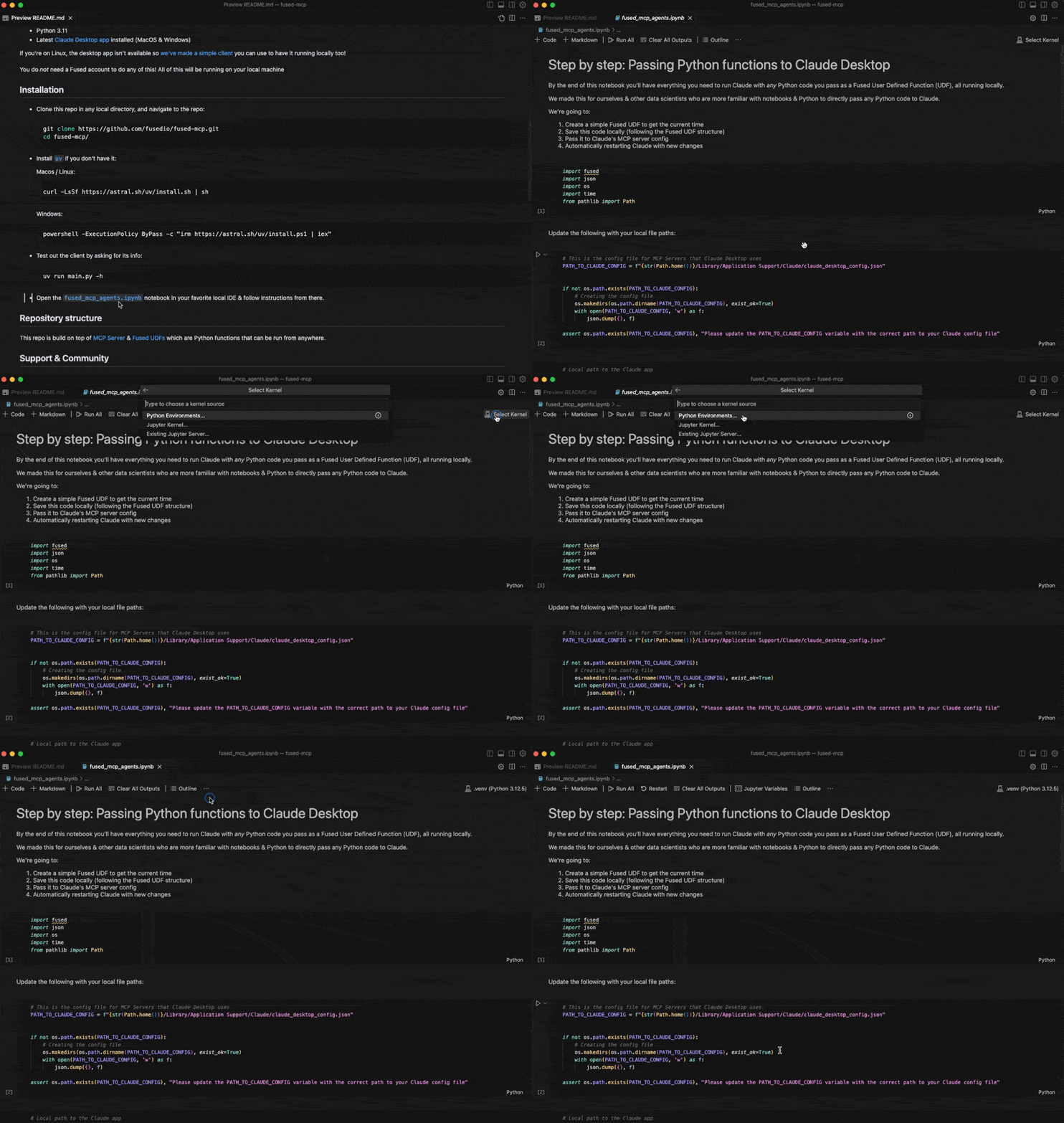
Comienza siguiendo nuestro notebook de inicio
fused_mcp_agents.ipynben tu IDE local favorito para configurarte y luego avanza al notebook más avanzado para crear tus propios Agentes y funciones
Estructura del repositorio
Este repositorio está construido sobre MCP Server y UDFs de Fused, que son funciones de Python que se pueden ejecutar desde cualquier lugar.
Soporte y comunidad
No dudes en unirte a nuestro servidor de Discord si quieres ayuda para desbloquearte.
Aquí hay algunos pasos comunes para depurar la configuración:
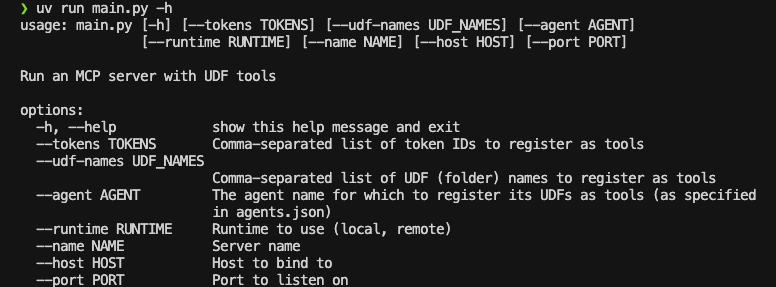
- Al ejecutar
uv run main.py -hdebería devolver algo como esto:
- Puede que necesites pasar rutas globales a algunas funciones al
Claude_Desktop_Config.json. Por ejemplo, por defecto solo pasamosuv:
{
    "mcpServers": {
        "qgis": {
            "command": "uv",
            "args": ["..."]
        }

    }
}
Pero puede que necesites pasar la ruta completa a uv, que simplemente puedes pasar a common.generate_local_mcp_config en el notebook:
# in fused_mcp_agents.ipynb
import shutil

common.generate_local_mcp_config(
    config_path=PATH_TO_CLAUDE_CONFIG,
    agents_list = ["get_current_time"],
    repo_path= WORKING_DIR,
    uv_path=shutil.which('uv'),
)
Lo que crearía una configuración como esta:
{
    "mcpServers": {
        "qgis": {
            "command": "/Users/<YOUR_USERNAME>/.local/bin/uv",
            "args": ["..."]
        }

    }
}
- Si Claude se ejecuta sin mostrar herramientas conectadas, echa un vistazo a la documentación de MCP para solucionar problemas de configuración de Claude Desktop
Contribuir
No dudes en abrir PRs para agregar tus propias UDFs a udfs/ para que otros también puedan jugar con ellas localmente.
Usar un cliente local de Claude (sin la aplicación de escritorio de Claude)
Si no puedes instalar la aplicación de escritorio de Claude (por ejemplo, en Linux), proporcionamos una pequeña interfaz de cliente local de ejemplo para usar Claude con el servidor MCP configurado en este repositorio:
NOTA: Necesitarás una clave API para Claude aquí, ya que no usarás la aplicación de escritorio.
-
Crea una cuenta de consola de Anthropic
-
Crea una clave API de Anthropic
-
Crea un
.env:touch .env -
Agrega tu clave como
ANTHROPIC_API_KEYdentro del.env:# .env ANTHROPIC_API_KEY = "your-key-here" -
Inicia el servidor MCP:
uv run main.py --agent get_current_time -
En otra sesión de terminal, inicia el cliente local, apuntando a la dirección del servidor:
uv run client.py http://localhost:8080/sse