Floom
Despliega funciones de Python como aplicaciones web. Las sugerencias de tipo se convierten en interfaz de usuario, API y enlaces compartibles. 32 herramientas MCP para desplegar, ejecutar, almacenar, gestionar secretos, programar, versionar y compartir.
Documentación
Floom
El harness de ingeniería de bucles. Trabajadores de IA que se ejecutan en un bucle.
Prográmalos, actívalos, exige aprobaciones y mantén cada ejecución en el registro.
Un trabajador es una carpeta: worker.yml + SKILL.md o run.py. Despliégalo desde Claude Code, Codex o la CLI. Ejecútalo desde la interfaz, REST o MCP.
Comenzar · Crear un trabajador · Probar la versión alojada · Leer la documentación




La mayor parte de la "automatización de IA" es una ventana de chat que tienes que vigilar, o un gráfico sin código que te factura por tarea y no se puede auditar. Floom es el harness de ingeniería de bucles: un runtime real donde un trabajador es un paquete legible, se ejecuta en un bucle sin que lo estés mirando, y cada ejecución deja registros, salidas, llamadas a herramientas, aprobaciones y una reproducción en la que puedes confiar. Se usa de forma nativa desde Claude Code y Codex mediante MCP o CLI.
Despliega un script de Python como aplicación, API REST y herramienta MCP
Floom permite que un agente o desarrollador convierta un script de Python en un trabajador que los no desarrolladores pueden ejecutar desde una interfaz, que otros sistemas pueden llamar mediante REST y que los agentes de IA pueden operar mediante MCP.
Empieza con tres archivos:
workers/my-worker/
  worker.yml
  run.py
  requirements.txt
Luego valida, despliega y ejecuta:
floom workers validate ./workers/my-worker
floom workers push ./workers/my-worker
floom run my-worker --input key=value
Lee BUILDING.md para conocer el contrato completo de trabajador de copiar y pegar.
Qué es Floom: Runtime de trabajadores para trabajadores de IA en segundo plano
Floom convierte las automatizaciones repetibles de trabajo de conocimiento en trabajadores de IA en segundo plano. Un trabajador puede ejecutarse manualmente, según un horario, desde un webhook o desde un evento de aplicación. El runtime mantiene la definición del trabajador, el esquema de entrada, el esquema de salida, los registros, las llamadas a herramientas, las aprobaciones y el historial de ejecuciones inspeccionables.
Usa Floom cuando quieras que un agente de IA haga trabajo recurrente sin convertir ese trabajo en un hilo de chat opaco, un gráfico de automatización difícil de diferenciar o un script único sin supervisión.
Crea y despliega un trabajador de IA desde una carpeta
Los agentes de IA y los desarrolladores pueden crear un trabajador de Floom desde una carpeta:
workers/<worker-id>/
  worker.yml        # manifest: inputs, outputs, trigger, runtime, secrets
  run.py            # script entrypoint, or SKILL.md for agent mode
  requirements.txt  # optional Python dependencies
Despliega el trabajador con:
floom workers validate ./workers/<worker-id>
floom workers push ./workers/<worker-id>
floom run <worker-id> --input key=value
Después del despliegue, Floom expone el trabajador en la interfaz, mediante endpoints REST y a través del servidor MCP de Floom para clientes de IA. Para conocer el contrato completo de creación de copiar y pegar, lee BUILDING.md.
Cómo se ve un trabajador
Un trabajador es una definición de trabajo respaldada por una carpeta. Describe el trabajo en inglés sencillo (SKILL.md) o entrégale un script (run.py), declara sus herramientas, activador, memoria y secretos en worker.yml, y Floom lo ejecuta.
# workers/github-digest/worker.yml  (abbreviated)
name: github-digest
description: "Every morning at 9am, send a digest of unread GitHub PRs and open issues."
exec:
  entry: SKILL.md          # plain-English agent; or run.py for a script
trigger:
  type: schedule
  cron: "0 9 * * *"        # also: manual, webhook, Composio event
connections:
  - app: github            # the only tools this agent is allowed to call
    allowed_tools: [GITHUB_FIND_PULL_REQUESTS, GITHUB_LIST_ASSIGNED_ISSUES]
<!-- workers/github-digest/SKILL.md -->
You are a GitHub assistant generating a daily PR + issues digest.
Fetch the user's open PRs and assigned issues, compile a markdown digest
with Action items, and finish_with_outputs({ "digest": "<markdown>" }).
Se ejecuta a las 9 a. m., llama solo a las dos herramientas de GitHub que declaró y escribe digest.md en una ejecución que puedes abrir, reproducir o revertir:
run 7f3a · github-digest · finished 09:00:04 · 2 tool calls · output: digest.md
  ✓ GITHUB_FIND_PULL_REQUESTS    q="is:open is:pr author:@me"   → 4 PRs
  ✓ GITHUB_LIST_ASSIGNED_ISSUES  state=open                     → 2 issues
  → out/digest.md (text/markdown)   [open · replay · rollback]
El manifiesto completo agrega schema_version, title, version y outputs declarados. Consulta workers/ para ver ejemplos ejecutables, BUILDING.md para un trabajador mínimo desplegable y el libro de recetas para agentes.
Dos tipos de agente
| se ejecuta en | aislamiento del host | herramientas | efectos secundarios | |
|---|---|---|---|---|
Script (run.py / .sh / .js / .ts) | microVM de sandbox E2B | sistema de archivos, entorno y proceso aislados; secretos de plataforma retenidos | sandbox + conexiones declaradas | puerta de aprobación cuando se declara |
Agente (SKILL.md) | AgentDriver en el proceso de API (solo paquetes de confianza) | no aislado por microVM por política | conexiones declaradas, lista de permitidos | puerta de aprobación cuando se declara |
Los sandboxes permiten la salida de red pública de forma predeterminada y bloquean los rangos privados/internos; una lista de permitidos más estricta es opcional. Modelo de confianza completo: ARCHITECTURE.md.
Runtime del trabajador de un vistazo
| Qué es | Runtime autoalojado para crear, ejecutar y supervisar agentes de IA en segundo plano |
| Ideal para | Trabajo recurrente de agentes: triaje de bandeja de entrada, resúmenes, redacción de divulgación, enriquecimiento, monitoreo |
| Tipos de agente | Script (run.py/.sh/.js/.ts) y agente en inglés sencillo (SKILL.md) |
| Aislamiento | Los trabajadores de script se ejecutan en microVMs de sandbox E2B - sistema de archivos, entorno y proceso del host aislados; secretos de plataforma retenidos |
| Activadores | Manual, horario (cron), webhook, evento de Composio |
| Seguridad | Aprobaciones de humano en el bucle para agentes con efectos secundarios; herramientas con lista de permitidos por agente |
| En el registro | Cada ejecución registra registros, salidas, llamadas a herramientas, estado de aprobación, reproducción + reversión |
| Modelo de costos | Floom agrega sin tarifa por tarea - pagas el runtime del sandbox E2B (por segundo) más el uso de tu proveedor de modelo/API |
| Stack | Next.js + Tailwind UI · FastAPI + SQLite API · servidor MCP + CLI |
| Se ejecuta en | Linux, macOS, Windows (Python 3.11+, Node 20+) |
| Licencia | MIT · versión alojada |
Para quién es Floom
- Fundadores y operadores que convierten trabajo recurrente (resúmenes, triaje, divulgación) en agentes que se ejecutan solos.
- Ingenieros que quieren un runtime real - manifiestos, sandboxes, límites, aprobaciones - no un archivo de prompt y un trabajo de cron.
- Equipos que necesitan que cada acción esté en la lista de permitidos, aprobada y reproducible para auditoría.
- Cualquiera que haya sido perjudicado por agentes que ejecutaron un comando destructivo, filtraron un secreto o afirmaron éxito sin nada en el registro.
Floom comparado: Scripts crudos vs Zapier vs MCP hecho a mano
| scripts crudos | Zapier / Make | servidor MCP hecho a mano | Floom | |
|---|---|---|---|---|
| Definición del trabajador | prompt o código ad-hoc | gráfico visual, difícil de diferenciar | código de servidor de herramientas personalizado | una carpeta: worker.yml + SKILL.md o run.py |
| Runtime | cron, shell o proceso local | runtime de automatización del proveedor | lo que sea que el desarrollador construya | runtime de agente con activadores, ejecuciones, registros, salidas, aprobaciones, reproducción y reversión |
| Aislamiento | se ejecuta en tu host | nube del proveedor, opaca | depende de la implementación | microVM de sandbox E2B para trabajadores de script |
| Acceso a herramientas | lo que el script pueda alcanzar | por conector | solo herramientas MCP | declarado y con lista de permitidos por trabajador |
| Efectos secundarios | se disparan de inmediato | dependiente del flujo de trabajo | lógica de aprobación personalizada | puerta de aprobación humana cuando se declara |
| Observabilidad | scrollback, si acaso | registros por paso | registros personalizados | registros, llamadas a herramientas, salidas, artefactos, estado de aprobación, reproducción y reversión |
| Acceso de agentes | se necesita un envoltorio personalizado | no es un objetivo de compilación nativo de agentes | el agente puede llamar herramientas, pero el runtime de la aplicación es separado | las herramientas MCP permiten que los agentes creen, ejecuten, observen e inspeccionen trabajadores |
| Modelo de costos | tokens de modelo e infraestructura | tarifas por tarea o por ejecución | tokens de modelo e infraestructura | sin tarifa por tarea; pagas runtime y uso del proveedor |
| Alojamiento | tu host | solo proveedor | tu host | autoalojado, o alojado |
Inicio rápido: Ejecuta Floom localmente
Linux / macOS
git clone https://github.com/floomhq/floom.git
cd floom
./scripts/setup.sh
# edit apps/api/.env: add a model provider key and E2B_API_KEY
./scripts/dev.sh
Windows PowerShell
git clone https://github.com/floomhq/floom.git; cd floom
.\scripts\setup.ps1
# edit apps\api\.env: add a model provider key and E2B_API_KEY
.\scripts\dev.ps1
Requiere Python 3.11+, Node.js 20+, Git, una clave de proveedor de modelos y una clave E2B de e2b.dev. Abre http://localhost:3000 e inicia sesión - sin secreto de autenticación para desarrollo local, y los agentes de ejemplo se siembran en el primer arranque.
Configuración completa, proveedores de modelos, integraciones opcionales y la lista de verificación segura de autoalojamiento: docs/GETTING-STARTED.md. Problemas comunes: docs/TROUBLESHOOTING.md.
¿No estás listo para autoalojar? floom.dev es la versión alojada - contrata agentes de IA sin configuración. Los usuarios alojados pueden comenzar desde un cliente MCP con:
npx -y @floomhq/floom mcp install --target claude
Las claves .env, de proveedor de modelos y E2B anteriores son para ejecutar tu propio runtime local o autoalojado, no para usar Floom Cloud.
Cómo funciona una ejecución
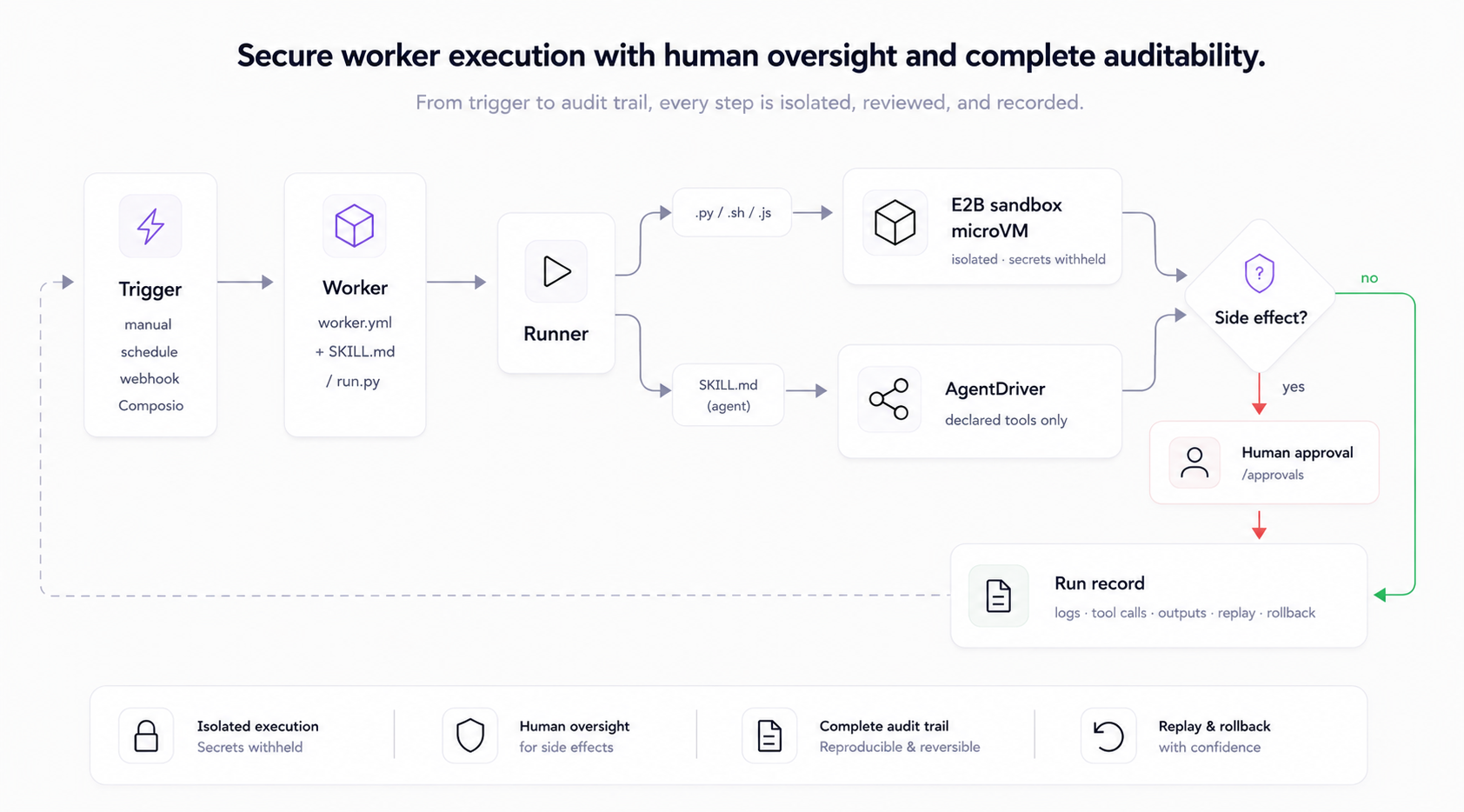
Conceptos principales
- Agentes - carpetas bajo
workers/<name>/conworker.ymlmás un punto de entrada de script (run.py) o un prompt de agente (SKILL.md). - Ejecuciones - cada ejecución registra registros, salidas, llamadas a herramientas, estado de aprobación y contexto de reproducción/reversión.
- Contextos - paquetes de archivos reutilizables adjuntos a los agentes como material de referencia; sensibles de forma predeterminada.
- Aprobaciones - los agentes con efectos secundarios se pausan para una decisión humana antes de que algo salga del edificio.
- Historial del espacio de trabajo - agentes, contextos y configuraciones versionados en un espacio de trabajo respaldado por git para reversión.
Escribe tu primer agente en docs/GETTING-STARTED.md, luego docs/AUTHORING.md para el manifiesto completo y el contrato de runtime.
Cómo se ejecutan los trabajadores
Los trabajadores de script (.py/.sh/.js/.ts) se ejecutan en una microVM de sandbox E2B de forma predeterminada: dependencias aisladas, sin acceso al proceso del host, recursos contenidos. Los trabajadores de TypeScript usan el runtime de Node con tsx (npx --yes tsx run.ts) y el mismo contrato inputs.json/result.json que los trabajadores de Python. Un paquete que vuelca os.environ dentro del sandbox solo ve metadatos del sandbox - FLOOM_SECRET, claves de proveedor y E2B_API_KEY están todos ausentes. Los trabajadores de agente (SKILL.md) se ejecutan a través del bucle de herramientas AgentDriver alojado en la API y se rigen por sus conexiones declaradas y la puerta de aprobación; la política actual de un solo inquilino solo permite paquetes de agente de confianza en esa ruta. No hay un ejecutor de script local en proceso. Modelo de confianza completo: ARCHITECTURE.md.
El manejo de datos, las salvaguardas de cuentas conectadas, los límites de retención y las superficies legales de Cloud alojado se resumen en docs/DATA-RETENTION.md.
Arquitectura
apps/web      Next.js + TypeScript + Tailwind + shadcn/ui
apps/api      FastAPI + SQLite + Pydantic
apps/mcp      MCP server + CLI
workers/      Worker folders (worker.yml + run.py or SKILL.md)
data/         SQLite DB + run artifacts
Preguntas frecuentes: Agentes de IA, MCP y despliegue de scripts de Python
¿Qué es Floom en una oración?
Floom es un runtime de código abierto para trabajadores de IA en segundo plano que se ejecutan desde carpetas de trabajadores versionadas con entradas, salidas, activadores, herramientas, aprobaciones, registros, acceso a API REST, acceso a interfaz y acceso a MCP declarados.
¿Es Floom un servidor MCP?
Floom incluye un servidor MCP, pero es más que un servidor MCP. El endpoint MCP permite que los clientes de agentes creen, ejecuten, observen, inspeccionen y gestionen trabajadores de Floom. El runtime de Floom es la parte que ejecuta esos trabajadores, registra ejecuciones, gestiona aprobaciones y expone la interfaz y la API REST.
¿Puede un agente de codificación de IA crear un trabajador de Floom desde este repositorio?
Sí. Lee BUILDING.md primero. El contrato de creación es una carpeta workers/<id>/ con worker.yml, run.py o SKILL.md, y requirements.txt opcional, luego floom workers validate y floom workers push.
¿Puedo desplegar un script de Python como aplicación, API REST y trabajador accesible por MCP?
Sí. Coloca el script en workers/<id>/run.py, declara sus entradas y salidas en worker.yml, despliégalo con floom workers push, y Floom lo hace ejecutable desde la interfaz, la API REST y las herramientas MCP.
¿Cuál es la diferencia entre el modo script y el modo agente?
El modo script ejecuta código determinista como Python, shell o Node en el sandbox. El modo agente ejecuta un prompt de SKILL.md a través del bucle de agente con herramientas declaradas y escritores de salida.
¿Reemplaza Floom a Zapier o Make?
Floom es para equipos que quieren carpetas de trabajadores versionadas, ejecución en sandbox, puertas de aprobación, registros, salidas, reproducción, reversión, acceso a API REST y acceso a MCP. Zapier y Make son productos de automatización visual con sus propios runtimes de proveedor.
¿Reemplaza Floom a las herramientas MCP escritas a mano?
Floom puede exponer trabajo a través de MCP sin que tengas que construir todo el runtime de la aplicación desde cero. Un servidor MCP escrito a mano le da herramientas a un agente; Floom le da al worker un runtime, interfaz de usuario, API, disparadores, salidas, registros, aprobaciones y herramientas MCP.
Documentación
- Primeros pasos - por qué existe Floom, primera ejecución, primer agente, lista de verificación para autoalojamiento seguro.
- Creación de workers de Floom - contrato de compilación legible por máquina para agentes y desarrolladores.
- Creación de agentes - esquema completo de
worker.yml, modos de ejecución, secretos, conexiones, disparadores, aprobaciones. - Datos, retención y salvaguardas - qué almacena Floom, cómo se delimitan los datos de cuentas conectadas y qué garantías de eliminación/retención son seguras de ofrecer.
- Recetario de agentes - recetas de creación asistida por agentes.
- Arquitectura - topología del runtime y el modelo de confianza del sandbox. Léelo antes de reportar hallazgos de seguridad.
- Descripción general de la API - mapa de endpoints seleccionados; referencia completa en
http://localhost:8000/docs. - Solución de problemas · Hoja de ruta · Historial del proyecto · Notas de la versión v1.0.0
- Licencias - la licencia MIT de Floom y las notas de licencia de dependencias de terceros.
Contribuciones
Las contribuciones son bienvenidas. Consulta CONTRIBUTING.md para la configuración local, el mapa de primeras contribuciones y las pautas para PR. Verificaciones locales rápidas desde la raíz del repositorio:
npm run test:api
npm run lint:web
npm run test:web
npm run test:mcp
Seguridad
Para reportar una vulnerabilidad, sigue SECURITY.md y repórtala de forma privada en lugar de abrir un issue público.
Licencia
Licencia MIT (c) 2026 contribuyentes de Floom. Puedes usar, copiar, modificar, fusionar, publicar, distribuir, sublicenciar y vender copias de Floom, sujeto al aviso de licencia MIT y la exención de garantía.