Heimdall MCP
Proxy MCP transparente con trazado OpenTelemetry. Envuelve cualquier servidor MCP, persiste trazas en cualquier backend OTel · SQLite · Postgres · MySQL. Sin necesidad de cambios en el código.
Documentación
@cardor/heimdall-mcp
Proxy transparente para cualquier servidor MCP. Intercepta todos los mensajes JSON-RPC, mide la latencia, almacena trazas en una base de datos configurable y aplica políticas de permitir/denegar por servidor — sin tocar el servidor original.
Visita el sitio web para ver una explicación completa, ejemplos y otras herramientas.






Tabla de contenidos
- @cardor/heimdall-mcp
Cómo funciona
flowchart LR
    A["MCP Client\n(Claude Desktop / OpenCode / Cursor)"]

    subgraph proxy["heimdall-mcp"]
        B["TelemetryInterceptor"]
        P["PolicyInterceptor"]
        C["ForwardInterceptor"]
        D[("SQLite\nPostgres\nMySQL")]
        B --> P
        P --> C
        B -->|"saves span"| D
    end

    S["Real MCP server\n(subprocess / HTTP / SSE)"]

    A -->|"stdio"| B
    C -->|"stdio · http · sse"| S
    S -->|"response"| C
    C -->|"response"| A
El proxy siempre expone stdio al cliente MCP y habla el transporte correcto con el servidor real. Cada par de solicitud/respuesta se convierte en un span con tiempos, atributos y el cuerpo de entrada/salida.
Instalación
npm install -g @cardor/heimdall-mcp
# or as a project dependency
npm install @cardor/heimdall-mcp
Configuración de políticas
Coloca un heimdall.config.ts en la raíz de tu proyecto y define exactamente qué herramientas, prompts y recursos puede exponer cada servidor MCP al agente — en la capa del proxy, sin tocar el código del servidor.
Archivos de configuración
| Ámbito | Ruta | Propósito |
|---|---|---|
| Local | {project-root}/heimdall.config.{ts,js,mjs,cjs,json} | Reglas por repositorio |
| Global | ~/.config/heimdall/heimdall.config.{ts,js,mjs,cjs,json} | Reglas para usuario/organización |
Ambos son opcionales. Si ninguno existe, el proxy permanece totalmente transparente (compatible con versiones anteriores).
Formato de configuración
// heimdall.config.ts
import type { HeimdallConfig } from '@cardor/heimdall-mcp';

export default {
  // default: applies to any server without an explicit entry
  default: {
    tools: { allow: ['*'], deny: [] },
  },

  // servers: keyed by --server-name (or serverInfo.name from initialize response)
  servers: {
    filesystem: {
      tools: {
        allow: ['read_file', 'list_directory', 'search_files'],
        deny:  ['write_file', 'create_file', 'delete_file', 'move_file'],
      },
      resources: {
        allow: ['*'],
        deny:  ['file:///etc/*', 'file:///root/*'],
      },
    },
    database: {
      tools: {
        allow: ['query', 'describe_table', 'list_tables'],
        deny:  ['execute', 'drop_table', 'truncate'],
      },
    },
  },
} satisfies HeimdallConfig;
Las configuraciones TypeScript se cargan mediante jiti sin precompilación. También funciona como .js, .mjs, .cjs o .json.
Estrategia de fusión
Cuando existen configuraciones local y global, se fusionan con semántica de seguridad primero:
| Regla | Comportamiento |
|---|---|
| Denegar → unión | Denegado por cualquiera = denegado. La denegación global no se puede anular localmente. |
| Permitir → intersección | Debe pasar ambas. * o [] significa "diferir al otro lado". |
| Denegar supera a permitir | Dentro de cualquier configuración individual, denegar siempre gana. |
La configuración global impone un mínimo que el equipo no puede relajar accidentalmente. Las configuraciones locales solo pueden añadir más restricciones, nunca menos.
Políticas de argumentos
toolPolicies añade una segunda capa de aplicación sobre las reglas de nivel de nombre tools. En lugar de solo decidir qué herramientas se pueden llamar, puedes restringir qué argumentos se permiten en cada llamada.
// heimdall.config.ts
export default {
  servers: {
    filesystem: {
      tools: { allow: ['read_file', 'list_directory'] },
      toolPolicies: {
        // '*' applies to every tool (merged first; tool-specific entries override)
        '*': {
          args: {
            path: { isPath: true, deny_pattern: ['\\.env$', '\\.pem$'] },
          },
        },
        read_file: {
          args: {
            // scope path to the current working directory
            path: { isPath: true, allow_pattern: './' },
            // allow only safe encodings
            encoding: { allow_pattern: ['utf-8', 'utf8', 'ascii'] },
          },
        },
      },
    },
  },
} satisfies HeimdallConfig;
Campos de ArgConstraint
| Campo | Tipo | Predeterminado | Descripción |
|---|---|---|---|
isPath | boolean | false | Habilita la coincidencia consciente de rutas (verificación de contención) en lugar de regex |
allow_pattern | string | string[] | — | El argumento debe coincidir con al menos un patrón para pasar |
deny_pattern | string | string[] | — | El argumento se bloquea si coincide con cualquier patrón; denegar supera a permitir |
array_mode | 'all' | 'any' | 'all' | Para argumentos de tipo array: requiere que todos los elementos pasen (all) o al menos uno (any) |
case_sensitive | boolean | true | Indicador de regex; no se aplica a la coincidencia de raíz de ruta |
warn_only | boolean | false | Registra la violación en el span de OTel sin bloquear la llamada |
Alcance de rutas con isPath: true
Cuando isPath: true, los patrones que parecen raíces de directorio se tratan como verificaciones de contención en lugar de expresiones regex:
| Patrón | Significado |
|---|---|
"./" o "." | El argumento debe resolverse dentro de process.cwd() |
"/some/dir" | El argumento debe resolverse dentro de /some/dir |
"~" / "${HOME}/projects" | Resuelto al directorio de inicio |
"${CWD}/data" | Resuelto a cwd + /data |
El resolvedor utiliza path.resolve + fs.realpathSync para prevenir el traversal de ../ y las fugas de enlaces simbólicos. Los patrones que no parecen raíces de directorio (p. ej., "^/etc/.*") recurren a la coincidencia regex.
Modo warn_only
Útil para implementación gradual: establece warn_only: true para observar violaciones sin bloquear. La llamada se reenvía y los siguientes atributos aparecen en el span de OTel:
policy.arg_warning = true
policy.arg_warning_field = "path"
policy.arg_warning_message = "Tool arg 'path' is denied by policy"
Cambia a warn_only: false (el predeterminado) cuando estés listo para aplicar.
Notación de puntos para argumentos anidados
Usa notación de puntos para restringir campos dentro de objetos de parámetros anidados:
toolPolicies: {
  my_tool: {
    args: {
      'options.target': { isPath: true, allow_pattern: './' },
    },
  },
}
Bloqueos de recursos
Previene que invocaciones concurrentes de tools/call compitan por el mismo recurso (p. ej., dos agentes escribiendo el mismo archivo a la vez). Configura un bloque locks por servidor, claveado por nombre de herramienta.
Casos de uso
Escenarios concretos donde los bloqueos de recursos resuelven un problema real de coordinación:
- Dos agentes de codificación de IA editando el mismo archivo concurrentemente. Dos sesiones de agente (p. ej., dos instancias de Claude Code, o un servidor de sistema de archivos MCP invocado por múltiples agentes) ejecutándose en paralelo contra el mismo repositorio pueden decidir escribir el mismo archivo al mismo tiempo. Sin un bloqueo, la segunda escritura sobrescribe silenciosamente los cambios del primer agente. Bloquear el argumento de ruta de archivo (
resource: 'path'oresource: 'file_path') serializa esas llamadas — la segunda llamada se rechaza (o, cononConflict: 'warn', se reenvía con una advertencia) hasta que la primera se completa o expira el TTL del bloqueo. - Serializar una herramienta de migración de base de datos entre sesiones paralelas. Una herramienta
run_migrationexpuesta a través de un servidor de base de datos MCP es peligrosa de ejecutar concurrentemente — dos migraciones superpuestas contra la misma base de datos pueden corromper el estado. Bloquear una clave de recurso literal (resource: 'db-migration', no vinculada a ningún argumento particular) asegura que solo una llamada de migración esté en vuelo a la vez, independientemente de qué sesión o agente la haya activado. - Evitar llamadas duplicadas/competidoras a una API externa con límite de velocidad. Una herramienta que llama a una API de terceros con un límite de velocidad estricto (p. ej., APIs de pago o búsqueda) se puede bloquear con una clave estable (el nombre de la herramienta, o un argumento como
query) para que las llamadas duplicadas casi simultáneas de turnos de agente separados no multipliquen el uso de la API ni activen el limitador del proveedor. - Coordinar entre múltiples instancias del proxy, no solo un proceso. Con un almacén de bloqueos Postgres/MySQL compartido (ver más abajo) en lugar del archivo SQLite local predeterminado, los bloqueos de recursos coordinan entre máquinas — útil para flotas de agentes o instancias del proxy que comparten la misma infraestructura subyacente.
// heimdall.config.ts
export default {
  servers: {
    filesystem: {
      tools: { allow: ['read_file', 'write_file'] },
      locks: {
        write_file: { resource: 'path', ttl: 30_000 },
        run_migration: { resource: 'db-migration', onConflict: 'warn' },
      },
    },
  },
} satisfies HeimdallConfig;
Campos de LockRule
| Campo | Tipo | Predeterminado | Descripción |
|---|---|---|---|
resource | string | — | Nombre de un argumento de llamada de herramienta cuyo valor se usa como clave de bloqueo (p. ej., resource: 'path' bloquea en arguments.path), o una clave de recurso literal (p. ej., resource: 'db-migration') si no existe ningún argumento con ese nombre. Recurre al nombre de la herramienta cuando se omite. Los valores similares a rutas se canonizan automáticamente (ver más abajo). |
ttl | number | 30000 | Tiempo de vida del bloqueo en milisegundos. Actúa como salvaguarda para que un titular bloqueado/colgado no pueda mantener un recurso bloqueado para siempre. |
onConflict | 'reject' | 'warn' | 'reject' | reject bloquea la llamada y devuelve un error JSON-RPC RESOURCE_LOCKED (predeterminado). warn reenvía la llamada de todos modos y adjunta metadatos de advertencia lock.* al span de OTel en lugar de bloquear. |
Semántica: modo escritura, TTL y modo lectura
- El modo escritura es exclusivo. Cada bloqueo adquirido por
LockInterceptores un bloqueo'write': como máximo un titular puede mantener una clave de recurso dada a la vez, independientemente de si la llamada subyacente es conceptualmente una lectura o una escritura. No hay un modo compartido/concurrente separado — dos llamadas que solo necesitan leer el mismo recurso aún se serializan entre sí si comparten una regla de bloqueo. - El modo
'read'existe como tipo, no como característica. La interfazLockStoredefineLockMode = 'read' | 'write'en la capa de almacenamiento, peroLockInterceptoractualmente codifica'write'en cada llamada aacquire(), yLockRuleSchemano tiene un campomodepara seleccionarlo desdeheimdall.config.ts. No confíes en el modo'read'para nada — aún no es configurable ni accesible desde la configuración del usuario. - Qué significa la expiración del TTL en la práctica.
ttlno es un tiempo de espera por llamada — es una salvaguarda para titulares atascados. Si el proceso que mantiene un bloqueo se bloquea, se cuelga o se mata antes de liberar el bloqueo, el bloqueo bloquearía ese recurso para siempre. Una vez que pasanttlmilisegundos desde la adquisición, el bloqueo se trata como expirado y un nuevo llamador puede adquirir el mismo recurso, incluso si el titular original nunca lo liberó explícitamente. La liberación es idempotente, así que si el titular original (bloqueado) llama más tarde arelease()después de que su bloqueo ya haya expirado y sido readquirido por otra persona, esa liberación obsoleta es un no-op silencioso — no libera el bloqueo del nuevo titular.
Estado: el bloqueo de modo escritura (exclusivo) se aplica en tools/call — LockInterceptor adquiere un bloqueo antes de reenviar, lo libera al completarse o en error, y está respaldado por un LockStore. Las claves de recurso que parecen rutas de sistema de archivos (absolutas, ~, ./, ../ o una letra de unidad) se canonizan — se expanden, se resuelven a una ruta absoluta y se siguen los enlaces simbólicos — para que el mismo archivo real se bloquee consistentemente sin importar cómo se haga referencia (ruta relativa, ~, enlace simbólico o un directorio de proyecto diferente). Aún no implementado: bloqueo de modo lectura (cada bloqueo se adquiere actualmente en modo exclusivo 'write'; no hay un campo mode en LockRuleSchema todavía — ver Limitaciones).
Por defecto, el almacén de bloqueos es un archivo SQLite local en ~/.config/heimdall/locks.db — no se requiere configuración. Los backends de Postgres y MySQL también están disponibles para coordinación de bloqueos entre múltiples máquinas (p. ej., múltiples instancias del proxy compartiendo los mismos bloqueos de recursos), mediante --lock-store:
heimdall-mcp --store sqlite://./traces.db --lock-store postgres://user:pass@host/db -- node server.js
heimdall-mcp --store sqlite://./traces.db --lock-store mysql://user:pass@host/db -- node server.js
Políticas de host
servers y default configuran servidores MCP enrutados a través del pipeline tools/call del proxy. hosts es un campo de nivel superior separado y hermano para configurar la política de bloqueo en herramientas nativas del host — herramientas integradas en el propio agente de codificación (p. ej. Write/Edit de Claude Code, o sus equivalentes en OpenCode/Codex) que no son servidores MCP y no son interceptadas por el proxy JSON-RPC. Está indexado por nombre de host, y el bloque locks de cada host usa exactamente la misma forma LockRule (resource/ttl/onConflict) documentada anteriormente.
// heimdall.config.ts
export default {
  hosts: {
    'claude-code': {
      locks: {
        Write: { resource: 'file_path', ttl: 30_000 },
        Edit: { resource: 'file_path', ttl: 30_000 },
        MultiEdit: { resource: 'file_path', ttl: 30_000 },
        NotebookEdit: { resource: 'file_path', ttl: 30_000 },
      },
    },
  },
} satisfies HeimdallConfig;
Campos de HostPolicy
| Campo | Tipo | Predeterminado | Descripción |
|---|---|---|---|
locks | Record<string, LockRule> | — | Misma forma que el bloque locks de un servidor, indexado por nombre de herramienta nativa (p. ej. Write, Edit). Ver Campos de LockRule anteriormente. |
@cardor/heimdall-mcp exporta CLAUDE_CODE_DEFAULT_HOST_POLICY, un HostPolicy listo para usar que cubre las herramientas nativas de mutación de archivos de Claude Code — Write, Edit, MultiEdit y NotebookEdit — cada una bloqueando un argumento file_path con un TTL de 30s.
Aún no implementado: Bash está deliberadamente excluido de CLAUDE_CODE_DEFAULT_HOST_POLICY y no tiene una regla de bloqueo recomendada. Los comandos de shell arbitrarios de Bash no tienen un único argumento "recurso" estable sobre el cual bloquear — un comando podría tocar cero, uno o muchos archivos — por lo que bloquearlo sería o bien sin sentido (sin clave de recurso que extraer) o peligrosamente grueso (serializando todas las llamadas a Bash globalmente, incluyendo trabajo no relacionado).
Estado: carga de configuración, fusión y aplicación mediante un script de hook PreToolUse real de Claude Code. El campo hosts, HostPolicySchema y CLAUDE_CODE_DEFAULT_HOST_POLICY están definidos, validados y fusionados (el hosts de la configuración global y el hosts de la configuración local se combinan por clave de host, ganando el locks local para un host dado por completo sobre el global cuando ambos lo establecen — sin unión a nivel de campo, coincidiendo con la semántica default/servers locks). Si ninguna configuración establece hosts['claude-code'], CLAUDE_CODE_DEFAULT_HOST_POLICY se aplica automáticamente como línea base; cualquier valor hosts['claude-code'] proporcionado por el usuario (en cualquiera de las configuraciones) reemplaza el predeterminado por completo.
Hook PreToolUse de Claude Code
bin/hooks/claude-pretooluse.js es un script de hook PreToolUse real y funcional para Claude Code. En cada invocación lee tool_name/tool_input de stdin, recarga heimdall.config.* fresco desde el disco (local + global, fusionado — nunca en caché), compara la herramienta contra hosts['claude-code'].locks, resuelve el recurso de bloqueo a partir del argumento resource de la regla coincidente (canonicalizando las rutas del sistema de archivos de la misma manera que la resolución de recursos LockRule lo hace en el resto de este documento), e intenta adquirir un bloqueo exclusivo contra el mismo almacén de bloqueos SQLite predeterminado usado por el proxy (~/.config/heimdall/locks.db). Si el bloqueo está libre, la llamada se permite. Si está retenido por otro titular, la llamada se deniega con una razón legible por humanos. El hook siempre sale con 0 y falla abierto (permite silenciosamente) ante cualquier error inesperado — un error en el hook nunca debe inutilizar una sesión de Claude Code.
Para la investigación completa del contrato del hook PreToolUse y los casos límite no resueltos detrás de esta implementación, ver SPIKE_CLAUDE_HOOKS.md.
Recomendado: ejecutar heimdall-mcp init --hooks claude-code para registrar este hook automáticamente:
heimdall-mcp init --hooks claude-code
Esto lee ~/.claude/settings.json (creándolo si no existe), resuelve la ruta absoluta al bin/hooks/claude-pretooluse.js del paquete instalado, y añade una entrada PreToolUse para él — sin tocar ninguna otra entrada hooks.* ni claves de configuración de nivel superior no relacionadas. Es idempotente: ejecutarlo de nuevo cuando el hook ya está registrado imprime una confirmación y no hace cambios, en lugar de añadir una entrada duplicada. Escrito mediante un archivo temporal atómico seguido de renombrado, y nunca sobrescribe el archivo a ciegas.
La versión manual, editada a mano, sigue siendo compatible y útil para solucionar problemas o entender exactamente qué se escribe — es la misma forma que produce init --hooks claude-code. Añádela a PreToolUse en .claude/settings.json (o .claude/settings.local.json):
{
  "hooks": {
    "PreToolUse": [
      {
        "matcher": "Write|Edit|MultiEdit|NotebookEdit",
        "hooks": [
          { "type": "command", "command": "node /absolute/path/to/node_modules/@cardor/heimdall-mcp/bin/hooks/claude-pretooluse.js" }
        ]
      }
    ]
  }
}
Aún no implementado:
- Un hook complementario
PostToolUsepara liberar el bloqueo una vez que la llamada a la herramienta se completa. Los bloqueos adquiridos por este hook se liberan solo mediante la expiración del TTL (30s por defecto, o elttlconfigurado de la regla), no inmediatamente después de que la herramienta termine — una limitación conocida, no un error.
Plugin tool.execute.before de OpenCode
src/plugins/opencode-heimdall.ts (compilado a dist/plugins/opencode-heimdall.js, re-exportado por bin/plugins/opencode-heimdall.js) es un plugin de OpenCode que implementa el hook tool.execute.before, siguiendo la misma lógica de carga de configuración, coincidencia de host y adquisición de bloqueo que el hook de Claude Code anterior — pero comparado contra hosts['opencode'] en lugar de hosts['claude-code']. Aún no hay una política predeterminada integrada para OpenCode (no hay OPENCODE_DEFAULT_HOST_POLICY equivalente a CLAUDE_CODE_DEFAULT_HOST_POLICY), por lo que este plugin permite cada llamada a herramienta hasta que configures hosts.opencode.locks explícitamente tú mismo, p. ej.:
// heimdall.config.ts
export default {
  hosts: {
    opencode: {
      locks: {
        write: { resource: 'filePath', ttl: 30_000 },
      },
    },
  },
} satisfies HeimdallConfig;
Para la investigación completa del contrato tool.execute.before, el método de verificación del mecanismo de denegación y las preguntas abiertas sin resolver detrás de esta implementación, ver SPIKE_OPENCODE_HOOKS.md.
A diferencia del hook de Claude Code (un proceso separado generado por cada llamada a herramienta, comunicándose por stdin/stdout), los plugins de OpenCode se resuelven y ejecutan en proceso — OpenCode mismo import()a el módulo del plugin y llama a su función de fábrica exportada una vez al inicio; no hay subproceso, no hay stdin/stdout, y los hooks resultantes permanecen registrados durante toda la sesión.
Recomendado: ejecutar heimdall-mcp init --hooks opencode para registrar este plugin automáticamente:
heimdall-mcp init --hooks opencode
Esto lee ~/.config/opencode/opencode.jsonc (creándolo si no existe), resuelve la ruta absoluta al bin/plugins/opencode-heimdall.js del paquete instalado, y lo añade al array plugin de nivel superior — sin tocar ninguna otra clave. Es idempotente: ejecutarlo de nuevo cuando el plugin ya está registrado imprime una confirmación y no hace cambios, en lugar de añadir una entrada duplicada. Escrito mediante un archivo temporal atómico seguido de renombrado, y nunca sobrescribe el archivo a ciegas.
opencode.jsonc es JSONC genuino — las configuraciones reales pueden y de hecho contienen comentarios // y comas finales. Este instalador usa jsonc-parser (la misma biblioteca que VS Code usa internamente para editar settings.json) para calcular una edición de texto quirúrgica que añade la nueva entrada del array, en lugar de un viaje de ida y vuelta simple de JSON.parse/JSON.stringify — por lo que los comentarios existentes, las comas finales y el formato en el resto del archivo se conservan. (Los comentarios adjuntos directamente a la línea de la propia entrada del array añadida pueden desplazarse una entrada como efecto secundario de la edición de inserción del array; los comentarios en el resto del archivo no se tocan.)
La versión manual, editada a mano, sigue siendo compatible y útil para solucionar problemas o entender exactamente qué se escribe — es la misma forma que produce init --hooks opencode. Añade la ruta del plugin del paquete compilado al array plugin de tu opencode.jsonc:
// opencode.jsonc
{
  "plugin": ["/absolute/path/to/node_modules/@cardor/heimdall-mcp/bin/plugins/opencode-heimdall.js"]
}
Advertencia de confianza sobre el mecanismo de registro en sí. El soporte del array plugin para entradas de ruta de archivo absoluta simple (sin package.json, sin empaquetado npm) se verificó con ALTA confianza contra el código fuente real obtenido de OpenCode (sst/opencode, isPathPluginSpec()/resolvePathPluginTarget() de packages/opencode/src/plugin/shared.ts) contrastado con las cadenas incrustadas del binario de OpenCode realmente instalado — ver SPIKE_OPENCODE_HOOKS.md para el método de verificación. Dicho esto, al igual que el mecanismo de denegación del plugin documentado a continuación, esto no ha sido validado de extremo a extremo contra un proceso de OpenCode en vivo que realmente cargue y use el plugin — trata el paso de registro, igual que el propio plugin, como experimental hasta que se verifique de forma independiente contra una sesión real de OpenCode.
Advertencia de confianza — leer antes de confiar en esto para seguridad. La documentación publicada de OpenCode para tool.execute.before no estaba disponible localmente durante el desarrollo (ver SPIKE_OPENCODE_HOOKS.md), y su tipo output es solo { args: any } — no hay un campo deny/block/status confirmado en este hook (en contraste con el hook permission.ask propio de OpenCode, que sí tiene un campo status: "ask" | "deny" | "allow" tipado). Este plugin deniega un bloqueo conflictivo lanzando un Error desde el callback del hook, bajo la suposición de que una promesa rechazada aborta la llamada a la herramienta — el patrón convencional para hooks previos que retornan void, y nada encontrado lo contradice, pero esto no ha sido confirmado contra una sesión en vivo de OpenCode. Si esa suposición es incorrecta, este plugin fallará silenciosamente al bloquear cualquier cosa mientras aún parece denegar (lanza; si el runtime de OpenCode realmente bloquea la llamada a la herramienta con ese lanzamiento no está verificado). Trata esta integración como experimental hasta que se verifique de forma independiente.
Aún no implementado:
- Un complemento
tool.execute.afterpara liberar el bloqueo una vez que la llamada a la herramienta se completa — misma limitación de liberación solo por TTL que el hook de Claude Code anterior. - Confirmación en vivo del mecanismo de denegación descrito anteriormente, y de que el mecanismo de registro
init --hooks opencoderealmente sea cargado por un proceso en vivo de OpenCode.
Limitaciones
Una lista única y canónica de todo lo que aún no está implementado, o aún no verificado de forma independiente, en bloqueos de recursos y políticas de host. Cada elemento también tiene una nota en línea cerca de la sección relevante anterior con más contexto local.
- Sin bloqueo en modo lectura. Cada bloqueo se adquiere en modo exclusivo
'write';LockRuleSchemaaún no tiene un campomode, aunque el tipoLockStoredefine'read' | 'write'. Ver Semántica anteriormente. - Sin soporte de bloqueo para
Bash.Bashestá deliberadamente excluido deCLAUDE_CODE_DEFAULT_HOST_POLICYporque los comandos de shell arbitrarios no tienen un único argumento "recurso" estable sobre el cual bloquear — bloquearlo sería o bien sin sentido o peligrosamente grueso. - Sin liberación automática al completar la herramienta (Claude Code). El hook
PreToolUseno tiene un complementoPostToolUsepara liberar el bloqueo inmediatamente cuando la llamada a la herramienta termina. Los bloqueos que adquiere se liberan solo mediante la expiración del TTL (30s por defecto, o elttlconfigurado de la regla) — no es un error, sino una limitación conocida. - Sin liberación automática al completar la herramienta (OpenCode). Misma limitación que Claude Code anteriormente — el plugin
tool.execute.beforeno tiene un complementotool.execute.after; la liberación es solo por TTL. - Mecanismo de denegación de OpenCode no verificado de extremo a extremo. El plugin deniega un bloqueo conflictivo lanzando un
Errordesde el callbacktool.execute.before, bajo la suposición de que un error lanzado aborta la llamada a la herramienta. Esto no ha sido confirmado contra una sesión en vivo de OpenCode. VerSPIKE_OPENCODE_HOOKS.md. - Registro
init --hooks opencodede OpenCode no verificado de extremo a extremo. El mecanismo de registro (añadir una ruta de archivo simple al arrayplugindeopencode.jsonc) se verificó con alta confianza contra el código fuente y el binario instalado de OpenCode, pero no ha sido validado contra un proceso en vivo de OpenCode que realmente cargue y use el plugin. VerSPIKE_OPENCODE_HOOKS.md.
Para la investigación completa del contrato de hook detrás de las advertencias de Claude Code anteriores, ver SPIKE_CLAUDE_HOOKS.md. Para la investigación del registro/mecanismo de denegación del plugin de OpenCode, ver SPIKE_OPENCODE_HOOKS.md.
Qué sucede cuando se bloquea una llamada
La llamada bloqueada nunca llega al servidor real:
[TelemetryInterceptor] → [PolicyInterceptor] → [ForwardInterceptor]
                                ↑
                         blocks here, returns JSON-RPC error
El cliente recibe:
{
  "jsonrpc": "2.0",
  "id": 42,
  "error": {
    "code": -32001,
    "message": "Tool 'write_file' is not permitted by policy"
  }
}
El span de OTel aún se registra — con policy.blocked = true y mcp.error.code = -32001 — para que obtengas un rastro de auditoría completo de lo que se intentó y se bloqueó.
tools/list, prompts/list y resources/list también se filtran: las entradas denegadas se eliminan antes de que el cliente las vea. El agente nunca se entera de que existe una herramienta denegada.
Conflictos de bloqueo
Una tools/call bloqueada por un bloqueo de recurso activo devuelve un error JSON-RPC distinto con información estructurada del titular en error.data:
{
  "jsonrpc": "2.0",
  "id": 42,
  "error": {
    "code": -32600,
    "message": "Resource '/repo/file.txt' is locked (requested by tool 'write_file')",
    "data": {
      "resource_key": "/repo/file.txt",
      "held_by": "a1b2c3d4...",
      "expires_at": 1735689600000
    }
  }
}
-32600 (exportado como RESOURCE_LOCKED) se usa deliberadamente aquí aunque colisiona con el rango reservado "Invalid Request" de JSON-RPC 2.0 — consulta el comentario de código en LockInterceptor.ts para conocer la justificación.
Establece onConflict: 'warn' en una regla de bloqueo para reenviar la llamada en lugar de bloquearla — el span de OTel recibe los atributos lock.conflict_warning = true, lock.resource_key, lock.held_by y lock.expires_at en lugar de una respuesta de error.
Nombre del servidor
Las entradas de política se indexan por nombre de servidor. Usa --server-name para establecerlo explícitamente en tu configuración de MCP:
{
  "mcpServers": {
    "filesystem": {
      "command": "heimdall-mcp",
      "args": [
        "start",
        "--store", "sqlite://~/.heimdall/traces.db",
        "--server-name", "filesystem",
        "--",
        "npx", "@modelcontextprotocol/server-filesystem", "/home/user/projects"
      ]
    }
  }
}
--server-name anula el nombre de la respuesta initialize del servidor — tanto para la búsqueda de políticas como para el atributo OTel mcp.server.name.
Configuración de políticas en modo biblioteca
import { ProxyBuilder } from '@cardor/heimdall-mcp';
import type { HeimdallConfig } from '@cardor/heimdall-mcp';

const policy: HeimdallConfig = {
  servers: {
    filesystem: {
      tools: { deny: ['write_file', 'delete_file'] },
    },
  },
};

const proxy = await ProxyBuilder.create()
  .inbound({ transport: 'stdio' })
  .outbound({ transport: 'stdio', command: 'npx', args: ['@modelcontextprotocol/server-filesystem', '/tmp'] })
  .store('sqlite://./traces.db')
  .config(policy)           // attach policy
  .serverName('filesystem') // match config key
  .build();

await proxy.start();
Modos de uso
Modo 1 — CLI envolviendo un subproceso (stdio)
El cliente MCP cree que está hablando con heimdall-mcp. El proxy inicia el servidor real como proceso hijo y reenvía todos los mensajes.
Configuración de mcp.json / Claude Desktop:
{
  "mcpServers": {
    "my-server": {
      "command": "heimdall-mcp",
      "args": [
        "--store", "sqlite://~/.mcp-traces/traces.db",
        "--", "node", "my-server.js"
      ]
    }
  }
}
El separador -- divide las banderas de heimdall-mcp del comando del servidor real. Todo lo que va después se ejecuta como subproceso.
Con un servidor instalado globalmente:
{
  "mcpServers": {
    "filesystem": {
      "command": "heimdall-mcp",
      "args": [
        "--store", "sqlite://~/.mcp-traces/traces.db",
        "--", "npx", "@modelcontextprotocol/server-filesystem", "/tmp"
      ]
    }
  }
}
Con Postgres en lugar de SQLite:
{
  "mcpServers": {
    "my-server": {
      "command": "heimdall-mcp",
      "args": [
        "--store", "postgres://user:pass@localhost:5432/traces",
        "--", "node", "my-server.js"
      ]
    }
  }
}
Modo 2 — CLI envolviendo un servidor HTTP remoto
Cuando el servidor MCP ya está en ejecución y expone un endpoint HTTP.
{
  "mcpServers": {
    "remote-server": {
      "command": "heimdall-mcp",
      "args": [
        "--store",  "sqlite://~/.mcp-traces/traces.db",
        "--out",    "http",
        "--target", "http://localhost:3001"
      ]
    }
  }
}
El proxy expone stdio al cliente y reenvía cada mensaje como una POST HTTP a la URL de destino.
Modo 3 — CLI envolviendo un servidor SSE remoto
Para servidores que usan Server-Sent Events.
{
  "mcpServers": {
    "sse-server": {
      "command": "heimdall-mcp",
      "args": [
        "--store",  "postgres://user:pass@host/db",
        "--out",    "sse",
        "--target", "http://remote.example.com"
      ]
    }
  }
}
El proxy se conecta a {target}/sse para recibir respuestas y envía solicitudes como POST a {target}.
Modo 4 — Biblioteca para desarrolladores
Cuando tienes acceso al código fuente y quieres integrar el proxy programáticamente.
Configuración mínima:
import { ProxyBuilder } from '@cardor/heimdall-mcp'

const proxy = await ProxyBuilder.create()
  .inbound({ transport: 'stdio' })
  .outbound({ transport: 'stdio', command: 'node', args: ['my-server.js'] })
  .store('sqlite://./traces.db')
  .build()

await proxy.start()

// clean shutdown
process.on('SIGINT', () => proxy.stop())
stdio → HTTP remoto:
const proxy = await ProxyBuilder.create()
  .inbound({ transport: 'stdio' })
  .outbound({ transport: 'http', url: 'http://localhost:3001' })
  .store('postgres://user:pass@localhost/traces')
  .build()

await proxy.start()
HTTP entrante (el proxy escucha en un puerto):
const proxy = await ProxyBuilder.create()
  .inbound({ transport: 'http', port: 8080 })
  .outbound({ transport: 'stdio', command: 'node', args: ['server.js'] })
  .store('mysql://user:pass@localhost/traces')
  .build()

await proxy.start()
Con exportación OTLP y registro de depuración:
const proxy = await ProxyBuilder.create()
  .inbound({ transport: 'stdio' })
  .outbound({ transport: 'stdio', command: 'node', args: ['my-server.js'] })
  .store('sqlite://./traces.db')
  .otlp('http://localhost:4318/v1/traces')   // export to Jaeger / Tempo / Grafana
  .setDebug(true)                             // verbose span logs to stderr
  .build()

await proxy.start()
Con un interceptor personalizado:
import type { Interceptor, InterceptorContext, JsonRpcMessage } from '@cardor/heimdall-mcp'

class LogAllInterceptor implements Interceptor {
  name = 'LogAllInterceptor'

  async intercept(
    request: JsonRpcMessage,
    context: InterceptorContext,
    next: () => Promise<JsonRpcMessage>
  ): Promise<JsonRpcMessage> {
    console.log('→', request.method, request.id)
    const response = await next()
    console.log('←', response.id, response.error ? 'ERROR' : 'OK')
    return response
  }
}

const proxy = await ProxyBuilder.create()
  .inbound({ transport: 'stdio' })
  .outbound({ transport: 'stdio', command: 'node', args: ['server.js'] })
  .store('sqlite://./traces.db')
  .build()

proxy.addInterceptor(new LogAllInterceptor())
await proxy.start()
Almacenes
SQLite
No requiere servidor externo — ideal para desarrollo local.
Cadenas de conexión válidas:
sqlite://./traces.db
sqlite://~/.mcp-traces/traces.db
sqlite:///absolute/path/traces.db
Controlador: @libsql/client — WASM puro, sin compilación nativa requerida.
Esquema:
heimdall_spans
  span_id               TEXT     PRIMARY KEY
  trace_id              TEXT     NOT NULL
  name                  TEXT     NOT NULL      → "mcp.tool.call", "mcp.initialize", etc.
  kind                  INTEGER               → OTel SpanKind: 0=INTERNAL, 1=SERVER, 2=CLIENT, 3=PRODUCER, 4=CONSUMER
  status                INTEGER  NOT NULL     → 0=UNSET, 1=OK, 2=ERROR
  status_message        TEXT
  start_time_unix_nano  INTEGER  NOT NULL     → Unix nanoseconds (OTel native)
  end_time_unix_nano    INTEGER  NOT NULL
  attributes            TEXT/JSON             → mcp.jsonrpc.method, mcp.jsonrpc.id, mcp.trace.request_id, mcp.tool.name, mcp.transport, mcp.status, mcp.error.type, mcp.server.name, mcp.latency.*, duration.ms, etc.
  events                TEXT/JSON             → OTel events array (e.g. error events)
  links                 TEXT/JSON             → OTel links array
  resource_attributes   TEXT/JSON             → service.name, service.version, service.namespace (OTel semantic conventions)
  created_at            TIMESTAMP DEFAULT CURRENT_TIMESTAMP

heimdall_metrics
  id           INTEGER  PRIMARY KEY AUTOINCREMENT
  tool_name    TEXT     NOT NULL
  call_count   INTEGER  DEFAULT 0
  error_count  INTEGER  DEFAULT 0
  avg_duration INTEGER
  updated_at   TEXT     NOT NULL
Nota: SQLite usa
INTEGERpara marcas de tiempo en nanosegundos porque SQLite no tiene un tipo nativoBIGINT— la afinidad de enteros maneja valores grandes correctamente.
PostgreSQL
postgres://user:pass@localhost:5432/my_db
postgresql://user:pass@localhost:5432/my_db
Controlador: postgres — JS puro, sin node-gyp.
Diferencias de esquema respecto a SQLite:
start_time_unix_nano/end_time_unix_nano→BIGINT(64 bits nativo, exacto para nanosegundos)attributes/events/links/resource_attributes→JSONB(indexable, consultable)avg_duration→REALupdated_at→TIMESTAMPcreated_at→TIMESTAMPTZ DEFAULT CURRENT_TIMESTAMP
MySQL
mysql://user:pass@localhost:3306/my_db
Controlador: mysql2.
Diferencias de esquema respecto a SQLite:
span_id/trace_id/name→VARCHAR(64/512)(longitudes explícitas)start_time_unix_nano/end_time_unix_nano→BIGINT(64 bits nativo, exacto para nanosegundos)attributes/events/links/resource_attributes→JSONavg_duration→FLOATiden métricas →BIGINT UNSIGNED AUTO_INCREMENTupdated_at→TIMESTAMP(3)(precisión de milisegundos)
Qué se registra
Cada mensaje JSON-RPC produce un span en la tabla heimdall_spans. Todos los atributos siguen el espacio de nombres mcp.* para interoperabilidad con otras herramientas compatibles con MCP.
| Método MCP | Nombre del span | Atributos clave |
|---|---|---|
initialize | mcp.initialize | mcp.jsonrpc.method, mcp.jsonrpc.id, mcp.trace.request_id, mcp.transport, mcp.status, duration.ms |
tools/list | mcp.tools.list | + mcp.server.name, mcp.server.version, mcp.response_mode, mcp.response.body_hash |
tools/call | mcp.tool.call | + mcp.tool.name, mcp.request.body_hash, mcp.response.body_hash, mcp.latency.proxy_to_server_ms, mcp.latency.proxy_overhead_ms |
resources/read | mcp.resource.read | + mcp.server.name, mcp.server.version |
resources/list | mcp.resources.list | + mcp.server.name, mcp.server.version |
prompts/get | mcp.prompt.get | + mcp.server.name, mcp.server.version |
prompts/list | mcp.prompts.list | + mcp.server.name, mcp.server.version |
shutdown | mcp.shutdown | mcp.jsonrpc.method, mcp.jsonrpc.id, mcp.trace.request_id, mcp.transport, mcp.status, duration.ms |
| cualquier otro | mcp.{method} | mcp.jsonrpc.method, mcp.jsonrpc.id, mcp.trace.request_id, mcp.transport, mcp.status, duration.ms |
Atributos comunes en cada span:
| Atributo | Descripción |
|---|---|
mcp.rpc.system | Siempre "mcp" |
mcp.jsonrpc.method | El nombre del método JSON-RPC |
mcp.jsonrpc.id | id JSON-RPC del marco, convertido a cadena. Vacío para notificaciones |
mcp.trace.request_id | ID de correlación por solicitud generado por el proxy (estable entre IDs JSON-RPC numéricos/cadenas/nulos) |
mcp.transport | stdio, http o sse |
mcp.status | ok · error · timeout · cancelled |
mcp.server.name | Nombre del servidor MCP real (capturado de la respuesta initialize) |
mcp.server.version | Versión del servidor MCP real (capturada de la respuesta initialize) |
duration.ms | Latencia total de ida y vuelta en milisegundos |
Desglose de latencia (en tools/call):
| Atributo | Descripción |
|---|---|
mcp.latency.proxy_to_server_ms | Tiempo que tardó el servidor real en responder |
mcp.latency.proxy_overhead_ms | Sobrecarga introducida por el propio proxy |
Modos de captura de cuerpo:
La captura de cuerpo se controla mediante --body-mode (CLI) o .setBodyMode() (biblioteca). El valor predeterminado es redacted.
| Modo | mcp.tool.request / mcp.tool.response | mcp.request.body_hash | mcp.response.body_hash |
|---|---|---|---|
redacted (predeterminado) | — (omitido) | sha256:<hex> (siempre) | [redacted] |
hash | — (omitido) | sha256:<hex> (siempre) | sha256:<hex> |
full | JSON sin procesar | sha256:<hex> (siempre) | sha256:<hex> |
mcp.request.body_hash es siempre un hash real independientemente del modo — úsalo para correlacionar llamadas idénticas repetidas sin exponer la carga útil. mcp.response.body_hash sigue la configuración de redacción.
Usa
fullsolo para desarrollo local — los cuerpos sin procesar en backends OTLP compartidos pueden filtrar secretos.
Correlación de agente (opcional):
Si el cliente MCP envía un objeto _meta dentro de params, heimdall-mcp extraerá y registrará automáticamente estos atributos:
Campo _meta | Atributo de span |
|---|---|
conversationId | gen_ai.conversation.id |
turnId | gen_ai.turn.id |
agentRunId | gen_ai.agent.run.id |
Como alternativa, las variables de entorno MCP_CONVERSATION_ID, MCP_TURN_ID y MCP_AGENT_RUN_ID se usan si están configuradas.
En caso de error, cada span también recibe mcp.error.type (protocol · tool · proxy · transport), mcp.error.message y mcp.error.code además de un evento OTel error adjunto al span.
Cuando una llamada es bloqueada por política, el span incluye adicionalmente policy.blocked = true — para que puedas consultar llamadas intentadas pero bloqueadas por separado de errores reales.
La columna resource_attributes de cada span contiene metadatos de recursos OTel:
service.name—@cardor/heimdall-mcpservice.version— versión del paqueteservice.namespace—mcp-proxy
El esquema sigue el modelo de datos de OpenTelemetry de forma nativa:
- Las marcas de tiempo se almacenan como nanosegundos Unix (
BIGINTen Postgres/MySQL,INTEGERen SQLite) kindes un SpanKind entero (0=INTERNAL, 1=SERVER, 2=CLIENT, 3=PRODUCER, 4=CONSUMER)statuses un SpanStatusCode entero (0=UNSET, 1=OK, 2=ERROR)- Las columnas JSON se asignan directamente a bolsas de atributos OTLP
Esto significa que las filas pueden ser consumidas directamente por cualquier herramienta compatible con OTel sin transformación.
Interfaz de Jaeger (OTLP)
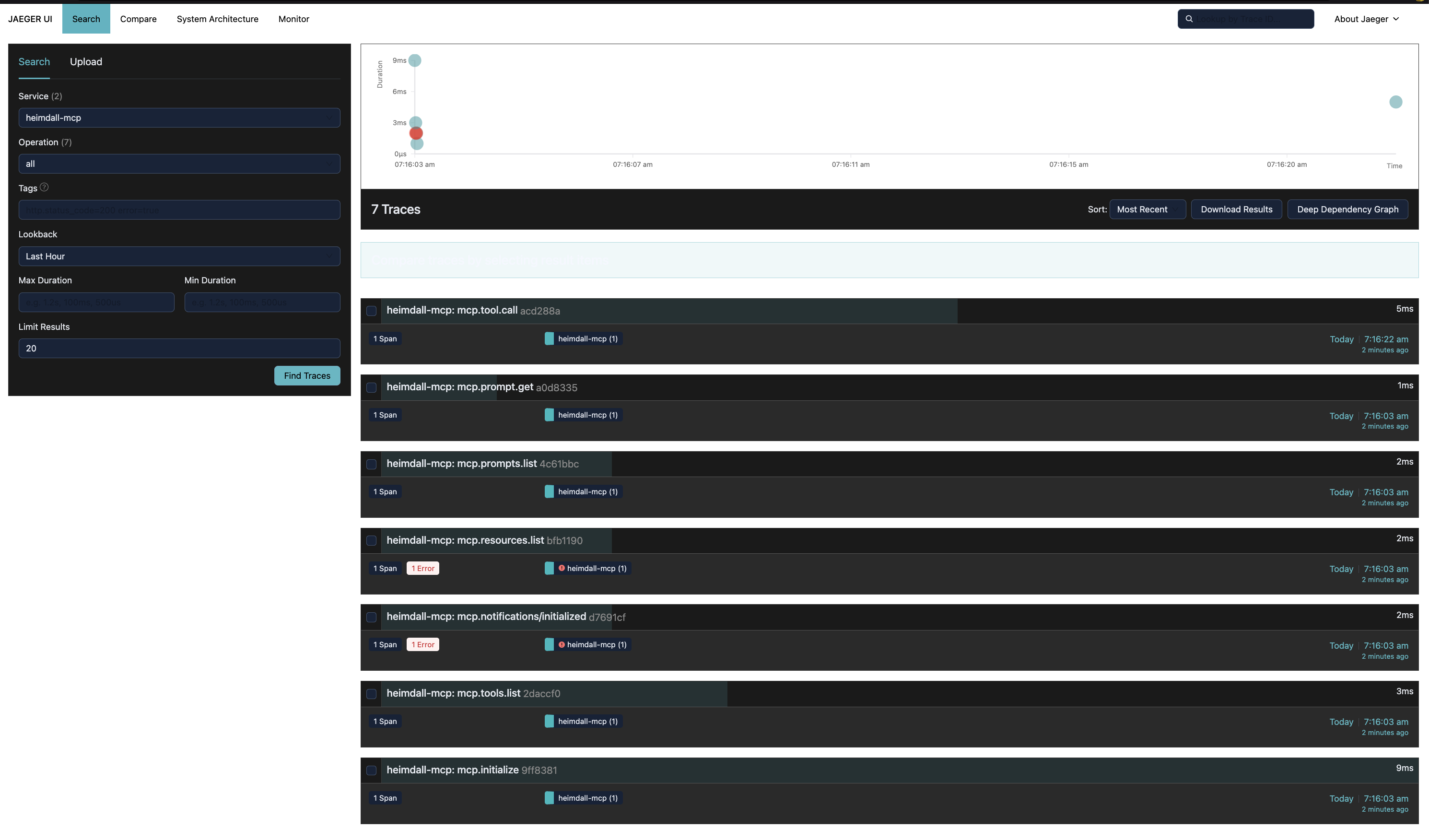
heimdall-mcp puede exportar cada span a una instancia de Jaeger en tiempo real mediante OTLP HTTP, para que puedas visualizar trazas sin consultar la base de datos directamente.
1. Iniciar Jaeger
docker run -d \
  --name jaeger \
  -p 16686:16686 \
  -p 4318:4318 \
  jaegertracing/all-in-one:latest
2. Agregar --otlp a tu configuración
{
  "mcpServers": {
    "my-server": {
      "command": "heimdall-mcp",
      "args": [
        "--store",  "sqlite://~/.mcp-traces/traces.db",
        "--otlp",   "http://localhost:4318/v1/traces",
        "--", "node", "my-server.js"
      ]
    }
  }
}
Para la variante HTTP/SSE (por ejemplo, la configuración utilizada durante el desarrollo de este proyecto):
{
  "mcpServers": {
    "my-server": {
      "command": "sh", "-c",
      "args": [
        "heimdall-mcp --store postgresql://user:pass@localhost:5432/db --out http --target http://localhost:3000/mcp --otlp http://localhost:4318/v1/traces"
      ]
    }
  }
}
3. Abrir la interfaz de Jaeger
http://localhost:16686
Selecciona el servicio heimdall-mcp y haz clic en Find Traces. Cada método MCP (mcp.tool.call, mcp.initialize, mcp.tools.list, …) aparece como una traza separada con atributos completos y cuerpos de eventos de entrada/salida.
Modo oscuro — agrega ?uiConfig={"theme":"dark"} a la URL, o monta un archivo de configuración:
echo '{"uiConfig":{"theme":"dark"}}' > jaeger-ui.json

docker rm -f jaeger && docker run -d \
  --name jaeger \
  -p 16686:16686 \
  -p 4318:4318 \
  -v $(pwd)/jaeger-ui.json:/etc/jaeger/ui-config.json \
  -e JAEGER_UI_CONFIG_FILE=/etc/jaeger/ui-config.json \
  jaegertracing/all-in-one:latest
La bandera
--otlpes aditiva — los spans se guardan en la base de datos y se exportan a Jaeger al mismo tiempo.
Interceptores personalizados
La interfaz Interceptor es pública. Puedes agregar tu propia lógica al pipeline antes del interceptor de telemetría:
interface Interceptor {
  name: string
  intercept(
    request: JsonRpcMessage,
    context: InterceptorContext,
    next: () => Promise<JsonRpcMessage>
  ): Promise<JsonRpcMessage>
}

interface InterceptorContext {
  startedAt: Date
  traceId: string
  spanId: string
  bodyMode: 'redacted' | 'hash' | 'full'
  transport: 'stdio' | 'http' | 'sse'
  serverInfo: { name?: string; version?: string }  // populated after initialize
  conversationId?: string                           // from _meta or env var
  turnId?: string
  agentRunId?: string
  metadata: Record<string, unknown>                 // shared bag between interceptors
}
Llamar a next() pasa el control al siguiente interceptor en la cadena. ForwardInterceptor siempre es el último — realiza la llamada real al servidor y registra latency.proxy_to_server_ms en context.metadata para que el interceptor de telemetría lo lea.
Puedes usar context.metadata para pasar datos entre tu interceptor y otros en la misma ejecución del pipeline.
Referencia de CLI
start
El comando predeterminado. Inicia el proxy.
heimdall-mcp start [options] [-- command [args...]]
heimdall-mcp [options] [-- command [args...]]   # "start" is optional

Options:
  --store <url>           Store connection string (required)
                            sqlite://./traces.db
                            postgres://user:pass@host/db
                            mysql://user:pass@host/db

  --lock-store <url>      Lock store connection string (optional)
                            sqlite:// | postgres:// | mysql://
                            defaults to ~/.config/heimdall/locks.db

  --out <transport>       Transport to the real server (default: stdio)
                            stdio | http | sse

  --target <url>          Server URL when --out is http or sse

  --in <transport>        Inbound transport (default: stdio)
                            stdio | http | sse

  --in-port <port>        Port for --in http or --in sse

  --otlp <url>            Export spans to an OTLP HTTP endpoint (e.g. Jaeger, Tempo)
                            Additive — spans are also saved to the store
                            Example: http://localhost:4318/v1/traces

  --body-mode <mode>      Body capture mode for tool args and responses (default: redacted)
                            redacted  → stores [redacted] + size (safe for production)
                            hash      → stores sha256:<hex> + size (safe for production)
                            full      → stores raw JSON (local/dev only — may leak secrets)

  --server-name <name>    Override server name for policy lookup and mcp.server.name OTel attribute.
                            If not provided, falls back to serverInfo.name from the initialize response.

  --out-port <port>       Port for outbound http or sse transport

  --debug                 Write verbose logs to stderr (prints span names + trace IDs to stderr)

  -V, --version           Print version
  -h, --help              Print this help

  --                      Separates proxy flags from the subprocess command
                          (required when --out is stdio)

Examples:
  # stdio proxy → subprocess
  heimdall-mcp --store sqlite://./t.db -- node server.js

  # stdio proxy with policy enforcement
  heimdall-mcp --store sqlite://./t.db --server-name filesystem -- npx @modelcontextprotocol/server-filesystem /tmp

  # stdio proxy → remote HTTP server
  heimdall-mcp --store sqlite://./t.db --out http --target http://localhost:3001

  # stdio proxy → remote SSE server with Postgres
  heimdall-mcp --store postgres://user:pass@host/db --out sse --target http://remote.com

  # with OTLP export to Jaeger
  heimdall-mcp --store sqlite://./t.db --otlp http://localhost:4318/v1/traces -- node server.js
start auto-descubre heimdall.config.{ts,js,json} en el directorio de trabajo actual y ~/.config/heimdall/heimdall.config.* al inicio. Los errores de carga de configuración imprimen una advertencia pero nunca bloquean el proxy.
init
Genera un heimdall.config.ts con ejemplos comentados. Con --hooks <host>, registra un hook de herramienta nativa para un agente de codificación en su lugar (consulta Claude Code PreToolUse hook y OpenCode tool.execute.before plugin).
heimdall-mcp init [options]

Options:
  --global          Write to ~/.config/heimdall/ instead of the current directory
  --format <fmt>    File format: ts | js | json (default: ts)
  --force           Overwrite an existing config file
  --hooks <host>    Register a native-tool PreToolUse hook for a coding agent instead of
                     writing a config file (supported: claude-code, opencode)
# Create local config in current directory
heimdall-mcp init

# Create global config (applies to all projects)
heimdall-mcp init --global

# Create as JSON
heimdall-mcp init --format json

# Register the Claude Code PreToolUse lock-enforcement hook in ~/.claude/settings.json
heimdall-mcp init --hooks claude-code

# Register the OpenCode plugin in ~/.config/opencode/opencode.jsonc
heimdall-mcp init --hooks opencode
health
Valida la configuración de políticas combinada e informa las políticas por servidor. No se conecta a ningún servidor MCP.
heimdall-mcp health [options]

Options:
  --config <path>   Path to a specific config file (skips auto-discovery)
Ejemplo de salida:
Config files loaded:
  global: ~/.config/heimdall/heimdall.config.ts
  local:  ./heimdall.config.ts

Default policy:
    tools: allow=[*] deny=[none]

Server policies:
  filesystem:
      tools: allow=[read_file, list_directory, search_files] deny=[write_file, create_file, delete_file, move_file]
  database:
      tools: allow=[query, describe_table, list_tables] deny=[execute, drop_table, truncate]

No conflicts detected.
Si la misma entidad aparece tanto en allow como en deny, health sale con código 1 y lista todos los conflictos.
Referencia de trazado
El vocabulario completo de atributos — atributos obligatorios, atributos opcionales, campos de captura de cuerpo, clasificación de errores y ejemplos de spans anotados para initialize, tools/list, tools/call y un caso de fallo de proxy — está documentado en TRACING.md.
Hoja de ruta
| Fase | Característica | Estado |
|---|---|---|
| 1 | heimdall.config.{ts,js,json} auto-descubiertos — locales + globales, listas de permitir/denegar por servidor | ✅ Hecho (v1.2) |
| 2 | PolicyInterceptor — las llamadas bloqueadas devuelven el error JSON-RPC -32001, registrado en OTel con policy.blocked = true | ✅ Hecho (v1.2) |
| 3 | Comandos CLI heimdall-mcp init + heimdall-mcp health | ✅ Hecho (v1.2) |
| 4 | Vocabulario de trazado estable — mcp.jsonrpc.id, mcp.trace.request_id, mcp.error.type, hashes de cuerpo por dirección, especificación TRACING.md | ✅ Hecho (v1.3) |
| 5 | Filtrar por tipo de acción (read / write / execute) inferido del nombre de la herramienta o de los metadatos de MCP | 📋 Planificado |
| 6 | Modos de aplicación en tiempo de ejecución: warn (registrar + reenviar), audit (span con policy.violation = true) | 📋 Planificado |
| 7 | Bloqueos de recursos — esquema de configuración locks, LockStore, expiración basada en TTL, código de error JSON-RPC específico de bloqueo, resolución de ruta canónica, almacenes respaldados por Postgres/MySQL, integraciones de hooks | 🚧 En progreso (bloqueo en modo escritura con resolución de ruta canónica, código de error RESOURCE_LOCKED, modos de rechazo/advertencia onConflict y almacenes respaldados por Postgres/MySQL implementados; integraciones de hooks y bloqueo en modo lectura pendientes) |