Substack Publisher API
Consulta publicaciones, análisis y datos de suscriptores desde la API oficial de Publisher de Substack.
Documentación
substack-publisher-mcp
Servidor MCP para la API oficial de Publisher de Substack



Nota: Esta es una herramienta no oficial, desarrollada por la comunidad, y no está afiliada, respaldada ni soportada por Substack, Inc.
Un servidor MCP para la API de Publisher oficial de Substack. Busca y lee publicaciones, obtén análisis de publicaciones y conteos de suscriptores, y consulta suscriptores desde Claude, Cursor o cualquier cliente MCP. Todas las herramientas son de solo lectura.
¿Por qué este servidor?
| substack-publisher-mcp | Otros servidores MCP de Substack | |
|---|---|---|
| API | API oficial de Publisher | API interna no oficial |
| Autenticación | Clave API (estable) | Cookies del navegador (frágiles) |
| Estabilidad | API oficial y documentada | Se rompe cuando Substack cambia sus internos |
| Multi-publicación | Soporte integrado | No disponible |
Requisitos previos
- Node.js 22+. Verifica con
node --version; instala desde nodejs.org si falta. - Clave API de Substack Publisher. Genera una desde el panel de control de tu publicación en Substack. Si no ves una opción de Publisher API allí, es posible que aún no esté habilitada para tu publicación; consulta la documentación de Publisher API para conocer la disponibilidad.
Inicio rápido
1. Instalación
git clone https://github.com/dkships/substack-publisher-mcp.git
cd substack-publisher-mcp
npm install && npm run build
2. Configura tu cliente MCP
Agrega al archivo de configuración MCP de tu cliente (crea el archivo si no existe):
| Cliente | Archivo de configuración |
|---|---|
| Claude Desktop (macOS) | ~/Library/Application Support/Claude/claude_desktop_config.json |
| Claude Desktop (Windows) | %APPDATA%\Claude\claude_desktop_config.json |
| Claude Code | .mcp.json en el directorio de tu proyecto |
| Cursor | .cursor/mcp.json |
{
  "mcpServers": {
    "substack": {
      "command": "node",
      "args": ["/path/to/substack-publisher-mcp/dist/index.js"],
      "env": {
        "SUBSTACK_API_KEY": "your-api-key-here"
      }
    }
  }
}
Usuarios de Claude Code: Agrega
"type": "stdio"a la configuración del servidor.
Reinicia tu cliente MCP después de editar la configuración: los servidores se cargan al inicio.
3. Comienza a usarlo
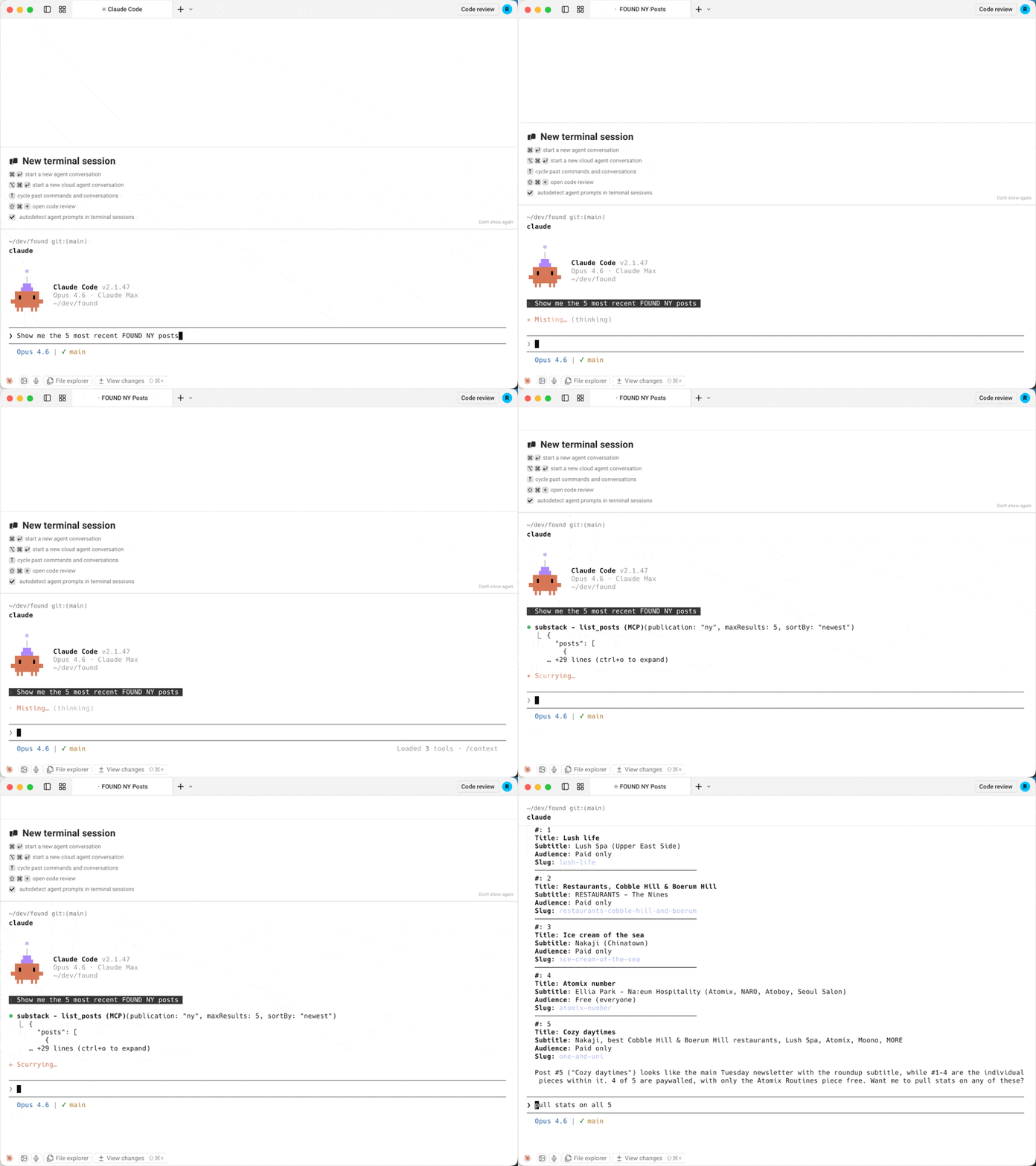
Pregúntale a Claude (o a tu cliente MCP):
- "¿Qué publicaciones de Substack tengo configuradas?"
- "Muéstrame mis publicaciones del último mes"
- "Encuentra mis publicaciones sobre precios"
- "Abre mi publicación con el slug my-latest-post"
- "¿Cuántas aperturas y clics obtuvo mi última publicación?"
- "¿Cuáles son mis conteos de suscriptores de los últimos 30 días?"
- "Busca al suscriptor jane@example.com"
¿Instalando a través de un agente de IA o registro? Consulta llms-install.md para una guía de configuración condensada y legible por máquina.
Herramientas
| Herramienta | Descripción | Parámetros clave |
|---|---|---|
list_publications | Lista las publicaciones configuradas | Ninguno |
list_posts | Lista las publicaciones publicadas | startDate, endDate, sortBy, type, maxResults, next |
search_posts | Búsqueda de texto completo en publicaciones publicadas | query (obligatorio), maxResults (1-100) |
get_post | Obtiene una publicación y su cuerpo por slug de URL | urlSlug (obligatorio), bodyFormat |
get_post_stats | Obtiene estadísticas de participación de una publicación | urlSlug (obligatorio) |
get_subscriber_counts | Obtiene conteos diarios de suscriptores por tipo | startDate, endDate |
get_subscriber | Busca un suscriptor por correo electrónico | email (obligatorio) |
Todas las herramientas excepto list_publications aceptan un parámetro opcional publication cuando hay múltiples publicaciones configuradas.
get_post devuelve el cuerpo de la publicación como Markdown de forma predeterminada. Substack lo envía como un documento ProseMirror codificado en JSON, típicamente aproximadamente el doble de tamaño. Pasa bodyFormat: "prosemirror" para el documento sin procesar o "none" para solo metadatos.
Los filtros de fecha aceptan YYYY-MM-DD. En list_posts, endDate es exclusivo; en get_subscriber_counts, es inclusivo.
Respuestas de ejemplo
get_subscriber_counts
[
  {
    "date": "2025-01-15",
    "total_email_subscribers": 25000,
    "paid_subscribers": 500,
    "free_trial_subscribers": 10,
    "comp_subscribers": 50,
    "gift_subscribers": 15,
    "lifetime_subscribers": 0,
    "founding_subscribers": 25
  }
]
get_post_stats
{
  "clicks": 320,
  "opens": 5400,
  "post_id": 12345678,
  "recipients": 10000,
  "views": 6100,
  "new_free_subscriptions": 80,
  "new_paid_subscriptions": 5,
  "estimated_revenue_increase": 400
}
list_posts
{
  "posts": [
    {
      "post_id": 12345678,
      "title": "My Latest Post",
      "audience": "only_paid",
      "subtitle": "A deep dive into the topic",
      "postDate": "2025-01-15T12:00:00.000Z",
      "urlSlug": "my-latest-post",
      "coverImage": "https://substackcdn.com/image/..."
    }
  ],
  "next": "abc123cursor"
}
next es null en la última página.
Múltiples publicaciones
Si gestionas múltiples publicaciones de Substack, configura una clave API separada para cada una usando el patrón SUBSTACK_API_KEY_<NAME>:
{
  "mcpServers": {
    "substack": {
      "command": "node",
      "args": ["/path/to/substack-publisher-mcp/dist/index.js"],
      "env": {
        "SUBSTACK_API_KEY_MAIN": "your-main-blog-key",
        "SUBSTACK_API_KEY_TECH": "your-tech-newsletter-key",
        "SUBSTACK_API_KEY_COMPANY": "your-company-updates-key"
      }
    }
  }
}
Luego especifica qué publicación consultar:
"Muéstrame los conteos de suscriptores para main" "Lista las publicaciones recientes de la publicación de tecnología"
Usa list_publications para ver todos los nombres de publicaciones configuradas.
Solución de problemas
| Problema | Solución |
|---|---|
Error Unauthorized | Verifica que tu clave API sea correcta. La clave va directamente en el encabezado authorization sin prefijo Bearer. |
... duplicates publication ... o ... ignoring it al inicio | Dos variables de entorno se asignan al mismo nombre de publicación (los nombres no distinguen entre mayúsculas y minúsculas, y SUBSTACK_API_KEY es default), o una clave está mal formada. Renombra o elimina la variable adicional. |
| El servidor no inicia | Asegúrate de haber ejecutado npm run build después de clonar. El servidor se ejecuta desde dist/, no desde src/. |
No API keys configured | Establece SUBSTACK_API_KEY o SUBSTACK_API_KEY_<NAME> en la configuración de tu cliente MCP. |
| El servidor no aparece en tu cliente | Verifica que el archivo de configuración sea JSON válido (sin comas finales) y luego reinicia el cliente. |
command not found / spawn node ENOENT | Node.js no está instalado o no está en tu PATH. Verifica node --version. |
| Sigue atascado | Revisa los registros MCP de tu cliente. Claude Desktop en macOS: ~/Library/Logs/Claude/mcp*.log. |
Referencia de la API
Este servidor envuelve la API de Publisher de Substack. Consulta la documentación de Substack para obtener detalles sobre los datos disponibles y los límites de velocidad.
Contribuciones
Consulta CONTRIBUTING.md para las pautas.
Licencia
Licencia MIT. Consulta LICENSE para más detalles.
Substack es una marca comercial de Substack, Inc. Este proyecto no está afiliado con Substack, Inc. El uso del nombre Substack es solo con fines descriptivos.