depwire
Motor de contexto de IA y grafo de dependencias de código. 10 herramientas MCP que brindan a Claude, Cursor y cualquier cliente MCP contexto completo del código base: análisis de impacto, trazado de dependencias, resúmenes de arquitectura y visualización interactiva de diagramas de arco. Compatible con TypeScript, JavaScript, Python y Go.
Documentación
Depwire












Tu IA no conoce tu arquitectura. Depwire sí.
Qué hace diferente a Depwire
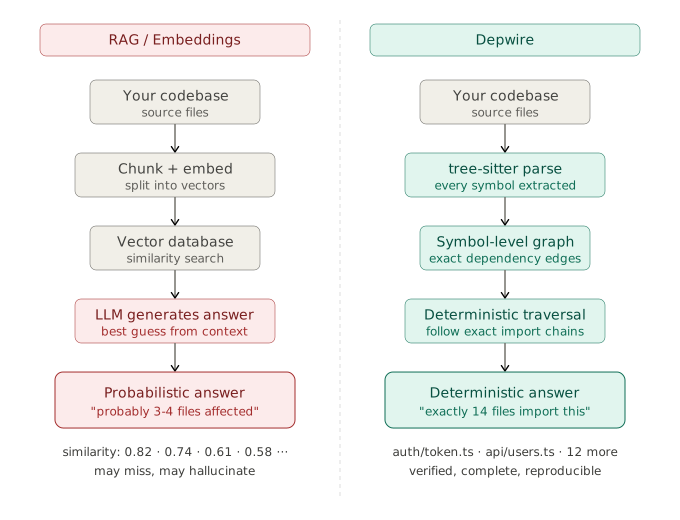
Depwire construye un grafo de dependencias DETERMINISTA, NO PROBABILÍSTICO de tu código. Esto no es RAG. No hay embeddings, ni puntuaciones de similitud, ni bases de datos vectoriales, ni conjeturas. Depwire usa tree-sitter — el mismo parser que impulsa la inteligencia de código de GitHub — para extraer hechos exactos a nivel de símbolo de cada archivo: cada función, cada clase, cada interfaz, cada relación de importación y exportación, en 17 lenguajes de programación. Cuando preguntas "¿qué se rompe si elimino encodeToken en auth/token.ts?", Depwire no busca código de apariencia similar y estima una respuesta. Recorre el grafo de dependencias exacto y devuelve la lista precisa de los 14 archivos que importan ese símbolo, qué cadenas de importación se rompen y cuánto baja tu puntuación de salud. Esta es precisión a nivel de compilador aplicada al desarrollo asistido por IA — no la mejor suposición de un modelo de lenguaje sobre tu código.
Tampoco es un grafo de compilación. Herramientas como Nx, Turborepo y Grapher rastrean dependencias a nivel de paquete para el caché de compilación. Depwire rastrea dependencias a nivel de símbolo — cada función, clase y relación de importación — que es lo que hace posible la simulación What If, el escaneo de seguridad consciente del grafo y el análisis exacto del radio de explosión.
Contenido
- Qué hace diferente a Depwire
- Empieza aquí
- La capa de infraestructura
- Simulación What If
- Escáner de seguridad
- Verificación previa a la acción
- Diff estructural entre commits
- Servidor MCP — integración con IA
- Detección de bordes entre lenguajes
- Puntuación de salud de la arquitectura
- Soporte de lenguajes
- SDK
- Telemetría
- Panel de control en la nube
- GitHub Action — Análisis de impacto de PR
- Hook pre-commit / prek
- Depwire Action Token (DAT)
- Hoja de ruta
Depwire es la capa de infraestructura entre tu asistente de codificación con IA y tu código. Antes de que tu IA toque un solo archivo, Depwire ya ha mapeado cada conexión, evaluado cada riesgo y simulado cada cambio.
⭐ Si Depwire te salva de una compilación rota, dale una estrella al repositorio — ayuda a que este proyecto crezca.
Evidencia de rendimiento
El benchmark de agentes publicado anteriormente ha sido retirado después de que una auditoría encontrara que el prompt de la tarea exponía su clave de respuestas, el conjunto de archivos puntuados era más limitado que el cambio requerido por el monorepo, y una de las ramas comenzó en un directorio de trabajo diferente. Se está preparando un experimento corregido de tres ramas. No se debe citar ninguna conclusión de rendimiento o corrección de las ejecuciones anteriores.
Auditoría y harness corregido →
El problema
Las herramientas de codificación con IA son cada vez más inteligentes. Pero todavía tienen un punto ciego fundamental: no conocen tu arquitectura antes de tocarla.
Le pides a Claude que elimine un archivo de utilidades. Lo elimina limpiamente. Con confianza. Sin advertencias.
Luego ejecutas la compilación. 30 archivos rotos.
Claude no tenía idea. Vio un archivo. No vio los 30 consumidores posteriores.
Esto no es un problema del modelo. Es un problema de contexto. La IA está volando a ciegas.
La capa de infraestructura
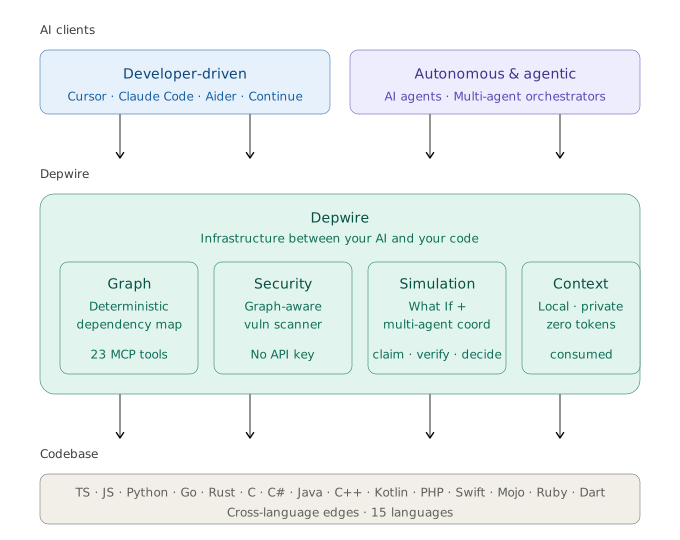

Depwire es la capa de contexto y seguridad para código generado por IA.
Depwire se sitúa entre tu IA y tu código. Construye un grafo de dependencias completo usando tree-sitter — determinista, no probabilístico — y lo sirve a tu IA a través de 24 herramientas MCP.
Cuatro garantías:
- Local — todo se ejecuta en tu máquina. Sin análisis en la nube. Sin envío de datos a ningún lugar.
- Seguro — tu código nunca sale de tu máquina. El escáner de seguridad no requiere clave API.
- Eficiente en tokens — Depwire sirve datos de grafo precomputados para que los agentes puedan solicitar contexto de dependencias enfocado en lugar de volcados de archivos amplios.
- Determinista — tree-sitter proporciona un análisis estructural consistente sin depender de la inferencia del modelo.
Empieza aquí
npm install -g depwire-cli
Tres comandos para entender cualquier código:
depwire whatif     # know what breaks before you change anything
depwire security   # catch vulnerabilities before AI ships them
depwire viz        # see your entire architecture instantly
Probado en proyectos del mundo real
| Proyecto | Lenguaje | Archivos | Símbolos | Bordes | Salud |
|---|---|---|---|---|---|
| google/guice | Java (multi-módulo, 13 módulos) | 647 | 30,592 | 10,081 | 31/100 |
| honojs/hono | TypeScript | 352 | 6,462 | 2,194 | 41/100 |
| apache/commons-lang | Java (módulo único) | 624 | 29,723 | 9,037 | — |
| pallets/flask | Python | 79 | 2,005 | 851 | — |
| dart-lang/shelf | Dart | 108 | 1,639 | 219 | — |
| rstudio/plumber | R | 197 | 1,194 | 219 | — |
| payloadcms/payload | TypeScript | 645 | 9,292 | 3,511 | — |
Números de ejecuciones reales de
depwire parseen repositorios públicos. Última validación: v1.8.2 (junio de 2026).Medición anterior a 1.9.0. v1.9.0 corrigió errores del parser (símbolos emitidos dos veces en los parsers de TypeScript/Python/C#/C++/Java, bordes de importación de solo tipos omitidos, huérfanos falsos) que afectan directamente los recuentos de símbolos, bordes y puntuaciones de salud. Estos números se capturaron antes de esa corrección y no se han vuelto a medir — son útiles direccionalmente pero no exactos bajo v1.9.0+.
Simulación What If
Conoce el radio de explosión antes de tocar nada.
depwire whatif . --simulate delete --target src/utils/encode.ts
Salida real en honojs/hono — 352 archivos, 6,245 símbolos:
Health Score:    41 → 41  (+0 → sin cambios)
Affected Nodes:  29
Broken Imports:  30
• src/utils/jwt/jwt.ts imports decodeBase64Url
• src/adapter/aws-lambda/handler.ts imports encodeBase64
• src/utils/basic-auth.ts imports decodeBase64
[27 more...]
Removed Edges:   32
Medición anterior a 1.9.0 — capturada antes de las correcciones del parser en v1.9.0; no re-medida.
Antes de tocar un solo archivo. Cero E/S de archivos. Simulación pura en memoria.
Cinco operaciones:
depwire whatif . --simulate delete --target src/utils/encode.ts
depwire whatif . --simulate move --target src/utils/encode.ts --destination src/core/encode.ts
depwire whatif . --simulate rename --target src/utils/encode.ts --destination src/utils/encoder.ts
depwire whatif . --simulate split --target src/services/auth.ts --symbols "validateToken,refreshToken"
depwire whatif . --simulate merge --target src/utils/helpers.ts --merge-target src/utils/formatters.ts
Ejecuta sin --simulate para abrir la interfaz de navegador — diagramas de arco lado a lado que muestran el estado actual vs. el simulado.
Inteligencia de dependencias entre módulos
Para proyectos Maven y Gradle multi-módulo, Depwire resuelve importaciones a través de los límites de módulos — no solo dentro de un módulo único.
Ejemplo: simular la eliminación de Injector.java en google/guice (un framework de DI Java de 13 módulos):
$ depwire whatif . --simulate delete --target core/src/com/google/inject/Injector.java

Action:          DELETE core/src/com/google/inject/Injector.java
Affected Nodes:  128
Broken Imports:  124  (cross-module: 106 across 10 extension modules)
Medición anterior a 1.9.0 — google/guice es un proyecto Java; el error de doble emisión del parser Java (corregido en v1.9.0) afecta esta cifra. No re-medida.
Sin esto, tu agente de IA no tiene visibilidad del radio de explosión entre módulos. Con esto, los cambios peligrosos se detectan antes de que ocurran.
Sistemas de compilación compatibles:
- Maven (
pom.xmlcon declaraciones<modules>, módulos anidados recursivos) - Gradle (
settings.gradle/settings.gradle.ktscon declaracionesinclude())
Se admiten tanto diseños de código fuente estándar (src/main/java) como no estándar (src/).
Escáner de seguridad
La IA enviará código vulnerable con confianza. Depwire lo detiene antes de producción.
depwire security .                        # full repo scan
depwire security . --target src/auth.ts   # single file
depwire security . --format sarif         # GitHub Security tab integration
depwire security . --fail-on high         # CI gate — exit 1 if HIGH or above
depwire security . --class secrets         # specific check only
Salida real en honojs/hono:
6 Critical 19 High 14 Medium 1 Low
10 categorías de verificación — CVEs de dependencias, seguridad de procesos, gestión de credenciales, seguridad de rutas, seguridad de autenticación, validación de entrada, divulgación de información, debilidades criptográficas, seguridad de codificación de salida y riesgos a nivel de arquitectura.
Severidad consciente del grafo: un hallazgo de severidad media alcanzable desde una herramienta MCP o una ruta HTTP se eleva automáticamente a crítica. Esto es lo que ninguna herramienta SAST genérica puede replicar — Depwire conoce tu arquitectura, así que sabe qué es realmente alcanzable.
Disponible como herramienta MCP security_scan y mediante depwire-cli/sdk.
Verificación previa a la acción
Verifica que un cambio propuesto sea seguro antes de aplicarlo. Reporta importaciones rotas, cambios en grupos cíclicos cuando hay un grafo posterior resuelto disponible, movimiento de salud y hallazgos de seguridad. Las comparaciones solo de exportación de contenido editado o diffs unificados no pueden establecer la seguridad de grupos cíclicos: devuelven cyclicGroupChanges.status: not_comparable y no certifican el cambio como seguro.
depwire verify-change --file src/auth.ts --content-from new-auth.ts
depwire verify-change --diff changes.patch
depwire verify-change --file src/auth.ts --content-from new-auth.ts --json
cat new-auth.ts | depwire verify-change --file src/auth.ts
Ejemplo de salida:
Verify Change Report
──────────────────────────────────────────────────
✗ UNSAFE — risk: high
──────────────────────────────────────────────────
Health Score:  62 → 59  (-3)
Broken Imports: 2
  • src/index.ts — missing trackCommand
  • src/server.ts — missing handleAuth
Cyclic Group Changes: unavailable without a resolved after-graph
Security Findings: 1
  • [HIGH] Hardcoded secret detected (src/auth.ts:14)
Blast Radius:    8 files affected
──────────────────────────────────────────────────
Integración con CI:
depwire verify-change --diff pr.patch --fail-on-warnings --quiet
# exits 1 for medium risk, 2 for high risk
Disponible como herramienta MCP verify_change y comando CLI depwire verify-change.
Diff estructural entre commits
Compara el grafo de dependencias entre dos referencias git cualesquiera — ramas, etiquetas, hashes de commit, HEAD~N.
depwire diff main feature/auth-refactor
depwire diff HEAD~5 HEAD --verbose
depwire diff v1.5.0 v1.6.0 --json | jq
Ejemplo de salida:
Depwire diff: v1.5.0..v1.6.0
━━━━━━━━━━━━━━━━━━━━━━━━━━━━━━━━━━━━━━━━━━━━━━━
Symbols
  + 114 added      VerifyChangeOptions, verifyChangeCommand, input ...
  - 66 removed    VerifyChangeInput, BrokenImportEntry, CircularDepEntry ...
  ~ 47 modified   __filename, __dirname, packageJsonPath ...
Edges
  + 31 added
  - 9 removed
Files
  152 → 154  (+2 / -0)
Blast radius:    4 files affected
Health score:    67 → 67  (+0)  [D → D]
Security:        1 new / 1 fixed
━━━━━━━━━━━━━━━━━━━━━━━━━━━━━━━━━━━━━━━━━━━━━━━
Determinista. Sin LLM. Seguro — los cambios no confirmados se guardan y restauran incluso si el comando falla.
Opciones: --json (legible por máquina), --verbose (cada símbolo/borde por nombre), --no-security / --no-health (ejecuciones más rápidas).
Visualización
depwire viz
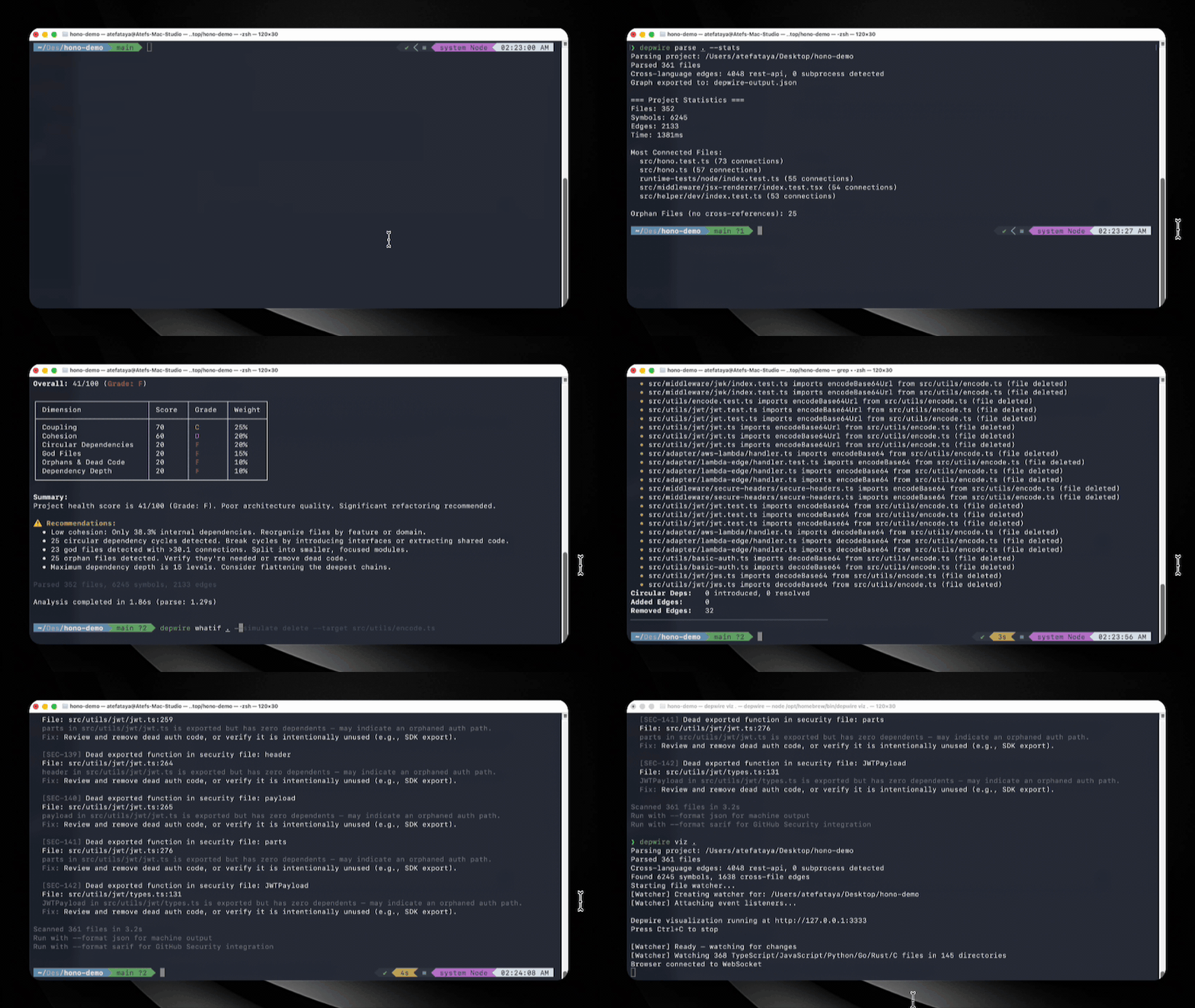
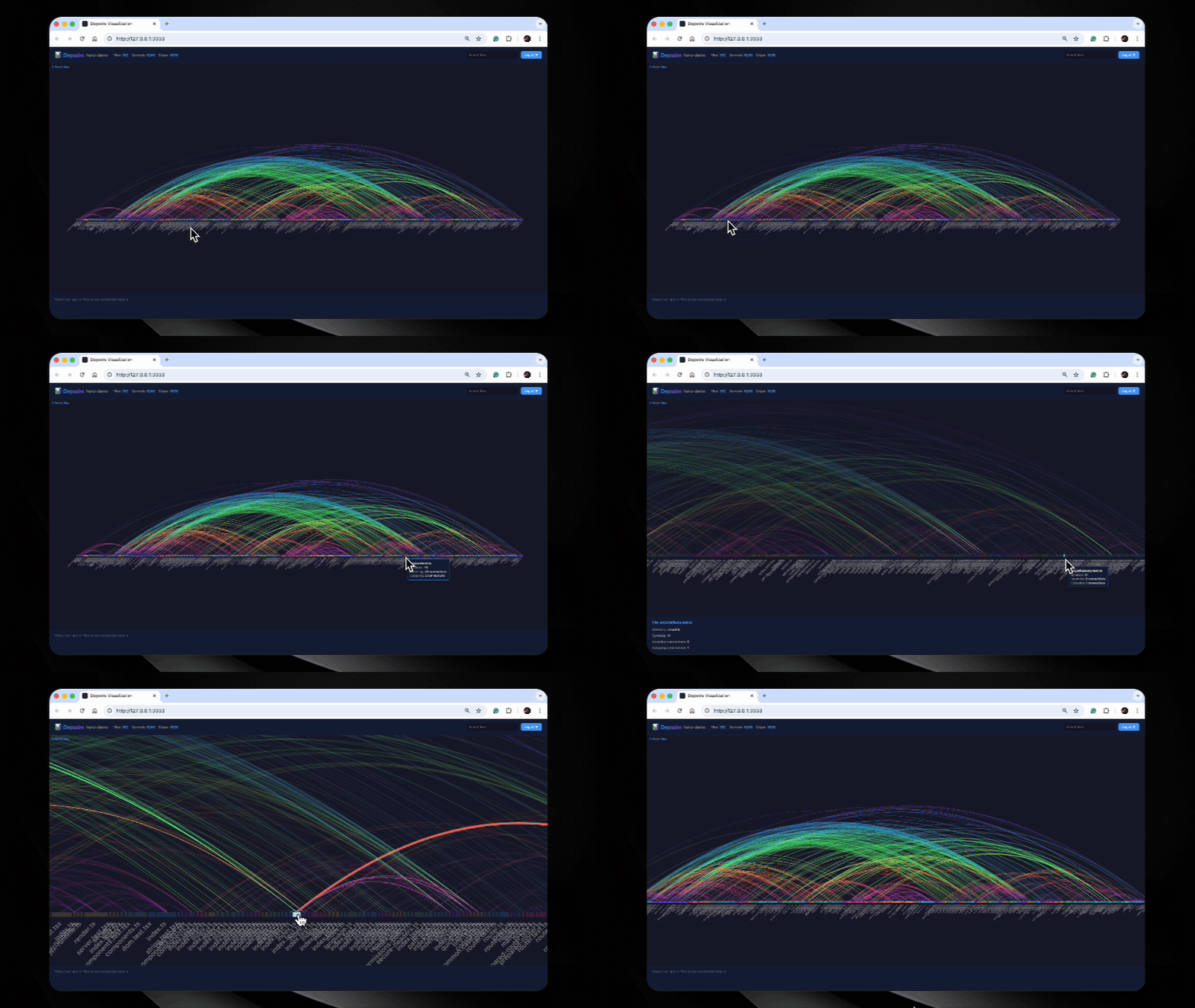
Diagrama de arco interactivo de todo tu código. Cada archivo, cada conexión, cada dependencia visible a la vez. Pasa el cursor para inspeccionar. Haz clic para filtrar. Exporta como PNG o SVG.
Grafo temporal
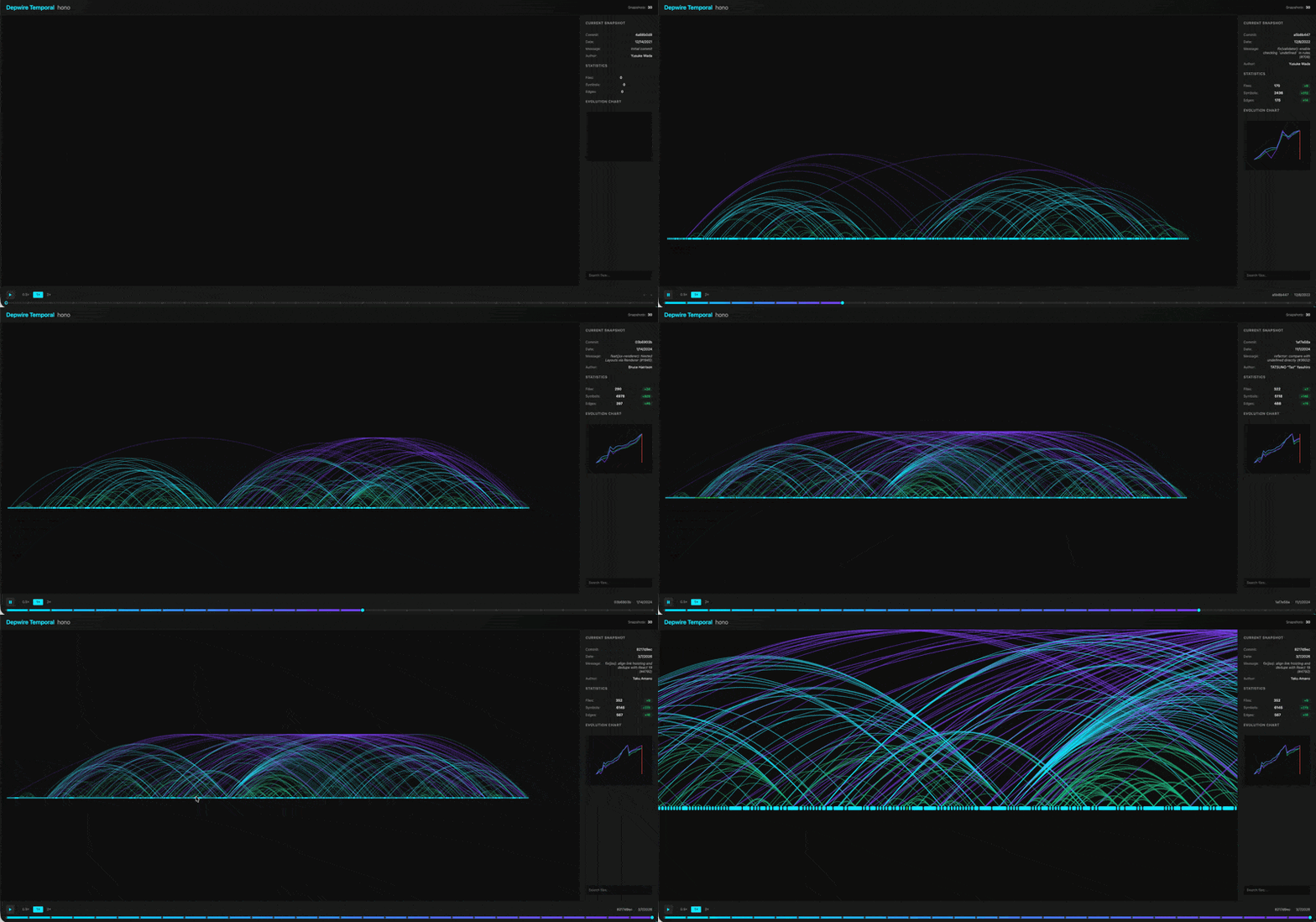
depwire temporal
Observa cómo evoluciona tu arquitectura a lo largo del historial de git. El control deslizante de línea de tiempo recorre los commits — el diagrama de arco se transforma mientras tu código crecía, se acoplaba y se refactorizaba. Nadie más hace esto.
Todos los comandos
| Comando | Descripción |
|---|---|
depwire viz | Diagrama de arco interactivo en el navegador |
depwire whatif | Simula cambios antes de tocar el código |
depwire verify-change | Verifica que un cambio propuesto sea seguro: imports rotos, delta de salud, seguridad |
depwire security | Escanea vulnerabilidades: severidad consciente del grafo |
depwire health | Puntuación de salud de arquitectura de 0 a 100 en 6 dimensiones |
depwire dead-code | Encuentra símbolos no utilizados con puntuación de confianza |
depwire docs | Genera 13 documentos de arquitectura |
depwire temporal | Visualiza la evolución de la arquitectura a lo largo del historial de git |
depwire parse | Analiza y exporta el grafo de dependencias como JSON |
depwire prompt | Obtén un prompt de flujo de trabajo centrado en el grafo para tu agente de IA |
depwire diff | Diff estructural entre dos commits de git: símbolos, aristas, salud, seguridad |
depwire mcp | Inicia el servidor MCP para asistentes de codificación con IA |
Todos los comandos detectan automáticamente la raíz de tu proyecto. No se necesita configuración de rutas.
depwire prompt — flujo de trabajo centrado en el grafo para agentes de IA
# Get the graph-first workflow prompt for your agent
depwire prompt                    # generic
depwire prompt --tool claude      # Claude Code optimized
depwire prompt --tool cline       # Cline optimized
depwire prompt --tool codex       # Codex optimized
Pega la salida como contexto del sistema de tu agente antes de comenzar una tarea compleja.
Servidor MCP — integración con IA
Conecta Depwire a cualquier herramienta de IA compatible con MCP. Tu IA obtiene 24 herramientas que puede invocar de forma autónoma.
Claude Desktop — añade a ~/Library/Application Support/Claude/claude_desktop_config.json:
{
  "mcpServers": {
    "depwire": {
      "command": "npx",
      "args": ["-y", "depwire-cli", "mcp"]
    }
  }
}
Para proyectos grandes — inicio instantáneo de MCP:
# Parse once (writes depwire-output.json)
depwire parse .

# Output defaults to the parsed project directory; --output takes precedence
depwire parse ./services/api --output ./artifacts

# MCP starts instantly from cached graph (<100ms)
depwire mcp .

# Flags:
depwire mcp . --from-cache   # error if no cache found
depwire mcp . --no-cache     # force full re-parse
depwire parse [directory] lee el directorio especificado, o el directorio de trabajo actual cuando se omite
(sin ascender a un proyecto ancestro). Escribe depwire-output.json en
--output <dir> cuando se proporciona; de lo contrario, en [directory]; de lo contrario, en el directorio de trabajo actual.
Las rutas relativas se resuelven desde el directorio de trabajo actual; --output es un directorio.
| Resultado del análisis | Código de salida | Resultado |
|---|---|---|
| Uno o más archivos analizados correctamente | 0 | Grafo exportado |
| Algunos archivos analizados, algunos fallaron | 0 | Grafo parcial exportado; advertencia no fatal en stderr |
| Ningún archivo analizado (vacío, no soportado, excluido, sobredimensionado, o todos fallaron) | 2 | Mensaje claro en stderr; no se exporta grafo |
| Falló el recorrido de directorios, la construcción del grafo o la escritura de salida | 1 | Error en stderr |
Los llamadores del SDK reciben fallos por archivo en parseProject(...).errorFiles y deben
verificar tanto length como errorFiles. El formato del grafo exportado no cambia;
los diagnósticos de análisis parcial no se incrustan en el grafo JSON. Un análisis
fallido no reemplaza ni elimina un archivo de salida anterior: CI debe verificar el código
de salida antes de consumir ese archivo.
Cursor — Configuración → Funciones → Experimental → Habilitar MCP → Agregar servidor:
- Comando:
npx - Argumentos:
-y depwire-cli mcp
Contexto de proyecto generado automáticamente
Después de ejecutar depwire parse ., Depwire genera .depwire/AGENTS.md — un archivo de contexto específico del proyecto que contiene la estructura de módulos, archivos clave, resumen de salud y comandos de inicio rápido de MCP.
Claude Code lee AGENTS.md automáticamente cuando está presente. Añádelo a tu CLAUDE.md:
# In your project root CLAUDE.md:
echo "## Depwire Context" >> CLAUDE.md
echo "Read .depwire/AGENTS.md for codebase architecture." >> CLAUDE.md
Esto le da a cada sesión de Claude Code una orientación específica del proyecto sin una llamada a herramienta MCP.
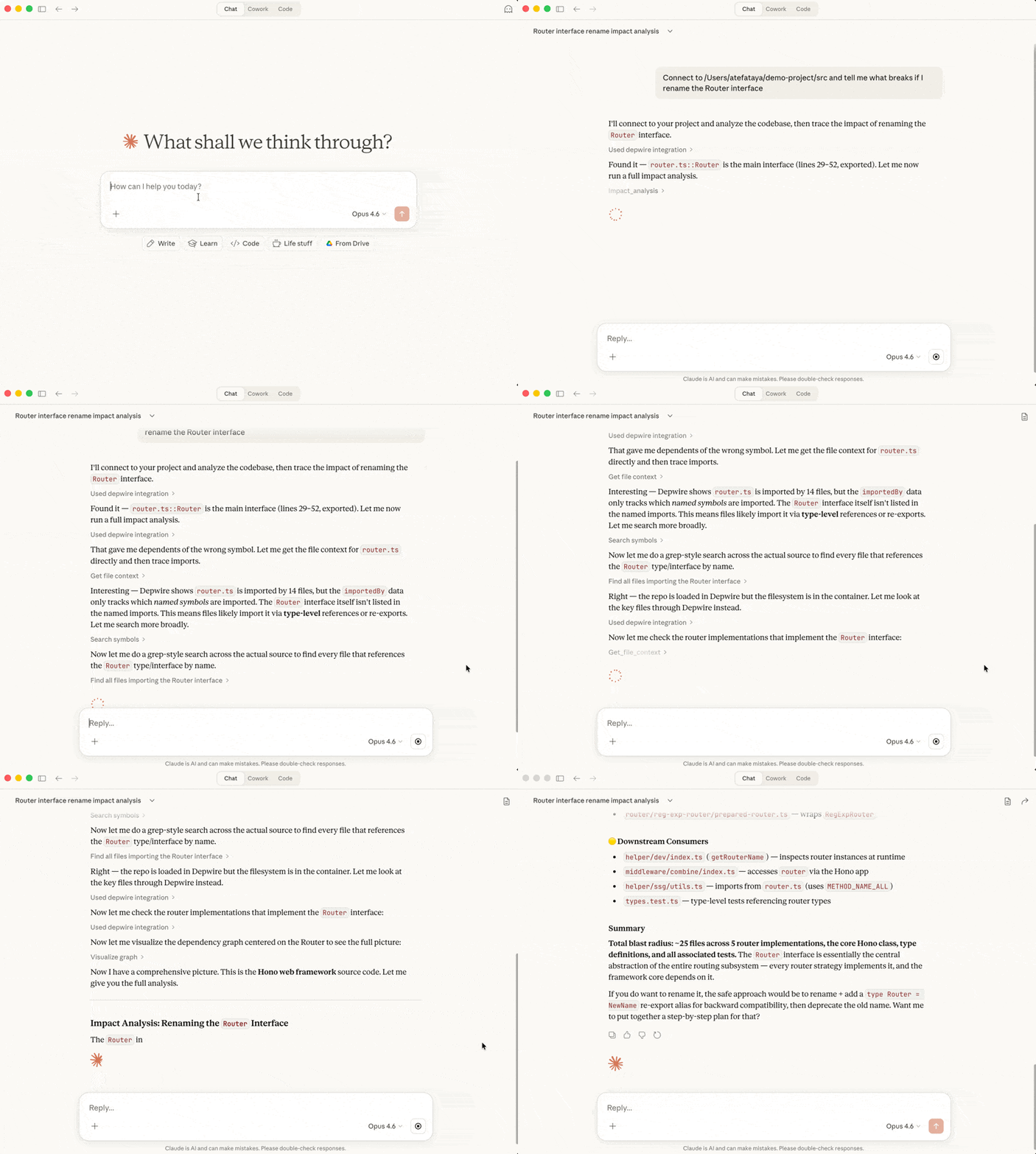
24 herramientas MCP
| Herramienta | Descripción |
|---|---|
connect_repo | Conéctate a cualquier proyecto local o repositorio de GitHub |
get_architecture_summary | Resumen general del proyecto |
get_file_context | Contexto completo: imports, exports, dependientes. Incluye conexiones entre lenguajes. |
get_dependencies | ¿De qué depende un símbolo? |
get_dependents | ¿Qué depende de este símbolo? |
get_symbol_info | Consulta los detalles de cualquier símbolo |
search_symbols | Encuentra símbolos por nombre en todo el código base |
list_files | Lista todos los archivos con estadísticas |
impact_analysis | ¿Qué se rompe si cambias un símbolo? Se incluyen aristas entre lenguajes. |
visualize_graph | Genera un diagrama de arco interactivo |
get_health_score | Puntuación de salud de 0 a 100 con recomendaciones |
find_dead_code | Símbolos definidos pero nunca referenciados |
get_project_docs | Recupera documentación del código base generada automáticamente |
update_project_docs | Regenera documentación bajo demanda |
get_temporal_graph | Evolución de la arquitectura a lo largo del historial de git |
simulate_change | Simula mover/eliminar/renombrar/dividir/fusionar antes de tocar el código. Devuelve delta de salud, imports rotos, nodos afectados. Se incluyen aristas entre lenguajes. |
security_scan | Escanea vulnerabilidades con elevación de severidad consciente del grafo. No se requiere clave API. |
verify_change | Informe de seguridad antes de aplicar cambios de código. Devuelve imports rotos, cambios en grupos cíclicos (o una razón explícita de no disponibilidad), delta de salud, archivos afectados. También disponible como CLI depwire verify-change. |
claim_files | Coordinación multiagente: declara la intención de modificar archivos para que otros clientes eviten conflictos. |
release_files | Libera una reclamación de archivo previamente realizada. |
get_active_claims | Consulta quién está trabajando actualmente en qué. |
record_decision | Guarda una decisión estructurada para que sesiones futuras la consulten. |
get_decisions | Recupera decisiones pasadas por consulta, sesión, archivo o etiqueta. |
affected_files | Encuentra archivos y pruebas afectados por cambiar un archivo o símbolo. |
Estado de ejecución de .depwire/
Las herramientas de coordinación (claim_files, release_files, get_active_claims, record_decision, get_decisions) escriben estado de ejecución en .depwire/claims.jsonl y .depwire/decisions.jsonl. Añádelos al .gitignore de tu proyecto:
.depwire/claims.jsonl
.depwire/decisions.jsonl
Detección de aristas entre lenguajes
Depwire detecta conexiones entre archivos escritos en diferentes lenguajes.
Una llamada fetch('/api/users') de TypeScript coincidente con una definición de ruta @app.get('/api/users') de Python — eso es una arista entre lenguajes. Elimina la ruta de Python y Depwire muestra los llamadores de TypeScript como rotos.
Patrones soportados:
- Aristas de API REST: llamadas fetch/axios coincidentes con definiciones de rutas de Express, FastAPI, Flask, Gin
- Aristas de subprocesos: llamadas execSync/subprocess.run coincidentes con archivos objetivo en el grafo
Estas aristas fluyen a través de cada función existente: simulación What If, análisis de impacto, escáner de seguridad y visualización de diagrama de arco.
Puntuación de salud de arquitectura
La dimensión cyclicGroups mide la proporción de archivos con grafo en
grupos mutuamente dependientes, más el tamaño del grupo más grande. Informa el
número de grupos, el recuento de archivos cíclicos, la cobertura y el tamaño del grupo más
grande por separado; el número de grupos no afecta la puntuación. Los grupos usan la
política de aristas de salud existente: las referencias de tipo ordinarias se excluyen,
mientras que la normalización heredada de imports solo de tipo se conserva. Las rutas de
testimonio ilustran cada grupo sin enumerar todos los ciclos.
El recuento de ciclos anterior era incompleto y dependía del orden de recorrido. Se ha
eliminado, no redefinido. Los resultados de salud llevan
dimensions_v: 2026-09-30-cyclic-groups-v1; las tendencias a través de ese límite de metodología
suprimen los deltas de mejora/regresión y explican el cambio. El formato de grafo 2 y la
versión de resolución 5 no cambian. Esta corrección no implica que cada cifra
anterior fuera incorrecta: los grafos acíclicos correctamente tenían cero, y algunos recuentos coincidían.
La simulación informa archivos recientemente cíclicos, archivos liberados, archivos cíclicos añadidos/eliminados, fusiones/divisiones de grupos y cambios de aristas internas por separado. Fusionar dos grupos existentes no es una resolución; eliminar un archivo cíclico no libera un archivo superviviente.
depwire health .
General: 68/100 (Calificación: D)
Acoplamiento              70   C
Cohesión                  80   B
Grupos de Dependencia Cíclica 100  A
Archivos Dios             40   F
Huérfanos y Código Muerto   20   F
Profundidad de Dependencia 60   D
6 dimensiones. Calificaciones con letras. Recomendaciones accionables. Seguimiento de tendencias entre ejecuciones.
Nota sobre el cambio de puntuación en v1.6.1: La metodología de puntuación de código muerto se corrigió en v1.6.1 para contar solo símbolos exportados con cero dependientes como candidatos a código muerto. Anteriormente, las variables locales y los internos de clases se incluían incorrectamente, inflando las proporciones de código muerto para códigos base con módulos internamente complejos. Las puntuaciones de salud de v1.6.1+ no son directamente comparables con las puntuaciones de versiones anteriores.
SDK
Depwire expone una API pública estable para uso programático y pipelines de CI:
npm install depwire-cli
import {
  parseProject,
  buildGraph,
  calculateHealthScore,
  analyzeDeadCode,
  generateDocs,
  scanSecurity,
  SimulationEngine,
  detectCrossLanguageEdges,
  searchSymbols,
  getImpact,
  getArchitectureSummary,
  DepwireSDKVersion
} from 'depwire-cli/sdk';
El SDK es la superficie de API pública estable. Todas las integraciones deben importar desde depwire-cli/sdk — nunca desde rutas internas.
Por qué Depwire
| Depwire | Herramientas basadas en RAG | Escaneo con LLM | |
|---|---|---|---|
| Enfoque | Grafo de dependencias derivado de AST | Similitud vectorial | Inspección directa de archivos |
| Contexto de refactorización | Relaciones de llamadas e imports | Fragmentos recuperados semánticamente | Archivos seleccionados por el modelo |
| Forma del contexto | Consultas de grafo enfocadas | Fragmentos de texto recuperados | Variable |
| Entre lenguajes | Aristas REST + subprocesos | Dependiente de la implementación | Dependiente del modelo |
| Escáner de seguridad | Severidad consciente del grafo | Dependiente de la implementación | Dependiente del modelo |
| Simulación What If | Disponible | Dependiente de la implementación | Dependiente del modelo |
| Soporte JVM multimódulo | Resolución entre módulos | Dependiente de la implementación | Dependiente del modelo |
| Operación local | Soportada | Dependiente de la implementación | Dependiente de la implementación |
Soporte de lenguajes
TypeScript, JavaScript, Python, Go, Rust, C, C#, Java, C++, Kotlin, PHP, Swift, Mojo, Ruby, Dart, R — con detección de aristas entre lenguajes para todos los lenguajes soportados.
Java / JVM — clases, interfaces, enums, records, anotaciones, clases internas, clases anónimas, expresiones lambda, aristas de dependencia de archivos de compilación Maven pom.xml y Gradle, aristas entre lenguajes de Spring Boot (@GetMapping, @PostMapping, @RequestMapping), detección de rutas JAX-RS / Jakarta EE, soporte de Spring WebFlux RouterFunction.
C# / .NET — clases, interfaces, records, structs, enums, delegados, espacios de nombres con ámbito de archivo, constructores primarios, usings globales, aristas de ProjectReference y PackageReference de .csproj, aristas entre lenguajes de ASP.NET Core (enrutamiento por atributos + Minimal API).
C++ / Sistemas — clases, structs, uniones, enums, espacios de nombres, conceptos, corrutinas, módulos C++20, soporte de plantillas con eliminación de parámetros. Análisis de aristas de dependencia de CMakeLists.txt, Conan y vcpkg. Detección de rutas entre lenguajes de Crow, Drogon, Pistache y cpp-httplib. Detección de código muerto con exclusiones de vtable y plantillas. Comprobaciones de puntuación de salud: includes circulares, guardas de encabezado faltantes, clases dios, campos de punteros crudos, destructores virtuales faltantes. Escáner de seguridad: patrones de seguridad de memoria, problemas de cadenas de formato, patrones de gestión de memoria, patrones de seguridad de ejecución de procesos.
Kotlin / JVM — clases, clases de datos, clases selladas, objetos, objetos complementarios, clases de valor, alias de tipo, funciones de extensión, clases enum, clases de anotación. Conciencia de corrutinas: funciones suspend, detección de GlobalScope, comprobaciones de concurrencia estructurada. Análisis de dependencias de build.gradle.kts, build.gradle y settings.gradle.kts. Detección de rutas entre lenguajes de Spring Boot, Ktor, Http4k y Ktor Resources. Detección de aristas salientes de Android Retrofit. Detección de código muerto con exclusiones de ciclo de vida de Android y anotaciones de Spring. Escáner de seguridad: patrones de seguridad de consultas, patrones de gestión de credenciales, seguridad de generación de números aleatorios, abuso de aserciones not-null, bloques de autenticación faltantes de Ktor. PHP / Web — funciones, clases, métodos, interfaces, traits, enums, namespaces, sentencias use, aristas de dependencia require/include. Tanto estilos procedurales como OOP. Laravel (Route::get/post/put/delete/patch, middleware), Symfony (#[Route(...)]), Slim Framework y detección de rutas cross-language de WordPress REST API (register_rest_route). Detección de aristas de cliente HTTP con Guzzle y file_get_contents. Detección de código muerto con hooks de WordPress, service providers de Laravel, controladores de Symfony y exclusiones de métodos mágicos (__construct, __get, __set, __call). Escáner de seguridad: patrones de seguridad de consultas, patrones de seguridad de evaluación en tiempo de ejecución, patrones de seguridad de ejecución de procesos, vulnerabilidades de modificadores regex, patrones de seguridad de serialización, patrones de seguridad de manejo de variables, patrones de seguridad de hash de contraseñas, librerías criptográficas obsoletas, PRNG débil en contextos de seguridad, patrones de gestión de credenciales.
Swift / Apple — funciones, métodos, inicializadores (init), deinicializadores (deinit), clases, structs, enums, protocolos, extensiones, actores (concurrencia Swift), propiedades (var, let), propiedades computadas, type aliases, associated types. Análisis de dependencias de Package.swift (SPM). Detección de rutas cross-language de Vapor, Hummingbird y Perfect. Detección de aristas de cliente HTTP con URLSession y Alamofire. Detección de código muerto con ciclo de vida AppDelegate/SceneDelegate, cuerpo de vista SwiftUI, @IBAction/@IBOutlet, @objc, conformidad de protocolos, síntesis Codable, XCTestCase y exclusiones de punto de entrada @main. Escáner de seguridad: seguridad de cadenas de consulta mediante interpolación de strings, seguridad de ejecución de Process(), patrones de seguridad de punteros de memoria, almacenamiento de datos sensibles en UserDefaults, hash débil CC_MD5/CC_SHA1, Insecure.MD5/SHA1 de CryptoKit, arc4random en contextos criptográficos, patrones de App Transport Security, patrones de gestión de credenciales, URLs HTTP hardcodeadas.
Mojo / AI-native (soporte estratégico) — fn (funciones tipadas), def (funciones compatibles con Python), structs (tipos de valor), clases, traits (interfaces), alias (type aliases y constantes en tiempo de compilación), declaraciones var/let, sentencias import y from...import. Parser basado en patrones (no hay tree-sitter-mojo disponible). Soporta decoradores @value, @register_passable, @staticmethod, modificadores de parámetros inout/owned/borrowed, referencias de tipos SIMD/Tensor/DType. Análisis de dependencias de mojoproject.toml. Detección de interoperabilidad con Python (from python import). Detección de rutas cross-language mediante interoperabilidad con frameworks de Python (FastAPI/Starlette). Detección de código muerto con exclusiones de ciclo de vida init/copyinit/moveinit, implementaciones de traits, operaciones de dialecto MLIR y @export. Escáner de seguridad: seguridad de memoria Pointer[T] y DTypePointer, seguridad de evaluación de interoperabilidad con Python, patrones de memoria no inicializada, seguridad de límites SIMD, aleatoriedad débil mediante el módulo random de Python, claves hardcodeadas en declaraciones alias, hashlib mediante interoperabilidad con Python en contextos criptográficos. Mojo es el primer lenguaje AI-native soportado por Depwire.
Ruby / Web — definiciones de métodos (def, def self.), clases, módulos, variables de instancia (@var), variables de clase (@@var), constantes, attr_accessor/attr_reader/attr_writer, aristas de dependencia require/require_relative, aristas de mixin include/extend/prepend, bloques, procs, lambdas, definiciones de Struct y OpenStruct, soporte de ActiveSupport::Concern. Análisis de dependencias de Gemfile. Detección de rutas cross-language de Rails (get/post/put/patch/delete/resources/namespace en routes.rb), Sinatra (bloques route + do), Rack (map/run/use en config.ru) y Grape API. Detección de aristas de cliente HTTP con Faraday, Net::HTTP y HTTParty. Detección de código muerto con callbacks de controladores Rails, callbacks de ciclo de vida ActiveRecord, tareas rake, métodos RSpec/Minitest, concerns (bloques included/class_methods), initialize, method_missing/respond_to_missing?, métodos de políticas Pundit y exclusiones de estrategias Devise. Escáner de seguridad: interpolación de strings en métodos de consulta de bases de datos, patrones de seguridad de ejecución de comandos, patrones de seguridad de evaluación en tiempo de ejecución, patrones de seguridad de despacho dinámico, patrones de seguridad de operaciones de archivos, seguridad de deserialización YAML, seguridad de deserialización Marshal, patrones de seguridad de renderizado de plantillas, algoritmos hash débiles (Digest::MD5/SHA1), aleatoriedad débil (rand vs SecureRandom), patrones de gestión de credenciales, patrones de verificación SSL, algoritmos de cifrado débiles.
Dart / Flutter — clases, clases abstractas, clases selladas (Dart 3.0+), mixins, extensiones, enums mejorados, typedefs, records, funciones y variables de nivel superior, constructores (nombrados y factory), métodos, getters/setters, campos. Directivas import/export/part/part of/library con resolución de rutas relativas. Análisis de dependencias de pubspec.yaml. Conciencia del árbol de widgets Flutter: StatelessWidget, StatefulWidget, detección de subclases State, seguimiento de composición del método build(). Detección de rutas cross-language de Shelf router, Aqueduct/Conduit, framework Angel y endpoints Serverpod. Detección de aristas de cliente HTTP con Dio, paquete http, Chopper (@Get/@Post) y Retrofit Dart (@GET/@POST). Detección de código muerto con ciclo de vida de widgets Flutter (initState, dispose, build, didChangeDependencies, didUpdateWidget), métodos de anulación de framework, métodos de serialización (fromJson/toJson/copyWith), providers Riverpod, manejadores de eventos Bloc/Cubit, ciclo de vida de controladores GetX, métodos de prueba y exclusiones de clases mock. Escáner de seguridad: interpolación de strings en consultas de bases de datos, seguridad de ejecución de procesos, patrones de reflexión en tiempo de ejecución, seguridad de rutas de archivos, validación de decodificación JSON, seguridad de canales JavaScript WebView, validación de canales de plataforma, patrones de almacenamiento local sin cifrar, hash débil para credenciales, generación aleatoria insegura, patrones de gestión de credenciales, validación de certificados SSL, conexiones HTTP inseguras y patrones SharedPreferences vs FlutterSecureStorage. Parser basado en patrones (no hay tree-sitter-dart WASM disponible).
R / Estadística y Ciencia de Datos — funciones (incluyendo funciones anónimas y closures), definiciones de clases S3/S4/R5/R6, métodos, asignaciones de variables (tanto formas <- como =), aristas de dependencia library/require/source, directivas NAMESPACE import/export, análisis de dependencias de archivos DESCRIPTION. Parser basado en patrones (tree-sitter-r no disponible en npm). Detección de aristas cross-language: definiciones de rutas API HTTP plumber (decoradores @get, @post, @put, @delete, @patch) emparejadas con llamadores de cliente; aristas de grafo reactivo Shiny (cableado de funciones server/UI, enlaces de salida observe, reactive, eventReactive, renderXxx); aristas de cliente HTTP salientes mediante httr (GET, POST, PUT, DELETE) y httr2 (request + req_perform); aristas de conexión a bases de datos DBI (dbConnect, dbGetQuery, dbExecute); aristas de interoperabilidad Python reticulate (import_from_path, source_python, py_run_file). Detección de código muerto con exclusiones de registro genérico S3/S4, funciones de servidor/UI de módulos Shiny y exclusiones de bloques de prueba testthat/RUnit. Escáner de seguridad: interpolación de strings en llamadas de consulta a bases de datos, patrones de seguridad de ejecución system/system2/shell, seguridad de evaluación en tiempo de ejecución eval/parse, seguridad de manejo de rutas de archivos, patrones de gestión de credenciales, PRNG débil en contextos estadístico-seguros (sample/runif vs openssl para material de claves) y entrada no validada en manejadores de rutas plumber.
HTML / Plantillas Angular — análisis de plantillas de componentes Angular (*.component.html). Empareja cada plantilla con su componente *.component.ts hermano automáticamente. Extrae selectores de componentes (etiquetas de elementos personalizados), directivas estructurales, directivas de atributos, enlaces de eventos y referencias a pipes de la sintaxis de plantillas Angular. Emite aristas uses desde la plantilla a los componentes y pipes que referencia. Los componentes externos/de librerías (built-ins de Angular, PrimeNG, ngx-translate, etc.) se resuelven a marcadores external:: y se excluyen del grafo para evitar nodos fantasma. Parser basado en patrones (extracción regex de sintaxis de plantillas Angular).
GitHub Action — Análisis de Impacto de PR
Depwire se integra en tu pipeline CI/CD mediante la GitHub Action depwire-action.
En cada pull request publica automáticamente un informe de impacto de dependencias — qué símbolos cambiaron, qué se rompe, puntuación de salud antes y después. Los revisores de código ven el radio de explosión arquitectónico antes de fusionar.
Añade a .github/workflows/depwire.yml:
name: Depwire PR Impact
on:
  pull_request:
    branches: [main]

permissions:
  contents: read
  pull-requests: write

jobs:
  depwire:
    runs-on: ubuntu-latest
    steps:
      - uses: actions/checkout@v4
        with:
          fetch-depth: 0
      - uses: actions/setup-node@v4
        with:
          node-version: '20'
      - uses: depwire/depwire-action@v1
        with:
          github-token: ${{ secrets.GITHUB_TOKEN }}
Bloquea PRs que dañen tu arquitectura:
- uses: depwire/depwire-action@v1
  with:
    github-token: ${{ secrets.GITHUB_TOKEN }}
    fail-on-score-drop: 5
GitHub Marketplace — repositorio depwire-action
Hook pre-commit / prek
Este repositorio incluye un .pre-commit-hooks.yaml, por lo que Depwire puede usarse como hook remoto con pre-commit y runners compatibles como prek — sin necesidad de envoltorio repo: local alrededor de depwire-cli. Añade a .pre-commit-config.yaml:
repos:
  - repo: https://github.com/depwire/depwire
    rev: v1.21.2
    hooks:
      - id: depwire
        args: ["parse", ".", "--stats"]
rev es una etiqueta de release que incluye .pre-commit-hooks.yaml. El hook ejecuta análisis a nivel de repositorio (pass_filenames: false); parse . --stats es el valor predeterminado, por lo que args solo se necesita para pasar otras opciones de CLI o ejecutar otro comando, p. ej. args: ["health", "."]. El runner instala la CLI desde la etiqueta en el primer uso (compilación única, aproximadamente medio minuto), tras lo cual un análisis de unos cientos de archivos tarda ~1-2s en frío y menos de un segundo con el .depwire/cache.db en caliente.
El hook solo se ejecuta cuando un archivo en stage está en un lenguaje o manifest de compilación que Depwire analiza; los commits que no tocan nada analizable se reportan como Skipped en lugar de fallar con No parseable files found. Añade depwire-output.json y .depwire/ a tu .gitignore.
Telemetría
La CLI envía eventos de uso fail-silent que contienen el nombre del comando, la versión de Depwire, el sistema operativo y la versión de Node.js. El código fuente, los nombres de archivos, los datos del grafo y los argumentos de comandos nunca se incluyen.
Establece DO_NOT_TRACK=1 para deshabilitar la telemetría por completo. Las formas heredadas específicas de Depwire DEPWIRE_NO_TELEMETRY=1 y DEPWIRE_NO_TELEMETRY=true también son compatibles. Cuando se establece cualquiera de estas, la CLI no intenta la solicitud de red.
Panel de control en la nube
app.depwire.dev — grafo de dependencias completo, puntuación de salud, informe de código muerto y chat de IA sobre el codebase en el navegador. Sin configuración local necesaria.
- Gratis para repositorios públicos
- Pro ($9.99/mes) — repositorios ilimitados, soporte para repositorios privados, chat de IA sobre el codebase
Extensión VSCode
Busca Depwire en el panel de Extensiones de VSCode o:
ext install depwire.depwire-vscode
Funciona en Mac y Windows. Gratis de instalar.
Funciones gratuitas:
- Diagrama de arco de dependencias interactivo
- Conteo de archivos y símbolos
- Puntuación de salud de arquitectura
Funciones Pro ($9.99/mes):
- Desglose de dimensiones de salud (6 métricas)
- Escáner de seguridad con severidad consciente del grafo
- Detección de código muerto
- Simulación What If
- Verify Change — comprobaciones de seguridad antes de hacer commit
- Diff estructural entre commits de git
- Contexto de archivos y mapeo de dependencias
- Grafo temporal
- Coordinación multi-agente
- Registro de decisiones
Suscríbete en app.depwire.dev/subscribe.
Tu clave de licencia funciona tanto en la extensión VSCode como en la aplicación Cloud — una suscripción, ambas superficies.
Roadmap
Publicado
- Visualización de diagramas de arco
- 24 herramientas MCP
- Soporte multilingüe (TypeScript, JavaScript, Python, Go, Rust, C, C#, Java, C++, Kotlin, PHP, Swift, Mojo, Ruby, Dart, R, HTML/Angular)
- Puntuación de salud de la arquitectura
- Detección de código muerto
- Grafo temporal
- Simulación "What If" — CLI + interfaz de navegador
- Escáner de seguridad — elevación de severidad consciente del grafo
- Detección de bordes entre lenguajes — API REST + subproceso
- Diff estructural entre commits —
depwire diff - SDK público —
depwire-cli/sdk - Panel de control en la nube — app.depwire.dev
- Acción de GitHub PR Impact
- Extensión de VSCode — v1.0.13, Mac + Windows, marketplace
- Análisis de plantillas HTML/Angular
- Análisis de inyección de dependencias por constructor/campo (servicios Angular, tipo de borde
injects) - Normalización de rutas de Windows para todas las herramientas MCP
verify_changebasado en diff (sin más falsos positivos)- Caché de grafo SQLite para análisis en caliente más rápidos
- Inicio rápido de MCP desde
depwire-output.jsonpersistido depwire prompt— prompt de flujo de trabajo para agentes de IA.depwire/AGENTS.mdde contexto de proyecto generado automáticamente después dedepwire parse
Próximamente
- Refactorizaciones sugeridas por IA
- Consultas de arquitectura en lenguaje natural
Postura de seguridad
Depwire es de solo lectura. Nunca escribe, modifica ni ejecuta tu código.
- Analiza con tree-sitter — el mismo analizador utilizado por VS Code y Zed
- El servidor de visualización se vincula solo a localhost
- Ningún dato sale de tu máquina
- Bloquea el acceso a directorios sensibles del sistema
- Paquetes npm publicados con verificación de procedencia
Consulta SECURITY.md para más detalles.
Contribuciones
- Haz un fork del repositorio
- Crea una rama de funcionalidad
- Añade pruebas para la nueva funcionalidad
- Envía una solicitud de extracción (pull request)
- Firma el CLA (se gestiona automáticamente en tu primer PR)
Autor
Atef Ataya — arquitecto de IA, autor y creador de Depwire.
- YouTube — más de 650K suscriptores cubriendo agentes de IA, MCP y LLMs
- The Architect's Playbook: 5 Pillars
Token de Acción de Depwire (DAT)
Depwire es la implementación de referencia del Token de Acción de Depwire (DAT) — un estándar abierto para firmar criptográficamente acciones de agentes de IA. DAT proporciona pistas de auditoría a prueba de manipulaciones para cada llamada de herramienta, cambio de archivo y delegación de agente.
Licencia
Licencia de Código Fuente Comercial 1.1 — gratuita para uso personal y empresarial interno. Se convierte a Apache 2.0 el 25 de febrero de 2029.
Licencias comerciales: atef@depwire.dev
Construido con tree-sitter, graphology, D3.js y el Protocolo de Contexto de Modelo.
Rutas y recuentos de archivos
Las rutas de archivos de grafo, los prefijos de ruta de ID de símbolo y las rutas de archivos emitidas por impacto,
affected, verify-change, whatif, código muerto, seguridad y herramientas MCP usan
separadores POSIX / en cada plataforma, relativos a la raíz del proyecto analizado.
Las rutas absolutas nativas siguen siendo apropiadas para E/S del sistema de archivos, el campo de metadatos projectRoot
y los argumentos de directorio de salida. Se aceptan barras invertidas y ./ iniciales en
consultas de archivos. Las consultas absolutas requieren la raíz del proyecto de grafo correspondiente.
Se conserva el caso de los nombres de archivo; los nombres de archivo POSIX distintos no se pliegan en mayúsculas/minúsculas.
El límite de entrada compartido del grafo canoniza los registros analizados (incluidos los registros de caché
y las pistas del resolvedor) antes de la resolución entre archivos, la construcción del grafo
y la restauración JSON. Las actualizaciones del observador usan ese límite también. Los consumidores del SDK que
construyen grafos de graphology directamente deben usar claves canónicas o cargar a través de
deserializeGraph; los grafos JSON existentes se normalizan al cargarse.
affected_files devuelve un error cuando no se puede encontrar un archivo en el grafo
(incluidos archivos excluidos o archivos sin nodos de grafo). Un archivo resuelto correctamente
sin dependientes devuelve un resultado vacío. Verifica los errores antes de interpretar
un resultado vacío como un análisis limpio. verify-change cuenta rutas canónicas únicas,
incluido el propio archivo modificado, en su radio de explosión.
- Archivos de grafo /
fileCount/totalFiles: archivos únicos representados por nodos de grafo, incluidos nodos de archivo estructurales. Resúmenes de arquitectura, documentación, JSON de grafo y MCP usan esta definición. Los listados de archivos filtrados cuentan su subconjunto devuelto. - Archivos analizados /
parsedFileCount(metadatos JSON) /parsedFiles(descripción general de arquitectura MCP): archivos analizados correctamente, incluidos aquellos sin nodos de grafo. Los fallos permanecen enerrorFilesdel SDK y no cuentan como analizados. El JSON más antiguo puede carecer de este recuento; se omite en lugar de inferirse. Las mutaciones incrementales del observador invalidan este recuento hasta el siguiente análisis completo.
Por ejemplo, 58 análisis exitosos con tres archivos solo de comentarios producen
Parsed files: 58 y Graph files: 55. La arquitectura y MCP informan 55 archivos
de grafo. La entrada CLI de arquitectura de este repositorio es
depwire docs <path> --include architecture --stats; no hay un comando
architecture independiente. depwire parse <path> --stats imprime estadísticas del grafo.
Este cambio mantiene la versión 2 del formato de grafo. La versión de caché de resolución es 5: las correcciones de clave de ruta de Windows y de destino del resolvedor requieren que los registros de análisis antiguos en caché se reconstruyan. No cambian los tipos de nodos ni de bordes.