GDD (Giggly-Dazzling-Duckling)
Granja de navegadores controlada por IA: ejecuta N instancias aisladas de Chromium con 36 herramientas MCP para emulación de dispositivos, capturas de pantalla, simulación de red/geolocalización y diagnósticos. Multiplataforma: GUI de Windows + modo con interfaz/sin interfaz en Linux/macOS.
Documentación

GDD — Giggly-Dazzling-Duckling
Granja de navegadores controlada por IA en tu máquina
Simula múltiples usuarios reales en 22 tipos de dispositivos: prueba tu sitio como si fuera el día del lanzamiento.







Cómo funciona
Tú: Abre 3 iPhones y un escritorio, navega a myapp.com, prueba el formulario de registro en todos los dispositivos
Claude Code crea 4 navegadores con emulación de dispositivos, navega cada uno a tu aplicación, completa el formulario, toma capturas de pantalla y revisa la consola en busca de errores, todo en paralelo.
gdd_add_players(3, device="iPhone 15 Pro")    → players [1, 2, 3]
gdd_add_players(1, device="Desktop 1080p")    → player  [4]
gdd_navigate(1, "https://myapp.com")          → all 4 browsers open your app
gdd_tap(1, "#signup-btn")                     → taps signup on iPhone
gdd_screenshot(1)                             → captures the result
gdd_get_console(1, level="error")             → checks for JS errors
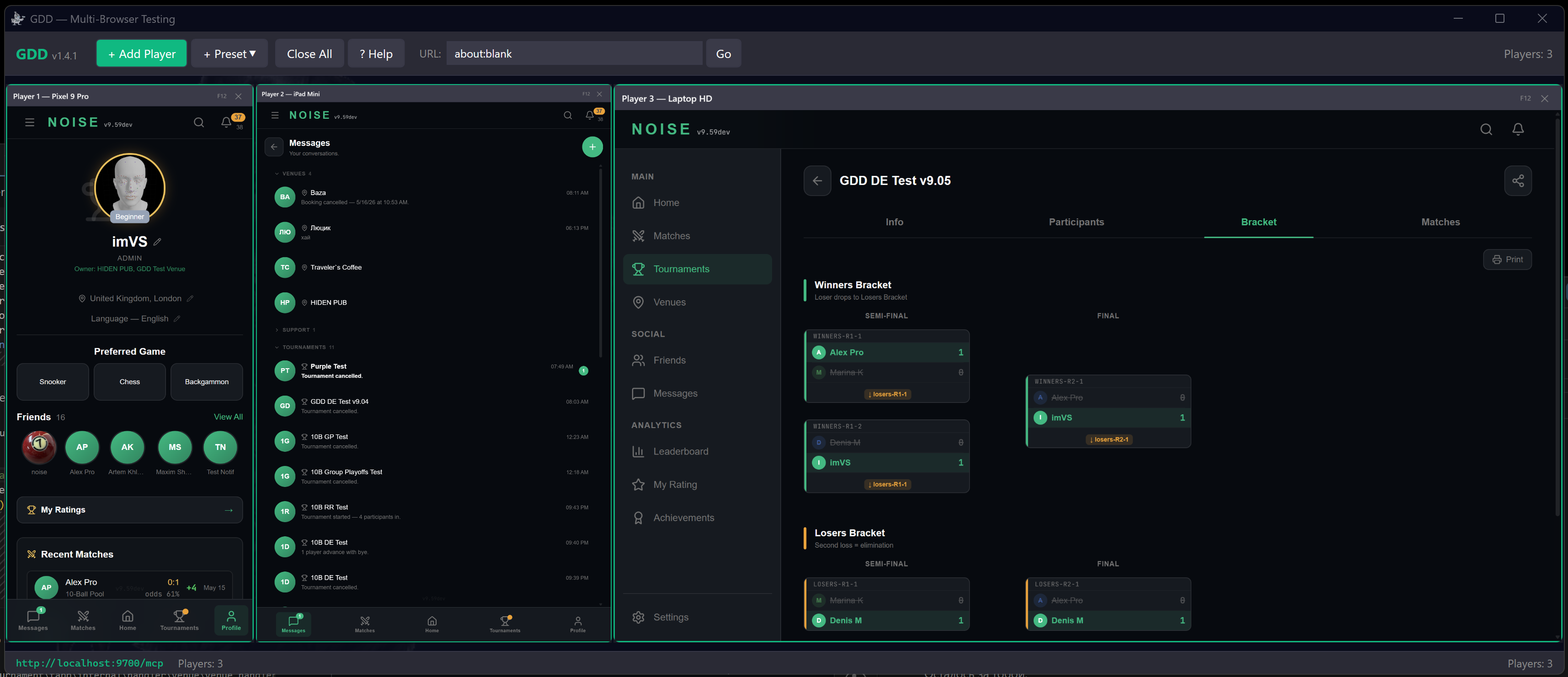
GDD ejecuta N instancias aisladas de Chromium, cada una con su propio perfil, cookies, emulación de dispositivo, geolocalización y condiciones de red. Expone 39 herramientas MCP a través de HTTP en localhost:9700.
Instalación
GDD viene en dos versiones. El Servidor es headless: es solo el backend MCP, se ejecuta en cualquier lugar (incluidas máquinas sin pantalla) y es todo lo que necesitas para automatización pura con IA. La aplicación de escritorio añade una GUI: una cuadrícula en vivo de miniaturas de navegadores en las que puedes hacer clic para tomar el control de una sesión manualmente. El Servidor se ejecuta en el puerto 9700, la aplicación de escritorio en 9800 — para que puedas ejecutar ambos en paralelo.
Servidor (headless) — el backend MCP:
| Plataforma | Descarga | Ejecutar |
|---|---|---|
| Linux | GDD-Server-Linux.tar.gz | chmod +x GDD.Headless && ./GDD.Headless |
| macOS ARM | GDD-Server-macOS-ARM.tar.gz | bash Scripts/setup-macos.sh && ./GDD.Headless |
| macOS Intel | GDD-Server-macOS-Intel.tar.gz | bash Scripts/setup-macos.sh && ./GDD.Headless |
| Windows | GDD-Server-Windows.zip | .\GDD.Headless.exe |
| Docker | ghcr.io/cap-of-tea/gdd | docker run -p 9700:9700 ghcr.io/cap-of-tea/gdd |
| Claude Desktop | Win / Mac ARM / Mac Intel (.mcpb) | Abre el archivo .mcpb — se instala como extensión de escritorio |
Aplicación de escritorio (GUI) — una cuadrícula en vivo de miniaturas de navegadores en las que puedes hacer clic:
| Plataforma | Descarga | Ejecutar |
|---|---|---|
| Windows | GDD-Desktop-Windows.zip | Extrae y ejecuta GDD.exe (requiere WebView2) |
| Linux | GDD-Desktop-Linux.tar.gz | bash Scripts/install-deps.sh && ./GDD.Desktop |
| macOS ARM | GDD-Desktop-macOS-ARM.tar.gz | bash Scripts/setup-macos.sh && ./GDD.Desktop |
| macOS Intel | GDD-Desktop-macOS-Intel.tar.gz | bash Scripts/setup-macos.sh && ./GDD.Desktop |
La aplicación de Windows usa WebView2; la aplicación de Linux/macOS (creada con Avalonia) controla ventanas reales de Chromium mantenidas fuera de pantalla. Binario autocontenido, ~70 MB. No se necesita instalación de .NET. Chromium se descarga automáticamente en el primer inicio.
Una línea (Linux):
curl -sL https://github.com/Cap-of-tea/GDD/releases/latest/download/GDD-Server-Linux.tar.gz | tar xz && chmod +x GDD.Headless && ./GDD.Headless
Docker
# Run (headless, port 9700)
docker run -p 9700:9700 ghcr.io/cap-of-tea/gdd

# Or build locally
docker build -t gdd .
docker run -p 9700:9700 gdd
La imagen de Docker se ejecuta en modo headless con todas las dependencias de Chromium preinstaladas.
Por defecto, los navegadores se lanzan en modo headed (ventanas visibles). Añade --headless para CI/CD. Otras banderas: --stealth y --stealth-max para enmascaramiento anti-bot, --update para autoactualización, --version y --help. La sección Configuración a continuación enumera todas las banderas y variables de entorno.
Conéctate a tu cliente de IA
Añade a .mcp.json y reinicia tu cliente de IA:
{
  "mcpServers": {
    "gdd": {
      "url": "http://localhost:9700/mcp"
    }
  }
}
Eso es todo. Inicia GDD, dile a Claude o Cursor que pruebe tu aplicación.
Usuarios de Claude Desktop: Descarga el archivo
.mcpbdesde Releases y ábrelo: GDD se instala como una extensión de escritorio con un clic. No se necesita configuración manual.
Ubicaciones de archivos de configuración
| Cliente | Configuración del proyecto | Configuración global |
|---|---|---|
| Claude Code | <project>/.mcp.json | ~/.claude/.mcp.json |
| Cursor | <project>/.cursor/mcp.json | ~/.cursor/mcp.json |
| VS Code / Windsurf / Antigravity | <project>/.vscode/mcp.json | IDE settings.json |
Las configuraciones global y del proyecto se fusionan: los servidores de ambas están disponibles simultáneamente. Los cambios se aplican solo al reiniciar la sesión del cliente de IA.
IDEs basados en VS Code (Windsurf, Antigravity, Copilot)
Los IDEs basados en VS Code usan un formato de configuración diferente al de Claude Code / Cursor.
Configuración del proyecto — .vscode/mcp.json:
{
  "servers": {
    "gdd": {
      "type": "http",
      "url": "http://localhost:9700/mcp"
    }
  }
}
Configuración global — abre a través de Cmd+Shift+P → "Open User Settings (JSON)":
{
  "mcp": {
    "servers": {
      "gdd": {
        "type": "http",
        "url": "http://localhost:9700/mcp"
      }
    }
  }
}
Ubicación global de settings.json: macOS — ~/Library/Application Support/<IDE>/User/settings.json, Linux — ~/.config/<IDE>/User/settings.json, Windows — %APPDATA%/<IDE>/User/settings.json. Reemplaza <IDE> con el nombre de tu editor (Code, Windsurf, Antigravity, etc.).
Alternativa stdio-proxy (.vscode/mcp.json):
{
  "servers": {
    "gdd": {
      "type": "stdio",
      "command": "bash",
      "args": ["/absolute/path/to/Scripts/mcp-proxy.sh"]
    }
  }
}
Permisos (Claude Code)
Por defecto, Claude Code pide confirmación en cada llamada a una herramienta MCP. Para permitir las herramientas de GDD sin avisos, añade a ~/.claude/settings.json:
{
  "permissions": {
    "allow": [
      "mcp__gdd__*"
    ]
  }
}
Este comodín único cubre las 39 herramientas de GDD. Reinicia Claude Code después de editar.
Inicio automático mediante proxy stdio (alternativa)
Los scripts proxy inician GDD automáticamente cuando tu cliente de IA se conecta:
Windows:
{
  "mcpServers": {
    "gdd": {
      "command": "powershell",
      "args": ["-ExecutionPolicy", "Bypass", "-File", "C:/path/to/Scripts/mcp-proxy.ps1"]
    }
  }
}
Linux / macOS:
{
  "mcpServers": {
    "gdd": {
      "command": "bash",
      "args": ["/path/to/Scripts/mcp-proxy.sh"]
    }
  }
}
Añade "--headless" al array args para CI/CD.
Consejo: En el primer inicio, GDD descarga Chromium (~80 MB). Si tu cliente de IA agota el tiempo de espera, ejecuta GDD manualmente primero y luego vuelve a conectarte.
Inicio automático como servicio (macOS / Linux)
macOS (launchd):
bash Scripts/install-launchd.sh            # headed (default)
bash Scripts/install-launchd.sh --headless  # for CI/CD
Gestionar: launchctl list | grep gdd / bash Scripts/install-launchd.sh --uninstall
Linux (systemd):
mkdir -p ~/.config/systemd/user
cat > ~/.config/systemd/user/gdd.service << 'EOF'
[Unit]
Description=GDD Multi-Browser Testing Server
[Service]
ExecStart=/path/to/GDD.Headless
WorkingDirectory=/path/to/gdd-directory
Restart=on-failure
[Install]
WantedBy=default.target
EOF

systemctl --user daemon-reload
systemctl --user enable --now gdd
HTTP directo (sin cliente de IA)
curl -X POST http://localhost:9700/mcp -H "Content-Type: application/json" \
  -d '{"jsonrpc":"2.0","id":1,"method":"tools/call","params":{"name":"gdd_add_players","arguments":{"count":1}}}'
GDD usa JSON-RPC 2.0 estándar: funciona con curl, Python, Node.js o cualquier cliente HTTP.
Características
- Multi-dispositivo — Ejecuta N instancias aisladas de Chromium con 22 ajustes predefinidos de dispositivos (teléfonos, tabletas, escritorios)
- Nativo para IA — 39 herramientas MCP para Claude Code, Cursor o cualquier cliente compatible con MCP
- Multiplataforma — GUI nativa con un muro de video en vivo en Windows, Linux y macOS, además de un servidor headless para CI/CD
- Interacción completa — Navegar, tocar, escribir, presionar teclas y atajos, arrastrar, deslizar, desplazarse, pasar el cursor, manejar diálogos, tomar capturas de pantalla
- Teclado real — Escribir envía pulsaciones de teclas genuinas y confiables (la cadena completa keydown→input), por lo que las máscaras de entrada, el autocompletado y
maxlengthse comportan exactamente como para un usuario real, y los editores de texto enriquecido (contenteditable) funcionan;gdd_pressmaneja teclas individuales y atajos como Enter, Tab, Escape y Ctrl+A - Diseños de teclado físicos — Las pulsaciones llevan el
code/keyCodereal del teclado de la configuración regional emulada: el ruso ЙЦУКЕН coloca «а» en elKeyFfísico, el francés AZERTY y el alemán QWERTZ reasignan sus teclas, los acentos de teclas muertas y los símbolos AltGr funcionan. El diseño siguegdd_set_languageautomáticamente (US, RU, DE, FR) - Entrada similar a la humana —
humanize=trueimpulsa una trayectoria de cursor continua (Bézier cúbico con easing y micro-vibración) que se mantiene entre clics, desplazamientos y arrastres; los toques envían una única entrada apropiada para el dispositivo (táctil o mouse), nunca ambas - Sigilo anti-bot —
--stealthopcional enmascara las señales habituales de automatización (navigator.webdriver, etc.);--stealth-maxañade evasiones de headless/datacenter (user-agent coherente con client hints, un proveedor WebGL plausible, métricas de dispositivo realistas) — en un contenedor headless esto redujo a la mitad la puntuación headless de CreepJS - Soporte de proxy — Enruta cada navegador a través de un proxy ascendente con
GDD_PROXY(con autenticación opcional) - Reescritura de encabezados —
gdd_set_headerspuede eliminarX-Frame-Options/CSPframe-ancestorspara cargar un sitio en un iframe, o agregar/reemplazar encabezados de respuesta - Emulación de dispositivos — Tamaño de pantalla, DPR, táctil, user-agent, geolocalización, zona horaria, idioma
- Control de red — Simula 4G, Fast 3G, Slow 3G o sin conexión por navegador
- Diagnósticos — Errores de consola, tráfico de red, métricas de rendimiento, notificaciones push
- Baliza de errores — Cada respuesta de herramienta advierte sobre errores de JS en todos los navegadores automáticamente
- Listo para Docker — Imagen oficial en GHCR (
ghcr.io/cap-of-tea/gdd), listada en el MCP Registry - Autoactualizable — Verificación de versión integrada y actualización con un comando
Herramientas MCP (39)
Gestión de jugadores
| Herramienta | Descripción |
|---|---|
gdd_add_players | Agrega N instancias de navegador con ajuste predefinido de dispositivo opcional |
gdd_remove_player | Elimina una instancia de navegador por ID de jugador |
gdd_list_windows | Lista todos los navegadores activos con su estado actual |
Navegación
| Herramienta | Descripción |
|---|---|
gdd_navigate | Navega a una URL |
gdd_wait | Espera a que aparezca un selector CSS (con tiempo de espera) |
gdd_reload | Recarga la página (hard=true omite la caché) |
gdd_back | Navega hacia atrás |
gdd_forward | Navega hacia adelante |
Interacción
| Herramienta | Descripción |
|---|---|
gdd_tap | Toca un elemento por selector CSS o coordenadas; envía una única entrada apropiada para el dispositivo (táctil en dispositivos táctiles, mouse en escritorio), nunca ambas. humanize=true añade una trayectoria de cursor continua similar a la humana |
gdd_swipe | Gesto de deslizamiento (arriba/abajo/izquierda/derecha) |
gdd_drag | Arrastra un elemento a (x, y) o sobre otro elemento mediante eventos de puntero reales (controla dnd-kit y arrastrar y soltar HTML5) |
gdd_scroll | Desplaza la página o un elemento |
gdd_type | Escribe texto con pulsaciones de teclas reales y confiables (CDP dispatchKeyEvent — las máscaras, el autocompletado y maxlength se comportan como para un usuario real; funciona en contenteditable). Los códigos de teclas físicas siguen el diseño emulado (US/RU/DE/FR); humanize=true añade micro-vibración por tecla; paste=true inserta de una sola vez |
gdd_press | Presiona una tecla individual o un atajo (Enter, Tab, Escape, teclas de flecha, F1–F12 o un carácter) con modificadores opcionales (Control/Alt/Shift/Meta); las teclas de caracteres siguen el diseño emulado |
gdd_hover | Pasa el cursor sobre un elemento. humanize=true añade una trayectoria de cursor continua similar a la humana |
gdd_select | Selecciona una opción de un menú desplegable <select> |
gdd_dialog | Maneja diálogos JS alert/confirm/prompt |
Lectura y capturas de pantalla
| Herramienta | Descripción |
|---|---|
gdd_read | Lee el contenido de texto de un elemento |
gdd_read_all | Lee el texto de todos los elementos coincidentes |
gdd_screenshot | Captura una captura de pantalla JPEG a resolución de píxeles CSS |
Emulación
| Herramienta | Descripción |
|---|---|
gdd_set_device | Establece un ajuste predefinido de dispositivo (22 dispositivos: teléfonos, tabletas, escritorios) |
gdd_set_viewport | Establece dimensiones de viewport personalizadas |
gdd_set_location | Establece geolocalización, zona horaria y configuración regional |
gdd_set_network | Establece condiciones de red (4G, 3G, sin conexión) |
gdd_set_language | Establece el idioma del navegador |
gdd_set_headers | Reescribe encabezados de respuesta: elimina X-Frame-Options/CSP para permitir el enmarcado |
Estado y diagnósticos
| Herramienta | Descripción |
|---|---|
gdd_get_state | Estado del navegador: URL, título, dispositivo, estado de autenticación |
gdd_get_console | Salida de consola y excepciones no capturadas |
gdd_get_network | Solicitudes de red con tiempo y estado |
gdd_get_notifications | Notificaciones push recibidas |
gdd_get_performance | Métricas de rendimiento (montón JS, nodos DOM, FPS) |
gdd_clear_logs | Limpiar registros de consola y/o red |
Autenticación y Ejecución
| Herramienta | Descripción |
|---|---|
gdd_quick_auth | Registro automático e inicio de sesión con credenciales generadas |
gdd_execute_js | Ejecutar JavaScript y devolver el resultado |
Almacenamiento del Navegador
| Herramienta | Descripción |
|---|---|
gdd_storage | Leer/escribir/limpiar localStorage/sessionStorage |
gdd_cookies | Leer o limpiar cookies del navegador |
Ayuda y Actualizaciones
| Herramienta | Descripción |
|---|---|
gdd_get_manual | Manual completo de GDD para autoaprendizaje de IA |
gdd_check_update | Comprobar si hay versiones más recientes |
gdd_update | Descargar e instalar actualización (reinicia GDD) |
Presets de Dispositivos (22)
Teléfonos (11)
| Dispositivo | Resolución | Escala | Táctil |
|---|---|---|---|
| iPhone SE | 375 x 667 | 2.0x | Sí |
| iPhone 14 | 390 x 844 | 3.0x | Sí |
| iPhone 15 Pro | 393 x 852 | 3.0x | Sí |
| iPhone 15 Pro Max | 430 x 932 | 3.0x | Sí |
| iPhone 16 Pro | 402 x 874 | 3.0x | Sí |
| iPhone 16 Pro Max | 440 x 956 | 3.0x | Sí |
| Pixel 9 | 412 x 915 | 2.625x | Sí |
| Pixel 9 Pro | 412 x 915 | 2.625x | Sí |
| Galaxy S24 | 360 x 780 | 3.0x | Sí |
| Galaxy S24 Ultra | 412 x 915 | 3.0x | Sí |
| OnePlus 12 | 412 x 915 | 3.5x | Sí |
Tabletas (6)
| Dispositivo | Resolución | Escala |
|---|---|---|
| iPad Mini | 744 x 1133 | 2.0x |
| iPad Air | 820 x 1180 | 2.0x |
| iPad Pro 11" | 834 x 1194 | 2.0x |
| iPad Pro 13" | 1024 x 1366 | 2.0x |
| Galaxy Tab S9 | 800 x 1280 | 2.0x |
| Pixel Tablet | 800 x 1280 | 2.0x |
Escritorios (5)
| Dispositivo | Resolución | Escala |
|---|---|---|
| Laptop HD | 1366 x 768 | 1.0x |
| Laptop HiDPI | 1440 x 900 | 2.0x |
| Desktop 1080p | 1920 x 1080 | 1.0x |
| Desktop 1440p | 2560 x 1440 | 1.0x |
| Desktop 4K | 3840 x 2160 | 2.0x |
Arquitectura
Client (AI agent / curl / script)
         │ POST /mcp (JSON-RPC 2.0)
         ▼
    McpServer (:9700)
    Streamable HTTP + SSE
         │
         ▼
    McpToolRegistry (39 tools)
    Player · Navigation · Interaction · Read
    Emulation · Auth · State · Diagnostics
         │
         ▼
    IPlayerManager
    MainViewModel (WPF) / DesktopPlayerManager (Avalonia) / HeadlessPlayerManager
         │
         ▼
    IBrowserEngine Instances
    WebView2 (Win GUI)  |  Playwright (Desktop GUI + headed/headless server)
    Each: own profile, CDP session, emulation
Ediciones
GDD se distribuye como tres aplicaciones sobre un núcleo compartido. Las dos GUI difieren solo en el kit de herramientas de escritorio (WebView2 en Windows, Avalonia en Linux/macOS); las tres exponen las mismas 39 herramientas MCP.
| GUI de Windows | GUI de escritorio | Servidor | |
|---|---|---|---|
| Binario | GDD.exe | GDD.Desktop | GDD.Headless (agrega --headless para sin ventanas) |
| Motor | WebView2 | Playwright (con interfaz) | Playwright (con/sin interfaz) |
| Interfaz | Muro de video WPF | Muro de video Avalonia | ninguna — solo API HTTP |
| Puerto MCP | 9700 | 9800 | 9700 |
| Plataformas | Windows | Linux, macOS | Windows, Linux, macOS |
Stack Tecnológico
| Capa | Tecnología |
|---|---|
| Runtime | .NET 8.0 (autocontenido) |
| UI (Windows) | WPF + CommunityToolkit.Mvvm |
| UI (Linux/macOS) | Avalonia + CommunityToolkit.Mvvm |
| Navegador (GUI de Windows) | Microsoft WebView2 |
| Navegador (GUI de escritorio + Servidor) | Microsoft Playwright |
| Protocolo | MCP (Model Context Protocol) |
| Control del navegador | Chrome DevTools Protocol (CDP) |
| Registro | Serilog |
Estructura del Proyecto
BrowserXn.sln
├── src/
│   ├── GDD.Core/              ← Shared library (net8.0)
│   │   ├── Abstractions/      ← IBrowserEngine, IPlayerManager, ...
│   │   ├── Mcp/               ← MCP server, tools, protocol
│   │   ├── Models/            ← Device, Location, Network presets
│   │   ├── Services/          ← CDP, Emulation, Monitoring services
│   │   └── Collections/       ← RingBuffer
│   ├── BrowserXn/             ← Windows GUI (WPF + WebView2)
│   │   ├── Engines/           ← WebView2ControlAdapter
│   │   ├── ViewModels/        ← MVVM (MainViewModel : IPlayerManager)
│   │   ├── Views/             ← XAML + VideoWallPanel
│   │   └── ...
│   ├── GDD.Desktop/           ← Linux/macOS GUI (Avalonia + Playwright)
│   │   ├── Engines/           ← PlaywrightHeadedEngine (headed, parked off-screen)
│   │   ├── ViewModels/        ← MainViewModel (DesktopPlayerManager)
│   │   ├── Views/             ← AXAML + VideoWallPanel
│   │   └── Scripts/           ← mcp-proxy.sh, setup-macos.sh, install-deps.sh
│   └── GDD.Headless/          ← Cross-platform server (Playwright)
│       ├── Engines/           ← PlaywrightEngine
│       ├── Platform/          ← HeadlessPlayerManager
│       └── Scripts/           ← mcp-proxy.sh, mcp-proxy.ps1
└── .github/workflows/         ← CI/CD (8 build targets + auto-release)
Configuración
appsettings.json junto al ejecutable:
{
  "GDD": {
    "FrontendUrl": "about:blank",
    "BackendUrl": "http://localhost:8080/api/v1",
    "BotToken": "",
    "McpPort": 9700,
    "DataFolderRoot": "",
    "Stealth": false
  }
}
| Clave | Descripción | Predeterminado |
|---|---|---|
FrontendUrl | URL predeterminada para nuevos navegadores | about:blank |
BackendUrl | API de backend para el servicio de autenticación | http://localhost:8080/api/v1 |
BotToken | Token de bot de Telegram (para pruebas de TG) | — |
McpPort | Puerto del servidor MCP (respaldo automático +1..+9) | 9700 |
DataFolderRoot | Raíz de almacenamiento de perfiles de navegador | %LOCALAPPDATA%\GDD\Profiles (Win), ~/.local/share/GDD/Profiles (Linux/macOS) |
Headed | Ventanas de navegador visibles | true (anular con --headless) |
Stealth | Enmascaramiento anti-bot opcional: lanza Chromium con AutomationControlled deshabilitado y oculta las señales habituales de automatización (navigator.webdriver, etc.). Solo motores Playwright (GDD.Desktop, GDD Server) | false |
Opciones de línea de comandos
| Opción | Descripción |
|---|---|
--headed | Ventanas de navegador visibles (predeterminado) |
--headless | Sin interfaz de usuario — para CI/CD |
--stealth | Habilitar enmascaramiento anti-bot (igual que GDD_STEALTH=true) |
--stealth-max | Sigilo total — metadatos de UA client-hints, suplantación de WebGL/dispositivo/zona horaria; implica --stealth (igual que GDD_STEALTH_MAX=true) |
--update | Comprobar si hay una versión más reciente e instalarla si está disponible |
--version | Imprimir la versión y salir |
--help | Mostrar uso y salir |
Variables de entorno
Útil para Docker y CI, donde un archivo appsettings.json es incómodo:
| Variable | Descripción |
|---|---|
GDD_STEALTH | true/1 para habilitar el enmascaramiento anti-bot (igual que --stealth) |
GDD_STEALTH_MAX | true/1 para sigilo total (igual que --stealth-max) |
GDD_PROXY | Proxy ascendente para cada navegador, p. ej. http://host:3128 o socks5://host:1080 (motores Server / Playwright) |
GDD_PROXY_USER / GDD_PROXY_PASS | Credenciales para un proxy autenticado |
GDD_CHROME_CHANNEL | Lanzar una compilación de Chrome instalada (p. ej. chrome, chrome-beta) en lugar del Chromium incluido |
GDD_TRACE | true/1 para registro de trazas detallado |
Compilación desde el Código Fuente
Requiere .NET 8 SDK.
# Windows GUI (requires Windows 10/11 + WebView2)
dotnet publish src/BrowserXn/BrowserXn.csproj -c Release -p:PublishSingleFile=true -o ./publish/win-gui

# Cross-platform headless
dotnet publish src/GDD.Headless/GDD.Headless.csproj -c Release -r linux-x64 --self-contained -o ./publish/linux-x64
dotnet publish src/GDD.Headless/GDD.Headless.csproj -c Release -r osx-arm64 --self-contained -o ./publish/osx-arm64
dotnet publish src/GDD.Headless/GDD.Headless.csproj -c Release -r win-x64 --self-contained -o ./publish/win-x64
Chromium se instala automáticamente en la primera ejecución.
Documentación
- GDD-MANUAL.md — Manual de uso completo con ejemplos de flujo de trabajo
- GDD-ARCHITECTURE.md — Análisis profundo de la arquitectura
- GDD-PROMPT.md — Instrucciones del agente Claude para la integración MCP
- DEPLOY-RAILWAY.md — Aloja GDD como servidor MCP remoto en Railway (detrás de un proxy de autenticación por token)
- CONTRIBUTING.md — Directrices de contribución
Privacidad
Política de Privacidad
GDD se ejecuta enteramente en tu máquina local. Sin telemetría, sin análisis, sin recopilación de datos.
- Ningún dato sale de tu máquina — todos los perfiles de navegador, capturas de pantalla, registros y cookies permanecen en el almacenamiento local
- Perfiles de navegador — almacenados en
%LOCALAPPDATA%\GDD\Profiles(Windows) o~/.local/share/GDD/Profiles(Linux/macOS) - Sin servicios de terceros — GDD no contacta ninguna API externa excepto GitHub Releases para comprobaciones opcionales de actualización
- Comprobaciones de actualización —
gdd_check_updaterealiza una única solicitud de solo lectura aapi.github.com. Puedes optar por no llamar a la herramienta, o establecerCheckForUpdates: falseenappsettings.json - Servidor MCP — escucha solo en
localhost(puerto predeterminado 9700), nunca expuesto a la red
Contacto: 2vsmirnov@gmail.com
Licencia
imVS©, gratuito para uso personal.
Código fuente disponible — No comercial. Gratuito para uso personal, educativo e investigación. El uso comercial requiere una licencia de pago. Consulta LICENSE para los términos completos.
Licencias comerciales: 2vsmirnov@gmail.com