AST2LLM for Go
Una herramienta local de mejora de contexto impulsada por AST para LLMs que analiza la estructura de proyectos Go para una resolución de contexto más rápida.
Documentación
AST2LLM for Go




Herramienta local de mejora de contexto impulsada por AST para LLM
Inyecta automáticamente la estructura de código relevante en tus indicaciones utilizando un análisis preciso del AST de Go.
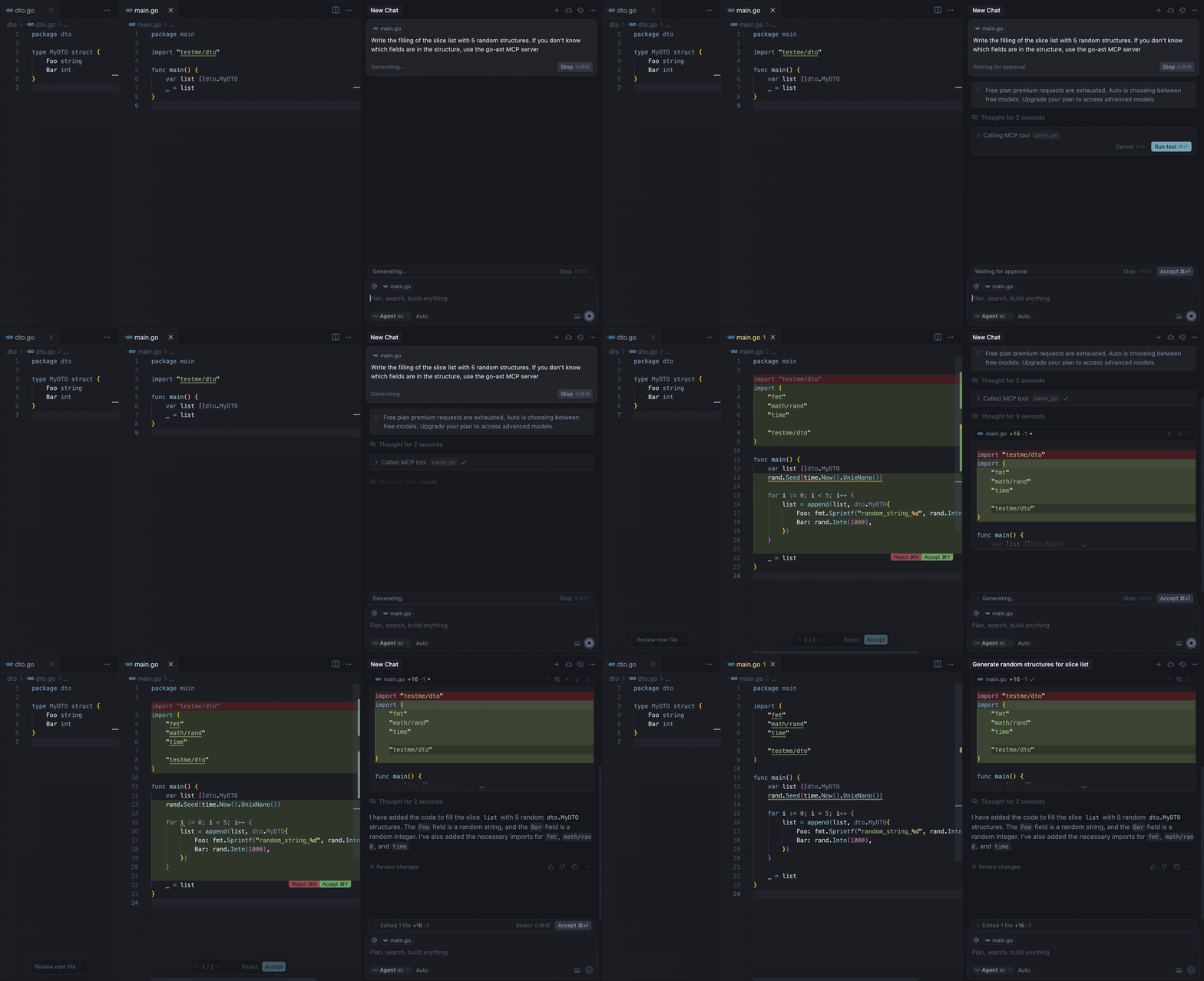
Nuestro servidor MCP proporciona la herramienta parse-go que:
- Analiza la estructura de tu proyecto Go
- Identifica declaraciones de tipos externos
- Empaqueta contexto para indicaciones de LLM
- Ofrece una resolución de contexto 3-5 veces más rápida que los enfoques basados en grafos
Por ejemplo, la demo anterior muestra al modelo llamando a la herramienta para obtener la información faltante sobre los campos de la estructura MyDTO. En respuesta, el modelo recibió toda la información necesaria de la respuesta:
Used Imported Structs (from this project, if available):
  Struct: testme/dto.MyDTO
    Fields:
      - Foo string
      - Bar int
Requisitos
- Go 1.22 o superior (si se compila desde el código fuente)
- Cliente MCP compatible (Cursor, Claude, VS Code, etc.)
Instalación
Binarios
Para instalar ast2llm-go en tu sistema, ejecuta el siguiente comando en tu terminal:
curl -LsSf https://raw.githubusercontent.com/ast2llm/ast2llm-go/main/install.sh | sh
Este script detectará automáticamente tu sistema operativo y arquitectura, descargará el binario apropiado e intentará agregarlo a tu PATH. También puedes especificar un directorio de instalación:
curl -LsSf https://raw.githubusercontent.com/ast2llm/ast2llm-go/main/install.sh | sh -s -- --install-dir /usr/local/bin
Auto-actualización
Para actualizar ast2llm-go a la última versión, simplemente vuelve a ejecutar el comando de instalación:
curl -LsSf https://raw.githubusercontent.com/ast2llm/ast2llm-go/main/install.sh | sh
Desinstalación
Para eliminar ast2llm-go de tu sistema, ejecuta el script de desinstalación:
curl -LsSf https://raw.githubusercontent.com/ast2llm/ast2llm-go/main/uninstall.sh | sh
Este script eliminará el binario, limpiará las modificaciones del PATH y borrará los archivos de configuración relacionados. Es posible que necesites reiniciar tu shell después de la desinstalación.
Configuración en Clientes
Después de la instalación ast2llm-go, debes reiniciar el IDE.
Cursor
Añade a tu ~/.cursor/mcp.json:
{
  "mcpServers": {
    "go-ast": {
      "command": "ast2llm-go",
      "args": []
    }
  }
}
Claude Desktop
Añade a claude_desktop_config.json:
{
  "mcpServers": {
    "go-ast": {
      "command": "ast2llm-go"
    }
  }
}
Visual Studio Code
Añade a tu configuración MCP de VS Code:
{
  "servers": {
    "go-ast": {
      "type": "stdio",
      "command": "ast2llm-go"
    }
  }
}
Nota sobre el Estado Actual
Este servidor MCP está en desarrollo activo y puede tener problemas de estabilidad o funcionalidad incompleta. Estamos trabajando duro para mejorarlo, pero es posible que encuentres:
- Errores de análisis ocasionales
- Soporte limitado de tipos en la versión actual
- Cuellos de botella de rendimiento con bases de código grandes
¿Encontraste un problema?
Abre un Issue en GitHub para ayudarnos a mejorar! Agradecemos todos los informes de errores y solicitudes de funciones.
Hoja de ruta
Soporte de lenguaje
- Soporte para tipos de estructura
- Soporte para tipos de interfaz
- Soporte para tipos de función
- Soporte para variables globales
Contexto de múltiples archivos
- Analizar múltiples archivos abiertos simultáneamente
- Resolución de dependencias entre archivos
- Optimización de importaciones consciente del contexto
Representación del AST
- Visualización mejorada de la jerarquía de tipos
- Investigar la representación óptima del AST para LLMs. Proporcionar diferentes formatos de salida adaptados a varios escenarios como en repomix:
- XML: Para compatibilidad con soluciones tradicionales similares a Repomix.
- JSON: Un formato moderno adecuado para la integración con herramientas y entornos contemporáneos.
- Markdown: Un formato fácilmente legible ideal para visualización rápida y documentación de cambios.
Rendimiento
- Análisis incremental
- Caché de AST
- Análisis en paralelo
Contribuciones
¡Agradecemos las contribuciones! Así es como puedes ayudar:
-
Reportar errores
- Abre un issue con una descripción clara
- Incluye pasos para reproducir
- Añade registros/capturas de pantalla relevantes
-
Sugerir funciones
- Abre un issue con la solicitud de función
- Explica el caso de uso y los beneficios
- Incluye cualquier ejemplo relevante
-
Enviar Pull Requests
- Haz un fork del repositorio
- Crea una rama de características
- Añade pruebas para la nueva funcionalidad
- Asegúrate de que todas las pruebas pasen
- Envía un PR con una descripción clara