Breezing
Servidor MCP Breezing que proporciona acceso a la API de Breezing: leer y actualizar transacciones, billeteras, activos y saldos en más de 40 cadenas de bloques y más de 15 intercambios. Categorizar transacciones mapeando cuentas contrapartidas del plan de cuentas, gestionar asignaciones del balance general y preparar datos para sincronizar con Xero o QuickBooks.
Documentación
El Subledger creado para contadores de criptomonedas
Importa cada wallet e intercambio, verifica los saldos contra la fuente y publica asientos de diario limpios en tu libro mayor.
Listo para auditoría desde el primer día, ya sea con cien transacciones o un millón.
4.8 en Xero App Store y G2
always.breezing.io
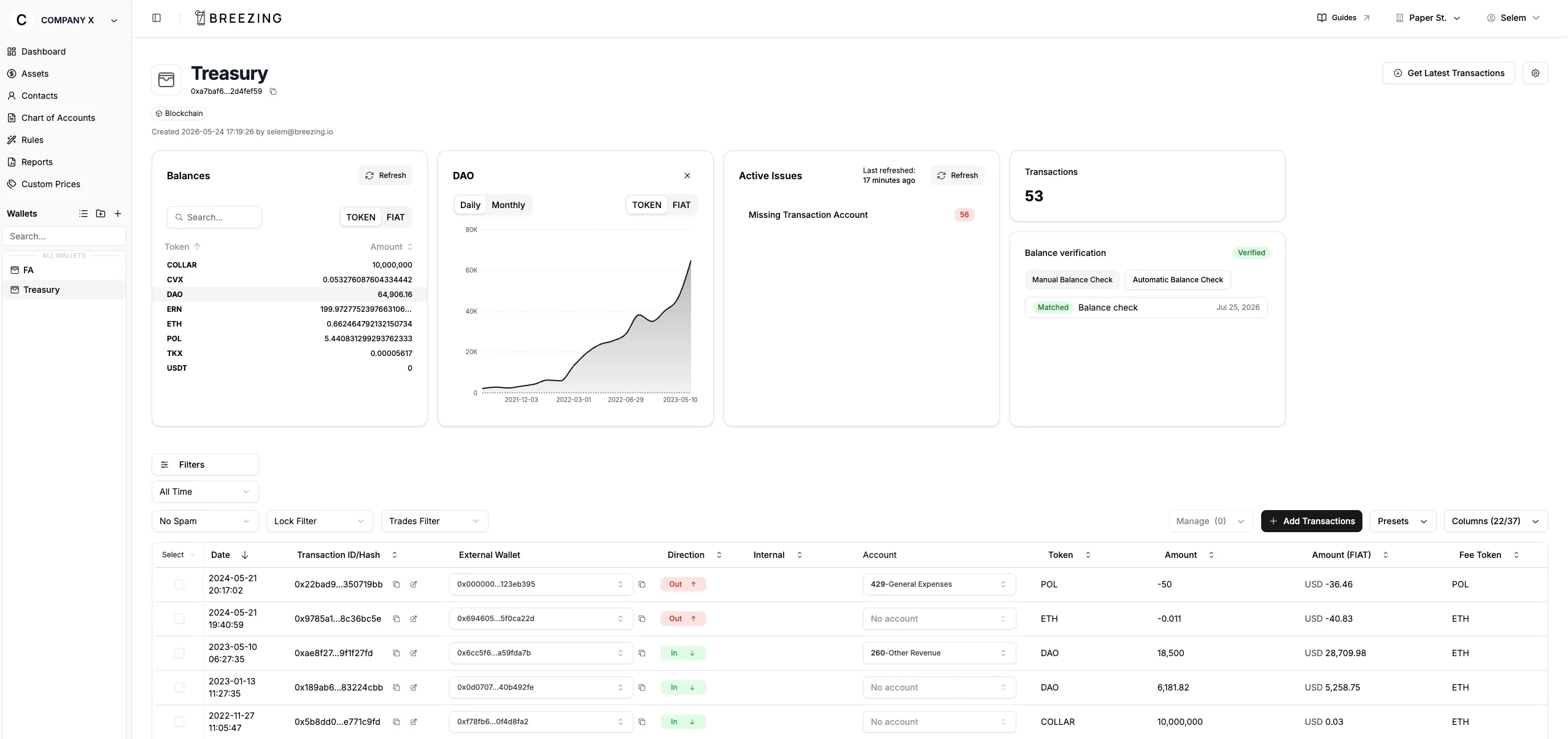
Haciendo que la contabilidad de criptomonedas sea pan comido para más de 200 empresas





















Cómo funciona
De la dirección de wallet al asiento de diario publicado
- 01
Conecta wallets e intercambios
Pega una dirección o clave API. Breezing descubre la cadena. - 02
Importa transacciones
Todo fluye desde blockchains e intercambios compatibles, con el spam ya filtrado. - 03
Asigna a tu plan de cuentas
Las reglas se encargan del trabajo repetitivo. Marca cualquier cosa para que tu cliente la apruebe. - 04
Sincroniza con tu libro mayor
Los asientos se publican en Xero, QuickBooks o Bexio. ¿Cometiste un error? Sincroniza de nuevo y se actualiza.
Verificación de saldos
Tus saldos coinciden con la blockchain, 100%
Breezing te permite verificar automáticamente cada token en cada cadena contra el explorador de bloques en cualquier período.
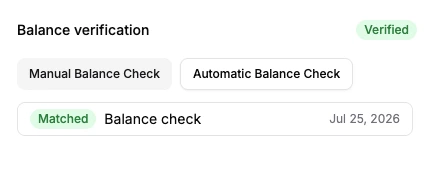
Una wallet que pasa su verificación de saldo en Breezing.
CIERRA FACTURAS Y CUENTAS POR PAGAR
Cierra facturas y cuentas por pagar sin una cuenta de compensación
- Xero: Elige la factura o cuenta por pagar abierta, establece el monto, envía.
- QuickBooks: Publica en cuentas por cobrar o por pagar contra el cliente o proveedor.
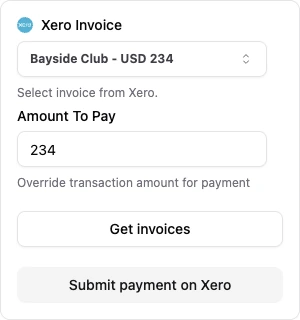
Cerrando una factura de Xero en Breezing.
Diseñado para el cierre contable completo
Detección automática de spam
Detecta, etiqueta y oculta el spam automáticamente.
FIFO, LIFO, HIFO y WAC, por wallet o universal
Ganancias y pérdidas según el método que exige tu jurisdicción.
Crea reglas
Configúralo una vez. Las nuevas transacciones se categorizan solas.
Etiquetado automático de cuentas
Las cuentas se completan automáticamente según el tipo de transacción.
Invita a tu cliente
Tu cliente revisa y aprueba directamente en Breezing.
Genera informes
Informes listos para el cliente, compartidos directamente desde Breezing.
Recompensas DeFi
Reconoce las recompensas cuando se emiten, no solo cuando se reclaman.
Gestiona millones de transacciones
Las wallets con millones de transacciones siguen siendo rápidas.
Soporte de API y MCP
Automatiza a través de la API REST o conecta herramientas de IA mediante MCP.
Invita a tu equipo
Añade compañeros de equipo y gestiona sus roles y accesos.
Integraciones
Cada cadena o intercambio que tus clientes usan
Wallets e intercambios







Breezing
Tu libro mayor

- 62 Blockchains
- 17 Intercambios
- 6 Sistemas contables
"Breezing es muy fácil de usar. Desde añadir wallets, asignar transacciones al plan de cuentas y sincronizar con Xero. El equipo de soporte también es muy servicial."
AL
Athena Liu
Contadora
vía Xero App Store
"La interfaz es muy fácil de navegar y hay muchas funciones para registrar transacciones según muchas especificaciones."
BC
Byron C.
Director de Finanzas y Operaciones
vía G2
"Como contador, no puedo elogiar lo suficiente a Breezing por simplificar la compleja tarea de gestionar transacciones de criptomonedas en Xero."
KL
Kenneth Lau
Gerente de Finanzas
vía Xero App Store
"He usado Breezing con varios de mis clientes, a un precio extremadamente asequible. Es un gran subledger de criptomonedas. Muy fácil de navegar y usar, con un equipo de desarrollo proactivo listo para implementar cualquier cambio."
HM
Hakeem McNabb
Contador senior
vía Xero App Store
"Esta es mi primera vez usando Breezing Subledger, y me ha parecido muy fácil de usar gracias a su interfaz limpia e intuitiva. Además, el equipo de soporte es excepcionalmente receptivo cuando nos comunicamos con preguntas."
ND
Nolan Dela Cruz
Contador
vía Xero App Store
"Las funciones están diseñadas para empresas (contadores y auditores), lo cual es excelente porque la mayoría de las herramientas se centran en individuos que no tienen los mismos requisitos. Los cálculos y las opciones (incluida la base de costos) son excelentes."
PS
Philipp S.
Asesor
vía G2
Precios
6 planes, desde 600 hasta 1,500,000 transacciones. Wallets y usuarios ilimitados, sin tarifas por asiento.
Facturado en USD, CHF, GBP, EUR o CAD. Habla con nosotros sobre volumen
Preguntas frecuentes
¿Cómo se conecta Breezing a Xero y QuickBooks?
A través de las API oficiales de Xero y QuickBooks. Autoriza una vez y luego publica asientos de diario y cierra facturas y cuentas por pagar abiertas desde Breezing. Consulta todas las integraciones contables compatibles.
¿Qué pasa con las transacciones anteriores a mi uso de Breezing?
Breezing admite saldos iniciales, por lo que migras tu cartera sin empezar de cero. Importa transacciones históricas y establece una fecha de base de costos para que coincida con tus registros anteriores.
¿Los datos de mis clientes están seguros?
Sí. Breezing ha completado una auditoría independiente SOC 2. Los datos están cifrados en reposo y en tránsito, y la membresía de Swiss Made Software nos compromete con los estándares suizos de protección de datos. Lee más sobre nuestras prácticas de seguridad.
¿Necesito un desarrollador o configuración técnica para empezar?
No. Breezing está diseñado para contadores y equipos financieros. Pega una dirección o clave API y Breezing se encarga del resto. La mayoría de los clientes están operando en un día.
¿Qué métodos de cálculo de ganancias y pérdidas admiten?
FIFO, LIFO, HIFO y WAC (costo promedio ponderado). Cambia el método en la configuración de la empresa en cualquier momento.
¿Aún tienes preguntas? Contáctanos