Armor Crypto MCP
oficialMCP para interactuar con múltiples blockchains, staking, DeFi, swap, puentes, gestión de billeteras, DCA, órdenes límite, consulta de monedas, seguimiento y más.
¿Qué puedes hacer con Armor Crypto MCP?
- Crear y gestionar carteras de Solana — Generar nuevas carteras, organizarlas en grupos y archivar las no utilizadas mediante herramientas de gestión de carteras.
- Ejecutar intercambios de tokens — Realizar intercambios normales en Solana usando la herramienta de intercambio.
- Configurar estrategias de trading automatizadas — Colocar, listar y cancelar órdenes DCA, órdenes limitadas y operaciones programadas.
- Apostar y retirar tokens — Usar herramientas de staking para apostar activos o retirar posiciones apostadas.
- Descubrir tokens populares — Buscar tokens y obtener datos de tokens populares en Solana.
- Ejecutar análisis estadístico — Aplicar la herramienta de calculadora estadística para un análisis preciso de datos en cadena.
Documentación
Armor Crypto MCP
Versión Alpha Test 0.1.24
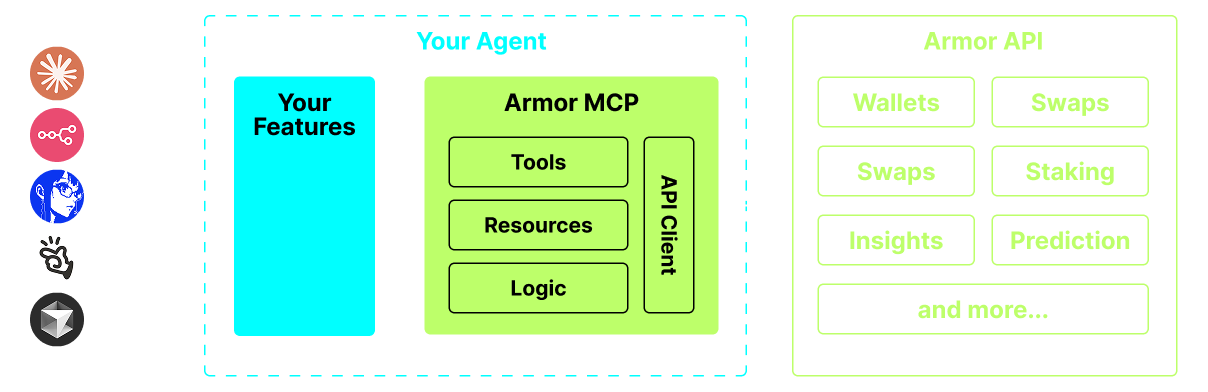
Una fuente única para integrar Agentes de IA con el ecosistema Cripto. Esto incluye creación y gestión de Billeteras, intercambios, transferencias, operaciones basadas en eventos como DCA, stop loss y take profit, y mucho más. El Armor MCP soporta Solana en Alpha y, cuando esté en beta, soportará más de una docena de blockchains, incluyendo Ethereum, Base, Avalanche, Bitcoin, Sui, Berachain, megaETH, Optimism, Ton, BNB y Arbitrum, entre otras. Usando el MCP de Armor puedes incorporar todo el mundo cripto en tu Agente de IA con lógica unificada y un conjunto completo de herramientas.
Características
🧠 Nativo de IA
📙 Gestión de Billeteras
🔃 Intercambios
🌈 Operaciones especializadas (DCA, Stop Loss, etc.)
⛓️ Multi-cadena
↔️ Transacciones entre cadenas
🥩 Staking
🤖 Integración rápida con frameworks Agentic
👫 Sentimiento Social
🔮 Predicción
Requisitos
1. Asegúrate de tener python instalado
2. Instalar uv
Linux / Windows
pip install uv
Mac
brew install uv
3. Claude Desktop o tu Agente de IA ejecutará el MCP
Consulta Uso y Configuración para más detalles.
Pruebas Alpha
Actualmente estamos en pre-alpha, y estamos probando las capacidades de varios agentes y frameworks agentic como Claude Desktop, Cline, Cursor, n8n, etc.
Características y Herramientas Actuales
- Gestión de Billeteras
- Agrupación y Organización
- Archivado
- Intercambios y Operaciones
- Intercambio normal
- DCA (colocar / listar / cancelar)
- Órdenes Programadas
- Órdenes Limitadas (colocar / listar / cancelar)
- Staking y Unstaking
- Búsqueda de Tokens y Tokens en Tendencia
- Calculadora Estadística para análisis precisos
- Soporta la blockchain Solana
Próximamente
- Más Soporte de Blockchains
- Acuñación (Minting)
- Armor Agents como Herramienta (o A2A)
Configuración del MCP
Actualmente necesitas tener el NFT de Armor para obtener una Clave API. Consíguelo aquí
Uso y Configuración
Para usar el Armor MCP con tu agente, necesitas la siguiente configuración, reemplaza <PUT-YOUR-KEY-HERE> con tu clave API:
{
  "mcpServers": {
    "armor-crypto-mcp": {
      "command": "uvx",
      "args": ["armor-crypto-mcp@latest", "--version"],
      "env": {
        "ARMOR_API_KEY": "<PUT-YOUR-KEY-HERE>"
      }
    }
  }
}
Uso en Claude Desktop
- Debes tener el Modo Desarrollador habilitado
- Abre el Menú Archivo de Claude Desktop en la parte superior izquierda de la ventana.
- Ve a Archivo > Configuración
- En Desarrollador, haz clic en Editar Configuración
- En el archivo de configuración, inserta la sección
armor-wallet-mcpde arriba - Asegúrate de reemplazar el marcador de posición con tu clave API
- Guarda el archivo e inicia un nuevo Chat en Claude Desktop
Uso en Cline
- Haz clic en el botón
MCP Serversen la pestaña Cline en VSCode en el panel izquierdo - Desplázate hasta la parte inferior del panel izquierdo y haz clic en
Configure MCP Servers - En el archivo de configuración, inserta la sección
armor-wallet-mcpde arriba - Asegúrate de reemplazar el marcador de posición con tu clave API
- Guarda el archivo, haz clic en
Donebajo la pestañaMCP Serversy comienza a chatear con Cline
Uso en n8n
- Abre la aplicación n8n
- En la parte inferior izquierda de la pantalla haz clic en
...junto a tu nombre de usuario y haz clic enSettings - En el panel izquierdo, haz clic en
Community nodesy luego en el botónInstall a Community Node - En el campo de búsqueda para
npm Package Nameescribe mcp - Instala
MCP Nodes - Agrega cualquier nodo MCP, por ejemplo:
List Tools - En la pestaña
Parametersdel Cliente MCP, haz clic enSelect Credentialy haz clic enCreate new credential - Bajo
Commandingresauvx - Bajo
Argumentsingresaarmor-crypto-mcp - Bajo
EnvironmentsingresaARMOR_API_KEY=eyJhbGciOiJIUzI1NiIsIn...pega el valor completo de la Clave API después de= - De vuelta en la pestaña
Parameterspuedes elegir elOperationdel MCP para ese Nodo
Usando Armor MCP
Una vez que hayas configurado el Armor MCP aquí tienes algunos prompts que puedes usar para comenzar