Kit.com (formerly ConvertKit) MCP
Gestiona tus listas de correo, suscriptores, transmisiones, secuencias y más a través de lenguaje natural.
Documentación
Servidor MCP de Kit
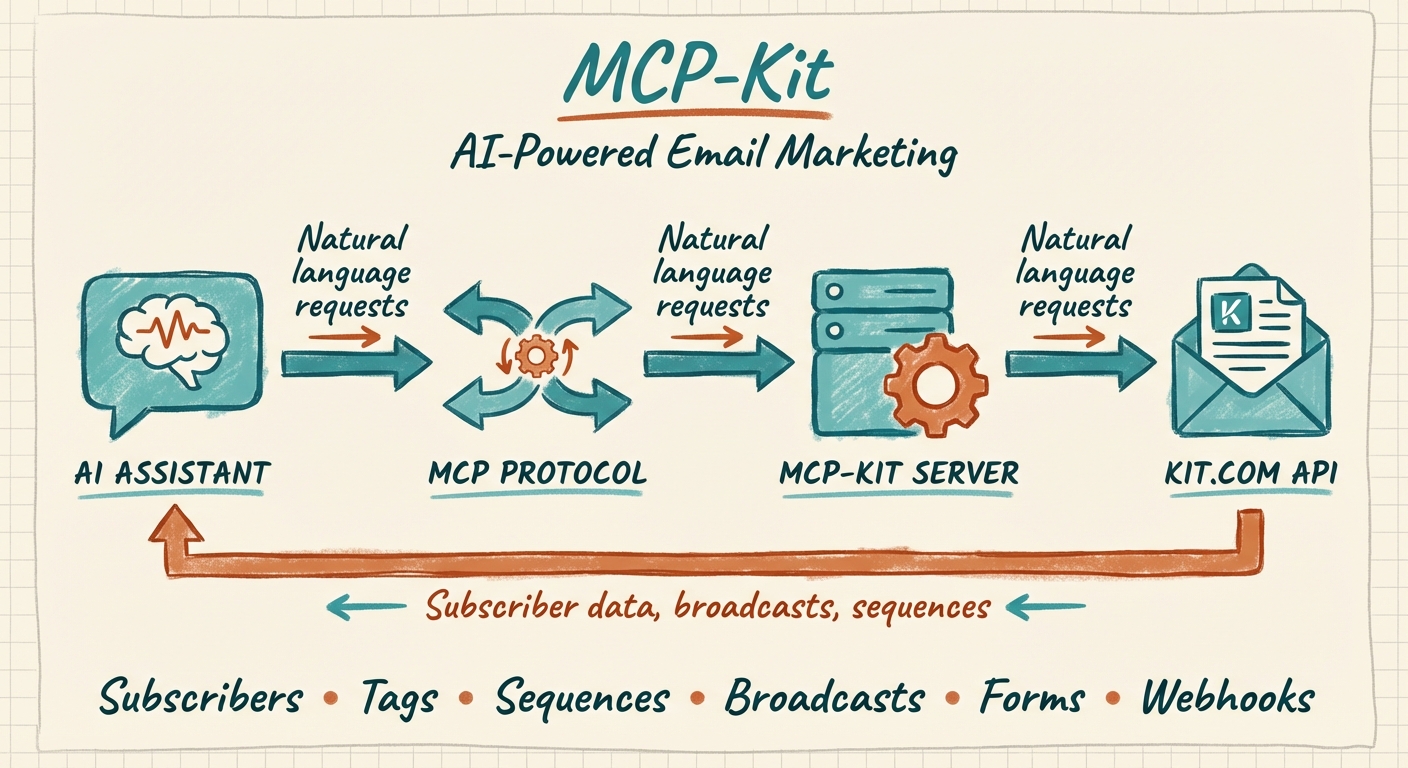




Un servidor MCP (Model Context Protocol) que conecta asistentes de IA como Claude a la plataforma de email marketing Kit.com (anteriormente ConvertKit). Gestiona tus listas de correo, suscriptores, transmisiones, secuencias y más mediante lenguaje natural.
[!WARNING] Este proyecto está obsoleto y ya no se mantiene. Kit ahora ofrece servidores MCP oficiales de primera parte que lo superan con una cobertura más amplia de la API y autenticación gestionada. Por favor, migra — consulta a continuación.
⚠️ Obsoleto — usa los servidores MCP oficiales de Kit
Este servidor comunitario fue creado antes de que Kit ofreciera su propio MCP. Kit ahora mantiene servidores oficiales que cubren mucho más de la superficie de la API v4 de Kit (incluyendo análisis, comercio, segmentos y operaciones masivas), gestionan la autenticación por ti y se mantienen al día con los cambios de la API. Los usuarios nuevos y existentes deben migrar.
| Caso de uso | Servidor oficial | URL |
|---|---|---|
| Actúa en tu cuenta de Kit — suscriptores, etiquetas, secuencias, transmisiones, análisis, comercio… | Kit MCP | https://app.kit.com/mcp |
| Dale a un agente de codificación acceso en vivo a la documentación para desarrolladores de Kit + API | Kit Developer Docs MCP | https://developers.kit.com/mcp |
Migrar en Claude Code
# Remove this deprecated server (if you added it as "kit")
claude mcp remove kit

# Add the official operational Kit MCP
claude mcp add --transport http kit https://app.kit.com/mcp

# Optional: add Kit's developer-docs MCP for building integrations
claude mcp add --transport http kit-docs https://developers.kit.com/mcp
Guías de configuración oficiales (Claude Desktop, Cursor, Windsurf, Cline y más): https://developers.kit.com/mcp/kit-developer-docs-mcp/mcp/overview
📦 Documentación heredada (para referencia histórica)
¿Por qué usar esto?
Si gestionas un boletín o email marketing en Kit.com, este servidor MCP te permite:
- Gestionar suscriptores - Listar, crear, actualizar y organizar tus suscriptores de correo
- Manejar etiquetas de manera eficiente - Crear etiquetas, añadir/eliminar etiquetas de suscriptores, listar suscriptores por etiqueta
- Trabajar con secuencias - Ver secuencias de correo y añadir suscriptores a secuencias automatizadas
- Crear transmisiones - Redactar y gestionar campañas de correo
- Analizar tu lista - Consultar datos de suscriptores con filtros (estado, rangos de fechas, campos personalizados)
- Automatizar flujos de trabajo - Deja que Claude maneje tareas repetitivas de email marketing
Características
| Categoría | Herramientas |
|---|---|
| Cuenta | Obtener información de la cuenta |
| Suscriptores | Listar, obtener, crear, actualizar, gestionar etiquetas |
| Etiquetas | Listar, crear, actualizar, eliminar, obtener suscriptores por etiqueta |
| Secuencias | Listar, obtener, añadir suscriptores |
| Transmisiones | Listar, obtener, crear, actualizar, eliminar |
| Formularios | Listar, obtener, añadir suscriptores |
| Campos personalizados | Listar campos disponibles |
| Webhooks | Listar, crear, eliminar |
Referencia completa de herramientas
Cuenta
kit_get_account- Obtener información de la cuenta de Kit.com
Suscriptores (7 herramientas)
kit_list_subscribers- Listar suscriptores con filtros (estado, rangos de fechas, paginación)kit_get_subscriber- Obtener un suscriptor específico por IDkit_create_subscriber- Crear un nuevo suscriptorkit_update_subscriber- Actualizar detalles del suscriptorkit_get_subscriber_tags- Obtener todas las etiquetas de un suscriptorkit_add_tag_to_subscriber- Añadir una etiqueta a un suscriptorkit_remove_tag_from_subscriber- Eliminar una etiqueta de un suscriptor
Etiquetas (6 herramientas)
kit_list_tags- Listar todas las etiquetaskit_get_tag- Obtener una etiqueta específicakit_create_tag- Crear una nueva etiquetakit_update_tag- Renombrar una etiquetakit_delete_tag- Eliminar una etiquetakit_list_tag_subscribers- Listar todos los suscriptores con una etiqueta específica
Secuencias (3 herramientas)
kit_list_sequences- Listar todas las secuencias de correokit_get_sequence- Obtener detalles de la secuenciakit_add_subscriber_to_sequence- Añadir suscriptor a una secuencia
Transmisiones (5 herramientas)
kit_list_broadcasts- Listar todas las transmisioneskit_get_broadcast- Obtener detalles de la transmisiónkit_create_broadcast- Crear una nueva transmisiónkit_update_broadcast- Actualizar una transmisiónkit_delete_broadcast- Eliminar una transmisión
Formularios (3 herramientas)
kit_list_forms- Listar todos los formularioskit_get_form- Obtener detalles del formulariokit_add_subscriber_to_form- Añadir suscriptor mediante formulario
Campos personalizados (1 herramienta)
kit_list_custom_fields- Listar todos los campos personalizados
Webhooks (3 herramientas)
kit_list_webhooks- Listar webhooks configuradoskit_create_webhook- Crear un nuevo webhookkit_delete_webhook- Eliminar un webhook
Requisitos previos
- Node.js 18+
- Una cuenta de Kit.com
- Tu clave de API de Kit.com (API v4)
Instalación
Opción 1: Instalar desde npm (recomendado)
npx kit-mcp-server
O instalar globalmente:
npm install -g kit-mcp-server
Opción 2: Clonar y compilar
git clone https://github.com/aplaceforallmystuff/mcp-kit.git
cd mcp-kit
npm install
npm run build
Configuración
1. Obtén tu clave de API de Kit.com
- Inicia sesión en Kit.com
- Navega a Configuración > Desarrollador
- Crea una nueva clave de API o copia una clave de API v4 existente
2. Configura tu cliente MCP
Para Claude Desktop
Añade a tu archivo de configuración de Claude Desktop:
macOS: ~/Library/Application Support/Claude/claude_desktop_config.json
Windows: %APPDATA%\Claude\claude_desktop_config.json
{
  "mcpServers": {
    "kit": {
      "command": "node",
      "args": ["/path/to/mcp-kit/dist/index.js"],
      "env": {
        "KIT_API_KEY": "your-api-key-here"
      }
    }
  }
}
Para Claude Code
claude mcp add kit -e KIT_API_KEY=your-api-key-here -- node /path/to/mcp-kit/dist/index.js
O añade a ~/.claude.json:
{
  "mcpServers": {
    "kit": {
      "command": "node",
      "args": ["/path/to/mcp-kit/dist/index.js"],
      "env": {
        "KIT_API_KEY": "your-api-key-here"
      }
    }
  }
}
Ejemplos de uso
Una vez configurado, puedes interactuar con Kit.com mediante lenguaje natural:
Gestión de suscriptores
"Muéstrame todos los suscriptores activos de los últimos 30 días"
"Crea un nuevo suscriptor con el correo user@example.com y etiquétalo como 'newsletter'"
"¿Qué etiquetas tiene subscriber@example.com?"
Operaciones con etiquetas
"Lista todas mis etiquetas y cuántos suscriptores tiene cada una"
"Crea una etiqueta llamada 'Clientes VIP'"
"Añade la etiqueta 'comprometido' a todos los suscriptores que se registraron este mes"
Secuencias de correo
"Muéstrame todas mis secuencias de correo"
"Añade user@example.com a la secuencia de bienvenida"
Transmisiones
"Crea una transmisión en borrador con el asunto 'Actualización semanal' y texto de vista previa 'Esta semana en IA...'"
"Lista todas mis transmisiones recientes y sus estadísticas"
Formularios
"Muéstrame todos los formularios activos"
"Añade un suscriptor a mi formulario principal de registro"
Desarrollo
# Run in development mode (watches for changes)
npm run dev

# Build for production
npm run build

# Run the built version
npm start
Solución de problemas
"Se requiere la variable de entorno KIT_API_KEY"
Asegúrate de haber establecido la variable de entorno KIT_API_KEY en tu configuración de MCP.
"Error de API de Kit (401)"
Tu clave de API no es válida o ha caducado. Genera una nueva desde Configuración > Desarrollador en Kit.com.
"Error de API de Kit (403)"
Tu clave de API no tiene permiso para esta operación. Verifica que estás usando una clave de API v4 con los alcances apropiados.
"Error de API de Kit (404)"
No se encontró el recurso (suscriptor, etiqueta, transmisión, etc.). Verifica que el ID sea correcto.
"Error de API de Kit (422)"
Datos de solicitud no válidos. Verifica que las direcciones de correo sean válidas y que se proporcionen los campos obligatorios.
Referencia de la API
Este servidor utiliza la API v4 de Kit.com. Todas las herramientas admiten paginación cuando corresponde utilizando los parámetros de cursor per_page y after.
Contribuciones
Este proyecto está obsoleto y no acepta contribuciones. Utiliza los servidores MCP oficiales de Kit en su lugar.
Licencia
Licencia MIT - consulta LICENSE para más detalles.