Trendyol Scraper: Products, Prices & Reviews (Apify Actor)
Scrape Trendyol.com search results, product pages and customer reviews. Rows include price in TRY with basket discount, seller, rating, stock, and size and variant for each review. Clear not-found rows. No login. Price: $0.90 per 1,000 products, $0.65 per 1,000 reviews, plus $0.01 per run start. Runs as an Apify Actor, callable from MCP clients via the Apify MCP server (https://mcp.apify.com/?tools=cliqtomedia/trendyol-scraper).
Servidor MCP alojado
npx add-mcp 'https://mcp.apify.com/?tools=cliqtomedia/trendyol-scraper'Se instala en Claude Code, Codex, Cursor y más
Documentación
Trendyol Scraper: Products, Prices & Reviews (No login) (cliqtomedia/trendyol-scraper) Actor
Scrape Trendyol.com search results, product pages and customer reviews. No login. Prices in TRY with basket discount, seller, rating, stock, size and variant of each review. Clear not-found and error rows.
- URL: https://apify.com/cliqtomedia/trendyol-scraper.md
- Developed by: Cliqto Media (community)
- Categories: E-commerce
- Features: Limited permissions
- Stats: 3 total users, 2 monthly users, 100.0% runs succeeded, 0 bookmarks
- User rating: No ratings yet
Pricing
from $0.63 / 1,000 products
This Actor is paid per event. You are not charged for the Apify platform usage, but only a fixed price for specific events. Since this Actor supports Apify Store discounts, the price gets lower the higher subscription plan you have.
Learn more: https://docs.apify.com/actors/running/actors-in-store.md#pay-per-event
What's an Apify Actor?
An Actor is a serverless cloud program that runs on the Apify platform. It has two run modes. In Batch mode, an Actor accepts a well-defined JSON input, performs an action which can take anything from a few seconds to a few hours, and optionally produces a well-defined JSON output, datasets with results, or files in key-value store. In Standby mode, an Actor provides a web server which can be used as a website, API, or an MCP server.
Apify vocabulary and the platform model are defined once, in the agent quickstart at https://apify.com/agents.md.
How to integrate an Actor?
If asked about integration, you help developers integrate Actors into their projects. You adapt to their stack and deliver integrations that are safe, well-documented, and production-ready.
Do not guess an integration path. Every one of them is in the agent quickstart at https://apify.com/agents.md: the Apify MCP server, Agent Skills with the Apify CLI, the JavaScript and Python clients, the REST API, and the account-free path for an agent with no human to sign in. It also carries the rule on stating cost before the first paid run.
For examples already wired to this Actor's own input schema, see the API section below.
Each client library has reference documentation the quickstart does not restate: JavaScript/TypeScript (npm install apify-client) and Python (pip install apify-client).
README
Trendyol Scraper gets products, prices and customer reviews from Trendyol.com, the largest online marketplace in Turkey. Add a keyword, a search URL or product URLs, and get a clean table with price in TRY, basket discount, seller, rating, stock and reviews. No login and no cookies are needed.
Start with one Turkish keyword, for example kulaklık (headphones), and 20 results. This run takes about 5 seconds and costs $0.028 on the Free plan.
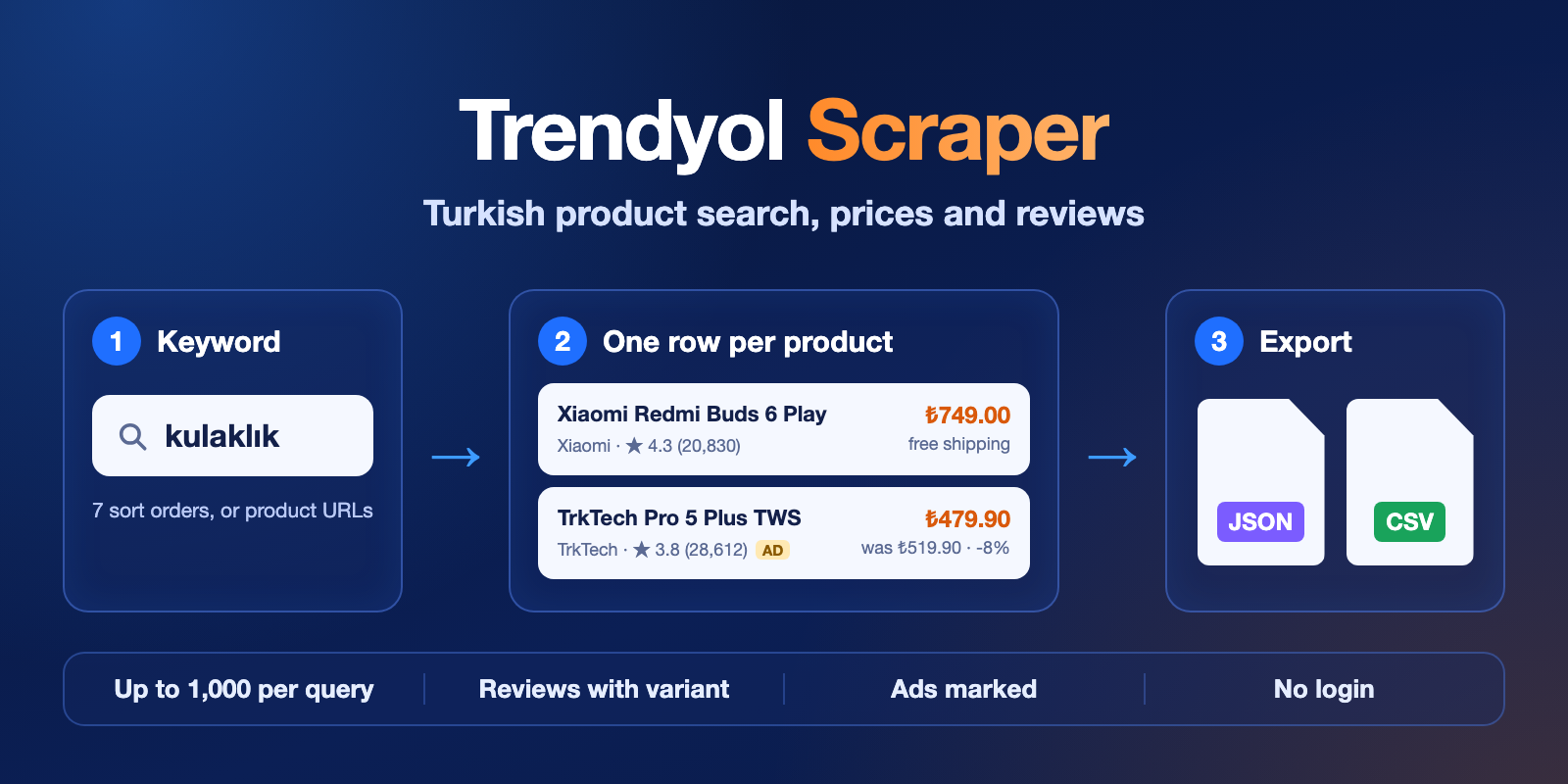
Table of contents
- What it does
- What data you get
- Quick start
- Input
- Input examples
- Output
- Pricing
- Use cases
- Scheduling and monitoring
- API, export and AI agents (MCP)
- Limits and partial results
- Troubleshooting
- FAQ
- Support
What it does
The Actor reads the public Trendyol website. It has three modes:
| Mode | You add | You get |
|---|---|---|
search | keywords or Trendyol search URLs | one row per product in the search results, in the same order as on the site |
product | product URLs or product IDs | one row per product, with data from the product page |
reviews | product URLs or product IDs | one row per customer review |
It works without a Trendyol account. It does not need a Turkish IP address: it uses the Apify datacenter proxy by default.
Good fit
- Check prices and discounts of your products and your competitors on Trendyol.
- Find which products and sellers appear first for a keyword, including paid (ad) listings.
- Read what buyers say about a product, with the size and variant they bought.
Not a fit
- Other Trendyol countries (only trendyol.com, prices in TRY).
- Questions and answers (Q&A), seller pages and short
ty.gllinks are not supported. - Personal data: the Actor does not return reviewer names, body measurements or the legal details of sellers.
What data you get
Products: product ID, name, brand, category, price, basket price, old (strikethrough) price, discount percent, promotions, seller ID, rating, number of ratings, stock, free shipping, ad flag, variant, URL and images.
With product pages (product mode, or includeDetails in search) you also get: seller name, seller score, full category path, number of reviews, number of favourites, all attributes and all variants with stock.
Reviews: review ID, star rating, text, date, size and variant bought, fit feedback, helpful votes, verified-buyer flag, seller, photo URLs and language.
Every row has source, sourceUrl and fetchedAt, so you always know where and when the data was read.
Quick start
- Open the Input tab.
- Keep Mode =
search. - In Queries, keep
kulaklıkor add your own keyword. - Keep Max items =
20. - Click Start.
- Open the Output tab and check the Products view:
name,price,discountedPrice,rating.
Expected result: 20 product rows for the keyword, in the same order as on trendyol.com.
Input
| Field | Type | Default | Allowed values | What it does |
|---|---|---|---|---|
mode | string | search | search, product, reviews | What to collect. |
queries | array of strings | empty (prefill kulaklık) | up to 20 | search mode: keywords or Trendyol search URLs (https://www.trendyol.com/sr?q=...). From a search URL the Actor takes only the search words (q=); other URL filters are not used. |
productUrls | array of strings | empty | up to 100 | product and reviews modes: product URLs (...-p-123456789) or numeric product IDs. |
maxItems | integer | 100 (prefill 20) | 1–1000 | search: products per query. reviews: reviews per product. product mode always returns one row per URL. |
sort | string | relevance | relevance, price_asc, price_desc, newest, best_seller, most_favourite, most_rated | Order of search results. |
includeDetails | boolean | false | true / false | search mode: also open each product page for seller name, attributes, variants and counts. Slower, same price per product. |
skipSponsored | boolean | false | true / false | search mode: leave out paid (ad) listings. Ads always have isSponsored: true. |
reviewSort | string | relevance | relevance, newest | Order of reviews. |
proxyConfiguration | object | Apify proxy on | Apify proxy settings | Change only if you see blocked errors. |
Good to know:
- The same keyword in another letter case (
Kulaklıkandkulaklık) is read and paid only once. The same product twice is read only once. - A value that is not a Trendyol product (another website, a URL without an ID) gets a free
errorrow. The other values still run. - With
includeDetails: truethe Actor uses 512 MB of memory instead of 256 MB and is slower (about 300 products in 2–3 minutes).
Input examples
Search with a sort order
{
  "mode": "search",
  "queries": ["kulaklık", "https://www.trendyol.com/sr?q=laptop"],
  "maxItems": 100,
  "sort": "price_asc",
  "skipSponsored": true
}
Up to 100 products for each query, cheapest first, without ads.
Product pages
{
  "mode": "product",
  "productUrls": [
    "https://www.trendyol.com/tarcin/air-pro-2-anc-gurultu-engelleyici-bluetooth-kulaklik-ios-android-tum-telefonlar-ile-uyumlu-kulaklik-p-819066262",
    "946802869"
  ]
}
One row per product with seller name, seller score, category path, attributes and variants.
Newest reviews of a product
{
  "mode": "reviews",
  "productUrls": ["946802869"],
  "maxItems": 20,
  "reviewSort": "newest"
}
The 20 newest reviews, with size and variant.
Output
The dataset has two views: Products and Reviews. You can export it as JSON, CSV, Excel or HTML.
Product row example
From the quick start run (search, kulaklık, 20 items). The image list is shortened.
{
  "recordType": "product",
  "status": "complete",
  "errorMessage": null,
  "query": "kulaklık",
  "position": 4,
  "input": null,
  "productId": "666158167",
  "name": "Pro 5 Plus Kablosuz Bluetooth Kulaklık Bluetooth 5.3 TWS iOS Android Uyumlu HD Stereo Ses Dokunmatik Kılıf Hediyeli Şarj Kutulu",
  "brand": "TrkTech",
  "category": "Kulak içi TWS Bluetooth Kulaklık",
  "categoryPath": null,
  "price": 479.9,
  "discountedPrice": null,
  "originalPrice": 519.9,
  "discountPercentage": 8,
  "currency": "TRY",
  "promotions": [],
  "seller": null,
  "sellerId": "260497",
  "sellerScore": null,
  "rating": 3.76,
  "ratingCount": 28612,
  "reviewCount": null,
  "favoriteCount": null,
  "inStock": true,
  "freeShipping": true,
  "isSponsored": true,
  "variant": "Tek Ebat",
  "variants": null,
  "attributes": null,
  "url": "https://www.trendyol.com/trktech/pro-5-plus-kablosuz-bluetooth-kulaklik-bluetooth-5-3-tws-ios-android-uyumlu-hd-stereo-ses-dokunmatik-kilif-hediyeli-sarj-kutulu-p-666158167",
  "image": "https://cdn.dsmcdn.com/mnresize/400/-/ty1910/prod/QC_ENRICHMENT/20260728/10/9ec2e259-2706-3ae9-874d-68678b5a420a/1_org_zoom.jpg",
  "images": ["https://cdn.dsmcdn.com/mnresize/400/-/ty1910/prod/QC_ENRICHMENT/20260728/10/9ec2e259-2706-3ae9-874d-68678b5a420a/1_org_zoom.jpg"],
  "detailsIncluded": false,
  "source": "trendyol.com",
  "sourceUrl": "https://apigw.trendyol.com/discovery-sfint-search-service/api/search/products/?channelId=1&culture=tr-TR&countryCode=TR&storefrontId=1&language=tr&pageSize=36&pi=1&q=kulakl%C4%B1k&qt=kulakl%C4%B1k&st=kulakl%C4%B1k&os=1",
  "fetchedAt": "2026-10-14T15:05:47.817Z"
}
seller, categoryPath, reviewCount, favoriteCount, variants and attributes are null here because the run did not open product pages. Use product mode or includeDetails: true to fill them.
Review row example
From the newest-reviews example above.
{
  "recordType": "review",
  "status": "complete",
  "errorMessage": null,
  "input": "946802869",
  "productId": "946802869",
  "productUrl": "https://www.trendyol.com/x/y-p-946802869",
  "reviewId": "672788584",
  "rating": 4,
  "text": "guzel bir tisort ise yarar",
  "date": "2026-10-14T03:40:54.974Z",
  "lastModifiedAt": "2026-10-14T03:41:14.532Z",
  "size": "M",
  "variantAttribute": "Beden",
  "variant": "M",
  "fit": null,
  "seller": "TEE NOVA",
  "sellerId": "1146443",
  "likesCount": 0,
  "trusted": true,
  "photos": [],
  "language": "tr",
  "source": "trendyol.com",
  "sourceUrl": "https://apigw.trendyol.com/discovery-storefront-trproductgw-service/api/review-read/product-reviews/detailed?contentId=946802869&page=0&pageSize=50&order=DESC&orderBy=CreatedDate&channelId=1&countryCode=TR&culture=tr-TR&storefrontId=1&language=tr",
  "fetchedAt": "2026-10-14T15:06:55.037Z"
}
productUrl is a short link to the product. Trendyol redirects it to the full product page.
All output fields
null means "the site does not show this value" or "this mode does not read it". It never means zero.
| Field | Type | Rows | Meaning |
|---|---|---|---|
recordType | string | all | product or review. |
status | string | all | complete; partial (search data only, the product page could not be read); not_found (no product with this ID, free); error (bad input or source failure, free). |
errorMessage | string or null | all | Why a row is partial, not_found or error. |
query | string or null | product | Search query that found the product. |
position | integer or null | product | Place in the search results, starting at 1. |
input | string or null | all | Your product URL or ID as you gave it (product and reviews modes). |
productId | string or null | all | Trendyol product ID. |
name, brand, category | string or null | product | Product name, brand and category. |
categoryPath | string or null | product | Full category path, for example Elektronik > Giyilebilir Teknoloji > Kulaklıklar > .... Product pages only. |
price | number or null | product | Selling price in TRY. |
discountedPrice | number or null | product | Lower basket or campaign price in TRY, when the site shows one. |
originalPrice | number or null | product | Old (strikethrough) price in TRY, when the site shows one. |
discountPercentage | number or null | product | Discount from the highest shown price to the lowest one, in percent. null when there is no discount. |
currency | string or null | product | TRY. |
promotions | array | product | Promotion labels, for example 300 TL'ye %10 İndirim. |
seller | string or null | both | Seller name. In search mode only with includeDetails. For reviews: where the buyer bought the item. |
sellerId | string or null | both | Seller ID. |
sellerScore | number or null | product | Seller score from 0 to 10. Product pages only. |
rating | number or null | both | Average rating 1–5 for a product; stars for a review. |
ratingCount | integer or null | product | Number of ratings. |
reviewCount, favoriteCount | integer or null | product | Number of written reviews and of favourites. Product pages only. |
inStock, freeShipping | boolean or null | product | Can be bought now; free delivery. |
isSponsored | boolean or null | product | true for paid (ad) listings in search results. |
variant | string or null | both | Selected size or colour; for reviews, the variant the buyer bought. |
variants | array or null | product | All variants with stock: [{"value": "M", "inStock": true}]. Product pages only. |
attributes | object or null | product | Product attributes, name → value. Product pages only. |
url, image, images | string / array | product | Product page URL, main image and all images. |
detailsIncluded | boolean | product | true if the product page was read. |
productUrl | string or null | review | Link to the product. |
reviewId, text | string or null | review | Review ID and text. |
date, lastModifiedAt | string or null | review | Review date and last edit date (ISO 8601, UTC). |
size, variantAttribute | string or null | review | Size bought and the variant type, for example Beden (size) or Renk (colour). |
fit | string or null | review | Buyer's size-fit feedback, when given. |
likesCount | integer or null | review | How many users found the review helpful. |
trusted | boolean or null | review | true if Trendyol marks the buyer as verified. |
photos | array | review | Photo URLs in the review. |
language | string or null | review | Review language, for example tr. |
source, sourceUrl, fetchedAt | string | all | trendyol.com, the exact URL the row came from, and when it was read (ISO 8601, UTC). |
Run summary
Each run also saves RUN_SUMMARY in the key-value store. It shows the result for each query or product (complete, no_results, not_found or error), row counts, charged counts and request statistics. Open it from the Output tab or with the API.
Pricing
You pay per event (pay-per-event). Platform usage is included in the price.
| Event | When | Free plan | Bronze | Silver | Gold and higher |
|---|---|---|---|---|---|
| Actor start | once per run | $0.01 | $0.01 | $0.01 | $0.01 |
| Product | one product row saved | $0.0009 | $0.00082 | $0.00073 | $0.00065 |
| Review | one review row saved | $0.00065 | $0.00055 | $0.00047 | $0.00045 |
Free rows: not_found and error rows cost nothing. A run where nothing is found costs only the start event ($0.01). Product pages with includeDetails cost the same as normal product rows.
Examples on the Free plan:
| Run | Rows | Cost | Time |
|---|---|---|---|
| 1 keyword, 20 products (quick start) | 20 | $0.028 | about 5 s |
| 1 keyword, 100 products | 100 | $0.10 | under 20 s |
| 1 keyword, 1,000 products | 1,000 | $0.91 | about 20 s |
| 100 reviews of one product | 100 | $0.075 | under 20 s |
| 1,000 reviews of one product | 1,000 | $0.66 | about 40 s |
| 20 keywords with no results | 0 | $0.01 | about 45 s |
| 100 products × 1,000 reviews | 100,000 | $65 | about 70 min |
Times come from our test runs; Trendyol's speed changes during the day. Reviews are read at about 25 per second.
To limit the cost, use Max items and the Maximum cost per run option in the run settings. When the limit is reached, the Actor stops and keeps the rows it already saved.
Use cases
| Job | Mode and input | Key fields |
|---|---|---|
| Price check for your products | product, your product URLs | price, discountedPrice, originalPrice, inStock, seller |
| Keyword and ad tracking | search, your main keywords | position, isSponsored, brand, sellerId, rating |
| Category price research | search, a product-type keyword, sort: price_asc | price, discountPercentage, ratingCount |
| Review analysis | reviews, reviewSort: newest | rating, text, size, fit, date |
| Size and fit problems | reviews for clothes or shoes | size, variant, fit, rating |
Scheduling and monitoring
Create a task with your input and add an Apify schedule, for example every morning. Each run gives a new dataset with fetchedAt, so you can compare prices and positions over time. Use reviewSort: newest with a small maxItems to get only the latest reviews.
API, export and AI agents (MCP)
- Export: download the dataset as JSON, CSV, Excel or HTML from the Output tab.
- API: start the Actor and read the dataset with the Apify API. The API tab shows ready code for Python, JavaScript and cURL.
- Integrations: send results to Google Sheets, Slack, Make, Zapier or a webhook after each run.
Use with AI agents (MCP)
Connect this Actor to Claude, Cursor or another MCP client with the Apify MCP server:
https://mcp.apify.com?tools=cliqtomedia/trendyol-scraper
Smallest useful input:
{ "mode": "search", "queries": ["kulaklık"], "maxItems": 20 }
Main fields: name, price (TRY), discountedPrice (basket price), rating, url. A run with 20 products takes about 5 seconds and costs $0.028 on the Free plan. Limits: 20 queries or 100 products per run, 1,000 items per query or product.
Limits and partial results
- Up to 20 queries per run and up to 1,000 products per query (20,000 products in about 13 minutes).
- Up to 100 product URLs per run, and up to 1,000 reviews per product. 100,000 reviews take about 70 minutes; the default run timeout is 2 hours.
- Search results can change between runs: Trendyol personalises and updates its listings.
discountedPriceis the basket price that Trendyol shows to all visitors. Coupons and personal prices are not included.- If a query or a product fails because of a source error, the rows already saved stay in the dataset, the failed item gets a free
errorrow, and the run ends with status Failed so you notice it.RUN_SUMMARYshows which item failed. - With
includeDetails, a product whose page could not be read keeps its search data withstatus: partial.
Troubleshooting
No rows for a keyword. Check RUN_SUMMARY: no_results means Trendyol has no products for this keyword. Try Turkish words (kulaklık, not headphones) or copy the search URL from trendyol.com.
A product row says not_found. The product was removed from Trendyol or the ID is wrong. This row is free.
An error row. Read errorMessage. INVALID_INPUT means the value is not a Trendyol product URL or ID. Other errors come from the source; run the same input again later.
The run failed with a blocked or rate-limit message. Trendyol limited the requests. Run again later. Keep the default Apify proxy or try another proxy group in Proxy configuration.
FAQ
Do I need a Trendyol account or cookies? No. The Actor reads only public pages.
Which prices do I get? price is the selling price, discountedPrice is the lower basket price (if any), and originalPrice is the old strikethrough price (if any). All in TRY.
Why is seller empty in search? The search page shows only the seller ID. Turn on includeDetails or use product mode to get the seller name.
Are reviewer names included? No. To protect privacy, the Actor does not return reviewer names.
Is the data fresh? Yes. Each run reads Trendyol live. fetchedAt shows the time.
Support
For a bug or a feature request, open an issue in the Issues tab. Add the run ID, the mode and the error message. Do not share tokens or other private data.
Changelog
This Actor's version history is a separate document: https://apify.com/cliqtomedia/trendyol-scraper/changelog.md
Actor input Schema
mode (type: string):
search: products for each query in Queries. product: one row per product URL/ID. reviews: customer reviews for each product URL/ID.
queries (type: array):
Search mode: up to 20 keywords (Turkish works best, e.g. kulaklık, laptop) or Trendyol search URLs (https://www.trendyol.com/sr?q=...). Each query gets up to Max items products.
productUrls (type: array):
Product and reviews modes: up to 100 Trendyol product URLs (…-p-123456789) or numeric product IDs. Short ty.gl links are not supported. Values that are not Trendyol products get a free error row.
maxItems (type: integer):
Search: max products per query. Reviews: max reviews per product. Product mode always returns one row per URL.
sort (type: string):
Order of search results (search mode).
includeDetails (type: boolean):
Search mode: also read each product's page to add seller name, seller score, category path, attributes, variants and review count. Slower; same price per product.
skipSponsored (type: boolean):
Search mode: leave out paid (ad) listings. Sponsored products are marked with isSponsored either way.
reviewSort (type: string):
Order of reviews (reviews mode).
proxyConfiguration (type: object):
Apify datacenter proxy works by default. Change only if you see blocked errors.
Actor input object example
{
  "mode": "search",
  "queries": [
    "kulaklık"
  ],
  "maxItems": 20,
  "sort": "relevance",
  "includeDetails": false,
  "skipSponsored": false,
  "reviewSort": "relevance",
  "proxyConfiguration": {
    "useApifyProxy": true
  }
}
Actor output Schema
products (type: string):
Product rows as a table.
reviews (type: string):
Review rows as a table.
runSummary (type: string):
Run status, reason, per-query/per-product results and request statistics.
API
You can run this Actor programmatically using our API. Below are code examples in JavaScript, Python, and CLI, as well as the OpenAPI specification and MCP server setup.
JavaScript example
import { ApifyClient } from 'apify-client';

// Initialize the ApifyClient with your Apify API token
// Replace the '<YOUR_API_TOKEN>' with your token
const client = new ApifyClient({
    token: '<YOUR_API_TOKEN>',
});

// Prepare Actor input
const input = {
    "mode": "search",
    "queries": [
        "kulaklık"
    ],
    "maxItems": 20,
    "proxyConfiguration": {
        "useApifyProxy": true
    }
};

// Run the Actor and wait for it to finish
const run = await client.actor("cliqtomedia/trendyol-scraper").call(input);

// Fetch and print Actor results from the run's dataset (if any)
console.log('Results from dataset');
console.log(`💾 Check your data here: https://console.apify.com/storage/datasets/${run.defaultDatasetId}`);
const { items } = await client.dataset(run.defaultDatasetId).listItems();
items.forEach((item) => {
    console.dir(item);
});

// 📚 Want to learn more 📖? Go to → https://docs.apify.com/api/client/js/docs
Python example
from apify_client import ApifyClient

# Initialize the ApifyClient with your Apify API token
# Replace '<YOUR_API_TOKEN>' with your token.
client = ApifyClient("<YOUR_API_TOKEN>")

# Prepare the Actor input
run_input = {
    "mode": "search",
    "queries": ["kulaklık"],
    "maxItems": 20,
    "proxyConfiguration": { "useApifyProxy": True },
}

# Run the Actor and wait for it to finish
run = client.actor("cliqtomedia/trendyol-scraper").call(run_input=run_input)

# Fetch and print Actor results from the run's dataset (if there are any)
print(f"💾 Check your data here: https://console.apify.com/storage/datasets/{run.default_dataset_id}")
for item in client.dataset(run.default_dataset_id).iterate_items():
    print(item)

# 📚 Want to learn more 📖? Go to → https://docs.apify.com/api/client/python/docs/quick-start
CLI example
echo '{
  "mode": "search",
  "queries": [
    "kulaklık"
  ],
  "maxItems": 20,
  "proxyConfiguration": {
    "useApifyProxy": true
  }
}' |
apify call cliqtomedia/trendyol-scraper --silent --output-dataset
MCP server setup
{
    "mcpServers": {
        "apify": {
            "type": "http",
            "url": "https://mcp.apify.com/?tools=fetch-actor-details,cliqtomedia/trendyol-scraper"
        }
    }
}
The hosted server signs you in with OAuth on first connect, so no API token belongs in this config. Clients without OAuth support can send an Authorization: Bearer <APIFY_API_TOKEN> header instead, using a token from API & Integrations in Apify Console (https://console.apify.com/settings/integrations).
OpenAPI specification
Download the OpenAPI definition: https://api.apify.com/v2/actors/dLOCBI4FHkKlX5wS6/builds/FTi3Vmq0KeXU9PAEj/openapi.json