AliExpress Scraper: Products, Prices & Reviews (Apify Actor)
Extrae resultados de búsqueda y reseñas de productos de AliExpress: precio, precio original, descuento, valoración, pedidos, nota de entrega e imágenes, además del texto de la reseña, estrellas, país y fecha. Elige el país de destino y la moneda. Sin inicio de sesión. Precio: 1,20 $ por cada 1.000 resultados de búsqueda, 0,50 $ por cada 1.000 reseñas, más 0,0015 $ por inicio de ejecución. Se ejecuta como un Apify Actor y se puede invocar desde clientes MCP mediante el servidor MCP de Apify (https://mcp.apify.com/?tools=cliqtomedia/aliexpress-scraper).
Servidor MCP alojado
npx add-mcp 'https://mcp.apify.com/?tools=cliqtomedia/aliexpress-scraper'Se instala en Claude Code, Codex, Cursor y más
Documentación
AliExpress Scraper: Products, Prices & Reviews, No Login (cliqtomedia/aliexpress-scraper) Actor
Scrape AliExpress search results and product reviews: price, original price, discount, currency, rating, orders, delivery note and images, plus review text, stars, country and date. Pick ship-to country and currency. No login.
- URL: https://apify.com/cliqtomedia/aliexpress-scraper.md
- Developed by: Cliqto Media (community)
- Categories: E-commerce
- Features: Limited permissions
- Stats: 3 total users, 2 monthly users, 97.6% runs succeeded, 0 bookmarks
- User rating: No ratings yet
Pricing
from $0.84 / 1,000 search results
This Actor is paid per event. You are not charged for the Apify platform usage, but only a fixed price for specific events. Since this Actor supports Apify Store discounts, the price gets lower the higher subscription plan you have.
Learn more: https://docs.apify.com/actors/running/actors-in-store.md#pay-per-event
What's an Apify Actor?
An Actor is a serverless cloud program that runs on the Apify platform. It has two run modes. In Batch mode, an Actor accepts a well-defined JSON input, performs an action which can take anything from a few seconds to a few hours, and optionally produces a well-defined JSON output, datasets with results, or files in key-value store. In Standby mode, an Actor provides a web server which can be used as a website, API, or an MCP server.
Apify vocabulary and the platform model are defined once, in the agent quickstart at https://apify.com/agents.md.
How to integrate an Actor?
If asked about integration, you help developers integrate Actors into their projects. You adapt to their stack and deliver integrations that are safe, well-documented, and production-ready.
Do not guess an integration path. Every one of them is in the agent quickstart at https://apify.com/agents.md: the Apify MCP server, Agent Skills with the Apify CLI, the JavaScript and Python clients, the REST API, and the account-free path for an agent with no human to sign in. It also carries the rule on stating cost before the first paid run.
For examples already wired to this Actor's own input schema, see the API section below.
Each client library has reference documentation the quickstart does not restate: JavaScript/TypeScript (npm install apify-client) and Python (pip install apify-client).
README
Type keywords or paste AliExpress product links, and get AliExpress search results or buyer reviews as one row each. Products come with price as a number, original price, discount, currency, rating, orders as a number, delivery note and images; reviews have stars, text, English translation, country, date and variant. No AliExpress login, no cookies, no API key. The prefilled search (10 products) costs about $0.014.
Use it for price research, dropshipping product research and review analysis. The prefilled search usb c cable with 10 products finishes in about 4 seconds.
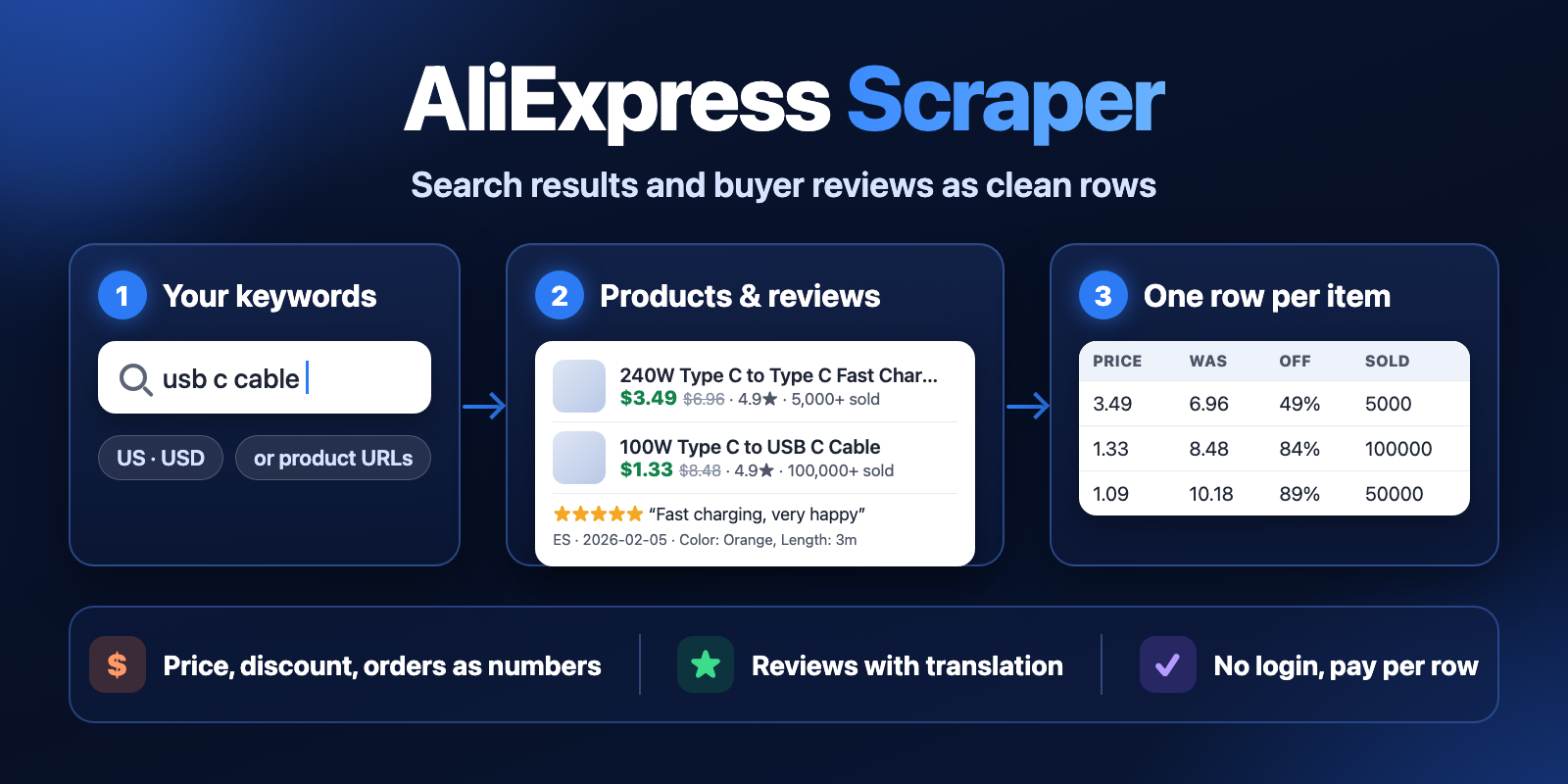
Table of contents
- What it does
- How it works
- Quick start
- Use cases
- Input
- Output
- Pricing
- Limits
- API, export and integrations
- Troubleshooting
- FAQ
- Related Actors
- Support
What it does
The Actor reads public pages of AliExpress in one of two modes:
- Search — for each keyword, it reads the AliExpress search results in page order (60 products per page) for the ship-to country and currency you pick. You can sort by orders or price and filter by price range, ships-from country, minimum rating and minimum orders. One row per product: price, original price, discount, currency, new-shopper price flag, rating, orders, delivery note, ships-from country, Choice flag, store name (when the card shows it), images, badges, ad flag and the position in the results.
- Reviews — for each product link or ID, it reads the buyer reviews. One row per review: stars, text, English translation by AliExpress, reviewer country, date, variant, shipping method, photos and helpful votes, plus the product rating and total number of reviews.
Every row has status, source, a link and fetchedAt, so you can filter, sort and join rows in the Dataset, a spreadsheet or by API.
Good fit
- Find products by keyword and compare price, discount and orders across sellers.
- Track how prices and discounts change for the same keywords over time (run on a schedule).
- Read what buyers say about a product: stars, text in English, countries and variants.
Not a fit / limits
- No product page details: no seller rating or store ID, no exact shipping cost by method, no variants (SKU) list, no stock. Search cards give a delivery note only (for example
Free shippingorDelivery: Oct 20 - 25). - Prices are the ones AliExpress shows to a new visitor. Often this is a new-shopper offer; the row marks it with
newShopperPrice: true. Regular buyers may pay more. - aliexpress.ru, short share links (
a.aliexpress.com) and other AliExpress apps are not supported. - Up to 1,000 products per keyword and 1,000 reviews per product.
How it works
- The Actor reads public AliExpress search pages for each keyword, or the public review pages for each product, for the ship-to country and currency you pick.
- It turns every product card or review into one clean row: prices and order counts become numbers, repeated products are skipped, and anything AliExpress did not show stays empty instead of 0.
- It saves the rows to the Dataset and a run summary (
RUN_SUMMARY) to the Key-value store: what was saved, what was skipped and why, and why the run stopped if it stopped early. If you picked a connector, it also posts a short summary to Slack or Notion.
Quick start
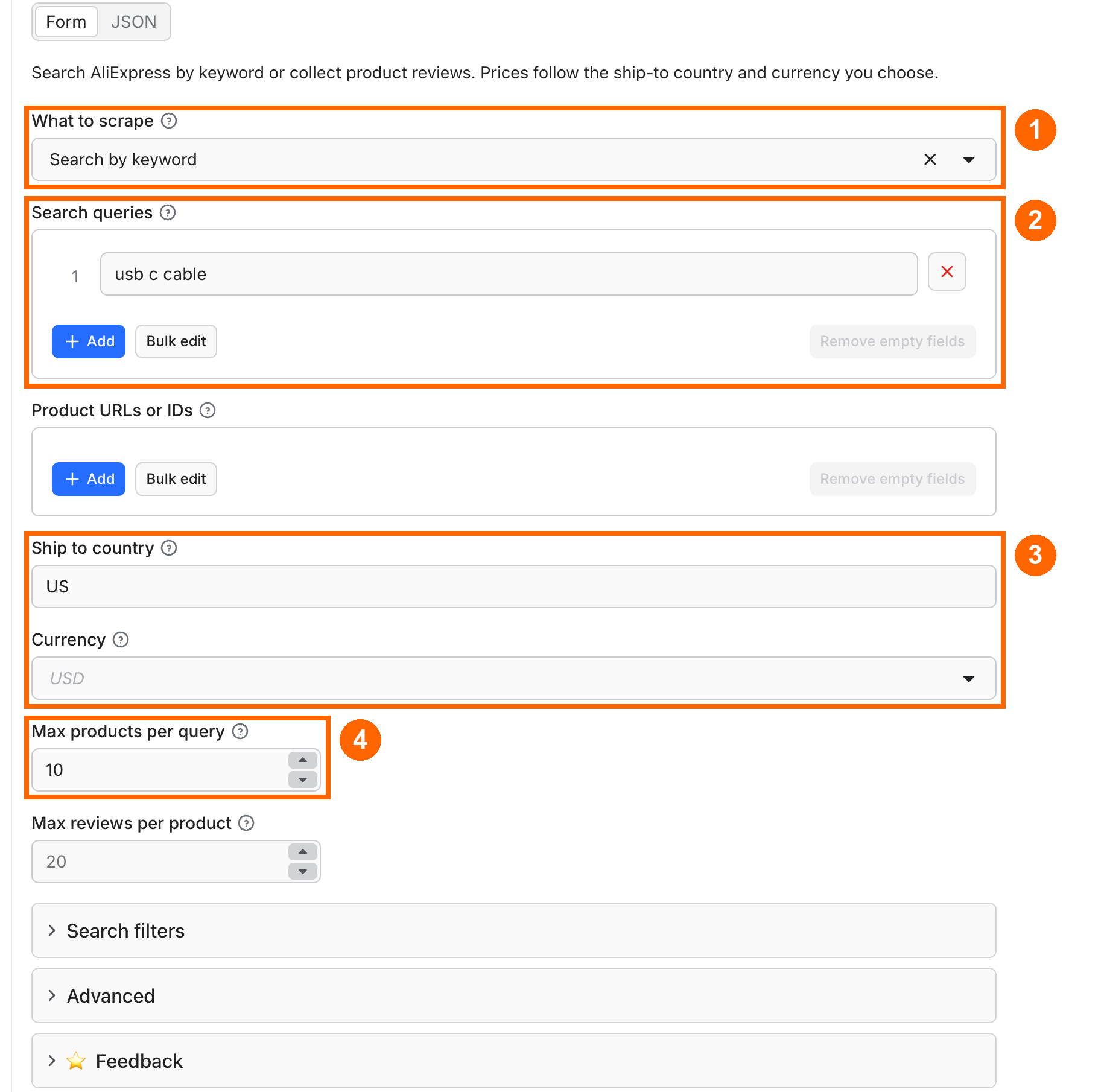
Open the input form (link above). The numbers match the boxes on the screenshots.
- Keep What to scrape =
Search by keyword. - Keep the prefilled keyword
usb c cablein Search queries, or type your own. - Keep Ship to country =
USand Currency =USD, or pick your country and currency. - Keep Max products per query = 10 (prefill) or raise it up to 1,000.
- Click Start at the bottom of the page (below the area shown on the screenshot).
- Open the Output tab, view Products, and check
price,originalPriceandordersCount.
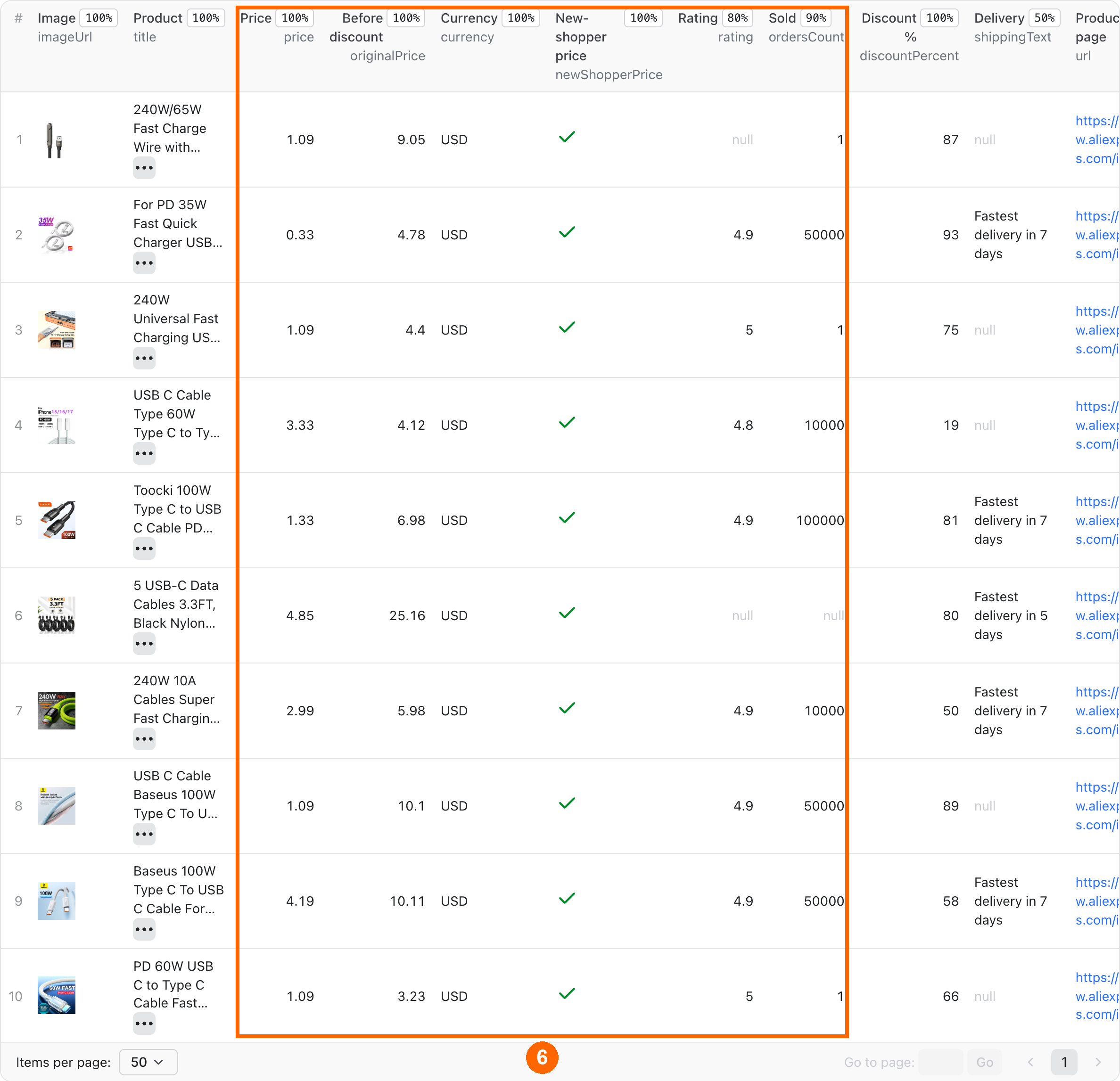
Expected result: 10 rows with status complete, one per product, in AliExpress search order.
For reviews, set What to scrape = Reviews (product URLs or IDs), add product links or IDs to Product URLs or IDs, and view Reviews in the Output tab.
Use cases
| Buyer job | Input path | Output entity | Key fields | Next integration |
|---|---|---|---|---|
| Best sellers for a keyword | searchQueries + sortBy: orders + minRating | product | ordersCount, rating, price, shipFrom | Google Sheets |
| Product research for dropshipping | searchQueries | product | price, ordersCount, rating, discountPercent | Google Sheets, CSV |
| Price and discount tracking | searchQueries + schedule | product | price, originalPrice, newShopperPrice, fetchedAt | Dataset API, webhooks |
| Review analysis | productUrls (mode reviews) | review | rating, translatedText, country, variant | LLM or sentiment tools |
| Prices for a local market | shipTo + currency | product | price, currency, shipTo | spreadsheet |
Input
Input fields
| Field | Plain name | Type | Required | Default / prefill | Allowed values | Effect | Example | Recommendation |
|---|---|---|---|---|---|---|---|---|
mode | Mode | string | no | default search | search, reviews | What to collect | "reviews" | If you send only productUrls without mode, the Actor uses reviews |
searchQueries | Search queries | array of strings | yes in search | prefill ["usb c cable"] | 1–20 queries, each up to 200 characters | One search per query | ["yoga mat", "phone case iphone 16"] | Repeated queries are read once |
productUrls | Product URLs | array of strings | yes in reviews | — | 1–200 aliexpress.com or aliexpress.us links, or numeric IDs | Products to read reviews for | ["1005004047407131"] | aliexpress.us IDs are converted; bad entries are skipped and listed in RUN_SUMMARY |
shipTo | Ship to | string | no | default and prefill US | two-letter country code | Prices, discounts and delivery notes for this country | "DE" | Use the country of your buyers |
currency | Currency | string | no | default USD | 45 currencies (USD, EUR, GBP, BRL, PLN, JPY…) | Currency of price and originalPrice | "EUR" | Match it with shipTo |
maxItems | Max products per query | integer | no | default 50, prefill 10 | 1–1000 | Most products per search query | 200 | 60 products = one results page |
maxReviews | Max reviews per product | integer | no | default 20 | 1–1000 | Most reviews per product | 100 | Cost grows with the number of reviews |
sortBy | Sort by | string | no | default relevance | relevance, orders, price_asc, price_desc | Order of search results, as on AliExpress | "orders" | Search mode only |
minPrice, maxPrice | Min price, Max price | number | no | none | 0 or more, in currency | AliExpress price filter | 2, 20 | Search mode only; minPrice must not be higher than maxPrice |
shipFrom | Ships from country | string | no | none | two-letter country code | Only items that ship from this country | "US" | Search mode only; fewer results for small warehouses. A row's shipFrom is the warehouse of the card's default variant, so a few rows can show another country |
minRating | Min rating | number | no | none | 0–5 | Skips cards rated below this | 4.5 | Checked by the Actor; skipped cards and cards without a rating are not saved or charged |
minOrders | Min orders | integer | no | none | 0 or more | Skips cards with fewer sold | 100 | Checked by the Actor on rounded numbers ("1,000+ sold" = 1000); skipped cards are not charged |
proxyConfiguration | Proxy | object | no | none | Apify Proxy (automatic or datacenter) | Uses this proxy from the first request | {"useApifyProxy": true} | Not needed: the Actor switches to Apify Proxy itself if AliExpress blocks it. Residential proxy is rejected |
deliveryConnector | Send results to | MCP connector | no | none | your Slack or Notion connector | Posts a short run summary there after the run | Slack connector | Optional; see Send results to Slack or Notion |
deliveryTarget | Notion page or channel | string | no | none | Notion page link or Slack channel ID | Where the summary goes | C0123456789 | Notion needs a page link |
Empty or wrong input stops the run with status invalid_input and a message that names the field and shows a valid example. Fields of the other mode are ignored and noted in RUN_SUMMARY.warnings.
Input from other AliExpress scrapers also works: query, queries, searchTerms or keywords are read as searchQueries; startUrls or urls as productUrls (an AliExpress search link becomes its keyword); maxResults, limit or resultsLimit as maxItems in search and maxReviews in reviews. If both names are given, this Actor's own field wins. Fields the Actor does not know are skipped and listed in RUN_SUMMARY.ignoredInputFields.
Interacting settings
| When | Input A | Input B | Effective behavior | Example | Cost/result effect |
|---|---|---|---|---|---|
| No mode, only links | mode missing | productUrls | Reviews mode | {"productUrls": ["1005004047407131"]} | Charged per review |
| Search mode with links | mode = search | productUrls | Links are ignored, search runs (if there are only links, reviews mode is used) | — | None |
| Country and currency | shipTo | currency | Prices for shipTo, shown in currency | DE + EUR | None |
| Search filters in reviews mode | mode = reviews | sortBy, minPrice… | Filters are ignored; the run log says which | — | None |
| Min rating or Min orders | minRating / minOrders | maxItems | Skipped cards do not count toward maxItems; the run reads more pages until it has enough, results end, 60 pages are read, or 10 results pages bring no match (limitReached: FILTER_PAGES, see Limits) | minOrders: 1000 | Only saved rows are charged |
| Some links are wrong | productUrls | — | Good links are read; wrong ones go to RUN_SUMMARY.invalidInputs | "not a url" | Wrong links are free |
Input examples
Search products by keyword
{
  "mode": "search",
  "searchQueries": ["usb c cable"],
  "maxItems": 10,
  "shipTo": "US",
  "currency": "USD"
}
Expected behavior: reads the first results page for usb c cable.
Expected output: 10 product rows with price, originalPrice, discountPercent, ordersCount.
Limit or cost note: about 4 seconds, $0.0135 on the Free plan.
Reviews of a product in Germany
{
  "mode": "reviews",
  "productUrls": ["https://www.aliexpress.com/item/1005004047407131.html"],
  "maxReviews": 25,
  "shipTo": "DE"
}
Expected behavior: reads review pages (20 reviews per page) until 25 reviews or the end.
Expected output: review rows with rating, text, translatedText, country, date, variant.
Limit or cost note: $0.0015 + $0.0005 per review on the Free plan.
Output
The Dataset has two views: Products (search mode) and Reviews (reviews mode). The run summary is in the Key-value store record RUN_SUMMARY.
Output fields
Common fields:
| Field | Meaning | Type | Can be empty? | Example / enum | Source / notes |
|---|---|---|---|---|---|
status | Row status | string | no | complete, partial, no_reviews | partial = price or title missing, see error |
productId | AliExpress product ID | string | rarely | "1005013255649235" | Global numbering; aliexpress.us IDs converted |
error | What is missing and why | string | yes | null | Empty on complete rows |
source | Data source | string | no | "aliexpress" | Always the same |
fetchedAt | When the row was read | string | no | "2026-10-15T06:31:22.607Z" | ISO 8601, UTC |
Product fields (search mode):
| Field | Meaning | Type | Can be empty? | Example / enum | Source / notes |
|---|---|---|---|---|---|
title | Product title | string | rarely | "240W 10A Cables Super Fast Charging…" | As on the card |
url | Product page | string | no | "https://www.aliexpress.com/item/1005013255649235.html" | www.aliexpress.com |
price | Current price, lowest variant | number | rarely | 3.49 | For shipTo, in currency |
originalPrice | Price before discount | number | yes | 6.96 | From the card, or from the card's price data when it gives the same discount; null when there is none |
discountPercent | Discount in percent | number | yes | 49 | As AliExpress shows it |
currency | Currency code | string | rarely | "USD" | |
priceText | Price as shown | string | yes | "US $3.49" | null on "FREE with any purchase" cards |
newShopperPrice | Price is a new-shopper offer | boolean | yes | true | Regular buyers may pay more |
rating | Average rating, 0–5 | number | yes | 4.9 | null = no rating on the card (not 0) |
ordersCount | Units sold as a number | number | yes | 5000 | "5,000+ sold" → 5000 |
ordersText | Units sold as shown | string | yes | "5,000+ sold" | |
shippingText | Delivery note | string | yes | "Delivery: Oct 20 - 25" | Not an exact shipping cost |
imageUrl, images | Main image, all card images | string, array | yes / empty | image URLs | |
badges | Tags on the card | array | yes | ["Extra 2% off with coins"] | |
sponsored | Ad placement | boolean | yes | false | |
shipFrom | Country the item ships from | string | yes | "CN" | Two-letter code from the card |
storeName | Store name | string | yes | "BASEUS Choice Store" | Only when the card carries it |
isChoice | AliExpress Choice item | boolean | no | true | |
categoryId | AliExpress category ID | string | yes | "440504" | |
launchDate | Date the listing went live | string | yes | "2025-03-14" | YYYY-MM-DD |
searchQuery, searchPage, searchPosition | Query, results page, position | string, number, number | no | "usb c cable", 1, 1 | Position in the results: ads and cards skipped by Min rating / Min orders count too, repeated products do not |
shipTo | Ship-to country used | string | no | "US" |
Review fields (reviews mode):
| Field | Meaning | Type | Can be empty? | Example / enum | Source / notes |
|---|---|---|---|---|---|
reviewId | Review ID | string | on no_reviews | "30100374977938306" | |
rating | Stars, 1–5 | number | on no_reviews | 5 | |
text | Review text, original language | string | yes | "carga rapida, de color naranja…" | null = stars only |
translatedText | English translation by AliExpress | string | yes | "Fast charging, deep orange color…" | |
country | Reviewer country | string | yes | "ES" | |
date, dateText | Review date | string | yes | "2026-02-05", "05 Feb 2026" | |
reviewerName | Masked nickname | string | yes | "J***e" | null for anonymous reviews; no avatars |
variant | Variant bought | string | yes | "Color:Orange Length:3m" | |
shippingMethod | Shipping method used | string | yes | "AliExpress Saver Shipping" | |
images | Review photos | array | empty | image URLs | |
helpfulCount | Helpful votes | number | yes | 0 | |
additionalText | Follow-up review | string | yes | null | |
productUrl, productRating, productReviewsCount | Product link, rating, total reviews | string, number, number | rating yes | 4.5, 80 | productReviewsCount = 0 on no_reviews |
input | Your input entry | string | no | "1005004047407131" |
Output entities and surfaces
| Situation | Dataset/API/KVS/live view | Result shape | User action |
|---|---|---|---|
| Normal item | Dataset, views Products / Reviews | one row per product or review, status: complete | Open, export or use the fields |
| Product without reviews | Dataset | one row status: no_reviews, productReviewsCount: 0 | Check the product ID |
| Keyword without matches | RUN_SUMMARY.queriesWithoutResults | no rows for that query, run complete | Try other words |
| Wrong link or ID | RUN_SUMMARY.invalidInputs | input and reason, no row | Fix the link |
| Partial row | Dataset | status: partial, error says what is missing | Use other fields |
| AliExpress blocks or fails | Run FAILED, RUN_SUMMARY.stopReason: SOURCE_ERROR | rows saved before the failure stay | Run again later |
Send results to Slack or Notion
Pick your connector in the optional deliveryConnector field. After the run saves its data, the Actor posts a short summary (up to 25 rows and a link to the full dataset) there. Put a Notion page link or a Slack channel ID in deliveryTarget: in Notion every run is added on top of that one page, so your workspace does not fill up with new pages. Without a page link, Notion delivery is skipped and the log says so. The result is in RUN_SUMMARY.delivery. A delivery error never fails the run and costs nothing extra. Connect a service once in Apify Console → MCP connectors.
Output example
Search mode, usb c cable sorted by Most orders (one row):
{
  "status": "complete",
  "productId": "1005012986702402",
  "title": "Baseus 60W PD Fast Charging Type C Cable for iPhone 16 17 Pro Max iPad with 100W Speed Durable Nylon Braided Cord",
  "url": "https://www.aliexpress.com/item/1005012986702402.html",
  "price": 4.39,
  "originalPrice": 10.61,
  "discountPercent": 58,
  "currency": "USD",
  "priceText": "US $4.39",
  "newShopperPrice": true,
  "rating": 4.9,
  "ordersCount": 100000,
  "ordersText": "100K+ sold",
  "shippingText": "Fastest delivery in 7 days",
  "imageUrl": "https://ae-pic-a1.aliexpress-media.com/kf/S0d94aab3f60c4037a58f759b229c95e5V.jpg",
  "images": ["https://ae-pic-a1.aliexpress-media.com/kf/S0d94aab3f60c4037a58f759b229c95e5V.jpg", "https://ae-pic-a1.aliexpress-media.com/kf/Sdb6a9e0ff58140c2a70c03aad09ca66bl.jpg", "https://ae-pic-a1.aliexpress-media.com/kf/S3c934b8bae8f4cb6bf3de8de7753689a4.jpg", "https://ae-pic-a1.aliexpress-media.com/kf/Sbcf5adb49697481199d825da40a94ebf9.jpg", "https://ae-pic-a1.aliexpress-media.com/kf/S195348ab1ee540f8a06430649cea76e82.jpg"],
  "badges": ["Save $6.28", "Fastest delivery in 7 days"],
  "sponsored": false,
  "shipFrom": "CN",
  "storeName": null,
  "isChoice": true,
  "categoryId": "440504",
  "launchDate": "2026-08-18",
  "searchQuery": "usb c cable",
  "searchPage": 1,
  "searchPosition": 1,
  "shipTo": "US",
  "error": null,
  "source": "aliexpress",
  "fetchedAt": "2026-11-13T03:16:47.241Z"
}
Reviews mode (one row, shipTo: DE):
{
  "status": "complete",
  "reviewId": "30100374977938306",
  "rating": 5,
  "text": "carga rapida, de color naranja intenso y 3 metro de largo, muy contenta con la compra. muyyyyyyy bonito el color",
  "translatedText": "Fast charging, deep orange color and 3 meters long, very happy with the purchase. The color is veryyyyyyy beautiful.",
  "country": "ES",
  "date": "2026-02-05",
  "dateText": "05 Feb 2026",
  "reviewerName": null,
  "variant": "Color:Orange Length:3m",
  "shippingMethod": "AliExpress Saver Shipping",
  "images": ["https://ae-pic-a1.aliexpress-media.com/kf/A88fc48570d4945c68897097c903b64c56.jpg"],
  "helpfulCount": 0,
  "additionalText": null,
  "productId": "1005004047407131",
  "productUrl": "https://www.aliexpress.com/item/1005004047407131.html",
  "productRating": 4.5,
  "productReviewsCount": 80,
  "input": "1005004047407131",
  "error": null,
  "source": "aliexpress",
  "fetchedAt": "2026-10-15T06:29:35.570Z"
}
null means AliExpress did not show this value; it is not 0. A rating of null means "no rating yet", not "0 stars".
Pricing
Pricing unit
Pay per event. You pay for:
- Actor start — $0.0015 per run (Apify counts one start per GB of memory, at least one; the default 512 MB is one start);
- search-result — each saved product row;
- review — each saved review row, and one
no_reviewsrow for a product that has no reviews (a definite answer).
| Event | Free | Bronze | Silver | Gold |
|---|---|---|---|---|
| Actor start | $0.0015 | $0.0015 | $0.0015 | $0.0015 |
| search-result | $0.0012 | $0.00108 | $0.00096 | $0.00084 |
| review | $0.0005 | $0.00045 | $0.0004 | $0.00035 |
Platform usage (compute, proxy) is included. A keyword with no matches, wrong links and failed requests are not charged; you pay only the start fee for such a run. If a run fails, you pay only for the rows it saved. The run stops when it reaches your maximum charge for the run: the rows saved so far stay, the summary says stopReason: CHARGE_LIMIT, and the inputs it did not reach are listed in RUN_SUMMARY.unprocessedInputs. If you set Max items in the run options, the run stops at that number of rows, marks limitReached: MAX_ITEMS and you are charged only for those rows.
Cost examples (Free plan)
| Scenario | Input scope | Rows | Charge | Stop/cap behavior |
|---|---|---|---|---|
| Prefill | 1 keyword, 10 products | 10 | $0.0135 | about 4 s |
| Normal search | 3 keywords × 50 products | 150 | $0.1815 | |
| Large search | 1 keyword × 1000 products | 1000 | $1.2015 | about 50 s |
| Reviews | 2 products × 100 reviews | 200 | $0.1015 | fewer if a product has fewer reviews |
| Nothing found | 1 keyword with no products | 0 | $0.0015 | start fee only |
| Filter matches nothing | 1 keyword, Min rating 5 | 0 | $0.0015 | start fee only; stops after 10 results pages |
Limits
- Input caps: up to 20 keywords per run and 1,000 products per keyword in search; up to 200 products and 1,000 reviews per product in reviews mode.
- Tested up to: 6 keywords × 1,000 products in one run (about 22 minutes, with proxy after a block); 3 products × 1,000 reviews (under 2 minutes); 1,000 products for one keyword in 47 seconds. Larger runs inside the caps should work but were not measured.
- AliExpress repeats products on later pages, so a keyword can give fewer than 1,000 unique products.
- Default run timeout is 1 hour, default memory 512 MB. The Actor stops on its own shortly before the timeout and keeps saved rows (
stopReason: DEADLINE; the run ispartial, orfailedif nothing was saved yet). - With Min rating or Min orders, the run stops paging after 10 results pages without a matching card (plus 5 more pages per saved row): the summary says
limitReached: FILTER_PAGESand lists the queries it did not finish inRUN_SUMMARY.unprocessedInputs. Lower the filter or use a broader keyword. - Requests to AliExpress: at least 0.7 s apart, up to 30 seconds each, up to 4 attempts within about 60 seconds (a block moves the run to Apify Proxy). If all attempts fail, the run stops with
SOURCE_ERRORand keeps saved rows. - No product page details (seller rating, store ID, exact shipping cost, SKU list, stock), no aliexpress.ru and no short share links.
API, export and integrations
- API: start the Actor with the Apify API and read the Dataset items as JSON, CSV or Excel.
- Export: the Output tab exports JSON, CSV, Excel, XML and RSS.
- Scheduling: run the same keywords daily with Apify Schedules and compare
pricebyproductIdandfetchedAt. - Webhooks / no-code: send results to Google Sheets, Make or Zapier through Apify integrations.
Use with AI agents (MCP)
- MCP server with only this Actor:
https://mcp.apify.com?tools=cliqtomedia/aliexpress-scraper - Smallest input:
{ "searchQueries": ["usb c cable"], "maxItems": 10 }
- Key output fields:
title,price,originalPrice,currency,ordersCount,rating,url; for reviewsrating,translatedText,country. - 10 products take about 4 seconds and cost $0.0135. Keep
maxItemsandmaxReviewssmall for quick answers.
Troubleshooting
Rows have newShopperPrice: true
Symptom: the price looks lower than on your account.
Likely reason: AliExpress shows new-shopper offers to visitors who are not logged in.
Check: the newShopperPrice field.
Action: filter on newShopperPrice: false if you need regular prices.
Fewer products than maxItems
Symptom: a keyword returns fewer rows.
Likely reason: AliExpress has fewer results, or it repeats the same products on later pages (the Actor skips repeats).
Check: RUN_SUMMARY.counts.duplicatesSkipped and the log.
Action: use broader keywords.
A product link was skipped
Symptom: no rows for a link.
Likely reason: the link is aliexpress.ru, a short share link or not a product page.
Check: RUN_SUMMARY.invalidInputs.
Action: open the link in a browser and copy the www.aliexpress.com/item/<ID>.html address or the numeric ID.
The run failed with SOURCE_ERROR
Symptom: run status FAILED, summary stopReason: SOURCE_ERROR.
Likely reason: AliExpress blocked the requests or did not answer after several tries.
Check: rows saved before the failure are in the Dataset.
Action: run again later. This is a failure, not an empty result.
The run stopped early
Symptom: fewer rows than you asked for; the summary has stopReason: CHARGE_LIMIT or DEADLINE.
Likely reason: the run reached your maximum charge or its timeout.
Check: RUN_SUMMARY.unprocessedInputs lists the keywords or products it did not finish.
Action: raise the maximum charge or the timeout, or run again with only the unprocessed inputs.
Some input fields were ignored
Symptom: the log or RUN_SUMMARY.ignoredInputFields lists fields.
Likely reason: the input came from another scraper and has fields this Actor does not use.
Check: the log line that says which synonym was used (for example startUrls → productUrls).
Action: nothing, or rename the field to the one in the Input table.
The summary did not reach Slack or Notion
Symptom: no message after the run.
Likely reason: no Notion page link in deliveryTarget, or the connector is not authorized.
Check: RUN_SUMMARY.delivery and the log.
Action: add a Notion page link or a Slack channel ID, or reconnect the service in Apify Console → MCP connectors. The data in the Dataset is not affected.
Prices differ from my browser
Likely reason: your browser uses another country, currency, language or a logged-in account. Set shipTo and currency to the same values.
FAQ
Do I need an AliExpress account, cookies or API key?
No. The Actor reads public pages without a login.
Can I get the store name, shipping cost or variants?
Store name: yes, in storeName when the search card shows it (often for brand and Choice stores). Exact shipping cost and the variants list: no, they are only on the product page; you get the delivery note shippingText and the ships-from country shipFrom. Reviews show the variant each buyer bought.
What does a null value mean?
AliExpress did not show this value for this product or review. It is not 0. For example, rating: null means the product has no rating yet.
Are the results complete and fresh?
The rows show what AliExpress shows at fetchedAt. AliExpress changes the order, prices and offers often and may show different results to different visitors. The Actor does not promise every product for a keyword.
Related Actors
- Temu Scraper — compare the same products and prices on Temu.
- Taobao & 1688 Scraper — find wholesale prices and sellers in China for the same product.
- Amazon Product Scraper — check the resale price and reviews of a product you found on AliExpress.
- Google Autocomplete Scraper — find product keywords to use as
searchQueries. - Historical Exchange Rates & Currency Converter (ECB) — convert prices to one currency for a given date.
Support
For bugs, questions or feature requests, open the Issues tab of this Actor. Add the run ID, your input (keywords can be shortened) and the error or RUN_SUMMARY message. Never send tokens, cookies or passwords.
⭐ Found it useful? Rate this Actor. Something wrong? Report a problem — we fix reported problems.
Changelog
This Actor's version history is a separate document: https://apify.com/cliqtomedia/aliexpress-scraper/changelog.md
Actor input Schema
mode (type: string):
Search: product cards from AliExpress search results. Reviews: buyer reviews of the products below.
searchQueries (type: array):
Keywords as you would type them on AliExpress, e.g. "usb c cable" or "phone case iphone 16". Up to 20 queries. Used in Search mode.
productUrls (type: array):
AliExpress product pages such as https://www.aliexpress.com/item/1005006727707575.html (aliexpress.com and aliexpress.us links work) or bare numeric product IDs. Up to 200. Short share links (a.aliexpress.com) and aliexpress.ru are not supported. Used in Reviews mode.
shipTo (type: string):
Two-letter ISO country code AliExpress ships to (upper or lower case). Common: US, GB, DE, FR, ES, IT, NL, PL, BR, MX, CA, AU, KR, JP, IL, SA, AE. Prices, discounts and delivery notes in Search mode depend on it; reviews mode uses it only to rank reviews.
currency (type: string):
Currency for prices.
maxItems (type: integer):
Search mode: most products per search query (1–1000; AliExpress shows 60 per results page). Leave empty for 50.
maxReviews (type: integer):
Reviews mode: most reviews per product (1–1000), in AliExpress's default order.
sortBy (type: string):
Search mode: order of results as on AliExpress. Best match is AliExpress's default.
minPrice (type: number):
Search mode: lowest price in the chosen currency, e.g. 2. Leave empty for no lower limit.
maxPrice (type: number):
Search mode: highest price in the chosen currency, e.g. 20. Leave empty for no upper limit.
shipFrom (type: string):
Search mode: only items that ship from this country, two-letter code such as CN, US, ES, FR, DE, PL or BR. Leave empty for all.
minRating (type: number):
Search mode: skip cards rated below this (0–5), e.g. 4.5. Cards without a rating are skipped too.
minOrders (type: integer):
Search mode: skip cards with fewer sold than this, e.g. 100 (AliExpress shows rounded numbers like "1,000+ sold").
proxyConfiguration (type: object):
Not needed in most cases: the Actor switches to Apify Proxy on its own if AliExpress blocks direct requests. Residential proxy is not supported.
deliveryConnector (type: string):
Your Slack, Notion or other MCP connector. After the run the Actor posts a short summary there. Connect services once in Apify Console → MCP connectors.
deliveryTarget (type: string):
Where to post the summary: a Notion page link (each run is added on top of that page) or a Slack channel ID. Notion needs a page here; without it the summary is not sent and the run summary says why.
Actor input object example
{
  "mode": "search",
  "searchQueries": [
    "usb c cable"
  ],
  "shipTo": "US",
  "currency": "USD",
  "maxItems": 10,
  "maxReviews": 20,
  "sortBy": "relevance"
}
Actor output Schema
products (type: string):
Search results: price, discount, rating, orders, delivery note, images.
reviews (type: string):
Reviews mode: one row per review.
runSummary (type: string):
Status, stop reason, counts and queries without results.
API
You can run this Actor programmatically using our API. Below are code examples in JavaScript, Python, and CLI, as well as the OpenAPI specification and MCP server setup.
JavaScript example
import { ApifyClient } from 'apify-client';

// Initialize the ApifyClient with your Apify API token
// Replace the '<YOUR_API_TOKEN>' with your token
const client = new ApifyClient({
    token: '<YOUR_API_TOKEN>',
});

// Prepare Actor input
const input = {
    "mode": "search",
    "searchQueries": [
        "usb c cable"
    ],
    "shipTo": "US",
    "maxItems": 10
};

// Run the Actor and wait for it to finish
const run = await client.actor("cliqtomedia/aliexpress-scraper").call(input);

// Fetch and print Actor results from the run's dataset (if any)
console.log('Results from dataset');
console.log(`💾 Check your data here: https://console.apify.com/storage/datasets/${run.defaultDatasetId}`);
const { items } = await client.dataset(run.defaultDatasetId).listItems();
items.forEach((item) => {
    console.dir(item);
});

// 📚 Want to learn more 📖? Go to → https://docs.apify.com/api/client/js/docs
Python example
from apify_client import ApifyClient

# Initialize the ApifyClient with your Apify API token
# Replace '<YOUR_API_TOKEN>' with your token.
client = ApifyClient("<YOUR_API_TOKEN>")

# Prepare the Actor input
run_input = {
    "mode": "search",
    "searchQueries": ["usb c cable"],
    "shipTo": "US",
    "maxItems": 10,
}

# Run the Actor and wait for it to finish
run = client.actor("cliqtomedia/aliexpress-scraper").call(run_input=run_input)

# Fetch and print Actor results from the run's dataset (if there are any)
print(f"💾 Check your data here: https://console.apify.com/storage/datasets/{run.default_dataset_id}")
for item in client.dataset(run.default_dataset_id).iterate_items():
    print(item)

# 📚 Want to learn more 📖? Go to → https://docs.apify.com/api/client/python/docs/quick-start
CLI example
echo '{
  "mode": "search",
  "searchQueries": [
    "usb c cable"
  ],
  "shipTo": "US",
  "maxItems": 10
}' |
apify call cliqtomedia/aliexpress-scraper --silent --output-dataset
MCP server setup
{
    "mcpServers": {
        "apify": {
            "type": "http",
            "url": "https://mcp.apify.com/?tools=fetch-actor-details,cliqtomedia/aliexpress-scraper"
        }
    }
}
The hosted server signs you in with OAuth on first connect, so no API token belongs in this config. Clients without OAuth support can send an Authorization: Bearer <APIFY_API_TOKEN> header instead, using a token from API & Integrations in Apify Console (https://console.apify.com/settings/integrations).
OpenAPI specification
Download the OpenAPI definition: https://api.apify.com/v2/actors/PXfL43vBzOu2FxFf0/builds/Uxtmv1bsLnvAOEAVv/openapi.json