ThreatByte-MCP
ThreatByte-MCP es una aplicación web de gestión de casos basada en MCP, deliberadamente vulnerable. Refleja un flujo de trabajo realista de analista de SOC con una interfaz renderizada en servidor y un servidor MCP real. Las herramientas MCP son intencionalmente vulnerables para fines de entrenamiento y demostración.
Documentación
ThreatByte-MCP


ThreatByte-MCP es una aplicación web de gestión de casos basada en MCP, deliberadamente vulnerable. Refleja un flujo de trabajo realista de analista de SOC con una interfaz de usuario renderizada en el servidor y un servidor MCP real. Las herramientas MCP son intencionalmente vulnerables para fines de formación y demostración.
[!NOTE] Solo para uso educativo en entornos controlados.
Características
- Autenticación web segura (registro/inicio de sesión/cierre de sesión)
- Interfaz de gestión de casos (crear/listar/ver casos)
- Notas y archivos adjuntos vinculados a casos
- Búsqueda de indicadores y flujos de trabajo de agente mediante herramientas MCP
- Personalización de agentes con registro de herramientas basado en esquemas
Servidor MCP (SDK, JSON-RPC)
ThreatByte-MCP es una arquitectura dividida:
- La aplicación web SOC (cliente/UI) se ejecuta en el puerto 5001.
- El servidor MCP (herramientas + agente) se ejecuta en el puerto 5002 utilizando el SDK oficial de MCP para Python (FastMCP).
El servidor MCP expone JSON-RPC en POST http://localhost:5002/mcp (Streamable HTTP). La interfaz web llama al servidor MCP a través de un proxy del lado del servidor para mantener la autenticación coherente con la sesión SOC; el proxy transmite las respuestas del agente al navegador mediante SSE. Se incluye un manifiesto de muestra mcp.json en la raíz del repositorio.
Todas las llamadas MCP directas deben incluir MCP-Protocol-Version: 2025-11-25 y Accept: application/json, text/event-stream.
Arquitectura (simplificada):
          Browser
             |
             v
    +------------------+        X-TBMCP-Token + X-TBMCP-User        +-------------------+
    |  SOC Web App     |  ---------------------------------------> |     MCP Server     |
    |  (Flask, :5001)  |           /mcp-proxy (server-side)         |  (FastMCP, :5002)  |
    +------------------+                                            +-------------------+
             |                                                                  |
             v                                                                  v
         SQLite DB                                                      Tool registry
                                                                       Agent + tool handlers
Arquitectura (detallada):
Mode A (Web UI as HTTP MCP client)
  Browser (Analyst)
    |
    v
  SOC Web App (Flask, :5001)
    - Auth session (cookie)
    - Dashboards, cases, notes, files UI
    - POST /mcp-proxy forwards JSON-RPC
    - Injects X-TBMCP-Token + X-TBMCP-User to the MCP server
    |
    +--> SQLite DB (users/cases/notes/files/indicators)
    +--> Uploads (app/uploads)
    |
    v
  MCP Server (FastMCP, :5002)
    - /mcp JSON-RPC (Streamable HTTP)
    - Tool registry (mcp_tools)
    - Agent runtime + tool handlers
    - Persistence: agent_contexts, agent_logs, mcp_audit_logs

Mode B (Local agent/IDE as stdio MCP client)
  Local Agent / IDE (e.g., Claude Desktop) spawns:
    python run_mcp_server.py --stdio
  and communicates via stdin/stdout JSON-RPC (stdio transport).
Diagrama: Diagrama de arquitectura de ThreatByte-MCP
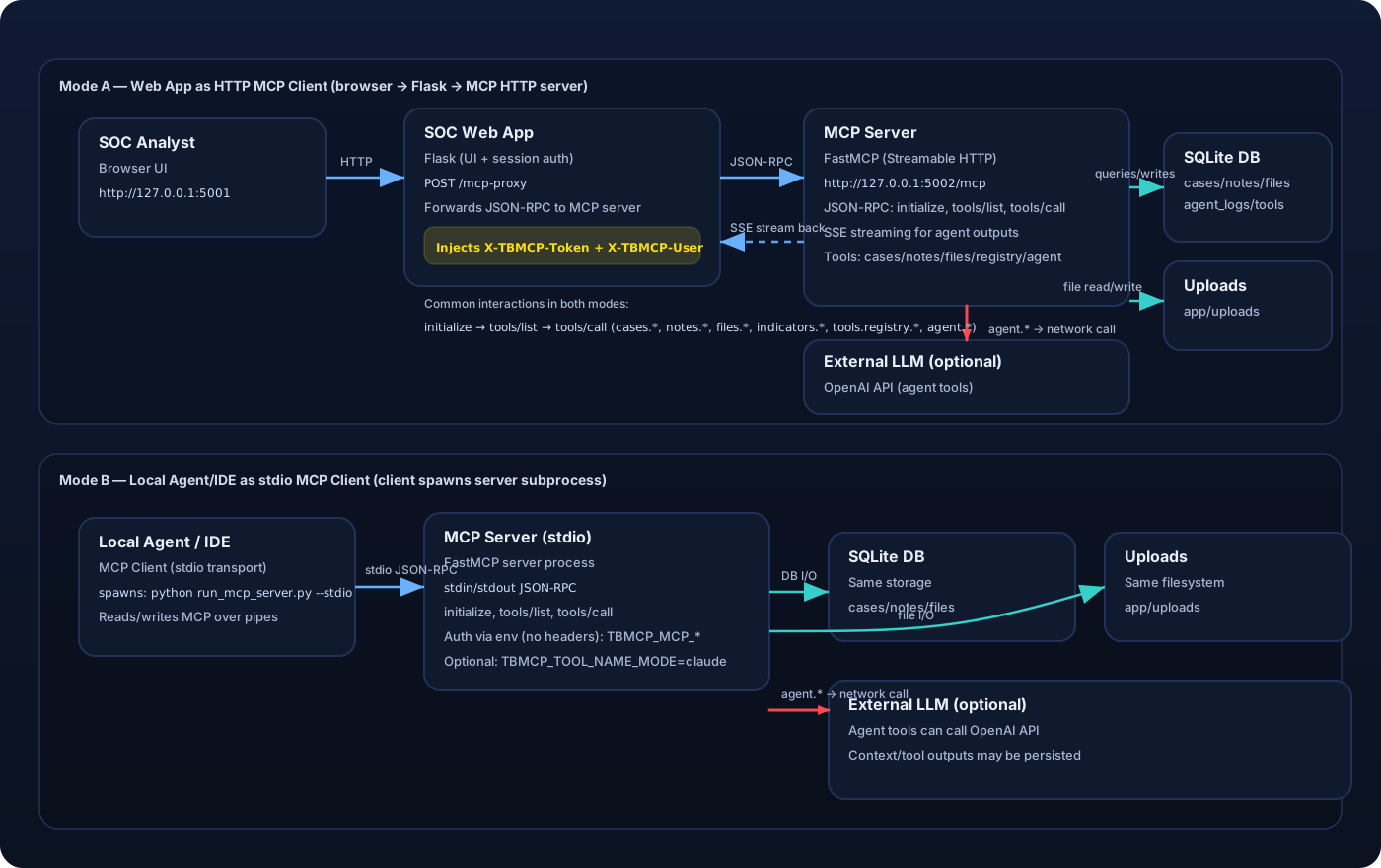
Autenticación MCP entre la aplicación web y el servidor MCP
La aplicación web proxifica las llamadas MCP con estos encabezados:
X-TBMCP-Token: secreto compartido deTBMCP_MCP_SERVER_TOKEN(configurado en ambos servidores).X-TBMCP-User: ID de usuario actual de la sesión SOC autenticada.
Las llamadas MCP directas requieren los mismos encabezados.
Herramientas compatibles:
cases.createcases.listcases.list_allcases.getcases.renamecases.set_statuscases.deletenotes.createnotes.listnotes.updatenotes.deletefiles.upload(base64)files.listfiles.get(base64)files.read_pathindicators.searchagent.summarize_caseagent.run_tasktools.registry.listtools.builtin.listtools.registry.registertools.registry.delete
Temas de vulnerabilidad (enfocados en formación)
Las siguientes debilidades están presentes intencionalmente con fines educativos:
- Autorización a nivel de objeto rota (casos/notas/archivos, list_all)
- XSS almacenado (notas renderizadas como HTML confiable)
- Inyección SQL en la búsqueda de indicadores
- Inyección de prompts en el ejecutor de tareas del agente
- Mala gestión de tokens y exposición de secretos (tokens codificados en prompts, contextos persistidos, registros completos)
- Envenenamiento de herramientas mediante anulaciones del registro de herramientas basado en esquemas (MCP03)
- Confianza excesiva en el contexto del cliente (suplantación de identidad en encabezados MCP)
- Lectura arbitraria de archivos mediante
files.read_path - Sobrescritura de archivos entre usuarios (espacio de nombres de nombres de archivo compartido)
Ejecución local
cd ThreatByte-MCP
python -m venv venv_threatbyte_mcp
source venv_threatbyte_mcp/bin/activate
pip install -r requirements.txt
python db/create_db_tables.py
python run_mcp_server.py --http
python run.py
Abrir: http://localhost:5001
Servidor MCP: http://localhost:5002/mcp
HTTP vs stdio
Este repositorio incluye dos transportes de servidor MCP:
- HTTP (Streamable HTTP): lo que utiliza la aplicación web ThreatByte. La aplicación web es solo un cliente MCP HTTP, a través del reenviador
/mcp-proxydel lado del servidor. - stdio: para clientes MCP externos (por ejemplo, clientes IDE/agente) que generan el servidor MCP y se comunican a través de stdin/stdout.
Ejemplos:
# HTTP (required for the web app)
python run_mcp_server.py --http --host 127.0.0.1 --port 5002

# stdio (for MCP clients that support stdio transport; the web app will NOT work with this)
# In stdio mode there are no HTTP headers, so the server reads user context from env vars.
# Note: stdio mode runs the MCP server on AnyIO's Trio backend; ensure `trio>=0.28.0` is installed.
export TBMCP_MCP_SERVER_TOKEN=tbmcp-mcp-token
export TBMCP_MCP_USER_ID=1
python run_mcp_server.py --stdio
Compatibilidad con Claude Desktop (nombres de herramientas)
Algunos clientes MCP (por ejemplo, Claude Desktop) aplican una validación estricta de nombres de herramientas (^[a-zA-Z0-9_-]{1,64}$) y rechazarán nombres de herramientas con puntos como cases.create.
Para ejecutar el servidor MCP en un modo compatible con Claude, establezca:
TBMCP_TOOL_NAME_MODE=claude
Esto expone las herramientas con nombres de subrayado (por ejemplo, cases_create, tools_registry_register, files_read_path) en lugar de nombres con puntos.
Para un tutorial completo (Windows + WSL stdio), consulte Configuración de Claude Desktop.
Ejecución con Docker o Podman
El repositorio incluye un Dockerfile y un script de inicio que inicializan la base de datos y ejecutan ambos servicios en un solo contenedor:
- Aplicación web SOC en
:5001 - Servidor MCP en
:5002
Construir la imagen:
# Docker
docker build -t threatbyte-mcp .

# Podman
podman build -t threatbyte-mcp .
Ejecutar el contenedor:
# Docker
docker run --rm -p 5001:5001 -p 5002:5002 threatbyte-mcp

# Podman
podman run --rm -p 5001:5001 -p 5002:5002 threatbyte-mcp
Ejecutar con variables de entorno opcionales:
# Docker
docker run --rm -p 5001:5001 -p 5002:5002 \
  -e TBMCP_MCP_SERVER_TOKEN=tbmcp-mcp-token \
  -e OPENAI_API_KEY=your_api_key \
  -e TBMCP_OPENAI_MODEL=gpt-4o-mini \
  threatbyte-mcp

# Podman
podman run --rm -p 5001:5001 -p 5002:5002 \
  -e TBMCP_MCP_SERVER_TOKEN=tbmcp-mcp-token \
  -e OPENAI_API_KEY=your_api_key \
  -e TBMCP_OPENAI_MODEL=gpt-4o-mini \
  threatbyte-mcp
Persistir datos SQLite entre ejecuciones (opcional):
# Docker
docker run --rm -p 5001:5001 -p 5002:5002 \
  -v "$(pwd)/db:/app/db" \
  -v "$(pwd)/app/uploads:/app/app/uploads" \
  threatbyte-mcp

# Podman
podman run --rm -p 5001:5001 -p 5002:5002 \
  -v "$(pwd)/db:/app/db:Z" \
  -v "$(pwd)/app/uploads:/app/app/uploads:Z" \
  threatbyte-mcp
Poblar datos de muestra
python db/populate_db.py --users 8 --cases 20 --notes 40 --files 20
Esto crea usuarios, casos, notas y artefactos de archivo aleatorios. Todas las contraseñas de usuario son Password123!.
Integración con LLM (requerida para respuestas del agente)
El endpoint de tareas del agente requiere un LLM real. Sin una clave de API, el agente devuelve un error indicando que no está disponible.
Variables de entorno:
TBMCP_OPENAI_API_KEYoOPENAI_API_KEYTBMCP_OPENAI_MODEL(predeterminado:gpt-4o-mini)
Mantenga las claves de API solo en el lado del servidor y nunca las exponga en el navegador.
Configuración del servidor MCP
La aplicación web SOC proxifica las llamadas MCP al servidor MCP utilizando un token compartido.
Variables de entorno:
TBMCP_MCP_SERVER_URL(predeterminado:http://localhost:5002/mcp)TBMCP_MCP_SERVER_TOKEN(secreto compartido entre la aplicación SOC y el servidor MCP)
Notas
- La interfaz utiliza plantillas renderizadas en el servidor.
- Las herramientas MCP se exponen bajo
http://localhost:5002/mcp(JSON-RPC). La interfaz las llama a través de/mcp-proxy. - Páginas de interfaz útiles para formación:
My Cases(todos los casos propiedad del usuario autenticado)MCP Audit Logs(registro de auditoría del lado del servidor de llamadas a herramientas MCP desde clientes HTTP + stdio)Agent Logs(trazas internas del ejecutor de agentes; pobladas poragent.run_task)
- Esta aplicación es intencionalmente insegura. No la despliegue en Internet público.