stella-mcp
Servidor MCP para crear y manipular modelos de dinámica de sistemas Stella (archivos .stmx en formato XMILE)
Documentación
Servidor Stella MCP
Un servidor Model Context Protocol (MCP) neutral respecto al proveedor
para crear y manipular modelos de dinámica de sistemas Stella.
Cualquier cliente MCP compatible puede construir, leer, validar y
guardar archivos .stmx en formato XMILE; las características opcionales del host aún varían.
¿Para qué sirve esto?
Stella es una herramienta de modelado de dinámica de sistemas utilizada para simular sistemas complejos en campos como ecología, biogeoquímica, economía e ingeniería. Este servidor MCP permite a los asistentes de IA:
- Crear modelos desde cero - Construir diagramas de stock-y-flujo programáticamente
- Leer modelos existentes - Analizar y comprender archivos .stmx
- Validar modelos - Verificar errores como variables indefinidas o conexiones faltantes
- Modificar modelos - Agregar stocks, flujos, auxiliares y conectores
- Guardar modelos - Exportar archivos XMILE válidos que se abren en Stella Professional
Esto es particularmente útil para:
- Enseñar modelado de dinámica de sistemas
- Prototipado rápido de modelos mediante lenguaje natural
- Creación o modificación por lotes de modelos
- Documentar y explicar modelos existentes
Instalación
Desde PyPI
pip install stella-mcp
Desde el código fuente
git clone https://github.com/bradleylab/stella-mcp.git
cd stella-mcp
pip install -e .
Requisitos
- Python 3.10+
mcp>=2.0.0,<3
Configuración
Mediante uvx (sin instalación requerida)
Si tiene uv instalado, la configuración de menor fricción ejecuta el paquete publicado directamente:
{
  "mcpServers": {
    "stella": {
      "command": "uvx",
      "args": ["stella-mcp"]
    }
  }
}
Claude Desktop
Agregue a su claude_desktop_config.json:
{
  "mcpServers": {
    "stella": {
      "command": "stella-mcp"
    }
  }
}
Claude Code
Agregue a su .claude/settings.json:
{
  "mcpServers": {
    "stella": {
      "command": "stella-mcp"
    }
  }
}
Modo de desarrollo
Si se ejecuta desde el código fuente:
{
  "mcpServers": {
    "stella": {
      "command": "python",
      "args": ["-m", "stella_mcp.server"],
      "cwd": "/path/to/stella-mcp"
    }
  }
}
Flujo de trabajo recomendado para agentes
Para un modelo nuevo:
- En MCP 2026-07-28, llame a
create_workspacey conserve elworkspace_iddevuelto a través de llamadas con estado. Los clientes stdio heredados pueden omitirlo. build_modelcon unmodel_idestable y el conjunto completo de stocks, auxiliares y flujos en una sola llamada (la sincronización de conectores y la validación se ejecutan por defecto, por lo que la respuesta sirve también como inspección).- Corrija errores de validación con
update_*,rename_variableodelete_variable. - Extienda incrementalmente con
add_variables(por lotes) o las herramientas de adición individual. simulatepara verificar el comportamiento (requiere el extrasim).- Guarde con
save_model.
Para modelos importados:
read_modelconcompat_mode="permissive"para inspeccionar advertencias.- Ejecute
inspect_modelpara comprender la estructura del modelo. - Use
compat_mode="strict"antes del guardado final cuando la fidelidad de ida y vuelta sea importante.
Herramientas disponibles
Creación de modelos y E/S
| Herramienta | Descripción |
|---|---|
create_model | Crear un nuevo modelo con nombre y configuración de tiempo (inicio, fin, dt, método) |
set_sim_specs | Actualizar la configuración de tiempo de simulación en un modelo existente |
read_model | Cargar un archivo .stmx existente |
save_model | Guardar el modelo en un archivo .stmx |
delete_model | Eliminar un modelo del espacio de trabajo (los archivos guardados no se modifican) |
Plantillas
| Herramienta | Descripción |
|---|---|
list_templates | Listar plantillas integradas y definidas por el usuario (admite filtros de fuente/consulta/etiqueta) |
get_template_info | Obtener metadatos detallados de una plantilla |
load_template | Cargar una plantilla como modelo en el espacio de trabajo actual |
save_as_template | Guardar el modelo actual como plantilla de usuario reutilizable (descripción/etiquetas opcionales) |
Construcción de modelos
| Herramienta | Descripción |
|---|---|
build_model | Crear y poblar un modelo en una sola llamada (lote atómico) |
add_variables | Agregar múltiples variables/conectores/módulos a un modelo existente (lote atómico) |
add_stock | Agregar un stock (reservorio) con valor inicial y unidades |
add_flow | Agregar un flujo entre stocks con una ecuación |
add_aux | Agregar una variable auxiliar (parámetro o cálculo) |
update_stock | Actualizar campos de stock preservando relaciones |
update_flow | Actualizar campos de flujo preservando enlaces de stock |
update_aux | Actualizar campos de variable auxiliar |
add_connector | Agregar un conector de dependencia entre variables |
sync_connectors_from_equations | Agregar conectores de dependencia faltantes inferidos de ecuaciones |
set_connector_routing | Establecer ángulo de conector y metadatos explícitos de enrutamiento de puntos de paso |
rename_variable | Renombrar un stock/flujo/auxiliar y actualizar referencias en ecuaciones/conectores/módulos |
delete_variable | Eliminar un stock/flujo/auxiliar con verificaciones de consistencia y limpieza |
create_module | Crear un módulo/grupo lógico de variables |
add_to_module | Agregar variables a un módulo/grupo existente |
remove_from_module | Eliminar variables de un módulo/grupo |
rename_module | Renombrar un módulo/grupo |
delete_module | Eliminar un módulo/grupo |
set_module_view | Establecer posición/tamaño explícito del cuadro del módulo en el diagrama |
set_module_style | Establecer estilo del cuadro del módulo (borde/fondo/fuente/lado de etiqueta) en el diagrama |
auto_place_module_boxes | Colocar automáticamente los cuadros de módulos alrededor de sus miembros |
Notas:
- Los clientes MCP 2026-07-28 llaman a
create_workspaceuna vez e incluyen suworkspace_iddevuelto en llamadas con estado. El descubrimiento moderno de herramientas marca ese campo como requerido en herramientas con estado. El ID enruta el estado de la aplicación; no es una credencial de autorización. - Los clientes stdio heredados compatibles pueden omitir
workspace_idy usar un espacio de trabajo de compatibilidad local al proceso; el descubrimiento heredado mantiene el campo opcional. - Las herramientas aceptan
model_idopcional para que un espacio de trabajo pueda gestionar múltiples modelos de forma segura. create_modelyread_modelestablecen elmodel_idactual del espacio de trabajo y lo devuelven.add_flowyadd_auxadmiten cargas útilesgraphical_functionopcionales (yptsmás exactamente uno dexscaleoxpts).add_stock/add_flow/add_auxrechazan nombres de variables duplicados entre tipos de variables;add_connectorrequiere que ambas variables existan.set_connector_routingpuede apuntar a un conector porconnector_uido porfrom_var+to_var.save_modelyget_model_xmlaceptanauto_layout(por defectotrue) yresolve_layout_violations(por defectofalse).save_model,get_model_xmlyrender_diagramdevuelven la vista de diseño más reciente, métricas y advertencias en contenido estructurado. Sus resultados de texto nombran cualquier código de advertencia de diseño no limpio.read_model,save_modelyget_model_xmlaceptancompat_mode:permissive(por defecto): continuar con advertenciasstrict: fallar en problemas de compatibilidad
set_module_styleactualiza el estilo de vista del módulo y persiste esos atributos en elementos<group .../>de vista XMILE.save_as_templateescribe plantillas de usuario en~/.stella-mcp/templatespor defecto (anulable medianteSTELLA_MCP_TEMPLATE_DIR) y almacena metadatos en un archivo secundario.meta.json.- Las fallas de herramientas devuelven errores MCP estructurados con
error.code,error.categoryyerror.message. - Cada resultado exitoso de herramienta conserva texto legible y proporciona
structuredContentvalidado por esquema descrito por suoutputSchemaJSON Schema 2020-12.
Ciclo de vida del espacio de trabajo
| Herramienta | Descripción |
|---|---|
create_workspace | Crear un espacio de trabajo aislado, opcionalmente con una vida útil seleccionada por el llamador |
revoke_workspace | Revocar un espacio de trabajo y descartar sus modelos en memoria |
Inspección de modelos
| Herramienta | Descripción |
|---|---|
list_models | Listar IDs de modelos disponibles en el espacio de trabajo e indicar el modelo actual |
inspect_model | Devolver un resumen estructurado del modelo para inspección del agente |
list_modules | Listar módulos/grupos en el modelo actual |
list_connectors | Listar IDs de conectores, extremos, ángulos y metadatos de enrutamiento |
list_variables | Listar todos los stocks, flujos y auxiliares |
validate_model | Verificar errores (variables indefinidas, conexiones faltantes, etc.) |
get_model_xml | Previsualizar la salida XML XMILE |
render_diagram | Renderizar el modelo como diagrama SVG de stock-y-flujo |
simulate | Ejecutar el modelo mediante PySD y devolver series temporales + resúmenes (extra sim) |
compare_scenarios | Ejecutar conjuntos de sobrescritura "qué pasaría si" con nombre contra una línea base e informar deltas (extra sim) |
sensitivity_analysis | Barrer parámetros uno a la vez y clasificar su efecto en una métrica de salida (extra sim) |
calibrate | Ajustar parámetros constantes a una serie temporal observada (inverso de simular) (extra sim) |
Construcción por lotes
build_model crea y puebla un modelo en una sola llamada. Los elementos se aplican en el
orden stocks → auxiliares → flujos → conectores → módulos; todo el lote es
todo-o-nada, y en caso de fallo el error nombra el elemento fallido
(error.stage + error.index). Los mismos arreglos de elementos funcionan en un modelo
existente mediante add_variables.
{
  "name": "build_model",
  "arguments": {
    "name": "SIR",
    "model_id": "sir",
    "sim_specs": {"start": 0, "stop": 100, "dt": 0.125, "time_units": "Days"},
    "stocks": [
      {"name": "Susceptible", "initial_value": "9999", "units": "people"},
      {"name": "Infected", "initial_value": "1", "units": "people"},
      {"name": "Recovered", "initial_value": "0", "units": "people"}
    ],
    "auxs": [
      {"name": "contact_rate", "equation": "6"},
      {"name": "infectivity", "equation": "0.25"},
      {"name": "recovery_time", "equation": "2", "units": "days"},
      {"name": "total_population", "equation": "Susceptible + Infected + Recovered"}
    ],
    "flows": [
      {"name": "infection", "equation": "Susceptible * contact_rate * infectivity * Infected / total_population", "from_stock": "Susceptible", "to_stock": "Infected"},
      {"name": "recovery", "equation": "Infected / recovery_time", "from_stock": "Infected", "to_stock": "Recovered"}
    ],
    "modules": [
      {"name": "Disease Dynamics", "members": ["Susceptible", "Infected", "Recovered"]}
    ]
  }
}
La sincronización de conectores y la validación se ejecutan por defecto (deshabilitables con
"sync_connectors": false / "validate": false); la respuesta incluye el
resumen estructurado completo del modelo, por lo que no se necesita una llamada de seguimiento inspect_model.
Ejemplos de cargas útiles de herramientas
Crear y cambiar entre modelos de espacio de trabajo:
{"name":"create_model","arguments":{"name":"Population","model_id":"pop_v1"}}
{"name":"create_model","arguments":{"name":"Carbon","model_id":"carbon_v1"}}
{"name":"list_models","arguments":{}}
{"name":"delete_model","arguments":{"model_id":"pop_v1"}}
{"name":"inspect_model","arguments":{"model_id":"sir_baseline","include_validation":true}}
Listar y cargar plantillas:
{"name":"list_templates","arguments":{}}
{"name":"list_templates","arguments":{"source":"builtin","query":"epidem","tags":["epidemiology"]}}
{"name":"get_template_info","arguments":{"template_name":"sir"}}
{"name":"load_template","arguments":{"template_name":"sir","model_id":"sir_baseline"}}
Guardar el modelo actual como plantilla de usuario:
{"name":"save_as_template","arguments":{"model_id":"pop_v1","template_name":"my_population_template","description":"Baseline single-stock growth starter","tags":["intro","population"]}}
Crear y gestionar módulos:
{"name":"create_module","arguments":{"model_id":"sir_baseline","name":"Disease Dynamics","members":["Susceptible","Infected","Recovered"]}}
{"name":"add_to_module","arguments":{"model_id":"sir_baseline","module_name":"Disease Dynamics","members":["infection","recovery"]}}
{"name":"list_modules","arguments":{"model_id":"sir_baseline"}}
{"name":"remove_from_module","arguments":{"model_id":"sir_baseline","module_name":"Disease Dynamics","members":["recovery"]}}
{"name":"rename_module","arguments":{"model_id":"sir_baseline","module_name":"Disease Dynamics","new_name":"Disease Core"}}
{"name":"delete_module","arguments":{"model_id":"sir_baseline","module_name":"Disease Core"}}
Renombrar y eliminar variables de forma segura:
{"name":"rename_variable","arguments":{"model_id":"sir_baseline","old_name":"population_total","new_name":"total_population"}}
{"name":"delete_variable","arguments":{"model_id":"sir_baseline","name":"recovery"}}
{"name":"delete_variable","arguments":{"model_id":"sir_baseline","name":"Susceptible","force":true}}
Actualizar una variable existente:
{"name":"update_flow","arguments":{"model_id":"pop_v1","name":"growth","equation":"Population * growth_rate * stress_modifier"}}
Inferir conectores faltantes a partir de ecuaciones:
{"name":"sync_connectors_from_equations","arguments":{"model_id":"pop_v1"}}
Establecer geometría de vista de módulo directamente:
{"name":"set_module_view","arguments":{"model_id":"sir_baseline","module_name":"Disease Dynamics","x":420,"y":280,"width":420,"height":240}}
Establecer estilo de vista de módulo:
{"name":"set_module_style","arguments":{"model_id":"sir_baseline","module_name":"Disease Dynamics","border_color":"#666666","background":"#FFF7E6","font_color":"#333333","font_size":"10pt","label_side":"top"}}
Colocar automáticamente cuadros de módulos desde posiciones actuales de miembros:
{"name":"auto_place_module_boxes","arguments":{"model_id":"sir_baseline","padding":40,"only_missing":true}}
Apuntar a un modelo específico en llamadas posteriores:
{"name":"add_stock","arguments":{"model_id":"pop_v1","name":"Population","initial_value":"100"}}
Leer con verificaciones estrictas de compatibilidad:
{"name":"read_model","arguments":{"filepath":"./external_model.stmx","model_id":"imported","compat_mode":"strict"}}
Previsualizar XML en modo permisivo (por defecto) y devolver advertencias de compatibilidad cuando estén presentes:
{"name":"get_model_xml","arguments":{"model_id":"imported","compat_mode":"permissive"}}
Carga útil válida de función gráfica:
{
  "name": "add_aux",
  "arguments": {
    "model_id": "pop_v1",
    "name": "lookup_rate",
    "equation": "GRAPH(Time)",
    "graphical_function": {
      "xscale": {"min": 0, "max": 100},
      "ypts": [0.1, 0.2, 0.4, 0.6],
      "type": "continuous"
    }
  }
}
Carga útil inválida de función gráfica (rechazada):
{
  "name": "add_aux",
  "arguments": {
    "name": "bad_lookup",
    "equation": "GRAPH(Time)",
    "graphical_function": {
      "xscale": {"min": 0, "max": 100},
      "xpts": [0, 10, 20, 30],
      "ypts": [0.1, 0.2, 0.4, 0.6]
    }
  }
}
Ejemplo de uso
Crear un modelo simple de población
User: Create a simple exponential growth model with a population starting at 100
      and a growth rate of 0.1 per year

Claude: [Uses create_model, add_stock, add_aux, add_flow, add_connector, save_model]
        Creates population_growth.stmx with:
        - Stock: Population (initial=100)
        - Aux: growth_rate (0.1)
        - Flow: growth (Population * growth_rate) into Population
Leer y analizar un modelo existente
User: Read the carbon cycle model and explain what it does

Claude: [Uses read_model, list_variables]
        This model has 3 stocks (Atmosphere, Land Biota, Soil) and 6 flows
        representing carbon exchange through photosynthesis, respiration...
Construir un modelo biogeoquímico
User: Create a two-box ocean model with surface and deep nutrients

Claude: [Uses create_model, add_stock (x4), add_aux (x8), add_flow (x6), save_model]
        Creates a model with nutrient cycling between surface and deep ocean
        including upwelling, downwelling, biological uptake, and remineralization
Vista previa del diagrama
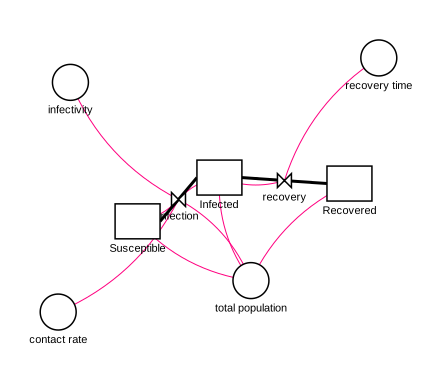
La herramienta render_diagram renderiza el modelo como un diagrama SVG de stock-y-flujo
— stocks como rectángulos, auxiliares como círculos, flujos como tuberías con válvulas
(las nubes marcan fuentes/sumideros) y conectores de dependencia como polilíneas enrutadas. El SVG se
devuelve en línea para que un agente pueda inspeccionar el diseño y, opcionalmente, se escribe
en un archivo que puede abrir en cualquier navegador. Ejecuta el auto-diseño primero por defecto,
por lo que un modelo recién construido se renderiza sin posicionamiento manual.
{"name":"render_diagram","arguments":{"model_id":"sir_baseline","filepath":"./sir.svg"}}
El diagrama siguiente es la plantilla integrada sir renderizada por render_diagram
(sin posicionamiento manual):
Simulación
La herramienta simulate ejecuta el modelo actual y devuelve series temporales
reducidas en muestreo más resúmenes por variable (inicial/final/mín/máx), cerrando el
bucle construir→verificar sin abrir Stella. Requiere la dependencia opcional
PySD:
pip install 'stella-mcp[sim]'
{"name":"simulate","arguments":{"model_id":"pop_v1","overrides":{"growth_rate":0.05},"include":["Population"],"max_points":50}}
Notas y advertencias:
- PySD se integra solo con Euler — los modelos cuyo
methodes RK4 simulan con Euler y la respuesta lleva una advertencia. Cada respuesta respaldada por PySD identifica la versión instalada de PySD, el método real, el método declarado, la verificación previa de funciones no compatibles y las advertencias. - Los arreglos, las instancias de módulos composicionales y los modelos adicionales de nivel superior
se conservan únicamente en 0.14. Fallan antes de PySD con un error estructurado
unsupported_model_featureen lugar de ser escalarizados o aplanados silenciosamente. - PySD y Stella no tienen semántica de salida idéntica en todos los casos escalares compatibles. En el fixture conservado de Lotka-Volterra, Stella limita un flujo de salida para imponer un stock no negativo, mientras que PySD reporta la ecuación de flujo sin límite. Las trayectorias de los stocks aún llegan a cero juntas en el siguiente tiempo del modelo.
overridesacepta nombres de variables en forma de visualización ("growth rate") o de guion bajo (growth_rate) y reemplaza la variable con una constante.save_results_csvescribe la tabla de resultados de resolución completa con una columnatime.- El modelo del espacio de trabajo nunca se modifica mediante simulación (la ejecución utiliza una copia desechable).
Comparación de Escenarios
La herramienta compare_scenarios responde "¿qué sucede bajo estas suposiciones
alternativas?" — ejecuta varios conjuntos de anulaciones nombradas contra una línea base (el
modelo sin modificar por defecto) e informa cómo diverge cada uno. También requiere el
extra sim.
{"name":"compare_scenarios","arguments":{"model_id":"pop_v1","include":["Population"],"scenarios":[{"name":"low growth","overrides":{"growth_rate":0.02}},{"name":"high growth","overrides":{"growth_rate":0.08}}]}}
Cada escenario informa su propia serie submuestreada más delta_vs_baseline por
variable: final_abs, final_pct (cambio porcentual del valor final), y
max_abs. Notas:
- Cada nombre de anulación en todos los escenarios se valida antes de cualquier ejecución, por lo que un error tipográfico falla rápidamente y de forma atómica — ningún escenario se ejecuta a medias.
- Un escenario cuya ejecución produce NaN/inf informa la advertencia en el
warningsde ese escenario sin abortar los demás;final_pctesnullcuando el final de la línea base es cero (sin división por cero). baselinees opcional — pase un conjunto de anulaciones para medir deltas contra él, u omítalo para comparar contra el modelo sin modificar.save_comparison_csvescribe una tabla ancha con una columna porvariable__scenario(yvariable__baseline).- El modelo compilado se reutiliza en cada escenario en una sola llamada, por lo que una comparación es aproximadamente tan costosa como una sola simulación más una ejecución por escenario.
Análisis de Sensibilidad
La herramienta sensitivity_analysis responde "¿qué parámetros realmente mueven el
resultado?" — barre cada parámetro uno a la vez a través de un rango (manteniendo los
demás en su línea base) e informa cómo responde una única métrica de salida elegida.
También requiere el extra sim.
{"name":"sensitivity_analysis","arguments":{"model_id":"pop_v1","parameters":[{"name":"growth_rate","start":0.02,"stop":0.08,"steps":7}],"output":{"variable":"Population","metric":"final"}}}
Para cada parámetro devuelve la métrica en cada valor barrido, un
range_sensitivity (la pendiente promedio de la métrica a través del rango barrido), y un
elasticity normalizado a la línea base (≈ Δsalida% / Δparámetro%) para que los parámetros puedan
clasificarse por influencia. Notas:
- Solo uno a la vez.
modeacepta"oat"; el factorial completo (grid) y el muestreo Monte-Carlo están reservados para una versión futura. metrices uno definal,max,min,mean, otime_to_threshold(que necesita unoutput.thresholde informa la primera vez que la serie lo cruza). max/min/mean cubren solo valores finitos; una ejecución no finita o que nunca cruza informanullpara ese punto con una advertencia.- Una especificación de parámetro es
start/stop/steps(espaciado uniformemente,steps≥ 2) o una lista explícita devalues(≥ 2 entradas). max_runs(por defecto 200) limita el total de ejecuciones barridas; un barrido sobredimensionado genera un error en lugar de truncarse silenciosamente. Las ejecuciones OAT son una suma entre parámetros, no un producto, por lo que el límite solo se activa en barridos genuinamente grandes.elasticityesnullcuando no puede definirse (un parámetro no constante, o una métrica/parámetro de línea base cero);range_sensitivityaún se informa.save_sweep_csvescribe una tabla larga deparameter, value, metric.- Al igual que la comparación de escenarios, el modelo se compila una vez y se reutiliza en todo el barrido.
Calibración
La herramienta calibrate es la inversa de simulate: dado un
serie de tiempo observada, ajusta parámetros constantes para que el modelo reproduzca los datos. También
requiere el extra sim.
{"name":"calibrate","arguments":{"model_id":"pop_v1","observations":{"time":[0,2,4,6,8,10],"targets":{"Population":[100,122,149,182,222,271]}},"parameters":[{"name":"growth_rate","initial":0.05,"min":0,"max":0.3}]}}
Devuelve los parámetros ajustados (cada uno con sus límites, un indicador at_bound, y
un std_error linealizado), la trayectoria del objetivo ponderado
(initial/final weighted_sse y weighted_rmse), métricas de error en unidades nativas para
cada objetivo, estado/configuración del optimizador, y advertencias. Notas:
- Solo los auxiliares y flujos constantes son calibrables. Los stocks son rechazados: la anulación de parámetros de PySD fija un stock a una constante durante toda la ejecución en lugar de establecer su valor inicial, lo que aplanaría silenciosamente un modelo dinámico. Ajustar condiciones iniciales de stocks no es compatible.
- Dos optimizadores.
least_squares(por defecto) es local y rápido e informa unstd_error;differential_evolutiones global, estocástico, sembrado para reproducibilidad, y requiere límitesmin/maxen cada parámetro. Su límite de generacionesmaxiterpor defecto es 100. - El
initialde cada parámetro por defecto es el valor constante actual del modelo. Los límites son opcionales paraleast_squares, requeridos paradifferential_evolution. std_errores una aproximación linealizada, no un posterior: es la covarianzaσ²·(JᵀJ)⁻¹y se informa solo cuando hay más observaciones que parámetros, el jacobiano está bien condicionado, y ningún parámetro está en un límite; de lo contrario esnullcon una advertencia.differential_evolutiondevuelvenull(sin jacobiano). Bajoweightsno predeterminado, la interpretación del error estándar se mantiene solo para pesos inversos a σ.- Alineación. El modelo se ejecuta sobre su ventana nativa de
[start, stop]y la simulación se interpola linealmente en los tiempos de observación. Los tiempos de observación fuera de la ventana se rechazan (sin extrapolación). Todos los objetivos comparten una cuadrícula de tiempo estrictamente creciente; las observaciones se cargan en línea o desde uncsv_path(primera columna tiempo, el resto objetivos). - Los
weightsopcionales por objetivo son multiplicadores de residuos: el optimizador usaweight * (simulated - observed). Los valores inversos de desviación estándar de medición dan residuos normalizados. Debido a que los errores ponderados pueden mezclar unidades,target_metricsinforma un SSE y RMSE no ponderados en las unidades nativas de cada objetivo; no se informa un RMSE agregado en unidades nativas.save_fit_csvescribe una tabla larga detime, target, observed, fitted;return_fit_seriesadjunta la serie de mejor ajuste. El modelo se compila una vez y se reutiliza en todo el ajuste.
Recursos y Prompts de MCP
Más allá de las herramientas, el servidor expone capacidades nativas de MCP:
- Anotaciones de herramientas. Cada herramienta lleva pistas (
readOnlyHint,destructiveHint,idempotentHint) para que los clientes puedan gestionar permisos y paralelizar llamadas de solo lectura. Las herramientas de inspección (inspect_model,validate_model,list_*,get_model_xml) son de solo lectura;delete_*están marcadas como destructivas. - Recursos. Las plantillas y los modelos del espacio de trabajo son legibles como recursos:
stella://templates/{name}— el.stmxde una plantilla integrada o de usuariostella://workspaces/{workspace_id}/models/{model_id}— una exportación XMILE actual de un modelo explícito del espacio de trabajostella://models/{model_id}— solo el espacio de trabajo de compatibilidad stdio heredado
- Prompt. Un prompt de
build-stella-model(argumento:description) codifica el flujo de trabajo recomendado construir → validar → simular → renderizar → guardar, por lo que es descubrible dentro de los clientes MCP.
Validación
La herramienta validate_model verifica:
- Variables indefinidas - Referencias a variables que no existen
- Problemas de balance de masa - Stocks sin flujos, flujos que referencian stocks inexistentes
- Conexiones faltantes - Ecuaciones que usan variables sin conectores (advertencia)
- Integridad de extremos de conectores - Conectores que apuntan a variables faltantes (error)
- Flujos huérfanos - Flujos no conectados a ningún stock
- Dependencias circulares - Bucles infinitos en cálculos auxiliares
- Integridad de módulos - Módulos vacíos (advertencia) y módulos que referencian miembros faltantes (error)
- Unidades presentes - Un stock o flujo sin unidades mientras otros las definen (advertencia)
- Consistencia de unidades - Un flujo cuyas unidades no se leen como
stock-units/time-unitcuando todos los stocks adjuntos comparten las mismas unidades (advertencia; conservador — permanece en silencio en flujos de conversión y cualquier cosa que no pueda analizar con confianza) - Auxiliares no utilizados - Un auxiliar referenciado por ninguna ecuación o conector (advertencia); los stocks y flujos nunca se marcan
Compatibilidad XMILE
- Los archivos de salida usan el estándar XMILE
- Compatible con Stella Professional 1.9+ y Stella Architect
- La importación/exportación de
permissivepreserva el contenido compatible y los fragmentos XML no compatibles seleccionados cuando es práctico, mientras devuelve advertencias explícitas. Editar variables compatibles no garantiza que las referencias dentro de fragmentos solo preservados se actualicen. - La importación/exportación de
strictrechaza arreglos, instancias de módulos composicionales, modelos adicionales de nivel superior, e identificadores reservados confirmados de Stella/XMILE. Los arreglos y modelos anidados no son funciones implementadas en 0.14. - Nombres reservados como
betaygammase preservan con advertencias en modo permisivo y se rechazan en modo estricto. La plantilla SIR integrada usatransmission_rateyrecovery_ratepara que Stella no los renombre al guardar. - El auto-diseño utiliza una columna vertebral determinista de flujo de stock dirigido, puertos de stock distintos, rutas de flujo y conector conscientes de obstáculos, verificaciones de colisión de etiquetas, y tamaño de cuadrícula de página a partir de límites visuales completos.
- Las coordenadas autorizadas, incluidas las coordenadas suministradas a través de herramientas de actualización, y los puntos de ruta bloqueados permanecen fijos. Las coordenadas generadas automáticamente se recalculan en exportaciones posteriores para que los modelos extendidos incrementalmente puedan clasificarse nuevamente en lugar de congelarse después de su primer guardado.
- Las rutas bloqueadas se reservan antes que las rutas desbloqueadas, las etiquetas se seleccionan en orden de nombre normalizado, y los tamaños de fuente de vista importados controlan la geometría de etiquetas en vistas previas de análisis y SVG.
- Los conectores de información usan segmentos directos de límite a límite siempre que el diagrama completo los deje sin obstrucciones y sin compartir. Las tuberías de flujo de stock permanecen ortogonales porque Stella reescribe segmentos de flujo diagonales al guardar.
- Los diseños planos limpios de referencia no tienen cruces de glifos, etiquetas o rutas. Un
gráfico que no puede dibujarse limpiamente aún se exporta e informa una advertencia estable
de
layout.*; no se prometen cruces cero para gráficos no planos arbitrarios. - Los nombres de variables con espacios se convierten a guiones bajos internamente
- El analizador normaliza las referencias de extremos de conectores y flujos de entrada/salida de stock importados
- La exportación de paso de tiempo evita el redondeo recíproco con pérdida (los recíprocos no exactos se exportan como
dtsimple) - La importación/exportación preserva atributos/elementos desconocidos en secciones compatibles (encabezado, sim_specs, variables, vistas/extras de modelo) para reducir la pérdida de datos en viajes de ida y vuelta
- Las pruebas de regresión del corpus de compatibilidad viven en
tests/fixtures/compat_corpus/. Un subconjunto fijado y atribuido de modelos de prueba de SDXorg vive entests/fixtures/external_corpus/; ambos se ejecutan sin conexión en CI. - Ayudante de mantenimiento:
python scripts/sync_compat_corpus_manifest.py --checkvalida la sincronización del manifiesto del corpus
Pruebas
La suite de pruebas del repositorio cubre el protocolo stdio de MCP, aislamiento del espacio de trabajo, construcción de modelos, validación, renderizado SVG, importación/exportación XMILE, simulación, análisis de escenarios, análisis de sensibilidad, calibración, e instalación de paquetes. Ejecútela desde una copia de origen con:
uv sync --locked --extra dev --extra sim
uv run python -m pytest
Pinned Stella-saved and external XMILE fixtures live under tests/fixtures/ and
run offline in CI. Generated reports, local planning files, and manual review
artifacts are intentionally not committed to the source tree.
Project Structure
See docs/architecture.md for dependency boundaries,
module ownership, workspace lifecycle, and compatibility contracts.
stella-mcp/
├── CHANGELOG.md
├── CITATION.cff
├── README.md
├── LICENSE
├── pyproject.toml
└── stella_mcp/
    ├── __init__.py
    ├── server.py         # MCP server lifecycle and protocol wiring
    ├── tool_handlers.py  # Compatibility facade for domain handlers
    ├── tool_schemas.py   # Compatibility facade for the tool catalog
    ├── tools/            # Domain schemas and handlers
    ├── mcp_resources.py  # MCP resources and prompts
    ├── session_store.py  # Explicit application workspace state
    ├── simulate.py       # PySD-backed simulation
    ├── analysis.py       # Scenario comparison and sensitivity analysis
    ├── calibrate.py      # Parameter fitting and native-unit error metrics
    ├── render_svg.py     # Stock-and-flow SVG rendering
    ├── model_types.py     # Model records and XMILE constants
    ├── model.py           # StellaModel lifecycle and compatibility delegates
    ├── model_layout.py    # Layout compatibility delegates and stock sizing
    ├── layout_graph.py    # Directed graph ranking and component packing
    ├── layout_router.py   # Boundary ports and obstacle-aware routing
    ├── layout_quality.py  # Geometry analysis, metrics, and warnings
    ├── layout_pipeline.py # Staged deterministic layout orchestration
    ├── xmile.py           # Public model compatibility facade
    ├── xmile_io.py        # XMILE I/O compatibility facade
    ├── xmile_features.py  # XMILE feature classification and typed errors
    ├── xmile_parse.py     # XMILE parser and compatibility warnings
    ├── xmile_export.py    # XMILE serialization and fragment retention
    └── validator.py      # Model validation logic
Contributing
Contributions are welcome! Please feel free to submit issues or pull requests.
Maintainer Release
PyPI publishing is handled by .github/workflows/publish.yml using PyPI Trusted
Publishing. To release a new version:
- Synchronize the version in
pyproject.toml,stella_mcp/__init__.py,CITATION.cff, andCHANGELOG.md; keep the citation and changelog release dates identical. - Run
uv lock --check, the core and simulation test suites, the MCP-floor suite, and the package job. Prepare the draft GitHub release notes from the matchingCHANGELOG.mdentry. - Before pushing the release branch, verify the protected
mainandv*tag rules, thepypienvironment's protected-tag policy, and the configured PyPI Trusted Publisher. - Open a draft pull request so every release-critical check runs, require those exact checks, obtain review, and separately approve the merge.
- Wait for a fresh
mainCI run at the exact merge commit. If the Chicago release date has changed, correct the metadata through another reviewed pull request before continuing. - With separate approval, create the lightweight version tag at that audited merge commit. With another approval, create and inspect the draft GitHub release from the matching notes file.
- With final publication approval, publish the draft. The release event builds
and validates the source distribution and wheel without OIDC authority; the
pypijob's configured deployment policy accepts only tags matching the protectedv*release-tag policy before Trusted Publishing can upload the verified artifacts.
Tagging, draft creation, and publication are distinct approval gates. Do not move or replace a public tag or uploaded distribution to repair a release.
License
MIT License - see LICENSE for details.
Acknowledgments
- Model Context Protocol by Anthropic
- ISEE Systems for Stella and the XMILE format