Coreflows MCP
Un orquestador MCP para flujos de trabajo de desarrollo modernos. Recopila contexto de Jira, Github y Slack y convierte tickets en PRs listos para fusionar.
Documentación
Core MCP
Herramientas MCP que convierten tickets de Jira en PRs a través de Claude Code. Obtiene contexto de Jira, GitHub, Notion y Slack, construye prompts estructurados, maneja git push/PR/CI — todo de forma autónoma.
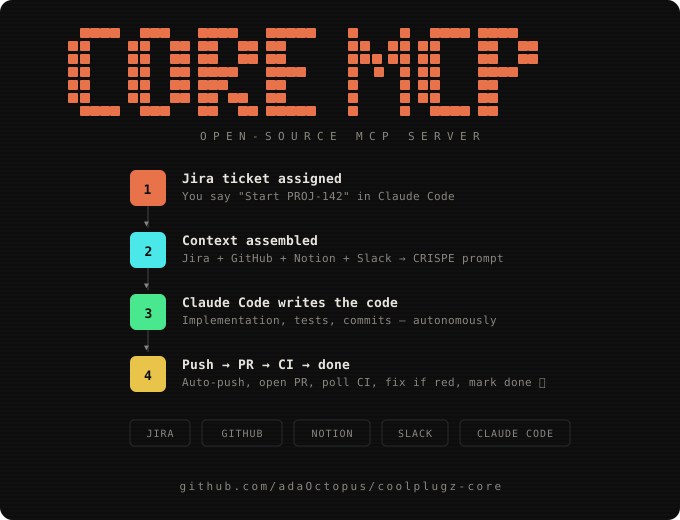
🏆 Se Volvió Algo Viral en Product Hunt y Reddit


Configuración (5 minutos)
1. Instalación
git clone https://github.com/adaOctopus/coolplugz-core.git
cd coolplugz-core
npm install
2. Crea tu .env
cp .env.example .env
Abre .env y completa:
Requerido:
| Variable | Dónde obtenerla |
|---|---|
GITHUB_TOKEN | github.com/settings/tokens → Generar token clásico → marca repo + workflow |
SHELL_ENV | Tu entorno de desarrollo: wsl2, macos, linux, git-bash, o powershell |
REPOS_ROOT | Ruta absoluta donde viven tus repositorios, p. ej. /home/you/projects |
Opcional (pero recomendado):
| Variable | Dónde obtenerla |
|---|---|
JIRA_API_TOKEN | id.atlassian.com/manage-profile/security/api-tokens |
JIRA_EMAIL | El correo de tu cuenta de Atlassian |
JIRA_BASE_URL | La URL de tu espacio de trabajo, p. ej. https://yourteam.atlassian.net |
NOTION_TOKEN | notion.so/my-integrations → Crear integración → copiar token |
SLACK_TOKEN | api.slack.com/apps → Crear app → Token de Bot con channels:history, search:read |
ANTHROPIC_API_KEY | Habilita la detección de repositorios impulsada por IA a partir del texto del ticket y borradores inteligentes de respuestas de Slack |
WSL_DISTRO | Solo si SHELL_ENV=wsl2 — el nombre de tu distribución (p. ej. Ubuntu) |
3. Inicia el servidor
npm run dev
Deberías ver:
CoolPlugz Core MCP server listening on :3100
4. Conéctate a Claude Code (una sola vez)
claude mcp add coolplugz --transport http http://localhost:3100/mcp
5. Úsalo
Abre Claude Code y di:
Show my dashboard
Start PROJ-142
Eso es todo. CoolPlugz se encarga del resto.
Qué Sucede Cuando Lo Usas
You: "Start PROJ-142"

CoolPlugz:
  ├── Fetches Jira ticket (description, acceptance criteria, comments)
  ├── Checks GitHub for existing branches/PRs
  ├── Pulls linked Notion specs
  ├── Finds relevant Slack mentions
  ├── Figures out which repo (from ticket links or fuzzy matching)
  ├── Builds a CRISPE implementation prompt
  └── Returns loop metadata → Claude Code knows exactly what to do next

Claude Code: writes the code, runs tests

You: (or Claude Code automatically calls push_branch)

CoolPlugz:
  ├── Pushes via token-authenticated HTTPS (no SSH needed)
  ├── Handles fork detection/creation automatically
  └── Returns next action → verify_and_submit

CoolPlugz (verify_and_submit):
  ├── Verifies push landed on GitHub (via API, not trusting output)
  ├── Opens PR with correct title/body
  ├── Polls CI for up to 5 minutes
  ├── If CI passes + no review comments → auto-marks DONE
  ├── If CI fails → fetches failure logs, tells Claude Code to fix
  └── If review comments → fetches them, tells Claude Code to address
Herramientas Disponibles
| Herramienta | Qué hace |
|---|---|
get_dashboard | Muestra todas tus tareas con estado, PRs y bloqueos |
start_task | Obtiene todo el contexto de un ticket de Jira y devuelve el prompt de implementación |
push_branch | Envía tu rama a GitHub — maneja autenticación, forks, todo |
verify_and_submit | Verifica el push, crea el PR, consulta CI, auto-completa si está en verde |
check_comments | Obtiene comentarios de revisión de PR sin resolver para abordarlos |
complete_task | Marca una tarea como completada después de la verificación |
get_task_state | Muestra el estado real desde el almacén + la API de GitHub |
check_conflicts | Detecta conflictos de fusión y da pasos para resolverlos |
add_insight | Agrega una instrucción personalizada incluida en todos los prompts futuros |
morning_report | Genera un informe de estado formateado con tareas completadas, PRs, resultados de CI y borradores de mensajes de Slack |
log_run | Rastrea inicio/fin de ejecución — alimenta morning_report con datos reales de cada ejecución programada |
Instrucciones Personalizadas
Dile a Claude Code que agregue instrucciones que CoolPlugz incluirá en cada prompt futuro:
"Add an insight: always use pnpm, never npm or yarn"
"Add an insight: this repo uses Tailwind, no inline styles"
"Add an insight for PROJ-142: the auth module uses Passport.js"
Los conocimientos globales se aplican a todas las tareas. Los conocimientos específicos de tareas se aplican a un solo ticket. Se almacenan en ~/.coolplugz/data.json y persisten entre sesiones.
Cómo Funciona el Constructor de Prompts
Cada start_task construye un prompt estructurado usando el marco CRISPE:
| Sección | Qué contiene |
|---|---|
| [C] Capacidad | Rol, repositorio, rama, configuración del espacio de trabajo (WSL2/macOS/Linux), rutas locales |
| [R] Conocimiento | Descripción completa del ticket, criterios de aceptación, comentarios de Jira, especificaciones de Notion, contexto de Slack, comentarios de revisión de PR |
| [I] Declaración | La instrucción de implementación específica |
| [S] Personalidad | Estilo de código, convenciones de commits (feat(PROJ-142): ...), reglas de comunicación |
| [P] Experimento | Permisos de ejecución autónoma, instrucciones de ingeniería de bucle, restricciones de seguridad |
| [F] Cerca | Nunca eliminar, nunca hacer push a main, nunca comprometer secretos |
| [Q] Calidad | Seguridad de tipos, cambios quirúrgicos, valores predeterminados de seguridad |
| [D] Conocimientos del desarrollador | Tus instrucciones personalizadas (de add_insight) |
| [E] Contexto de error | Detalles de fallos anteriores en reintentos |
Ingeniería de Bucles
Cada respuesta de herramienta lleva metadatos estructurados en lugar de listas de verificación de texto libre:
State: EXECUTING → Goal: DONE
Next: push_branch({ jiraKey: "PROJ-142", branch: "proj-142-impl", repo: "org/repo" })
Claude Code lee esto y llama a la siguiente herramienta automáticamente. La máquina de estados:
IDLE → start_task → EXECUTING → push_branch → PUSHED → verify_and_submit
  → CI passed, no comments → DONE ✅
  → CI failed → fix code → push_branch → verify_and_submit (loop)
  → Review comments → fix → push_branch → verify_and_submit (loop)
Prompt de Piloto Automático
Una vez que todo esté conectado, pega este prompt en Claude Code para que ejecute tus tickets en piloto automático — recorriendo Jira, escribiendo código, enviando PRs y publicando actualizaciones en Slack:
You are my autonomous dev agent. Use the coolplugz MCP tools to work through my Jira tickets without asking me anything.

Your loop:
1. Call get_dashboard to see all tasks and their status
2. For any task in QUEUED or EXECUTING state, call start_task with its Jira key
3. Follow the loop metadata exactly — the _meta.loop in each response tells you the next tool to call
4. After writing code and running tests, call push_branch to push
5. Call verify_and_submit — it opens the PR, polls CI, and tells you what to do next
6. If CI fails, read the failure logs, fix the code, and push again
7. If there are review comments, call check_comments, address them, push again
8. When done with a task, move to the next one from the dashboard
9. After completing all tasks, post a summary of what you did

Rules:
- Never ask me for confirmation — just do it
- Never push to main — always use feature branches
- Never commit secrets or .env files
- If you get stuck after 3 retries, mark it blocked and move on
- Commit messages follow: feat(TICKET-KEY): description
Prográmalo (se ejecuta incluso cuando tu laptop está cerrada)
Pega esto en Claude Code para configurar un horario diario que ejecute tus tickets automáticamente:
Set up a scheduled task using /schedule that runs every weekday:

- 6:00 AM: Morning run
  1. Call log_run with action "start" and trigger "morning" — save the run_id
  2. Call get_dashboard to see all tasks
  3. For every QUEUED ticket, call start_task with its Jira key
  4. Follow the loop metadata for each: code → push_branch → verify_and_submit
  5. If CI fails, fix and retry up to 3 times
  6. When all tasks are processed, call log_run with action "finish", the run_id, and all task_results
  7. Call morning_report with mode "latest" and slack_channels ["standup", "engineering"]
  8. Show me the full report output

- 12:00 PM: Midday check
  1. Call log_run with action "start" and trigger "midday"
  2. Call get_dashboard — for any task stuck in EXECUTING or CI_FAILED, retry it
  3. For tasks with review comments, call check_comments, address them, push again
  4. Call log_run with action "finish" with results
  5. Call morning_report with mode "latest"

- 5:00 PM: End of day
  1. Call log_run with action "start" and trigger "evening"
  2. Call get_dashboard and process any remaining tasks
  3. Call log_run with action "finish" with results
  4. Call morning_report with mode "today" and slack_channels ["standup", "engineering", "product"]
  5. Show me the full report — I want to see what got done today

Rules for all runs:
- Use the coolplugz MCP tools
- Never ask for confirmation — just do it
- Never push to main — always feature branches
- Never commit secrets or .env files
- If stuck after 3 retries, mark blocked and move on
- Commit messages: feat(TICKET-KEY): description
- Always call log_run start/finish so morning_report has real data
Ver el informe en cualquier momento
También puedes llamar al informe manualmente en Claude Code:
Call morning_report with mode "today" and slack_channels ["standup", "engineering"]
Modos:
latest— muestra los resultados de la ejecución más reciente (predeterminado)today— muestra todas las tareas actualizadas hoyfull— muestra todo en el almacén
Referencia de Variables de Entorno
Requeridas
| Variable | Qué hace | Cómo obtenerla |
|---|---|---|
GITHUB_TOKEN | Envía ramas, abre PRs, lee el estado del repositorio, consulta CI | github.com/settings/tokens → Generar token clásico → marca repo + workflow ámbitos |
SHELL_ENV | Le dice a CoolPlugz cómo ejecutar comandos de shell en tu entorno | Uno de: wsl2, macos, linux, git-bash, powershell |
REPOS_ROOT | Dónde están clonados tus repositorios localmente | Ruta absoluta, p. ej. /home/you/projects o C:\Users\you\repos |
Jira (habilita el contexto de tickets)
| Variable | Qué hace | Cómo obtenerla |
|---|---|---|
JIRA_API_TOKEN | Obtiene descripción del ticket, criterios de aceptación, comentarios | id.atlassian.com/manage-profile/security/api-tokens → Crear token de API |
JIRA_EMAIL | Autentica con Jira (autenticación básica = correo:token) | El correo de tu cuenta de Atlassian |
JIRA_BASE_URL | La URL de tu instancia de Jira | p. ej. https://yourteam.atlassian.net |
GitHub (ya cubierto por GITHUB_TOKEN arriba)
El GITHUB_TOKEN maneja todo: leer repositorios, enviar ramas, abrir PRs, consultar estado de CI, obtener comentarios de revisión, detectar forks.
Ámbitos necesarios: repo (acceso completo al repositorio) + workflow (activar/leer CI)
Notion (habilita la obtención de especificaciones)
| Variable | Qué hace | Cómo obtenerla |
|---|---|---|
NOTION_TOKEN | Trae documentos de Notion vinculados al prompt CRISPE como contexto de referencia | notion.so/my-integrations → Crear integración → Copiar "Secreto de Integración Interna" → Compartir páginas objetivo con la integración |
Slack (habilita el seguimiento de menciones + borradores de respuestas)
| Variable | Qué hace | Cómo obtenerla |
|---|---|---|
SLACK_TOKEN | Rastrea menciones de tus tickets en Slack, redacta respuestas de IA | api.slack.com/apps → Crear Nueva App → OAuth y Permisos → Agregar ámbitos: channels:history, search:read → Instalar en el espacio de trabajo → Copiar Token de OAuth de Usuario Bot (xoxb-...) |
Funciones de IA (opcional)
| Variable | Qué hace | Cómo obtenerla |
|---|---|---|
ANTHROPIC_API_KEY | Potencia la detección inteligente de repositorios a partir del texto del ticket + respuestas de Slack redactadas por IA | console.anthropic.com → Claves de API → Crear Clave |
Espacio de trabajo (opcional)
| Variable | Qué hace | Cuándo se necesita |
|---|---|---|
WSL_DISTRO | El nombre de tu distribución WSL2 para traducción de rutas | Solo si SHELL_ENV=wsl2 (p. ej. Ubuntu) |
PORT | Puerto del servidor MCP | Predeterminado: 3100 — cámbialo si el puerto está ocupado |
Almacenamiento de Datos
Todos los datos viven en ~/.coolplugz/data.json — tareas, instantáneas de contexto, mapeos de repositorios, conocimientos, historial de prompts. No se requiere base de datos. Elimina el archivo para empezar de nuevo.
Arquitectura
src/
├── index.ts              # MCP server (Express + StreamableHTTP)
├── config.ts             # Reads tokens from .env
├── store.ts              # JSON file store (~/.coolplugz/data.json)
├── lib/
│   ├── loopState.ts      # State machine
│   └── response.ts       # mcpText() and mcpLoop() builders
├── context/
│   ├── jira.ts           # Jira fetcher (Basic auth)
│   ├── github.ts         # GitHub state (branches, PRs, CI)
│   ├── notion.ts         # Notion doc fetcher
│   ├── slack.ts          # Slack mentions + AI draft replies
│   ├── repoResolver.ts   # Auto-detect repo from ticket content
│   └── assemble.ts       # CRISPE prompt builder
├── orchestrator/
│   └── githubApi.ts      # GitHub API helpers
└── tools/
    ├── orchestrator.ts   # start_task, verify_and_submit, etc.
    ├── pushBranch.ts     # Token-authenticated push + fork handling
    ├── getDashboard.ts   # Text dashboard
    └── addInsight.ts     # Custom instruction management
Licencia
MIT