Dive AI Agent
Una aplicación de escritorio de código abierto para alojar servidores MCP que se integra con LLMs de llamada a funciones.
Documentación

Dive AI Agent









Dive es una aplicación de escritorio de host MCP de código abierto que se integra perfectamente con cualquier LLM que admita capacidades de llamada de funciones. ✨
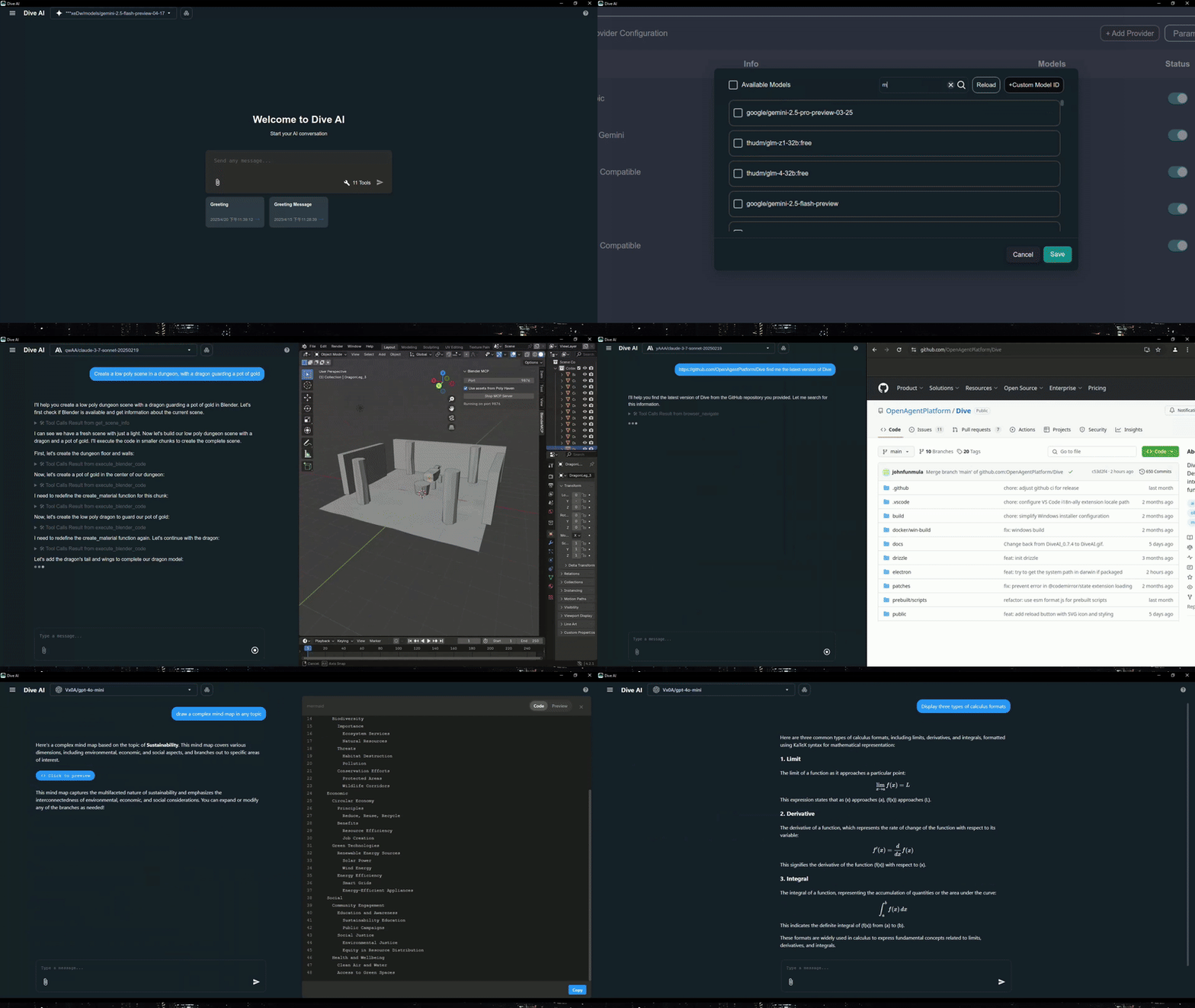
Características 🎯
- 🌐 Soporte Universal de LLM: Compatible con ChatGPT, Anthropic, Ollama y modelos compatibles con OpenAI
- 💻 Multiplataforma: Disponible para Windows, MacOS y Linux
- 🔄 Protocolo de Contexto de Modelo: Permite la integración fluida de agentes MCP en modo stdio y SSE
- ☁️ Integración con OAP Cloud: Acceso con un clic a servidores MCP administrados a través de OAPHub.ai - elimina implementaciones locales complejas
- 🏗️ Arquitectura Dual: Versión moderna de Tauri junto con la versión tradicional de Electron para un rendimiento óptimo
- 🌍 Soporte Multilingüe: Admite más de 24 idiomas, incluidos inglés, chino tradicional, chino simplificado, español, japonés, coreano, alemán, francés, italiano, portugués, ruso, tailandés, vietnamita, filipino, indonesio, polaco, turco, ucraniano, sueco, noruego, finlandés y lao
- ⚙️ Gestión Avanzada de API: Múltiples claves de API y soporte de cambio de modelo con
model_settings.json - 🛠️ Control Granular de Herramientas: Habilita/deshabilita herramientas MCP individuales para una personalización precisa
- 💡 Instrucciones Personalizadas: Prompts de sistema personalizados para un comportamiento de IA adaptado
- ⌨️ Atajos de Teclado: Soporte completo de atajos para navegación y operaciones eficientes (renombrar, configuración, recargar, nuevo chat, etc.)
- 📝 Guardado de Borradores de Chat: Guarda automáticamente los borradores de entrada del chat para evitar la pérdida de datos
- 🔄 Mecanismo de Actualización Automática: Verifica e instala automáticamente las últimas actualizaciones de la aplicación
- 🔐 Autenticación de Servidor MCP: Soporte añadido para la autenticación de servidores MCP
⚠️ Nota: Esta función es actualmente inestable y puede requerir reautorización frecuente
- 🛠️ Herramientas Locales Integradas: Herramientas preconfiguradas disponibles de serie - Fetch (solicitudes web), Administrador de Archivos (lectura/escritura de archivos) y Bash (ejecución de comandos)
- 🤖 Agente Instalador de Servidores MCP: Agente inteligente que te ayuda a instalar y configurar servidores MCP automáticamente
- 🔔 Soporte de Múltiples Elicitaciones: Maneja múltiples solicitudes de elicitación MCP simultáneamente en la interfaz
- 📁 Búsqueda de Rutas de Archivo con @: Extiende la palabra clave @ en la entrada del chat para buscar rutas de archivos
Actualizaciones recientes (2026/02/26) - v0.14.0+ 🎉
- 🛠️ Habilidades y Comandos de Barra: Soporte de habilidades y más comandos de barra
- 🔍 Búsqueda en el Historial de Chat: Soporte de búsqueda en el historial de chat
Disponibilidad de Plataformas
| Plataforma | Electron | Tauri |
|---|---|---|
| Windows | ✅ | ✅ |
| macOS | ✅ | 🔜 |
| Linux | ✅ | ✅ |
Nota de Migración: Las configuraciones locales existentes de MCP/LLM siguen siendo totalmente compatibles. La integración con OAP es aditiva y no afecta los flujos de trabajo actuales.
Descarga e Instalación ⬇️
Obtén la última versión de Dive:

Usuarios de Windows: 🪟
Elige entre dos arquitecturas:
- Versión Tauri (Recomendada): Instalador más pequeño (<30MB), arquitectura moderna
- Versión Electron: Arquitectura tradicional, totalmente estable
- Los entornos de Python y Node.js se descargarán automáticamente después de iniciar
Usuarios de MacOS: 🍎
- Versión Electron: Descarga la versión .dmg
- Debes instalar los entornos de Python y Node.js (con npx uvx) por tu cuenta
- Sigue las instrucciones de instalación para completar la configuración
Usuarios de Linux: 🐧
Elige entre dos arquitecturas:
- Versión Tauri: Arquitectura moderna con instalador más pequeño
- Versión Electron (Recomendada): Arquitectura tradicional con formato .AppImage
- Debes instalar los entornos de Python y Node.js (con npx uvx) por tu cuenta
- Para usuarios de Ubuntu/Debian:
- Es posible que debas agregar el parámetro
--no-sandbox - O modificar la configuración del sistema para permitir el sandbox
- Ejecuta
chmod +xpara hacer ejecutable el AppImage
- Es posible que debas agregar el parámetro
- Para usuarios de Arch:
- Si usas Arch Linux, puedes instalar dive usando un ayudante de AUR. Por ejemplo:
paru -S dive-ai
- Si usas Arch Linux, puedes instalar dive usando un ayudante de AUR. Por ejemplo:
Opciones de Configuración de MCP
Para instrucciones más detalladas, consulta Configuración de Servidores MCP.
¡La forma más fácil de comenzar! Accede a herramientas MCP de nivel empresarial al instante:
- Regístrate en OAPHub.ai
- Conéctate a Dive usando enlaces profundos de un clic o archivos de configuración
- Disfruta de servidores MCP administrados sin configuración - sin Python, Docker ni dependencias complejas
Beneficios:
- ✅ Configuración cero necesaria
- ✅ Compatibilidad multiplataforma
- ✅ Fiabilidad de nivel empresarial
- ✅ Actualizaciones y mantenimiento automáticos
Compilación 🛠️
Consulta BUILD.md para más detalles.
Contribuciones 🤝
¡Damos la bienvenida a las contribuciones de la comunidad! Así es como puedes ayudar:
Configuración de Desarrollo
- Haz un fork del repositorio
- Clona tu fork:
git clone https://github.com/YOUR_USERNAME/Dive.git - Instala las dependencias:
npm install - Inicia el desarrollo:
npm run dev(Electron) ocargo tauri dev(Tauri) - Haz tus cambios y prueba a fondo
- Envía una solicitud de pull
Licencia 📄
Dive es software de código abierto bajo la Licencia MIT.
Conéctate con Nosotros 🌐
- 💬 Únete a nuestro Discord
- 🐦 Síguenos en Twitter/X Reddit Thread
- ⭐ Danos una estrella en GitHub
- 🐛 Reporta problemas en nuestro Rastreador de Problemas