MCP Sandbox
Ejecuta código Python e instala paquetes de forma segura dentro de contenedores Docker aislados.
Documentación
MCP Sandbox

No dudes en probarlo en mcp sandbox




中文文档 | English
Demo
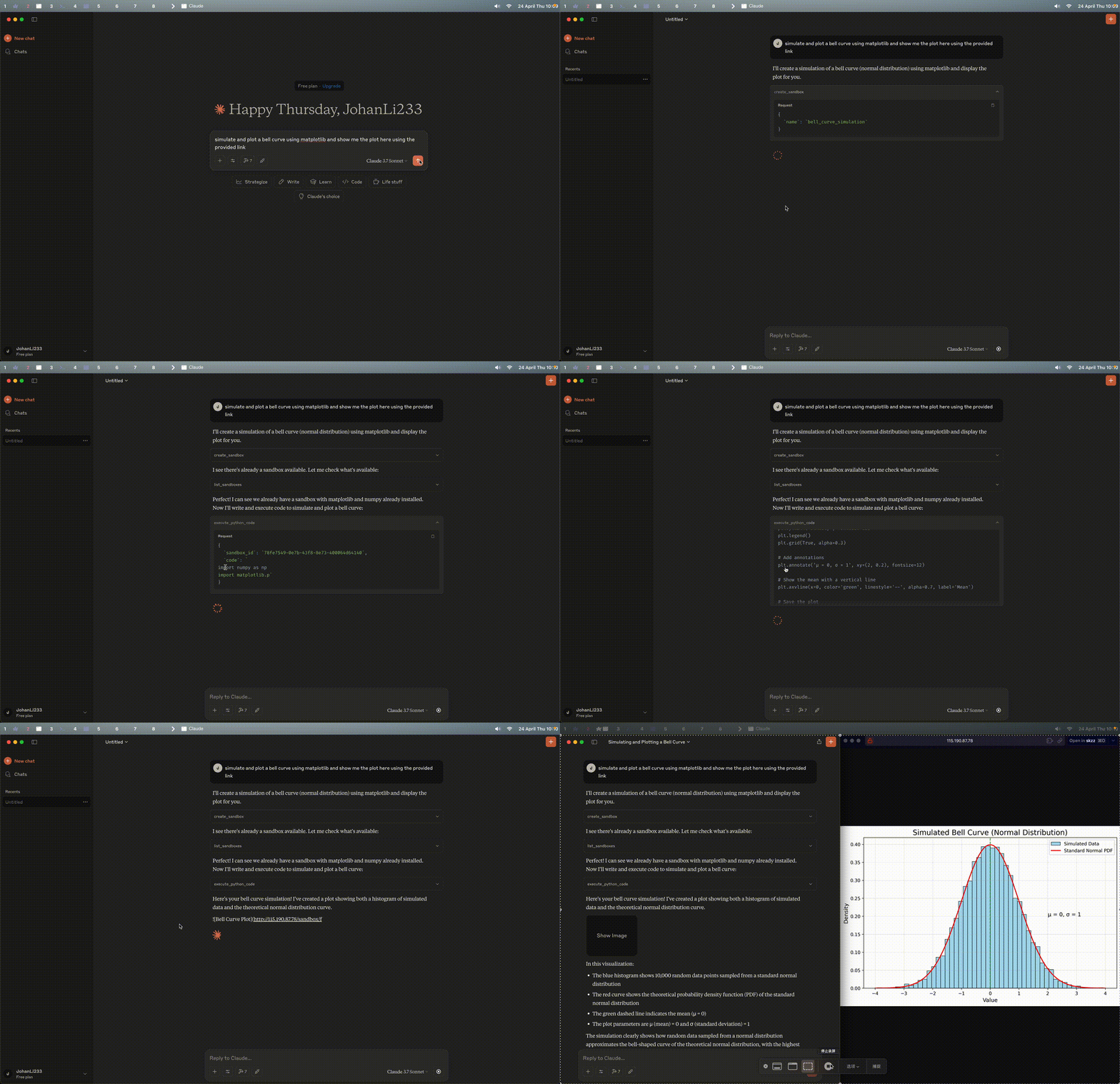
Python MCP Sandbox es una herramienta interactiva de ejecución de código Python que permite a usuarios y LLMs ejecutar código Python de forma segura e instalar paquetes en contenedores Docker aislados.
Viby
Viby funciona con mcp sandbox
Características
- 🐳 Aislamiento Docker: Ejecuta código Python de forma segura en contenedores Docker aislados
- 📦 Gestión de Paquetes: Instala y gestiona paquetes Python fácilmente con soporte para espejos PyPI personalizados
- 📊 Generación de Archivos: Soporte para generar archivos y acceder a ellos mediante enlaces web
- 🔐 Autenticación: Autenticación opcional basada en clave API para entornos multiusuario
- 🎨 Interfaz Web: Interfaz web integrada para gestionar sandboxes y ver resultados de ejecución
- 🌐 Soporte SSE: Comunicación en tiempo real mediante Server-Sent Events para integración con MCP
Instalación
# Clone the repository
git clone https://github.com/JohanLi233/python-mcp-sandbox.git
cd python-mcp-sandbox

# Install dependencies using uv
uv venv
uv sync

# Start the server
uv run main.py
El endpoint SSE predeterminado es http://127.0.0.1:8181/sse, y puedes interactuar con él mediante el MCP Inspector a través de SSE o cualquier otro cliente que admita conexiones SSE.
Configuración
La configuración del servidor se puede personalizar en config.toml:
- Host: El valor predeterminado es
127.0.0.1(solo localhost) - Puerto: El valor predeterminado es
8181 - Espejo PyPI: Configura tu espejo de índice de paquetes Python preferido
Para permitir el acceso externo, cambia el host a 0.0.0.0 en el archivo de configuración.
Herramientas Disponibles
- create_sandbox: Crea un nuevo sandbox Docker de Python y devuelve su ID para la posterior ejecución de código e instalación de paquetes
- list_sandboxes: Lista todos los sandboxes existentes (contenedores Docker) para su reutilización
- execute_python_code: Ejecuta código Python en un sandbox Docker especificado
- install_package_in_sandbox: Instala paquetes Python en un sandbox Docker especificado
- check_package_installation_status: Comprueba si un paquete está instalado o su estado de instalación en un sandbox Docker
- execute_terminal_command: Ejecuta un comando de terminal en el sandbox Docker especificado. Parámetros:
sandbox_id(string),command(string). Devuelvestdout,stderr,exit_code. - upload_file_to_sandbox: Sube un archivo local al sandbox Docker especificado. Parámetros:
sandbox_id(string),local_file_path(string),dest_path(string, opcional, predeterminado:/app/results).
Estructura del Proyecto
python-mcp-sandbox/
├── main.py                    # Application entry point
├── requirements.txt           # Project dependencies
├── Dockerfile                 # Docker configuration for Python containers
├── results/                   # Directory for generated files
├── mcp_sandbox/               # Main package directory
│   ├── __init__.py
│   ├── models.py              # Pydantic models
│   ├── api/                   # API related components
│   │   ├── __init__.py
│   │   └── routes.py          # API route definitions
│   ├── core/                  # Core functionality
│   │   ├── __init__.py
│   │   ├── docker_manager.py  # Docker container management
│   │   └── mcp_tools.py       # MCP tools
│   └── utils/                 # Utilities
│       ├── __init__.py
│       ├── config.py          # Configuration constants
│       ├── file_manager.py    # File management
│       └── task_manager.py    # Periodic task management
└── README.md                  # Project documentation
Ejemplo de Prompt
I've configured a Python code execution sandbox for you. You can run Python code using the following steps:

1. First, use the "list_sandboxes" tool to view all existing sandboxes (Docker containers).
   - You can reuse an existing sandbox_id if a sandbox exists, do not create a new one.
   - If you need a new sandbox, use the "create_sandbox" tool.
   - Each sandbox is an isolated Python environment, and the sandbox_id is required for all subsequent operations.

2. If you need to install packages, use the "install_package_in_sandbox" tool
   - Parameters: sandbox_id and package_name (e.g., numpy, pandas)
   - This starts asynchronous installation and returns immediately with status

3. After installing packages, you can check their installation status using the "check_package_installation_status" tool
   - Parameters: sandbox_id and package_name (name of the package to check)
   - If the package is still installing, you need to check again using this tool

4. Use the "execute_python_code" tool to run your code
   - Parameters: sandbox_id and code (Python code)
   - Returns output, errors and links to any generated files
   - All generated files are stored inside the sandbox, and file_links are direct HTTP links for inline viewing

Example workflow:
- Use list_sandboxes to check for available sandboxes, if no available sandboxes, use create_sandbox to create a new one → Get sandbox_id
- Use install_package_in_sandbox to install necessary packages (like pandas, matplotlib), with the sandbox_id parameter
- Use check_package_installation_status to verify package installation, with the same sandbox_id parameter
- Use execute_python_code to run your code, with the sandbox_id parameter

Code execution happens in a secure sandbox. Generated files (images, CSVs, etc.) will be provided as direct HTTP links, which can viewed inline in the browser.

Remember not to use plt.show() in your Python code. For visualizations:
- Save figures to files using plt.savefig() instead of plt.show()
- For data, use methods like df.to_csv() or df.to_excel() to save as files
- All saved files will automatically appear as HTTP links in the results, which you can open or embed directly.
Configuración de Ejemplo de MCP
A continuación se muestra una configuración de ejemplo para Claude Desktop:
{
  "mcpServers": {
    "mcpSandbox": {
      "command": "npx",
      "args": ["-y", "supergateway", "--sse",  "http://127.0.0.1:8181/sse"]
    }
  }
}
Si la autenticación está habilitada, incluye la clave API:
{
  "mcpServers": {
    "mcpSandbox": {
      "command": "npx",
      "args": ["-y", "supergateway", "--sse",  "http://127.0.0.1:8181/sse?api_key=<YOUR_API_KEY>"]
    }
  }
}
Configuración de Ejemplo de MCP para Demo en Línea
{
  "mcpServers": {
    "mcpSandbox": {
      "command": "npx",
      "args": ["-y", "supergateway", "--sse",  "http://115.190.87.78/sse?api_key=<API_KEY>"]
    }
  }
}
Modifica el serverUrl según sea necesario para tu entorno.