FOCUS DATA MCP Server
Convierte lenguaje natural en sentencias SQL con una solución de generación en dos pasos para reducir alucinaciones y mejorar la confianza.
Documentación
Servidor FOCUS DATA MCP [中文]
Un servidor del Protocolo de Contexto de Modelo (MCP) que permite a los asistentes de inteligencia artificial convertir lenguaje natural en sentencias SQL.
Ya existen tantos frameworks de Texto a SQL. ¿Por qué necesitamos otro?
En términos simples, focus_mcp_sql adopta una solución de generación de SQL en dos pasos, lo que permite controlar las alucinaciones del LLM y construir verdaderamente la confianza de los usuarios no técnicos en los resultados SQL generados.
A continuación se muestra la tabla comparativa entre focus_mcp_sql y otros:
Tabla de Análisis Comparativo
Aquí hay una comparación lado a lado de focus_mcp_sql con otros frameworks basados en LLM:
| Característica | Frameworks LLM Tradicionales | focus_mcp_sql |
|---|---|---|
| Proceso de Generación | Caja negra, generación directa de SQL | Transparente, dos pasos (palabras clave + SQL) |
| Riesgo de Alucinación | Alto, depende de la calidad del modelo | Bajo, controlable (verificación de palabras clave) |
| Velocidad | Lenta, depende de la inferencia del modelo grande | Rápida, conversión determinista de palabras clave a SQL |
| Costo | Alto, requiere modelos avanzados | Bajo, reduce la dependencia de modelos grandes |
| Amigabilidad para Usuarios No Técnicos | Baja, difícil de verificar resultados | Alta, fácil verificación de palabras clave |
Características
- Inicializar el modelo
- Convertir lenguaje natural en sentencias SQL
Requisitos Previos
- jdk 23 o superior. Descargar jdk
- gradle 8.12 o superior. Descargar gradle
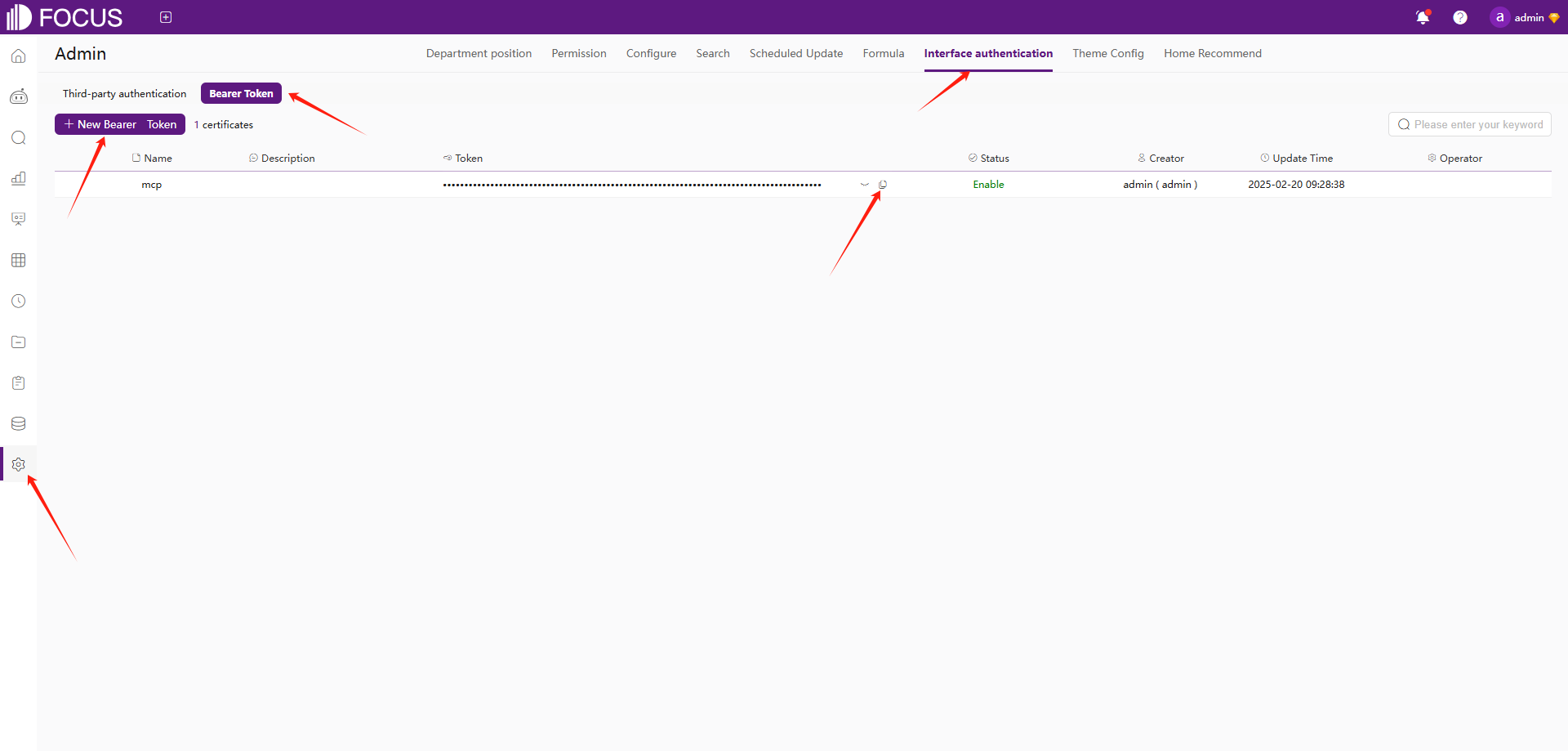
- Registrarse en Datafocus para obtener el bearer token:
- Crear una cuenta en Datafocus
- Crear una aplicación
- Entrar en la aplicación
- Admin -> Autenticación de interfaz -> Bearer Token -> Nuevo Bearer Token
Instalación
- Clonar este repositorio:
git clone https://github.com/FocusSearch/focus_mcp_sql.git
cd focus_mcp_sql
- Compilar el servidor:
gradle clean
gradle bootJar

The jar path: build/libs/focus_mcp_sql.jar
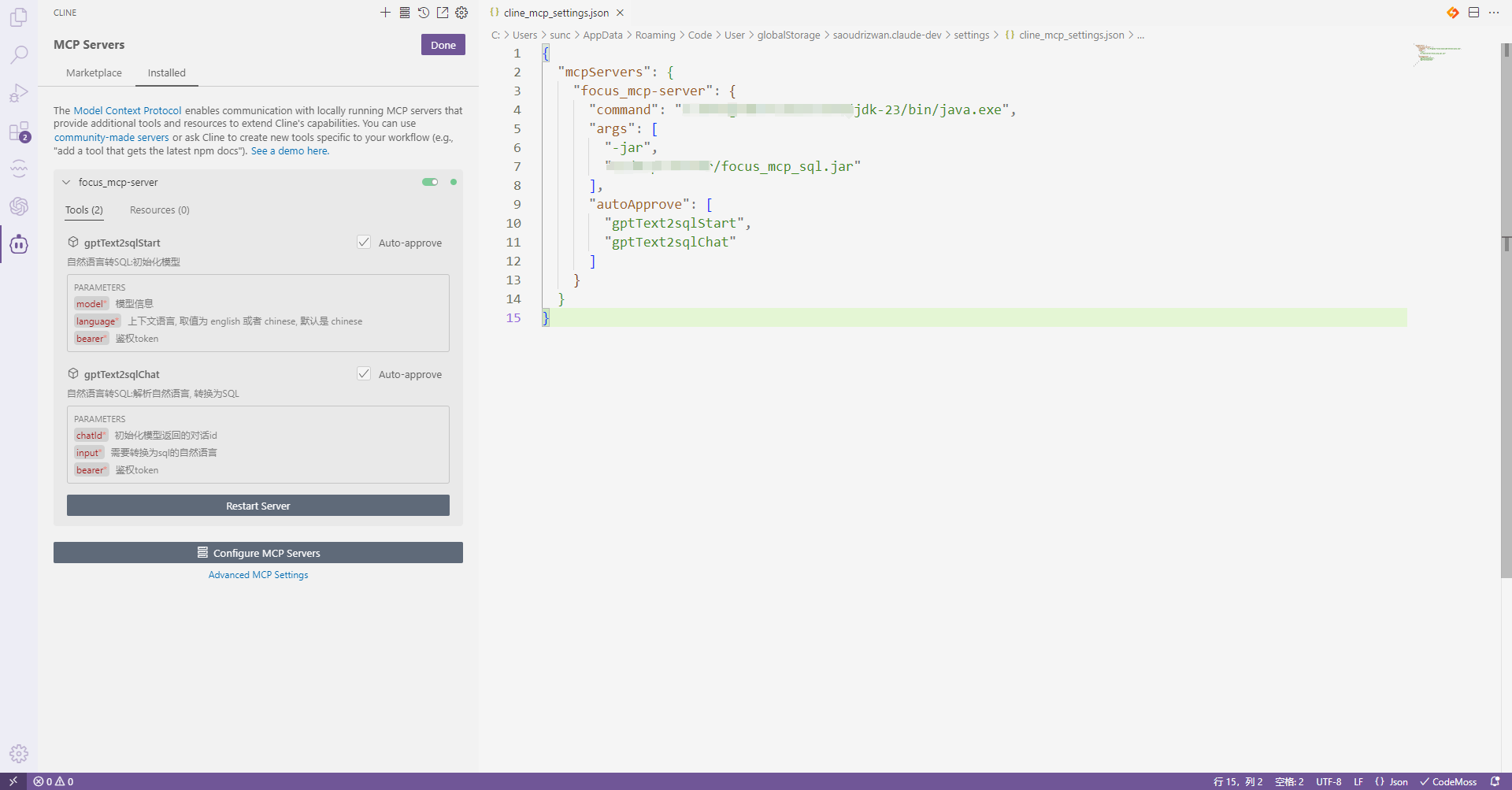
Configuración de MCP
Añadir el servidor al archivo de configuración de MCP:
{
  "mcpServers": {
    "focus_mcp_data": {
      "command": "java",
      "args": [
        "-jar",
        "path/to/focus_mcp_sql/focus_mcp_sql.jar"
      ],
      "autoApprove": [
        "gptText2sqlStart",
        "gptText2sqlChat"
      ]
    }
  }
}
Herramientas Disponibles
1. gptText2sqlStart
Modelo inicial.
Parámetros:
model(obligatorio): modelo de tablabearer(obligatorio): bearer tokenlanguage(opcional): idioma ['english','chinese']
Ejemplo:
{
  "model": {
    "tables": [
      {
        "columns": [
          {
            "columnDisplayName": "name",
            "dataType": "string",
            "aggregation": "",
            "columnName": "name"
          },
          {
            "columnDisplayName": "address",
            "dataType": "string",
            "aggregation": "",
            "columnName": "address"
          },
          {
            "columnDisplayName": "age",
            "dataType": "int",
            "aggregation": "SUM",
            "columnName": "age"
          },
          {
            "columnDisplayName": "date",
            "dataType": "timestamp",
            "aggregation": "",
            "columnName": "date"
          }
        ],
        "tableDisplayName": "test",
        "tableName": "test"
      }
    ],
    "relations": [

    ],
    "type": "mysql",
    "version": "8.0"
  },
  "bearer": "ZTllYzAzZjM2YzA3NDA0ZGE3ZjguNDJhNDjNGU4NzkyYjY1OTY0YzUxYWU5NmU="
}
Descripción del parámetro model:
| Nombre | Ubicación | Tipo | Obligatorio | Descripción |
|---|---|---|---|---|
| model | body | object | 是 | none |
| » type | body | string | 是 | Tipo de base de datos |
| » version | body | string | 是 | Versión de la base de datos |
| » tables | body | [object] | 是 | Lista de estructuras de tablas |
| »» tableDisplayName | body | string | 否 | Nombre mostrado de la tabla |
| »» tableName | body | string | 否 | Nombre original de la tabla |
| »» columns | body | [object] | 否 | Lista de columnas de la tabla |
| »»» columnDisplayName | body | string | 是 | Nombre mostrado de la columna |
| »»» columnName | body | string | 是 | Nombre original de la columna |
| »»» dataType | body | string | 是 | Tipo de datos de la columna |
| »»» aggregation | body | string | 是 | Método de agregación de la columna |
| » relations | body | [object] | 是 | Lista de relaciones entre tablas |
| »» conditions | body | [object] | 否 | Condiciones de relación |
| »»» dstColName | body | string | 否 | Nombre original de la columna de relación de la tabla dimension |
| »»» srcColName | body | string | 否 | Nombre original de la columna de relación de la tabla fact |
| »» dimensionTable | body | string | 否 | Nombre original de la tabla dimension |
| »» factTable | body | string | 否 | Nombre original de la tabla fact |
| »» joinType | body | string | 否 | Tipo de relación |
2. gptText2sqlChat
Convierte lenguaje natural en SQL.
Parámetros:
chatId(obligatorio): id de chatinput(obligatorio): lenguaje naturalbearer(obligatorio): bearer token
Ejemplo:
{
  "chatId": "03975af5de4b4562938a985403f206d4",
  "input": "what is the max age",
  "bearer": "ZTllYzAzZjM2YzA3NDA0ZGE3ZjguNDJhNDjNGU4NzkyYjY1OTY0YzUxYWU5NmU="
}
Formato de Respuesta
Todas las herramientas devuelven respuestas en el siguiente formato:
{
  "errCode": 0,
  "exception": "",
  "msgParams": null,
  "promptMsg": null,
  "success": true,
  "data": {
  }
}
Ejemplo de Visual Studio Code Cline
- Instalar el plugin cline en vsCode
- Configurar el servidor mcp
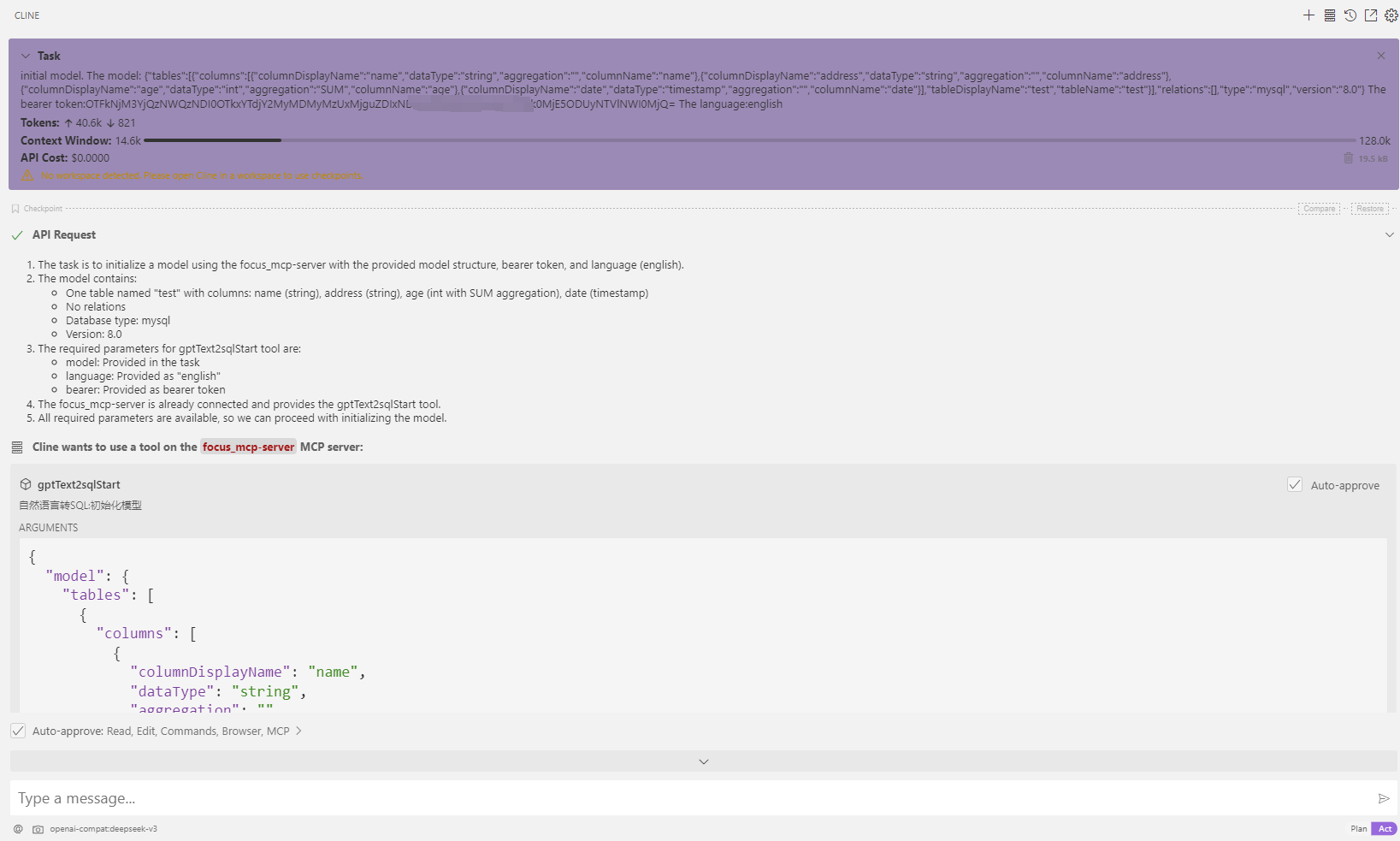
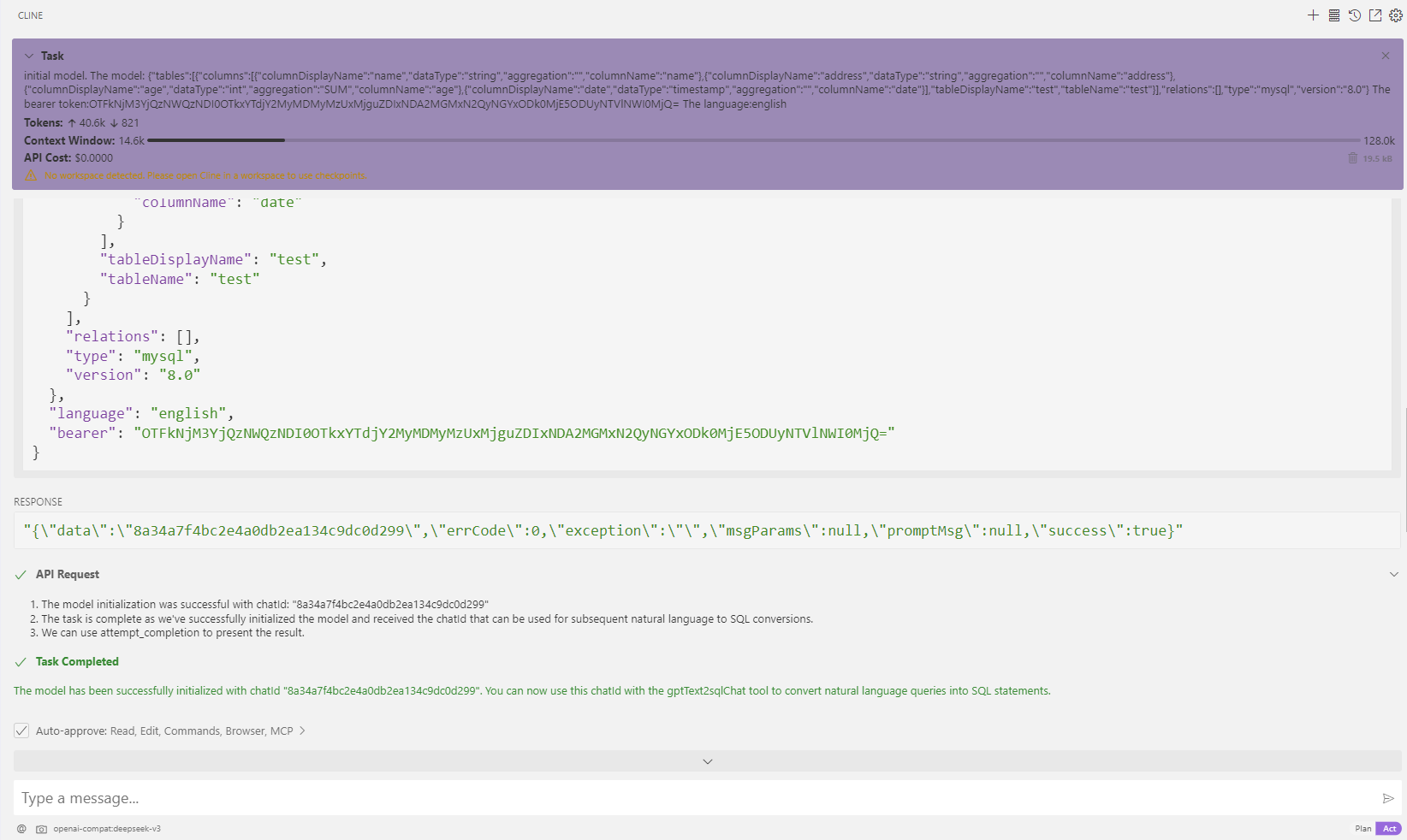
- Uso
- Modelo inicial
- Transferencia: ¿cuál es la edad máxima?
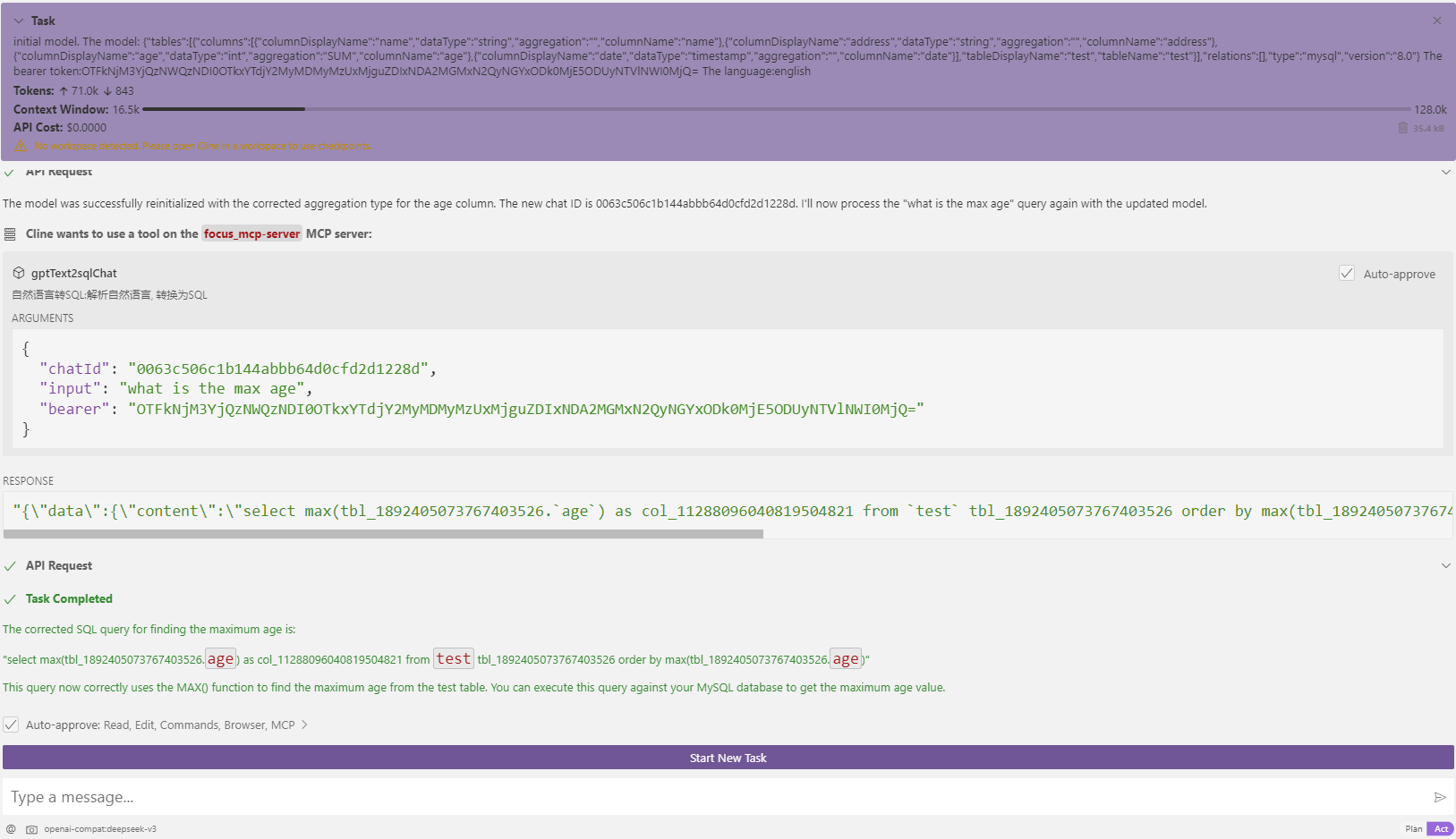
- Modelo inicial