Notion MCP Server
Servidor MCP para la API de Notion, que permite interacciones en tiempo real mediante Server-Sent Events (SSE).
Documentación
Implementa y comienza en minutos en ContexaAI
Nota importante
This repository is a fork of the official Notion MCP server available on NPM.
The primary modification is the replacement of the transport mechanism from Stdio to Server-Sent Events (SSE).
Notion MCP Server
Este proyecto implementa un servidor MCP para la API de Notion.
Instalación
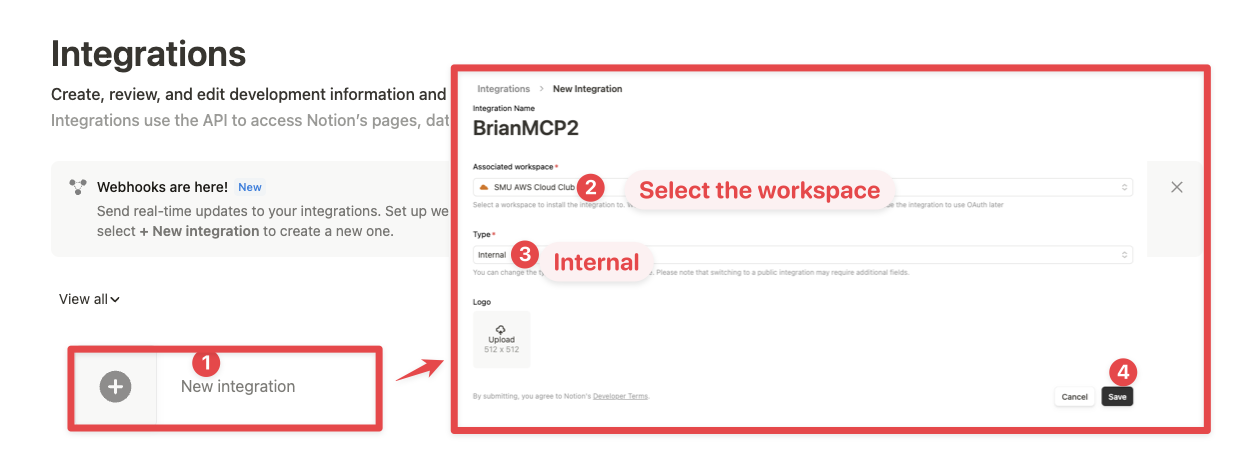
1. Configuración de la integración en Notion:
Ve a https://www.notion.so/profile/integrations y crea una nueva integración interna o selecciona una existente.
Si bien limitamos el alcance de la API de Notion expuesta (por ejemplo, no podrás eliminar bases de datos a través de MCP), existe un riesgo no nulo para los datos del espacio de trabajo al exponerlos a los LLM. Los usuarios preocupados por la seguridad pueden querer configurar adicionalmente las Capacidades de la integración.
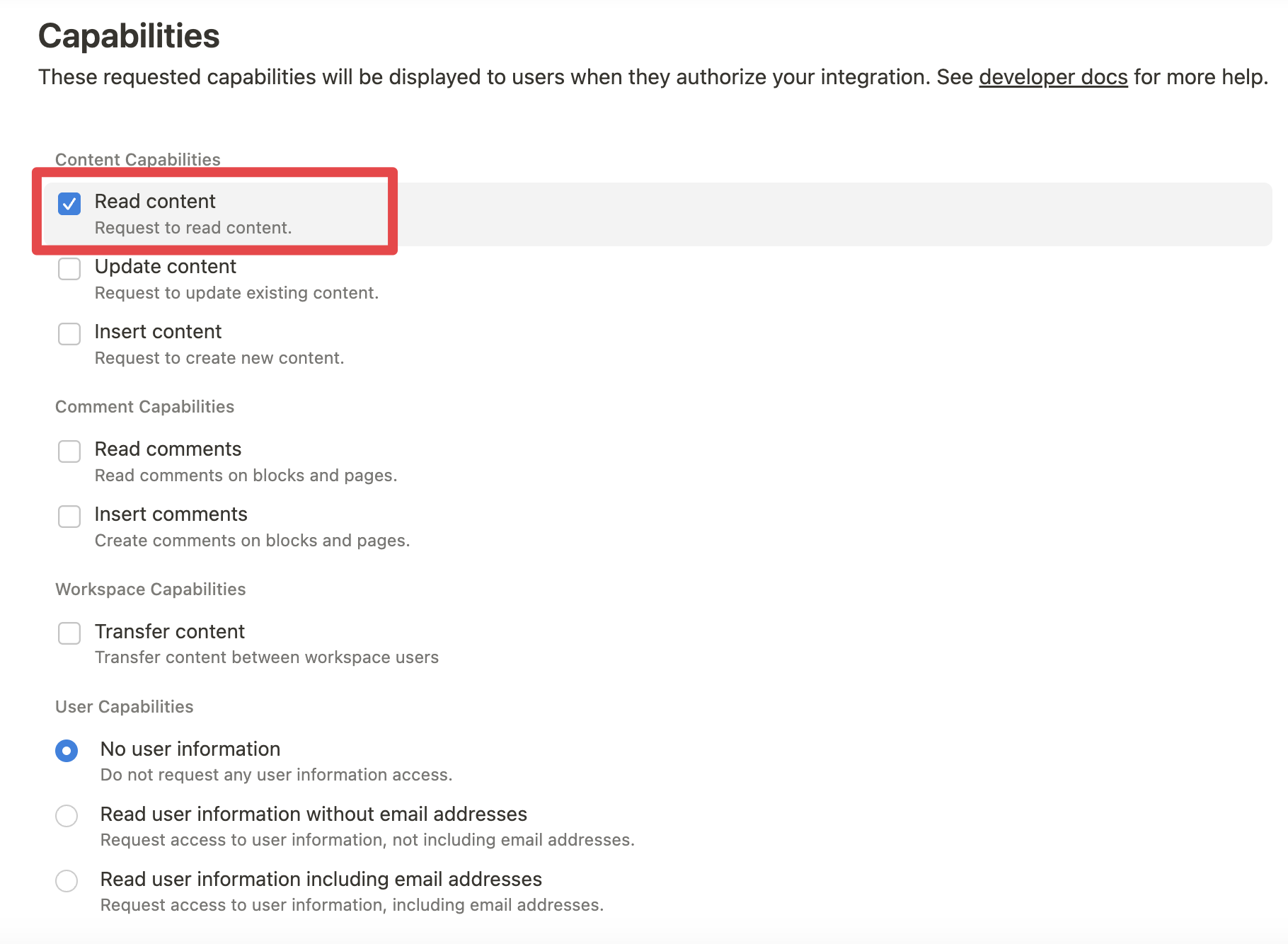
Por ejemplo, puedes crear un token de integración de solo lectura otorgando únicamente acceso de "Leer contenido" desde la pestaña "Configuración":
2. Conexión de contenido a la integración:
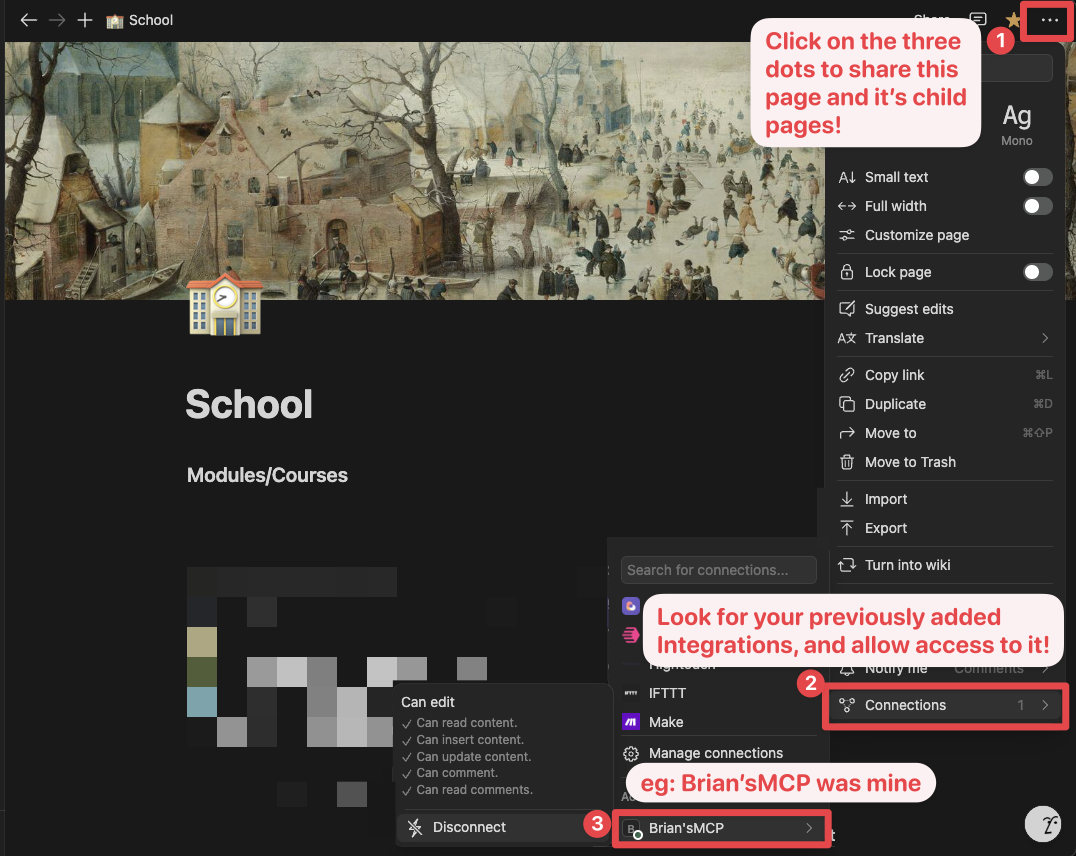
Asegúrate de que las páginas y bases de datos relevantes estén conectadas a tu integración.
Para hacer esto, deberás visitar esa página, hacer clic en los 3 puntos y seleccionar "Conectar a la integración".
3. Agregar la configuración de MCP a tu cliente:
Usando npm:
Agrega lo siguiente a tu .cursor/mcp.json o claude_desktop_config.json (MacOS: ~/Library/Application\ Support/Claude/claude_desktop_config.json)
{
  "mcpServers": {
    "notionApi": {
      "command": "npx",
      "args": ["-y", "@notionhq/notion-mcp-server"],
      "env": {
        "OPENAPI_MCP_HEADERS": "{\"Authorization\": \"Bearer ntn_****\", \"Notion-Version\": \"2022-06-28\" }"
      }
    }
  }
}
Usando Docker:
Hay dos opciones para ejecutar el servidor MCP con Docker:
Opción 1: Usar la imagen oficial de Docker Hub:
Agrega lo siguiente a tu .cursor/mcp.json o claude_desktop_config.json:
{
  "mcpServers": {
    "notionApi": {
      "command": "docker",
      "args": [
        "run",
        "--rm",
        "-i",
        "-e", "OPENAPI_MCP_HEADERS",
        "mcp/notion"
      ],
      "env": {
        "OPENAPI_MCP_HEADERS": "{\"Authorization\":\"Bearer ntn_****\",\"Notion-Version\":\"2022-06-28\"}"
      }
    }
  }
}
Este enfoque:
- Usa la imagen oficial de Docker Hub
- Maneja correctamente el escape de JSON mediante variables de entorno
- Proporciona un método de configuración más confiable
Opción 2: Construir la imagen de Docker localmente:
También puedes construir y ejecutar la imagen de Docker localmente. Primero, construye la imagen de Docker:
docker-compose build
Luego, agrega lo siguiente a tu .cursor/mcp.json o claude_desktop_config.json:
{
  "mcpServers": {
    "notionApi": {
      "command": "docker",
      "args": [
        "run",
        "--rm",
        "-i",
        "-e",
        "OPENAPI_MCP_HEADERS={\"Authorization\": \"Bearer ntn_****\", \"Notion-Version\": \"2022-06-28\"}",
        "notion-mcp-server"
      ]
    }
  }
}
No olvides reemplazar ntn_**** con tu secreto de integración. Encuéntralo en la pestaña de configuración de tu integración:
Ejemplos
- Usando la siguiente instrucción
Comment "Hello MCP" on page "Getting started"
La IA planificará correctamente dos llamadas a la API, v1/search y v1/comments, para lograr la tarea
- De manera similar, la siguiente instrucción resultará en una nueva página llamada "Notion MCP" agregada a la página principal "Development"
Add a page titled "Notion MCP" to page "Development"
- También puedes hacer referencia directa al ID del contenido
Get the content of page 1a6b35e6e67f802fa7e1d27686f017f2
Desarrollo
Compilar
npm run build
Ejecutar
npx -y --prefix /path/to/local/notion-mcp-server @notionhq/notion-mcp-server
Publicar
npm publish --access public