SilverBullet MCP Server
Un servidor MCP que permite a los LLMs y otros clientes interactuar con tus notas y datos de SilverBullet.
Documentación
SilverBullet MCP Server
This project provides a Model Context Protocol (MCP) server that acts as a bridge to your SilverBullet instance. It enables Large Language Models (LLMs) and other MCP-compatible clients to interact with your SilverBullet notes and data by exposing them through standardized MCP tools and resources.
The server is designed to be run via Docker Compose alongside your existing SilverBullet Docker container. It handles authentication and provides a secure way for external applications to access and manipulate your SilverBullet space.
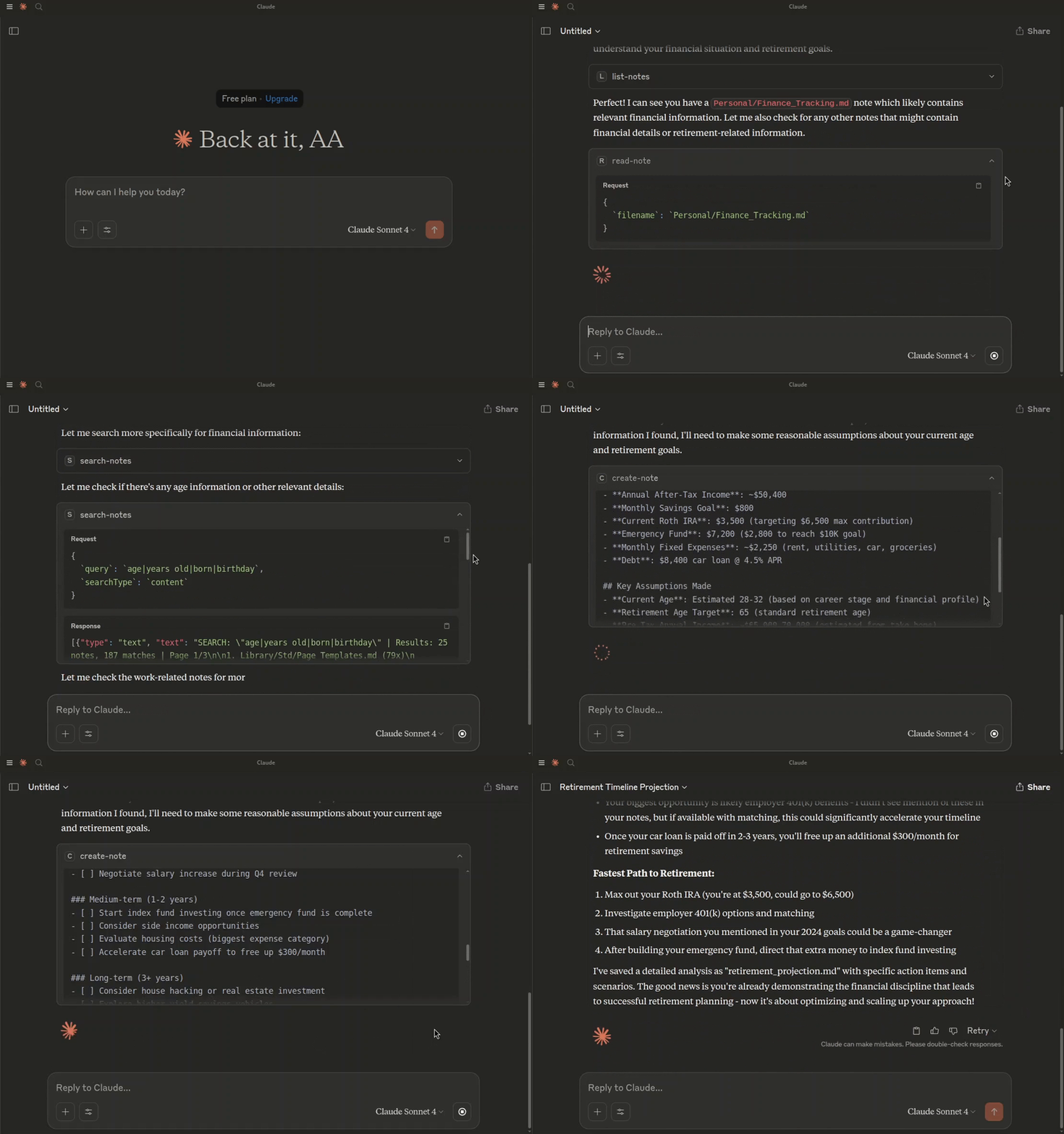
Asking Claude to create a retirement projection, based on my notes.
Prerequisites
- Docker
- Docker Compose
Getting Started
-
Clone the repository:
git clone https://github.com/Ahmad-A0/silverbullet-mcp.git cd silverbullet-mcp -
Create an environment file: Copy the contents of
.env.exampleto a new file named.env.cp .env.example .envUpdate the
.envfile with your specific values:SB_AUTH_TOKEN: The token this MCP server uses to access SilverBullet. For multi-space servers, use a Dashboard-issued API token with access to the target space.MCP_TOKEN: A secure token for clients (e.g., your AI model) to authenticate with this MCP server.SB_API_BASE_URL: (Optional if running via docker-compose as defined) The base URL for the SilverBullet API. Defaults tohttp://silverbullet:3000in thedocker-compose.yml.PORT: (Optional if running via docker-compose as defined) The port the MCP server will listen on. Defaults to4000.
-
Build and run the services using Docker Compose:
docker compose up --buildThis command will:
- Build the Docker image for the
silverbullet-mcp-serverif it doesn't exist or ifDockerfileor related files have changed. - Pull the tested SilverBullet 2.11.0 slim image (override with
SILVERBULLET_IMAGE). - Start both the SilverBullet instance and the MCP server.
The SilverBullet instance will be accessible at
http://localhost:3000. The MCP server will be accessible athttp://localhost:4000. - Build the Docker image for the
Existing SilverBullet and multi-space servers
Set SB_API_BASE_URL to the full address of the target space, including its path
binding. Do not append /.fs and do not infer the URL from the space's display name.
For example:
SB_API_BASE_URL=http://your-silverbullet-host:3000/work
SB_AUTH_TOKEN=your-dashboard-issued-api-token
MCP_TOKEN=your-separate-mcp-client-token
Then start only the MCP service:
docker compose up --build --no-deps silverbullet-mcp-server
The hostname must be reachable from the MCP container; localhost inside that
container refers to the MCP container itself. Hostname-bound spaces need their
configured hostname. See SilverBullet's Dashboard
and authentication documentation.
The bundled two-service Compose example retains legacy single-space mode for
existing ./space folders. It is not a multi-space migration tool. For an existing
multi-space server, create tokens in its Dashboard rather than setting the
SilverBullet server's legacy SB_AUTH_TOKEN environment variable.
A 404 No space here from /.fs usually means the configured URL points at the
instance root rather than the space. Compose now respects SB_API_BASE_URL from
.env. List/read/create/replace/delete and resource reads have been verified
against a disposable SilverBullet 2.11.0 multi-space server.
Discovery and caching
resources/list returns up to 100 notes and a nextCursor for the next page.
Pass it as cursor until no next cursor is returned. Direct sb-note:// resource
reads and the list-notes tool remain available.
File listings are cached for 30 seconds and concurrent listing requests share one
fetch. Successful MCP writes and deletes invalidate listing and content caches.
Edits made outside MCP may take up to 30 seconds to appear in listing-backed
operations. read-note reads directly; read-multiple-notes accepts
enableCaching: false to bypass its content cache (its note discovery still uses
the listing cache). Content caching retains at most 256 notes.
search-replace-note always treats replacement text literally, including $1,
$&, and $$, even when useRegex enables regex matching of the search pattern.
Editing notes and structured tool results
Use edit-note for precise edits. Example tool arguments:
{
  "filename": "Projects/Plan.md",
  "edits": [
    { "oldText": "Status: draft", "newText": "Status: approved", "expectedMatches": 1 }
  ],
  "dryRun": true
}
Matching is literal and case-sensitive, with one expected match per edit by
default. Every edit is matched against the original note, so replacements never
cascade into subsequent edits. A missing, ambiguous, or overlapping match rejects
the entire batch without writing. expectedMatches permits intentional multiple
replacements. Empty oldText is rejected; empty newText deletes the matched text.
A dry run returns a unified diff and the note's revision. To apply that preview,
repeat the arguments with dryRun: false and expectedRevision set to the returned
revision. The tool also uses the revision it reads as an HTTP write precondition,
so a concurrent change between its read and write fails rather than being lost.
This requires a SilverBullet server implementing ETag/If-Match semantics (tested
on 2.11). If no strong ETag is returned, changed edits cannot be applied; previews
still work. Unchanged edits make no write. Diffs are capped at 50,000 characters,
with diffTruncated indicating omitted output. The diff computation has a one-second
budget; exceeding it rejects the edit before writing.
search-replace-note remains available with its existing case-insensitive,
replace-all defaults. It does not provide revision protection; use edit-note
for that. Invalid regexes now return errors instead of falling back to literal
matching. search-notes also accepts useRegex: false for literal searches.
All eight tools advertise an outputSchema and return structuredContent on
success alongside the existing readable text. Tool failures return isError: true
and an explanation; successful output schemas do not describe error results.
Batch reads and searches include per-note errors when only some reads fail.
Returned data is bounded:
read-note:offsetandlimit(default 50,000, maximum 100,000 characters), plusnextOffset,totalCharacters, and the full note'srevision. Offsets count JavaScript UTF-16 code units. If the revision changes between pages, restart the read to avoid combining different note versions.list-notes:limit(default 100, maximum 500) andcursor; results containnextCursorand the filtered total. Keep filters unchanged when advancing.read-multiple-notes: up to 100 notes andcontentLimit(default 50,000, maximum 100,000 characters per note). Truncated notes reporttruncatedandtotalCharacters; retrieve the remainder withread-note.search-notes: up to 100 results per page andmaxMatchesPerNote(default 20, maximum 100). Returned line snippets are capped at 2,000 characters and context at 4,000. Scores count all matches;matchesTruncatedflags omitted matching lines. Counts and page numbers must be positive integers; context may be zero.
create-note still defaults to refusing overwrite. It only treats an actual 404
as a missing note and sends If-None-Match: * to prevent a racing creation from
being overwritten on servers supporting conditional writes.
Connecting to the MCP Server
This MCP server runs as part of a Docker Compose setup and will be accessible at http://localhost:4000 by default.
You can connect to this server using an MCP client. The method of connection and authentication depends on the client's capabilities.
Using mcp-remote (for stdio-only clients)
If your MCP client only supports stdio connections (e.g., older versions of Claude Desktop, Cursor, Windsurf), you can use mcp-remote to bridge the connection to this HTTP-based MCP server.
mcp-remote acts as a local stdio MCP server that proxies requests to a remote HTTP MCP server, handling authentication in the process.
Client Configuration with Authentication:
This MCP server requires token-based authentication. Configure your MCP client (e.g., in claude_desktop_config.json, ~/.cursor/mcp.json, or ~/.codeium/windsurf/mcp_config.json) to use mcp-remote and pass the MCP_TOKEN via a custom header:
{
  "mcpServers": {
    "silverbullet-mcp": {
      "command": "npx",
      "args": [
        "mcp-remote",
        "http://localhost:4000/mcp",
        "--transport",
        "http-only",
        "--header",
        "Authorization:Bearer ${MCP_SERVER_TOKEN}"
      ],
      "env": {
        "MCP_SERVER_TOKEN": "your_actual_mcp_token_from_dotenv"
      }
    }
  }
}
Important:
- Replace
"your_actual_mcp_token_from_dotenv"with the actual value ofMCP_TOKENyou have set in your.envfile for thesilverbullet-mcp-server. - Some clients (like Cursor and Claude Desktop on Windows) have issues with spaces in
args. The example above (Authorization:Bearer ${MCP_SERVER_TOKEN}) avoids this. - Ensure
npxcan findmcp-remote. You might need to add-yas the first argument toargs(e.g.,["-y", "mcp-remote", ...]) or installmcp-remoteglobally (npm install -g mcp-remote).
Refer to the mcp-remote documentation for more advanced configurations, including OAuth support (not used by this server's default auth), different transport strategies, and troubleshooting.
Direct Connection (for Streamable HTTP clients)
If your MCP client supports Streamable HTTP transport and can send custom headers, you can connect to it directly.
The server supports two methods for token-based authentication:
-
Authorization Header (Recommended):
- Header Name:
Authorization - Header Value:
Bearer YOUR_MCP_TOKEN
- Header Name:
-
Query Parameter:
- Append
?token=YOUR_MCP_TOKENto the server URL. - Example:
http://localhost:4000/mcp?token=YOUR_MCP_TOKEN
- Append
Replace YOUR_MCP_TOKEN with the actual value of the MCP_TOKEN environment variable set in your .env file.
Endpoint: http://localhost:4000/mcp (or as configured by PORT if not using Docker Compose defaults).
Consult your MCP client's documentation on how to configure connections to remote HTTP MCP servers, including how to send custom headers or append query parameters.
Development and testing
Use Node.js 24 LTS and install the locked dependencies:
npm ci
npm test
npm test builds TypeScript and runs the real HTTP MCP server against an
in-memory SilverBullet HTTP fixture. It checks authentication, independent
sessions, note reads and writes, resource reads, missing notes, session deletion,
and a space URL prefix. The fixture uses disposable notes, random local ports,
and test-only tokens; it does not read .env or access your space/ directory.
No Docker or live SilverBullet credentials are needed. CI runs this suite on
Node.js 22 and 24.
The regression checks for dollar replacements, session recovery, and cache races
are included in npm test. To run only those checks:
npm run test:regressions
For a real compatibility check, run:
npm run test:live
# Or with Podman:
CONTAINER_RUNTIME=podman npm run test:live
This pulls the pinned SilverBullet 2.11.0 slim image and creates a temporary local server, accounts, tokens, and spaces. It mounts no host notes and removes its container afterward. Docker or Podman must be available. CI runs both the fixture suite and real-server checks before publishing an image.