302AI Basic MCP Server
Un conjunto de herramientas para mejorar las capacidades fundamentales de los modelos de lenguaje grandes.
Documentación
🤖 302AI Basic MCP Server🚀✨
302AI Basic Tools es un conjunto de herramientas para mejorar las capacidades fundamentales de los modelos de lenguaje grandes.

Vistas previas
Aquí hay algunos ejemplos de uso
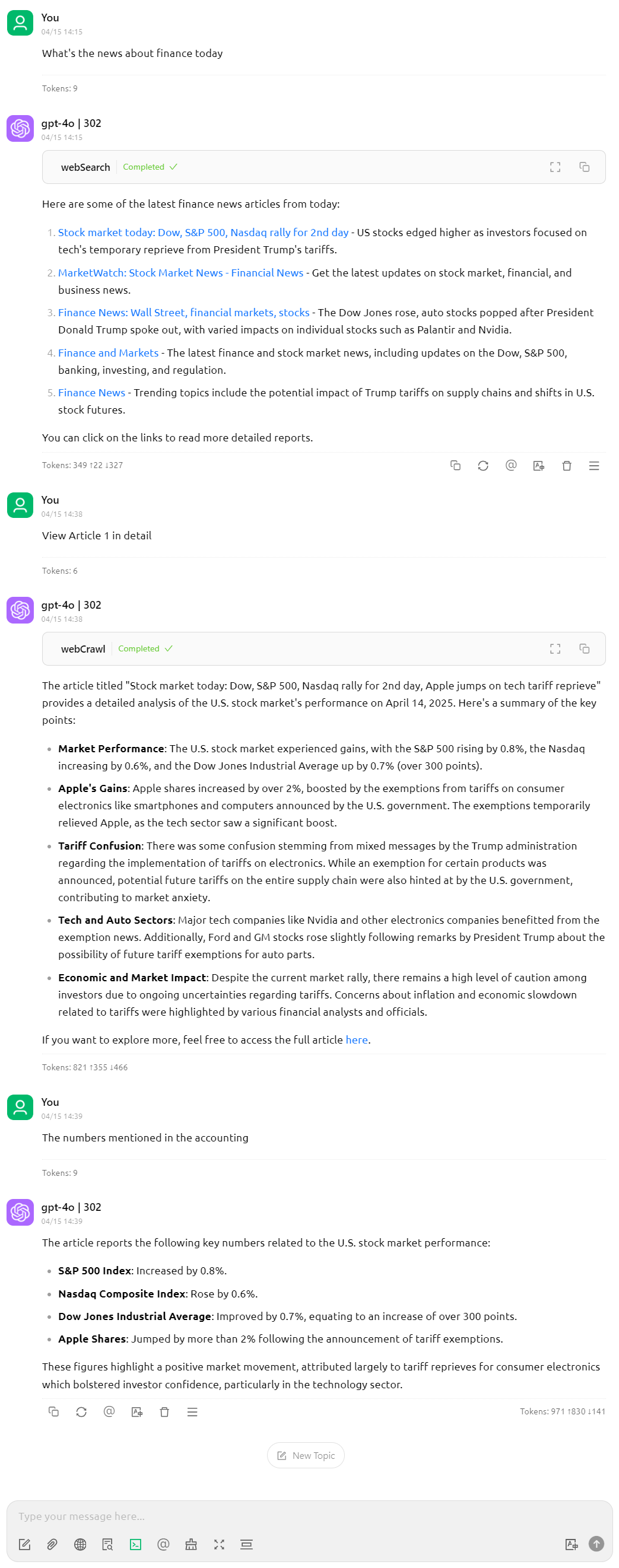
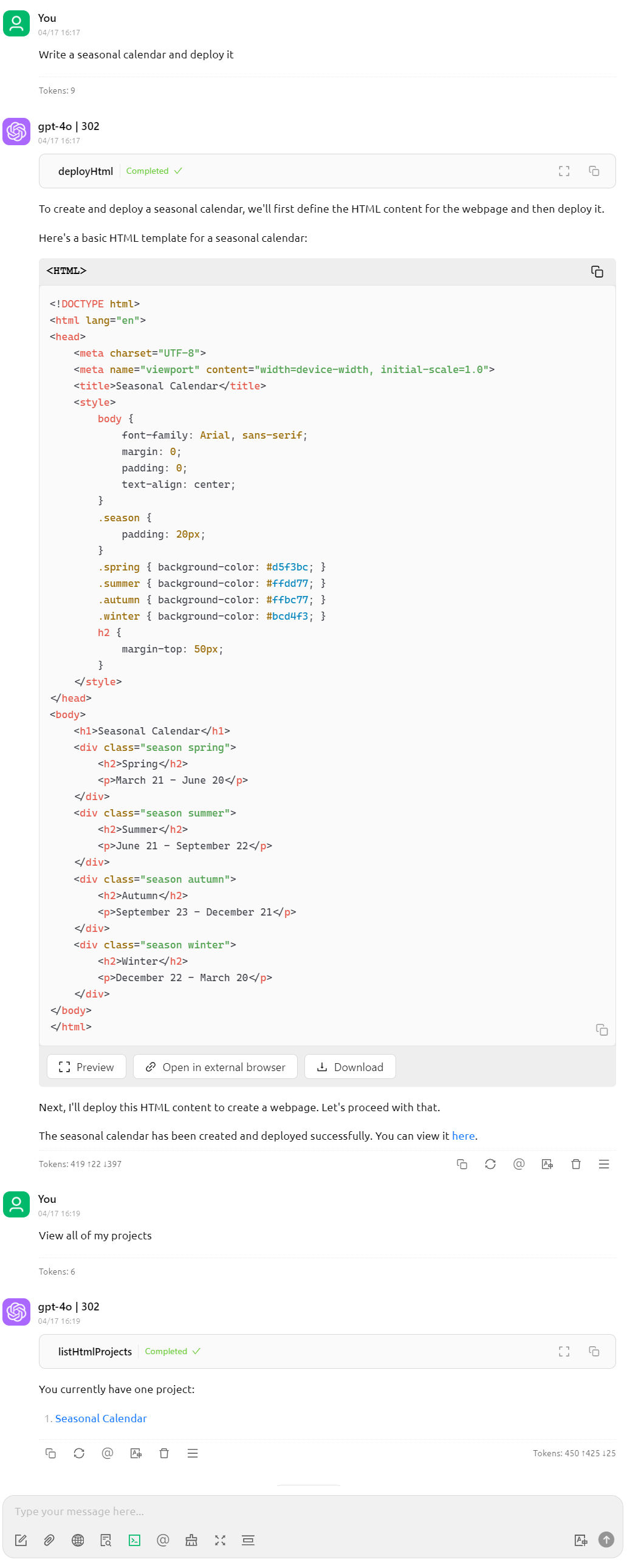
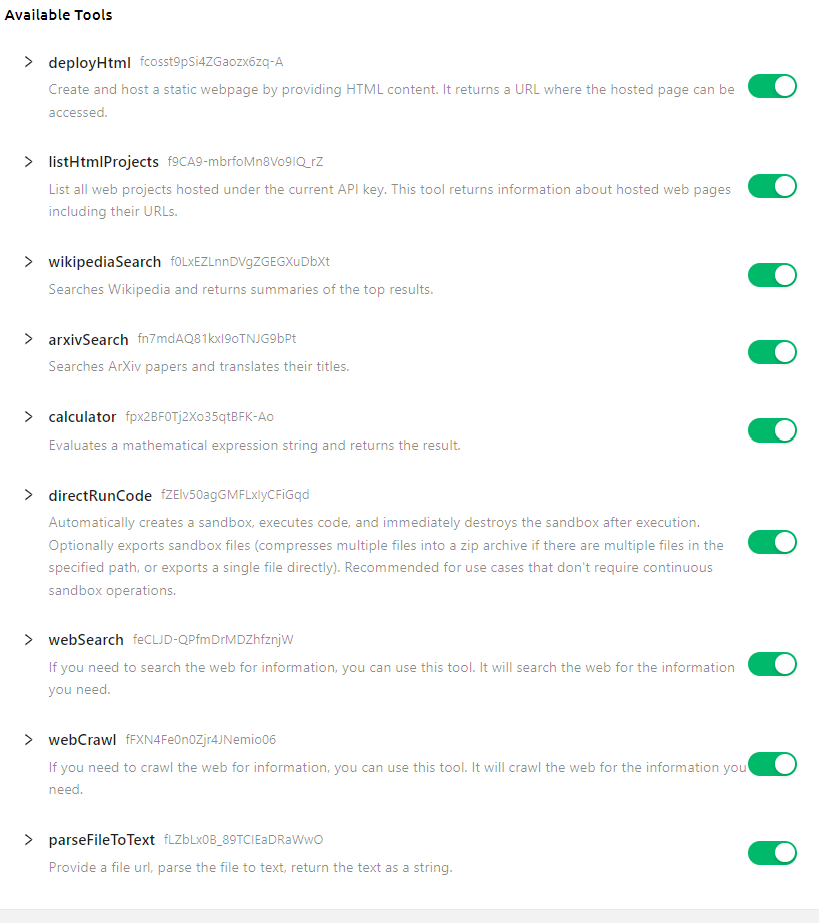
Aquí está la lista de herramientas compatibles
✨ Características ✨
- 🔧 Carga dinámica: actualiza automáticamente la lista de herramientas desde el servidor remoto.
- 🌐 Modos múltiples compatibles, puedes usar el modo
stdinlocalmente, o alojarlo como servidor HTTP remoto
🚀 Lista de Herramientas
- Wiki Search
- Arxiv Search
- Calculator
- Code Execution
- Web Search
- File Parser
- Upload webpage
Desarrollo
Instalar dependencias:
npm install
Compilar el servidor:
npm run build
Para desarrollo con recompilación automática:
npm run watch
Instalación
Para usar con Claude Desktop, añade la configuración del servidor:
En MacOS: ~/Library/Application Support/Claude/claude_desktop_config.json
En Windows: %APPDATA%/Claude/claude_desktop_config.json
{
  "mcpServers": {
    "302ai-basic-mcp": {
      "command": "npx",
      "args": ["-y", "@302ai/basic-mcp"],
      "env": {
        "302AI_API_KEY": "YOUR_API_KEY_HERE"
      }
    }
  }
}
Para usar con Cherry Studio, añade la configuración del servidor:
{
  "mcpServers": {
    "Li2ZXXJkvhAALyKOFeO4N": {
      "name": "302ai-basic-mcp",
      "description": "",
      "isActive": true,
      "registryUrl": "",
      "command": "npx",
      "args": [
        "-y",
        "@302ai/basic-mcp"
      ],
      "env": {
        "302AI_API_KEY": "YOUR_API_KEY_HERE"
      }
    }
  }
}
Para usar con ChatWise, copia el siguiente contenido al portapapeles
{
  "mcpServers": {
    "302ai-sandbox-mcp": {
      "command": "npx",
      "args": ["-y", "@302ai/basic-mcp"],
      "env": {
        "302AI_API_KEY": "YOUR_API_KEY_HERE"
      }
    }
  }
}
Ve a Configuración -> Herramientas -> Botón Añadir -> Selecciona Importar desde portapapeles
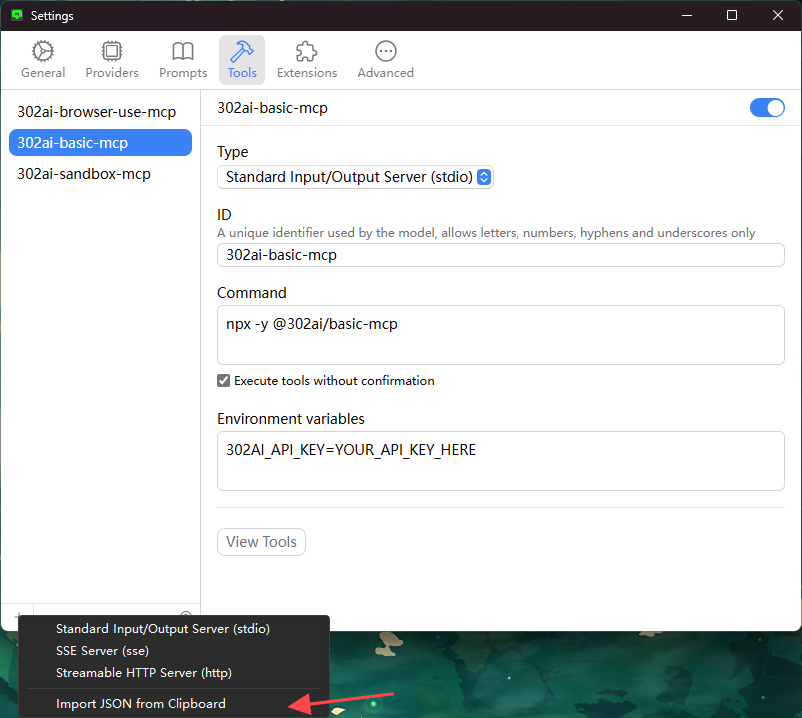
Encuentra tu 302AI_API_KEY aquí
Depuración
Dado que los servidores MCP se comunican a través de stdio, la depuración puede ser un desafío. Recomendamos usar el Inspector MCP, que está disponible como script del paquete:
npm run inspector
El Inspector proporcionará una URL para acceder a las herramientas de depuración en tu navegador.
✨ Acerca de 302.AI ✨
302.AI es una plataforma de aplicaciones de IA orientada a empresas que ofrece servicios de pago por uso, soluciones listas para usar y un ecosistema de código abierto.✨
- 🧠 Integra las capacidades y marcas de IA más recientes y completas, incluyendo, entre otros, modelos de lenguaje, modelos de imagen, modelos de voz y modelos de video.
- 🚀 Desarrolla aplicaciones profundas basadas en modelos fundacionales: desarrollamos productos de IA reales, no simples chatbots
- 💰 Sin cuota mensual, todas las funciones son de pago por uso, totalmente abierto, logrando barreras realmente bajas con alto potencial.
- 🛠 Potente backend de gestión para equipos y pymes: una persona gestiona, muchas personas usan.
- 🔗 Todas las capacidades de IA proporcionan acceso API, todas las herramientas son de código abierto y personalizables (en progreso).
- 💡 Fuerte equipo de desarrollo, lanzando 2-3 nuevas aplicaciones semanalmente, productos actualizados diariamente. Los desarrolladores interesados en unirse son bienvenidos a contactarnos.