AutoCAD MCP Server
Integriert AutoCAD mit großen Sprachmodellen (LLMs) für die Interaktion in natürlicher Sprache. Erfordert AutoCAD 2018+ unter Windows.
Dokumentation
AutoCAD MCP 服务器 / AutoCAD MCP Server
⚠️ 本项目目前维护精力有限,欢迎有兴趣的开发者参与协作!
⚠️ Currently this project is not actively maintained due to time constraints. I would be very happy to collaborate with anyone interested in co-maintaining or extending it.
基于 Model Context Protocol (MCP) 的 AutoCAD 集成服务器,允许通过 Claude 等大型语言模型 (LLM) 与 AutoCAD 进行自然语言交互。
An AutoCAD integration server based on Model Context Protocol (MCP), enabling natural language interaction with AutoCAD via large language models like Claude.
🔗 项目在 MseeP.ai 展示 / Referenced on MseeP.ai:
https://mseep.ai/app/zh19980811-easy-mcp-autocad
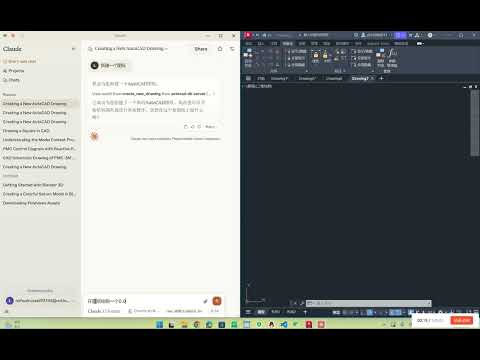
🎬 演示视频 / Demo Video:
✨ 功能特点 / Features
- 🗣️ 自然语言控制 AutoCAD 图纸 / Natural language control of AutoCAD drawings
- ✏️ 基础绘图功能(线条、圆)/ Basic drawing tools (line, circle)
- 📚 图层管理 / Layer management
- 🧠 自动生成 PMC 控制图 / Auto-generate PMC control diagrams
- 🔍 图纸元素分析 / Drawing element analysis
- 🔦 文本高亮匹配 / Highlight specific text patterns
- 💾 内嵌 SQLite 数据库存储 CAD 元素 / Integrated SQLite storage for CAD elements
🖥️ 系统要求 / System Requirements
- Python 3.10+
- AutoCAD 2018+ (需支持 COM 接口 / with COM interface support)
- Windows 操作系统 / Windows OS
⚙️ 安装步骤 / Installation
1. 克隆仓库 / Clone the repository
git clone https://github.com/yourusername/autocad-mcp-server.git
cd autocad-mcp-server
2. 创建虚拟环境 / Create virtual environment
Windows:
python -m venv .venv
.venv\Scripts\activate
macOS / Linux:
python -m venv .venv
source .venv/bin/activate
3. 安装依赖 / Install dependencies
pip install -r requirements.txt
4. (可选)构建可执行文件 / (Optional) Build as executable
pyinstaller --onefile server.py
🚀 使用方法 / How to Use
独立运行服务器 / Run server independently
python server.py
集成 Claude Desktop / Integrate with Claude Desktop
编辑配置文件 / Edit config file:
Windows 路径 / Config path on Windows:
%APPDATA%\Claude\claude_desktop_config.json
推荐配置 (源码运行) / Recommended Config (Run from source):
💡 请将
path/to/project替换为您实际的项目绝对路径。 💡 Please replacepath/to/projectwith your actual absolute project path.
{
  "mcpServers": {
    "easy-autocad": {
      "command": "C:/path/to/project/.venv/Scripts/python.exe",
      "args": [
        "C:/path/to/project/server.py"
      ]
    }
  }
}
注意 / Note:
- 请使用正斜杠
/或双反斜杠\\作为路径分隔符。python.exe必须指向.venv虚拟环境中的解释器。
🧰 工具 API / Available API Tools
| 功能 / Function | 描述 / Description |
|---|---|
create_new_drawing | 创建新的图纸 / Create a new drawing |
draw_line | 画直线 / Draw a line |
draw_polyline | 画多段线 / Draw a polyline |
draw_rectangle | 画矩形 / Draw a rectangle |
draw_circle | 画圆 / Draw a circle |
draw_text | 添加文字 / Add text annotation |
create_layer | 创建或修改图层 / Create or modify layer |
move_entity | 移动实体 / Move entity |
rotate_entity | 旋转实体 / Rotate entity |
copy_entity | 复制实体 / Copy entity |
highlight_entity | 高亮显示实体 / Highlight entity |
highlight_text_matches | 高亮显示匹配文本 / Highlight matching text |
scan_all_entities | 扫描并入库 / Scan and save entities |
count_text_patterns | 统计文本模式 / Count text patterns |
execute_query | 执行SQL查询 / Execute SQL query |
🙋♂️ 维护状态 / Maintenance Notice
⚠️ 当前我正忙于其他项目,维护精力有限。欢迎 Fork 项目或提交 PR,一起完善 AutoCAD 智能交互生态!
⚠️ I'm currently busy and not able to actively maintain this repo. PRs and collaborators are welcome!
📬 联系我 / Contact: 1062723732@qq.com
Made with ❤️ for open-source learning.