memory engine
Ein lebendiges Gedächtnis, das mit Ihrer KI vergeht, lernt und sich weiterentwickelt.
Dokumentation





🧠 Memory Engine MCP
Local-first, graph-aware long-term memory for AI assistants.
SQLite + semantic search + knowledge graph + MCP tools for agents that need continuity.
Works with Claude Desktop · Claude Code · Cursor · Cline · Windsurf · OpenClaw · any MCP client
Why Memory Engine?
Most MCP memory servers are either simple key-value stores or plain text search wrappers.
Memory Engine is different: it models memory as typed atoms connected by typed bonds, then retrieves context with a hybrid ranking pipeline that combines:
- full-text search (SQLite FTS5)
- semantic similarity via local Ollama embeddings
- confidence, recency, and weight
- graph expansion from related memories
The goal is not just storage. The goal is a memory system that can recall, connect, decay, curate, and learn over time.
Highlights
- Local-first — SQLite database, optional local embeddings via Ollama, no required cloud API.
- MCP-native — exposes 35 tools through FastMCP.
- Graph-aware recall — expands top hits through bidirectional bonds for richer context.
- Semantic search — meaning-based retrieval with
nomic-embed-text. - Markdown coexistence — import existing notes one-way without replacing your human-readable memory.
- Error memory — remembers mistakes and corrections, with auto-promotion to preferences after repeated failures.
- Cognitive curator — non-destructive maintenance pass for compaction, bond suggestions, duplicate detection, and isolated atom classification.
- Session watcher — canonical OpenClaw SQLite ingestion (schema 17), reset-aware digests, and JSONL legacy fallback.
- Backup & restore — full SQLite snapshots, JSON export/import, verified restores with automatic safety backups.
- Auth & hardening — optional API token, secure bind, input validation, rate limiting.
- Test suite — 144 tests covering CRUD, ranking, migrations, auth, backup, concurrency, and transcript ingestion.
- Benchmark — CLI recall quality suite with Precision@K, MRR, latency percentiles.
Architecture
AI assistant / MCP client
        │
        ▼
FastMCP server — 35 tools
        │
        ▼
Memory engine — hybrid ranking, graph recall, decay, learning
        │
        ├── SQLite — atoms, bonds, FTS5, JSON metadata, versions
        ├── Ollama — optional local embeddings
        ├── Curator — conservative maintenance
        └── Session watcher — OpenClaw SQLite + JSONL fallback
MCP Tools
Memory
| Tool | Purpose |
|---|---|
remember | Create or update an atom |
recall | Smart hybrid recall with graph expansion |
working_set | Build a task-oriented context pack |
semantic_search | Pure semantic search |
get_atom | Read one atom with bonds |
list_atoms | Browse atoms by domain/type/status |
merge_atoms | Merge duplicate atoms |
export_atom | Export one atom as markdown |
Knowledge graph
| Tool | Purpose |
|---|---|
link / unlink | Create or remove typed bonds |
search_graph | Traverse the graph from one atom |
suggest_bonds | Suggest bonds for one atom |
suggest_bonds_all | Suggest or create bonds in bulk |
Learning and maintenance
| Tool | Purpose |
|---|---|
curator_run | Conservative curation pass |
cognitive_status | Graph and memory health metrics |
learning_run | Detect contradictions, weak atoms, merge candidates, gaps |
ask_pending / answer_human | Human-in-the-loop clarification |
decay_run | Run decay cycle |
cleanup_sessions | Remove expired session atoms |
cleanup_duplicates | Remove duplicate session atoms |
reindex_embeddings | Rebuild embeddings |
Error memory and preferences
| Tool | Purpose |
|---|---|
error_check | Check past failures before doing a task |
error_log | Record a mistake and the correction |
error_list | Browse unresolved/resolved errors |
preference_search | Search structured preferences |
Import and introspection
| Tool | Purpose |
|---|---|
import_markdown | Import markdown notes into atoms |
memory_summary | 3-level summary: global → domain → detail |
stats | Database statistics |
version | Server version |
recall_session | Search one OpenClaw session |
session_summary | Summarize one OpenClaw session |
memory_contradict | Supersede an old atom with a newer contradictory one |
list_contradictions | List explicit contradiction/supersession records |
classify_memory_tier | Infer the 3-tier class (episodic/semantic/procedural) |
memory_impact | Impact analysis: what depends on this atom |
Backup, restore & export
| Tool | Purpose |
|---|---|
backup_database | Create, list, verify, or clean up SQLite snapshots |
restore_database | Restore from a backup (with automatic safety backup) |
export_all | Export all memory data as portable JSON |
import_data | Import from JSON (merge or replace mode) |
Web UI (optional)
Memory Engine includes an optional web UI for graph exploration, atom inspection, contradiction browsing, and impact analysis.
# In docker-compose.yml, add:
#   environment:
#     - MEM_UI_PORT=6000
#   expose:
#     - "6000"
Or run standalone:
python3 web_ui.py
# Open http://localhost:6000
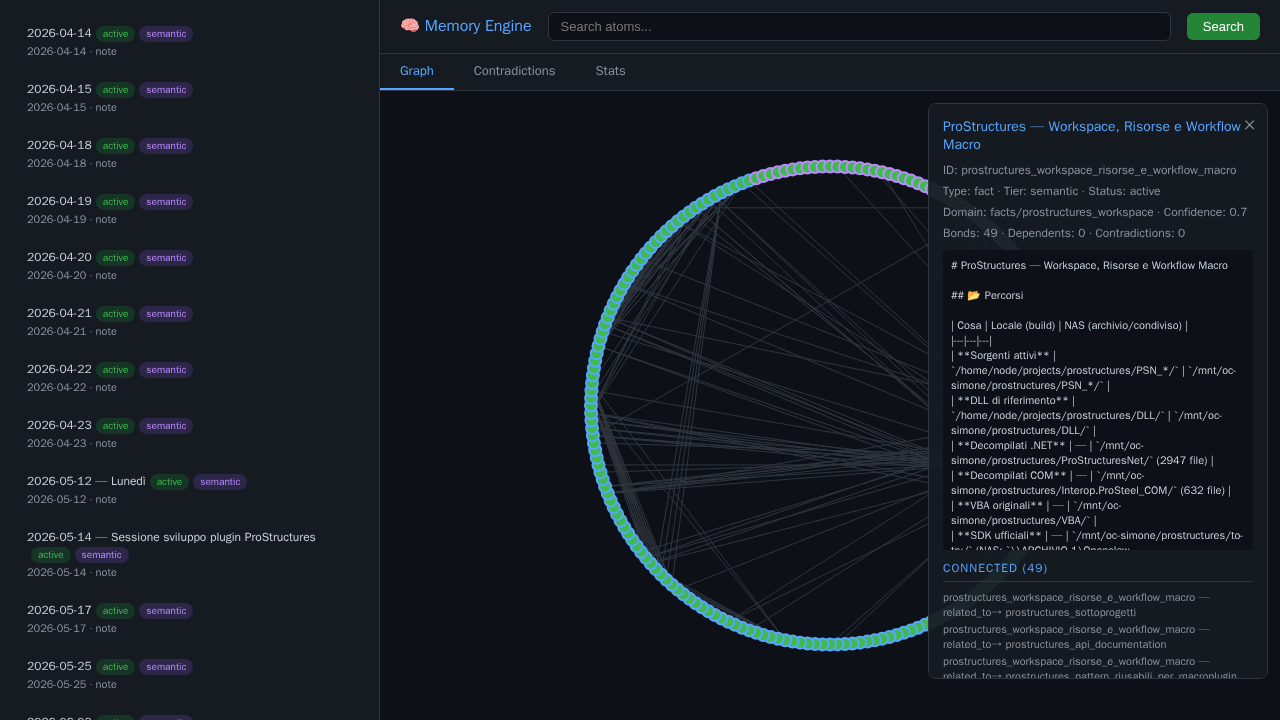
Web UI: interactive graph, atom details, contradiction browser, stats dashboard
Quick start with Docker
Option A — Use the pre-built image (recommended)
# docker-compose.yml
services:
  memory-engine:
    image: ghcr.io/simoneb79/memory-engine-mcp:1.9.0
    ports:
      - "8085:8085"
    volumes:
      - memory-data:/data
    restart: unless-stopped

volumes:
  memory-data:
docker compose up -d
Pin the version. Use an explicit tag like
:1.7.0in production. Avoid:latest— it can change without notice.
Option B — Build from source
git clone https://github.com/SimoneB79/memory-engine-mcp.git
cd memory-engine-mcp
cp docker-compose.yml docker-compose.local.yml
# Edit volume paths in docker-compose.local.yml if needed
docker compose -f docker-compose.local.yml up -d --build
Default endpoint:
http://localhost:8085/sse
Example MCP client config:
{
  "mcpServers": {
    "memory-engine": {
      "url": "http://localhost:8085/sse",
      "transport": "sse"
    }
  }
}
See docs/INSTALL.md for Docker, local Python, Claude Desktop, Cursor, and OpenClaw examples.
Local Python
python -m venv .venv
source .venv/bin/activate
pip install -r requirements.txt
python server.py
Configuration
Main configuration file: config.json
Important environment variables:
| Variable | Default | Purpose |
|---|---|---|
MEMORY_DB_PATH | /data/memory.db | SQLite database path |
MARKDOWN_SOURCE | /workspace/memory | Markdown directory for import |
MEMORY_HOST | 127.0.0.1 | Server bind address (secure default) |
MEMORY_PORT | 8085 | SSE port |
MEMORY_API_TOKEN | (none) | Optional API token for auth (see Security) |
OPENCLAW_AGENT_DB | (none) | Preferred per-agent OpenClaw SQLite DB (schema 17) |
OPENCLAW_SESSIONS_DIR | /sessions | Legacy JSONL fallback when no agent DB is configured |
SESSION_DIGEST_DIR | /data/session_digests | Optional session digest output |
For the SQLite mount, WAL/SHM handling, filtering, and security boundary, see OpenClaw transcript ingestion.
Semantic search requires Ollama reachable from the container or host. Default:
{
  "ollama": {
    "enabled": true,
    "host": "http://ollama:11434",
    "model": "nomic-embed-text"
  }
}
If you do not use Ollama, set ollama.enabled to false; FTS recall still works.
Memory model
Atoms have:
titlebodytype:fact,decision,event,preference,log,procedure,note, etc.domain: project or topic namespaceconfidenceweighttags- optional TTL
Bonds connect atoms with relation types:
is_a · part_of · depends_on · contradicts · refines · derived_from · detail_of · related_to
Example usage
remember(
    title="Use PostgreSQL for analytics",
    body="SQLite is kept for local memory, PostgreSQL is used for multi-user analytics.",
    type="decision",
    domain="project:analytics",
    confidence=0.9,
    tags=["database", "architecture"]
)
recall(query="what database did we choose for analytics?", limit=5)
working_set(
    query="continue the analytics backend work",
    domain="project:analytics",
    limit=8,
    graph_depth=1
)
Security
By default, Memory Engine runs in open mode (no auth) — safe for stdio or trusted local environments.
To enable API token auth:
// config.json
{
  "security": {
    "api_token": "your-secret-token",
    "allow_remote": false
  }
}
Or via environment variable:
MEMORY_API_TOKEN=your-secret-token
When auth is enabled:
- MCP SSE requests must include
Authorization: Bearer <token> - Web UI API endpoints require
?token=<token>or Bearer header - Server binds to
127.0.0.1unlessallow_remote: true - Input validation (title/body size limits) and rate limiting are always active
See CHANGELOG.md for the full list of security features.
Publishing and registries
This repository is prepared for MCP discovery:
- MCP Registry name:
io.github.simoneb79/memory-engine-mcp - Registry metadata:
server.json - Docker/OCI verification label: included in
Dockerfile - Client config example:
mcp.json
See docs/PUBLISHING.md for the publication checklist.
Repository status
- Public GitHub repository: https://github.com/SimoneB79/memory-engine-mcp
- Existing listing: https://mcpmarket.com/server/memory-engine
- License: MIT
License
MIT — see LICENSE.
Made with 🧠 by SimoneB79