Montik
Bearbeite kurze Videoanzeigen im Chat mit Claude oder Cursor und sieh dir jede Änderung auf einer echten Timeline an. Schneide, indem du Wörter löschst, füge Untertitel und Grafiken hinzu, probiere neue Hooks aus und exportiere. Keine Installation erforderlich.
Gehosteter MCP-Server
npx add-mcp 'https://studio.montik.app/mcp'Installiert in Claude Code, Codex, Cursor und mehr
Dokumentation
Montik: a hosted video editing MCP server for Claude, ChatGPT and Cursor
Montik is a hosted MCP server and browser video editor for marketers and agencies making short ads. Claude, ChatGPT or Cursor cut, caption and voice your footage on a timeline you watch.
Free to start. No card needed.
By the Montik team. Updated 17 November 2026.
Is there an MCP server for video editing?
Yes. Montik runs a hosted video editing MCP server at https://studio.montik.app/mcp. Connect Claude, ChatGPT, Cursor or another MCP client and it can cut on the transcript, add captions and graphics, record a voiceover and export, in an editor you can watch and take over. The free plan includes 5 exports and 30 min of transcription a month.
It isn’t the only one. Other servers clip long videos or run FFmpeg on files on your computer, and our comparison covers which suits which job.
How to connect Claude, ChatGPT or Cursor
Montik’s hosted MCP server is at this URL and uses Streamable HTTP.
https://studio.montik.app/mcp
Claude on the web, desktop and mobile
Add to Claude opens Claude’s connector dialog with Montik filled in. Press Add, then Connect. Claude opens Montik, where you sign in or create an account and choose Allow. It works on any Claude plan.
Or open Customize > Connectors yourself, choose Add custom connector and paste the URL.
Claude Code
Paste this into a chat. Claude Code reads the setup steps and adds the server itself, then asks you to run /mcp to sign in.
Read studio.montik.app/claude and connect Montik.
Or add it yourself:
claude mcp add --transport http montik https://studio.montik.app/mcp
ChatGPT
In Settings > Apps & Connectors > Advanced, turn on Developer mode. Then create a connector with this URL and OAuth, sign in to Montik and choose Allow.
https://studio.montik.app/mcp?tools=compact
Cursor and other clients
Add the compact URL above as a remote server and sign in. It lists the everyday tools and finds the rest when they’re needed, so clients that load every tool at once stay quick. A client that can’t sign in can send an access token instead: in Montik, open Agent, choose Use an access token instead and create one, then send it as Authorization: Bearer mtk_….
Which tools will an assistant use most?
A short ad usually runs through these eight, roughly in this order.
get_project
Reads the project: its tracks and clips, the media, and anything not ready yet.
get_transcript
Returns the footage’s words, numbered and timed, so cuts can land on a word.
delete_words
Cuts the video by deleting words from the transcript.
remove_filler_words
Takes out ums, uhs and false starts in one step.
generate_captions
Adds captions timed to each spoken word, in the brand kit’s fonts and colours.
add_html_overlay
Lays an HTML and CSS graphic over the video: a hook title, a price card, an end card.
check_edit
Checks safe areas, the brand kit and pacing, so the assistant fixes problems before you review.
export_video
Renders the finished video, or every variant at once.
A worked example: raw footage to a serum ad
Four messages in Claude, the tools each one called, and what was on the timeline afterwards.
- 01
Set up Halo in Montik: a folder for the brand and a 9:16 project for the serum ad.
create_projectA Halo folder with an empty 9:16 project in it. - 02
Brand: ink #2B1D1A, rose #E36D8C, blush #FBE9EC, Instrument Serif. Warm, first person. Never say “miracle”.
add_google_fontsave_brandupdate_folderA brand kit with the colours, the font and the voice, set on the folder so every Halo project starts with it. - 03
Here’s the shoot and the voiceover.
create_upload × 6Six files in the library: the voiceover, a music bed and four shots of the serum. - 04
Cut a 9:16 ad from it. Lose the ums and pauses, B-roll under every line, captions, music under the voice.
add_cliptranscribe_mediaremove_filler_wordsremove_silencesadd_clip × 5set_transition × 2punch_inset_duckinggenerate_captionsadd_html_overlay × 5check_editsave_versionset_review_statusAn 18-second ad: the voiceover cut on the words, a serum shot under every line, word-timed captions in the kit’s colours, five graphics from the hook to the end card, and music ducked under the voice. Saved as v1 and marked in review.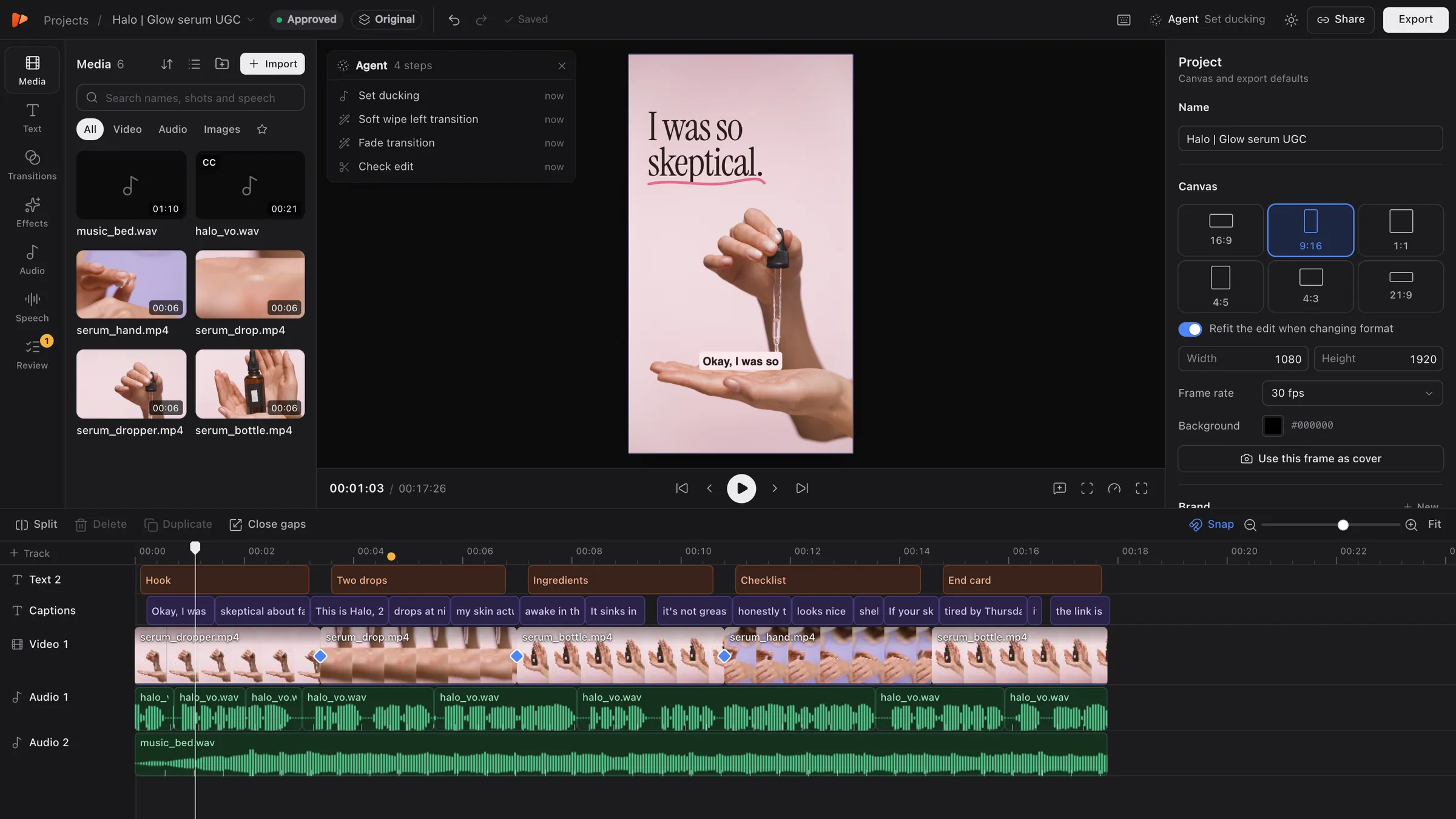
The project after the fourth message. We filmed this run for our demo, so the tool calls were replayed by a script over the same MCP connection Claude uses, to keep the film’s pace even.
What does the free plan include?
A plan belongs to the workspace, and an assistant’s exports, transcription and voiceovers count against it like yours do. Free needs no card and doesn’t run out. Paid plans open soon.
| Free | Pro · $29 a month | Studio · $149 a month | |
|---|---|---|---|
| Exports a month | 5 | 30 | 200 |
| Transcription a month | 30 min | 200 min | 1,000 min |
| Voice and music a month | 1 min | 10 min | 50 min |
| Storage | 2 GB | 100 GB | 300 GB |
| Export size | 720p | 1080p | 4K |
| Longest export | 3 min | 10 min | 30 min |
What tools does Montik’s MCP server have?
Montik’s MCP server has more than 100 tools, and these are a sample. The editor’s interface and agents share one registry of actions, so a new editing feature reaches both. The full reference lists every tool with its inputs.
Look
get_project get_transcript view_media_frames search_media render_frame
Cut
delete_words remove_filler_words remove_silences split_clip trim_clip close_gaps
Sound
level_audio set_ducking set_voice_cleanup add_sfx get_beats
Voice and music
list_voices add_voiceover voice_captions add_music
Text and graphics
generate_captions add_text add_html_overlay import_brand get_brand check_copy
The subject
remove_background text_behind_subject follow_subject
Motion
set_transition add_effect add_keyframe punch_in
Finish
check_edit save_version create_variants create_language_variants create_share_link export_video
Should you use Montik or an FFmpeg MCP server?
An FFmpeg MCP server suits scripted jobs on local files, and many video MCP servers are built that way. Montik suits edits a person wants to watch, change and send for review.
| FFmpeg MCP server | Montik | |
|---|---|---|
| Where it runs | On your machine, with FFmpeg installed | Hosted, with nothing to install |
| What it works on | Video files, one command at a time | A project with tracks, clips and a transcript |
| What you see | The output file when it’s done | Each change on the timeline as it’s made |
| Changing your mind | Run another command | Undo per action, and saved versions |
| Your footage | Stays on your machine | Stored in the cloud |
| Cost | Usually free and open source | Free plan with monthly limits |
New to this? Start with how to edit video with Claude. Still comparing? See the best video editing MCP servers or three ways to edit video with Claude Code.
Where is Montik listed?
Montik’s server is in the official MCP Registry and on Glama. The other links are the docs for connecting it.
- Official MCP Registry Montik is listed as app.montik/editor
- Glama Montik’s connector listing
- Anthropic Get started with custom connectors using remote MCP
- Claude Code docs Connect Claude Code to tools via MCP
- Model Context Protocol The specification
Questions people ask
Is there an MCP server for video editing?
Yes. Montik runs a hosted one at https://studio.montik.app/mcp. Claude, ChatGPT, Cursor and other MCP clients connect to it and cut, caption, voice and export short videos on Montik’s timeline, with nothing to install.
What is a video editing MCP server?
MCP, the Model Context Protocol, is an open standard that lets AI assistants use other software through tools. A video editing MCP server gives an assistant tools for cutting, captioning and exporting video.
Which clients work with Montik?
Claude on the web, desktop and mobile sign in as a custom connector. Claude Code can sign in or use an access token. ChatGPT, Cursor and other clients sign in with OAuth at the compact address, or send an access token.
How does sign-in work?
The server speaks Streamable HTTP and signs clients in with OAuth 2.1. You can also create a personal access token in a project. Connected apps and tokens are listed in the same dialog, and removing one locks it out straight away.
Do I have to install anything?
No. The server is hosted, and rendering happens on Montik’s side, so you don’t need FFmpeg on your machine.
What can an agent not do?
Team roles, invites and access tokens stay out of the tools. An agent can open any project the person who connected it can open.