Arbo
Planen Sie die Seitenstruktur Ihres Kunden mit KI, erhalten Sie die Freigabe über einen Link, behalten Sie URLs bei und exportieren Sie den Redirect-Plan.
Gehosteter MCP-Server
npx add-mcp 'https://getarbo.com/api/mcp'Installiert in Claude Code, Codex, Cursor und mehr
Dokumentation
Your client's site structure, signed off before the mockups.
Describe the site in one sentence or drop in your client's brief as a PDF, and AI drafts the tree. You adjust it by writing to the AI, then your client signs off from a link without creating an account.
Try without an account No credit card required
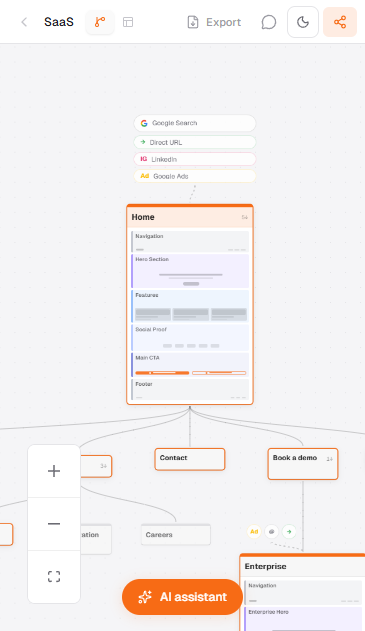
How it works
01
Describe
One sentence about your site. What it does, who it's for.
02
Generate
AI returns a full page tree in under 30 seconds. Hierarchy, page types, descriptions included.
03
Deliver
Share a live link, hand off a PDF, or connect via MCP. Done.
Everything a site needs before the mockups, in one place.
The brief usually arrives as a PDF, the sitemap lives in a drawing tool and client feedback in email threads. In Arbo, everything starts from the tree.
Start from the brief
AI reads your sentence or your client's PDF and drafts the tree. For a redesign, import the live site.
Your client signs off from a link
They open the tree without an account and go through it page by page. There's a PDF for the meeting.
Edit by asking
"Add a blog section", and AI reorganizes the tree without you touching a node.
1.0
Generate
A first tree in seconds, or the live site imported.
Describe the site in one sentence or drop in the brief as a PDF, and AI proposes the hierarchy, page types and a description for each page. For a redesign, import the live site and Arbo rebuilds its structure with every URL.
Describe your project in plain English. AI handles the hierarchy, page types, and information architecture.
Every page comes with a type, description, and parent-child relationship. Pass it to design or dev immediately.
Use included credits or plug your OpenAI, Anthropic, or Mistral API key. Unlimited generation, zero margin.
2.0
Your client signs off on the structure without an account.
An interactive link and a PDF for the meeting, with your logo from the Studio plan. Your team edits at the same time, by hand or by asking AI.
Your client opens the interactive tree from a link. No sign up, no install.
The tree exported and ready to present, with the SEO block of each page.
From the Studio plan, your client sees your logo instead of Arbo's.
Invite your team. Everyone sees the others' changes as they happen.
"Split this into 3 sub-pages" or "Add a blog section." AI restructures the tree without you touching a node.
3.0
Redesign and SEO
For a redesign, every page keeps its URL and keyword.
Every page carries its URL, main keyword, volume and intent, and a status to keep, create, redirect or delete, with the target URL. On launch day, the redirect plan is ready.
One row per page, in tree order. Hierarchy, URL, keyword, volume, intent and status, ready to open in your spreadsheet.
Pages to redirect export as 301s to their target URL, pages to delete as 410s. One file to hand to the developer on migration day.
Link two pages right on the canvas and the link shows as a dashed line between them. Each page lists its links in its panel.
Integrations
Connect to your AI tools.
Arbo is an MCP server. Any AI client can read and edit your sitemaps programmatically.
Claude Desktop
Native MCP support
Claude Code
CLI integration
Cursor
IDE-native MCP
ChatGPT
Via Apps connector
terminal
$ claude mcp add --transport http arbo "https://getarbo.com/api/mcp"
One command to connect. Full read/write access to your sitemaps from any MCP client.
4.0
Wireframe
Skip the back-and-forth on page layouts.
Select any page, get a lo-fi wireframe. Header and footer auto-extracted as global components. Export HTML directly to Figma.
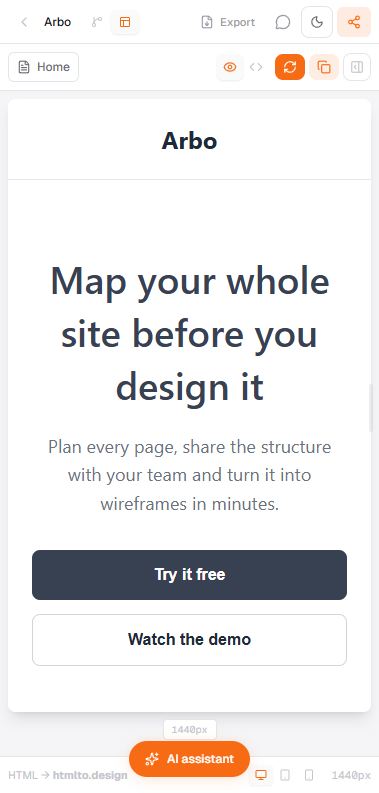
AI reads the page type and description and proposes a relevant lo-fi layout. No blank artboard.
Header and footer detected and shared across all pages. Edit once, applied everywhere.
Copy the wireframe HTML, paste into htmlto.design. Auto-layered and ready for hi-fi, no manual cleanup.
Pricing
Pay once. Use it on every project.
No subscription. No 'your trial expired.' One payment, yours forever.
★
Solo
For active freelancers
59€one-time
- Unlimited projects
- 300 AI credits
- BYOK + MCP
- PDF without watermark
- 50 snapshots / project Buy now
Studio
For small teams
129€one-time
- Everything in Solo
- 5 editors
- 1,000 AI credits
- White label (custom logo)
- Unlimited history Buy now
Agency
For agencies
249€one-time
- Everything in Studio
- 15 editors
- 3,000 AI credits
- Multi-workspace
- Priority support Buy now
Lifetime access
Your own API key (BYOK) on paid plans
MCP to connect Claude, Cursor, ChatGPT
AI sitemap generation
Real-time collaboration
Version history
FAQ
Frequently asked
Yes. Share links are public and interactive. Your client can view and navigate the full sitemap without signing up or installing anything.
AI generation. Other sitemap tools make you drag boxes manually. Arbo generates your entire website structure from a sentence and lets you edit it with natural language. Those tools are sold as monthly subscriptions. Arbo is a one-time purchase, and free to start.
Yes. The free tier includes 3 projects, 20 AI credits, PDF export, share links, collaboration, and version history. No credit card required. Paid plans (Solo 59€, Studio 129€, Agency 249€) are one-time purchases for unlimited projects and more credits.
Yes. Export a clean PDF for the meeting, or share a live interactive link. Your client goes through the tree and approves the structure without creating an account.
Yes, from the Studio plan. The shared link and the PDF carry your logo, your client doesn't see Arbo.
You can buy credit packs (from 4€ for 200 credits) or plug your own API key (OpenAI, Anthropic, or Mistral) on paid plans. BYOK means unlimited AI with zero margin from Arbo.
Yes. Select any page in your sitemap and AI generates a lo-fi wireframe. Header and footer are auto-extracted as global components. You can export the wireframe HTML and paste it into htmlto.design for instant Figma import.
MCP (Model Context Protocol) lets AI assistants like Claude, Cursor, or ChatGPT read and edit your sitemaps programmatically. Arbo is an MCP server. One command to connect, and your AI assistant has full access to your projects.
A sitemap builder is a tool, not a service. You shouldn't pay monthly for something you use per project. Buy once, use forever. We charge for AI credit packs separately if you don't bring your own API key.
Yes. BYOK is available on Solo, Studio, and Agency plans. Plug your OpenAI, Anthropic, or Mistral key and use AI with no credit limits. Zero margin from Arbo on your API usage.
It replaces the structure part. Every page in the tree carries URL, keyword, volume, intent and status, and the CSV export gives you a clean sheet back. Keyword research itself still happens in your usual tool.
Import the current site, every page comes in with its URL. Mark what stays, what goes and where it goes, then export the redirect plan as CSV, with 301 and 410 codes. The full guide is on the SEO site migration page.
Plan the structure of your next client site.
Free. No credit card required.